hold OPEL AMPERA E 2018.5 Service Manual
[x] Cancel search | Manufacturer: OPEL, Model Year: 2018.5, Model line: AMPERA E, Model: OPEL AMPERA E 2018.5Pages: 273, PDF Size: 6.6 MB
Page 220 of 273

218Vehicle careBatteries do not belong in household
waste. They must be disposed of at
an appropriate recycling collection
point.
There are connecting points for jump
starting in the engine compartment.
Jump starting 3 240.
Remove the 12 V vehicle battery
black negative (−) cable from the
12 V vehicle battery to prevent the
12 V vehicle battery from running
down, or use a battery trickle charger.
Ensure the vehicle is switched off
before connecting or disconnecting
the 12 V vehicle battery.
Vehicle storage 3 211.
Battery discharge protection 3 105.Warning label
Meaning of symbols:
● No sparks, naked flames or smoking.
● Always shield eyes. Explosive gases can cause blindness or
injury.
● Keep the 12 V vehicle battery out
of reach of children.
● The 12 V vehicle battery contains
sulphuric acid which could cause
blindness or serious burn
injuries.
● See the Owner's Manual for further information.
● Explosive gas may be present in the vicinity of the 12 V vehicle
battery.
Post-crash label
The post-crash label is located in the
door frame 3 152.
Page 222 of 273
220Vehicle careIf the vehicle is damaged in a crash,
the headlight aim may be affected. If
adjustment to the low beam is
necessary, seek the assistance of a
workshop.Bulb replacement
Switch off the vehicle and the relevant
light.
Only hold a new bulb at the base. Do not touch the bulb glass with bare
hands.
Use only the same bulb type for
replacement.
Replace headlight bulbs from within
the engine compartment.
Bulb check
After a bulb replacement, switch on
the vehicle, operate and check the
lights.
Halogen bulbs9 Warning
Halogen bulbs have pressurised
gas inside and can burst if you
drop or scratch the bulb. You or others could be injured. Be sure to read and follow the instructions onthe bulb package.
Xenon headlights9 Danger
Xenon headlights work under
extremely high electrical voltage.
Do not touch. Have bulbs replaced by a workshop.
Bulbs for front turn lights and
corner lighting can be changed.
Sidelight / Daytime running lights are
designed as Light Emitting Diodes
(LEDs) and cannot be replaced.
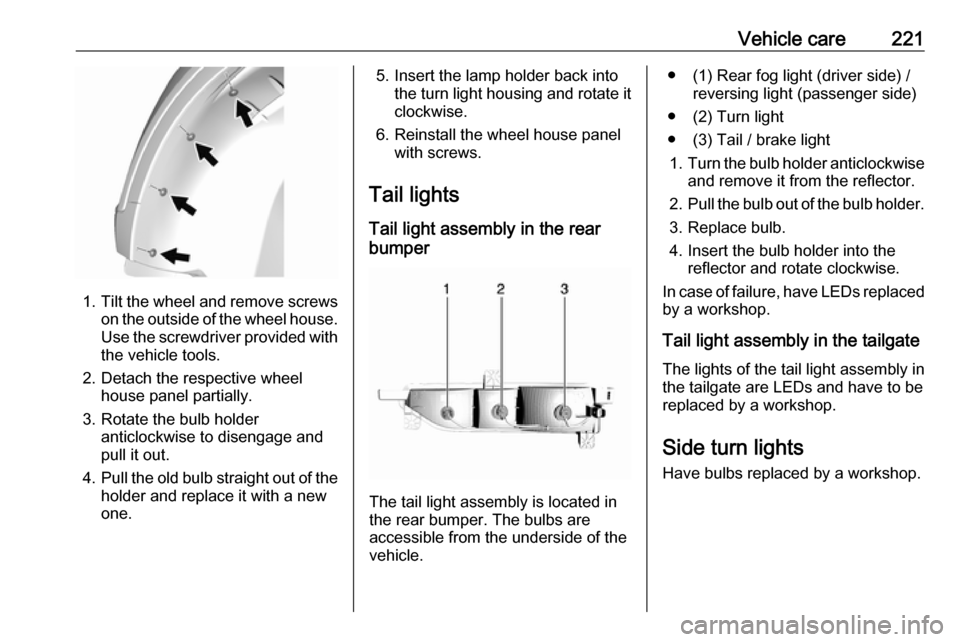
Front turn lights Each turn light is accessible from
behind via the respective wheel
house:
Page 223 of 273
Vehicle care221
1.Tilt the wheel and remove screws
on the outside of the wheel house.
Use the screwdriver provided with the vehicle tools.
2. Detach the respective wheel house panel partially.
3. Rotate the bulb holder anticlockwise to disengage and
pull it out.
4. Pull the old bulb straight out of the
holder and replace it with a new
one.
5. Insert the lamp holder back into the turn light housing and rotate it
clockwise.
6. Reinstall the wheel house panel with screws.
Tail lights Tail light assembly in the rear
bumper
The tail light assembly is located in
the rear bumper. The bulbs are
accessible from the underside of the
vehicle.
● (1) Rear fog light (driver side) / reversing light (passenger side)
● (2) Turn light
● (3) Tail / brake light 1. Turn the bulb holder anticlockwise
and remove it from the reflector.
2. Pull the bulb out of the bulb holder.
3. Replace bulb.
4. Insert the bulb holder into the reflector and rotate clockwise.
In case of failure, have LEDs replaced by a workshop.
Tail light assembly in the tailgate The lights of the tail light assembly in
the tailgate are LEDs and have to be
replaced by a workshop.
Side turn lights Have bulbs replaced by a workshop.
Page 224 of 273
222Vehicle careNumber plate light
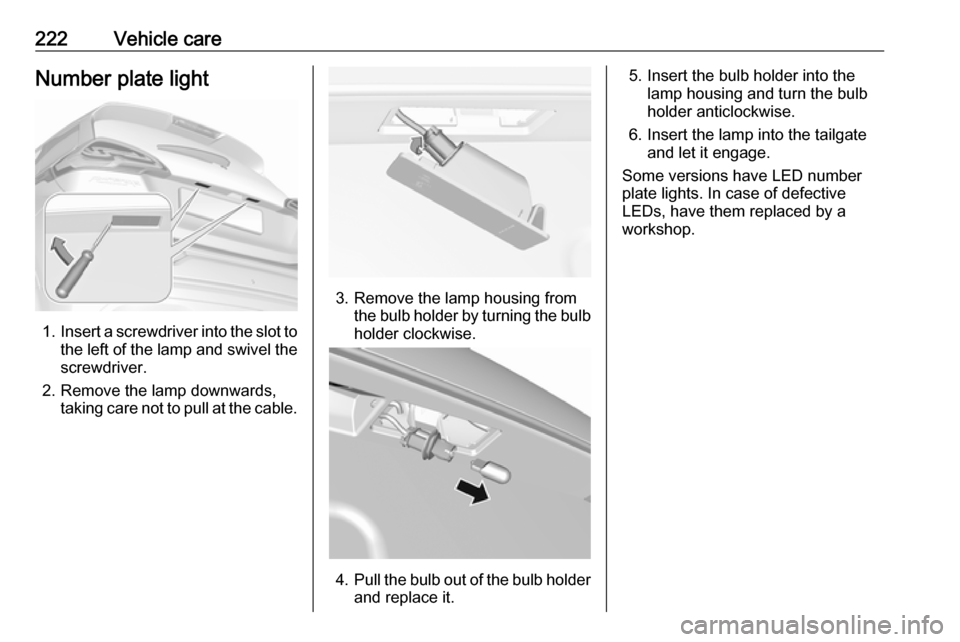
1.Insert a screwdriver into the slot to
the left of the lamp and swivel the screwdriver.
2. Remove the lamp downwards, taking care not to pull at the cable.
3. Remove the lamp housing fromthe bulb holder by turning the bulbholder clockwise.
4. Pull the bulb out of the bulb holder
and replace it.
5. Insert the bulb holder into the lamp housing and turn the bulb
holder anticlockwise.
6. Insert the lamp into the tailgate and let it engage.
Some versions have LED number
plate lights. In case of defective
LEDs, have them replaced by a
workshop.
Page 236 of 273

234Vehicle care
To access the tyre pressure page,
choose vehicle info menu via right
steering wheel buttons and press
{ or } to select tyre pressure.
To reset the system: ● Press and hold 9 until the tyre
pressure monitoring system asks
for a check.
● Press 9 again to confirm. The
vehicle honks twice.
System status and pressure warnings
are displayed by a message
indicating the corresponding tyre in
the Driver Information Centre.
The system considers the tyre
temperature for the warnings.
Temperature dependency 3 232.
A detected low tyre pressure
condition is indicated by the control
indicator w 3 80.
If w illuminates, stop as soon as
possible and inflate the tyres as
recommended 3 254.
After inflating, some driving may be
required to update the tyre pressure
values in the Driver Information
Centre. During this time w may
illuminate.
If w illuminates at lower temperatures
and extinguishes after driving, this
could be an indicator for approaching a low tyre pressure condition. Check
tyre pressure.
Vehicle messages 3 89.
If the tyre pressure must be reduced or increased, switch off vehicle.
Winter tyres or additional wheel sets
must be fitted with sensors, otherwise the system will not work and control
indicator w illuminates continuously.
The tyre pressure monitoring system
malfunction indicator is combined
with the low tyre pressure control
indicator. If the system detects a
malfunction, w will flash for approx.
1 minute and then remain
continuously illuminated. This
sequence will continue upon
subsequent vehicle start-ups as long
as the malfunction exists.
If the malfunction indicator w is
illuminated, the system may not be
able to detect or signal low tyre
pressure as intended. Tyre pressure
monitoring system malfunctions may
occur for a variety of reasons,
including the installation of
replacement or alternate tyres or wheels on the vehicle that prevent the
tyre pressure monitoring system from functioning properly. Always check
the tyre pressure monitoring system
malfunction control indicator w after
replacing one or more tyres or wheels
on your vehicle to ensure that the
Page 259 of 273

Customer information257Software acknowledgementCertain OnStar components include
libcurl and unzip software and other
third party software. Below are the notices and licenses associated with
libcurl and unzip and for other third
party software please see http://
www.lg.com/global/support/
opensource/index.
libcurl Copyright and permission notice
Copyright (c) 1996 - 2010, Daniel
Stenberg,
All rights reserved.
Permission to use, copy, modify, and
distribute this software for any
purpose with or without fee is hereby
granted, provided that the above
copyright notice and this permission
notice appear in all copies.
The software is provided "as is",
without warranty of any kind, express
or implied, including but not limited to
the warranties of merchantability,
fitness for a particular purpose and
non-infringement of third party rights.
In no event shall the authors orcopyright holders be liable for any
claim, damages or other liability,
whether in an action of contract, tort
or otherwise, arising from, out of or in connection with the software or the
use or other dealings in the software.
Except as contained in this notice, the name of a copyright holder shall not
be used in advertising or otherwise to
promote the sale, use or other
dealings in this Software without prior
written authorization of the copyright
holder.
unzip This is version 2005-Feb-10 of theInfo-ZIP copyright and license. The
definitive version of this document
should be available at ftp://ftp.info-
zip.org/pub/infozip/license.html
indefinitely.
Copyright (c) 1990-2005 Info-ZIP. All
rights reserved.
For the purposes of this copyright and
license, “Info-ZIP” is defined as the
following set of individuals:
Mark Adler, John Bush, Karl Davis,
Harald Denker, Jean-Michel Dubois,
Jean-loup Gailly, Hunter Goatley, EdGordon, Ian Gorman, Chris Herborth, Dirk Haase, Greg Hartwig, Robert
Heath, Jonathan Hudson, Paul
Kienitz, David Kirschbaum, Johnny
Lee, Onno van der Linden, Igor
Mandrichenko, Steve P. Miller, Sergio Monesi, Keith Owens, George
Petrov, Greg Roelofs, Kai Uwe
Rommel, Steve Salisbury, Dave
Smith, Steven M. Schweda, Christian
Spieler, Cosmin Truta, Antoine
Verheijen, Paul von Behren, Rich
Wales, Mike White.
This software is provided “as is,” without warranty of any kind, express or implied. In no event shall Info-ZIP
or its contributors be held liable for
any direct, indirect, incidental, special
or consequential damages arising out
of the use of or inability to use this
software.
Permission is granted to anyone to
use this software for any purpose,
including commercial applications,
and to alter it and redistribute it freely,
subject to the following restrictions:
Page 267 of 273

265Initiating a phone call..............137
Ring tone ................................. 137
Call history .................................. 137
Car wash mode .......................... 154
Central locking system ................20
Centre console storage ...............58
Changing tyre and wheel size ...236
Charge cord ................................ 205
Charge limit selection .................197
Charge mode selection ..............197
Charge rate selection .................197
Charging ..................................... 194
Charging override .......................197
Charging status .......................... 204
Charging system .......................... 78
Child locks ................................... 26
Child restraint installation locations ................................... 53
Child restraints.............................. 51
Child restraint systems ................51
Climate control ............................. 13
Clock............................................. 69
Control elements Infotainment system ................108
Steering wheel ........................ 108
Control elements overview .........108
Control indicators.......................... 77
Control of the vehicle .................149
Controls ........................................ 65
Convex shape .............................. 31Coolant ....................................... 214
Coolant and antifreeze ...............248
Cooling system ........................... 214
Cruise control ...................... 81, 164
Cupholders .................................. 57
Curtain airbag system .................. 49
D
DAB ............................................ 124
Danger, Warnings and Cautions ...2
Daytime running lights ...............102
Declaration of conformity ............255
Delayed locking ............................ 25
Digital audio broadcasting ..........124
Directional tyres .......................... 231
Displaying pictures .....................130
Display settings ..................130, 131
Door open .................................... 82
Doors ............................................ 28
Drive modes ............................... 154
Driver assistance systems ..........164
Driver Information Centre .............82
Driving economically................... 148
Driving efficiency gauge ...............74
Driving hints ........................ 148, 149
E Electric adjustment ......................32
Electrical requirements ...............209
Electrical system......................... 223
Electrical system overload .........223Electric drive unit ..................14, 154
Electric parking brake ...........79, 159
Electric parking brake fault ...........79
Electric rate schedule .................197
Electric vehicle operation modes 154
Electronic climate control system 142
Electronic key system ...................19
Electronic Stability Control.......... 163
Electronic Stability Control and Traction Control system ............80
Electronic Stability Control off....... 80
Emergency call ........................... 136
End-of-life vehicle recovery .......212
Engine compartment fuse box ...225
Engine data ............................... 252
Entry lighting .............................. 105
Event data recorders ..................259
Exit lighting ................................ 105
Exterior care .............................. 244
Exterior light ................................. 81
Exterior lighting ......................10, 99
Exterior mirrors ............................. 31
F
File formats Audio files................................ 126
Movie files ............................... 126
Picture files.............................. 126
First aid kit ................................... 61
Fixed air vents ........................... 146