tyre OPEL ASTRA J 2017 Owner's Manual
[x] Cancel search | Manufacturer: OPEL, Model Year: 2017, Model line: ASTRA J, Model: OPEL ASTRA J 2017Pages: 295, PDF Size: 8.23 MB
Page 21 of 295
In brief19Transmission
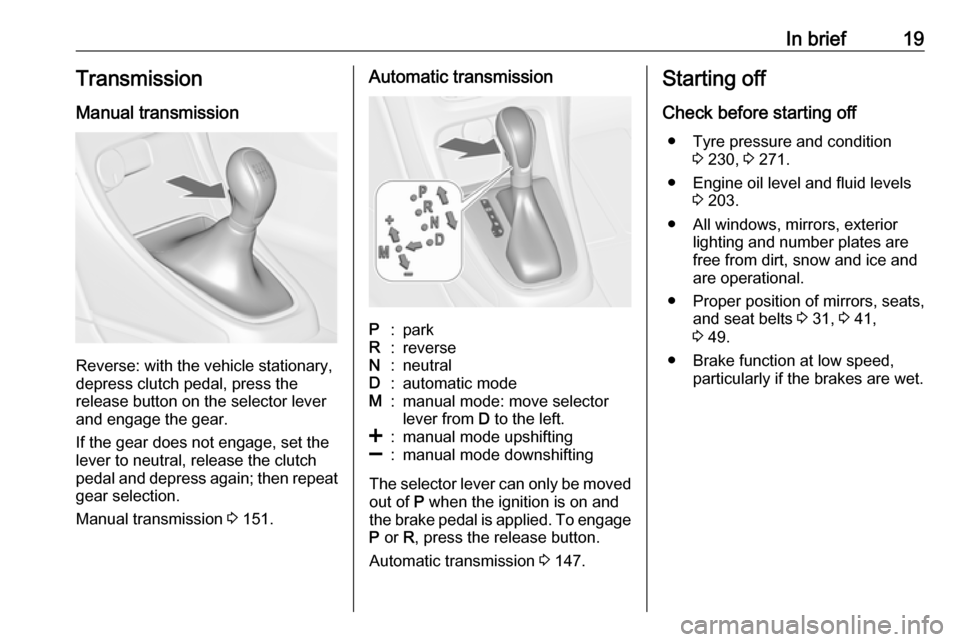
Manual transmission
Reverse: with the vehicle stationary,
depress clutch pedal, press the
release button on the selector lever
and engage the gear.
If the gear does not engage, set the
lever to neutral, release the clutch
pedal and depress again; then repeat
gear selection.
Manual transmission 3 151.
Automatic transmissionP:parkR:reverseN:neutralD:automatic modeM:manual mode: move selector
lever from D to the left.<:manual mode upshifting]:manual mode downshifting
The selector lever can only be moved
out of P when the ignition is on and
the brake pedal is applied. To engage
P or R, press the release button.
Automatic transmission 3 147.
Starting off
Check before starting off ● Tyre pressure and condition 3 230, 3 271.
● Engine oil level and fluid levels 3 203.
● All windows, mirrors, exterior lighting and number plates are
free from dirt, snow and ice and
are operational.
● Proper position of mirrors, seats, and seat belts 3 31, 3 41,
3 49.
● Brake function at low speed, particularly if the brakes are wet.
Page 74 of 295

72Storage● Use the four hooks on thesidewalls of the load
compartment for hanging up
carrier bags. Maximum load:
5 kg per hook.
● Secure loose objects in the load compartment to prevent themfrom sliding.
● When transporting objects in the load compartment, the backrests
of the rear seats must not be angled forward.
● Do not allow the load to protrude above the upper edge of the
backrests.
● Do not place any objects on the load compartment cover or theinstrument panel, and do notcover the sensor on top of the
instrument panel.
● The load must not obstruct the operation of the pedals, parking
brake and selector lever, or
hinder the freedom of movement of the driver. Do not place any
unsecured objects in the interior.
● Do not drive with an open load compartment.9Warning
Always make sure that the load in
the vehicle is securely stowed.
Otherwise objects can be thrown
around inside the vehicle and
cause personal injury or damage
to the load or car.
● The payload is the difference between the permitted gross
vehicle weight (see identification
plate 3 257) and the EC kerb
weight.
To calculate the payload, enter
the data for your vehicle in the
weights table at the front of this
manual.
The EC kerb weight includes
weights for the driver (68 kg),
luggage (7 kg) and all fluids (fuel
tank 90% full).
Optional equipment and
accessories increase the kerb
weight.
● Driving with a roof load increases
the sensitivity of the vehicle to
cross-winds and has a
detrimental effect on vehicle
handling due to the vehicle's
higher centre of gravity.
Distribute the load evenly and secure it properly with retaining
straps. Adjust the tyre pressure
and vehicle speed according to
the load conditions. Check and
retighten the straps frequently.
Do not drive faster than
120 km/h.
The permissible roof load is
75 kg. The roof load is the
combined weight of the roof rack and the load.
Page 75 of 295

Instruments and controls73Instruments and
controlsControls ....................................... 74
Steering wheel adjustment ........74
Steering wheel controls .............74
Heated steering wheel ...............74
Horn ........................................... 75
Windscreen wiper/washer .........75
Rear window wiper/washer .......77
Outside temperature ..................77
Clock ......................................... 78
Power outlets ............................. 79
Cigarette lighter ......................... 80
Ashtrays .................................... 80
Warning lights, gauges and indi‐ cators ........................................... 81
Instrument cluster ......................81
Speedometer ............................. 81
Odometer .................................. 81
Trip odometer ............................ 81
Tachometer ............................... 81
Fuel gauge ................................ 82
Fuel selector .............................. 82
Engine coolant temperature gauge ....................................... 82
Service display .......................... 83Control indicators ......................84
Turn signal ................................. 87
Seat belt reminder .....................87
Airbag and belt tensioners .........87
Airbag deactivation ....................87
Charging system .......................88
Malfunction indicator light ..........88
Service vehicle soon .................88
Brake and clutch system ...........88
Operate pedal ............................ 88
Electric parking brake ................88
Electric parking brake fault ........89
Antilock brake system (ABS) .....89
Upshift ....................................... 89
Power steering .......................... 89
Lane departure warning ............89
Ultrasonic parking assist ...........90
Electronic Stability Control off ...90
Electronic Stability Control and Traction Control system ...........90
Traction Control system off .......90
Preheating ................................. 90
Diesel particle filter ....................90
Tyre pressure monitoring system ...................................... 91
Engine oil pressure ....................91
Low fuel ..................................... 91
Immobiliser ................................ 92
Reduced engine power .............92
Exterior light .............................. 92High beam................................. 92
High beam assist .......................92
Adaptive forward lighting ...........92
Fog light ..................................... 92
Rear fog light ............................. 92
Low washer fluid ........................92
Cruise control ............................ 92
Adaptive cruise control ..............92
Vehicle detected ahead .............93
Door open .................................. 93
Information displays .....................93
Driver Information Centre ..........93
Graphic-Info-Display, Colour- Info-Display .............................. 97
Smartphone controller ...............99
Vehicle messages ........................99
Warning chimes .......................102
Battery voltage ........................ 102
Trip computer ............................. 103
Vehicle personalisation ..............105
Telematics service .....................110
OnStar ..................................... 110
ERA GLONASS .......................113
Page 88 of 295
86Instruments and controlsControl indicators in the centre
console
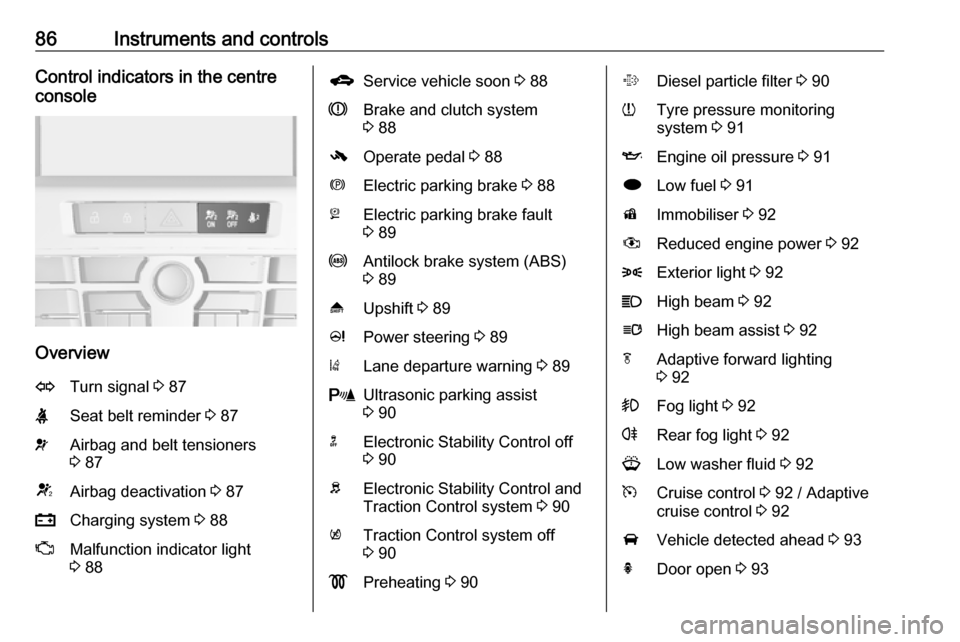
Overview
OTurn signal 3 87XSeat belt reminder 3 87vAirbag and belt tensioners
3 87VAirbag deactivation 3 87pCharging system 3 88ZMalfunction indicator light
3 88gService vehicle soon 3 88RBrake and clutch system
3 88-Operate pedal 3 88mElectric parking brake 3 88jElectric parking brake fault
3 89uAntilock brake system (ABS)
3 89[Upshift 3 89cPower steering 3 89)Lane departure warning 3 89rUltrasonic parking assist
3 90nElectronic Stability Control off
3 90bElectronic Stability Control and
Traction Control system 3 90kTraction Control system off
3 90!Preheating 3 90%Diesel particle filter 3 90wTyre pressure monitoring
system 3 91IEngine oil pressure 3 91iLow fuel 3 91dImmobiliser 3 92#Reduced engine power 3 928Exterior light 3 92CHigh beam 3 92lHigh beam assist 3 92fAdaptive forward lighting
3 92>Fog light 3 92rRear fog light 3 92GLow washer fluid 3 92mCruise control 3 92 / Adaptive
cruise control 3 92AVehicle detected ahead 3 93hDoor open 3 93
Page 93 of 295
Instruments and controls91Flashes
The maximum filling level of the filter
is reached. Start cleaning process
immediately to avoid damage to the
engine.
Diesel particle filter 3 145, Stop-start
system 3 142.
Tyre pressure monitoring system
w illuminates or flashes yellow.
Illuminates
Tyre pressure loss. Stop immediately
and check tyre pressure.
Flashes
Fault in system or tyre without pressure sensor mounted ( e.g. spare
wheel). After 60-90 seconds the
control indicator illuminates
continuously. Consult a workshop.
Engine oil pressure
I illuminates red.Illuminates when the ignition is
switched on and extinguishes shortly
after the engine starts.
Illuminates when the engine is
runningCaution
Engine lubrication may be
interrupted. This may result in
damage to the engine and/or
locking of the drive wheels.
1. Depress clutch.
2. Select neutral gear, set selector lever to N.
3. Move out of the flow of traffic as quickly as possible without
impeding other vehicles.
4. Switch off ignition.
9 Warning
When the engine is off,
considerably more force is needed
to brake and steer. During an
Autostop the brake servo unit will still be operational.
Do not remove key until vehicle is stationary, otherwise the steeringwheel lock could engage
unexpectedly.
Check oil level before seeking the
assistance of a workshop 3 203.
Low fuel
i illuminates or flashes yellow.
Illuminates
Level in fuel tank is too low.
Flashes
Fuel used up. Refuel immediately.
Never run the tank dry.
Catalytic converter 3 146.
Bleeding the diesel fuel system
3 208.
Page 96 of 295
94Instruments and controlsSome of the displayed functions differ
when the vehicle is being driven or at
a standstill. Some functions are only
available when the vehicle is being
driven.
Vehicle personalisation 3 105.
Memorised settings 3 24.
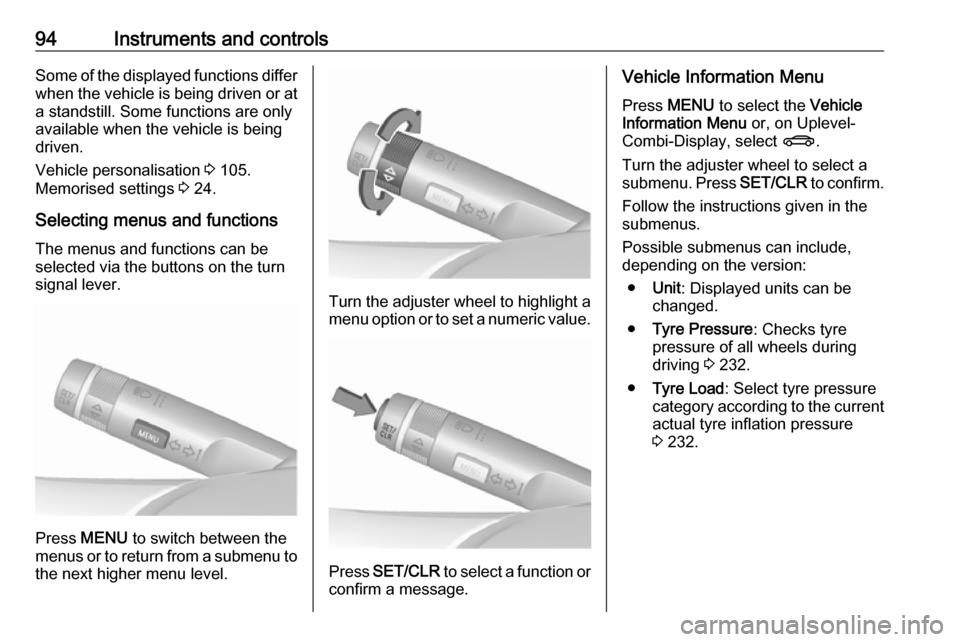
Selecting menus and functions The menus and functions can be
selected via the buttons on the turn signal lever.
Press MENU to switch between the
menus or to return from a submenu to the next higher menu level.
Turn the adjuster wheel to highlight a
menu option or to set a numeric value.
Press SET/CLR to select a function or
confirm a message.
Vehicle Information Menu
Press MENU to select the Vehicle
Information Menu or, on Uplevel-
Combi-Display, select X.
Turn the adjuster wheel to select a submenu. Press SET/CLR to confirm.
Follow the instructions given in the
submenus.
Possible submenus can include,
depending on the version:
● Unit : Displayed units can be
changed.
● Tyre Pressure : Checks tyre
pressure of all wheels during
driving 3 232.
● Tyre Load : Select tyre pressure
category according to the current actual tyre inflation pressure
3 232.
Page 103 of 295

Instruments and controls101No.Vehicle message56Tyre pressure imbalance on
front axle57Tyre pressure imbalance on
rear axle58Tyres without TPMS sensors
detected59Open then close driver window60Open then close front
passenger window61Open then close rear left
window62Open then close rear right
window65Theft attempted66Service anti-theft alarm system67Service steering wheel lock68Service power steering69Service suspension system70Service level control systemNo.Vehicle message71Service rear axle74Service AFL75Service air conditioning76Service side blind spot alert
system77Service lane departure warning79Top up engine oil81Service transmission82Change engine oil soon83Service adaptive cruise control84Engine power is reduced89Service vehicle soon94Shift to park position before
exiting95Service airbag128Bonnet open134Park assist fault, clean bumper136Service parking assistNo.Vehicle message145Check washer fluid level174Low vehicle battery258Parking assist off
Vehicle messages on the
Uplevel-Combi-Display
The vehicle messages are displayed
as text. Follow the instructions given
in the messages.
Page 113 of 295

Instruments and controls111SOS button
Press [ to establish a priority
emergency connection to a specially
trained emergency advisor.
Status LED
Green: The system is ready with activated transmission of the vehicle
location.
Green flashing: The system is on a
call.
Red: A problem arose.
Off: The system is ready with
deactivated transmission of the
vehicle location or the system is in
standby mode.
Red / green flashing for a short period
of time: The transmission of the
vehicle location has been
deactivated.
OnStar services
General services
If you need any information e.g.
opening hours, points of interest and
destinations or if you need any
support e.g. in the case of a vehiclebreakdown, a flat tyre and empty fuel
tank, press Z to establish a
connection to an advisor.
Emergency services
In the case of an emergency situation,
press [ and talk to an advisor. The
advisor then contacts emergency or
assistance service providers and
directs them to your vehicle.
In the case of an accident with
activation of airbags or belt
tensioners, an automatic emergency
call is established. The advisor is
immediately connected to your
vehicle to see whether help is
needed.
Wi-Fi hotspot
The Wi-Fi hotspot of the vehicle
provides internet connectivity with a
maximum speed of 4G/LTE.
Note
The Wi-Fi hotspot functionality is not available for all markets.
Up to seven devices may be
connected.To connect a mobile device with the
Wi-Fi hotspot:
1. Press j and then select Wi-Fi
settings on the Info-Display. The
settings displayed include the Wi-
Fi hotspot name (SSID),
password and connection type.
2. Start a Wi-Fi network search on your mobile device.
3. Select your vehicle hotspot (SSID) when listed.
4. When prompted, enter the password on your mobile device.
Note
To change the SSID or password,
press Z and talk to an advisor or log
in to your account.
To switch off the Wi-Fi hotspot
functionality, press Z to call an
advisor.
Smartphone app
With the myOpel smartphone app, some vehicle functions can be
operated remotely.
Page 114 of 295

112Instruments and controlsThe following functions are available:● Lock or unlock vehicle.
● Honk horn or flash lights.
● Check fuel level, engine oil life and tyre pressure (only with tyre
pressure monitoring system).
● Send navigation destination to the vehicle, if equipped with a
built-in navigation system.
● Locate vehicle on a map.
● Manage Wi-Fi settings.
To operate these functions, download the app from App Store ®
or
Google Play™ Store.
Remote control
If desired, use any phone to call an
advisor, who can remotely operate
specific vehicle functions. Find the
respective OnStar phone number on
our country-specific website.
The following functions are available: ● Lock or unlock vehicle.
● Provide information on the vehicle location.
● Honk horn or flash lights.Stolen vehicle assistance
If the vehicle is stolen, report the theft
to the authorities and request OnStar
stolen vehicle assistance. Use any
phone to call an advisor. Find the
respective OnStar phone number on
our country-specific website.
OnStar can provide support in
locating and recovering the vehicle.Theft alert
When the anti-theft alarm system is
triggered, a notification is sent to
OnStar. You are then informed about
this event by text message or email.Restart prevention
By sending remote signals, OnStar can prevent the vehicle from
restarting once it has been turned off.
On-demand diagnostics
At any time e.g. if the vehicle displays a vehicle message, press Z to
contact an advisor and ask to
complete a real-time diagnostic check
to directly determine the issue.
Depending on the results, the advisor
will provide further support.
Diagnostic report
The vehicle automatically transmits
diagnostic data to OnStar which
sends a monthly email report to you
and your preferred workshop.
Note
The workshop notification function
can be disabled in your account.
The report contains the status of key
operating systems of the vehicle like
engine, transmission, airbags, ABS,
and other major systems. It also
provides information on possible
maintenance items and tyre pressure (only with tyre pressure monitoring
system).
To look at the information in greater
detail, select the link within the email and log in to your account.
Destination download
A desired destination can be directly
downloaded to the navigation system.
Press Z to call an advisor and
describe the destination or point of
interest.
Page 156 of 295

154Driving and operatingApply electric parking brake: pull and
hold the switch m for more than five
seconds . If control indicator m
illuminates, electric parking brake is
applied.
Release electric parking brake: push
and hold the switch m for more than
two seconds. If control indicator m
extinguishes, electric parking brake is
released.
Control indicator m flashes: electric
parking brake is not fully applied or released. When continuously
flashing, release electric parking
brake and retry applying.
Brake assist If the brake pedal is depressed
quickly and forcefully, maximum
brake force is automatically applied
(full braking).
Maintain steady pressure on the
brake pedal for as long as full braking
is required. Maximum brake force is
automatically reduced when the
brake pedal is released.Hill start assist
The system helps prevent unintendedmovement when driving away on
inclines.
When releasing the brake pedal after
stopping on an incline, the brakes
remain on for a further two seconds.
The brakes release automatically as
soon as the vehicle begins to
accelerate.
The hill start assist is not active during
an Autostop.Ride control systems
Traction Control system
The Traction Control system (TC) is a component of the Electronic Stability
Control (ESC) 3 155.
TC improves driving stability when
necessary, regardless of the type of
road surface or tyre grip, by
preventing the drive wheels from
spinning.
As soon as the drive wheels starts to
spin, engine output is reduced and
the wheel spinning the most is braked
individually. This considerably
improves the driving stability of the
vehicle on slippery road surfaces.
TC is operational after each engine
start as soon as control indicator b
extinguishes.
When TC operates b flashes.