door lock OPEL CASCADA 2015 Manual user
[x] Cancel search | Manufacturer: OPEL, Model Year: 2015, Model line: CASCADA, Model: OPEL CASCADA 2015Pages: 253, PDF Size: 7.58 MB
Page 35 of 253
Keys, doors and windows33
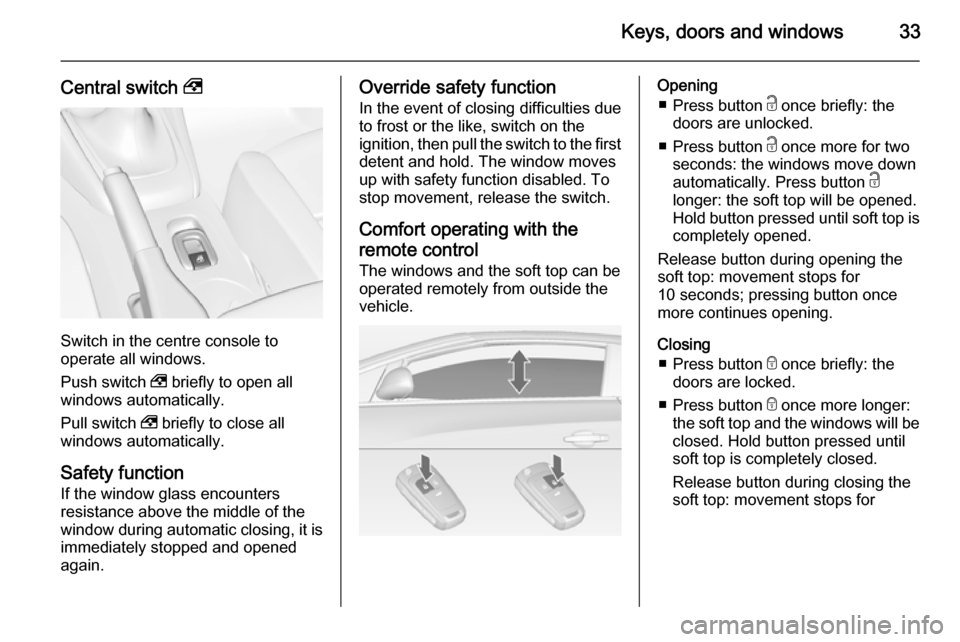
Central switch ,
Switch in the centre console to
operate all windows.
Push switch , briefly to open all
windows automatically.
Pull switch , briefly to close all
windows automatically.
Safety function
If the window glass encounters
resistance above the middle of the
window during automatic closing, it is
immediately stopped and opened again.
Override safety function
In the event of closing difficulties due
to frost or the like, switch on the
ignition, then pull the switch to the first
detent and hold. The window moves
up with safety function disabled. To
stop movement, release the switch.
Comfort operating with the
remote control
The windows and the soft top can be
operated remotely from outside the vehicle.Opening
■ Press button c once briefly: the
doors are unlocked.
■ Press button c once more for two
seconds: the windows move down
automatically. Press button c
longer: the soft top will be opened.
Hold button pressed until soft top is
completely opened.
Release button during opening the
soft top: movement stops for
10 seconds; pressing button once
more continues opening.
Closing ■ Press button e once briefly: the
doors are locked.
■ Press button e once more longer:
the soft top and the windows will be
closed. Hold button pressed until
soft top is completely closed.
Release button during closing the
soft top: movement stops for
Page 42 of 253
40Keys, doors and windows
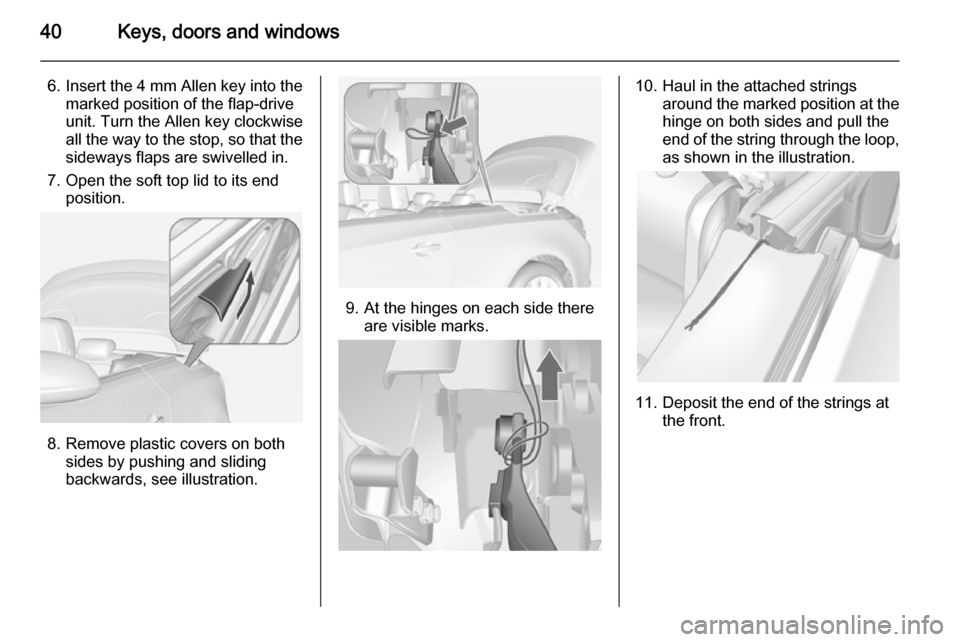
6. Insert the 4 mm Allen key into the
marked position of the flap-drive
unit. Turn the Allen key clockwise
all the way to the stop, so that the
sideways flaps are swivelled in.
7. Open the soft top lid to its end position.
8. Remove plastic covers on both sides by pushing and sliding
backwards, see illustration.
9. At the hinges on each side there are visible marks.
10. Haul in the attached strings around the marked position at the
hinge on both sides and pull the
end of the string through the loop, as shown in the illustration.
11. Deposit the end of the strings at the front.
Page 43 of 253
Keys, doors and windows41
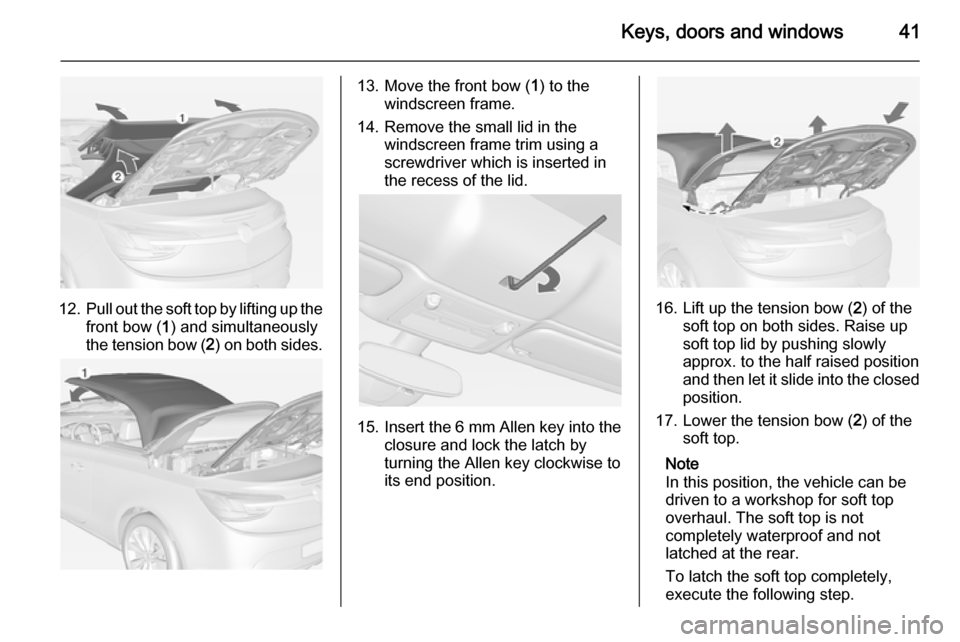
12.Pull out the soft top by lifting up the
front bow ( 1) and simultaneously
the tension bow ( 2) on both sides.
13. Move the front bow ( 1) to the
windscreen frame.
14. Remove the small lid in the windscreen frame trim using a
screwdriver which is inserted in
the recess of the lid.
15. Insert the 6 mm Allen key into the
closure and lock the latch by
turning the Allen key clockwise to
its end position.
16. Lift up the tension bow ( 2) of the
soft top on both sides. Raise up
soft top lid by pushing slowly
approx. to the half raised position
and then let it slide into the closed position.
17. Lower the tension bow ( 2) of the
soft top.
Note
In this position, the vehicle can be
driven to a workshop for soft top
overhaul. The soft top is not
completely waterproof and not
latched at the rear.
To latch the soft top completely,
execute the following step.
Page 45 of 253
Keys, doors and windows43
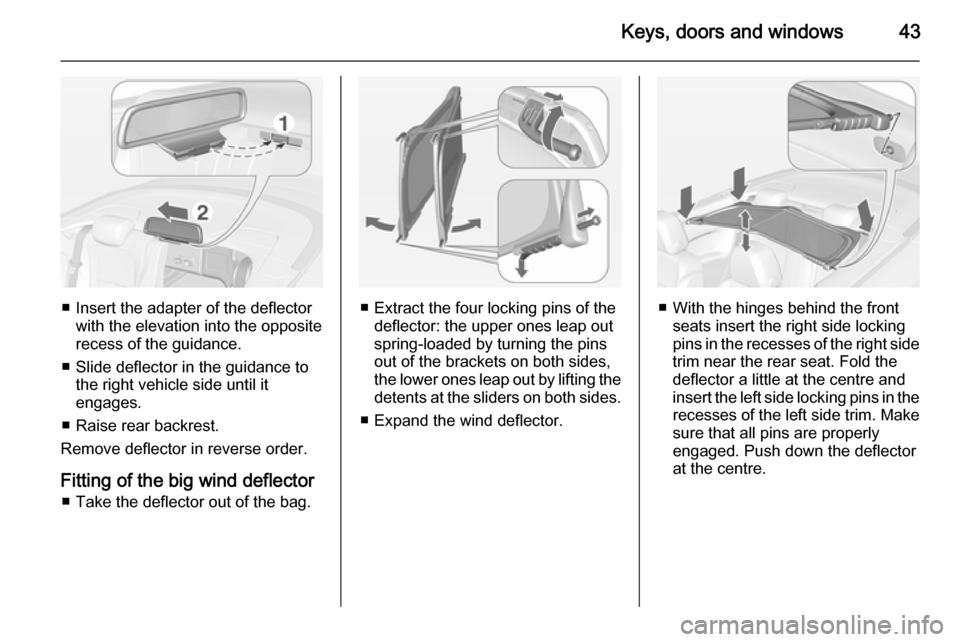
■ Insert the adapter of the deflectorwith the elevation into the opposite
recess of the guidance.
■ Slide deflector in the guidance to the right vehicle side until it
engages.
■ Raise rear backrest.
Remove deflector in reverse order.
Fitting of the big wind deflector ■ Take the deflector out of the bag.■ Extract the four locking pins of the deflector: the upper ones leap out
spring-loaded by turning the pins
out of the brackets on both sides,
the lower ones leap out by lifting the
detents at the sliders on both sides.
■ Expand the wind deflector.■ With the hinges behind the front seats insert the right side locking
pins in the recesses of the right side
trim near the rear seat. Fold the
deflector a little at the centre and
insert the left side locking pins in the recesses of the left side trim. Make
sure that all pins are properly
engaged. Push down the deflector
at the centre.
Page 46 of 253
44Keys, doors and windows
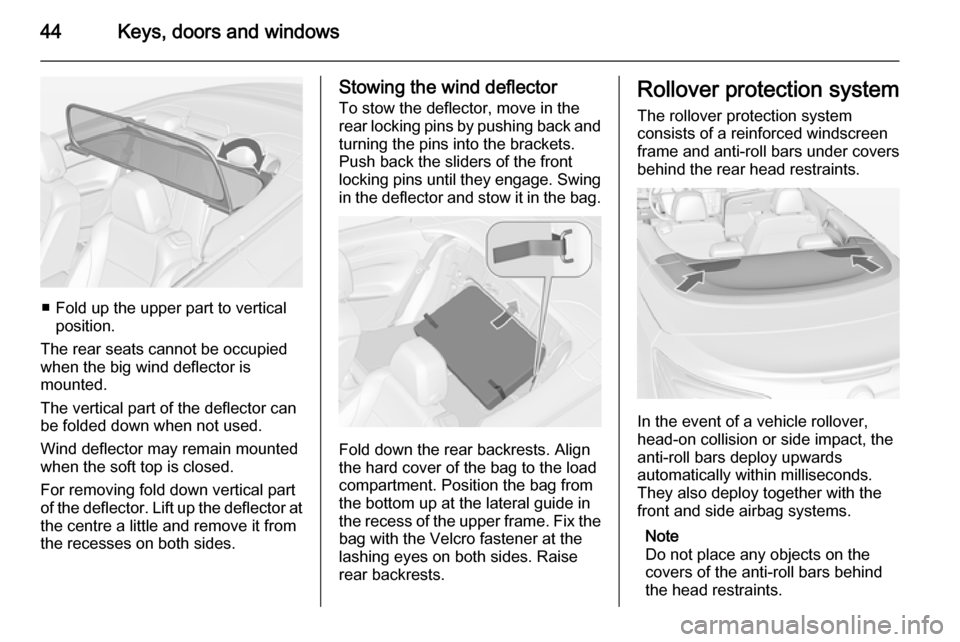
■ Fold up the upper part to verticalposition.
The rear seats cannot be occupied
when the big wind deflector is
mounted.
The vertical part of the deflector can
be folded down when not used.
Wind deflector may remain mounted
when the soft top is closed.
For removing fold down vertical part
of the deflector. Lift up the deflector at
the centre a little and remove it from
the recesses on both sides.
Stowing the wind deflector
To stow the deflector, move in the
rear locking pins by pushing back and
turning the pins into the brackets.
Push back the sliders of the front
locking pins until they engage. Swing in the deflector and stow it in the bag.
Fold down the rear backrests. Align
the hard cover of the bag to the load
compartment. Position the bag from
the bottom up at the lateral guide in
the recess of the upper frame. Fix the
bag with the Velcro fastener at the
lashing eyes on both sides. Raise
rear backrests.
Rollover protection system
The rollover protection system
consists of a reinforced windscreen
frame and anti-roll bars under covers
behind the rear head restraints.
In the event of a vehicle rollover,
head-on collision or side impact, the
anti-roll bars deploy upwards
automatically within milliseconds.
They also deploy together with the
front and side airbag systems.
Note
Do not place any objects on the
covers of the anti-roll bars behind
the head restraints.
Page 54 of 253
52Seats, restraints
To restore, lift backrest to upright
position and engage. The seat slides
automatically backwards to the
original position.
In case the head restraint of the
folded backrest is blocked by the
upper windscreen frame, allow the
seat to move backwards or
downwards slightly 3 52, or set
head restraint to lowest position
3 46.
Safety function
If the power seat encounters
resistance while sliding forwards or
rearwards, it is immediately stopped
and moved in the opposite direction.
Note
Do not sit on the seat while seat is
moving.
Power disconnection
If seat remains in forward position
with opened door for more than
10 minutes, power adjustment is
disconnected. In this event, close and open the door or switch on ignition
and operate power adjustment again.Overload
If the folding function is electrically
overloaded, the power supply is
automatically cut-off for a short time.
Power seat adjustment9 Warning
Care must be taken when
operating the power seats. There
is a risk of injury, particularly for
children. Objects could become
trapped.
Keep a close watch on the seats
when adjusting them. Vehicle
passengers should be informed
accordingly.
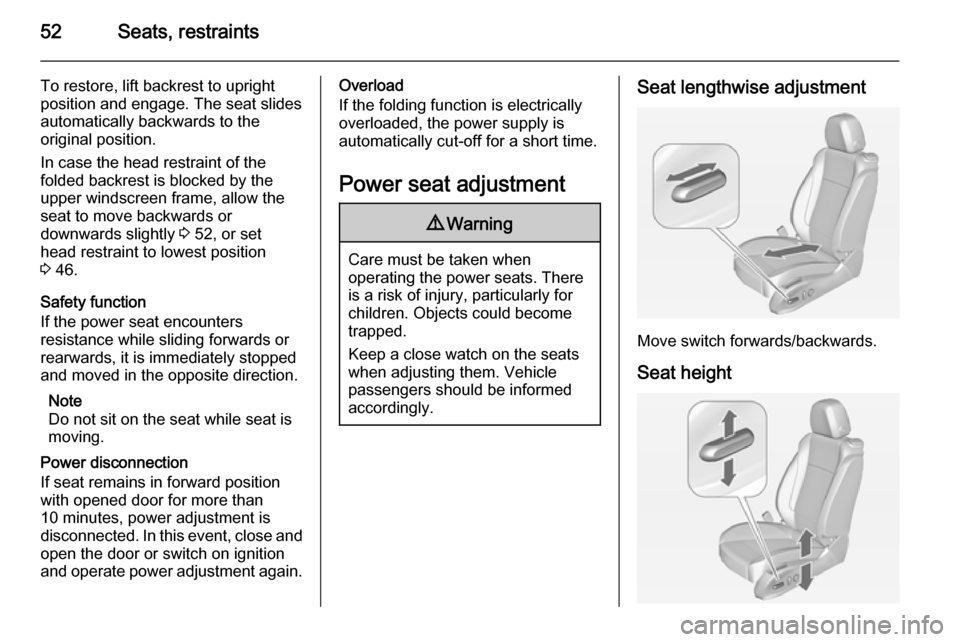
Seat lengthwise adjustment
Move switch forwards/backwards.
Seat height
Page 57 of 253
Seats, restraints55Seat belts
The seat belts are locked during
heavy acceleration or deceleration of
the vehicle holding the occupants in
the sitting position. Therefore the risk
of injury is considerably reduced.
9 Warning
Fasten seat belt before each trip.
In the event of an accident, people
not wearing seat belts endanger their fellow occupants and
themselves.
Seat belts are designed to be used by only one person at a time. Child
restraint system 3 64.
Periodically check all parts of the belt
system for damage, pollution and
proper functionality.
Have damaged components
replaced. After an accident, have the
belts and triggered belt pretensioners replaced by a workshop.
Note
Make sure that the belts are not
damaged by shoes or sharp-edged
objects or trapped. Prevent dirt from
getting into the belt retractors.
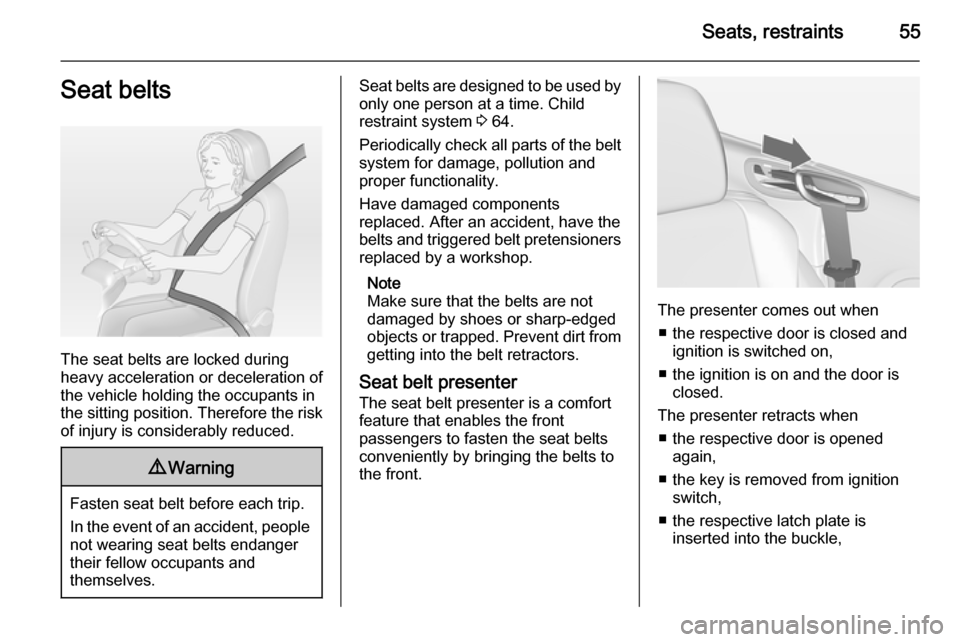
Seat belt presenter
The seat belt presenter is a comfort
feature that enables the front
passengers to fasten the seat belts
conveniently by bringing the belts to
the front.
The presenter comes out when
■ the respective door is closed and ignition is switched on,
■ the ignition is on and the door is closed.
The presenter retracts when ■ the respective door is opened again,
■ the key is removed from ignition switch,
■ the respective latch plate is inserted into the buckle,
Page 108 of 253
106Instruments and controls
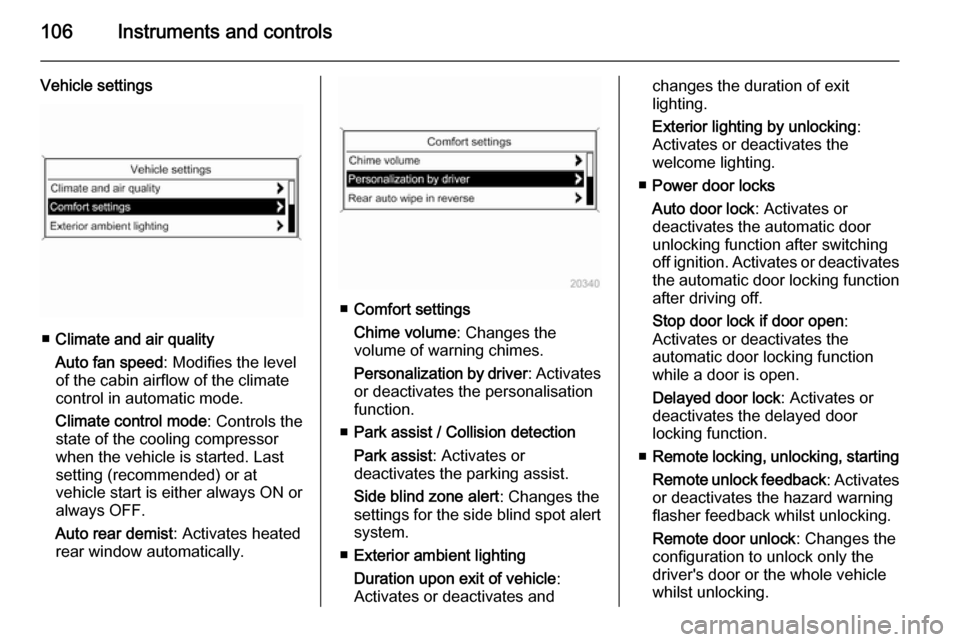
Vehicle settings
■Climate and air quality
Auto fan speed : Modifies the level
of the cabin airflow of the climate
control in automatic mode.
Climate control mode : Controls the
state of the cooling compressor
when the vehicle is started. Last
setting (recommended) or at
vehicle start is either always ON or
always OFF.
Auto rear demist : Activates heated
rear window automatically.
■ Comfort settings
Chime volume : Changes the
volume of warning chimes.
Personalization by driver : Activates
or deactivates the personalisation
function.
■ Park assist / Collision detection
Park assist : Activates or
deactivates the parking assist.
Side blind zone alert : Changes the
settings for the side blind spot alert
system.
■ Exterior ambient lighting
Duration upon exit of vehicle :
Activates or deactivates and
changes the duration of exit
lighting.
Exterior lighting by unlocking :
Activates or deactivates the
welcome lighting.
■ Power door locks
Auto door lock : Activates or
deactivates the automatic door
unlocking function after switching
off ignition. Activates or deactivates the automatic door locking function after driving off.
Stop door lock if door open :
Activates or deactivates the
automatic door locking function
while a door is open.
Delayed door lock : Activates or
deactivates the delayed door
locking function.
■ Remote locking, unlocking, starting
Remote unlock feedback : Activates
or deactivates the hazard warning
flasher feedback whilst unlocking.
Remote door unlock : Changes the
configuration to unlock only the
driver's door or the whole vehicle
whilst unlocking.
Page 109 of 253
Instruments and controls107
Auto relock doors: Activates or
deactivates the automatic relock
function after unlocking without
opening the vehicle.
■ Restore factory settings
Restore factory settings : Resets all
settings to the default settings.
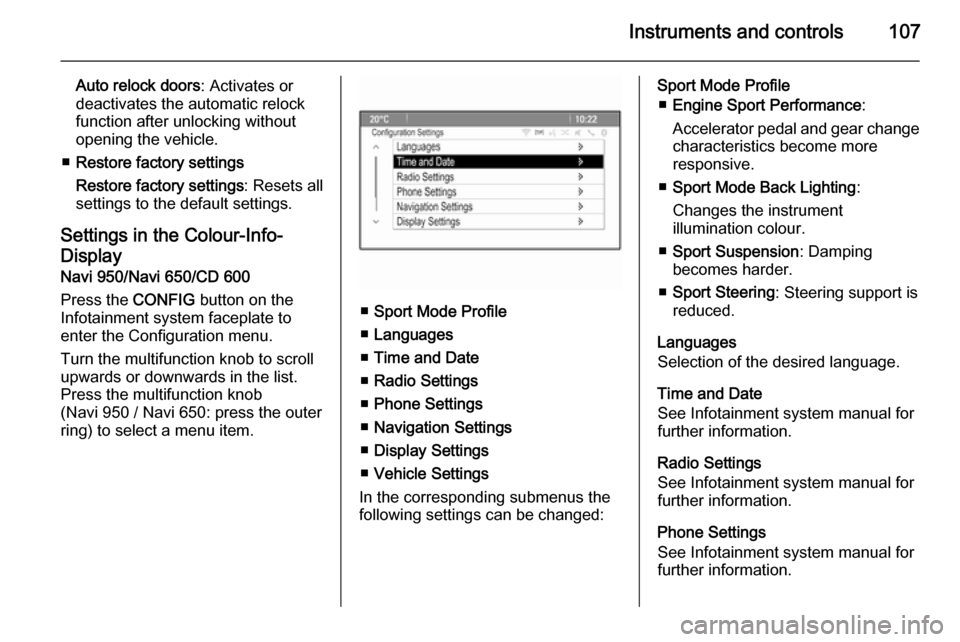
Settings in the Colour-Info-
Display
Navi 950/Navi 650/CD 600
Press the CONFIG button on the
Infotainment system faceplate to enter the Configuration menu.
Turn the multifunction knob to scroll
upwards or downwards in the list.
Press the multifunction knob
(Navi 950 / Navi 650: press the outer
ring) to select a menu item.
■ Sport Mode Profile
■ Languages
■ Time and Date
■ Radio Settings
■ Phone Settings
■ Navigation Settings
■ Display Settings
■ Vehicle Settings
In the corresponding submenus the
following settings can be changed:
Sport Mode Profile
■ Engine Sport Performance :
Accelerator pedal and gear change characteristics become more
responsive.
■ Sport Mode Back Lighting :
Changes the instrument
illumination colour.
■ Sport Suspension : Damping
becomes harder.
■ Sport Steering : Steering support is
reduced.
Languages
Selection of the desired language.
Time and Date
See Infotainment system manual for
further information.
Radio Settings
See Infotainment system manual for further information.
Phone Settings
See Infotainment system manual for further information.
Page 110 of 253

108Instruments and controls
Navigation Settings
See Infotainment system manual for
further information.
Display Settings ■ Home Page Menu :
See Infotainment system manual
for further information.
■ Rear Camera Options :
Press to adjust the rear camera options 3 166.
■ Display Off :
See Infotainment system manual
for further information.
■ Map Settings :
See Infotainment system manual
for further information.
Vehicle Settings ■ Climate and Air Quality
Auto Fan Speed : Modifies the level
of the cabin airflow of the climate
control in automatic mode.
Air Conditioning Mode : Controls the
state of the cooling compressor
when the vehicle is started. Last
setting (recommended) or atvehicle start is either always ON or
always OFF.
Auto Rear Demist : Activates
heated rear window automatically.
■ Comfort and Convenience
Chime Volume : Changes the
volume of warning chimes.
Personalisation by Driver :
Activates or deactivates the
personalisation function.
■ Collision Detection Systems
Park Assist : Activates or
deactivates the ultrasonic sensors.
Side Blind Zone Alert : Activates or
deactivates the side blind spot alert system.
■ Lighting
Vehicle Locator Lights : Activates or
deactivates the entry lighting.
Exit Lighting : Activates or
deactivates and changes the
duration of exit lighting.
■ Power Door Locks
Open Door Anti Lock Out : Activates
or deactivates the automatic doorlocking function while a door is open.
Auto Door Lock : Activates or
deactivates the automatic door
unlocking function after switching
off ignition. Activates or deactivates the automatic door locking function
after driving-off.
Delay Door Lock : Activates or
deactivates the delayed door
locking function.
■ Remote Lock/Unlock/Start
Remote Lock Feedback : Activates
or deactivates the hazard warning
flasher feedback whilst locking.
Remote Unlock Feedback :
Activates or deactivates the hazard warning flasher feedback whilst
unlocking.
Remote Door Unlock : Changes the
configuration to unlock only the
driver's door or the whole vehicle
whilst unlocking.
Relock Remotely Unlocked Doors :
Activates or deactivates the
automatic relock function after