wheel OPEL INSIGNIA BREAK 2018.5 Manual user
[x] Cancel search | Manufacturer: OPEL, Model Year: 2018.5, Model line: INSIGNIA BREAK, Model: OPEL INSIGNIA BREAK 2018.5Pages: 329, PDF Size: 9.32 MB
Page 228 of 329

226Driving and operatingAdditionally, the currently valid speed
limit is displayed permanently in the
lower line of the Driver Information
Centre. In case a speed limit with add on sign is available, a + symbol is
displayed in this area.
On Baselevel display, choose Info
Menu ? via MENU and select
traffic sign assistant page with the adjuster wheel on the turn signal lever
3 114.
On Mid- or Uplevel display, choose
Info Menu via right steering wheel
buttons and press å or ä to select
traffic sign assistant page 3 114.
When another page on the Driver Information Centre menu was
selected and then traffic sign
assistant page is chosen again, the
last recognised traffic sign will be
displayed.
Alert function
The alert function can be activated or
deactivated in the setting menu of the
traffic sign assistant page.Once activated and when the traffic
sign detection page is currently not
displayed, newly detected speed limit and no passing signs are displayed
as pop-up alerts in the Driver
Information Centre.
Page 229 of 329
Driving and operating227
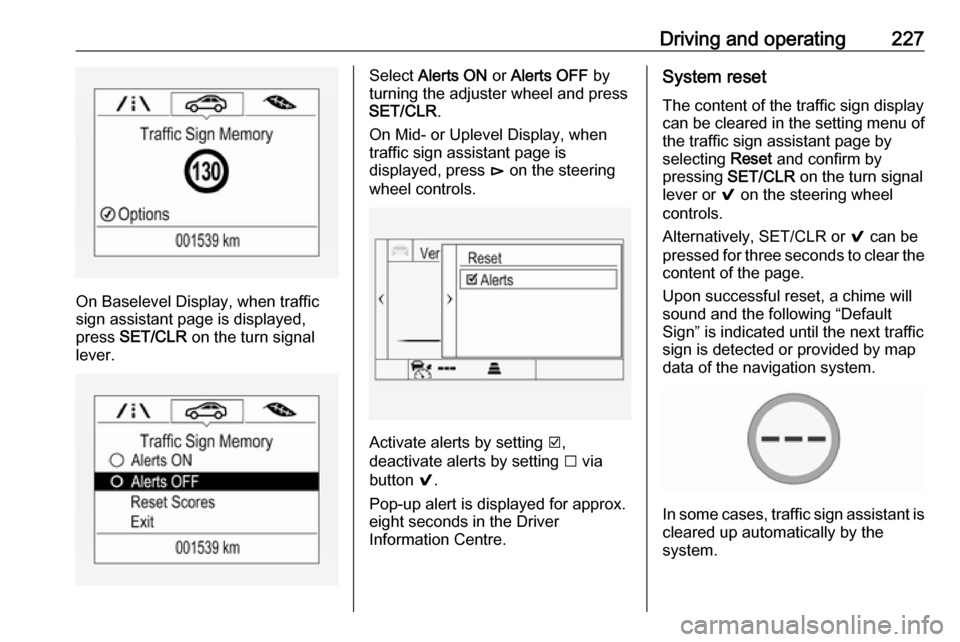
On Baselevel Display, when traffic
sign assistant page is displayed,
press SET/CLR on the turn signal
lever.
Select Alerts ON or Alerts OFF by
turning the adjuster wheel and press
SET/CLR .
On Mid- or Uplevel Display, when
traffic sign assistant page is
displayed, press é on the steering
wheel controls.
Activate alerts by setting J,
deactivate alerts by setting I via
button 9.
Pop-up alert is displayed for approx.
eight seconds in the Driver
Information Centre.
System reset
The content of the traffic sign display
can be cleared in the setting menu of
the traffic sign assistant page by
selecting Reset and confirm by
pressing SET/CLR on the turn signal
lever or 9 on the steering wheel
controls.
Alternatively, SET/CLR or 9 can be
pressed for three seconds to clear the
content of the page.
Upon successful reset, a chime will
sound and the following “Default
Sign” is indicated until the next traffic
sign is detected or provided by map
data of the navigation system.
In some cases, traffic sign assistant is
cleared up automatically by the
system.
Page 231 of 329

Driving and operating229The driver assistance systems donot relieve the driver from full
responsibility for vehicle
operation.
Lane keep assist
Lane keep assist helps to avoid
crashes due to unintentional lane
departures. The front camera
observes the lane markings between
which the vehicle is driving. If the
vehicle approaches a lane marking, the steering wheel is gently turned to
position the vehicle back into the lane. Turn steering wheel in same
direction, if system steering is not
sufficient. Turn steering wheel gently
into opposite direction, if lane change
is intended.
When crossing a lane marking
significantly, lane keep assist starts a
visual and acoustic warning.
Unintended lane departure is
assumed
● without using turn signal
● using the turn signal in the opposite direction of the lane
departure
● without braking
● without acceleration
● without active steering.
Note
The system is switched off during
detection of ambiguous lane
markings, e.g. in construction areas.
Note
The system may be switched off if it
detects lanes which are too narrow,
too wide or too curved.
ActivationThe lane keep assist is activated by
pressing a. The LED in the button
illuminates to indicate that the system
is switched on.
When the control indicator a in the
instrument cluster or in the head-up display illuminates green, the system
is ready to assist.
The system is operational at vehicle
speeds between 60 km/h and
180 km/h and if lane markings are
available.
The system gently turns the steering
wheel and the control indicator a
changes to yellow, if the vehicle
approaches a detected lane marking
without using the turn signal in that
direction.
The system alerts by flashing a
together with three chimes, from the
respective direction, if the lane is
departed significantly.
Page 232 of 329

230Driving and operatingThe system is only operable when a
lane marking is detected.
If the system only detects lane
markings on one side of the road, it
will only assist for this side.
Lane keep assist detects hands-free
driving. In this case a message in the
Driver Information Centre pops-up
and a chime sounds as long as lane
keep assist detects hands-free
driving.
Deactivation The system is deactivated by
pressing a; the LED in the button
extinguishes.
The system is deactivated
automatically when a trailer is
detected.
System limitations
The system performance may not
operate properly when:
● Vehicle speed is out of range from 60 to 180 km/h.
● Driving on winding or hilly roads.
● During nighttime driving.● Weather limits visibility, such as fog, rain, or snow.
● The sensor in the windscreen is blocked by snow, ice, slush, mud,dirt, windscreen damage or
affected by foreign items, e.g.
stickers.
● The sun is shining directly into the camera lens.
● Close vehicles ahead
● Banked roads
● Road edges
● Roads with poor lane markings
● Sudden lighting changes
● Vehicle modifications, e.g. tyres.
Switch off the system if the system is
disturbed by tar marks, shadows,
road cracks, temporary or
construction lane markings, or other
road imperfections.9 Warning
Always keep your attention on the
road and maintain proper vehicle
position within the lane, otherwise
vehicle damage, injury or death
could occur.
Lane keep assist does not
continuously steer the vehicle.
The system may not keep the
vehicle in the lane or give an alert,
even if a lane marking is detected.
The steering of the lane keep
assist may not be sufficient to
avoid a lane departure.
The system may not detect hands-
off driving due to external
influences (road condition and
surface, weather etc). The driver
has full responsibility to control the vehicle and is always required tokeep the hands on the steeringwheel while driving.
Using the system while towing a
trailer or on slippery roads could
cause loss of control of the vehicle
and a crash. Switch the system off.
Page 240 of 329

238Driving and operatingrelease handle is impossible toguide to its hidden initial position in the housing or if the buzzing tone
sounds after engaging the
coupling ball bar, seek the
assistance of a workshop.
Eye for break-away stopping cable
Attach break-away stopping cable to
eye.
Trailer stability assist
If the system detects snaking
movements, engine power is reduced
and the vehicle/trailer combination is
selectively braked until the snaking ceases. While the system is working
keep steering wheel as still as
possible.
Trailer stability assistant is a function
of the Electronic Stability Control
3 185.
Page 241 of 329

Vehicle care239Vehicle careGeneral Information...................239
Accessories and vehicle modifications .......................... 239
Vehicle storage ........................240
End-of-life vehicle recovery .....240
Vehicle checks ........................... 241
Performing work ......................241
Bonnet ..................................... 241
Engine oil ................................. 242
Engine coolant ......................... 243
Washer fluid ............................ 244
Brakes ..................................... 244
Brake fluid ............................... 244
Vehicle battery ......................... 245
Diesel fuel system bleeding .....246
Wiper blade replacement ........246
Bulb replacement .......................247
Halogen headlights ..................247
LED headlights ........................ 249
Fog lights ................................. 249
Tail lights ................................. 251
Side turn lights ......................... 256
Number plate light ...................257
Interior lights ............................ 257
Instrument panel illumination ...257Electrical system ........................257
Fuses ....................................... 257
Engine compartment fuse box . 258
Instrument panel fuse box .......261
Vehicle tools .............................. 262
Tools ........................................ 262
Wheels and tyres .......................263
Winter tyres ............................. 263
Tyre designations ....................264
Tyre pressure .......................... 264
Tyre pressure monitoring system .................................... 265
Tread depth ............................. 268
Changing tyre and wheel size . 268
Wheel covers ........................... 268
Tyre chains .............................. 269
Tyre repair kit .......................... 269
Wheel changing .......................274
Spare wheel ............................ 276
Jump starting ............................. 278
Towing ....................................... 279
Towing the vehicle ...................279
Towing another vehicle ...........280
Appearance care .......................281
Exterior care ............................ 281
Interior care ............................. 283General Information
Accessories and vehiclemodifications
We recommend the use of genuine
parts and accessories and factory approved parts specific for your
vehicle type. We cannot assess or guarantee reliability of other products
- even if they have a regulatory or
otherwise granted approval.
Any modification, conversion or other changes made to standard vehicle
specifications (including, without
limitation, software modifications,
modifications of the electronic control
units) may invalidate the warranty
offered by Opel. Furthermore, such
changes may affect driver assistance
systems, fuel consumption, CO 2
emissions and other emissions of the
vehicle. They may also invalidate the
vehicle operating permit.
Page 261 of 329

Vehicle care259No.Circuit1–2–3ABS4–5–6Tailgate7Fog light8Memory module9Heated windscreen10Seat lumbar11DC/DC battery12Heated rear window13Heated mirror14–15–16Front wiper17Power seat, passengerNo.Circuit18Sunblind19Power seat, driver20–21Sunroof22Rear wiper/Airbag23Adaptive forward lighting24–25–26Transmission control module27Ignition/Instrument panel28–29Rear view camera/Air vent30Malfunction indicator light/
Trailer31–32Camera33Seat heat front34Seat heat rearNo.Circuit35Damping/All-wheel drive36Fuel system37–38–39–40Steering wheel lock41–42–43Heated steering wheel44Headlight range adjustment45–46Engine control module47–48DC/DC converter/Air vent/E-
Boost49Rear door control module50–51–
Page 263 of 329
Vehicle care261Instrument panel fuse box
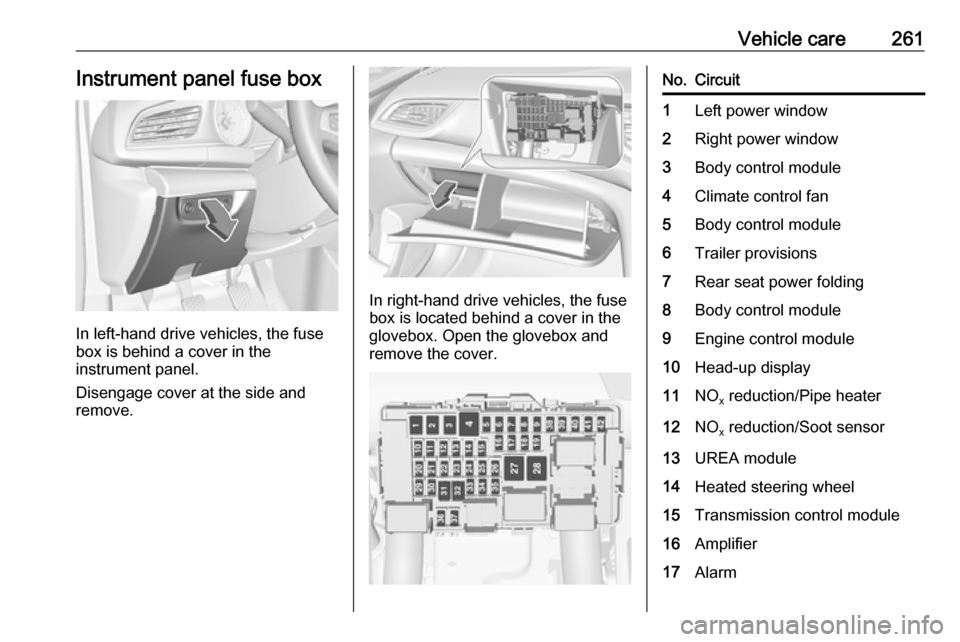
In left-hand drive vehicles, the fuse
box is behind a cover in the
instrument panel.
Disengage cover at the side and
remove.
In right-hand drive vehicles, the fuse
box is located behind a cover in the
glovebox. Open the glovebox and
remove the cover.
No.Circuit1Left power window2Right power window3Body control module4Climate control fan5Body control module6Trailer provisions7Rear seat power folding8Body control module9Engine control module10Head-up display11NO x reduction/Pipe heater12NO
x reduction/Soot sensor13UREA module14Heated steering wheel15Transmission control module16Amplifier17Alarm
Page 264 of 329
262Vehicle careNo.Circuit18Body control module19UREA module20Body control module21Body control module22Body control module23Electric steering wheel lock24Airbag25Diagnostic connector26Power outlet load compartment27EBCM valve28Police provision29–30–31Steering wheel controls32Ignition switch33Climate control34Central gateway moduleNo.Circuit35AUX/USB connector36Wireless charger37Rear wiper38Onstar39Display40Parking assist41Overhead console42RadioVehicle tools
Tools
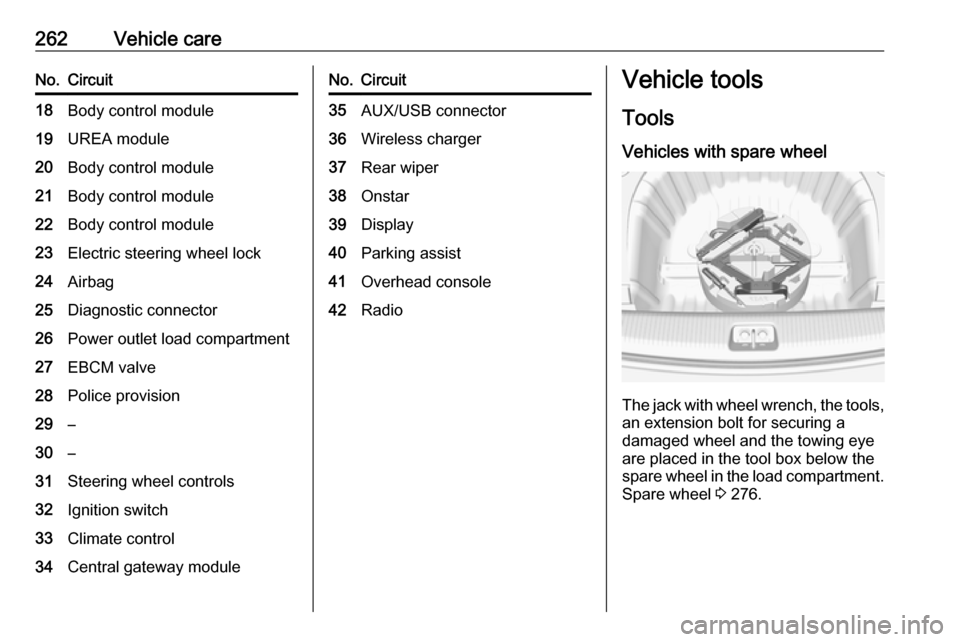
Vehicles with spare wheel
The jack with wheel wrench, the tools,
an extension bolt for securing a
damaged wheel and the towing eye
are placed in the tool box below the
spare wheel in the load compartment. Spare wheel 3 276.
Page 265 of 329
Vehicle care263Vehicles without spare wheel
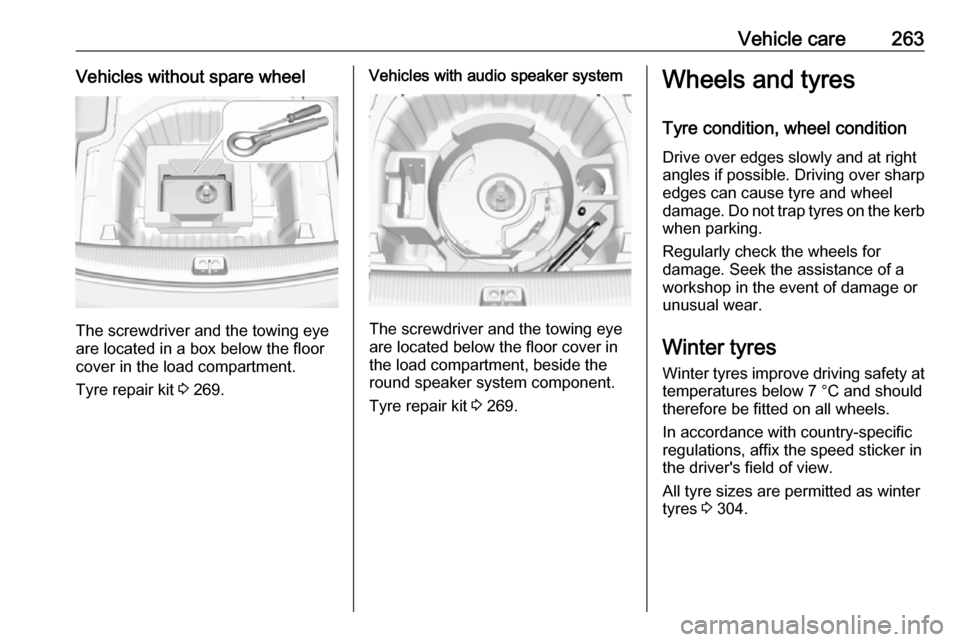
The screwdriver and the towing eye
are located in a box below the floor
cover in the load compartment.
Tyre repair kit 3 269.
Vehicles with audio speaker system
The screwdriver and the towing eye
are located below the floor cover in
the load compartment, beside the
round speaker system component.
Tyre repair kit 3 269.
Wheels and tyres
Tyre condition, wheel condition Drive over edges slowly and at right
angles if possible. Driving over sharp
edges can cause tyre and wheel
damage. Do not trap tyres on the kerb when parking.
Regularly check the wheels for
damage. Seek the assistance of a
workshop in the event of damage or
unusual wear.
Winter tyres
Winter tyres improve driving safety at temperatures below 7 °C and shouldtherefore be fitted on all wheels.
In accordance with country-specific
regulations, affix the speed sticker in
the driver's field of view.
All tyre sizes are permitted as winter
tyres 3 304.