tyre pressure OPEL INSIGNIA BREAK 2019.5 Manual user
[x] Cancel search | Manufacturer: OPEL, Model Year: 2019.5, Model line: INSIGNIA BREAK, Model: OPEL INSIGNIA BREAK 2019.5Pages: 323, PDF Size: 9.49 MB
Page 20 of 323
18In briefStarting off
Check before starting off ● Tyre pressure 3 261 and
condition 3 298.
● Engine oil level and fluid levels 3 238.
● All windows, mirrors, exterior lighting and number plates are
free from dirt, snow and ice and
are operational.
● Proper position of mirrors 3 37,
seats 3 47 and seat belts
3 57.
● Brake function at low speed, particularly if the brakes are wet.Starting the engine
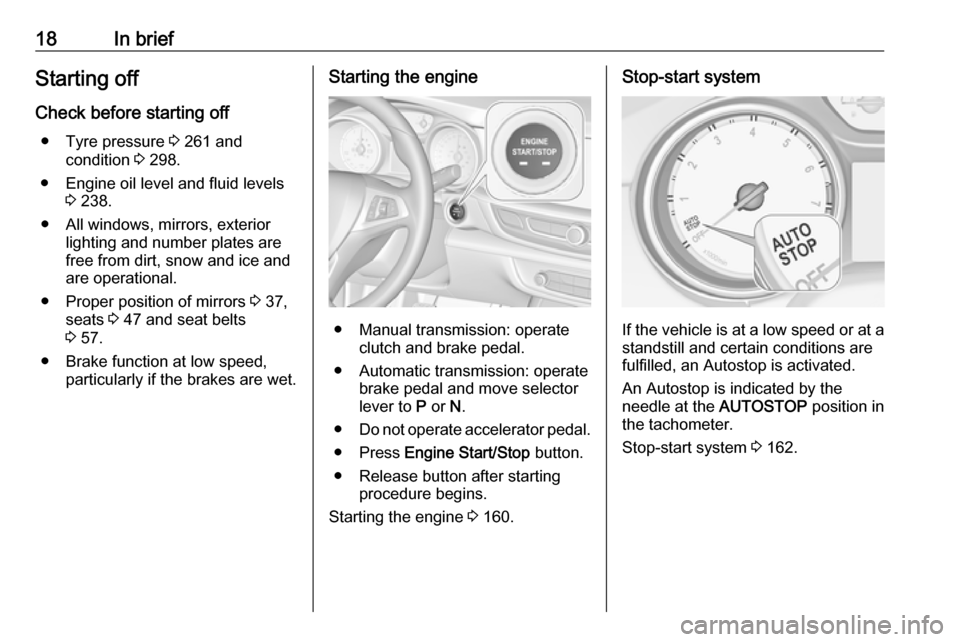
● Manual transmission: operateclutch and brake pedal.
● Automatic transmission: operate brake pedal and move selector
lever to P or N.
● Do not operate accelerator pedal.
● Press Engine Start/Stop button.
● Release button after starting procedure begins.
Starting the engine 3 160.
Stop-start system
If the vehicle is at a low speed or at a
standstill and certain conditions are
fulfilled, an Autostop is activated.
An Autostop is indicated by the
needle at the AUTOSTOP position in
the tachometer.
Stop-start system 3 162.
Page 88 of 323

86Storage● Do not allow the load to protrudeabove the upper edge of the
backrests.
● Do not place any objects on the load compartment cover or theinstrument panel, and do notcover the sensor on top of the
instrument panel.
● The load must not obstruct the operation of the pedals, parking
brake and gear selector, or
hinder the freedom of movement
of the driver. Do not place any
unsecured objects in the interior.
● Do not drive with an open load compartment.9Warning
Always ensure that the load in the
vehicle is securely stowed.
Otherwise objects can be thrown
around inside the vehicle and
cause personal injury or damage
to the load or vehicle.
● The payload is the difference between the permitted grossvehicle weight (see identification
plate 3 286) and the EC kerb
weight.
To calculate the payload, enter the data for your vehicle in the
weights table at the front of this
manual.
The EC kerb weight includes
weights for the driver (68 kg),
luggage (7 kg) and all fluids (fuel
tank 90% full).
Optional equipment and
accessories increase the kerb
weight.
● Driving with a roof load increases
the sensitivity of the vehicle to
cross-winds and has a
detrimental effect on vehicle
handling due to the vehicle's
higher centre of gravity.
Distribute the load evenly and secure it properly with retaining
straps. Adjust the tyre pressure
and vehicle speed according to
the load conditions. Check and
retighten the straps frequently.
Do not drive faster than
120 km/h.The permissible roof load is
100 kg. The roof load is the
combined weight of the roof rack and the load.
Page 89 of 323

Instruments and controls87Instruments and
controlsControls ....................................... 88
Steering wheel adjustment ........88
Steering wheel controls .............88
Heated steering wheel ...............88
Horn ........................................... 89
Windscreen wiper and washer ..89
Rear window wiper and washer ...................................... 91
Outside temperature ..................92
Clock ......................................... 92
Power outlets ............................. 93
Inductive charging .....................94
Ashtrays .................................... 95
Warning lights, gauges and indi‐ cators ........................................... 96
Instrument cluster ......................96
Speedometer ........................... 101
Odometer ................................ 102
Trip odometer .......................... 102
Tachometer ............................. 103
Fuel gauge .............................. 103
Engine coolant temperature gauge ..................................... 104
Service display ........................ 104Control indicators ....................105
Turn lights ................................ 105
Seat belt reminder ...................105
Airbag and belt tensioners .......106
Airbag deactivation ..................106
Charging system .....................107
Malfunction indicator light ........107
Brake and clutch system .........107
Electric parking brake ..............107
Electric parking brake fault ......107
Antilock brake system (ABS) ...108
Gear shifting ............................ 108
Following distance ...................108
Lane keep assist .....................108
Electronic Stability Control off . 108
Electronic Stability Control and Traction Control system .........108
Traction Control system off .....109
Engine coolant temperature ....109
Preheating ............................... 109
AdBlue ..................................... 109
Tyre pressure monitoring system .................................... 109
Engine oil pressure ..................109
Low fuel ................................... 110
Immobiliser .............................. 110
Exterior light ............................ 110
High beam ............................... 110
High beam assist .....................110
LED headlights ........................ 110Front fog lights......................... 110
Rear fog light ........................... 111
Cruise control .......................... 111
Adaptive cruise control ............111
Vehicle detected ahead ...........111
Pedestrian detection ................111
Speed limiter ........................... 111
Traffic sign assistant ................111
Door open ................................ 111
Displays ..................................... 112
Driver Information Centre ........112
Info Display .............................. 118
Head-up display ......................120
Vehicle messages ......................123
Warning chimes .......................123
Vehicle personalisation ..............124
Telematics service .....................129
OnStar ..................................... 129
Page 103 of 323

Instruments and controls101OverviewOTurn lights 3 105XSeat belt reminder 3 105vAirbag and belt tensioners
3 106VAirbag deactivation 3 106pCharging system 3 107ZMalfunction indicator light
3 107RBrake and clutch system 3 107mElectric parking brake 3 107jElectric parking brake fault
3 107uAntilock brake system (ABS)
3 108RGear shifting 3 108EFollowing distance 3 108aLane keep assist 3 108nElectronic Stability Control off
3 108bElectronic Stability Control and
Traction Control system 3 108kTraction Control system off
3 109WEngine coolant temperature
3 109!Preheating 3 109uAdBlue 3 109wTyre pressure monitoring
system 3 109IEngine oil pressure 3 109YLow fuel 3 110dImmobiliser 3 1108Exterior light 3 110CHigh beam 3 110fHigh beam assist 3 110fLED headlights 3 110>Front fog lights 3 110rRear fog light 3 111mCruise control 3 111CAdaptive cruise control 3 111AVehicle detected ahead 3 1117Pedestrian detected ahead
3 111LSpeed limiter 3 111LTraffic sign assistant 3 111hDoor open 3 111
Speedometer
Indicates vehicle speed.
Page 111 of 323
Instruments and controls109Flashes
The system is actively engaged.
Engine output may be reduced and
the vehicle may be braked
automatically to a small degree.
Electronic Stability Control 3 179.
Traction Control system 3 178.
Traction Control system off
k illuminates yellow.
The system is deactivated.
Engine coolant temperature W illuminates red.
Illuminates when the engine is
running
Stop, switch off engine.Caution
Coolant temperature too high.
Check coolant level immediately
3 239.
If there is sufficient coolant, consult a
workshop.
Preheating
! illuminates yellow.
Preheating of Diesel engine is
activated. Only activates when
outside temperature is low. Start the
engine when control indicator
extinguishes.
AdBlue
Y flashes yellow.
AdBlue level is low. Refill AdBlue
soon to avoid prevention of the
engine start.
AdBlue 3 167.
Tyre pressure monitoring system
w illuminates or flashes yellow.
Illuminates
Tyre pressure loss. Stop immediately and check tyre pressure.Flashes
Fault in system or tyre without
pressure sensor mounted (e.g. spare
wheel). After 60 to 90 seconds the
control indicator illuminates
continuously. Consult a workshop.
Engine oil pressure
I illuminates red.
Illuminates when the ignition is
switched on and extinguishes shortly after the engine starts.
Illuminates when the engine is
runningCaution
Engine lubrication may be
interrupted. This may result in
damage to the engine and / or
locking of the drive wheels.
1. Depress clutch.
2. Select neutral gear.
Page 117 of 323

Instruments and controls115●Speed
● Trip 1 / Trip A , containing:
Distance
Fuel Economy / Average Fuel
Economy
Average Speed
● Trip 2 / Trip B , containing:
Distance
Fuel Economy / Average Fuel
Economy
Average Speed
● Fuel / Fuel Information ,
containing:
Fuel Range
Instant Fuel Economy
● Oil Life
● Tyre Pressure
● Timer
● Traffic Sign Memory
● Following Distance
● Driver Assistance
● Top Consumers
● Economy Trend●ECO Index
● AdBlue Level
On Baselevel display, the pages Oil
Life , Tyre Pressure , Following
Distance , Traffic Sign Memory ,
AdBlue Level , Tyre Load and Speed
Warning are displayed in the Vehicle
information menu, select ?.
Speed
Digital display of the instantaneous
speed.
Trip 1/A or 2/B
Two independent pages 1/A and 2/B
display the current distance, average
fuel consumption and average speed
since a certain reset.
The distance indicator counts up to a
distance of 9,999 km then restarts at
0.
To reset on Baselevel or Midlevel
display, press Å and confirm reset.
On Uplevel display, press é and
confirm with Å. This only resets the
values on the current displayed page.
The other Trip page stays unaffected.Fuel /Fuel InformationFuel Range
Range is calculated from current fuel
tank level and current consumption.
The display shows average values.
After refuelling, the range is updated
automatically after a brief delay.
When the fuel level in the tank is low,
a message appears on the display
and control indicator Y in the fuel
gauge illuminates.
When the tank must be refuelled
immediately, a warning message
appears and remains on the display.
Additionally, control indicator Y in the
fuel gauge flashes 3 110.Instant Fuel Economy
Display of the instantaneous
consumption.
Oil Life
Indicates an estimate of the oil's
useful life. The number in % means
the remaining of current oil life 3 104.
Tyre Pressure
Checks tyre pressure of all wheels
during driving 3 262.
Page 120 of 323
118Instruments and controlsSpeed limit can only be set when
speed warning is enabled. Once the
speed is set, this feature can be
turned off by pressing Å while
viewing this page. If the selected
speed limit is exceeded, a pop-up
warning is displayed with a chime.
Tyre Load
The tyre pressure category according
to the actual tyre inflation pressure
can be selected 3 262.
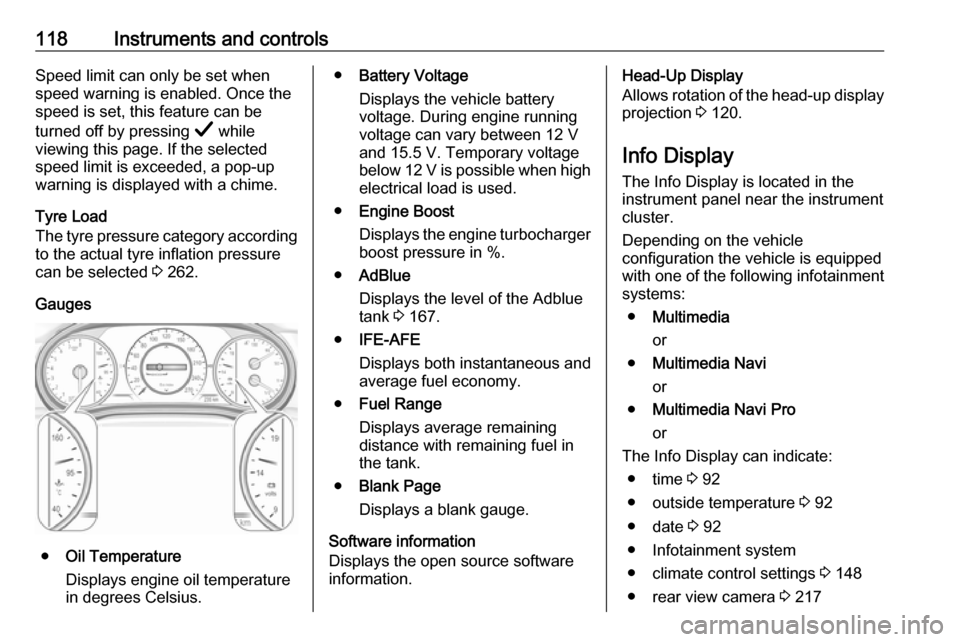
Gauges
● Oil Temperature
Displays engine oil temperature
in degrees Celsius.
● Battery Voltage
Displays the vehicle battery
voltage. During engine running
voltage can vary between 12 V
and 15.5 V. Temporary voltage
below 12 V is possible when high
electrical load is used.
● Engine Boost
Displays the engine turbocharger
boost pressure in %.
● AdBlue
Displays the level of the Adblue
tank 3 167.
● IFE-AFE
Displays both instantaneous and
average fuel economy.
● Fuel Range
Displays average remaining
distance with remaining fuel in
the tank.
● Blank Page
Displays a blank gauge.
Software information
Displays the open source software
information.Head-Up Display
Allows rotation of the head-up display projection 3 120.
Info Display The Info Display is located in theinstrument panel near the instrument
cluster.
Depending on the vehicle
configuration the vehicle is equipped
with one of the following infotainment
systems:
● Multimedia
or
● Multimedia Navi
or
● Multimedia Navi Pro
or
The Info Display can indicate: ● time 3 92
● outside temperature 3 92
● date 3 92
● Infotainment system
● climate control settings 3 148
● rear view camera 3 217
Page 133 of 323

Instruments and controls1313. Select your vehicle hotspot(SSID) when listed.
4. When prompted, enter the password on your mobile device.
Note
To change the SSID or password,
press Z and talk to an advisor or log
in to your account.
To switch off the Wi-Fi hotspot
functionality, press Z to call an
advisor.
Smartphone app
With the myOpel smartphone app,
some vehicle functions can be
operated remotely.
The following functions are available: ● Lock or unlock vehicle.
● Honk horn or flash lights.
● Check fuel level, engine oil life and tyre pressure (only with tyre
pressure monitoring system).
● Send navigation destination to the vehicle, if equipped with a
built-in navigation system.
● Locate vehicle on a map.
● Manage Wi-Fi settings.To operate these functions, download the app from App Store ®
or
Google Play™ Store.
Remote control
If desired, use any phone to call an
advisor, who can remotely operate
specific vehicle functions. Find the
respective OnStar phone number on
our country-specific website.
The following functions are available: ● Lock or unlock vehicle.
● Provide information on the vehicle location.
● Honk horn or flash lights.
Stolen vehicle assistance
If the vehicle is stolen, report the theft
to the authorities and request OnStar
stolen vehicle assistance. Use any
phone to call an advisor. Find the
respective OnStar phone number on
our country-specific website.
OnStar can provide support in
locating and recovering the vehicle.Theft alert
When the anti-theft alarm system is
triggered, a notification is sent to
OnStar. You are then informed about
this event by text message or email.Restart prevention
By sending remote signals, OnStar can prevent the vehicle from
restarting once it has been turned off.
On-demand diagnostics
At any time e.g. if the vehicle displays a vehicle message, press Z to
contact an advisor and ask to
complete a real-time diagnostic check
to directly determine the issue.
Depending on the results, the advisor
will provide further support.
Diagnostic report
The vehicle automatically transmits
diagnostic data to OnStar which
sends a monthly email report to you
and your preferred workshop.
Note
The workshop notification function
can be disabled in your account.
Page 134 of 323

132Instruments and controlsThe report contains the status of key
operating systems of the vehicle like
engine, transmission, airbags, ABS,
and other major systems. It also
provides information on possible
maintenance items and tyre pressure (only with tyre pressure monitoring
system).
To look at the information in greater
detail, select the link within the email and log in to your account.
Destination download
A desired destination can be directly
downloaded to the navigation system.
Press Z to call an advisor and
describe the destination or point of
interest.
The advisor can look up any address
or point of interest and directly send
the destination to the built-in
navigation system.
OnStar settings
OnStar PIN
To have full access to all OnStar
services, a four-digit PIN is required. The PIN has to be personalised when first talking to an advisor.To change the PIN, press Z to call an
advisor.
Account data
An OnStar subscriber has an account
where all the data is stored. To
request a change of the account
information, press Z and talk to an
advisor or log in to your account.
If the OnStar service is used on
another vehicle, press Z and request
that the account be transferred to the
new vehicle.
Note
In any case, if the vehicle is disposed of, sold or otherwise transferred,
immediately inform OnStar about
the changes and terminate the
OnStar service on this vehicle.
Vehicle location
The vehicle location is transmitted to OnStar when service is requested ortriggered. A message on the Info
Display informs about this
transmission.To activate or deactivate the
transmission of the vehicle location,
press and hold j until an audio
message is heard.
The deactivation is indicated by the
status light flashing red and green for a short period of time and each time
the vehicle is started.
Note
If the transmission of the vehicle
location is deactivated, some
services are no longer available.
Note
The vehicle location always remains
accessible to OnStar in the case of
an emergency.
Find the privacy policy in your
account.
Software updates
OnStar may remotely carry out
software updates without further
notice or consent. These updates are
to enhance or maintain safety and
security or the operation of the
vehicle.
Page 233 of 323

Driving and operating231Trailer hitch
General information
The factory-fitted towing equipment is
folded up under the rear bumper
fascia.
Entrust retrofitting of towing
equipment to a workshop. It may be
necessary to make changes that
affect the cooling system, heat
shields or other equipment. Only use
towing equipment that has been
approved for your vehicle.
To avoid vehicle damage, the power
tailgate cannot be operated with the
radio remote control when a trailer is
electrically connected.
The bulb outage detection function for trailer brake light cannot detect a
partial bulb outage. E.g. in case of
four bulbs with a power of 5 W each,
the function only detects light outage
when only a single 5 W bulb remains
or none remain.
Fitting of towing equipment could
cover the opening of the towing eye.
If this is the case use the coupling ball
bar for towing.Driving characteristics and
towing tips
Before attaching a trailer, lubricatethe coupling ball. However, do not do
so if a stabiliser, which acts on the
coupling ball, is being used to reduce
snaking movements.
During trailer towing do not exceed a
speed of 80 km/h. A maximum speed
of 100 km/h is only appropriate if an oscillation damper is used and the
permissible gross trailer weight does
not exceed the vehicle’s kerb weight.
For trailers with low driving stability
and caravan trailers, the use of an
oscillation damper is strongly
recommended.
If the trailer starts snaking, drive more
slowly, do not attempt to correct the
steering and brake sharply if
necessary.
When driving downhill, drive in the
same gear as if driving uphill and
drive at a similar speed.
Adjust tyre pressure to the value
specified for full load 3 298.Trailer towing
Trailer loads
The permissible trailer loads are
vehicle and engine-dependent
maximum values which must not be
exceeded. The actual trailer load is
the difference between the actual
gross weight of the trailer and the
actual coupling socket load with the
trailer coupled.
The permissible trailer loads are
specified in the vehicle documents. In general, they are valid for gradients
up to 12%.
The permissible trailer load applies
up to the specified incline and at sea
level. Since engine power decreases
as altitude increases due to the air
becoming thinner, therefore reducing
climbing ability, the permissible gross
train weight also decreases by 10%
for every 1000 m of altitude. The
gross train weight does not have to be reduced when driving on roads with
slight inclines (less than 8%, e.g.
motorways).