change time OPEL KARL 2015 User Guide
[x] Cancel search | Manufacturer: OPEL, Model Year: 2015, Model line: KARL, Model: OPEL KARL 2015Pages: 217, PDF Size: 4.16 MB
Page 95 of 217

OPEL Karl Owner Manual (GMK-Localizing-EU RHD-9231168) - 2016 - crc -
5/7/15
94 Infotainment System
1.P(power) button with
VOLUME dial
. When power is off, press to
turn power on.
. When power is on, press
and hold to turn power off.
. When power is on, press
shortly to turn the mute
function on or off.
. Turn to control volume.
2. RADIO Select Radio mode. Each time
the button is pressed, the
system switches between AM
RADIO →FM RADIO →DAB
→ AM RADIO →….
3. MEDIA Press the button to change the
mode in the order of USB/iPod
→AUX →Bluetooth music →
USB/iPod →…. 4. Display
Display for Play, Reception,
Menu state and information.
5.
g/d(seek)
. In Radio or DAB mode:
When pressed shortly,
automatically seeks station
with superior reception.
When pressed and held,
continuously changes the
station until the button is
released. When releasing,
the system stops on the
current frequency displayed
or seeks the next station.
. In USB/iPod/Bluetooth
audio playback:
When pressed shortly,
move to the previous or
next file.
When pressed and held,
rewind or fast forward
the file. 6. PHONE
Press this button to enter the
phone application mode.
7. BACK Cancel input content or return
to the previous menu.
8. MENU button with TUNE dial .Turn dial to search the
station/file on the list screen
or move/change setup
content or setup values.
. Press the button to display
the currently functioning
menu or select/practice
setup content and setup
values.
9. - (preset) buttons .In Radio mode:
When pressed shortly,
recall the stored radio
station.
When pressed and held,
store the current radio
station to the
Favourites page.
Page 98 of 217

OPEL Karl Owner Manual (GMK-Localizing-EU RHD-9231168) - 2016 - crc -
5/7/15
Infotainment System 97
1.P(power) button with
VOLUME dial
. When power is off, press to
turn power on.
. When power is on, press
and hold to turn power off.
. When power is on, press
shortly to turn the mute
function on or off.
. Turn to control volume.
2. RADIO Select Radio mode. Each time
the button is pressed, the
system switches between AM
RADIO →FM RADIO →AM
RADIO →….
3. MEDIA Press the button to enter the
Aux mode.
4. Display Display for Play, Reception,
Menu state and information. 5.g/d(seek)
When pressed shortly,
automatically seeks station
with superior reception.
When pressed and held,
continuously changes the
station until the button is
released. When releasing, the
system stops on the current
frequency displayed or seeks
the next station.
6. TONE
Press this button to enter the
Tone Settings mode.
7. BACK Cancel input content or return
to the previous menu.
8. MENU button with TUNE dial .Turn dial to search the
station on the list screen or
move/change setup content
or setup values. .
Press the button to display
the currently functioning
menu or select/practice
setup content and setup
values.
9. AUX port
Connect the external audio
device.
10. - (preset) buttons .In Radio mode:
When pressed shortly,
recall the stored radio
station.
When pressed and held,
store the current radio
station to the
Favourites page.
. In Menu mode:
Press any of these buttons
to select the function linked
to that button.
11. FAV (favourites) Press this button to select the
page of saved favourite
channels.
Page 113 of 217
OPEL Karl Owner Manual (GMK-Localizing-EU RHD-9231168) - 2016 - crc -
5/7/15
112 Infotainment System
.Folder View: Enter the Folder
View mode, and move to the
previous or next folder.
. Shuffle: Turn the shuffle feature
on or off.
Browsing/indexing device
. Browsing is not supported until
indexing is completed for the
connected device.
. If the browse function is selected
during the indexing process, a
pop-up “Feature not supported
during Indexing Use folder
view to browse contents ”will
display.
. When a single device with
greater than 6,000 songs is
connected, a pop-up “Media
indexing memory full Use
folder view or remove other
device ”will display.
Remove USB
Remove the USB device from the
USB connection terminal.
If the USB device is removed, the
system will display the No
Connection message for each source on the display screen and
keep the current status until the
device is reconnected.
Using the Media transfer protocol
(MTP) menu
Charge Only: Select the charge
option for the MTP device. The MTP
device will be charged, and the
system will show the pop-up
message, when it is connected.
.
The default setting is
Charge Only.
. When the Charge Only option is
selected in the Media Transfer
Protocol (MTP) Setting Menu,
the audio source is not changed
and the connected device is only
charged.
. If you change to USB mode
while charging the device, a
Charge message with charging
activity indicator is shown on the
display screen. In this case, the
system will not start indexing the
files on the device.
. Charging may not be supported
by some MTP devices. Scan Music Folder Only: Select
the Music Folder Scan option for the
MTP device.
The system can display the Artist
Name/Song Name/Elapsed Time
regarding the current song and
access the playlist on the MTP
device.
Scan All Folder: Select the All
Folder scan option for the MTP
device.
.
The device indexing time takes
longer than the setting of Scan
Music Folder Only. It depends on
the smartphone and the files/
folders on the smartphone.
. With some phones featuring
Media Transfer Protocol (MTP),
music search can take a
long time.
. If the phone screen is locked,
you cannot search for music. To
access music on the phone,
unlock the phone screen.
Page 116 of 217
OPEL Karl Owner Manual (GMK-Localizing-EU RHD-9231168) - 2016 - crc -
5/7/15
Infotainment System 115
Personalisation
How to use the Settings menu for
personalisation
.Settings menus and functions
may differ according to car
model.
. The settings menu comprises a
detailed list for the relevant
setup menu or functioning state.
. If there is another detailed list
from the relevant detailed list,
you can repeat this action.
Select Settings in the Menu > turn
the TUNE dial to move to the
desired menu item > press MENU to
enter the item's detailed menu.
Setting the time and date
Set time : Manually set the hours
and minutes for the current time.
. Press Set Time in the Time and
Date menu.
. Press - to select the Time format
12HR or 24HR.
. Turn the TUNE dial to change
the hour, and then press MENU
to move to the Minute Setting. .
Turn the TUNE dial to change
the minute, and then press
MENU to move to the AM or PM
Setting.
. Turn the TUNE dial to select the
AM or PM, and then press
MENU to finish the Time Setting.
When MENU is pressed, the
Time and Date menu is
automatically displayed.
Set date : Manually set the current
year, month or date.
Press Set Date in the Time and
Date menu.
Press - to select the Date format.
The format shows: DD/MM/YYYY: 15. Oct. 2014
MM/DD/YYYY: Oct. 15. 2014
YYYY/MM/DD: 2014. Oct. 15
. Turn the TUNE dial to change
the Month, and then press
MENU to move to the Day
Setting.
. Turn the TUNE dial to change
the Day, and then press MENU
to move to the Year Setting. .
Turn the TUNE dial to change
the Year, and then press MENU
to finish the Date Setting. When
MENU is pressed, the Time and
Date menu is automatically
displayed.
Set time and date automatically.
Press - to select the Time setting
mode in the Set Time menu.
. Off (Manual): Activates
manual mode.
. On-Cell Network: Set the Cell
Network clock synchronization
feature on or off.
. On-RDS: Set the RDS clock
synchronization feature on or off.
Setting the tone
. For details, see page7.
Setting the auto volume
Auto Volume adjusts the volume of
the audio based on the speed or
ambient noise of the vehicle.
. Off: Auto Volume does not act.
Page 146 of 217
OPEL Karl Owner Manual (GMK-Localizing-EU RHD-9231168) - 2016 - crc -
5/7/15
Driving and Operating 145
Deactivation
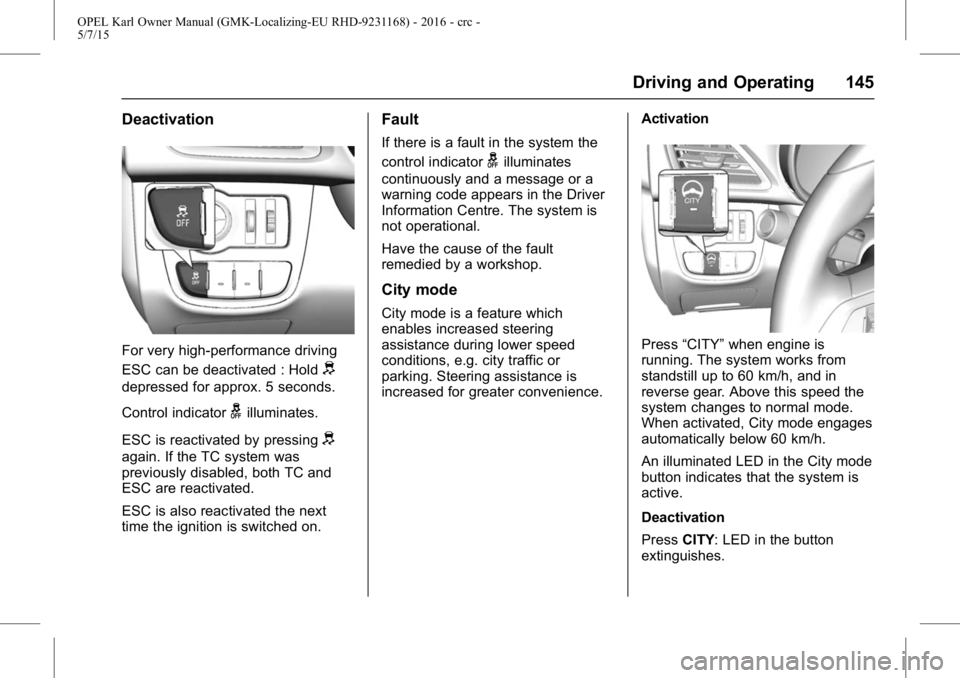
For very high-performance driving
ESC can be deactivated : Hold
d
depressed for approx. 5 seconds.
Control indicator
gilluminates.
ESC is reactivated by pressing
d
again. If the TC system was
previously disabled, both TC and
ESC are reactivated.
ESC is also reactivated the next
time the ignition is switched on.
Fault
If there is a fault in the system the
control indicator
gilluminates
continuously and a message or a
warning code appears in the Driver
Information Centre. The system is
not operational.
Have the cause of the fault
remedied by a workshop.
City mode
City mode is a feature which
enables increased steering
assistance during lower speed
conditions, e.g. city traffic or
parking. Steering assistance is
increased for greater convenience. Activation
Press
“CITY” when engine is
running. The system works from
standstill up to 60 km/h, and in
reverse gear. Above this speed the
system changes to normal mode.
When activated, City mode engages
automatically below 60 km/h.
An illuminated LED in the City mode
button indicates that the system is
active.
Deactivation
Press CITY: LED in the button
extinguishes.
Page 157 of 217
OPEL Karl Owner Manual (GMK-Localizing-EU RHD-9231168) - 2016 - crc -
5/7/15
156 Vehicle Care
General Information
Accessories and
Modifications
We recommend the use of genuine
parts and accessories and factory
approved parts specific for your
vehicle type. We cannot assess or
guarantee reliability of other
products - even if they have a
regulatory or otherwise granted
approval.
Do not make any modifications to
the electrical system, e.g. changes
of electronic control units (chip
tuning).
Caution
When transporting the vehicle on
a train or on a recovery vehicle,
the mud flaps might be damaged.
Vehicle Storage
Storage for a long period
of time
If the vehicle is to be stored for
several months :
.Wash and wax the vehicle.
. Have the wax in the engine
compartment and underbody
checked.
. Clean and preserve the rubber
seals.
. Fill up fuel tank completely.
. Change the engine oil.
. Drain the washer fluid reservoir.
. Check the coolant antifreeze
and corrosion protection.
. Adjust tyre pressure to the value
specified for full load.
. Park the vehicle in a dry, well
ventilated place. Engage first or
reverse gear. Prevent the
vehicle from rolling.
. Do not apply the parking brake. .
Open the bonnet, close all doors
and lock the vehicle.
. Disconnect the clamp from the
negative terminal of the vehicle
battery. Beware that all systems
are not functional, e.g. anti-theft
alarm system.
Putting back into operation
When the vehicle is to be put back
into operation :
.Connect the clamp to the
negative terminal of the vehicle
battery. Activate the electronics
of the power windows.
. Check tyre pressure.
. Fill up the washer fluid reservoir.
. Check the engine oil level.
. Check the coolant level.
. Fit the number plate if
necessary.
Page 212 of 217

OPEL Karl Owner Manual (GMK-Localizing-EU RHD-9231168) - 2016 - crc -
5/7/15
Index 211
Fuel (cont'd)Consumption - CO2 -
Emissions . . . . . . . . . . . . . . . . . . . 154
Filling the Tank . . . . . . . . . . . . . . . 152
Gauge . . . . . . . . . . . . . . . . . . . . . . . . . . 65
Low Fuel Warning Light . . . . . . . . . 73
Fuses . . . . . . . . . . . . . . . . . . . . . . . . . . 169 Engine Compartment FuseBlock . . . . . . . . . . . . . . . . . . . . . . . . 170
Instrument Panel Fuse Block . . . . . . . . . . . . . . . . . . . . . . . . 172
G
GaugesEngine Coolant Temperature . . . 68
Fuel . . . . . . . . . . . . . . . . . . . . . . . . . . . . 65
Indicator . . . . . . . . . . . . . . . . . . . . . . . . 69
Mileometer . . . . . . . . . . . . . . . . . . . . . 64
Rev Counter . . . . . . . . . . . . . . . . . . . . 65
Service Display . . . . . . . . . . . . . . . . . 68
Speedometer . . . . . . . . . . . . . . . . . . . 64
Trip Odometer . . . . . . . . . . . . . . . . . . 64
Gear Shifting Light . . . . . . . . . . . . . . . 71
Glove Box . . . . . . . . . . . . . . . . . . . . . . . 53
H
Hazard Lights . . . . . . . . . . . . . . . . . . . . 87
Head Restraints . . . . . . . . . . . . . . . . . 32
Headlamp Range Adjustment . . . . 86
Headlamps Bulb Replacement . . . . . . . . . . . . 163
Daytime RunningLamps (DRL) . . . . . . . . . . . . . . . . . . 86
Main-Beam On Light . . . . . . . . . . . . 74
Main/Dipped Beam Changer . . . . 86
Parking Lamps . . . . . . . . . . . . . . . 163
Position Lamps . . . . . . . . . . . . . . . . . 88
Range Adjustment . . . . . . . . . . . . . . 86
Headlights When Driving
Abroad . . . . . . . . . . . . . . . . . . . . . . . . . 86
Heated Rear Window . . . . . . . . . . . . . . . . . . . 30
Steering Wheel . . . . . . . . . . . . . . . . . 60
Heated Front Seats . . . . . . . . . . . . . . 35
Heated Mirrors . . . . . . . . . . . . . . . . . . . 28
Heating . . . . . . . . . . . . . . . . . . . . . . . . . 125
Heating and Ventilation
System . . . . . . . . . . . . . . . . . . . . . . . . 125
Hill Start Assist (HSA) . . . . . . . . . . 143
Horn . . . . . . . . . . . . . . . . . . . . . . . . . 15, 61
I
Identification Plate . . . . . . . . . . . . . . 201
Ignition Positions . . . . . . . . . . . . . . . 135
Immobiliser . . . . . . . . . . . . . . . . . . . . . . 27 Light . . . . . . . . . . . . . . . . . . . . . . . . . . . . 74
Indicator . . . . . . . . . . . . . . . . . . . . . . . . . 69
Indicators Control . . . . . . . . . . . . . . . . . . . . . . . . . 65
Information Service . . . . . . . . . . . . . . . . . . . . . . . 194
Information on Loading the Vehicle . . . . . . . . . . . . . . . . . . . . . . . . . 57
Instrument Panel Overview . . . . . . . . . . . . . . . . . . . . . . . . 9
Storage Area . . . . . . . . . . . . . . . . . . . 52
Instrument Panel Illumination . . . 168
Interior Lamps . . . . . . . . . . . . . . . . . . . 89
Introduction . . . . . . . . . . . . . . . . . . . .2, 92
ISOFIX Child Restraint Systems . . . . . . . . . . . . . . . . . . . . . . . 50
J
Jump Starting . . . . . . . . . . . . . . . . . . . 188
K
Keys . . . . . . . . . . . . . . . . . . . . . . . . . . . . . 20
Page 213 of 217

OPEL Karl Owner Manual (GMK-Localizing-EU RHD-9231168) - 2016 - crc -
5/7/15
212 Index
L
LampsCornering . . . . . . . . . . . . . . . . . . . . . . . 88
Daytime Running (DRL) . . . . . . . . 86
Exterior Controls . . . . . . . . . . . . . . . . 85
Front Fog . . . . . . . . . . . . . . . . . . . . . . . 87
Front Indicator . . . . . . . . . . . . . . . . 165
Headlamps and ParkingLamps . . . . . . . . . . . . . . . . . . . . . . 163
Interior . . . . . . . . . . . . . . . . . . . . .89, 168
Malfunction Indicator . . . . . . . . . . . 70
Misted Covers . . . . . . . . . . . . . . . . . . 89
Number Plate . . . . . . . . . . . . . . . . . 168
Rear Fog . . . . . . . . . . . . . . . . . . . . . . . 88
Reversing . . . . . . . . . . . . . . . . . . . . . . 89
Side Indicator . . . . . . . . . . . . . . . . . 167
Taillights . . . . . . . . . . . . . . . . . . . . . . 165
Lane Departure Warning (LDW) . . . . . . . . . . . . . . . . 150
Lane Departure Warning Light . . . 72
Light Electronic Stability Control(ESC), Off . . . . . . . . . . . . . . . . . . . . . 72
Gear Shifting . . . . . . . . . . . . . . . . . . . 71
Traction Control
System (TCS) . . . . . . . . . . . . . . . . . 72
Variable Effort Steering . . . . . . . . . 71
Light, Auto Stop Mode . . . . . . . . . . . 74 Lighting
Centre Console . . . . . . . . . . . . . . . . . 90
Entry . . . . . . . . . . . . . . . . . . . . . . . . . . . 90
Exit . . . . . . . . . . . . . . . . . . . . . . . . . . . . . 91
Illumination Control . . . . . . . . . . . . . 89
Lights . . . . . . . . . . . . . . . . . . . . . . . . . . . . 72 Airbag and Safety Belt
Tensioner . . . . . . . . . . . . . . . . . . . . . 70
Airbag On-Off . . . . . . . . . . . . . . . . . . . 70
Antilock Brake System (ABS) Warning . . . . . . . . . . . . . . . . 71
Bonnet Ajar . . . . . . . . . . . . . . . . . . . . . 74
Brake and Clutch System . . . . . . . 71
Charging System . . . . . . . . . . . . . . . 70
Cruise Control . . . . . . . . . . . . . . . . . . 74
Door Ajar . . . . . . . . . . . . . . . . . . . . . . . 74
Engine Coolant Temperature Warning . . . . . . . . . . . . . . . . . . . . . . . 72
Engine Oil Pressure . . . . . . . . . . . . 73
Fog Lamp, Rear . . . . . . . . . . . . . . . . 74
Front Fog Lamp . . . . . . . . . . . . . . . . 74
Immobiliser . . . . . . . . . . . . . . . . . . . . . 74
Lane Departure Warning . . . . . . . . 72
Low Fuel Warning . . . . . . . . . . . . . . 73
Main-Beam On . . . . . . . . . . . . . . . . . 74
Main/Dipped Beam Changer . . . . 86
Reduced Engine Power . . . . . . . . 74
Seat Belt Reminders . . . . . . . . . . . . 69 Lights (cont'd)
Service Vehicle Soon . . . . . . . . . . . 71
Tail lamp Indicator . . . . . . . . . . . . . . 74
Tyre Pressure Monitoring
System . . . . . . . . . . . . . . . . . . . . . . . . 73
Ultrasonic Parking Sensor . . . . . . 72
Lights, Hazard . . . . . . . . . . . . . . . . . . . 87
Load Compartment . . . . . . . . . . . . . . 53
LoadCompartment . . . . . . . . . . . . . . . 25
Loading the Vehicle . . . . . . . . . . . . . . 57
Locks Central Locking System . . . . . . . . 22
Safety . . . . . . . . . . . . . . . . . . . . . . . . . . 24
Low Fuel Warning Light . . . . . . . . . . 73
M
Main-Beam On Light . . . . . . . . . . . . . 74
Maintenance Air Conditioning Regular
Operation . . . . . . . . . . . . . . . . . . . 132
Maintenance Schedule Recommended Fluids andLubricants . . . . . . . . . . . . . . . . . . . 195
Malfunction Indicator Lamp . . . . . . 70
Manual Gearbox . . . . . . . . . . . . . . . . 141
Manual Windows . . . . . . . . . . . . . . . . 29
Memorised Settings . . . . . . . . . . . . . 22
Messages
Vehicle . . . . . . . . . . . . . . . . . . . . . . . . . 80
Page 215 of 217

OPEL Karl Owner Manual (GMK-Localizing-EU RHD-9231168) - 2016 - crc -
5/7/15
214 Index
Ride Control Systems . . . . . . . . . . 144Electronic Stability (ESC) . . . . . 144
Roof Sunroof . . . . . . . . . . . . . . . . . . . . . . . . . 31
Running-In, New Vehicle . . . . . . . 135
S
Safety Belts . . . . . . . . . . . . . . . . . . . . . 36 Child Restraints . . . . . . . . . . . . . . . . 46
Three-Point . . . . . . . . . . . . . . . . . . . . . 37
Safety Locks . . . . . . . . . . . . . . . . . . . . . 24
Seat Belts Reminders . . . . . . . . . . . . . . . . . . . . . . 69
Seats Adjustment, Front . . . . . . . . . . . . . . . 34
Head Restraints . . . . . . . . . . . . . . . . 32
Heated Front . . . . . . . . . . . . . . . . . . . 35
Position, Front . . . . . . . . . . . . . . . . . . 33
Service . . . . . . . . . . . . . . . . . . . . . . . . . 133 Accessories andModifications . . . . . . . . . . . . . . . . 156
Doing Your Own Work . . . . . . . . 157
Engine Soon Light . . . . . . . . . . . . . . 70
Vehicle Soon Light . . . . . . . . . . . . . . 71
Service and Maintenance Service Information . . . . . . . . . . . 194
Service Display . . . . . . . . . . . . . . . . . . 68
Service Information . . . . . . . . . . . . . 194 Settings
Memorised . . . . . . . . . . . . . . . . . . . . . 22
Side Airbag System . . . . . . . . . . . . . 42
Side Indicator Lamps . . . . . . . . . . . 167
Signals, Turn and Lane-Change . . . . . . . . . . . . . . . . . . 87
Spare Tyre
Compact . . . . . . . . . . . . . . . . . . . . . . 186
Specifications and Capacities . . . . . . . . . . . . . . . . . . . . . 204
Speed Limiter . . . . . . . . . . . . . . . . . . . 149
Speedometer . . . . . . . . . . . . . . . . . . . . 64
Start Assist, Hills . . . . . . . . . . . . . . . 143
Starting the Engine . . . . . . . . . 18, 136
Steering . . . . . . . . . . . . . . . . . . . . . . . . 135 Heated Wheel . . . . . . . . . . . . . . . . . . 60
Wheel Adjustment . . . . . . . . . . . . . . 60
Wheel Controls . . . . . . . . . . . . . . . . . 60
Storage Load Compartment . . . . . . . . . 25, 53
Vehicle . . . . . . . . . . . . . . . . . . . . . . . 156
Storage Areas Convenience Net . . . . . . . . . . . . . . . 56
Glove Box . . . . . . . . . . . . . . . . . . . . . . 53
Information on Loading theVehicle . . . . . . . . . . . . . . . . . . . . . . . . 57
Instrument Panel . . . . . . . . . . . . . . . 52 Storage Areas (cont'd)
Rear Compartment/Storage
Panel Cover . . . . . . . . . . . . . . . . . . . 56
Storage Compartments . . . . . . . . . . 52
Sun Visors . . . . . . . . . . . . . . . . . . . . . . . 30
Sunroof . . . . . . . . . . . . . . . . . . . . . . . . . . 31
Switches
Airbag On-Off . . . . . . . . . . . . . . . . . . . 43
Symbols . . . . . . . . . . . . . . . . . . . . . . . . . . 4
Systems
Driver Assistance . . . . . . . . . . . . . 148
T
Tail lamp Indicator Light . . . . . . . . . 74
Taillights . . . . . . . . . . . . . . . . . . . . . . . . 165
Technical DataTyre Pressure . . . . . . . . . . . . . . . . 204
Temperature Outside . . . . . . . . . . . . . . . . . . . . . . . . . 63
Theft-Deterrent Systems Immobiliser . . . . . . . . . . . . . . . . . . . . . 27
Thermometer Outside Temperature . . . . . . . . . . . 63
Three-Point Safety Belt . . . . . . . . . . 37
Time . . . . . . . . . . . . . . . . . . . . . . . . . . . . . 63
Tools . . . . . . . . . . . . . . . . . . . . . . . . . . . 173
Top Tether Child Restraint Systems . . . . . . . . . . . . . . . . . . . . . . . 51