ignition OPEL KARL 2015 Owner's Manual
[x] Cancel search | Manufacturer: OPEL, Model Year: 2015, Model line: KARL, Model: OPEL KARL 2015Pages: 217, PDF Size: 4.16 MB
Page 83 of 217
OPEL Karl Owner Manual (GMK-Localizing-EU RHD-9231168) - 2016 - crc -
5/7/15
82 Instruments and Controls
.If a fault in the automatic locking
system is detected.
When the vehicle is parked
and / or the driver's door is
opened
.With exterior lights on.
During an Autostop
.If the driver's door is opened.
Battery voltage
When the vehicle battery voltage is
running low, a warning message or
warning code 174 will appear in the
Driver Information Centre.
1. Switch off immediately any electrical consumers which are
not required for a safe ride, e.g.
seat heating, heated rear
window or other main
consumers.
2. Charge the vehicle battery by driving continuously for a while
or by using a charging device. The warning message or warning
code will disappear after the engine
has been started twice
consecutively without a
voltage drop.
If the vehicle battery cannot be
recharged, have the cause of the
fault remedied by a workshop.
Vehicle
Personalisation
The vehicle can be personalised by
changing the settings in the
infotainment display.
Depending on vehicle equipment
some of the functions described
below might not be available.
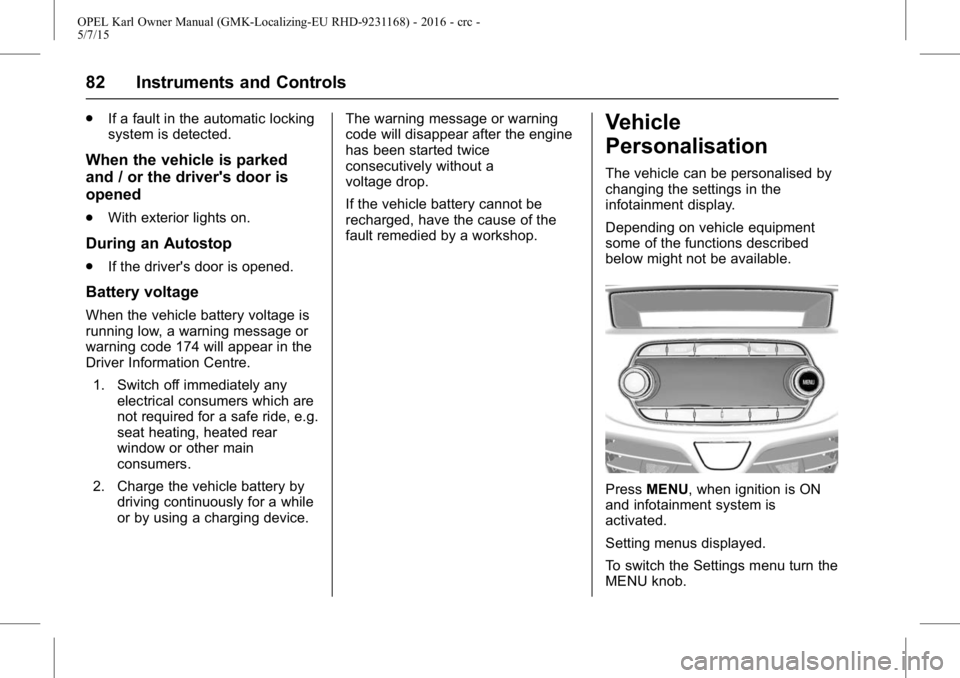
Press
MENU, when ignition is ON
and infotainment system is
activated.
Setting menus displayed.
To switch the Settings menu turn the
MENU knob.
Page 87 of 217
OPEL Karl Owner Manual (GMK-Localizing-EU RHD-9231168) - 2016 - crc -
5/7/15
86 Lighting
Tail lights
Tail lights are illuminated together
with dipped beam and sidelights.
Headlamp Main/
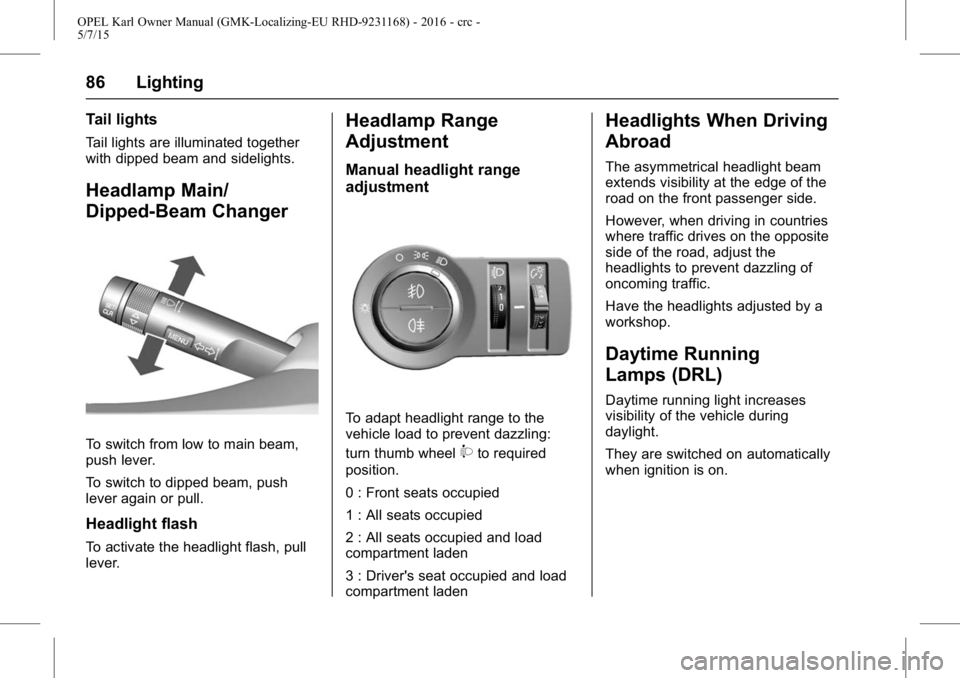
Dipped-Beam Changer
To switch from low to main beam,
push lever.
To switch to dipped beam, push
lever again or pull.
Headlight flash
To activate the headlight flash, pull
lever.
Headlamp Range
Adjustment
Manual headlight range
adjustment
To adapt headlight range to the
vehicle load to prevent dazzling:
turn thumb wheel
9to required
position.
0 : Front seats occupied
1 : All seats occupied
2 : All seats occupied and load
compartment laden
3 : Driver's seat occupied and load
compartment laden
Headlights When Driving
Abroad
The asymmetrical headlight beam
extends visibility at the edge of the
road on the front passenger side.
However, when driving in countries
where traffic drives on the opposite
side of the road, adjust the
headlights to prevent dazzling of
oncoming traffic.
Have the headlights adjusted by a
workshop.
Daytime Running
Lamps (DRL)
Daytime running light increases
visibility of the vehicle during
daylight.
They are switched on automatically
when ignition is on.
Page 89 of 217
OPEL Karl Owner Manual (GMK-Localizing-EU RHD-9231168) - 2016 - crc -
5/7/15
88 Lighting
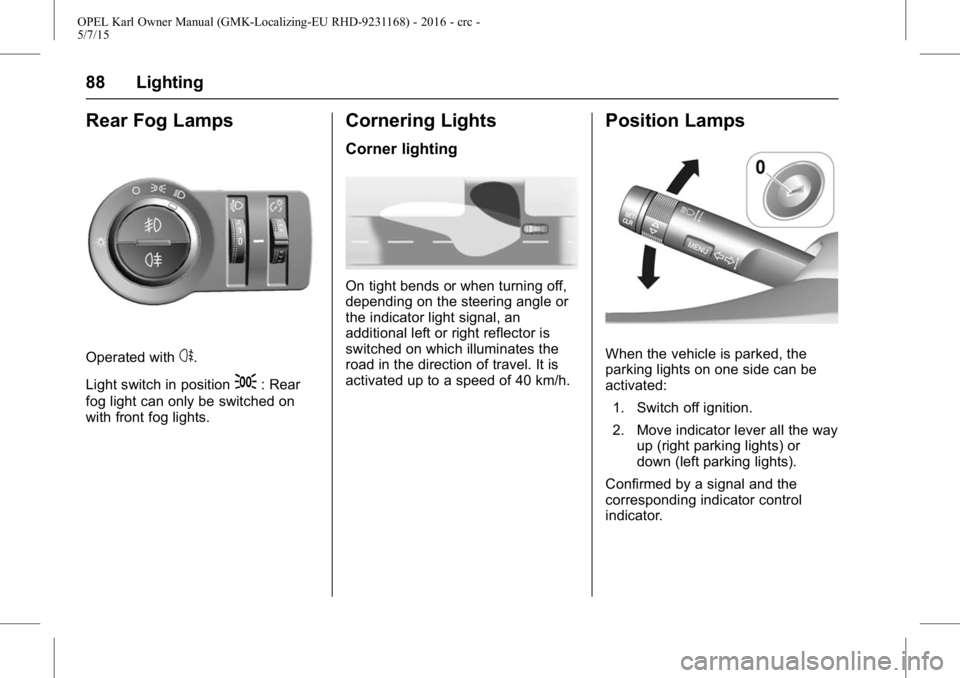
Rear Fog Lamps
Operated withs.
Light switch in position
;: Rear
fog light can only be switched on
with front fog lights.
Cornering Lights
Corner lighting
On tight bends or when turning off,
depending on the steering angle or
the indicator light signal, an
additional left or right reflector is
switched on which illuminates the
road in the direction of travel. It is
activated up to a speed of 40 km/h.
Position Lamps
When the vehicle is parked, the
parking lights on one side can be
activated:
1. Switch off ignition.
2. Move indicator lever all the way up (right parking lights) or
down (left parking lights).
Confirmed by a signal and the
corresponding indicator control
indicator.
Page 90 of 217
OPEL Karl Owner Manual (GMK-Localizing-EU RHD-9231168) - 2016 - crc -
5/7/15
Lighting 89
Reversing Lamps
The reversing light comes on when
the ignition is on and reverse gear is
selected.
Misted Lamp Covers
The inside of the light housing may
mist up briefly in poor, wet and cold
weather conditions, in heavy rain or
after washing. The mist disappears
quickly by itself; to help switch on
the exterior lights.
Interior Lighting
Instrument Panel
Illumination Control
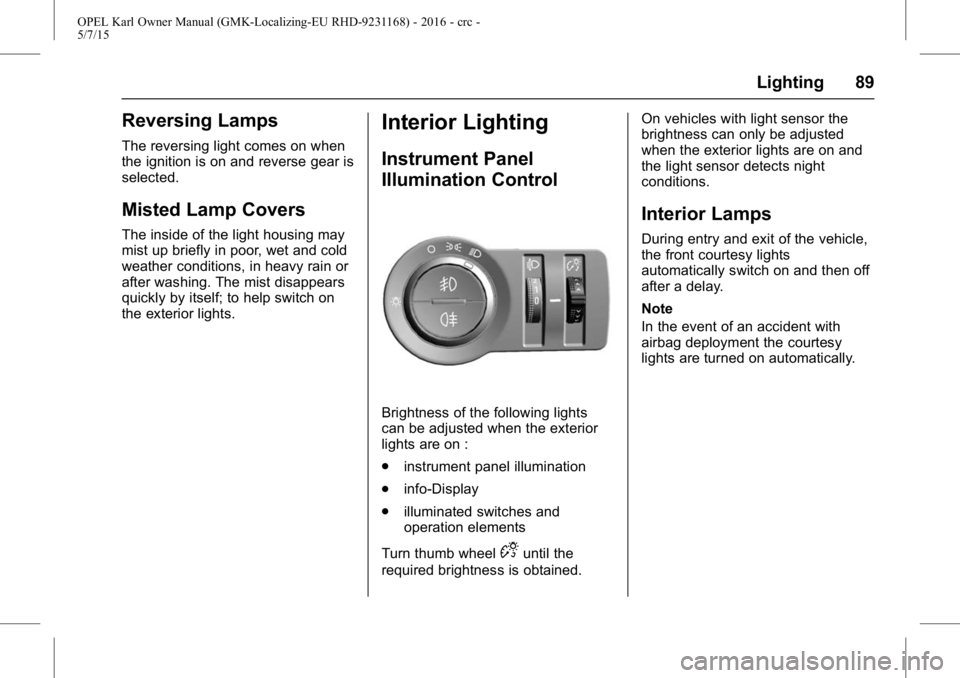
Brightness of the following lights
can be adjusted when the exterior
lights are on :
.instrument panel illumination
. info-Display
. illuminated switches and
operation elements
Turn thumb wheel
Duntil the
required brightness is obtained. On vehicles with light sensor the
brightness can only be adjusted
when the exterior lights are on and
the light sensor detects night
conditions.
Interior Lamps
During entry and exit of the vehicle,
the front courtesy lights
automatically switch on and then off
after a delay.
Note
In the event of an accident with
airbag deployment the courtesy
lights are turned on automatically.
Page 91 of 217
OPEL Karl Owner Manual (GMK-Localizing-EU RHD-9231168) - 2016 - crc -
5/7/15
90 Lighting
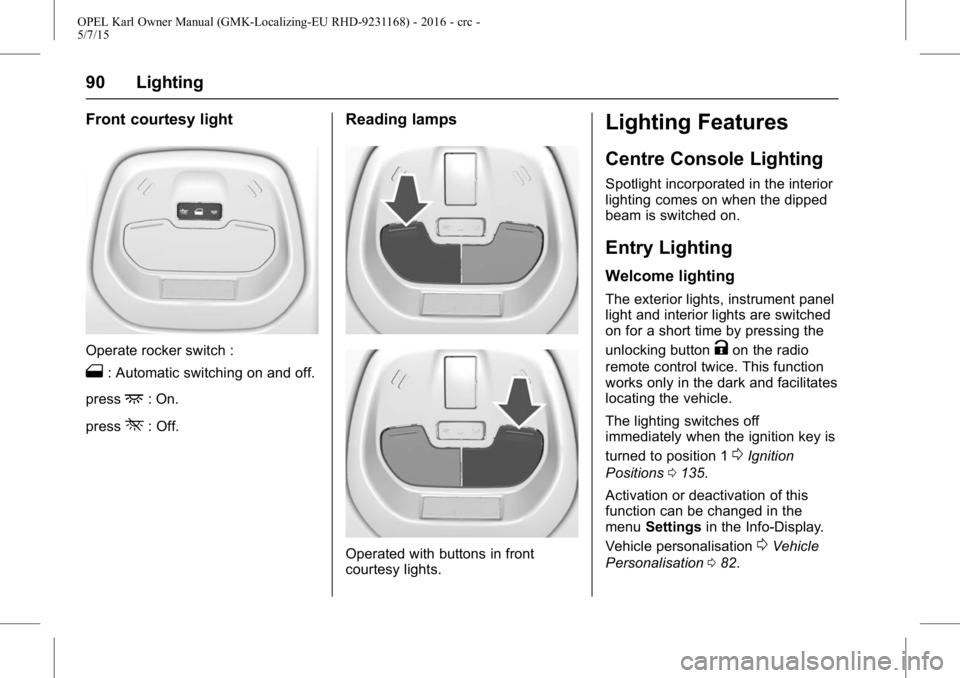
Front courtesy light
Operate rocker switch :
1: Automatic switching on and off.
press
+: On.
press
*: Off.
Reading lamps
Operated with buttons in front
courtesy lights.
Lighting Features
Centre Console Lighting
Spotlight incorporated in the interior
lighting comes on when the dipped
beam is switched on.
Entry Lighting
Welcome lighting
The exterior lights, instrument panel
light and interior lights are switched
on for a short time by pressing the
unlocking button
Kon the radio
remote control twice. This function
works only in the dark and facilitates
locating the vehicle.
The lighting switches off
immediately when the ignition key is
turned to position 1
0Ignition
Positions 0135.
Activation or deactivation of this
function can be changed in the
menu Settings in the Info-Display.
Vehicle personalisation
0Vehicle
Personalisation 082.
Page 92 of 217
OPEL Karl Owner Manual (GMK-Localizing-EU RHD-9231168) - 2016 - crc -
5/7/15
Lighting 91
The settings can be saved for the
key being used
0Memorised
Settings 022.
The following lights will additionally
switch on when the driver's door is
opened :
. all switches
. driver Information Centre
Exit Lighting
The following lights illuminate if the
key is removed from the ignition
switch :
.
Interior lights
. Instrument panel light (only
when it is dark)
They will switch off automatically
after a delay. Both lights will be
activated again if the driver's door is
opened.
The exterior lights illuminate the
surrounding area for an adjustable
time after leaving the vehicle.
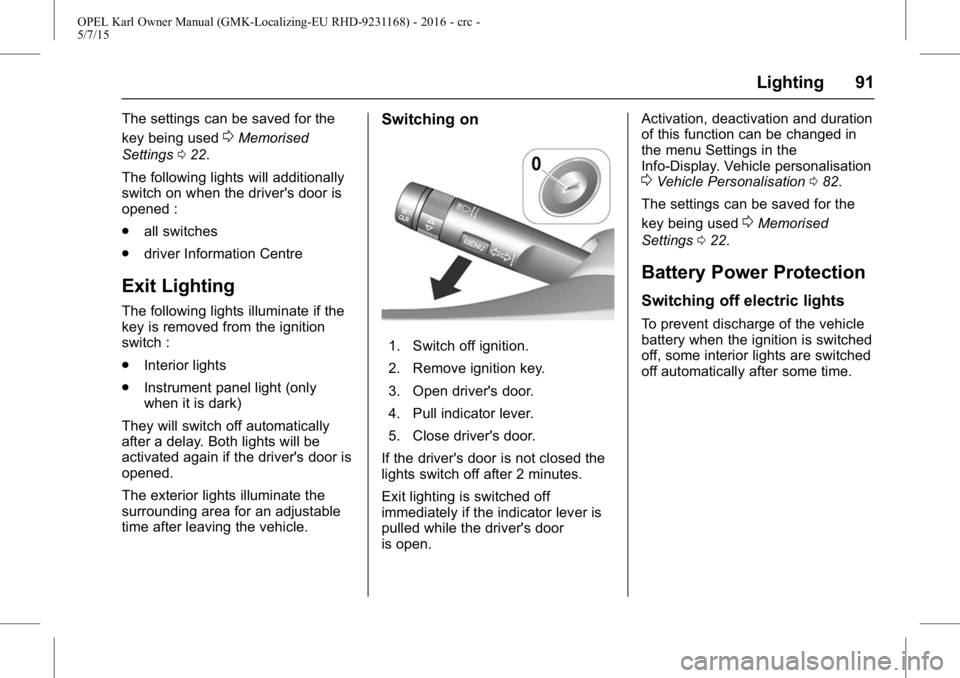
Switching on
1. Switch off ignition.
2. Remove ignition key.
3. Open driver's door.
4. Pull indicator lever.
5. Close driver's door.
If the driver's door is not closed the
lights switch off after 2 minutes.
Exit lighting is switched off
immediately if the indicator lever is
pulled while the driver's door
is open. Activation, deactivation and duration
of this function can be changed in
the menu Settings in the
Info-Display. Vehicle personalisation
0Vehicle Personalisation
082.
The settings can be saved for the
key being used
0Memorised
Settings 022.
Battery Power Protection
Switching off electric lights
To prevent discharge of the vehicle
battery when the ignition is switched
off, some interior lights are switched
off automatically after some time.
Page 110 of 217

OPEL Karl Owner Manual (GMK-Localizing-EU RHD-9231168) - 2016 - crc -
5/7/15
Infotainment System 109
supported. Please check the
device's operation in the vehicle
before use.
. When devices such as an MP3
player or digital camera are
connected through a mobile
disc, it may not operate normally.
. Do not disconnect the USB
storage device while it is being
played.
This may cause damage to the
product or the performance of
the USB device.
. Disconnect the connected USB
storage device when the vehicle
ignition is turned off. If the
ignition is turned on while the
USB storage device is
connected, the USB storage
device may be damaged or may
not operate normally in some
cases.Caution
USB storage devices can only be
connected to this product for the
purpose of playing music files.
The product's USB terminal
should not be used to charge
USB accessory equipment since
the heat generation using the
USB terminal may cause
performance issues or damage to
the product.
. When the logical drive is
separated from a mass USB
storage device, only the files
from the top-level logical drive
can be played as USB music
files. This is the reason that the
music files to be played should
be stored in the top-level drive of
the device. Music files on
particular USB storage devices
may also not be normally played
if an application is loaded by
partitioning a separate drive
inside the USB device. .
Music files to which DRM (Digital
Right Management) is applied
cannot be played.
This product can support USB
storage devices that are up to 16
Gigabytes in capacity with a limit
of 6,000 files, 100 folders, and 8
stages of folder structure.
Normal usage cannot be
guaranteed for storage devices
that exceed this limit.
If the device loading time takes
longer than usual, use after
formatting the USB into FAT16/
32 format.
Caution for using USB music files
. Damaged music files may be
cut-off during playback or may
not be played at all.
About MP3 (WMA) music files
. The MP3 files that can be played
are the following:
‐Bit rate: 8 kbps ~ 320 kbps
‐ Sampling frequency:
48 kHz, 44.1 kHz, 32 kHz (for
MPEG-1)
Page 114 of 217
OPEL Karl Owner Manual (GMK-Localizing-EU RHD-9231168) - 2016 - crc -
5/7/15
Infotainment System 113
iPod player
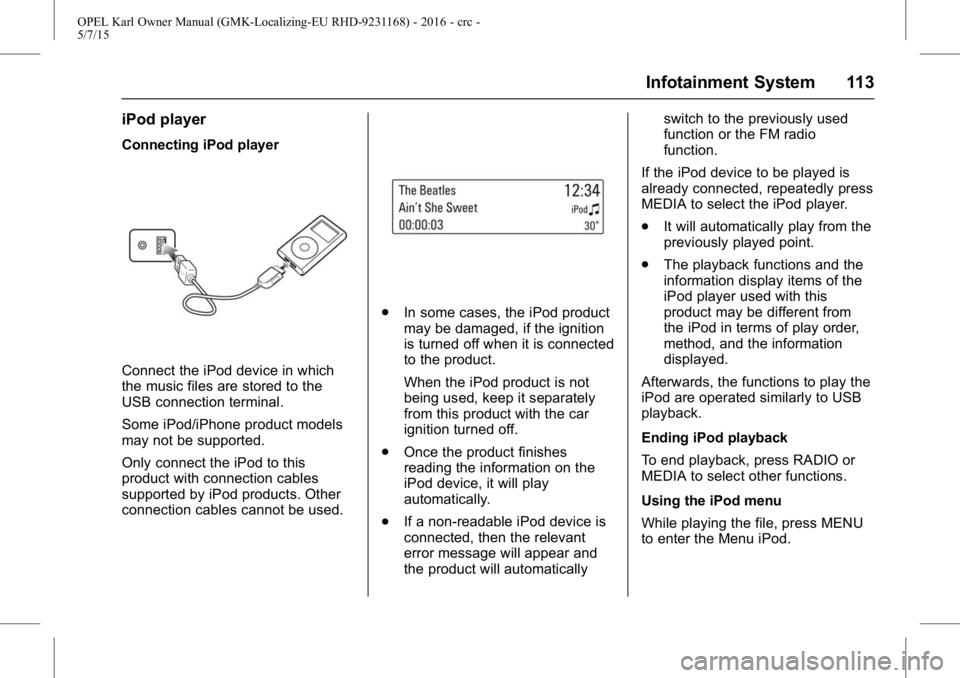
Connecting iPod player
Connect the iPod device in which
the music files are stored to the
USB connection terminal.
Some iPod/iPhone product models
may not be supported.
Only connect the iPod to this
product with connection cables
supported by iPod products. Other
connection cables cannot be used.
.In some cases, the iPod product
may be damaged, if the ignition
is turned off when it is connected
to the product.
When the iPod product is not
being used, keep it separately
from this product with the car
ignition turned off.
. Once the product finishes
reading the information on the
iPod device, it will play
automatically.
. If a non-readable iPod device is
connected, then the relevant
error message will appear and
the product will automatically switch to the previously used
function or the FM radio
function.
If the iPod device to be played is
already connected, repeatedly press
MEDIA to select the iPod player.
. It will automatically play from the
previously played point.
. The playback functions and the
information display items of the
iPod player used with this
product may be different from
the iPod in terms of play order,
method, and the information
displayed.
Afterwards, the functions to play the
iPod are operated similarly to USB
playback.
Ending iPod playback
To end playback, press RADIO or
MEDIA to select other functions.
Using the iPod menu
While playing the file, press MENU
to enter the Menu iPod.
Page 118 of 217

OPEL Karl Owner Manual (GMK-Localizing-EU RHD-9231168) - 2016 - crc -
5/7/15
Infotainment System 117
calls with Bluetooth®mobile
phones through the multimedia
system.
Before connecting the
Bluetooth unit
. Before connecting the head unit
with the mobile phone, check to
see that the mobile phone
supports Bluetooth features.
. Even if the phone supports
Bluetooth Wireless Technology,
the phone will not be found in a
search" if the phone has been
set to hidden mode or if the
Bluetooth power is turned off.
. Disable the hidden mode or turn
on the Bluetooth power prior to
searching or connecting with the
head unit.
. If Auto Connection is used, the
Bluetooth phone automatically
connects to the system when the
ignition is turned on.
. If you do not want automatic
connection with your Bluetooth
device, turn the Bluetooth
feature off on the Bluetooth
device. .
Park the vehicle when
connecting the unit with the
mobile phone.
. Bluetooth connection may be
intermittently disconnected
depending on the phone. Follow
these steps to try again.
‐Turn the Bluetooth
®function
within the mobile phone OFF/
ON and try again.
‐ Turn the mobile phone power
OFF/ON and try again.
‐ Completely remove the mobile
phone battery, reboot, and try
again.
‐ Reboot this unit and try again.
‐ Delete all paired devices, pair
and try again.
. The hands-free call volume and
quality may differ depending on
the mobile phone.
. Pairing Bluetooth devices and
the use of Bluetooth features are
not supported when the vehicle
is in motion. Please park your
vehicle first. .
The process of downloading
contacts may differ depending
on the mobile phone.
In case of events not described
within this manual, see the
mobile phone manufacturer's
user guide.
. As a Bluetooth wireless
connection can have a range of
up to 10 meters, your Bluetooth
device may automatically
connect to the system even if
the device is not inside the
vehicle. Please consider this,
especially when pairing or
connecting Bluetooth devices to
the Infotainment system when
other Bluetooth devices may be
within range.
. This unit uses the latest Digital
Noise & Echo suppression
system to provide the best
sound clarity with little or no
distortion, but under some
conditions there may still be
some echo and noise
experienced within the vehicle.
Page 124 of 217
OPEL Karl Owner Manual (GMK-Localizing-EU RHD-9231168) - 2016 - crc -
5/7/15
Infotainment System 123
handheld device or by pressingcon the steering wheel audio
remote control.
. After 5 seconds, the display
returns to the previous screen.
Re-dialling a call
If the phone call was dropped, you
can re-dial the number before the
time out by pressing - directly below
the display labelled Redial.
Calling a number in the call log
Press PHONE to enter the Phone
List menu > turn the TUNE dial to
select the Recent Calls > press
ENTER > turn the TUNE dial to
select Missed Calls, Received Calls
or Sent Calls, then press ENTER.
The recent calls list displays an
intermediate menu containing
missed calls, received calls, and
sent calls.
Turn the TUNE dial to select a
name or phone number, and press
ENTER to make a call. Calling a number in the
phone book
Press PHONE to enter the Phone
List menu > turn the TUNE dial to
select Contacts > press ENTER >
turn the TUNE dial to select a name
or phone number, and press ENTER
to make a call.
The last outgoing phone source is
retained at the next ignition cycle,
if that phone device is connected,
and it is the outgoing phone source.
Downloading the phone book
If the Bluetooth device supports a
phone book synchronization
function, the phonebook is
downloaded automatically after the
connection has been established.
.
The call history lists can be
downloaded from the connected
Bluetooth device.
. Sorting call histories by time is
not supported.
. It is possible to download the
call history even when
proceeding another action. .
It is not possible to start the
download process when the call
history download feature is
turned off within the Bluetooth
device.
. After Pairing is completed, a
contacts download request is
sent to your mobile phone.
Some phones require additional
confirmation. Please check your
phone and accept the download
request if necessary.
. If a paired phone is deleted, its
call history lists will also be
deleted from the system.
. The system only uses
information coded in UTF-8
format.
Dial a number by keypad
Press PHONE to enter the Phone
List menu > turn the TUNE dial to
select the Keypad and press
ENTER to enter the Keypad screen.
. When users select Keypad from
the Phone Home Screen, a
phone dialler keypad is
displayed.