tow OPEL MOVANO_B 2020 Manual user
[x] Cancel search | Manufacturer: OPEL, Model Year: 2020, Model line: MOVANO_B, Model: OPEL MOVANO_B 2020Pages: 353, PDF Size: 9.4 MB
Page 184 of 353

182Infotainment systemNote
When entering an address, certain
letters and numbers are unavailable
for selection (greyed-out) based on
the addresses recognised by the
navigation system.
Proceed in the same way to enter a Postcode or enter details for Town/
City , Street and Number .
Note
If a Postcode consists of several
parts, insert a space after the first
part of the postcode.
The address is automatically stored in the memory, available for future
selection.
For keyboard operation, refer to
(NAVI 80 IntelliLink) "Operating keyboards in the display" in the
"Usage" section 3 166.Recent destinations
Select from a list of previous
destinations that have been
automatically stored.Local search/TomTom places
Select a nearby Point of Interest (POI)
by entering key words using the
keyboard.Note
This feature is only available by
subscribing to LIVE services.
For further information, refer to
(NAVI 80 IntelliLink) "LIVE services"
in the "Usage" section 3 166.Point of Interest
POIs can be selected as a destination
using the following search options:
● POI categories: Select a POI category type (e.g.petrol station, restaurant,
parking), then select a search area (e.g. POI nearby , POI in
town , POI at home .
Enter a town/city name and touch Done to confirm selection.
● POI names: Enter name of a POI and select
to begin a search.Point on Map
Select a destination by using the
digital map.
To scroll within the map, drag the
cursor in the required direction, then
confirm the position as a destination.Latitude Longitude
Enter the co-ordinates of the
destination.
Confirm the destination
When a destination has been
selected, the route appears on the
map and a route summary is provided in the y tab.
Select the LIVE tab to view real-time traffic information. For further
information, refer to
(NAVI 80 IntelliLink) "LIVE services"
in the "Usage" section 3 166.
Touch Done to confirm the route.
Add and save a favouriteAdd to saved locations
From the Home page, touch MENU
then Navigation followed by Drive
to... .
Select Recent destinations and
choose a destination from the
displayed list.
Touch < (to open a pop-up menu)
then Add to saved locations , give a
name to the destination using the
keyboard, then touch Next.
Page 194 of 353

192Infotainment system● available functions anddescriptions
● conditions of use
NAVI 80 IntelliLink
The voice recognition function allows
to operate certain functions via voice
input, including:
● Navigation
Refer to "Navigation control" in
this section 3 192.
● Phone
Refer to "Phone control" in this section 3 193.
Press 5 on the column controls to
open the Voice control main menu.
After the tone, say the name of the
menu you wish to access.
When activated, the Voice control
main menu is displayed and the voice
recognition indicator in the top right
corner indicates system status and
optimisation levels:Green:optimal voice recognitionOrange:good voice recognitionRed:average voice recognitionMicrophone é:System is ready to
receive a voice
commandLoudspeaker
l:Voice instructions
are currently being
given by the systemLoading icon:Data currently
loading
Navigation control
NAVI 50 IntelliLink
Activating voice recognition
To activate the voice recognition
function during navigation:
Press 5 on the column controls; 5
appears, alongside the audio system
information, in the bottom right corner of the display.
Note
During use of the voice recognition
function, audio source playback is
interrupted.
For a guide to using voice commands,
refer to (NAVI 50 IntelliLink) "Help" in the "General information" section
3 191.
NAVI 80 IntelliLink
Activating voice recognition
To activate the voice recognition
function:
Press 5 on the column controls to
open the Voice control main menu.
After the tone, say " Destination" to
enter a new address. Say " Address"
then say the full destination of a new
address (number, street name,
destination town/city).
The address recognised by the
system is displayed. Confirm
destination when prompted to begin
guidance.
Alternatively, after the tone say
" Recent destinations " to access a list
of the most recent destinations
entered and select the desired
destination.
Page 211 of 353
Climate control209J:to windscreen, front door
windows and foot wellV:to windscreen and front door
windows
Intermediate settings are possible.
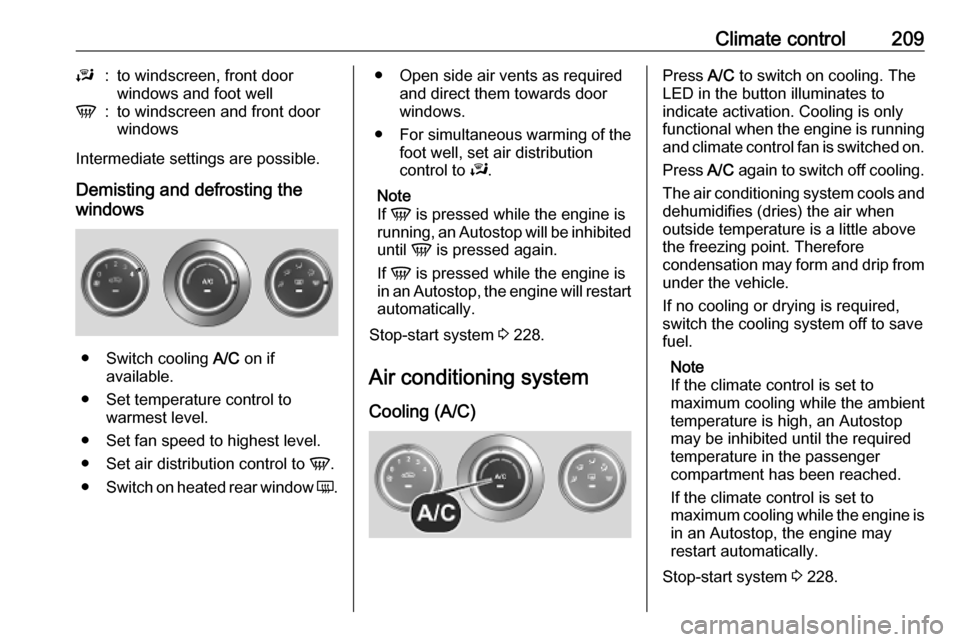
Demisting and defrosting the
windows
● Switch cooling A/C on if
available.
● Set temperature control to warmest level.
● Set fan speed to highest level.
● Set air distribution control to V.
● Switch on heated rear window Ü.
● Open side air vents as required
and direct them towards door
windows.
● For simultaneous warming of the
foot well, set air distribution
control to J.
Note
If V is pressed while the engine is
running, an Autostop will be inhibited
until V is pressed again.
If V is pressed while the engine is
in an Autostop, the engine will restart automatically.
Stop-start system 3 228.
Air conditioning system
Cooling (A/C)Press A/C to switch on cooling. The
LED in the button illuminates to
indicate activation. Cooling is only
functional when the engine is running and climate control fan is switched on.
Press A/C again to switch off cooling.
The air conditioning system cools and
dehumidifies (dries) the air when
outside temperature is a little above
the freezing point. Therefore
condensation may form and drip from under the vehicle.
If no cooling or drying is required,
switch the cooling system off to save
fuel.
Note
If the climate control is set to
maximum cooling while the ambient temperature is high, an Autostop
may be inhibited until the required
temperature in the passenger
compartment has been reached.
If the climate control is set to
maximum cooling while the engine is in an Autostop, the engine may
restart automatically.
Stop-start system 3 228.
Page 223 of 353

Climate control221To switch off, press OFF.
Programming y
The system calculates the operating
time of the heater depending on the
temperature inside the vehicle.
● Press k twice.
● Press Y and OFF
simultaneously, y flashes.
● Adjust using k or l to select the
departure time.
● Press Y and OFF simultaneously
to confirm.
To switch on, press Y for one second ,
HTM is displayed.
Heating stops automatically after the
programmed departure time, or can
be manually switched off.
● Press k twice.
● Press OFF for 1 second, HTM
goes out.
Set time
If the vehicle battery is disconnected
or its voltage is too low, the time will
need to be reset.● Press l once.
● Press Y and OFF
simultaneously, Ö flashes.
● Adjust using k or l to set the
time.
● Press Y and OFF simultaneously
to confirm.
Heating level
The preferred heating level for
programmed departure times can be set to between C1 and C5.
● Press k three times.
● Press Y and OFF
simultaneously, Y flashes.
● Adjust using k or l to set the
heating level.
● Press Y and OFF simultaneously
to confirm.
To display the passenger
compartment temperature, press l
twice.Air vents
Adjustable air vents At least one air vent must be open
while cooling is on in order to prevent
the evaporator from icing up due to lack of air movement.
Centre air vents
Direct the flow of air by tilting and
swivelling the slats.
To close the vent, swivel the slat
towards the outside of the vehicle.
Page 224 of 353
222Climate controlSide air vents
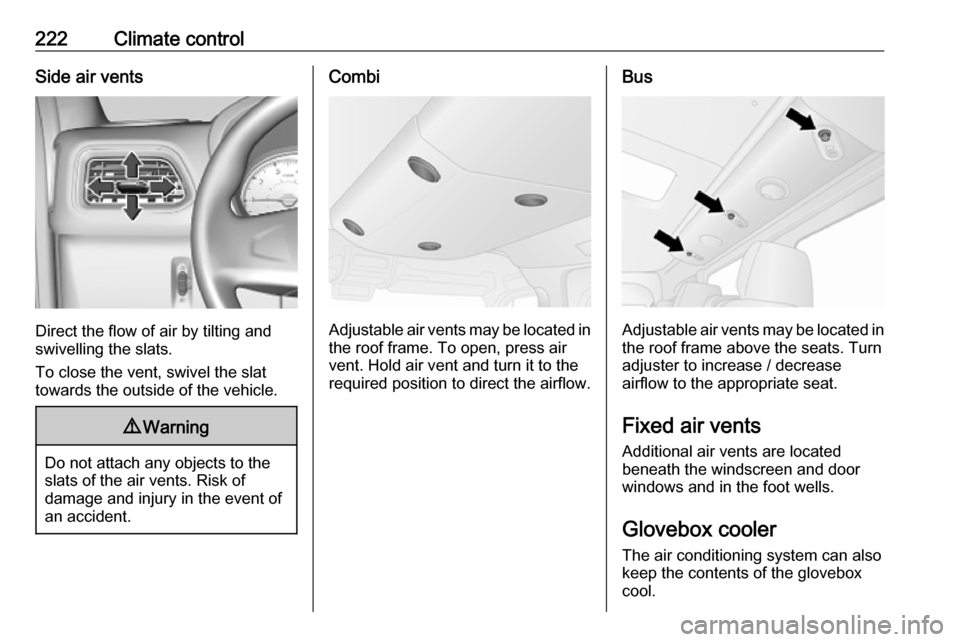
Direct the flow of air by tilting and
swivelling the slats.
To close the vent, swivel the slat
towards the outside of the vehicle.
9 Warning
Do not attach any objects to the
slats of the air vents. Risk of
damage and injury in the event of
an accident.
Combi
Adjustable air vents may be located in the roof frame. To open, press air
vent. Hold air vent and turn it to the
required position to direct the airflow.
Bus
Adjustable air vents may be located in the roof frame above the seats. Turn
adjuster to increase / decrease
airflow to the appropriate seat.
Fixed air vents
Additional air vents are located
beneath the windscreen and door
windows and in the foot wells.
Glovebox cooler The air conditioning system can alsokeep the contents of the glovebox
cool.
Page 226 of 353

224Driving and operatingDriving and
operatingDriving hints ............................... 225
Driving economically ...............225
Control of the vehicle ...............225
Steering ................................... 225
Starting and operating ...............226
New vehicle running-in ............226
Ignition switch positions ...........226
Starting the engine ..................227
Idle speed control ....................228
Overrun cut-off ........................ 228
Stop-start system ....................228
Parking .................................... 231
Air suspension ......................... 231
Engine exhaust .......................... 233
Diesel particle filter ..................233
Catalytic converter ...................234
AdBlue ..................................... 234
Manual transmission ..................241
Manual transmission automa‐ ted .............................................. 241
Transmission display ...............241
Starting the engine ..................242
Selector lever .......................... 242Manual mode........................... 243
Electronic driving programmes 243
Fault ........................................ 244
Interruption of power supply ....244
Brakes ........................................ 244
Antilock brake system .............244
Parking brake .......................... 245
Brake assist ............................. 246
Hill start assist ......................... 246
Ride control systems .................247
Traction Control system ..........247
Electronic Stability Control ......248
Limited-slip rear axle ...............249
Driver assistance systems .........249
Cruise control .......................... 249
Speed limiter ........................... 251
Active emergency braking .......253
Parking assist .......................... 255
Side blind spot alert .................257
Rear view camera ...................259
Lane departure warning ..........261
Fuel ............................................ 262
Fuel for diesel engines ............262
Refuelling ................................ 263
Trailer hitch ................................ 265
General information .................265
Driving characteristics and towing tips .............................. 265
Trailer towing ........................... 265Towing equipment ...................266
Trailer stability assist ...............266
Auxiliary features .......................266
Power take-off ......................... 266
Page 233 of 353
Driving and operating231Restart of the engine by the stop-start system
If one of the conditions for an
Autostop is not fulfilled anymore or
the vehicle starts to move, the engine
may be restarted automatically by the
stop-start system.
An automatic engine restart may not
be possible if a door or the bonnet is
open.
If an electrical accessory, e.g. a
portable CD player, is connected to
the power outlet, a brief power drop
during restart might be noticeable.
If the Infotainment system is active,
audio sound may briefly be reduced
or interrupted during the restart.
Fault
If the LED illuminates in deactivation
button ) without first being pressed
to deactivate the system, there is a
fault in the stop-start system and it is
deactivated. A corresponding
message also appears in the Driver
Information Centre 3 105.
Seek the assistance of a workshop.Parking9 Warning
● Do not park the vehicle on an
easily ignitable surface. The
high temperature of the
exhaust system could ignite the
surface.
● Always apply parking brake without pressing release
button. Apply as firmly as
possible on a downhill slope or
uphill slope. Depress brake
pedal at the same time to
reduce operating force.
● Switch off the engine.
● If the vehicle is on a level surface or uphill slope, engage
first gear. On an uphill slope,
turn the front wheels away from
the kerb.
If the vehicle is on a downhill
slope, engage reverse gear.
Turn the front wheels towards the kerb.
● Close the windows.
● Turn the ignition key to position
0 and remove it. Turn the
steering wheel until the
steering wheel lock is felt to
engage.
Lock the vehicle 3 24 and activate the
anti-theft locking system 3 35 and
anti-theft alarm system 3 36.
Air suspension
Operates automatically when the
vehicle is driven. The air suspension
system constantly adjusts the ride
height according to the vehicle load.
Caution
To ensure safe operation of the air
suspension system, do not exceed the maximum permissible gross
vehicle weight rating. Refer to
identification plate 3 316 or the
vehicle documents.
Page 234 of 353
232Driving and operatingFor further information on the air
suspension system, refer to the
operating instructions supplied.
Master switchCaution
The air suspension system must
be switched off when the vehicle is being towed, jump‐started, raised
off the ground or transported.
Do not switch off the air
suspension system when driving.
Jump starting 3 304.
Towing the vehicle 3 306.
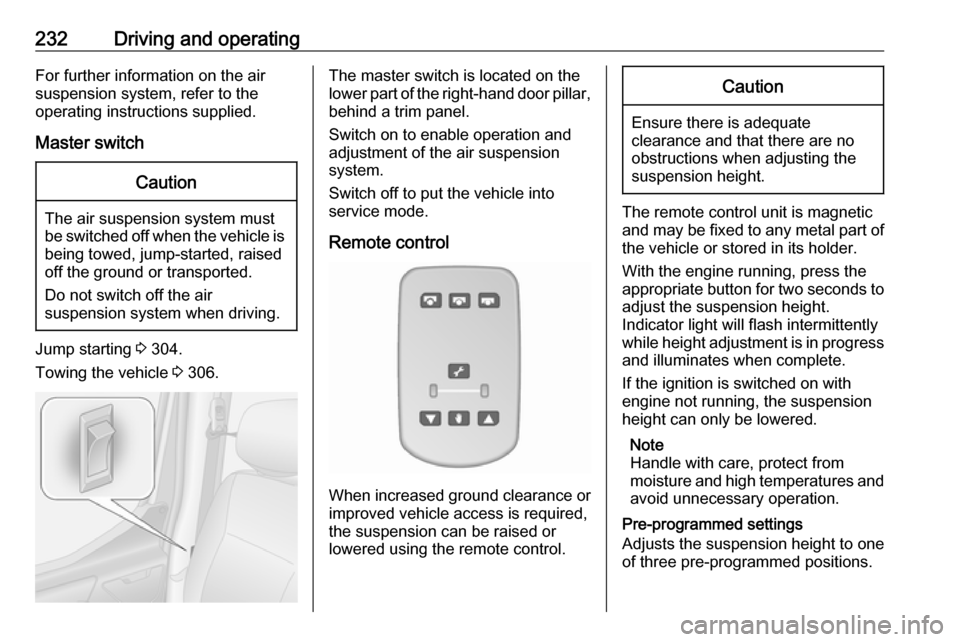
The master switch is located on the
lower part of the right-hand door pillar,
behind a trim panel.
Switch on to enable operation and
adjustment of the air suspension
system.
Switch off to put the vehicle into
service mode.
Remote control
When increased ground clearance or improved vehicle access is required,
the suspension can be raised or
lowered using the remote control.
Caution
Ensure there is adequate
clearance and that there are no
obstructions when adjusting the
suspension height.
The remote control unit is magnetic
and may be fixed to any metal part of the vehicle or stored in its holder.
With the engine running, press the appropriate button for two seconds to
adjust the suspension height.
Indicator light will flash intermittently
while height adjustment is in progress
and illuminates when complete.
If the ignition is switched on with
engine not running, the suspension
height can only be lowered.
Note
Handle with care, protect from
moisture and high temperatures and
avoid unnecessary operation.
Pre-programmed settings
Adjusts the suspension height to one
of three pre-programmed positions.
Page 236 of 353
234Driving and operatingconditions. Autostop is not available
and fuel consumption may be higher
during this period. The emission of
smells and smoke during this process is normal.
Under certain driving conditions, e.g.
short distances, the system cannot
clean itself automatically.
If cleaning of the filter is required and
if previous driving conditions did not
enable automatic cleaning, it will be
indicated by illumination of control
indicator j 3 99. Seek the
assistance of a workshop
immediately.Caution
If the cleaning process is
interrupted, there is a risk of
provoking severe engine damage.
Cleaning takes place quickest at high engine speeds and loads.
Catalytic converter
The catalytic converter reduces the
amount of harmful substances in the
exhaust gases.
Caution
Fuel grades other than those listed on page 3 262 could damage the
catalytic converter or electronic
components.
Unburnt fuel will overheat and
damage the catalytic converter.
Therefore avoid excessive use of
the starter, running the fuel tank
dry and starting the engine by
pushing or towing.
In the event of misfiring, uneven
engine running, a reduction in engine performance or other unusual
problems, have the cause of the fault
rectified by a workshop as soon as
possible. In an emergency, driving
can be continued for a short period,
keeping vehicle speed and engine
speed low.
If control indicator Z flashes, the
permitted emission limits may be
exceeded. Lift your foot off the
accelerator until Z stops flashing and
is steadily illuminated. Contact a
workshop immediately.
Malfunction indicator light 3 99.
AdBlue
General information The selective catalytic reduction is a
method to substantially reduce the
nitrogen oxides in the exhaust
emission. This is achieved by
injecting a Diesel Exhaust Fluid
(DEF) into the exhaust system.
The designation of this fluid is
AdBlue ®
. It is a non-toxic, non-
flammable, colourless and odourless
fluid which consists of 32% urea and
68% water.9 Warning
Avoid contact of your eyes or skin
with AdBlue.
In case of eye or skin contact,
rinse off with water.
Page 244 of 353
242Driving and operatingStarting the engine
Depress the brake pedal when
starting the engine. If the brake pedal
is not depressed, T illuminates in the
transmission display and the engine
cannot be started.
When the brake pedal is depressed,
the transmission automatically shifts
to N (neutral). "N" appears in the
transmission display and the engine
can be started. There may be a slight delay.
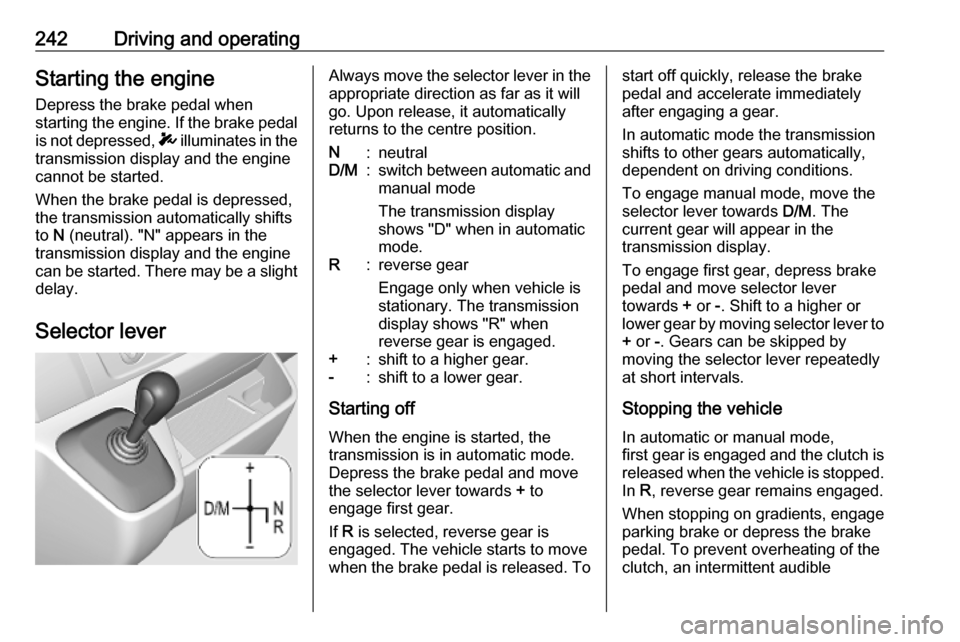
Selector leverAlways move the selector lever in the
appropriate direction as far as it will
go. Upon release, it automatically
returns to the centre position.N:neutralD/M:switch between automatic and manual mode
The transmission display
shows "D" when in automatic
mode.R:reverse gear
Engage only when vehicle is
stationary. The transmission
display shows "R" when
reverse gear is engaged.+:shift to a higher gear.-:shift to a lower gear.
Starting off
When the engine is started, the
transmission is in automatic mode.
Depress the brake pedal and move
the selector lever towards + to
engage first gear.
If R is selected, reverse gear is
engaged. The vehicle starts to move
when the brake pedal is released. To
start off quickly, release the brake
pedal and accelerate immediately
after engaging a gear.
In automatic mode the transmission
shifts to other gears automatically,
dependent on driving conditions.
To engage manual mode, move the
selector lever towards D/M. The
current gear will appear in the
transmission display.
To engage first gear, depress brake
pedal and move selector lever
towards + or -. Shift to a higher or
lower gear by moving selector lever to + or -. Gears can be skipped by
moving the selector lever repeatedly
at short intervals.
Stopping the vehicle In automatic or manual mode,
first gear is engaged and the clutch is
released when the vehicle is stopped.
In R, reverse gear remains engaged.
When stopping on gradients, engage parking brake or depress the brake
pedal. To prevent overheating of the
clutch, an intermittent audible