door lock OPEL VIVARO B 2018 Manual user
[x] Cancel search | Manufacturer: OPEL, Model Year: 2018, Model line: VIVARO B, Model: OPEL VIVARO B 2018Pages: 237, PDF Size: 5.57 MB
Page 42 of 237
40Keys, doors and windowsTo silence the alarm siren (if
triggered) and therefore deactivate
the anti-theft alarm system, reconnect vehicle battery and unlock the vehicle
or switch on the ignition.
Immobiliser
The immobiliser is part of the ignition
switch and checks whether the
vehicle is allowed to be started with the key being used.
The immobiliser is activated
automatically after the key has been removed from the ignition switch and
also if the key is left in the ignition
switch when the engine is turned off.
If the engine cannot be started, switch off the ignition and remove key, wait
approx. two seconds and then repeat
the start attempt. If start attempt is
unsuccessful, attempt to start the
engine using the spare key and seek
the assistance of a workshop.Note
Radio Frequency Identification
(RFID) tags may cause interference with the key. Do not have it placednear the key when starting the
vehicle.
Note
The immobiliser does not lock the doors. You should always lock the
vehicle after leaving it and switch on the anti-theft alarm system 3 26,
3 38.Exterior mirrors
Convex shape The convex exterior mirror contains
an aspherical area and reduces blind spots. The shape of the mirror makes
objects appear smaller, which will affect the ability to estimate
distances.
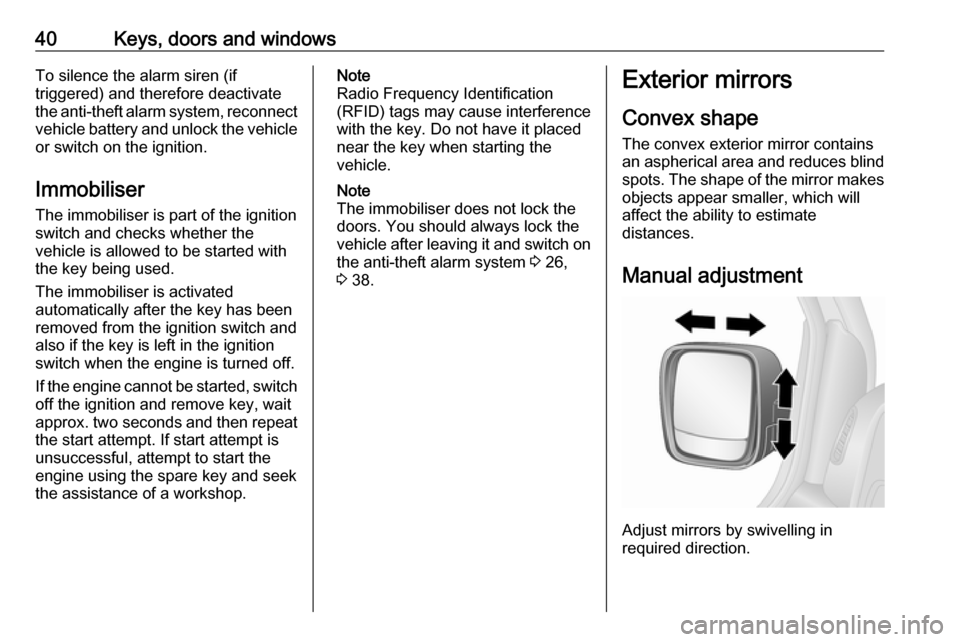
Manual adjustment
Adjust mirrors by swivelling in
required direction.
Page 43 of 237
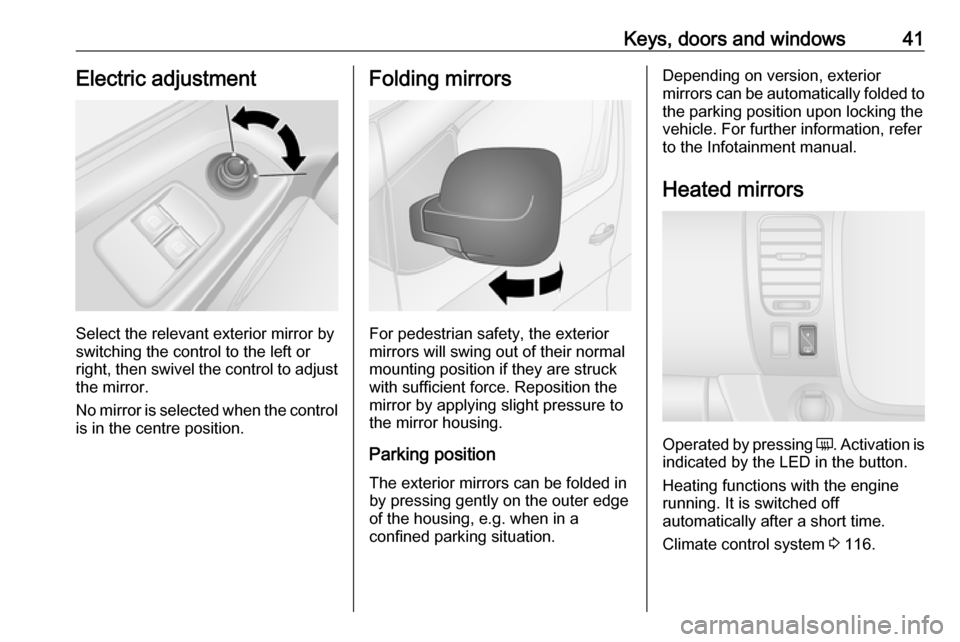
Keys, doors and windows41Electric adjustment
Select the relevant exterior mirror by
switching the control to the left or
right, then swivel the control to adjust
the mirror.
No mirror is selected when the control is in the centre position.
Folding mirrors
For pedestrian safety, the exterior
mirrors will swing out of their normal
mounting position if they are struck
with sufficient force. Reposition the mirror by applying slight pressure tothe mirror housing.
Parking position
The exterior mirrors can be folded in
by pressing gently on the outer edge
of the housing, e.g. when in a
confined parking situation.
Depending on version, exterior
mirrors can be automatically folded to the parking position upon locking the
vehicle. For further information, refer
to the Infotainment manual.
Heated mirrors
Operated by pressing Ü
. Activation is
indicated by the LED in the button.
Heating functions with the engine running. It is switched off
automatically after a short time.
Climate control system 3 116.
Page 46 of 237
44Keys, doors and windowsOperate the switch for the respective
window by pushing to open or pulling to close.
For incremental operation: Push or
pull switch briefly.
For automatic opening or closing:
Push or pull switch for longer.
Window moves up or down
automatically with safety function
enabled. To stop movement, operate
the switch once more in the same
direction.
In the event of closing difficulties due
to frost or the like, operate the switch
several times to close the window in
stages.
Safety function
If the window glass encounters
resistance during automatic closing, it is immediately stopped and opened
again.
Overload
If the windows are repeatedly
operated within short intervals, the
window operation is disabled for
some time.Rear windows
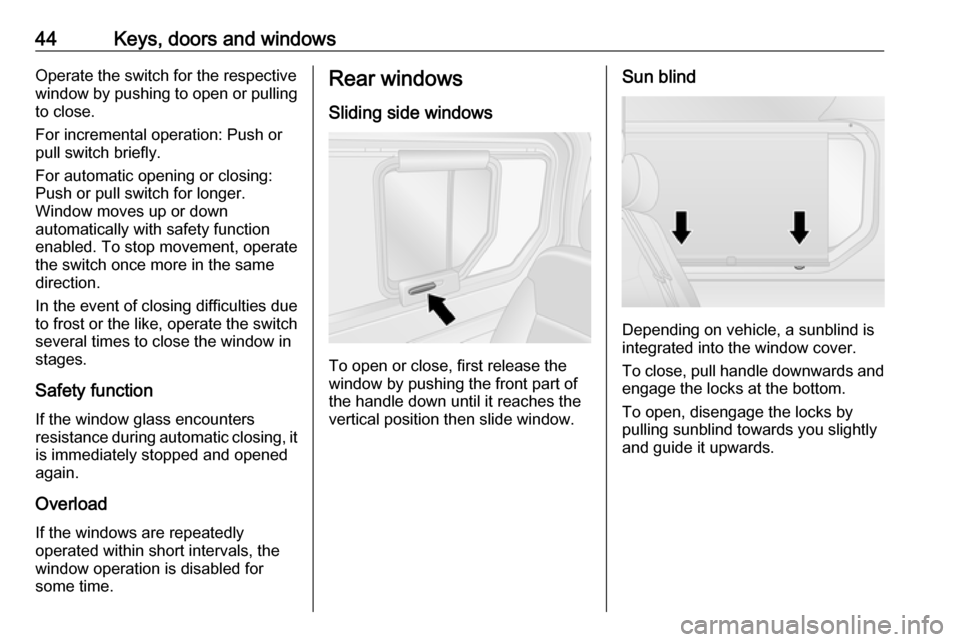
Sliding side windows
To open or close, first release the
window by pushing the front part of
the handle down until it reaches the
vertical position then slide window.
Sun blind
Depending on vehicle, a sunblind is
integrated into the window cover.
To close, pull handle downwards and engage the locks at the bottom.
To open, disengage the locks by
pulling sunblind towards you slightly
and guide it upwards.
Page 56 of 237

54Seats, restraints
Raise the locking catches, then movethe seat unit towards the rear to
release from the rear floor anchor
points.
Raise the seat unit, then move it
towards the rear again to release from
the front floor anchor points. The seat unit can then be lifted out.
The seats must be removed through
the sliding side door only (not through
the rear doors / tailgate). The
2nd row seats must be removed from
the vehicle before the 3rd row seats.
Installing rear seats
When re-installing seats, always
ensure that the row with the folding
access seat B is positioned correctly
in front of the fixed seat row A.
The seats must be introduced
through the sliding side door only (not
through the rear doors / tailgate). The
3rd row seats must be introduced into the vehicle before the 2nd row seats.
Caution
The 2nd and 3rd row seats are not
interchangeable and must be fitted back into their original position.
Note
Make sure that the anchor points are
clean before installing the seat. They should be free from grit or any other
item which may prevent the seat
from locking securely.
Position the seat unit over the front
anchor points, then push the seat unit
until it sits over the rear anchor points.
Lower the locking catches and push
them until they are locked securely in place. Ensure that the visual markers
on the locking catches are correctly
aligned.
Page 77 of 237
Storage75Cupholders
Cupholders are located at both ends
of the instrument panel, centrally in the lower instrument panel, and
depending on version, also in the
door pockets and in the rear seat
area.
Additional cupholders are located on
the back of the folded down centre
rear seat 3 75, 3 51.
The cupholders can also be used to hold the portable ashtray unit.
Remove the portable ashtray unit to
use the cupholders.
Ashtrays 3 90.
Front storage
Coat hooks are located on the cabin
bulkhead and on the grab handles in
the roof lining.
Folding centre seatback The front centre passenger seat
backrest, when folded fully forwards, features a storage compartment,
cupholder and a document tray.
Seat folding 3 50.9 Warning
When the front centre passenger
seat is in the folded position, the front passenger airbag system
must be deactivated.
Airbag deactivation 3 64.
Close the instrument panel cupholder
before folding down the backrest.
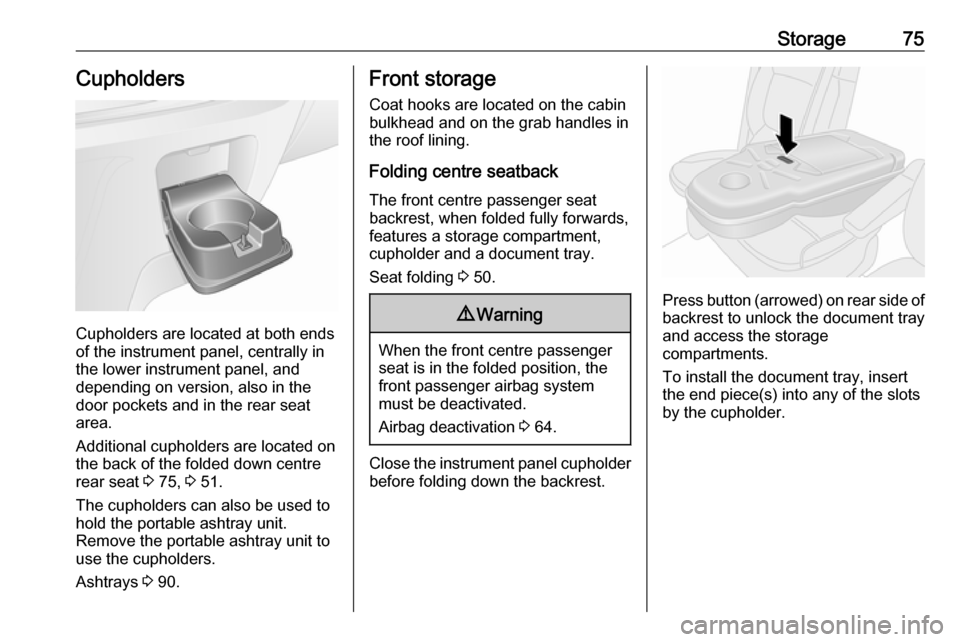
Press button (arrowed) on rear side of
backrest to unlock the document tray
and access the storage
compartments.
To install the document tray, insert
the end piece(s) into any of the slots
by the cupholder.
Page 86 of 237

84Instruments and controlsInstruments and
controlsControls ....................................... 85
Steering wheel adjustment ........85
Steering wheel controls .............85
Horn ........................................... 85
Steering column controls ...........85
Windscreen wiper/washer .........86
Rear window wiper/washer .......87
Outside temperature ..................87
Clock ......................................... 88
Power outlets ............................. 88
Cigarette lighter ......................... 90
Ashtrays .................................... 90
Warning lights, gauges and indi‐ cators ........................................... 91
Instrument cluster ......................91
Speedometer ............................. 91
Odometer .................................. 91
Trip odometer ............................ 91
Tachometer ............................... 92
Fuel gauge ................................ 92
Fuel economy gauge .................93
Service display .......................... 93
Control indicators ......................94
Turn signal ................................. 96Seat belt reminder.....................97
Airbag and belt tensioners .........97
Airbag deactivation ....................97
Charging system .......................98
Malfunction indicator light ..........98
Service vehicle soon .................98
Stop engine ............................... 98
Brake system ............................. 98
Antilock brake system (ABS) .....99
Upshift ....................................... 99
Electronic Stability Program ......99
Electronic Stability Program off ............................................. 99
Engine coolant temperature ......99
Preheating ............................... 100
AdBlue ..................................... 100
Tyre pressure monitoring system .................................... 100
Engine oil pressure ..................100
Fuel economy mode ................101
Low fuel ................................... 101
Stop-start system ....................101
Exterior light ............................ 101
High beam ............................... 101
Fog light ................................... 101
Rear fog light ........................... 101
Cruise control .......................... 102
Tachograph ............................. 102
Door open ................................ 102Information displays...................102
Driver Information Centre ........102
Info display .............................. 102
Vehicle messages ......................103
Warning chimes .......................104
Engine oil level ........................ 104
Trip computer ............................. 105
Tachograph ................................ 107
Page 98 of 237
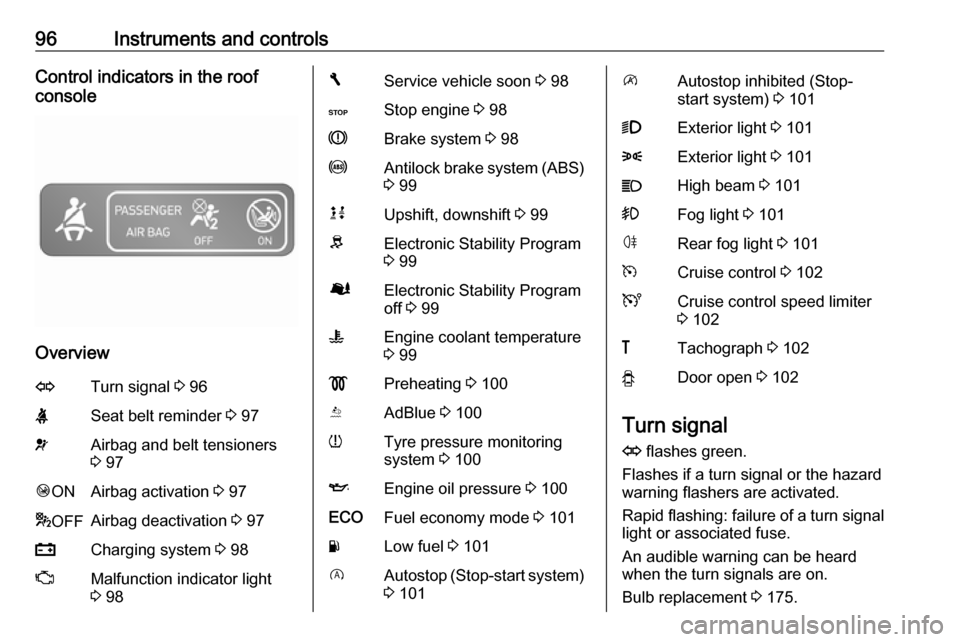
96Instruments and controlsControl indicators in the roof
console
Overview
OTurn signal 3 96XSeat belt reminder 3 97vAirbag and belt tensioners
3 97Ó ONAirbag activation 3 97* OFFAirbag deactivation 3 97pCharging system 3 98ZMalfunction indicator light
3 98FService vehicle soon 3 98CStop engine 3 98RBrake system 3 98uAntilock brake system (ABS)
3 99kjUpshift, downshift 3 99RElectronic Stability Program
3 99ØElectronic Stability Program
off 3 99WEngine coolant temperature
3 99!Preheating 3 100YAdBlue 3 100wTyre pressure monitoring
system 3 100IEngine oil pressure 3 100ECOFuel economy mode 3 101YLow fuel 3 101DAutostop (Stop-start system)
3 101\Autostop inhibited (Stop-
start system) 3 1019Exterior light 3 1018Exterior light 3 101CHigh beam 3 101>Fog light 3 101øRear fog light 3 101mCruise control 3 102UCruise control speed limiter
3 102&Tachograph 3 102yDoor open 3 102
Turn signal
O flashes green.
Flashes if a turn signal or the hazard
warning flashers are activated.
Rapid flashing: failure of a turn signal
light or associated fuse.
An audible warning can be heard
when the turn signals are on.
Bulb replacement 3 175.
Page 104 of 237
102Instruments and controlsCruise controlm , U illuminates green or yellow.
m illuminates green when a certain
speed is stored.
U illuminates green when the system
is on.
Speed limiter U illuminates yellow.
U illuminates yellow when the
system is on.
Cruise control and speed limiter
3 152.
Tachograph & illuminates when there is a fault
3 107.
Door open y illuminates red.
Illuminates when a door is not fully
closed.
A corresponding message also
appears in the Driver Information
Centre 3 102.Information displays
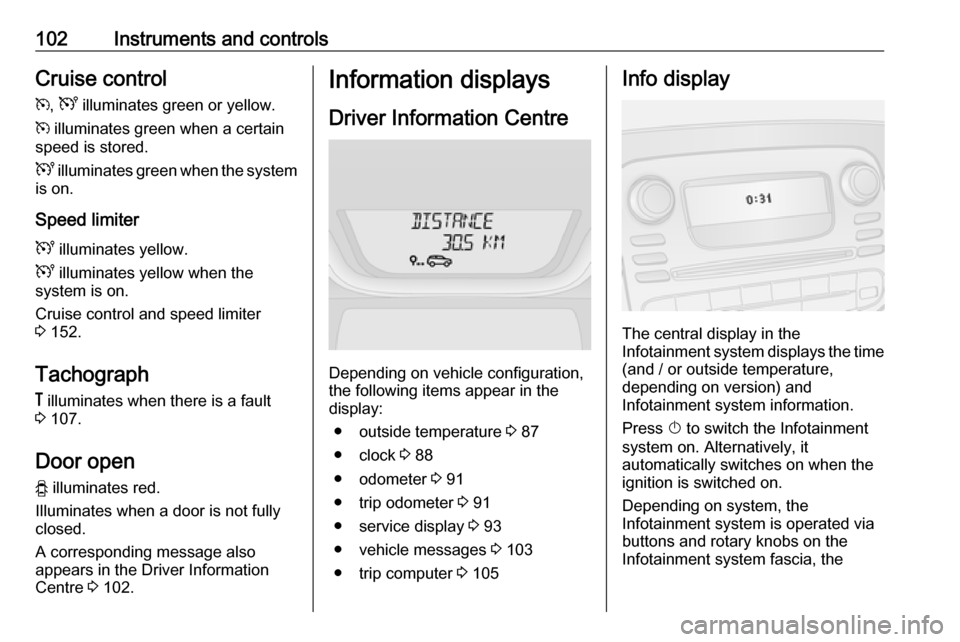
Driver Information Centre
Depending on vehicle configuration,
the following items appear in the
display:
● outside temperature 3 87
● clock 3 88
● odometer 3 91
● trip odometer 3 91
● service display 3 93
● vehicle messages 3 103
● trip computer 3 105
Info display
The central display in the
Infotainment system displays the time (and / or outside temperature,
depending on version) and
Infotainment system information.
Press X to switch the Infotainment
system on. Alternatively, it
automatically switches on when the ignition is switched on.
Depending on system, the
Infotainment system is operated via
buttons and rotary knobs on the
Infotainment system fascia, the
Page 116 of 237

114LightingLoad compartment lighting
The lower load compartment lights
come on when the load compartment is opened.
Reading lights Front reading light
Operate rocker switch:
press 7:offpress l:on
Glove box lighting
The glovebox light comes on when
the glovebox is opened.
Lighting features
Entry lighting
Welcome lighting
Vehicle lights are switched on for a
short time to facilitate locating the
vehicle when it is dark.
Remote control operation
Lights switch on when unlocking the
vehicle with the remote control.
Electronic key system operation
Press t. Press again to switch off.
Exit lighting
If equipped, headlights come on for
approx. 30 seconds after the vehicle
is parked and the system is activated.
Activating 1. Switch off lights (position 7).
2. Switch off ignition.
3. Remove ignition key.
4. Open driver's door.
5. Pull turn signal lever towards steering wheel.
A corresponding message may
appear in the Driver Information
Centre 3 102.
Page 134 of 237
132Driving and operatingStarting and operating
New vehicle running-in
Do not brake unnecessarily hard for
the first few journeys and after new
disc brake pads have been fitted.
During the first drive, smoke may
occur because of wax and oil
evaporating off the exhaust system.
Park the vehicle in the open for a
while after the first drive and avoid
inhaling the fumes.
During the running-in period, fuel and engine oil consumption may be
higher and the cleaning process of
the diesel particle filter may take
place more often. Autostop may be
inhibited to allow for charging the
vehicle battery.
Stop-start system 3 136.
Diesel particle filter 3 140.
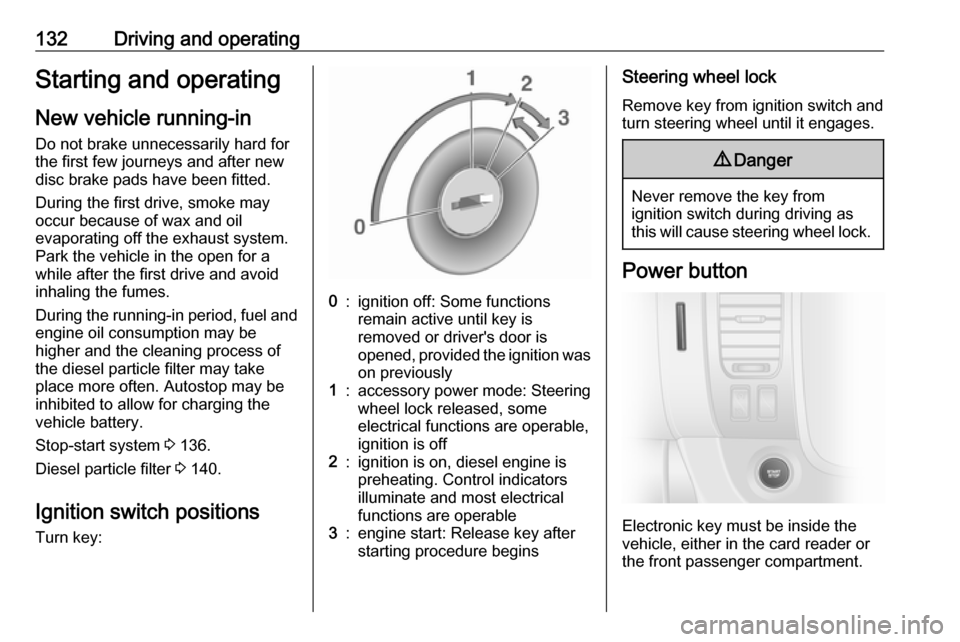
Ignition switch positions
Turn key:0:ignition off: Some functions
remain active until key is
removed or driver's door is
opened, provided the ignition was on previously1:accessory power mode: Steering
wheel lock released, some
electrical functions are operable,
ignition is off2:ignition is on, diesel engine is
preheating. Control indicators
illuminate and most electrical
functions are operable3:engine start: Release key after
starting procedure beginsSteering wheel lock
Remove key from ignition switch and
turn steering wheel until it engages.9 Danger
Never remove the key from
ignition switch during driving as
this will cause steering wheel lock.
Power button
Electronic key must be inside the
vehicle, either in the card reader or
the front passenger compartment.