wheel OPEL ZAFIRA TOURER 2017 User Guide
[x] Cancel search | Manufacturer: OPEL, Model Year: 2017, Model line: ZAFIRA TOURER, Model: OPEL ZAFIRA TOURER 2017Pages: 307, PDF Size: 9.35 MB
Page 73 of 307
Storage71the attachment of electrically-
powered bicycles to the pull-out
carrier. The maximum load per
bicycle on the adapter is 20 kg.
The wheelbase of a bicycle must not
exceed 1.15 metres. Otherwise the
secure fastening of a bicycle is not
possible.
If not in use, the rear carrier system
must be slid back into the vehicle
floor.
There must not be any objects on the
bicycles that could become loose
during transportation.Caution
If the rear carrier system is
extended and the vehicle is fully loaded, the chassis clearance will
be reduced.
Drive carefully whenever the road has a steep inclination or when
driving over a ramp, bump, etc.
Caution
Consult your bicycle dealer before
attaching bicycles with carbon
frames. The bicycles might get
damaged.
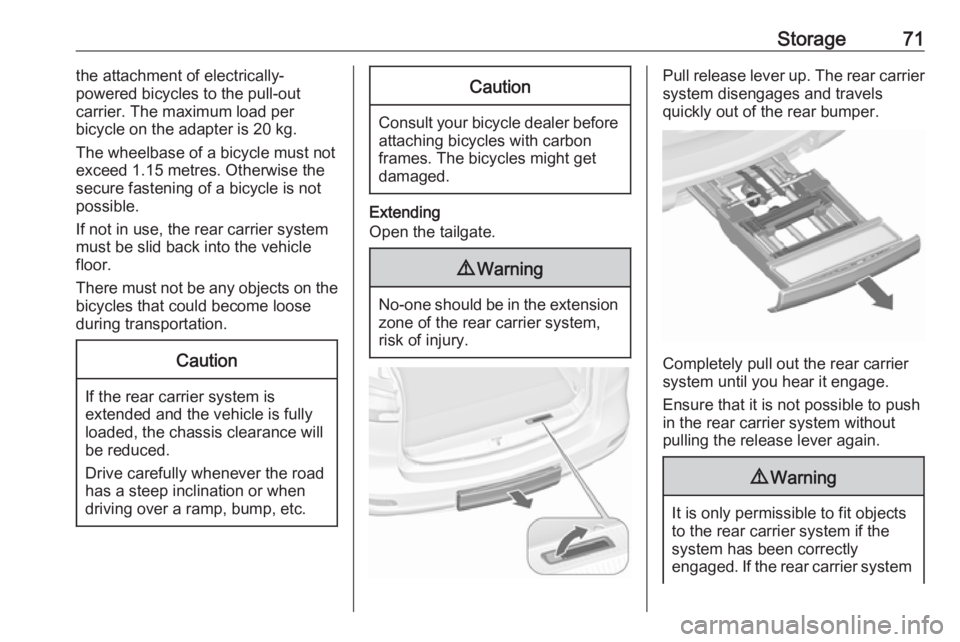
Extending
Open the tailgate.
9 Warning
No-one should be in the extension
zone of the rear carrier system,
risk of injury.
Pull release lever up. The rear carrier system disengages and travels
quickly out of the rear bumper.
Completely pull out the rear carrier
system until you hear it engage.
Ensure that it is not possible to push in the rear carrier system without
pulling the release lever again.
9 Warning
It is only permissible to fit objects
to the rear carrier system if the
system has been correctly
engaged. If the rear carrier system
Page 74 of 307
72Storagewill not engage correctly, do not fit
objects to the system and slide the system back. Seek the assistance
of a workshop.
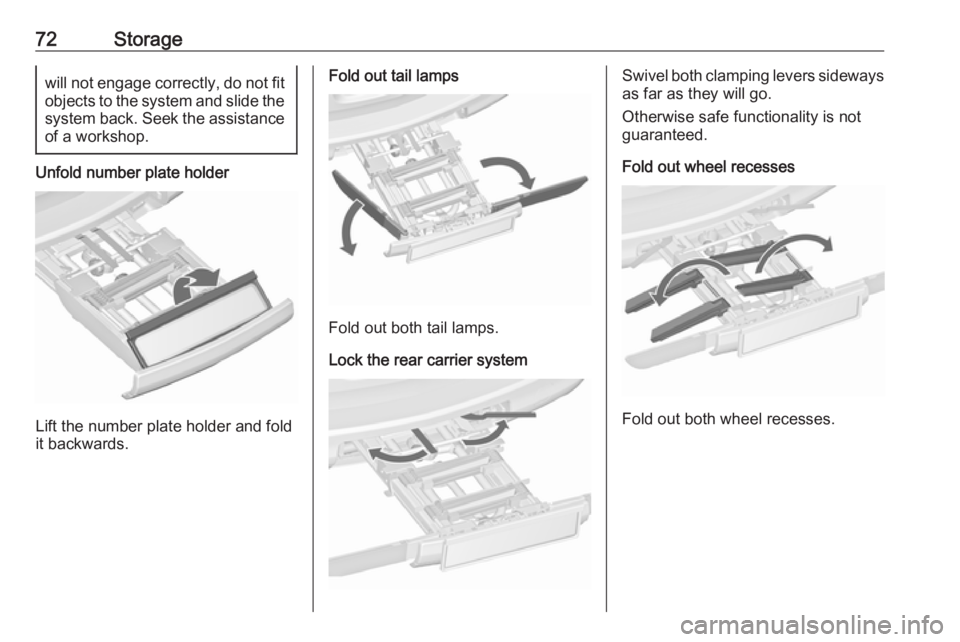
Unfold number plate holder
Lift the number plate holder and fold
it backwards.
Fold out tail lamps
Fold out both tail lamps.
Lock the rear carrier system
Swivel both clamping levers sideways as far as they will go.
Otherwise safe functionality is not
guaranteed.
Fold out wheel recesses
Fold out both wheel recesses.
Page 75 of 307
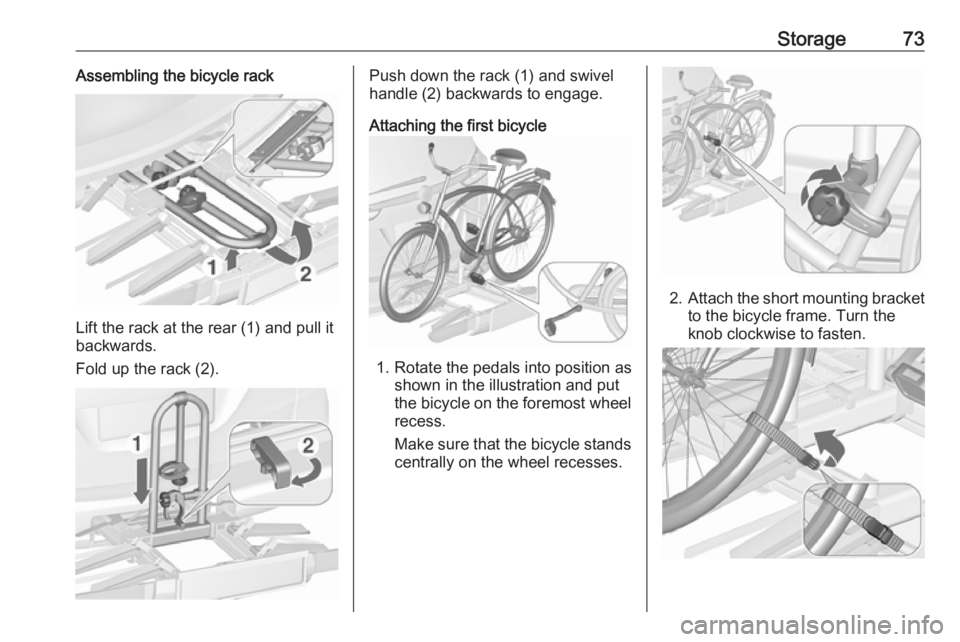
Storage73Assembling the bicycle rack
Lift the rack at the rear (1) and pull it
backwards.
Fold up the rack (2).
Push down the rack (1) and swivel
handle (2) backwards to engage.
Attaching the first bicycle
1. Rotate the pedals into position as shown in the illustration and put
the bicycle on the foremost wheel
recess.
Make sure that the bicycle stands centrally on the wheel recesses.
2. Attach the short mounting bracket
to the bicycle frame. Turn the
knob clockwise to fasten.
Page 76 of 307
74Storage3.Secure both bicycle wheels to the
wheel recesses using the strap
retainers.
4. Check the bicycle to make sure it is secure.Caution
Ensure gap between bicycle and
vehicle is at least 5 cm. If
necessary, loosen handlebar and swivel sideways.
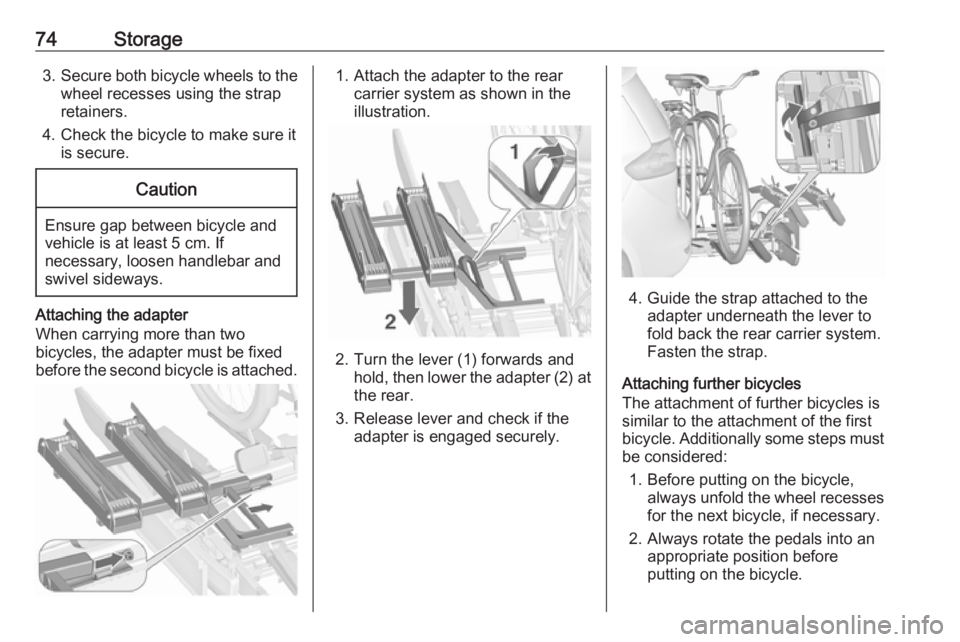
Attaching the adapter
When carrying more than two
bicycles, the adapter must be fixed
before the second bicycle is attached.
1. Attach the adapter to the rear carrier system as shown in the
illustration.
2. Turn the lever (1) forwards and hold, then lower the adapter (2) at
the rear.
3. Release lever and check if the adapter is engaged securely.
4. Guide the strap attached to the adapter underneath the lever to
fold back the rear carrier system.
Fasten the strap.
Attaching further bicycles
The attachment of further bicycles is
similar to the attachment of the first
bicycle. Additionally some steps must be considered:
1. Before putting on the bicycle, always unfold the wheel recesses
for the next bicycle, if necessary.
2. Always rotate the pedals into an appropriate position before
putting on the bicycle.
Page 77 of 307
Storage75
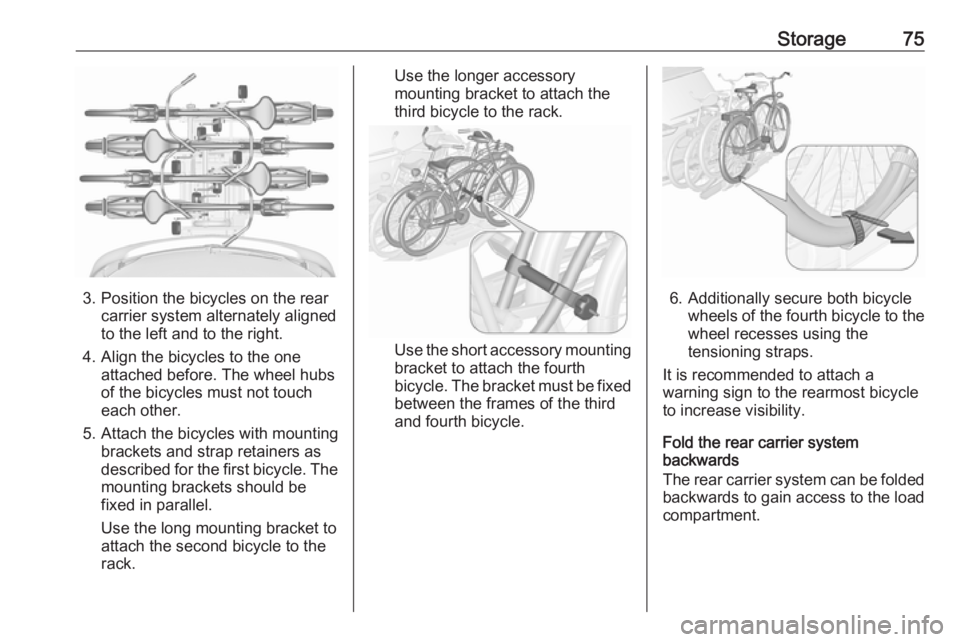
3. Position the bicycles on the rearcarrier system alternately aligned
to the left and to the right.
4. Align the bicycles to the one attached before. The wheel hubsof the bicycles must not touch
each other.
5. Attach the bicycles with mounting brackets and strap retainers as
described for the first bicycle. The
mounting brackets should be
fixed in parallel.
Use the long mounting bracket to
attach the second bicycle to the
rack.
Use the longer accessory
mounting bracket to attach the
third bicycle to the rack.
Use the short accessory mounting
bracket to attach the fourth
bicycle. The bracket must be fixed
between the frames of the third
and fourth bicycle.
6. Additionally secure both bicycle wheels of the fourth bicycle to thewheel recesses using the
tensioning straps.
It is recommended to attach a
warning sign to the rearmost bicycle
to increase visibility.
Fold the rear carrier system
backwards
The rear carrier system can be folded backwards to gain access to the load
compartment.
Page 78 of 307
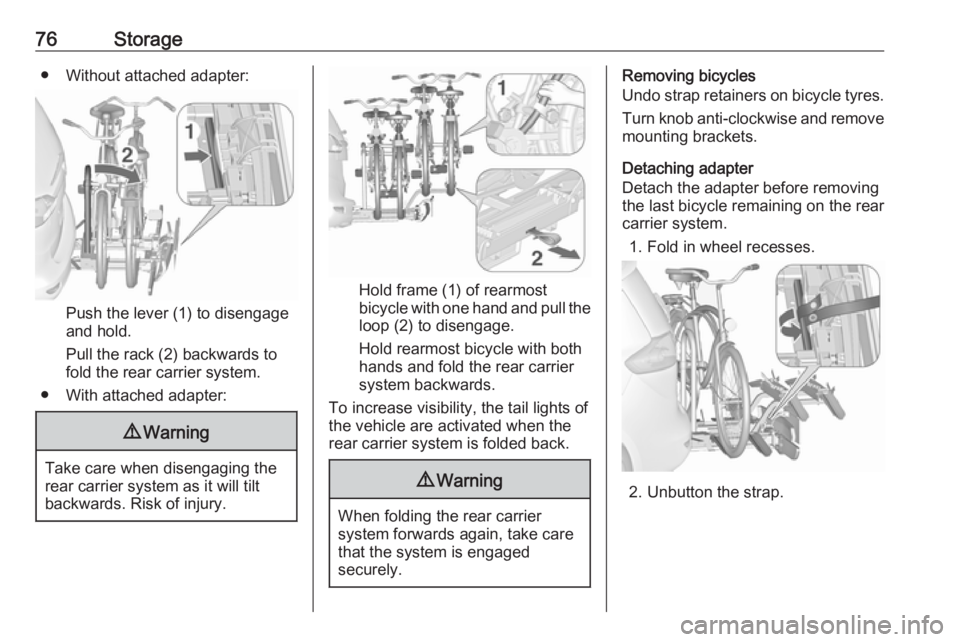
76Storage● Without attached adapter:
Push the lever (1) to disengage
and hold.
Pull the rack (2) backwards to
fold the rear carrier system.
● With attached adapter:
9 Warning
Take care when disengaging the
rear carrier system as it will tilt
backwards. Risk of injury.
Hold frame (1) of rearmost
bicycle with one hand and pull the
loop (2) to disengage.
Hold rearmost bicycle with both
hands and fold the rear carrier
system backwards.
To increase visibility, the tail lights of
the vehicle are activated when the
rear carrier system is folded back.
9 Warning
When folding the rear carrier
system forwards again, take care
that the system is engaged
securely.
Removing bicycles
Undo strap retainers on bicycle tyres.
Turn knob anti-clockwise and remove
mounting brackets.
Detaching adapter
Detach the adapter before removing
the last bicycle remaining on the rear
carrier system.
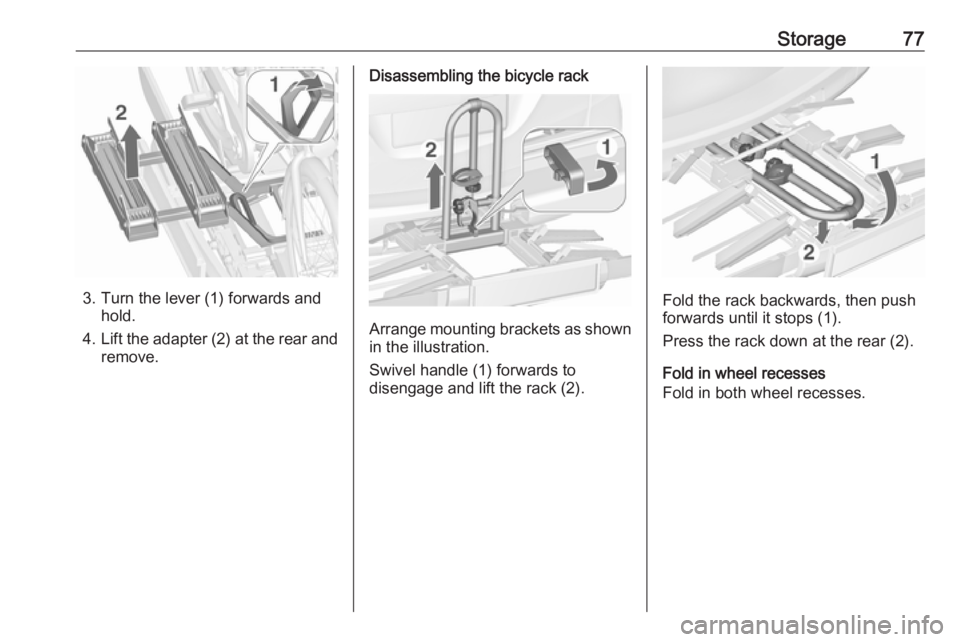
1. Fold in wheel recesses.
2. Unbutton the strap.
Page 79 of 307
Storage77
3. Turn the lever (1) forwards andhold.
4. Lift the adapter (2) at the rear and
remove.
Disassembling the bicycle rack
Arrange mounting brackets as shown in the illustration.
Swivel handle (1) forwards to
disengage and lift the rack (2).
Fold the rack backwards, then push
forwards until it stops (1).
Press the rack down at the rear (2).
Fold in wheel recesses
Fold in both wheel recesses.
Page 80 of 307
78Storage
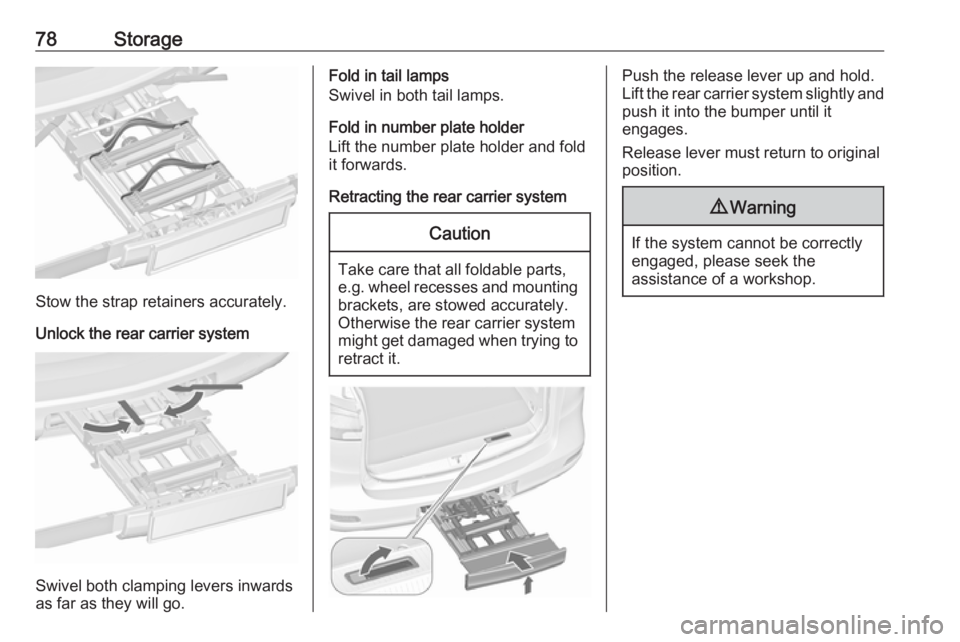
Stow the strap retainers accurately.
Unlock the rear carrier system
Swivel both clamping levers inwards
as far as they will go.
Fold in tail lamps
Swivel in both tail lamps.
Fold in number plate holder
Lift the number plate holder and fold
it forwards.
Retracting the rear carrier systemCaution
Take care that all foldable parts,
e.g. wheel recesses and mounting brackets, are stowed accurately.
Otherwise the rear carrier system might get damaged when trying to retract it.
Push the release lever up and hold.
Lift the rear carrier system slightly and
push it into the bumper until it
engages.
Release lever must return to original
position.9 Warning
If the system cannot be correctly
engaged, please seek the
assistance of a workshop.
Page 98 of 307
96Instruments and controlsInstruments and
controlsControls ....................................... 97
Steering wheel adjustment ........97
Steering wheel controls .............97
Heated steering wheel ...............97
Horn ........................................... 98
Windscreen wiper/washer .........98
Rear window wiper/washer .....100
Outside temperature ................100
Clock ....................................... 101
Power outlets ........................... 102
Cigarette lighter .......................103
Ashtrays .................................. 103
Warning lights, gauges and indi‐ cators ......................................... 104
Instrument cluster ....................104
Speedometer ........................... 104
Odometer ................................ 104
Trip odometer .......................... 104
Tachometer ............................. 104
Fuel gauge .............................. 105
Fuel selector ............................ 105
Engine coolant temperature gauge ..................................... 106
Service display ........................ 106Control indicators ....................107
Turn signal ............................... 110
Seat belt reminder ...................110
Airbag and belt tensioners .......110
Airbag deactivation ..................111
Charging system .....................111
Malfunction indicator light ........111
Service vehicle soon ...............111
Brake and clutch system .........111
Operate pedal .......................... 112
Electric parking brake ..............112
Electric parking brake fault ......112
Antilock brake system (ABS) ...112
Upshift ..................................... 113
Power steering ........................ 113
Lane departure warning ..........113
Ultrasonic parking assist .........113
Electronic Stability Control off . 113
Electronic Stability Control and Traction Control system .........113
Traction Control system off .....114
Preheating ............................... 114
Diesel particle filter ..................114
AdBlue ..................................... 114
Tyre pressure monitoring system .................................... 114
Engine oil pressure ..................114
Low fuel ................................... 115
Immobiliser .............................. 115
Reduced engine power ...........115Exterior light ............................ 115
High beam ............................... 115
High beam assist .....................115
Adaptive forward lighting .........115
Fog light ................................... 116
Rear fog light ........................... 116
Low washer fluid ......................116
Cruise control .......................... 116
Adaptive cruise control ............116
Vehicle detected ahead ...........116
Door open ................................ 116
Information displays ...................116
Driver Information Centre ........116
Graphic-Info-Display, Colour- Info-Display ............................ 120
Vehicle messages ......................122
Warning chimes .......................125
Battery voltage ........................ 126
Trip computer ............................. 126
Vehicle personalisation ..............129
OnStar ....................................... 133
Page 99 of 307
Instruments and controls97Controls
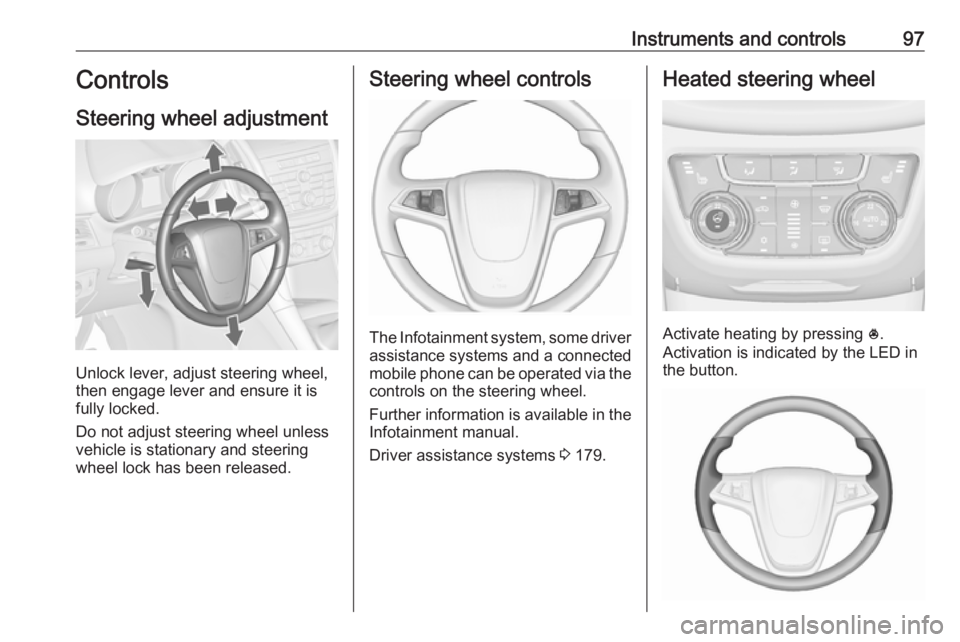
Steering wheel adjustment
Unlock lever, adjust steering wheel,
then engage lever and ensure it is
fully locked.
Do not adjust steering wheel unless
vehicle is stationary and steering
wheel lock has been released.
Steering wheel controls
The Infotainment system, some driver assistance systems and a connected
mobile phone can be operated via the
controls on the steering wheel.
Further information is available in the
Infotainment manual.
Driver assistance systems 3 179.
Heated steering wheel
Activate heating by pressing *.
Activation is indicated by the LED in
the button.