wheel OPEL ZAFIRA TOURER 2017 Service Manual
[x] Cancel search | Manufacturer: OPEL, Model Year: 2017, Model line: ZAFIRA TOURER, Model: OPEL ZAFIRA TOURER 2017Pages: 307, PDF Size: 9.35 MB
Page 162 of 307
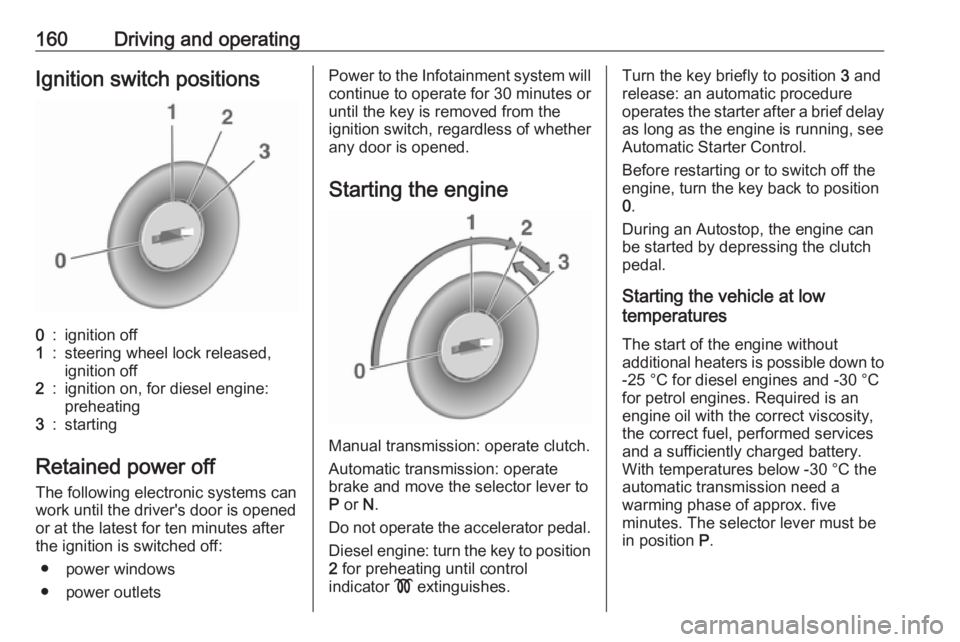
160Driving and operatingIgnition switch positions0:ignition off1:steering wheel lock released,
ignition off2:ignition on, for diesel engine:
preheating3:starting
Retained power off
The following electronic systems can
work until the driver's door is opened
or at the latest for ten minutes after the ignition is switched off:
● power windows
● power outlets
Power to the Infotainment system will continue to operate for 30 minutes or
until the key is removed from the ignition switch, regardless of whether
any door is opened.
Starting the engine
Manual transmission: operate clutch.
Automatic transmission: operate
brake and move the selector lever to
P or N.
Do not operate the accelerator pedal. Diesel engine: turn the key to position2 for preheating until control
indicator ! extinguishes.
Turn the key briefly to position 3 and
release: an automatic procedure
operates the starter after a brief delay as long as the engine is running, see
Automatic Starter Control.
Before restarting or to switch off the
engine, turn the key back to position
0 .
During an Autostop, the engine can
be started by depressing the clutch
pedal.
Starting the vehicle at low
temperatures
The start of the engine without
additional heaters is possible down to -25 °С for diesel engines and -30 °C
for petrol engines. Required is an
engine oil with the correct viscosity,
the correct fuel, performed services
and a sufficiently charged battery.
With temperatures below -30 °C the
automatic transmission need a
warming phase of approx. five
minutes. The selector lever must be
in position P.
Page 166 of 307
164Driving and operatinglever to position P before
removing the ignition key. On
an uphill slope, turn the front
wheels away from the kerb.
If the vehicle is on a downhill
slope, engage reverse gear or
set the selector lever to position
P before removing the ignition
key. Turn the front wheels
towards the kerb.
● Close the windows.
● Remove the ignition key from the ignition switch. Turn the
steering wheel until the
steering wheel lock is felt to
engage.
For vehicles with automatic
transmission, the key can only
be removed when the selector
lever is in position P.
● Lock the vehicle.
● Activate the anti-theft alarm system.
Note
In the event of an accident with
airbag deployment, the engine is
turned off automatically if the vehicle comes to a standstill within a certain
time.Engine exhaust9 Danger
Engine exhaust gases contain
poisonous carbon monoxide,
which is colourless and odourless and could be fatal if inhaled.
If exhaust gases enter the interior
of the vehicle, open the windows.
Have the cause of the fault
rectified by a workshop.
Avoid driving with an open load
compartment, otherwise exhaust
gases could enter the vehicle.
Diesel particle filter
The diesel particle filter system filters
harmful soot particles out of the
exhaust gases. The system includes
a self-cleaning function that runs
automatically during driving without
any notification. The filter is cleaned
by periodically burning off the soot
particles at high temperature. This
process takes place automatically
under set driving conditions and may
take up to 25 minutes. Typically it
Page 171 of 307
Driving and operating169Note
Dispose of AdBlue canister and
hose according to environmental
requirements.
Exchanging AdBlue
If less than five litres of AdBlue have
been refilled during the last two years, the remaining fluid should be
exchanged since AdBlue has a
limited durability. Seek the assistance of a workshop.Caution
Disregard could lead to damage to
the selective catalytic reduction
system.
Automatic transmission
The automatic transmission permits
automatic gearshifting (automatic
mode) or manual gearshifting
(manual mode).
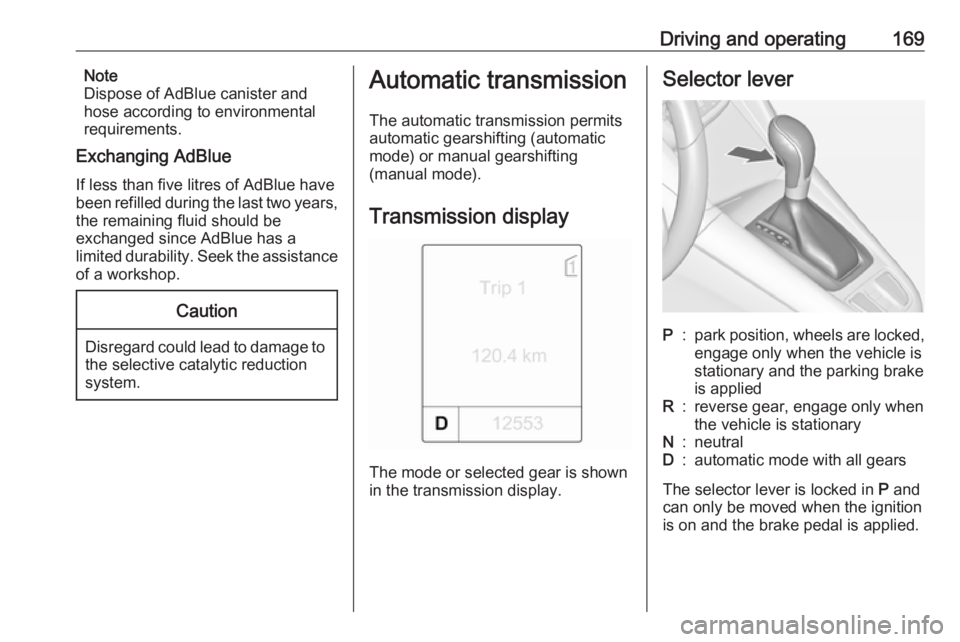
Transmission display
The mode or selected gear is shown
in the transmission display.
Selector leverP:park position, wheels are locked,
engage only when the vehicle is
stationary and the parking brake
is appliedR:reverse gear, engage only when
the vehicle is stationaryN:neutralD:automatic mode with all gears
The selector lever is locked in P and
can only be moved when the ignition
is on and the brake pedal is applied.
Page 175 of 307
Driving and operating173Brakes
The brake system comprises two
independent brake circuits.
If a brake circuit fails, the vehicle can
still be braked using the other brake
circuit. However, braking effect is
achieved only when the brake pedal
is depressed firmly. Considerably
more force is needed for this. The
braking distance is extended. Seek the assistance of a workshop before
continuing your journey.
When the engine is not running, the
support of the brake servo unit
disappears once the brake pedal has
been depressed once or twice.
Braking effect is not reduced, but
braking requires significantly greater
force. It is especially important to bear this in mind when being towed.
Control indicator R 3 111.
Antilock brake system
Antilock brake system (ABS)
prevents the wheels from locking.ABS starts to regulate brake pressure as soon as a wheel shows a tendency to lock. The vehicle remains
steerable, even during hard braking.
ABS control is made apparent
through a pulse in the brake pedal
and the noise of the regulation
process.
For optimum braking, keep the brake
pedal fully depressed throughout the
braking process, despite the fact that
the pedal is pulsating. Do not reduce
the pressure on the pedal.
After starting off the system performs
a self-test which may be audible.
Control indicator u 3 112.
Adaptive brake light
During full braking, all three brake
lights flash for the duration of ABS
control.Fault9 Warning
If there is a fault in the ABS, the
wheels may be liable to lock due
to braking that is heavier than
normal. The advantages of ABS are no longer available. During
hard braking, the vehicle can no longer be steered and may
swerve.
Have the cause of the fault remedied
by a workshop.
Page 178 of 307
176Driving and operatingRide control systems
Traction Control system
The Traction Control system (TC) is a component of the Electronic Stability
Control.
TC improves driving stability when
necessary, regardless of the type of
road surface or tyre grip, by
preventing the drive wheels from
spinning.
As soon as the drive wheels starts to
spin, engine output is reduced and
the wheel spinning the most is braked
individually. This considerably
improves the driving stability of the
vehicle on slippery road surfaces.
TC is operational as soon as the
control indicator b extinguishes.
When TC is active b flashes.9 Warning
Do not let this special safety
feature tempt you into taking risks
when driving.
Adapt speed to the road
conditions.
Control indicator b 3 113.
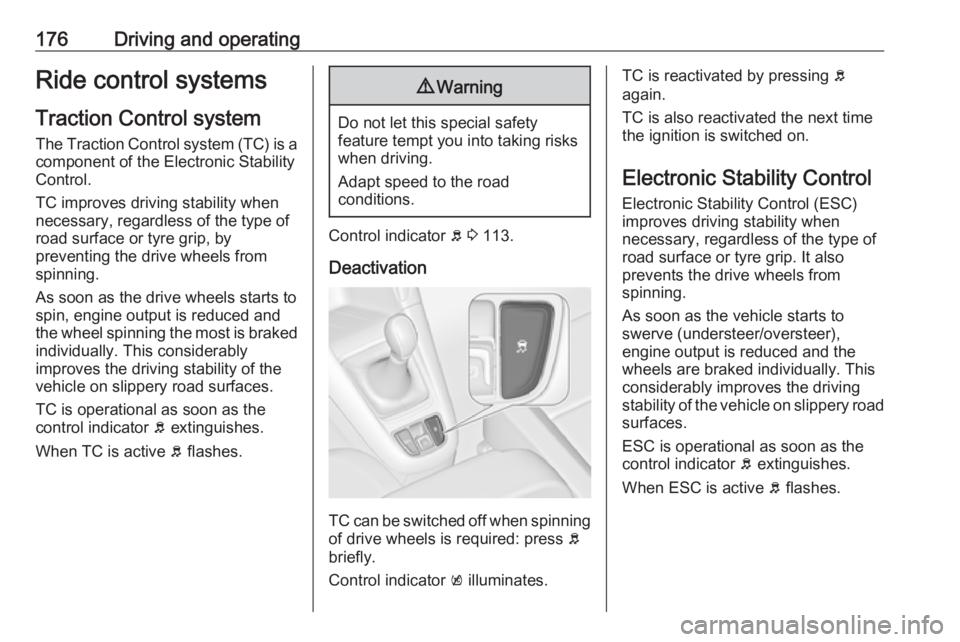
Deactivation
TC can be switched off when spinning of drive wheels is required: press b
briefly.
Control indicator k illuminates.
TC is reactivated by pressing b
again.
TC is also reactivated the next time
the ignition is switched on.
Electronic Stability Control
Electronic Stability Control (ESC)
improves driving stability when
necessary, regardless of the type of
road surface or tyre grip. It also
prevents the drive wheels from
spinning.
As soon as the vehicle starts to
swerve (understeer/oversteer),
engine output is reduced and the wheels are braked individually. This
considerably improves the driving stability of the vehicle on slippery road
surfaces.
ESC is operational as soon as the
control indicator b extinguishes.
When ESC is active b flashes.
Page 181 of 307
Driving and operating179Personalised settings in the Sportmode
The driver can select the functions of
the SPORT mode when SPORT is
pressed. These settings can be
changed in the Settings menu in the
Info-Display. Vehicle personalisation
3 129.Driver assistance
systems9 Warning
Driver assistance systems are
developed to support the driver
and not to replace the driver's
attention.
The driver accepts full
responsibility when driving the
vehicle.
When using driver assistance
systems, always take care
regarding the current traffic
situation.
Cruise control
The cruise control can store and
maintain speeds of approx. 30 to
200 km/h. Deviations from the stored
speeds may occur when driving uphill or downhill.
For safety reasons, the cruise control cannot be activated until the foot
brake has been operated once.
Activation in first gear is not possible.
Do not use the cruise control if it is not advisable to maintain a constant
speed.
With automatic transmission, only
activate cruise control in automatic
mode.
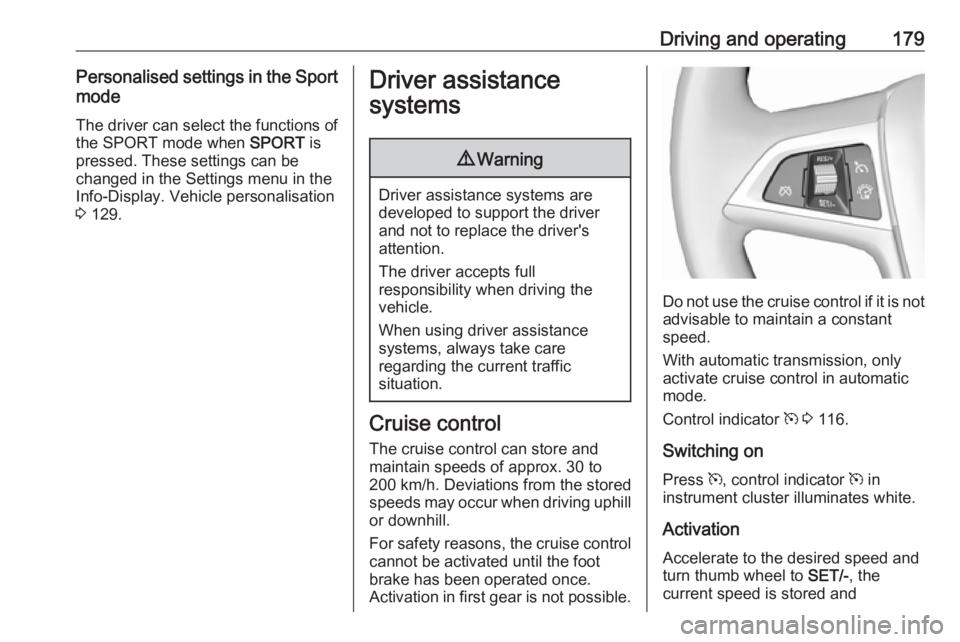
Control indicator m 3 116.
Switching on
Press m, control indicator m in
instrument cluster illuminates white.
Activation Accelerate to the desired speed and
turn thumb wheel to SET/-, the
current speed is stored and
Page 182 of 307
180Driving and operatingmaintained. Control indicator m in
instrument cluster illuminates green.
Accelerator pedal can be released.
Vehicle speed can be increased by depressing the accelerator pedal.
When the accelerator pedal is
released, the previously stored speed
is resumed.
Cruise control remains activated
while gearshifting.
Increase speed With cruise control active, hold thumb
wheel turned to RES/+ or briefly turn
to RES/+ repeatedly: speed
increases continuously or in small
increments.
Alternatively accelerate to the desired speed and store by turning to SET/-.
Reduce speed With cruise control active, hold thumb
wheel turned to SET/- or briefly turn to
SET/- repeatedly: speed decreases
continuously or in small increments.Deactivation
Press y, control indicator m in
instrument cluster illuminates white.
Cruise control is deactivated. Last
stored speed remains in memory for
later speed resume.
Automatic deactivation: ● Vehicle speed is below approx. 30 km/h.
● Vehicle speed is above approx. 200 km/h.
● The brake pedal is depressed.
● The clutch pedal is depressed for
a few seconds.
● Selector lever is in N.
● Engine speed is in a very low range.
● The Traction Control system or Electronic Stability Control is
operating.
Resume stored speed
Turn thumb wheel to RES/+ at a
speed above 30 km/h. The stored
speed will be obtained.Switching off
Press m, control indicator m in
instrument cluster extinguishes. The
stored speed is deleted.
Pressing L for activating speed
limiter or switching off the ignition also switches off cruise control and
deletes the stored speed.
Speed limiter
The speed limiter prevents the
vehicle exceeding a preset maximum
speed.
The maximum speed can be set at a
speed above 25 km/h.
The driver can only accelerate up to
the preset speed. Deviations from the
limited speed may occur when driving downhill.
The preset speed limit is displayed in
the top line of the Driver Information
Centre when the system is active.
Page 183 of 307
Driving and operating181Activation
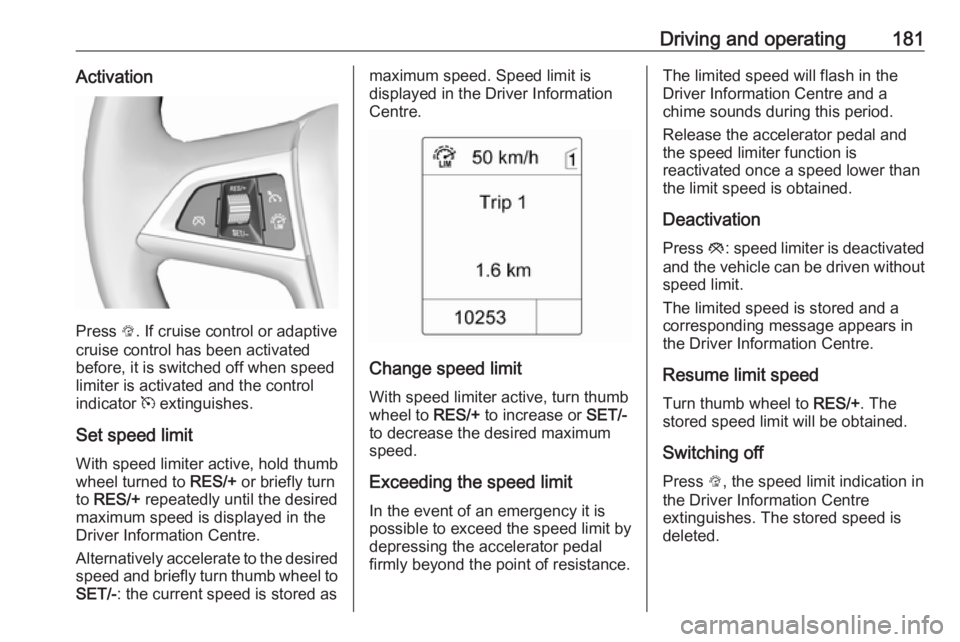
Press L. If cruise control or adaptive
cruise control has been activated
before, it is switched off when speed
limiter is activated and the control
indicator m extinguishes.
Set speed limit
With speed limiter active, hold thumb
wheel turned to RES/+ or briefly turn
to RES/+ repeatedly until the desired
maximum speed is displayed in the
Driver Information Centre.
Alternatively accelerate to the desired speed and briefly turn thumb wheel to SET/- : the current speed is stored as
maximum speed. Speed limit is
displayed in the Driver Information
Centre.
Change speed limit
With speed limiter active, turn thumb
wheel to RES/+ to increase or SET/-
to decrease the desired maximum
speed.
Exceeding the speed limit
In the event of an emergency it is
possible to exceed the speed limit by
depressing the accelerator pedal firmly beyond the point of resistance.
The limited speed will flash in the
Driver Information Centre and a
chime sounds during this period.
Release the accelerator pedal and the speed limiter function is
reactivated once a speed lower than
the limit speed is obtained.
Deactivation Press y: speed limiter is deactivated
and the vehicle can be driven without speed limit.
The limited speed is stored and a
corresponding message appears in
the Driver Information Centre.
Resume limit speed
Turn thumb wheel to RES/+. The
stored speed limit will be obtained.
Switching off
Press L, the speed limit indication in
the Driver Information Centre
extinguishes. The stored speed is
deleted.
Page 185 of 307
Driving and operating183Activation by setting the speed
Adaptive cruise control can be
activated between 50 km/h and
180 km/h.
Accelerate to the desired speed and
turn thumb wheel to SET/-; the
current speed is stored and
maintained. Control indicator m
illuminates green.
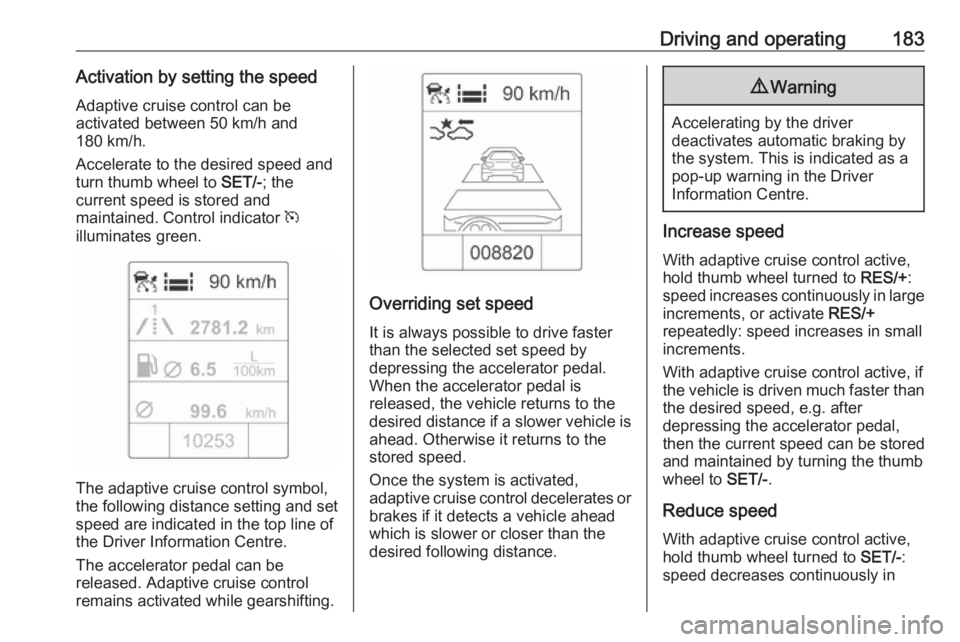
The adaptive cruise control symbol,
the following distance setting and set
speed are indicated in the top line ofthe Driver Information Centre.
The accelerator pedal can be
released. Adaptive cruise control
remains activated while gearshifting.
Overriding set speed
It is always possible to drive faster
than the selected set speed by
depressing the accelerator pedal. When the accelerator pedal is
released, the vehicle returns to the
desired distance if a slower vehicle is
ahead. Otherwise it returns to the
stored speed.
Once the system is activated,
adaptive cruise control decelerates or
brakes if it detects a vehicle ahead
which is slower or closer than the
desired following distance.
9 Warning
Accelerating by the driver
deactivates automatic braking by
the system. This is indicated as a
pop-up warning in the Driver
Information Centre.
Increase speed
With adaptive cruise control active,
hold thumb wheel turned to RES/+:
speed increases continuously in large
increments, or activate RES/+
repeatedly: speed increases in small increments.
With adaptive cruise control active, if
the vehicle is driven much faster than the desired speed, e.g. after
depressing the accelerator pedal,
then the current speed can be stored
and maintained by turning the thumb
wheel to SET/-.
Reduce speed With adaptive cruise control active,hold thumb wheel turned to SET/-:
speed decreases continuously in
Page 186 of 307
184Driving and operatinglarge increments, or activate SET/-
repeatedly: speed decreases in small
increments.
With adaptive cruise control active, if
the vehicle is driven much slower than
the desired speed, e.g. because of a
slower vehicle ahead, then the
current speed can be stored and
maintained by turning the thumb
wheel to SET/-.
Resume stored speed
If the system is switched on but
inactive, then turn thumb wheel to
RES/+ at a speed above 50 km/h to
resume the stored speed.
Setting the following distance
When adaptive cruise control detects a slower moving vehicle in the driving
path, it will adjust the vehicle speed to maintain the following distance
selected by the driver.
The following distance can be set to
near, medium or far.
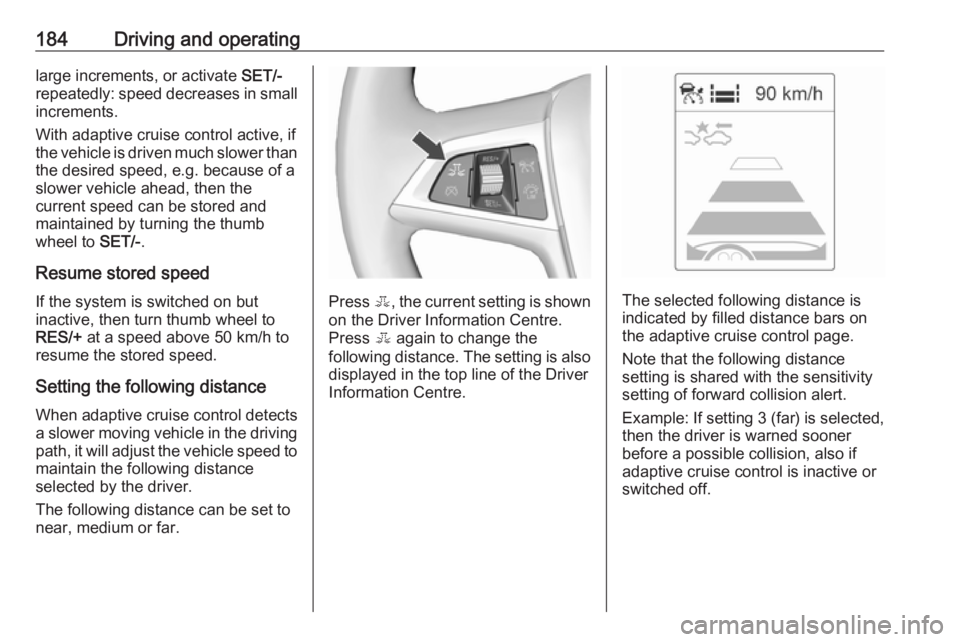
Press E, the current setting is shown
on the Driver Information Centre.
Press E again to change the
following distance. The setting is also displayed in the top line of the Driver
Information Centre.The selected following distance is
indicated by filled distance bars on
the adaptive cruise control page.
Note that the following distance
setting is shared with the sensitivity
setting of forward collision alert.
Example: If setting 3 (far) is selected,
then the driver is warned sooner
before a possible collision, also if
adaptive cruise control is inactive or
switched off.