ECO mode PEUGEOT 108 2014 User Guide
[x] Cancel search | Manufacturer: PEUGEOT, Model Year: 2014, Model line: 108, Model: PEUGEOT 108 2014Pages: 256, PDF Size: 5.88 MB
Page 166 of 256
164
electrical energy economy mode*
System which manages the duration of use of certain functions to conserve a sufficient level of
charge in the battery.
After the engine has stopped, you can still use functions such as the audio system, windscreen
wipers, dipped beam headlamps,
courtesy lamps, etc. for a maximum combined duration of
twenty
minutes.
th
is period may be greatly reduced if the battery is not fully charged. Let the engine run for the duration
specified to ensure that the battery
charge is sufficient.
Do not repeatedly and continuously
restart the engine in order to charge the
battery.
A flat battery prevents the engine from
starting.
Refer to the "Battery" section.
Switching to economy mode
Once this time has elapsed the active functions
are put on standby.
Exiting economy mode
these functions are reactivated automatically
next time the vehicle is driven.
to r
estore the use of these functions
immediately, start the engine and let it run for at
least 5 minutes.
Changing a wiper
blade
Removing the front wiper blade
F Raise the wiper arm.
F R emove the wiper blade, sliding it towards
the outside.
Fitting the front wiper blade
F Put the corresponding new wiper blade in place and fix it.
F
F
old down the wiper arm carefully.
to c
onserve the effectiveness of
the flat-blade type wiper blades, we
recommend that they are:
-
han
dled with care,
-
c
leaned regularly with soapy water,
-
n
ot used to hold a cardboard sheet
against the windscreen,
-
r
eplaced at the first signs of wear.
*
O
nly on vehicles with the "Keyless
e
n
try and
Starting" system.
Practical information
Page 183 of 256
181
7-Inch touch screen
For safety reasons, the driver must carry out operations
which require prolonged attention while the vehicle is
stationary.
to prevent discharging of the battery
, the system cuts off
following activation of energy economy mode, 20 minutes
after switching off the engine on vehicles fitted with the
"Keyless
e ntry and Starting" system.
Multimedia system
Bluetooth
® telephone
Mirror Screen
®
CONTENTS
182
01
General
operation p.
184
02
First steps - Control
panelp.
198
05
Telephone p. 186
04
Media p.
206
06
Connections p.
206
p.
210
06-1
iPhone
® connection
06-2
MirrorLink
® connection p.
214
07
Configuration p.
218
Frequently asked questions
p. 185
03
Steering mounted
controls
p.
B3_en_Chap12a_Autoradio-t oyota-tactile-1_ed01-2014
Page 185 of 256

01
In ACC mode or when starting the vehicle, the system comes on.
u
se the button at bottom right of the screen for access to the main menus\
.
A second press returns the system to the last source activated, then pres\
s the virtual buttons
in the screen.
GENERAL OPERATION
In the event of prolonged exposure to sunlight and very hot conditions, \
the system may go into stand-by (screen and sound completely off)
for at least 5 minutes.
Return to normal operation takes place when the temperature in the passe\
nger compartment drops.
183
B3_en_Chap12a_Autoradio-toyota-tactile-1_ed01-2014
Page 186 of 256
02
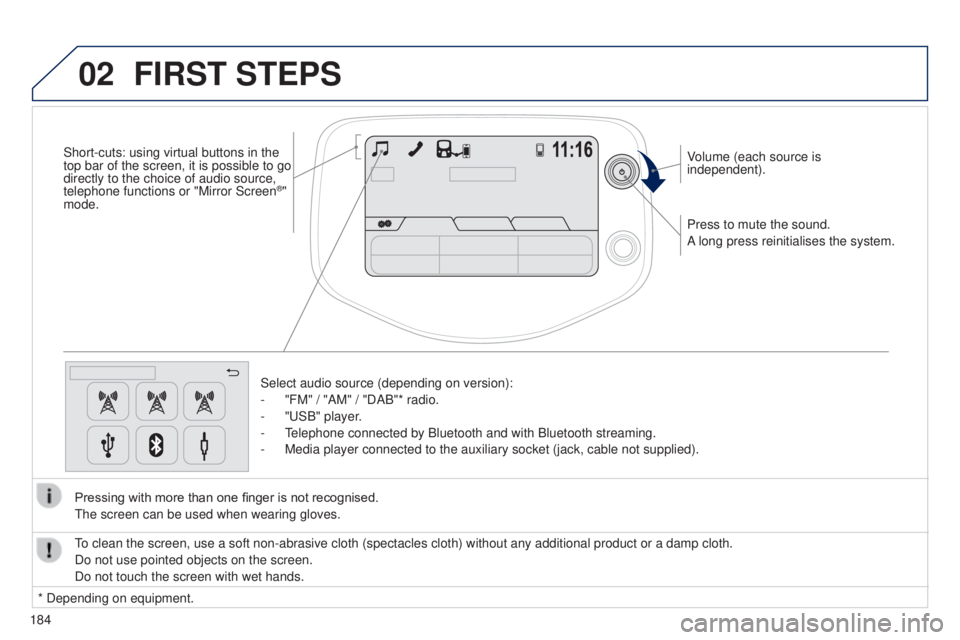
184Press to mute the sound.
A long press reinitialises the system. Volume (each source is
independent).
Select audio source (depending on version):
-
"FM" / "AM" / "DAB"* radio.
-
"
u SB" player.
- t
elephone connected by Bluetooth and with Bluetooth streaming.
-
Media player connected to the auxiliary socket (jack, cable not supplie\
d).
Pressing with more than one finger is not recognised.
t
he screen can be used when wearing gloves.
FIRST STEPS
* Depending on equipment.
to clean the screen, use a soft non-abrasive cloth (spectacles cloth) w\
ithout any additional product or a damp cloth.
Do not use pointed objects on the screen.
Do not touch the screen with wet hands.
Short-cuts: using virtual buttons in the
top bar of the screen, it is possible to go
directly to the choice of audio source,
telephone functions or "Mirror Screen
®"
mode.
Page 199 of 256
04
197
Audio streaming
Streaming allows audio files on your telephone to be played via the
vehicle's speakers.
Connect the telephone : see the "Telephone" section, then
Bluetooth.
Choose either " Connect all" or "Connect as audio player" profile.
If play does not start automatically, it may be necessary to start
audio play from the telephone.
Control is from the peripheral device or by using the audio system
controls.
Once connected for streaming, the telephone is considered as a
media source.
It is recommended that "Repeat" mode be activated in the Bluetooth
device.
Connecting Apple® players
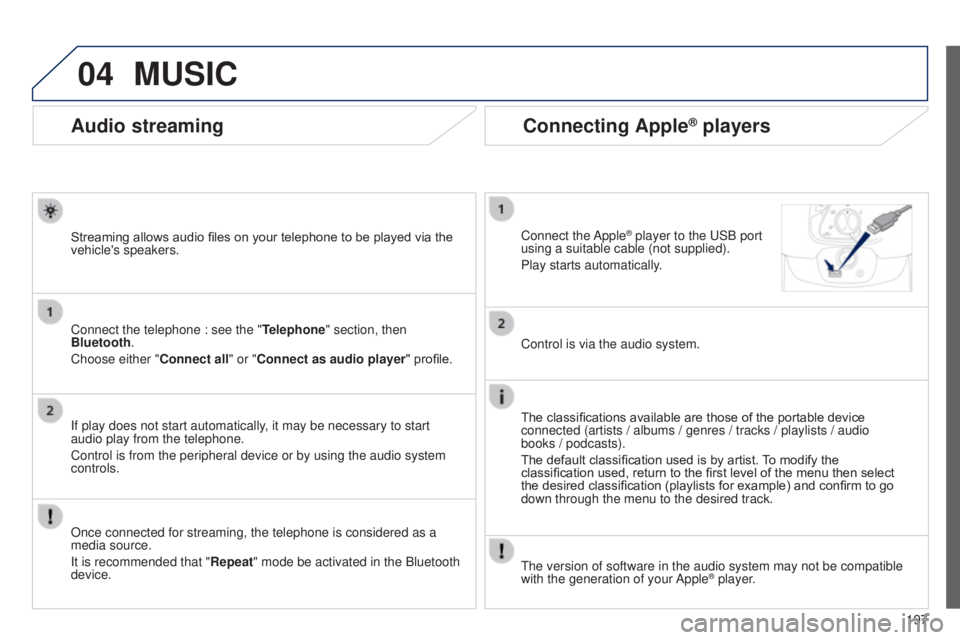
Connect the Apple® player to the uSB port
using a suitable cable (not supplied).
Play starts automatically
.
Control is via the audio system.
The classifications available are those of the portable device
connected (artists / albums / genres / tracks / playlists / audio
books
/ podcasts).
The default classification used is by artist. To modify the
classification used, return to the first level of the menu then select
the desired classification (playlists for example) and confirm to go
down through the menu to the desired track.
MUSIC
the version of software in the audio system may not be compatible
with the generation of your Apple® player.
B3_en_Chap12a_Autoradio-t oyota-tactile-1_ed01-2014
Page 213 of 256
06
2 11
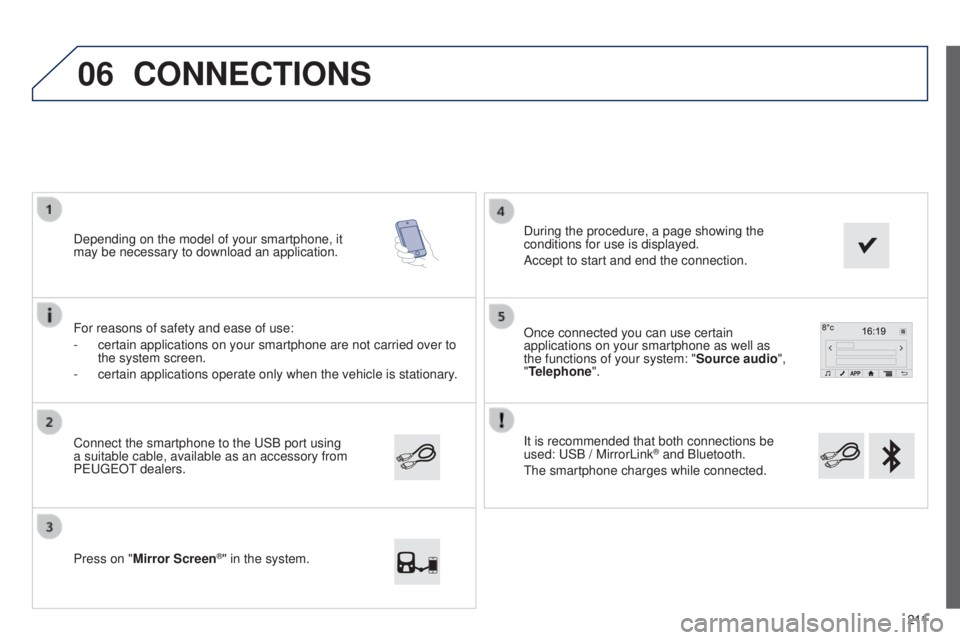
It is recommended that both connections be
used:
u
SB / MirrorLink
® and Bluetooth.
t
he smartphone charges while connected.
Once connected you can use certain
applications on your smartphone as well as
the functions of your system: "Source audio
",
"Telephone".
Connect the smartphone to the
u
SB port using
a suitable cable, available as an accessory from
P
euge
O
t dealers.
Depending on the model of your smartphone, it
may be necessary to download an application.
Press on "
Mirror Screen
®" in the system. During the procedure, a page showing the
conditions for use is displayed.
Accept to start and end the connection.
For reasons of safety and ease of use:
-
certain applications on your smartphone are not carried over to
the system screen.
-
certain applications operate only when the vehicle is stationary
.
CONNECTIONS
B3_en_Chap12a_Autoradio-t
oyota-tactile-1_ed01-2014
Page 221 of 256
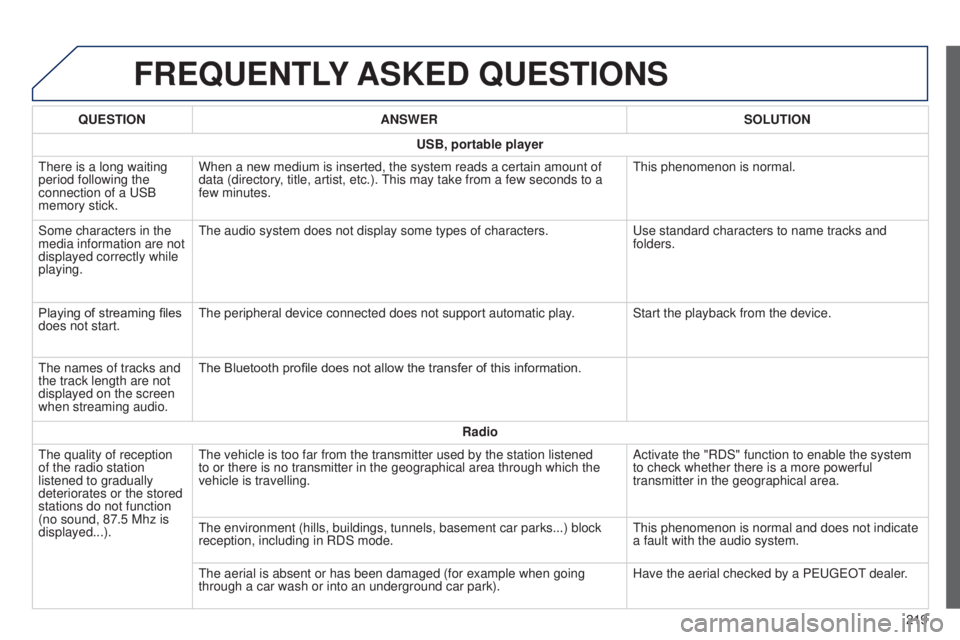
FREQUENTLY ASKED QUESTIONS
219
QUESTION
ANSWER SOLUTION
USB, portable player
t
here is a long waiting
period following the
connection of a
u
SB
memory stick. When a new medium is inserted, the system reads a certain amount of
data (directory, title, artist, etc.).
t
his may take from a few seconds to a
few minutes.
t
his phenomenon is normal.
Some characters in the
media information are not
displayed correctly while
playing.
t
he audio system does not display some types of characters.
u
se standard characters to name tracks and
folders.
Playing of streaming files
does not start.
t
he peripheral device connected does not support automatic play. Start the playback from the device.
t
he names of tracks and
the track length are not
displayed on the screen
when streaming audio. The Bluetooth profile does not allow the transfer of this information.
Radio
t
he quality of reception
of the radio station
listened to gradually
deteriorates or the stored
stations do not function
(no sound, 87.5
Mhz is
displayed...).
t
he vehicle is too far from the transmitter used by the station listened \
to or there is no transmitter in the geographical area through which the\
vehicle is travelling. Activate the "RDS" function to enable the system
to check whether there is a more powerful
transmitter in the geographical area.
t
he environment (hills, buildings, tunnels, basement car parks...) bloc\
k
reception, including in RDS mode.
t
his phenomenon is normal and does not indicate
a fault with the audio system.
t
he aerial is absent or has been damaged (for example when going
through a car wash or into an underground car park). Have the aerial checked by a P
euge
O
t
dealer
.
B3_en_Chap12a_Autoradio-t
oyota-tactile-1_ed01-2014
Page 222 of 256
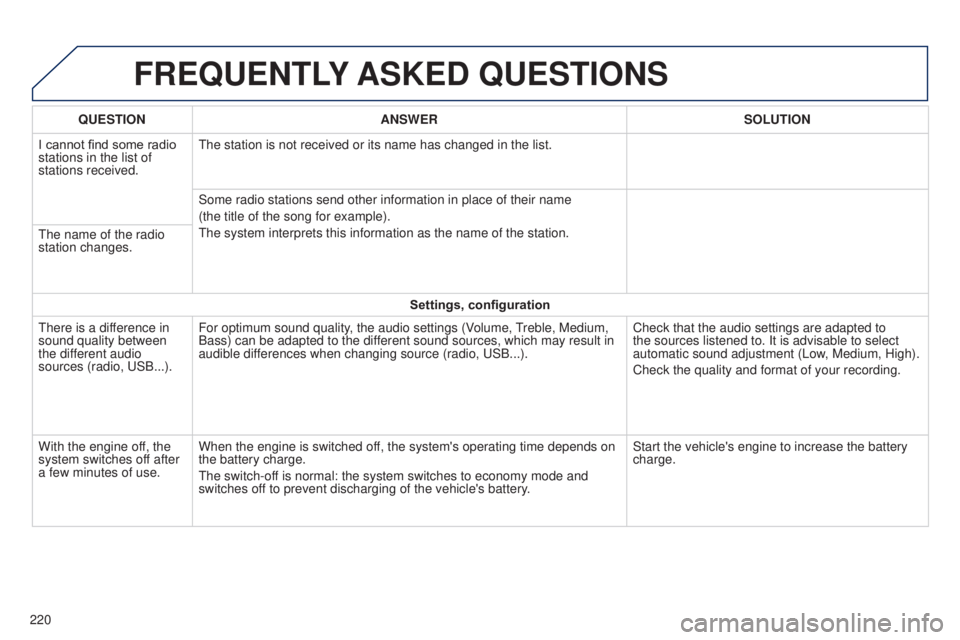
FREQUENTLY ASKED QUESTIONS
220QUESTION
ANSWER SOLUTION
I cannot find some radio
stations in the list of
stations received.
t
he station is not received or its name has changed in the list.
Some radio stations send other information in place of their name
(the title of the song for example).
t
he system interprets this information as the name of the station.
t
he name of the radio
station changes.
Settings, configuration
t
here is a difference in
sound quality between
the different audio
sources (radio, u SB...).
For optimum sound quality, the audio settings (Volume,
treble, Medium,
Bass) can be adapted to the dif
ferent sound sources, which may result in
audible differences when changing source (radio, u SB...).
Check that the audio settings are adapted to
the sources listened to. It is advisable to select
automatic sound adjustment (Low, Medium, High).
Check the quality and format of your recording.
With the engine off, the
system switches off after
a few minutes of use. When the engine is switched off, the system's operating time depends on
the battery charge.
t
he switch-off is normal: the system switches to economy mode and
switches off to prevent discharging of the vehicle's battery. Start the vehicle's engine to increase the battery
charge.
Page 223 of 256
MODE
221
RADIO
For safety reasons, the driver must only carry out
operations which require prolonged attention while
the vehicle is stationary.
to preserve the state of charge of the battery
, on vehicle
fitted with "Keyless Entry and Starting" the audio system
switches off following activation of energy economy
mode, 20 minutes after stopping the engine.
222
224
225
228
231
233
234
CONTENTS
01
First steps p.
02
Steering mounted
controls p.
05
Telephone p.
04
Media p.
06
Settings p.
p.
03
Radio p.
Frequently asked questions
B3_en_Chap12b_Autoradio-t oyota-2_ed01-2014
Page 229 of 256
03
MODE
227
RADIO
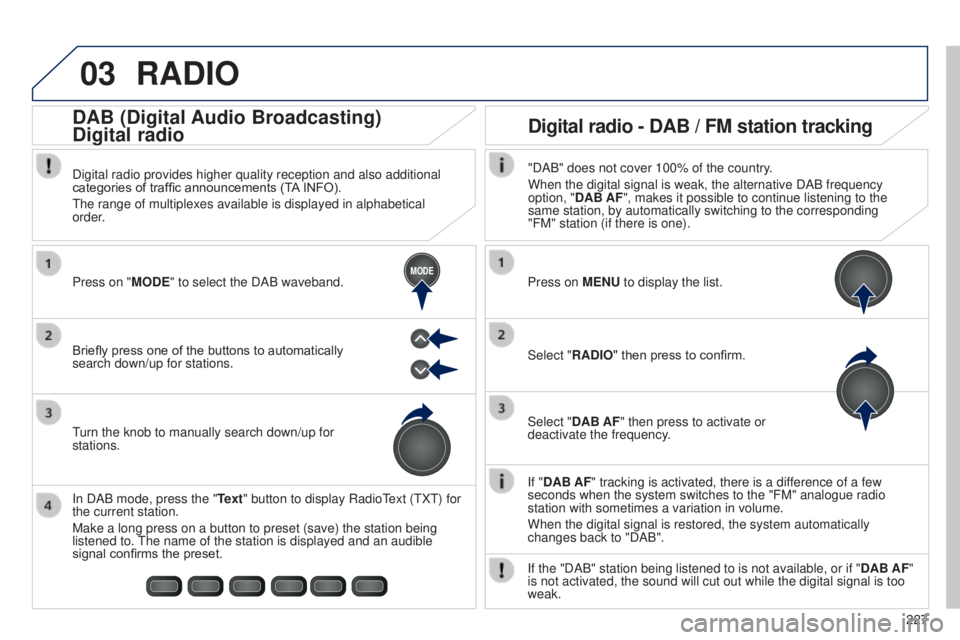
If "DAB AF" tracking is activated, there is a difference of a few
seconds when the system switches to the "FM" analogue radio
station with sometimes a variation in volume.
When the digital signal is restored, the system automatically
changes back to "DAB".
Briefly press one of the buttons to automatically
search down/up for stations. Press on "MODE" to select the DAB waveband.
In DAB mode, press the "Text" button to display Radio
t
ext (
t
X
t
) for
the current station.
Make a long press on a button to preset (save) the station being
listened to.
t
he name of the station is displayed and an audible
signal confirms the preset.
turn the knob to manually search down/up for
stations. Digital radio provides higher quality reception and also additional
categories of traffic announcements (T
A INFO).
t
he range of multiplexes available is displayed in alphabetical
order.
Press on MENU to display the list.
Select "RADIO" then press to confirm.
Select "DAB AF" then press to activate or
deactivate the frequency."DAB" does not cover 100% of the country.
When the digital signal is weak, the alternative DAB frequency
option, "DAB AF", makes it possible to continue listening to the
same station, by automatically switching to the corresponding
"FM" station (if there is one).
If the "DAB" station being listened to is not available, or if " DAB AF"
is not activated, the sound will cut out while the digital signal is too\
weak.
Digital radio - DAB / FM station tracking
DAB (Digital Audio Broadcasting)
Digital radio
B3_en_Chap12b_Autoradio-t
oyota-2_ed01-2014