keyless PEUGEOT 108 2014 User Guide
[x] Cancel search | Manufacturer: PEUGEOT, Model Year: 2014, Model line: 108, Model: PEUGEOT 108 2014Pages: 256, PDF Size: 5.88 MB
Page 75 of 256
73
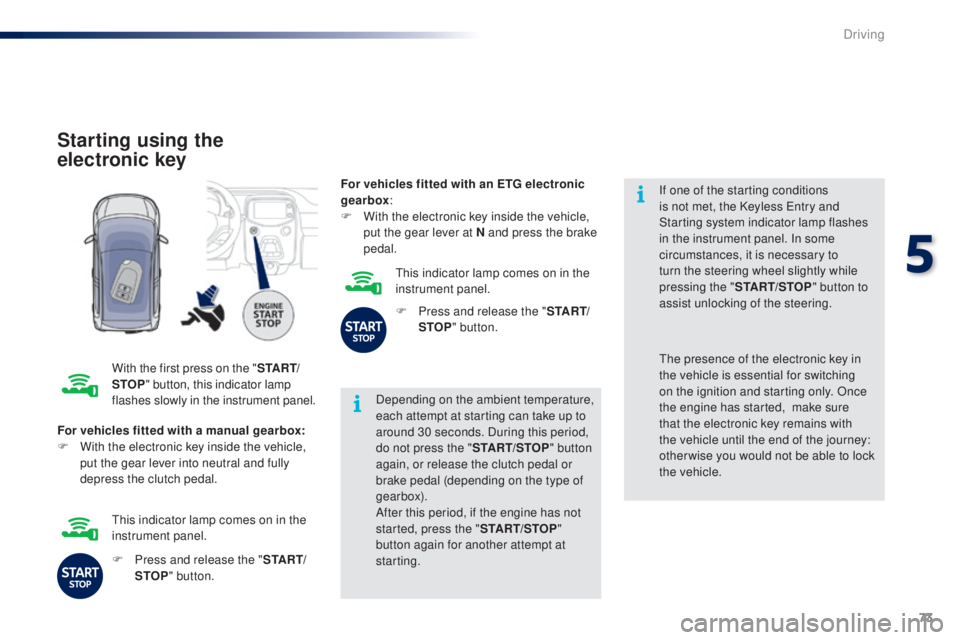
Starting using the
electronic key
With the first press on the "S TA R T/
STOP " button, this indicator lamp
flashes slowly in the instrument panel. Depending on the ambient temperature,
each attempt at starting can take up to
around 30 seconds. During this period,
do not press the "
START/STOP" button
again, or release the clutch pedal or
brake pedal (depending on the type of
gearbox).
After this period, if the engine has not
started, press the " START/STOP"
button again for another attempt at
starting. If one of the starting conditions
is not met, the Keyless
e
n
try and
Starting system indicator lamp flashes
in the instrument panel. In some
circumstances, it is necessary to
turn the steering wheel slightly while
pressing the " START/STOP " button to
assist unlocking of the steering.
For vehicles fitted with a manual gearbox:
F
W
ith the electronic key inside the vehicle,
put the gear lever into neutral and fully
depress the clutch pedal.th e presence of the electronic key in
the vehicle is essential for switching
on the ignition and starting only. Once
the engine has started,
make sure
that the electronic key remains with
the vehicle until the end of the journey:
other wise you would not be able to lock
the vehicle.
F
P
ress and release the " S TA R T/
STOP " button.
th
is indicator lamp comes on in the
instrument panel. For vehicles fitted with an ETG electronic
gearbox
:
F
W
ith the electronic key inside the vehicle,
put the gear lever at N and press the brake
pedal.
th
is indicator lamp comes on in the
instrument panel.
F
P
ress and release the "
S TA R T/
STOP " button.
5
Driving
Page 76 of 256
74
there is an audible signal when the driver's
door is opened and the vehicle is not in "OFF"
mode.
If the vehicle is not immobilised, the
engine will not stop.
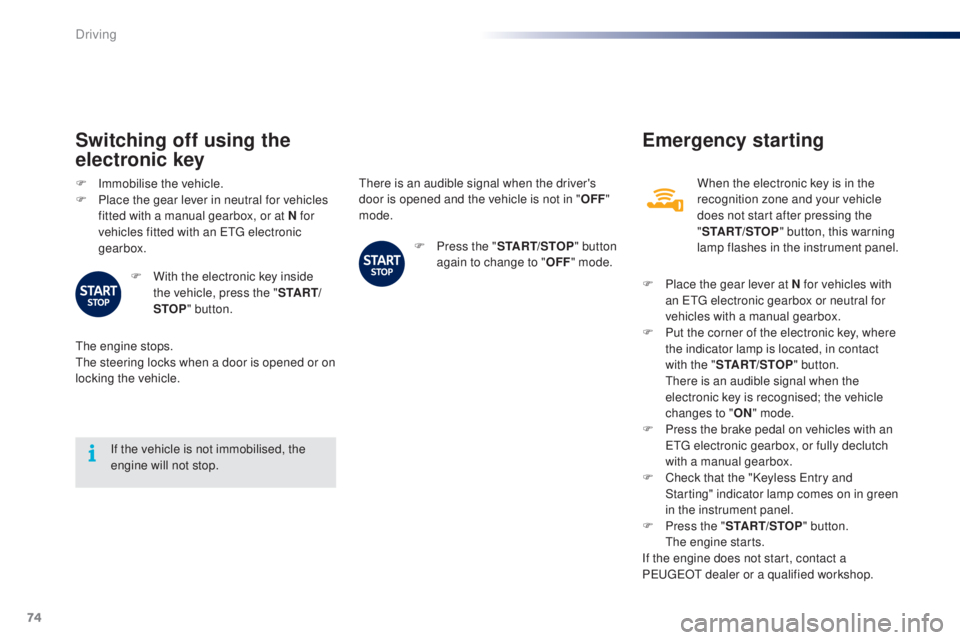
Switching off using the
electronic key
F Immobilise the vehicle.
F P lace the gear lever in neutral for vehicles
fitted with a manual gearbox, or at N for
vehicles fitted with an
etg electronic
gearbox.
F
W
ith the electronic key inside
the vehicle, press the " S TA R T/
STOP " button.
the
engine stops.
th
e steering locks when a door is opened or on
locking the vehicle. F
P
ress the "START/STOP " button
again to change to " OFF" mode.
Emergency starting
When the electronic key is in the
recognition zone and your vehicle
does not start after pressing the
"START/STOP " button, this warning
lamp flashes in the instrument panel.
F
P
lace the gear lever at N for vehicles with
an
etg electronic gearbox or neutral for
vehicles with a manual gearbox.
F
P
ut the corner of the electronic key, where
the indicator lamp is located, in contact
with the " START/STOP " button.
t
h
ere is an audible signal when the
electronic key is recognised; the vehicle
changes to " ON" mode.
F
P
ress the brake pedal on vehicles with an
e
tg
electronic gearbox, or fully declutch
with a manual gearbox.
F
C
heck that the "Keyless e
n
try and
Starting" indicator lamp comes on in green
in the instrument panel.
F
P
ress the " START/STOP " button.
t
h
e engine starts.
If the engine does not start, contact a
P
e
uge
Ot
dealer or a qualified workshop.
Driving
Page 143 of 256
141
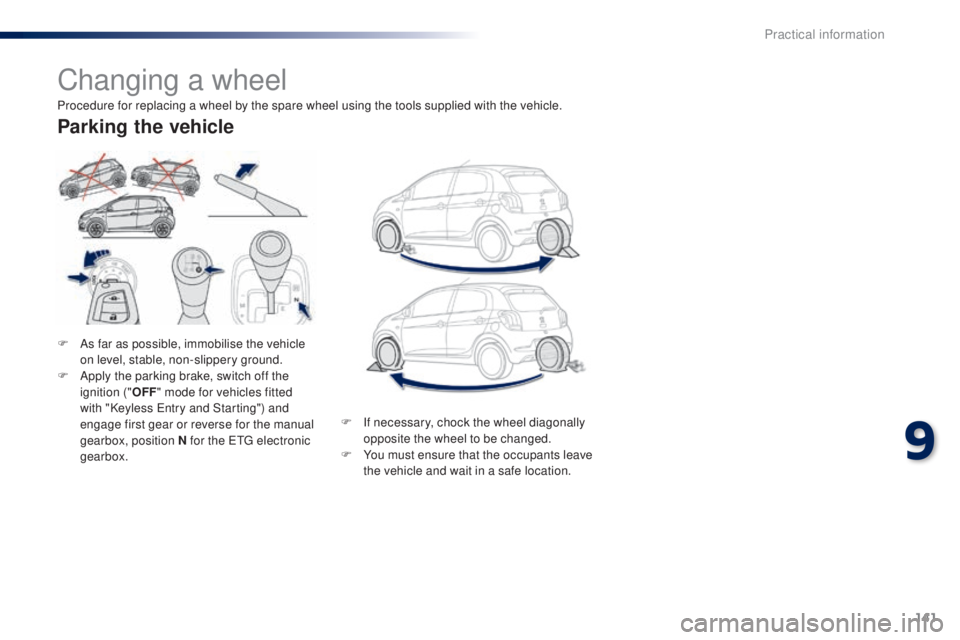
Changing a wheel
F As far as possible, immobilise the vehicle on level, stable, non-slippery ground.
F
A
pply the parking brake, switch off the
ignition (" OFF" mode for vehicles fitted
with "Keyless
e
n
try and Starting") and
engage first gear or reverse for the manual
gearbox, position N for the
etg electronic
gearbox.
Parking the vehicle
Procedure for replacing a wheel by the spare wheel using the tools supplied with the vehicle.
F
I
f necessary, chock the wheel diagonally
opposite the wheel to be changed.
F
Y
ou must ensure that the occupants leave
the vehicle and wait in a safe location.
9
Practical information
Page 157 of 256
155
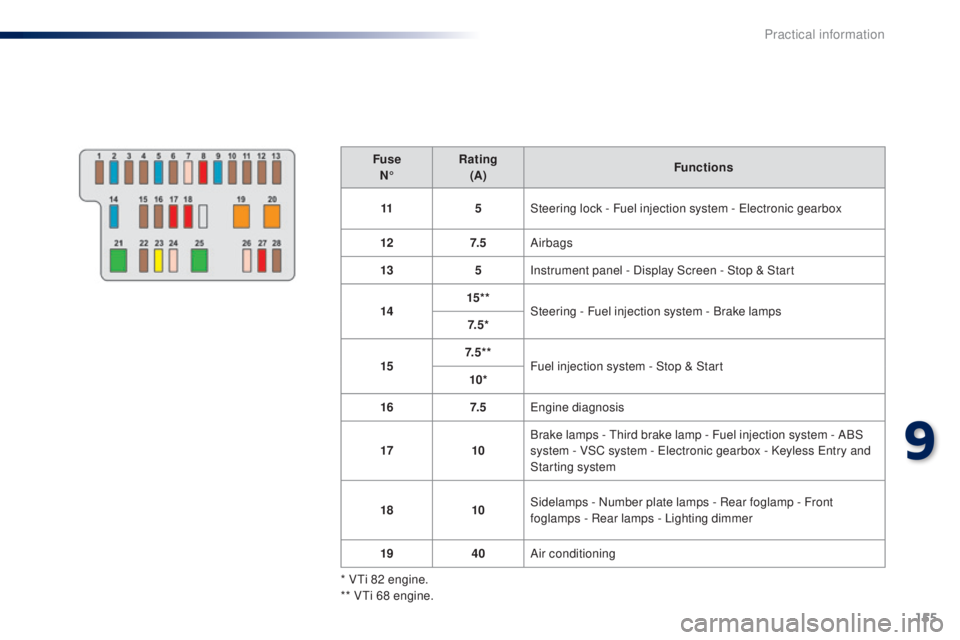
FuseN° Rating
(A) Functions
11 5Steering lock - Fuel injection system -
e
l
ectronic gearbox
12 7. 5Airbags
13 5Instrument panel - Display Screen - Stop & Start
14 15* *
Steering - Fuel injection system - Brake lamps
7. 5 *
15 7. 5 * *
Fuel injection system - Stop & Start
10*
16 7. 5
en
gine diagnosis
17 10Brake lamps -
t
h
ird brake lamp - Fuel injection system - ABS
system - VSC system -
e
l
ectronic gearbox - Keyless e
n
try and
Starting system
18 10Sidelamps - Number plate lamps - Rear foglamp - Front
foglamps - Rear lamps - Lighting dimmer
19 40Air conditioning
* V
ti 8
2 engine.
** V
ti 6
8 engine.
9
Practical information
Page 158 of 256
156
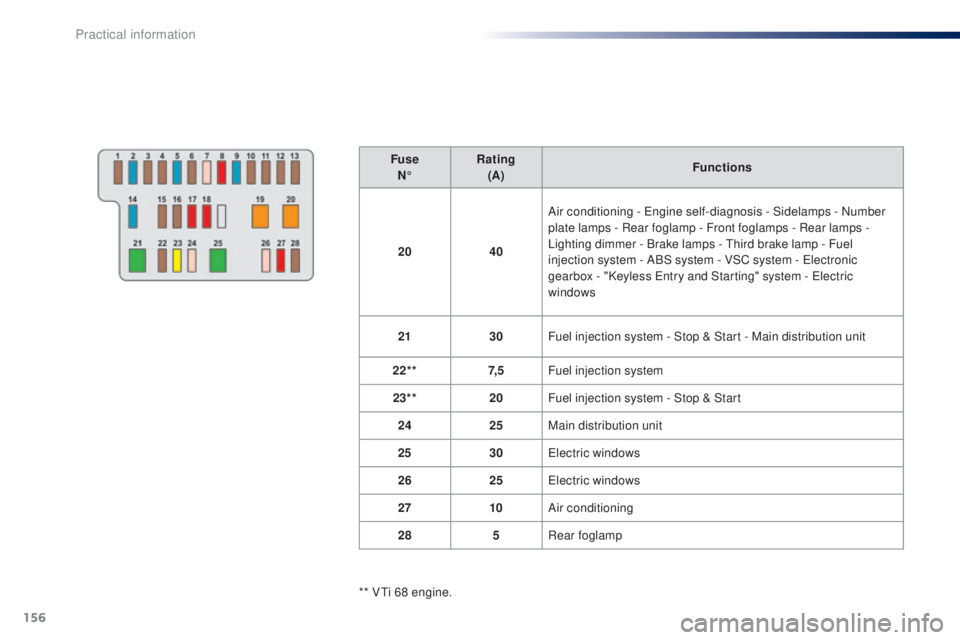
FuseN° Rating
(A) Functions
20 40Air conditioning -
e
n
gine self-diagnosis - Sidelamps - Number
plate lamps - Rear foglamp - Front foglamps - Rear lamps
-
Lighting dimmer - Brake lamps -
t
h
ird brake lamp - Fuel
injection system - ABS system - VSC system -
e
l
ectronic
gearbox - "Keyless
e
n
try and Starting" system - e
l
ectric
windows
21 30Fuel injection system - Stop & Start - Main distribution unit
22** 7, 5Fuel injection system
23** 20Fuel injection system - Stop & Start
24 25Main distribution unit
25 30
el
ectric windows
26 25
el
ectric windows
27 10Air conditioning
28 5Rear foglamp
** V
ti 6
8 engine.
Practical information
Page 160 of 256
158
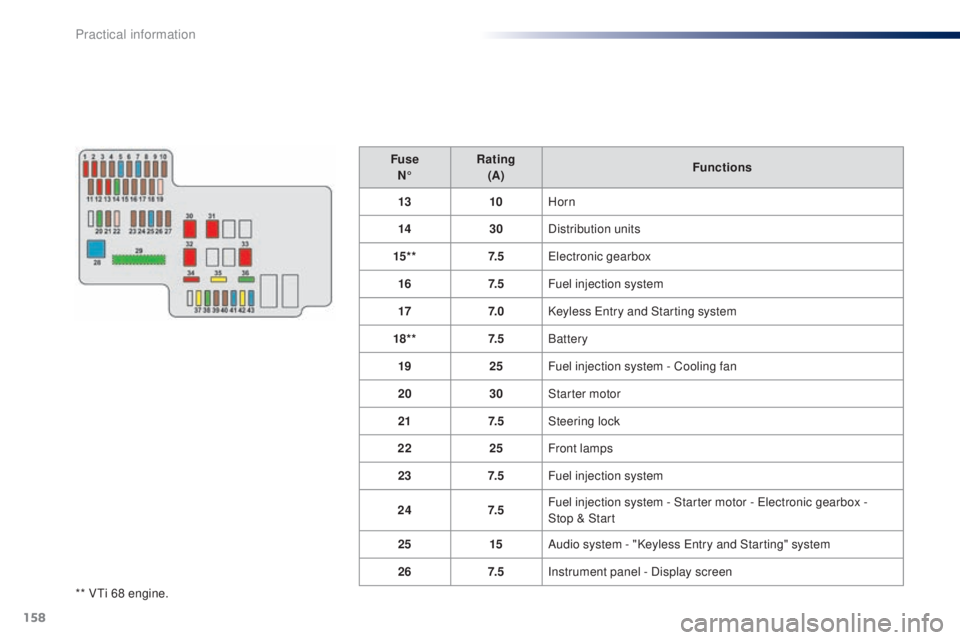
** Vti 68 engine.Fuse
N° Rating
(A) Functions
13 10Horn
14 30Distribution units
15* * 7. 5
ele
ctronic gearbox
16 7. 5Fuel injection system
17 7. 0Keyless e
n
try and Starting system
18* * 7. 5Battery
19 25Fuel injection system - Cooling fan
20 30Starter motor
21 7. 5Steering lock
22 25Front lamps
23 7. 5Fuel injection system
24 7. 5Fuel injection system - Starter motor - e
l
ectronic gearbox -
Stop
& Start
25 15Audio system - "Keyless e
n
try and Starting" system
26 7. 5Instrument panel - Display screen
Practical information
Page 166 of 256
164
electrical energy economy mode*
System which manages the duration of use of certain functions to conserve a sufficient level of
charge in the battery.
After the engine has stopped, you can still use functions such as the audio system, windscreen
wipers, dipped beam headlamps,
courtesy lamps, etc. for a maximum combined duration of
twenty
minutes.
th
is period may be greatly reduced if the battery is not fully charged. Let the engine run for the duration
specified to ensure that the battery
charge is sufficient.
Do not repeatedly and continuously
restart the engine in order to charge the
battery.
A flat battery prevents the engine from
starting.
Refer to the "Battery" section.
Switching to economy mode
Once this time has elapsed the active functions
are put on standby.
Exiting economy mode
these functions are reactivated automatically
next time the vehicle is driven.
to r
estore the use of these functions
immediately, start the engine and let it run for at
least 5 minutes.
Changing a wiper
blade
Removing the front wiper blade
F Raise the wiper arm.
F R emove the wiper blade, sliding it towards
the outside.
Fitting the front wiper blade
F Put the corresponding new wiper blade in place and fix it.
F
F
old down the wiper arm carefully.
to c
onserve the effectiveness of
the flat-blade type wiper blades, we
recommend that they are:
-
han
dled with care,
-
c
leaned regularly with soapy water,
-
n
ot used to hold a cardboard sheet
against the windscreen,
-
r
eplaced at the first signs of wear.
*
O
nly on vehicles with the "Keyless
e
n
try and
Starting" system.
Practical information
Page 183 of 256
181
7-Inch touch screen
For safety reasons, the driver must carry out operations
which require prolonged attention while the vehicle is
stationary.
to prevent discharging of the battery
, the system cuts off
following activation of energy economy mode, 20 minutes
after switching off the engine on vehicles fitted with the
"Keyless
e ntry and Starting" system.
Multimedia system
Bluetooth
® telephone
Mirror Screen
®
CONTENTS
182
01
General
operation p.
184
02
First steps - Control
panelp.
198
05
Telephone p. 186
04
Media p.
206
06
Connections p.
206
p.
210
06-1
iPhone
® connection
06-2
MirrorLink
® connection p.
214
07
Configuration p.
218
Frequently asked questions
p. 185
03
Steering mounted
controls
p.
B3_en_Chap12a_Autoradio-t oyota-tactile-1_ed01-2014
Page 223 of 256
MODE
221
RADIO
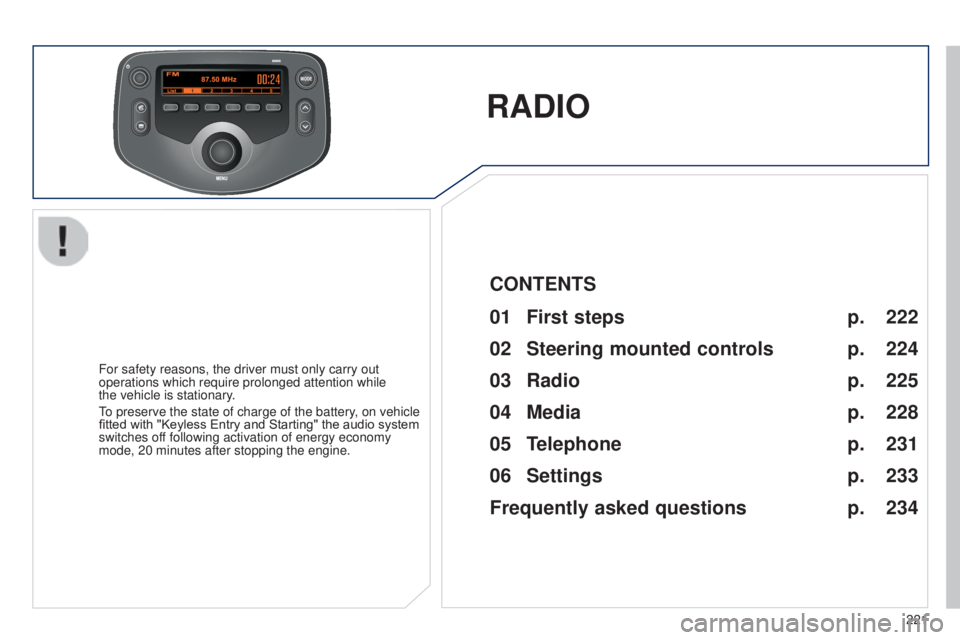
For safety reasons, the driver must only carry out
operations which require prolonged attention while
the vehicle is stationary.
to preserve the state of charge of the battery
, on vehicle
fitted with "Keyless Entry and Starting" the audio system
switches off following activation of energy economy
mode, 20 minutes after stopping the engine.
222
224
225
228
231
233
234
CONTENTS
01
First steps p.
02
Steering mounted
controls p.
05
Telephone p.
04
Media p.
06
Settings p.
p.
03
Radio p.
Frequently asked questions
B3_en_Chap12b_Autoradio-t oyota-2_ed01-2014
Page 239 of 256
237
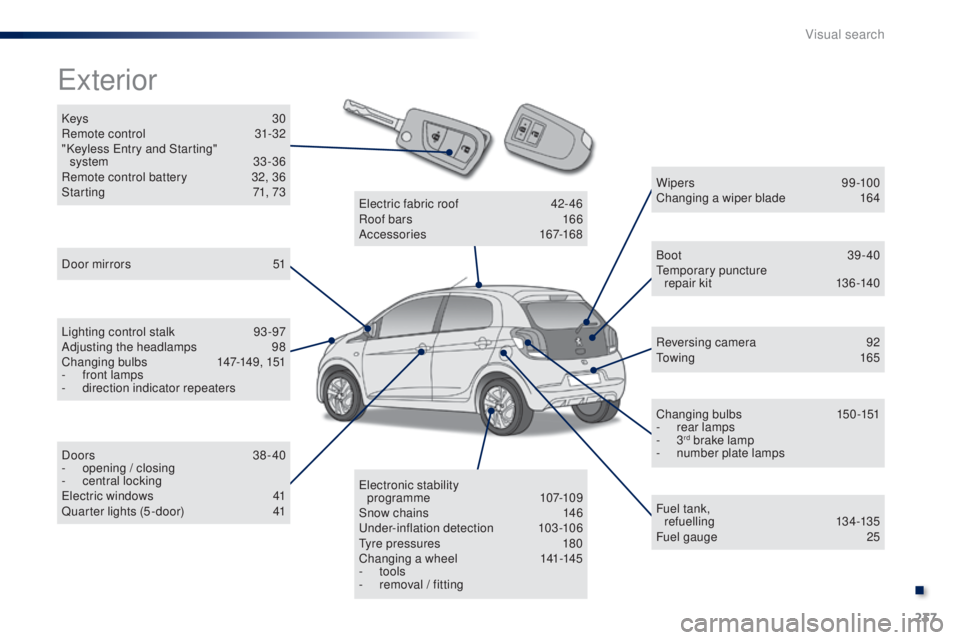
Keys 30
Remote control 3 1-32
"Keyless
e
n
try and Starting"
system
33 -36
Remote control battery
3
2, 36
Starting
7
1, 73
exterior
Door mirrors 5 1
Lighting control stalk
93
-97
Adjusting the headlamps
9
8
Changing bulbs
1
47-149, 151
-
f
ront lamps
-
d
irection indicator repeaters
Doors
38-40
-
ope
ning / closing
-
c
entral locking
el
ectric windows
4
1
Quarter lights (5 -door)
4
1 W ip e r s
9 9 -10 0
Changing a wiper blade
1
64
Boot 39-40te
mporary puncture
repair kit
1
36-140
Reversing camera
9
2
to
w i n g
16 5
Changing bulbs
1
50-151
-
r
ear lamps
-
3
rd brake lamp
-
n
umber plate lamps
Fuel tank, ref uelling
13 4 -13 5
Fuel gauge
2
5
ele
ctronic stability
programme
107-109
Snow chains
1
46
un
der-inflation detection
1
03-106
ty
re pressures
1
80
Changing a wheel
1
41-145
-
tools
-
r
emoval / fitting
ele
ctric fabric roof
4
2-46
Roof bars
1
66
Accessories
167-168
B3_en_Chap13_recherche-visuelle_ed01-2014
.
Visual search