radio PEUGEOT 108 2014 Owner's Manual
[x] Cancel search | Manufacturer: PEUGEOT, Model Year: 2014, Model line: 108, Model: PEUGEOT 108 2014Pages: 256, PDF Size: 5.88 MB
Page 207 of 256
05
205
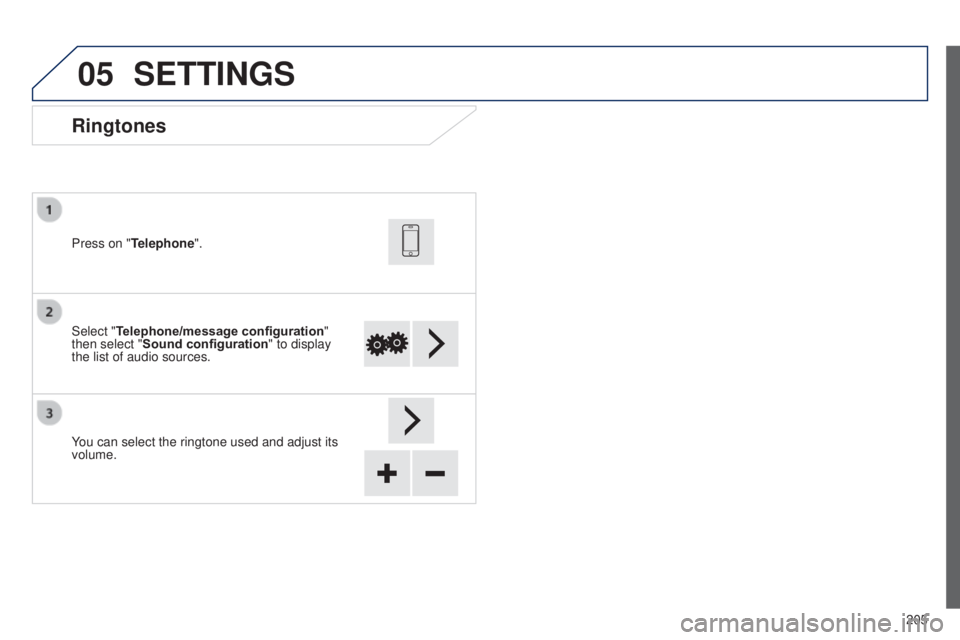
Ringtones
Select "Telephone/message configuration"
then select "Sound configuration " to display
the list of audio sources. Press on "Telephone".
You can select the ringtone used and adjust its
volume.
SETTINGS
B3_en_Chap12a_Autoradio-t oyota-tactile-1_ed01-2014
Page 209 of 256
06
207
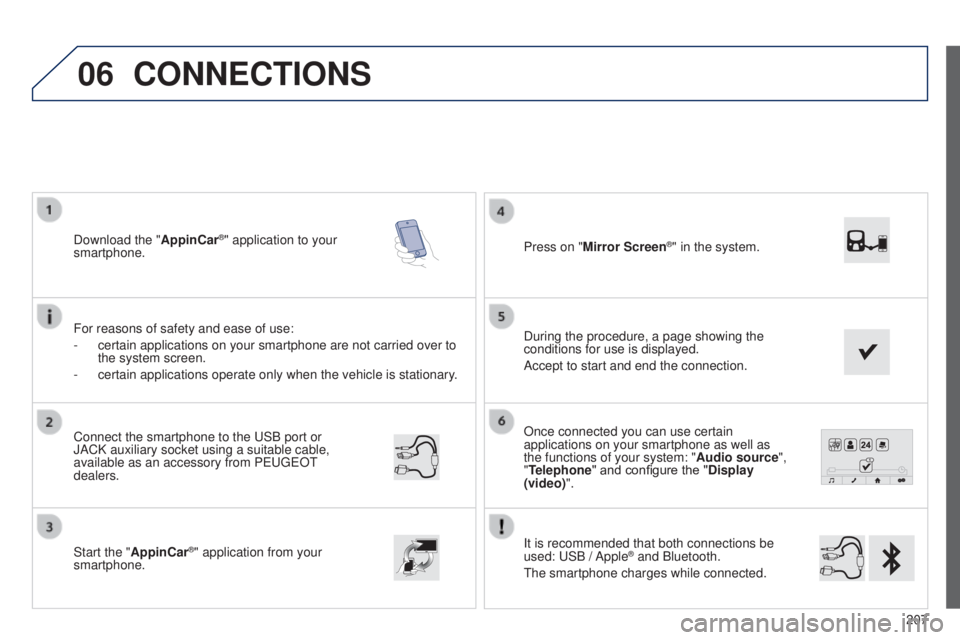
Once connected you can use certain
applications on your smartphone as well as
the functions of your system: "Audio source",
"Telephone" and configure the "Display
(video)".
It is recommended that both connections be
used:
u
SB / Apple
® and Bluetooth.
t
he smartphone charges while connected.
Connect the smartphone to the
u
SB
port or
JACK auxiliary socket using a suitable cable,
available as an accessory from P
euge
O
t
dealers.
Start the "
AppinCar®" application from your
smartphone. During the procedure, a page showing the
conditions for use is displayed.
Accept to start and end the connection. Press on "Mirror Screen
®" in the system.
Download the "
AppinCar®" application to your
smartphone.
For reasons of safety and ease of use:
-
certain applications on your smartphone are not carried over to
the system screen.
-
certain applications operate only when the vehicle is stationary
.
CONNECTIONS
B3_en_Chap12a_Autoradio-toyota-tactile-1_ed01-2014
Page 211 of 256
209
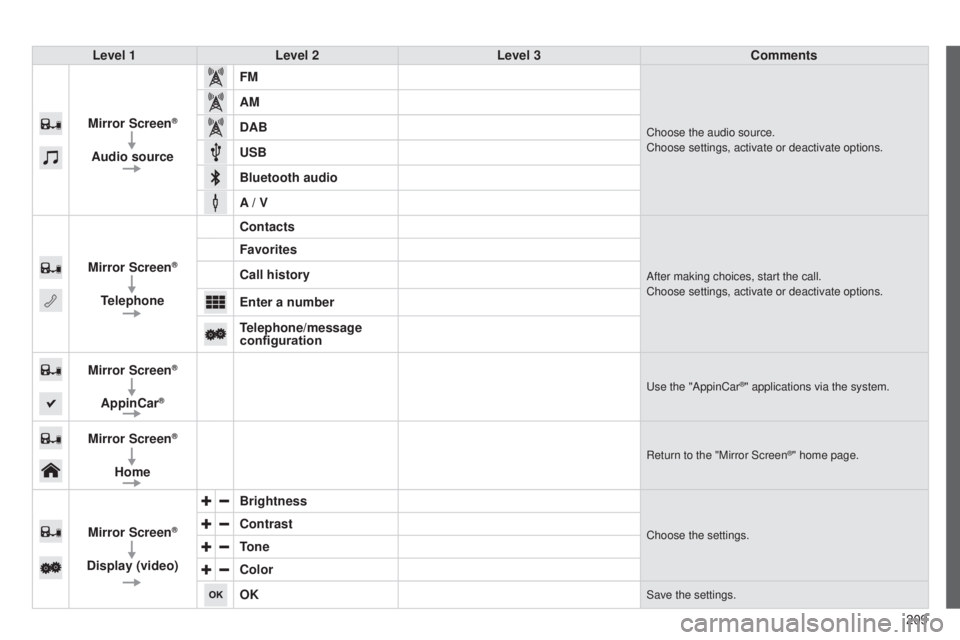
Level 1
Level 2 Level 3 Comments
Mirror Screen
®
Audio source FM
Choose the audio source.
Choose settings, activate or deactivate options.
AM
DAB
USB
Bluetooth audio
A / V
Mirror Screen
®
Telephone Contacts
After making choices, start the call.
Choose settings, activate or deactivate options.
Favorites
Call history
Enter a number
Telephone/message
configuration
Mirror Screen
®
AppinCar®use the "AppinCar®" applications via the system.
Mirror Screen®
Home
Return to the "Mirror Screen®" home page.
Mirror Screen®
Display (video) Brightness
Choose the settings.Contrast
Tone
Color
OK
Save the settings.
B3_en_Chap12a_Autoradio-t
oyota-tactile-1_ed01-2014
Page 213 of 256
06
2 11
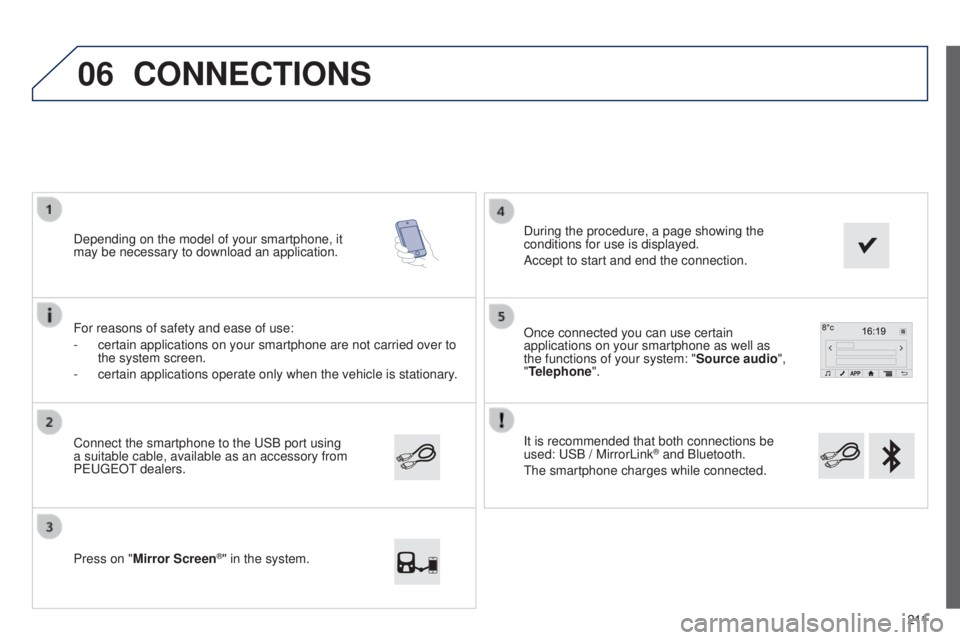
It is recommended that both connections be
used:
u
SB / MirrorLink
® and Bluetooth.
t
he smartphone charges while connected.
Once connected you can use certain
applications on your smartphone as well as
the functions of your system: "Source audio
",
"Telephone".
Connect the smartphone to the
u
SB port using
a suitable cable, available as an accessory from
P
euge
O
t dealers.
Depending on the model of your smartphone, it
may be necessary to download an application.
Press on "
Mirror Screen
®" in the system. During the procedure, a page showing the
conditions for use is displayed.
Accept to start and end the connection.
For reasons of safety and ease of use:
-
certain applications on your smartphone are not carried over to
the system screen.
-
certain applications operate only when the vehicle is stationary
.
CONNECTIONS
B3_en_Chap12a_Autoradio-t
oyota-tactile-1_ed01-2014
Page 215 of 256
213
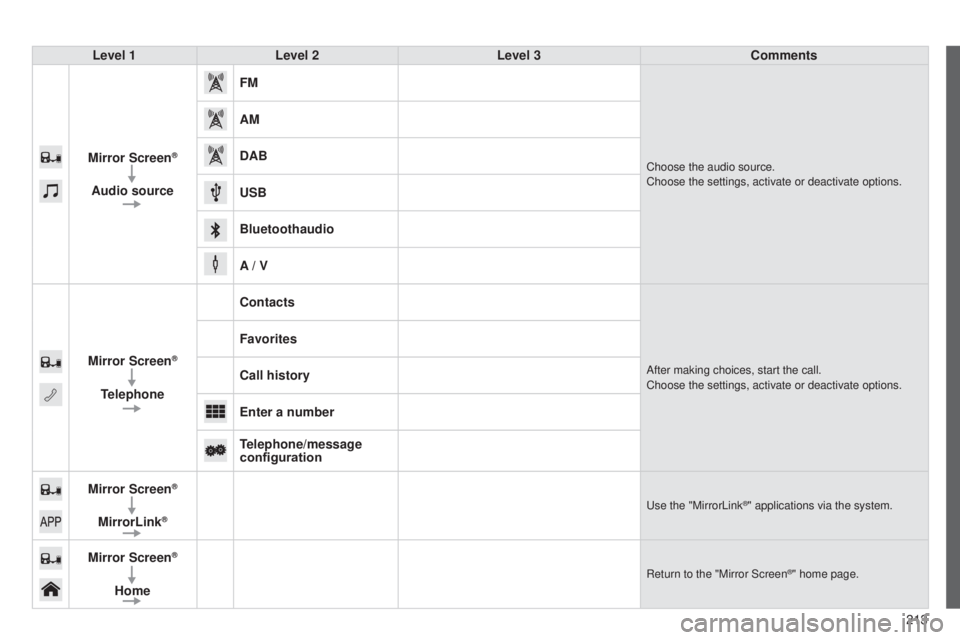
Level 1
Level 2 Level 3 Comments
Mirror Screen
®
Audio source FM
Choose the audio source.
Choose the settings, activate or deactivate options.
AM
DAB
USB
Bluetoothaudio
A / V
Mirror Screen
®
Telephone Contacts
After making choices, start the call.
Choose the settings, activate or deactivate options.
Favorites
Call history
Enter a number
Telephone/message
configuration
Mirror Screen
®
MirrorLink®use the "MirrorLink®" applications via the system.
Mirror Screen®
Home
Return to the "Mirror Screen®" home page.
B3_en_Chap12a_Autoradio-t oyota-tactile-1_ed01-2014
Page 217 of 256
215
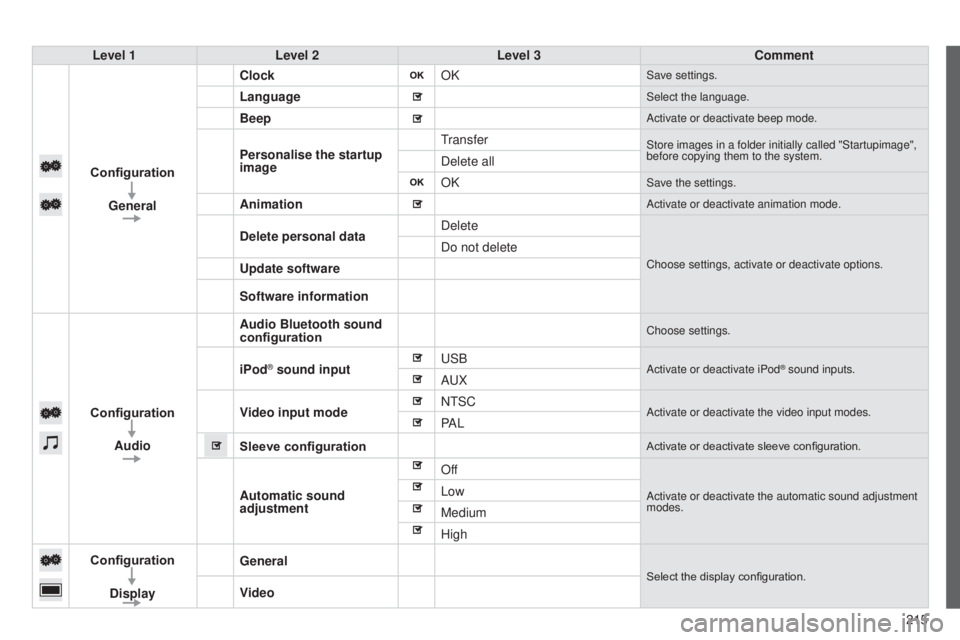
Level 1
Level 2 Level 3 Comment
Configuration General Clock
OK
Save settings.
LanguageSelect the language.
BeepActivate or deactivate beep mode.
Personalise the startup
imagetransferStore images in a folder initially called "Startupimage",
before copying them to the system.
Delete all
OK
Save the settings.
AnimationActivate or deactivate animation mode.
Delete personal dataDelete
Choose settings, activate or deactivate options.
Do not delete
Update software
Software information
Configuration Audio Audio Bluetooth sound
configuration
Choose settings.
iPod® sound inputu
SBActivate or deactivate iPod® sound inputs.AuX
V
ideo input mode N
t SC
Activate or deactivate the video input modes.PA L
Sleeve configuration
Activate or deactivate sleeve configuration.
Automatic sound
adjustment OffActivate or deactivate the automatic sound adjustment
modes.Low
Medium
High
Configuration
Display General
Select the display configuration.
Video
B3_en_Chap12a_Autoradio-t
oyota-tactile-1_ed01-2014
Page 219 of 256

217
Level 1
Level 2 Level 3 Comment
Configuration Bluetooth Telephone
Select the services to use on the peripheral device.
Audio player
Add
Connect a new peripheral device.
System configuration
telephone
Select the services to use on the peripheral device.Audio player
Cancel
Remove
Disconnect and remove a peripheral device from the
list.
Configuration Telephone Connect the telephoneSee the telephone section.
Sounds configuration
Contacts/call history
configuration
Message configuration
Telephone display
configuration
Configuration Screen off
Select this mode to switch off the screen, touch the
screen to restore.
B3_en_Chap12a_Autoradio-t oyota-tactile-1_ed01-2014
Page 221 of 256
FREQUENTLY ASKED QUESTIONS
219
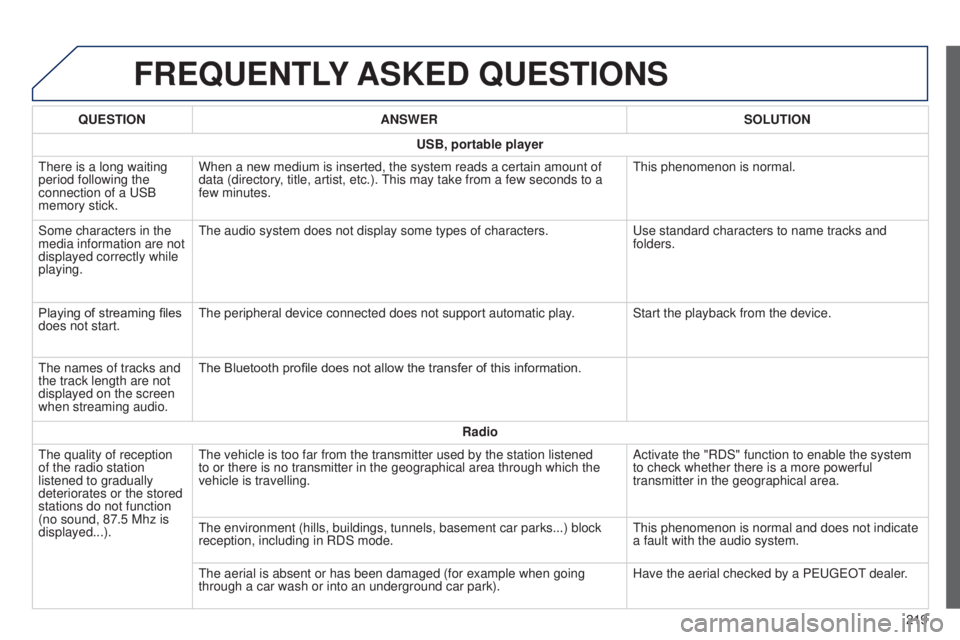
QUESTION
ANSWER SOLUTION
USB, portable player
t
here is a long waiting
period following the
connection of a
u
SB
memory stick. When a new medium is inserted, the system reads a certain amount of
data (directory, title, artist, etc.).
t
his may take from a few seconds to a
few minutes.
t
his phenomenon is normal.
Some characters in the
media information are not
displayed correctly while
playing.
t
he audio system does not display some types of characters.
u
se standard characters to name tracks and
folders.
Playing of streaming files
does not start.
t
he peripheral device connected does not support automatic play. Start the playback from the device.
t
he names of tracks and
the track length are not
displayed on the screen
when streaming audio. The Bluetooth profile does not allow the transfer of this information.
Radio
t
he quality of reception
of the radio station
listened to gradually
deteriorates or the stored
stations do not function
(no sound, 87.5
Mhz is
displayed...).
t
he vehicle is too far from the transmitter used by the station listened \
to or there is no transmitter in the geographical area through which the\
vehicle is travelling. Activate the "RDS" function to enable the system
to check whether there is a more powerful
transmitter in the geographical area.
t
he environment (hills, buildings, tunnels, basement car parks...) bloc\
k
reception, including in RDS mode.
t
his phenomenon is normal and does not indicate
a fault with the audio system.
t
he aerial is absent or has been damaged (for example when going
through a car wash or into an underground car park). Have the aerial checked by a P
euge
O
t
dealer
.
B3_en_Chap12a_Autoradio-t
oyota-tactile-1_ed01-2014
Page 222 of 256
FREQUENTLY ASKED QUESTIONS
220QUESTION
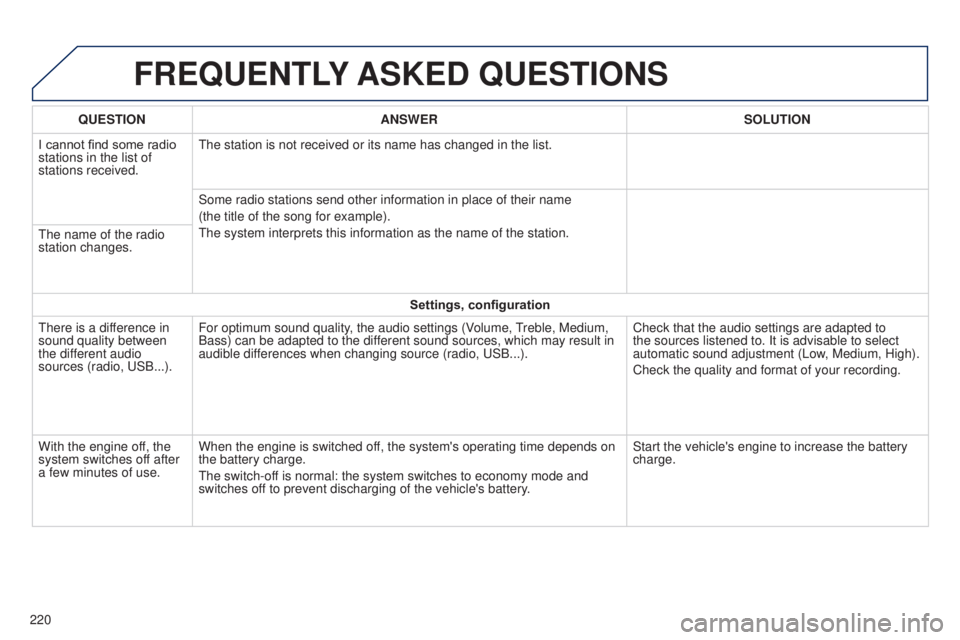
ANSWER SOLUTION
I cannot find some radio
stations in the list of
stations received.
t
he station is not received or its name has changed in the list.
Some radio stations send other information in place of their name
(the title of the song for example).
t
he system interprets this information as the name of the station.
t
he name of the radio
station changes.
Settings, configuration
t
here is a difference in
sound quality between
the different audio
sources (radio, u SB...).
For optimum sound quality, the audio settings (Volume,
treble, Medium,
Bass) can be adapted to the dif
ferent sound sources, which may result in
audible differences when changing source (radio, u SB...).
Check that the audio settings are adapted to
the sources listened to. It is advisable to select
automatic sound adjustment (Low, Medium, High).
Check the quality and format of your recording.
With the engine off, the
system switches off after
a few minutes of use. When the engine is switched off, the system's operating time depends on
the battery charge.
t
he switch-off is normal: the system switches to economy mode and
switches off to prevent discharging of the vehicle's battery. Start the vehicle's engine to increase the battery
charge.
Page 223 of 256
MODE
221
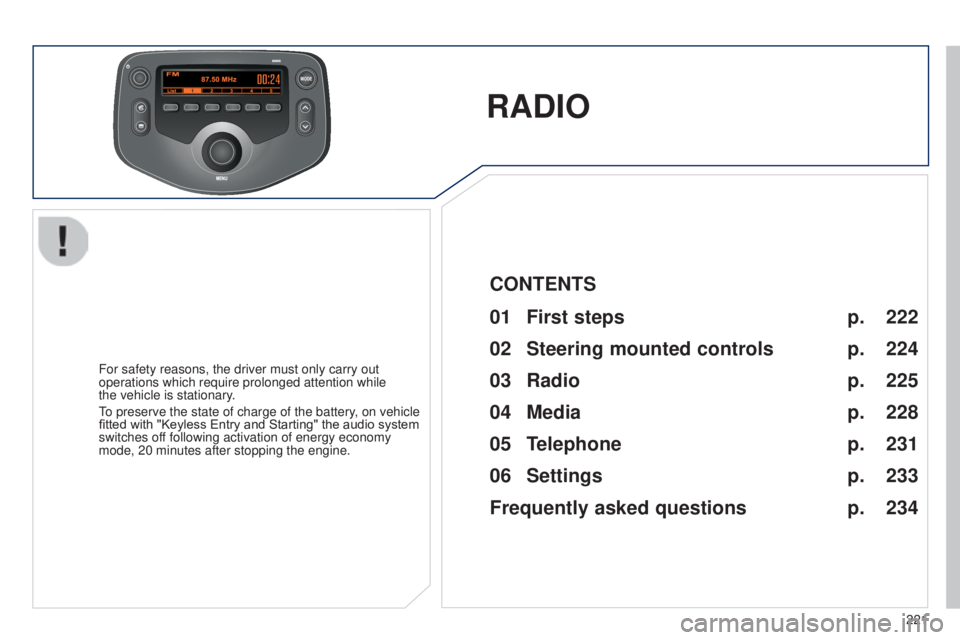
RADIO
For safety reasons, the driver must only carry out
operations which require prolonged attention while
the vehicle is stationary.
to preserve the state of charge of the battery
, on vehicle
fitted with "Keyless Entry and Starting" the audio system
switches off following activation of energy economy
mode, 20 minutes after stopping the engine.
222
224
225
228
231
233
234
CONTENTS
01
First steps p.
02
Steering mounted
controls p.
05
Telephone p.
04
Media p.
06
Settings p.
p.
03
Radio p.
Frequently asked questions
B3_en_Chap12b_Autoradio-t oyota-2_ed01-2014