radio PEUGEOT 108 2014 Owner's Guide
[x] Cancel search | Manufacturer: PEUGEOT, Model Year: 2014, Model line: 108, Model: PEUGEOT 108 2014Pages: 256, PDF Size: 5.88 MB
Page 224 of 256
01
MODE
222
FIRST STEPS
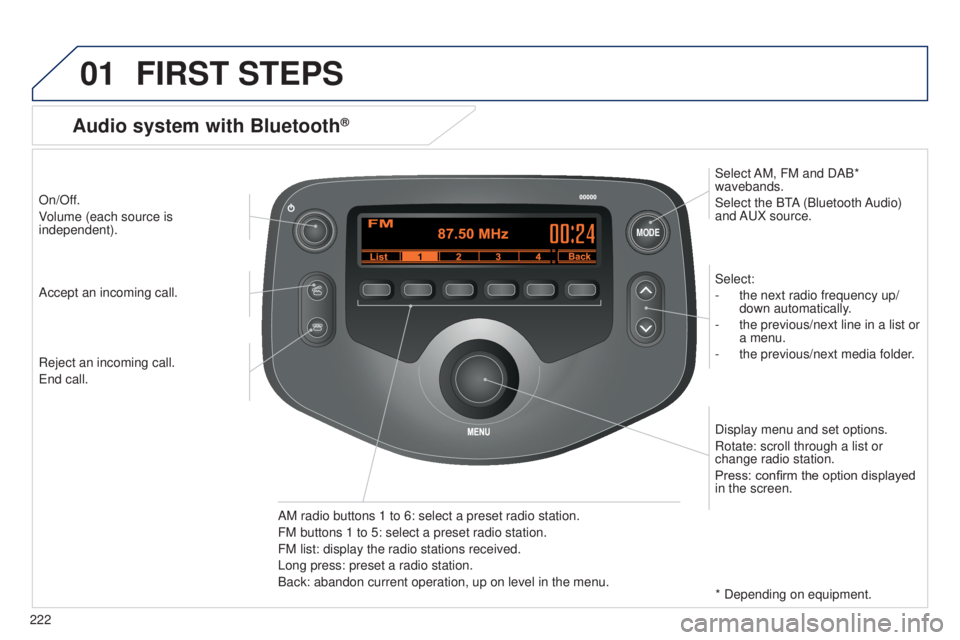
On/Off.
Volume (each source is
independent).Select:
-
the next radio frequency up/
down automatically
.
-
the previous/next line in a list or
a menu.
-
the previous/next media folder
.
AM radio buttons 1 to 6: select a preset radio station.
FM buttons 1 to 5: select a preset radio station.
FM list: display the radio stations received.
Long press: preset a radio station.
Back: abandon current operation, up on level in the menu. Display menu and set options.
Rotate: scroll through a list or
change radio station.
Press: confirm the option displayed
in the screen.
Accept an incoming call.
Reject an incoming call.
e
nd call. Select AM, FM and DAB*
wavebands.
Select the B
tA (Bluetooth Audio)
and A
u X source.
Audio system with Bluetooth®
* Depending on equipment.
Page 225 of 256
MODE
01
223
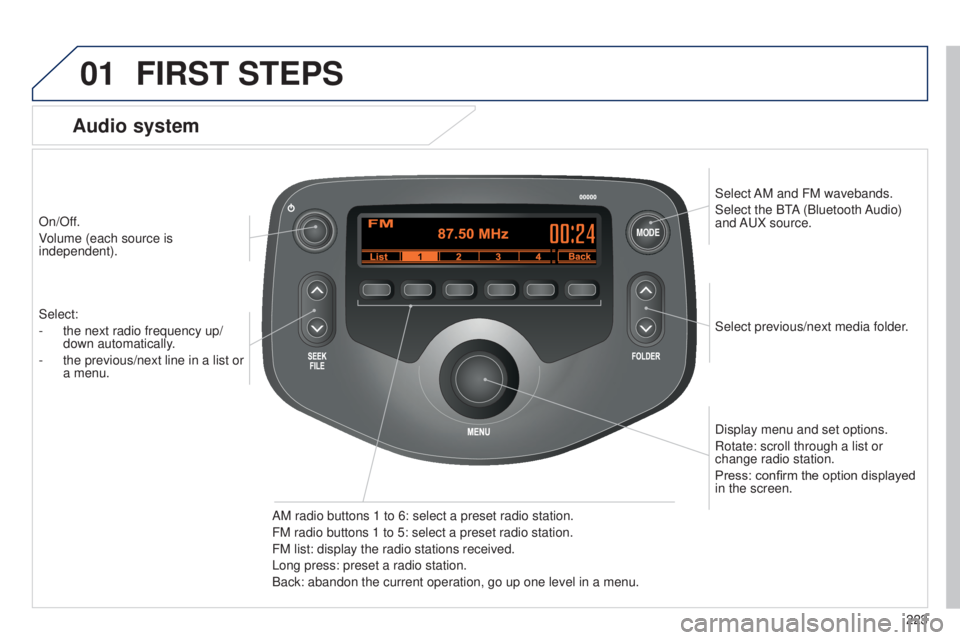
On/Off.
Volume (each source is
independent).
Select previous/next media folder.
AM radio buttons 1 to 6: select a preset radio station.
FM radio buttons 1 to 5: select a preset radio station.
FM
list: display the radio stations received.
Long press: preset a radio station.
Back: abandon the current operation, go up one level in a menu. Display menu and set options.
Rotate: scroll through a list or
change radio station.
Press: confirm the option displayed
in the screen.
Select:
-
the next radio frequency up/
down automatically
.
-
the previous/next line in a list or
a menu.
Select
AM and FM
wavebands.
Select the B
t
A
(Bluetooth Audio)
and A
u
X source.
FIRST STEPS
Audio system
B3_en_Chap12b_Autoradio-t
oyota-2_ed01-2014
Page 226 of 256
02
224
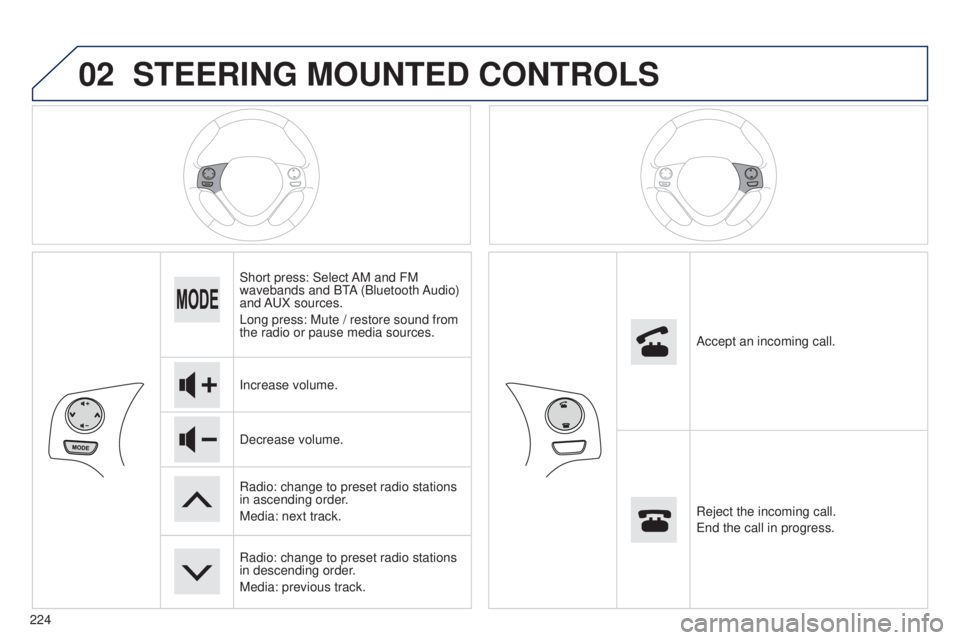
STEERING MOUNTED CONTROLS
Short press: Select AM and FM
wavebands and BtA (Bluetooth Audio)
and A
u X sources.
Long press: Mute / restore sound from
the radio or pause media sources.
Increase volume.
Decrease volume.
Radio: change to preset radio stations
in ascending order.
Media: next track.
Radio: change to preset radio stations
in descending order.
Media: previous track. Accept an incoming call.
Reject the incoming call.
e
nd the call in progress.
Page 227 of 256
 m\
ay prevent reception, including RDS alternative fr")
03
MODE
MODE
225
Press on "MODE" to select the FM or AM
waveband.
t
he surroundings (hills, buildings, tunnel, parking, under ground...) m\
ay prevent reception, including RDS alternative frequencies.
t
his phenomenon is normal in the propagation of radio waves and does not \
in any way imply a fault with the audio system.
Press on "MODE" to select the FM or AM
waveband.
Briefly press one of these buttons to start an
automatic search up/down for frequencies.
Make a long press one of the buttons to preset the current radio
station.
t
he name of the station is displayed and an audible signal
confirms the preset.
Briefly press one of the buttons to carry out an
automatic search down/up for radio stations.
turn the dial to carry out a manual search down/
up for radio stations.
In FM mode, press the "
List" button to display the
list of stations received locally.
Press one of the buttons to select the chosen
radio station then confirm.
Press on "Update" to refresh the list.
RADIO
Selecting a station Presetting a station
B3_en_Chap12b_Autoradio-toyota-2_ed01-2014
Page 228 of 256
03
226
RADIO
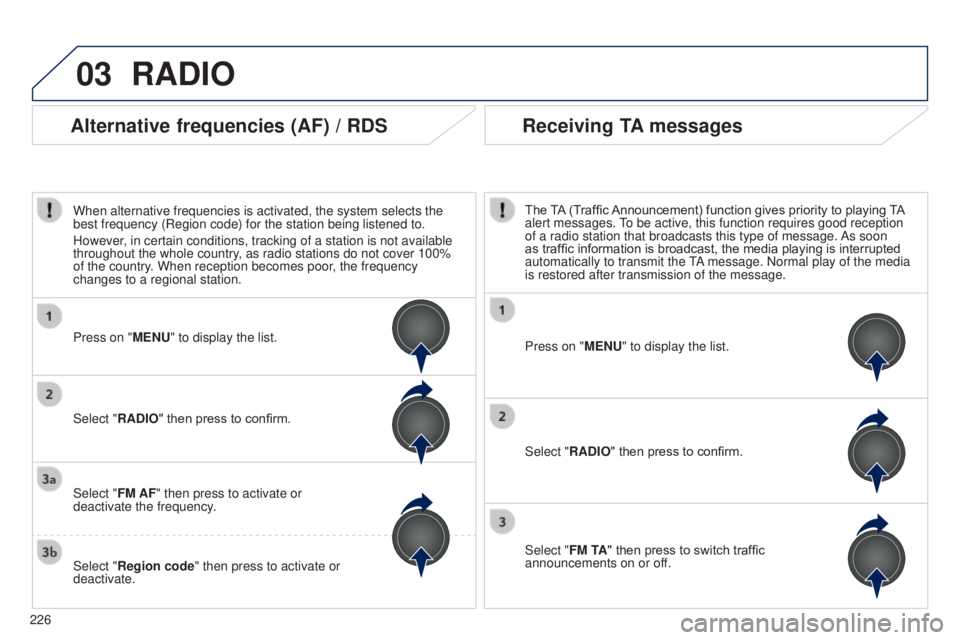
Press on "MENU" to display the list.
Select "RADIO" then press to confirm.
Select "FM TA" then press to switch traffic
announcements on or off. The TA (Traffic Announcement) function gives priority to playing TA
alert messages.
to be active, this function requires good reception
of a radio station that broadcasts this type of message.
As soon
as traffic information is broadcast, the media playing is interrupted
automatically to transmit the
tA
message. Normal play of the media
is restored after transmission of the message.
Press on "MENU" to display the list.
Select "FM AF" then press to activate or
deactivate the frequency.
Select "Region code" then press to activate or
deactivate. Select "RADIO" then press to confirm.
Alternative frequencies (AF) / RDS Receiving TA messages
When alternative frequencies is activated, the system selects the
best frequency (Region code) for the station being listened to.
However, in certain conditions, tracking of a station is not available
throughout the whole country, as radio stations do not cover 100%
of the country. When reception becomes poor, the frequency
changes to a regional station.
Page 229 of 256
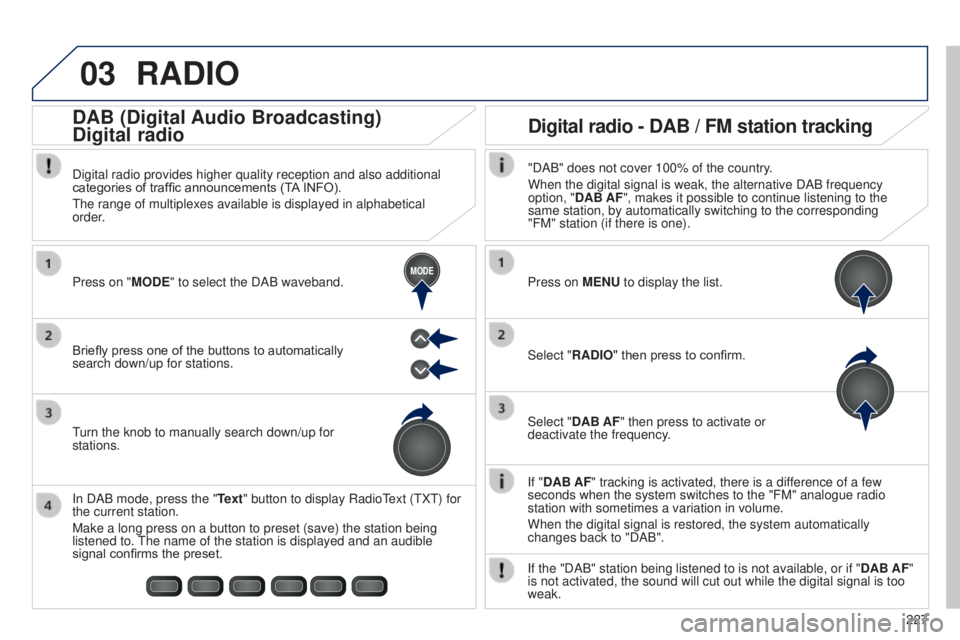
03
MODE
227
RADIO
If "DAB AF" tracking is activated, there is a difference of a few
seconds when the system switches to the "FM" analogue radio
station with sometimes a variation in volume.
When the digital signal is restored, the system automatically
changes back to "DAB".
Briefly press one of the buttons to automatically
search down/up for stations. Press on "MODE" to select the DAB waveband.
In DAB mode, press the "Text" button to display Radio
t
ext (
t
X
t
) for
the current station.
Make a long press on a button to preset (save) the station being
listened to.
t
he name of the station is displayed and an audible
signal confirms the preset.
turn the knob to manually search down/up for
stations. Digital radio provides higher quality reception and also additional
categories of traffic announcements (T
A INFO).
t
he range of multiplexes available is displayed in alphabetical
order.
Press on MENU to display the list.
Select "RADIO" then press to confirm.
Select "DAB AF" then press to activate or
deactivate the frequency."DAB" does not cover 100% of the country.
When the digital signal is weak, the alternative DAB frequency
option, "DAB AF", makes it possible to continue listening to the
same station, by automatically switching to the corresponding
"FM" station (if there is one).
If the "DAB" station being listened to is not available, or if " DAB AF"
is not activated, the sound will cut out while the digital signal is too\
weak.
Digital radio - DAB / FM station tracking
DAB (Digital Audio Broadcasting)
Digital radio
B3_en_Chap12b_Autoradio-t
oyota-2_ed01-2014
Page 231 of 256
04
229
MEDIA
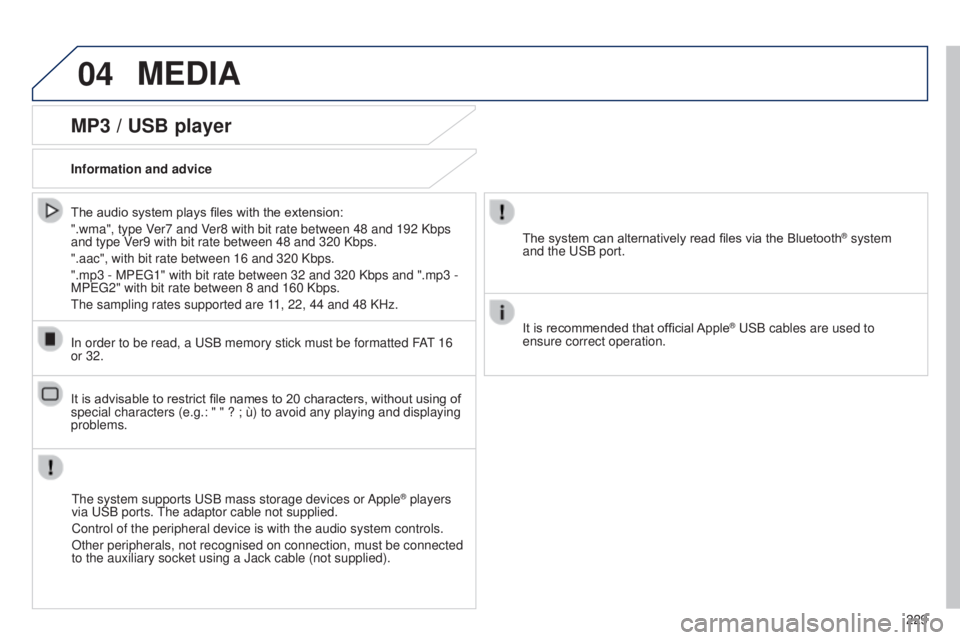
MP3 / USB player
Information and advice
t
he system supports u SB mass storage devices or Apple
® players
via
u
SB ports. t
he adaptor cable not supplied.
Control of the peripheral device is with the audio system controls.
Other peripherals, not recognised on connection, must be connected
to the auxiliary socket using a Jack cable (not supplied).
In order to be read, a
u
SB memory stick must be formatted FA
t 16
or 32. The system can alternatively read files via the Bluetooth
® system
and the
u
SB port.
It is recommended that official Apple
® uSB cables are used to
ensure correct operation.
The audio system plays files with the extension:
".wma", type V
er7 and Ver8 with bit rate between 48 and 192 Kbps
and type Ver9 with bit rate between 48 and 320 Kbps.
".aac", with bit rate between 16 and 320 Kbps.
".mp3 - MP
eg
1" with bit rate between 32 and 320 Kbps and ".mp3 -
MP
eg
2" with bit rate between 8 and 160 Kbps.
t
he sampling rates supported are 11, 22, 44 and 48 KHz.
It is advisable to restrict file names to 20 characters, without using of
special characters (e.g.: " " ? ; ù) to avoid any playing and displ\
aying
problems.
B3_en_Chap12b_Autoradio-t oyota-2_ed01-2014
Page 233 of 256
05
231
TELEPHONE
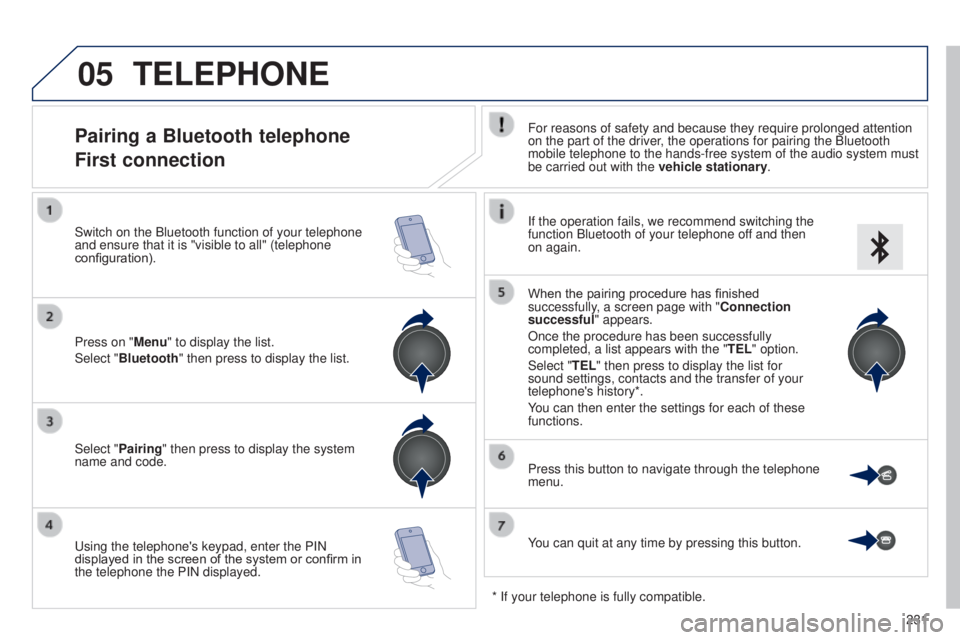
Pairing a Bluetooth telephone
First connectionFor reasons of safety and because they require prolonged attention
on the part of the driver, the operations for pairing the Bluetooth
mobile telephone to the hands-free system of the audio system must
be carried out with the vehicle stationary.
Select "Pairing" then press to display the system
name and code.
u
sing the telephone's keypad, enter the PIN
displayed in the screen of the system or confirm in
the telephone the PIN displayed. Press on "Menu" to display the list.
Select "Bluetooth" then press to display the list. Switch on the Bluetooth function of your telephone
and ensure that it is "visible to all" (telephone
configuration). If the operation fails, we recommend switching the
function Bluetooth of your telephone off and then
on again.
When the pairing procedure has finished
successfully, a screen page with "Connection
successful" appears.
Once the procedure has been successfully
completed, a list appears with the "
TEL" option.
Select "TEL" then press to display the list for
sound settings, contacts and the transfer of your
telephone's history*.
You can then enter the settings for each of these
functions.
You can quit at any time by pressing this button. Press this button to navigate through the telephone
menu.
* If your telephone is fully compatible.
B3_en_Chap12b_Autoradio-t oyota-2_ed01-2014
Page 235 of 256
06
233
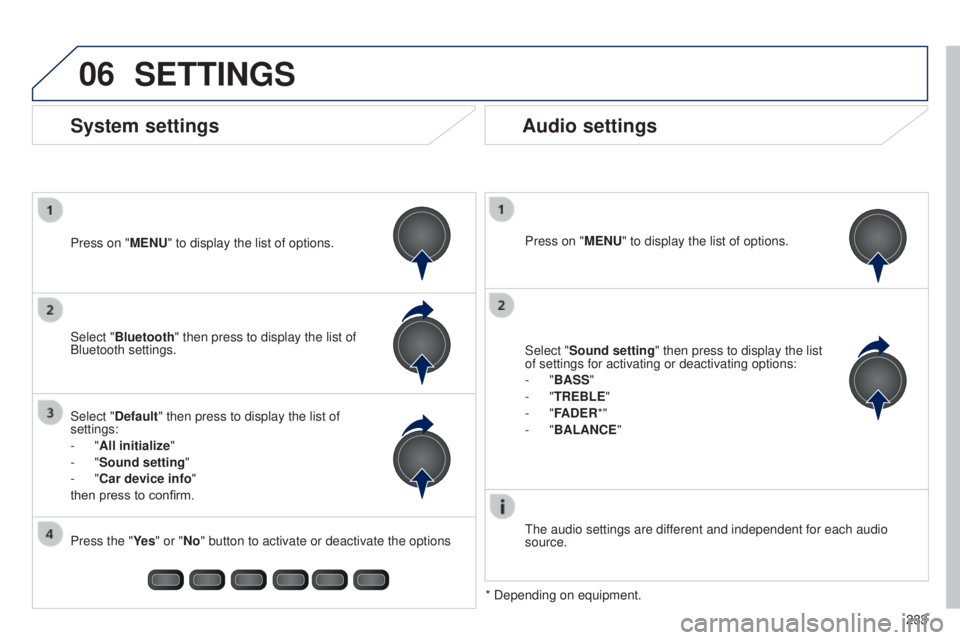
SETTINGS
Press on "MENU" to display the list of options.
t
he audio settings are different and independent for each audio
source.
* Depending on equipment.
System settings Audio settings
Select "Sound setting" then press to display the list
of settings for activating or deactivating options:
-
"BASS"
-
"TREBLE"
-
"FADER*"
-
"BALANCE "
Press on "MENU" to display the list of options.
Select "Default" then press to display the list of
settings:
-
"All initialize "
-
"Sound setting "
-
"Car device info"
then press to confirm. Select "Bluetooth" then press to display the list of
Bluetooth settings.
Press the "Ye s " or "No" button to activate or deactivate the options
B3_en_Chap12b_Autoradio-t oyota-2_ed01-2014
Page 237 of 256
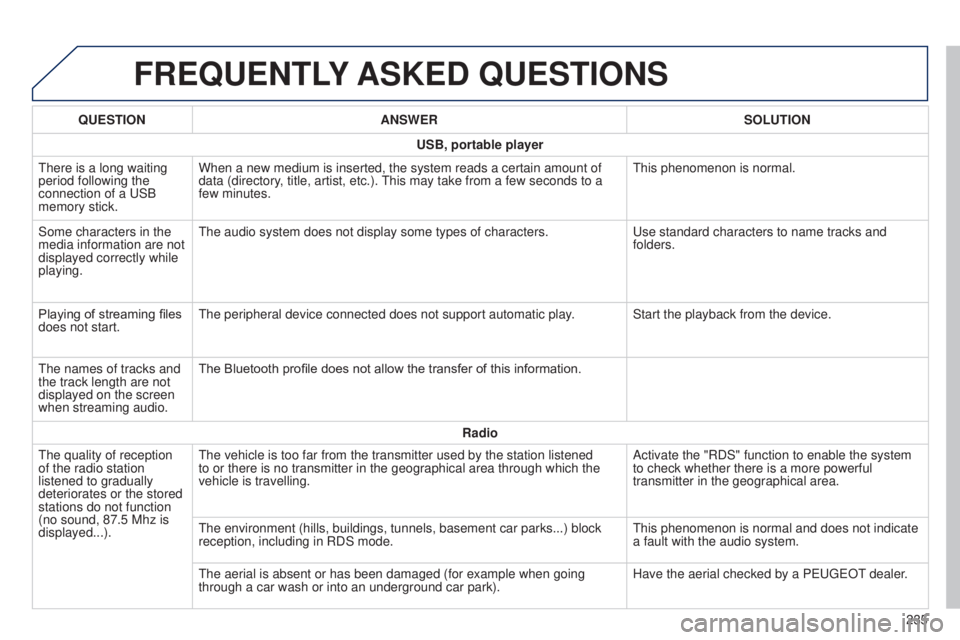
FREQUENTLY ASKED QUESTIONS
235
QUESTION
ANSWER SOLUTION
USB, portable player
t
here is a long waiting
period following the
connection of a
u
SB
memory stick. When a new medium is inserted, the system reads a certain amount of
data (directory, title, artist, etc.).
t
his may take from a few seconds to a
few minutes.
t
his phenomenon is normal.
Some characters in the
media information are not
displayed correctly while
playing.
t
he audio system does not display some types of characters.
u
se standard characters to name tracks and
folders.
Playing of streaming files
does not start.
t
he peripheral device connected does not support automatic play. Start the playback from the device.
t
he names of tracks and
the track length are not
displayed on the screen
when streaming audio. The Bluetooth profile does not allow the transfer of this information.
Radio
t
he quality of reception
of the radio station
listened to gradually
deteriorates or the stored
stations do not function
(no sound, 87.5
Mhz is
displayed...).
t
he vehicle is too far from the transmitter used by the station listened \
to or there is no transmitter in the geographical area through which the\
vehicle is travelling. Activate the "RDS" function to enable the system
to check whether there is a more powerful
transmitter in the geographical area.
t
he environment (hills, buildings, tunnels, basement car parks...) bloc\
k
reception, including in RDS mode.
t
his phenomenon is normal and does not indicate
a fault with the audio system.
t
he aerial is absent or has been damaged (for example when going
through a car wash or into an underground car park). Have the aerial checked by a P
euge
O
t
dealer
.
B3_en_Chap12b_Autoradio-t
oyota-2_ed01-2014