audio PEUGEOT 108 2014 Service Manual
[x] Cancel search | Manufacturer: PEUGEOT, Model Year: 2014, Model line: 108, Model: PEUGEOT 108 2014Pages: 256, PDF Size: 5.88 MB
Page 230 of 256
04
228
MEDIA
USB playerUsing the auxiliary input (A/V)
(audio cable not supplied)
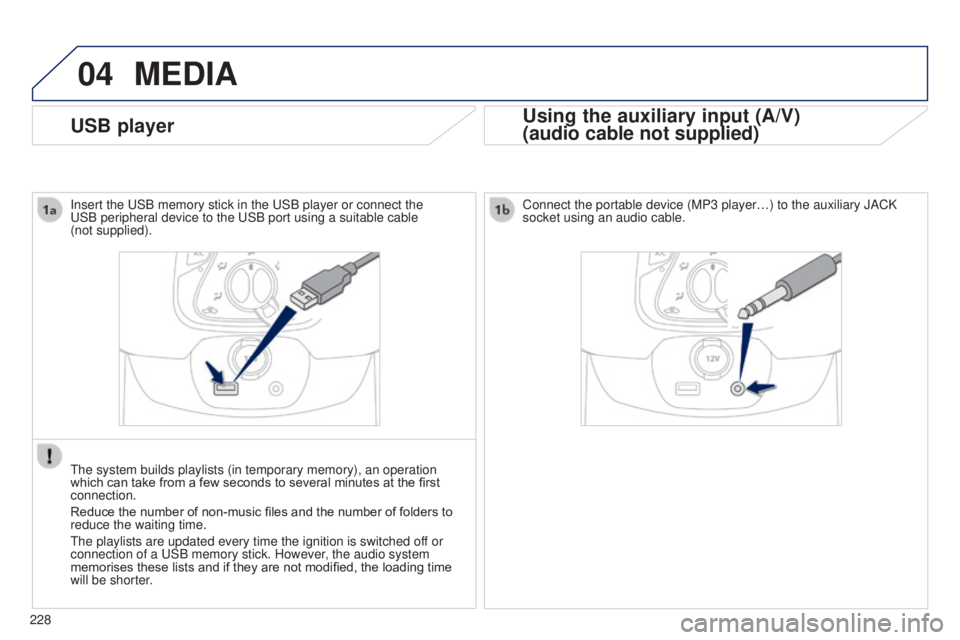
Connect the portable device (MP3 player…) to the auxiliary JACK
socket using an audio cable.
Insert the
u
SB memory stick in the
u
SB player or connect the u
SB peripheral device to the
u
SB port using a suitable cable
(not
supplied).
t
he system builds playlists (in temporary memory), an operation
which can take from a few seconds to several minutes at the first
connection.
Reduce the number of non-music files and the number of folders to
reduce the waiting time.
t
he playlists are updated every time the ignition is switched off or
connection of a
u
SB memory stick. However, the audio system
memorises these lists and if they are not modified, the loading time
will be shorter.
Page 231 of 256
04
229
MEDIA
MP3 / USB player
Information and advice
t
he system supports u SB mass storage devices or Apple
® players
via
u
SB ports. t
he adaptor cable not supplied.
Control of the peripheral device is with the audio system controls.
Other peripherals, not recognised on connection, must be connected
to the auxiliary socket using a Jack cable (not supplied).
In order to be read, a
u
SB memory stick must be formatted FA
t 16
or 32. The system can alternatively read files via the Bluetooth
® system
and the
u
SB port.
It is recommended that official Apple
® uSB cables are used to
ensure correct operation.
The audio system plays files with the extension:
".wma", type V
er7 and Ver8 with bit rate between 48 and 192 Kbps
and type Ver9 with bit rate between 48 and 320 Kbps.
".aac", with bit rate between 16 and 320 Kbps.
".mp3 - MP
eg
1" with bit rate between 32 and 320 Kbps and ".mp3 -
MP
eg
2" with bit rate between 8 and 160 Kbps.
t
he sampling rates supported are 11, 22, 44 and 48 KHz.
It is advisable to restrict file names to 20 characters, without using of
special characters (e.g.: " " ? ; ù) to avoid any playing and displ\
aying
problems.
B3_en_Chap12b_Autoradio-t oyota-2_ed01-2014
Page 232 of 256
04
230
Connecting Apple® players
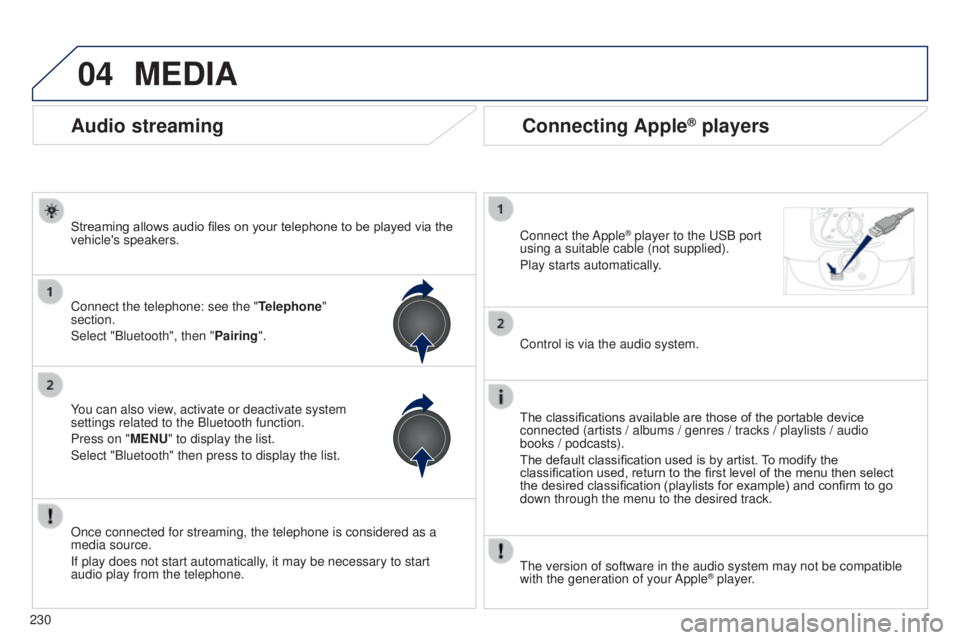
Connect the Apple® player to the uSB port
using a suitable cable (not supplied).
Play starts automatically
.
Control is via the audio system.
The classifications available are those of the portable device
connected (artists / albums / genres / tracks / playlists / audio
books
/ podcasts).
The default classification used is by artist. To modify the
classification used, return to the first level of the menu then select
the desired classification (playlists for example) and confirm to go
down through the menu to the desired track.
t
he version of software in the audio system may not be compatible
with the generation of your Apple
® player.
MEDIA
Audio streaming
Streaming allows audio files on your telephone to be played via the
vehicle's speakers.
Connect the telephone: see the " Telephone"
section.
Select "Bluetooth", then "Pairing".
You can also view, activate or deactivate system
settings related to the Bluetooth function.
Press on "MENU" to display the list.
Select "Bluetooth" then press to display the list.
Once connected for streaming, the telephone is considered as a
media source.
If play does not start automatically, it may be necessary to start
audio play from the telephone.
Page 233 of 256
05
231
TELEPHONE
Pairing a Bluetooth telephone
First connectionFor reasons of safety and because they require prolonged attention
on the part of the driver, the operations for pairing the Bluetooth
mobile telephone to the hands-free system of the audio system must
be carried out with the vehicle stationary.
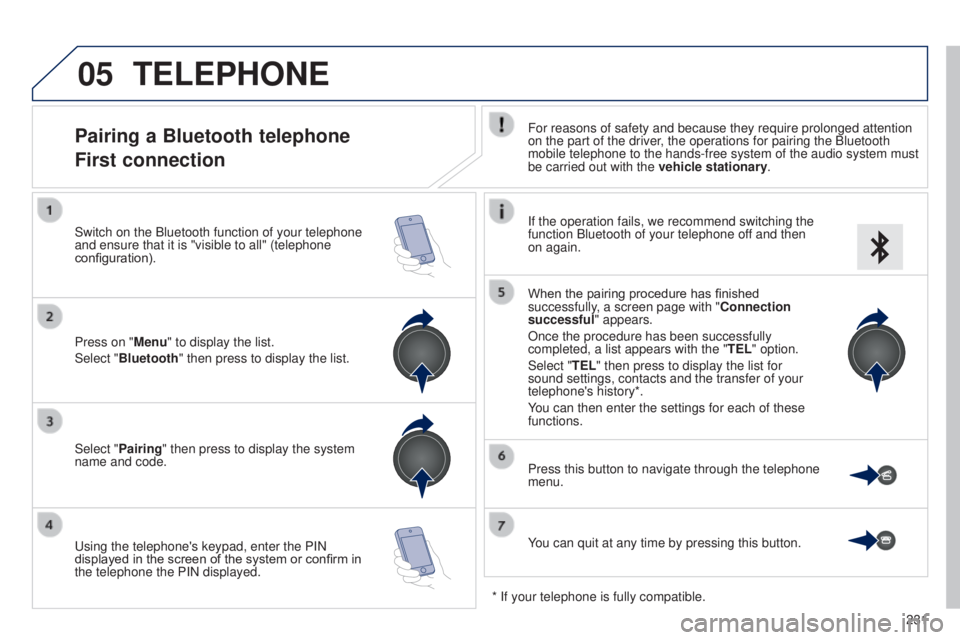
Select "Pairing" then press to display the system
name and code.
u
sing the telephone's keypad, enter the PIN
displayed in the screen of the system or confirm in
the telephone the PIN displayed. Press on "Menu" to display the list.
Select "Bluetooth" then press to display the list. Switch on the Bluetooth function of your telephone
and ensure that it is "visible to all" (telephone
configuration). If the operation fails, we recommend switching the
function Bluetooth of your telephone off and then
on again.
When the pairing procedure has finished
successfully, a screen page with "Connection
successful" appears.
Once the procedure has been successfully
completed, a list appears with the "
TEL" option.
Select "TEL" then press to display the list for
sound settings, contacts and the transfer of your
telephone's history*.
You can then enter the settings for each of these
functions.
You can quit at any time by pressing this button. Press this button to navigate through the telephone
menu.
* If your telephone is fully compatible.
B3_en_Chap12b_Autoradio-t oyota-2_ed01-2014
Page 235 of 256
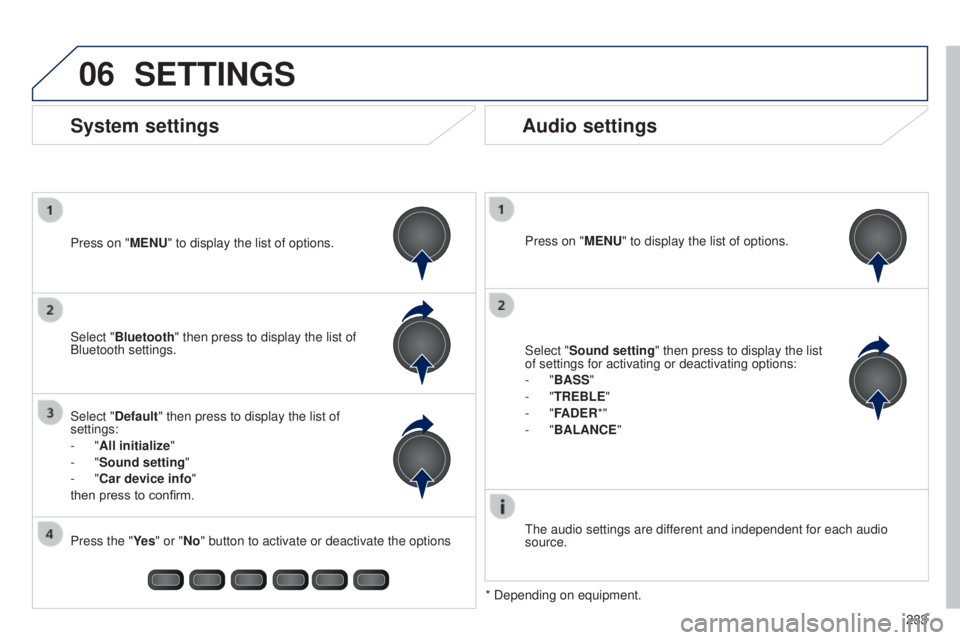
06
233
SETTINGS
Press on "MENU" to display the list of options.
t
he audio settings are different and independent for each audio
source.
* Depending on equipment.
System settings Audio settings
Select "Sound setting" then press to display the list
of settings for activating or deactivating options:
-
"BASS"
-
"TREBLE"
-
"FADER*"
-
"BALANCE "
Press on "MENU" to display the list of options.
Select "Default" then press to display the list of
settings:
-
"All initialize "
-
"Sound setting "
-
"Car device info"
then press to confirm. Select "Bluetooth" then press to display the list of
Bluetooth settings.
Press the "Ye s " or "No" button to activate or deactivate the options
B3_en_Chap12b_Autoradio-t oyota-2_ed01-2014
Page 236 of 256

the following table groups together the answers to the most frequently as\
ked questions concerning your audio system.
FREQUENTLY ASKED QUESTIONS
234QUESTION
ANSWER SOLUTION
Telephone, Bluetooth
I cannot connect my
Bluetooth telephone.
t
he telephone's Bluetooth function may be switched off or the telephone
may not be visible. -
Check that your telephone's Bluetooth
function is switched on.
-
Check in the telephone settings that it is
"visible to all".
t
he Bluetooth telephone is not compatible with the system.
You can check the compatibility of your telephone
at www.peugeot.co.uk (services).
t
he volume of the
telephone connected
in Bluetooth mode is
inaudible.
t
he volume depends both on the system and on the telephone.
Increase the volume of the audio system, to
maximum if required, and increase the volume of
the telephone if necessary.
The ambient noise level has an influence on the quality of telephone
communication. Reduce the ambient noise level (close the
windows, reduce the booster fan speed, slow
down, ...).
Contacts are not shown
in alphabetical order. Some telephones offer display options. Depending on the settings
chosen, contacts can be transferred in a specific order. Modify the display setting in the telephone
directory.
t
he system does
not receive SMS text
messages.
t
he Bluetooth mode on your telephone does not permit sending SMS text
messages to the system.
Page 237 of 256
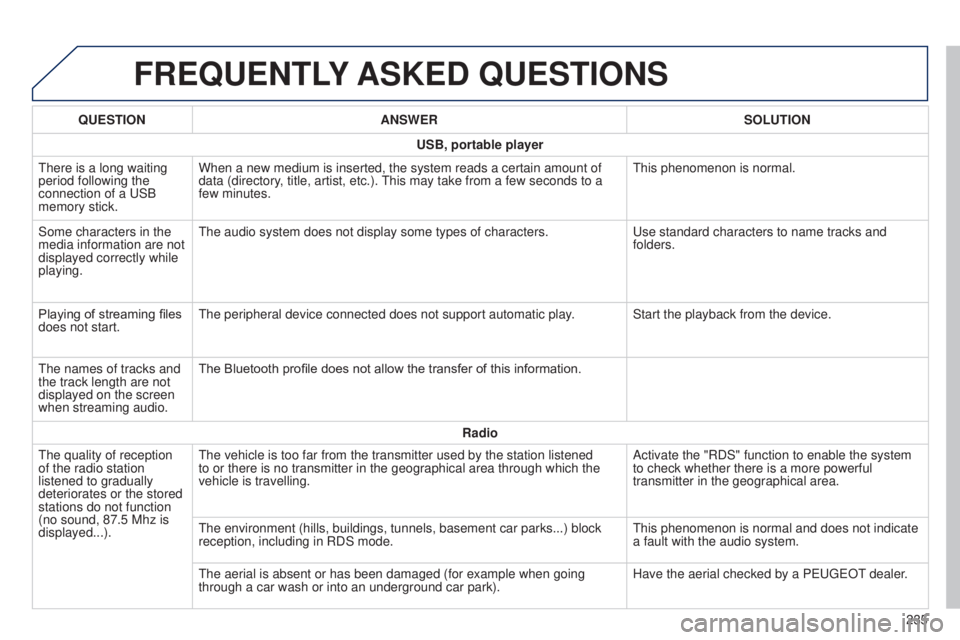
FREQUENTLY ASKED QUESTIONS
235
QUESTION
ANSWER SOLUTION
USB, portable player
t
here is a long waiting
period following the
connection of a
u
SB
memory stick. When a new medium is inserted, the system reads a certain amount of
data (directory, title, artist, etc.).
t
his may take from a few seconds to a
few minutes.
t
his phenomenon is normal.
Some characters in the
media information are not
displayed correctly while
playing.
t
he audio system does not display some types of characters.
u
se standard characters to name tracks and
folders.
Playing of streaming files
does not start.
t
he peripheral device connected does not support automatic play. Start the playback from the device.
t
he names of tracks and
the track length are not
displayed on the screen
when streaming audio. The Bluetooth profile does not allow the transfer of this information.
Radio
t
he quality of reception
of the radio station
listened to gradually
deteriorates or the stored
stations do not function
(no sound, 87.5
Mhz is
displayed...).
t
he vehicle is too far from the transmitter used by the station listened \
to or there is no transmitter in the geographical area through which the\
vehicle is travelling. Activate the "RDS" function to enable the system
to check whether there is a more powerful
transmitter in the geographical area.
t
he environment (hills, buildings, tunnels, basement car parks...) bloc\
k
reception, including in RDS mode.
t
his phenomenon is normal and does not indicate
a fault with the audio system.
t
he aerial is absent or has been damaged (for example when going
through a car wash or into an underground car park). Have the aerial checked by a P
euge
O
t
dealer
.
B3_en_Chap12b_Autoradio-t
oyota-2_ed01-2014
Page 238 of 256
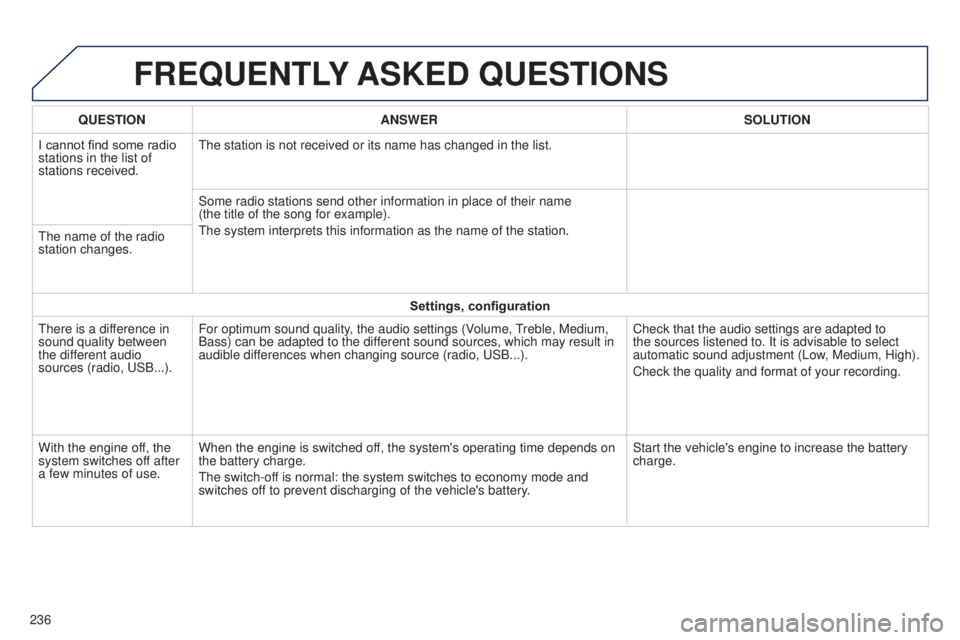
FREQUENTLY ASKED QUESTIONS
236QUESTION
ANSWER SOLUTION
I cannot find some radio
stations in the list of
stations received.
t
he station is not received or its name has changed in the list.
Some radio stations send other information in place of their name
(the title of the song for example).
t
he system interprets this information as the name of the station.
t
he name of the radio
station changes.
Settings, configuration
t
here is a difference in
sound quality between
the different audio
sources (radio, u SB...).
For optimum sound quality, the audio settings (Volume,
treble, Medium,
Bass) can be adapted to the dif
ferent sound sources, which may result in
audible differences when changing source (radio, u SB...).
Check that the audio settings are adapted to
the sources listened to. It is advisable to select
automatic sound adjustment (Low, Medium, High).
Check the quality and format of your recording.
With the engine off, the
system switches off after
a few minutes of use. When the engine is switched off, the system's operating time depends on
the battery charge.
t
he switch-off is normal: the system switches to economy mode and
switches off to prevent discharging of the vehicle's battery. Start the vehicle's engine to increase the battery
charge.
Page 244 of 256
242
ABS .......................................................107, 108
Accessories .................................................. 167
Accessory socket, 12V
.............................64, 65
Access to rear seats (3 -door)
.........................48
Adjusting headlamps
...................................... 98
Adjusting the steering wheel
..........................52
Airbags
.................................................... 2 2 , 113
Airbags, curtain
..................................... 11
6 , 117
Airbags, front .......................................... 114 , 117
Airbags, lateral
....................................... 115 , 117
Air conditioning
..................................... 8, 57, 60
Air conditioning, automatic
.............................58
Air conditioning, manual
.................................56
Air distribution adjustment
..............................55
Air filter
.......................................................... 175
Air flow
..............................
..............................53
Air flow adjustment
................................... 56, 59
Air intake
................................................... 5 7, 6 0
Air recirculation
......................................... 5 7, 6 0
Air vents
.......................................................... 53
Anti-lock braking system (ABS)
............107, 108
Audible warning
............................................ 102
Audio cable
........................................... 19 4, 228
Audio streaming (Bluetooth)
......... 19
5, 197, 230
Automatic illumination of headlamps
........94, 96
Auxiliary socket
................64, 66, 194, 195, 228 Bonnet
...........................................................
170
Boot .................................................................39
Boot lamp
......................................................101
Brake discs
.................................................... 17
6
Brake lamps
..................................................150
Brake pads
....................................................176
A
C
DAB
(Digital Audio Broadcasting) .......192, 193, 227
Daytime running lamps
...................94, 147, 149
Deactivating the passenger airbag
...............114
Defrosting
........................................... 53, 56, 63
Defrosting, front
.............................................. 62
D
emisting
............................... 5
3, 56, 58, 62, 63
Demisting, front
............................................... 62
Demisting the rear screen
.............................. 63
D
igital Audio Broadcasting
(DA B)
.......................................... 192, 193, 227
Dimensions
................................................... 179
Dipped beam
...............................
............93, 148
Dipstick
................
.......................................... 172
Direction indicators
.......................102, 148, 150
Display screen
.......................................... 11, 2 4
Doors
............................................................... 38
Door pockets
................................................... 64
D
riving economically ........................................ 8
Driving mode
................................................... 77
Dynamic stability control (DSC) .....17, 20, 107-109
Battery
............................................ 161-163, 175
Battery, charging
........................................... 163
Battery for electronic key
................................ 36
Battery, remote control
................................... 32
B
luetooth (hands-free)
.......................... 20
0, 231
Bluetooth (telephone)
............................ 200, 231
B
easy mode (automatic mode) .........................77eBA
(em ergency braking assistance) ..........107
eB
FD
..................................................... 107, 108
ec
o-driving ....................................................... 8
ec
onomy mode
............................................. 16 4
el
ectronic brake force distribution
(
eB
FD)
................................................ 107, 108
el
ectronic engine immobiliser .........................32
em
ergency starting
....................................... 162
em
ergency warning lamps
........................... 10
3
en
ergy economy mode
.................................16 4
en
gine compartment
.................................... 171
en
gine compartment fusebox
.......................157
E
D
Capacity, fuel tank .............................. ..........13 4
Central locking .................................... 31, 33, 38
Changing a bulb
..................................... 147-151
Changing a fuse
..................................... 152-16 0
Changing a wheel
.................................. 141-145
Changing a wiper blade
................................16 4
Changing the electronic key battery
...............36
Changing the remote control battery
..............32
Checking levels
...................................... 17
2-174
Checking tyre pressures (using the kit)
........13 9
Checks
...............
............................171, 175 , 176
Child lock
...............................
........................13 3
Children
...............................
....112 , 114 , 118 -13 3
Child seats
..............................
..............118 -13 2
Child seats, conventional
..............................124
Child seats, ISOFIX
..............................12
8, 129
Closing the boot
.............................................. 39
Closing the doors
............................................ 34
Clutch
............................................................ 175
Colour screen
...............................
.........182, 183
Connectors, audio
.................... 6
4, 66, 195, 228
Coolant level
................................................. 174
Cup holder
...............................
........................64
Alphabetical index
Page 246 of 256
244
Parcel shelf, rear .............................................68
P arking brake .......................................... 76, 176
Passenger compartment filter
......................175
Pedal, clutch.................................................. 175
Port,
u
S
B
................................. 6
4, 66, 194, 228
Power steering
................................................ 22
Protecting children
..................112 , 114 , 118 -13 3
Puncture
................................................ 13 6 , 141
Radio
...................................... 19 0 -193, 225 -227
RDS
....................................................... 191, 2 26
Rear demisting
................................................ 63
R
ear foglamp ........................................... 9 5, 150
Rear quarter panel windows
...........................41
Rear screen (demisting)
..................................63
Recharging the battery
................................. 16
3
Remote control
.......................................... 3
1, 37
Removing and fitting a fuse
...................152-16 0
Removing a wheel
........................................ 143
Removing the mat
........................................... 67
Replacing bulbs
..................................... 147-151
Replacing the air filter
...................................175
Replacing the oil filter
................................... 17
5Screen menu
.................186, 188, 198, 214, 216
Screenwash
..................................................10 0
Screenwash fluid level
..................................174
Screen-wash reservoir
.................................174
Seat adjustment
...............................
.........4 7, 4 9
Seat belts
................................. 4
9 , 11 0 -112 , 12 4
Seat, rear, folding backrest
.............................49
Seats, rear
.................................................48, 49
Servicing
...............................
............................8
Setting the clock
.......................................28, 29
Sidelamps
.........................................93, 94, 148
Side repeater
..............................
..................151
Snow chains
.................................................. 14
6
Spare wheel
...............................
...................142
Speed limiter
.............................................86, 89
Speedometer
..................................................24
Starting using another battery
...................... 16
2
Starting the vehicle
.......................71, 72, 74, 77
Steering mounted controls, audio
........185, 224
Steering wheel adjustment
............................. 52
S
topping the vehicle
.....................71, 72, 74, 77
Stop Start
............................................27, 83, 85
Storage
......................................................64, 65
Sun visor
...................................................64, 65
P
R
S
Oil filter .......................................................... 175
Oil level .......................................................... 172
Opening the bonnet
...................................... 17
0
Opening the boot
..............................
........33, 39
Opening the doors
...............................
...........33
Operation indicator lamps
........................13 -23Replacing the passenger
compartment filter ......................................175
Replacing wiper blades .................................16 4
Rev counter
.....................................................10
Reversing camera
...........................................92
Reversing lamps
...........................................150
Roof bars
....................................................... 16
6
Roof, electric fabric
.........................................42
Routine checks
.....................................175 , 176
O
tables of fuses .............................................. 152te
lephone ............................................. 200, 231
te
mperature adjustment
.................... 5
5, 56, 59
te
mporary puncture repair kit
................70, 13 6
thr
ee flashes function
(direction indicators)
...................................102
th
ird brake lamp
........................................... 151
tim
e
.......................................................... 28, 29
to
o l s
.............................................................. 142
to
uch screen ................................................. 181
tou
ch screen (Menus)
..................................182
to
wing another vehicle
................................. 16
5
to
wing eye .............................................. 70, 165
tr
affic information (
tA
)
.................................226
tR
C (traction control)
................ 1
7, 20, 107-109
tr
ip computer
............................................ 26, 27
tr
ip distance recorder
..................................... 24
ty
re pressures
...................................... 140, 18 0
ty
r e s
.................................................................. 8
ty
r e
under-inflation detection
.......22, 103 -10 6, 140
un
der floor storage
......................................... 70
un
der-inflation (detection)
............................ 10
3
unl
ocking
..............................
....................31, 3 3
u
SB
.................................. 64, 66, 194, 195, 228
U
T
Vanity mirror .................................................... 65
V entilation .............................. ............53, 56, 59
Visibility
........................................................... 53
V
Alphabetical index