AUX PEUGEOT 108 2016 User Guide
[x] Cancel search | Manufacturer: PEUGEOT, Model Year: 2016, Model line: 108, Model: PEUGEOT 108 2016Pages: 268, PDF Size: 6.17 MB
Page 238 of 268
236
108_en_Chap10b_Autoradio-toyota-2_ed01-2016
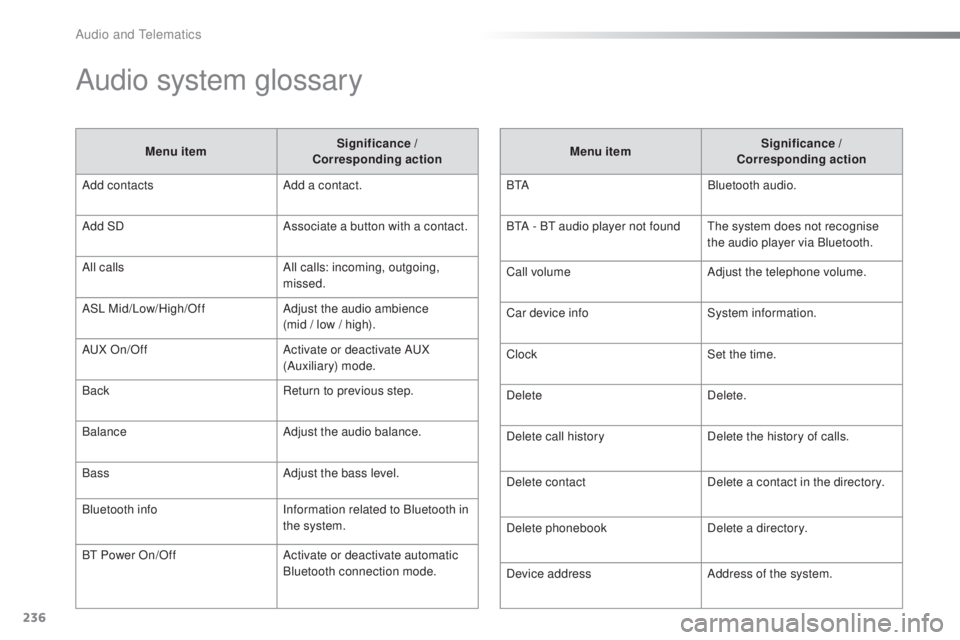
Audio system glossary
Menu item Significance /
Corresponding action
Add contacts Add a contact.
Add SD Associate a button with a contact.
All calls All calls: incoming, outgoing,
missed.
ASL Mid/Low/High/Off Adjust the audio ambience
(mid / low / high).
A
uX
On/Off Activate or deactivate A
uX
(
Auxiliary) mode.
Back Return to previous step.
Balance Adjust the audio balance.
Bass Adjust the bass level.
Bluetooth info Information related to Bluetooth in
the system.
B
t
Power On/Off Activate or deactivate automatic
Bluetooth connection mode. Menu item
Significance /
Corresponding action
B
t
ABluetooth audio.
B
tA - Bt
audio player not found
th
e system does not recognise
the audio player via Bluetooth.
Call volume Adjust the telephone volume.
Car device info System information.
Clock Set the time.
Delete Delete.
Delete call history Delete the history of calls.
Delete contact Delete a contact in the directory.
Delete phonebook Delete a directory.
Device address Address of the system.
Audio and telematics
Page 241 of 268
MODE
239
108_en_Chap10b_Autoradio-toyota-2_ed01-2016
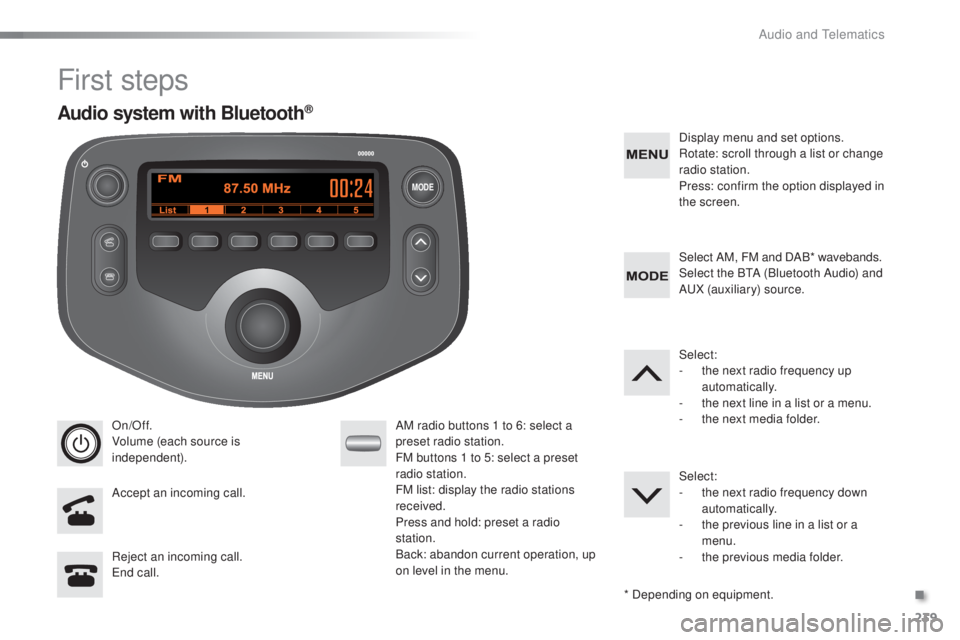
First steps
On/Off.
Volume (each source is
independent).
Accept an incoming call. AM radio buttons 1 to 6: select a
preset radio station.
FM buttons 1 to 5: select a preset
radio station.
FM list: display the radio stations
received.
Press and hold: preset a radio
station.
Back: abandon current operation, up
on level in the menu.Display menu and set options.
Rotate: scroll through a list or change
radio station.
Press: confirm the option displayed in
the screen.
Reject an incoming call.
en
d call. Select AM, FM and DAB* wavebands.
Select the B
tA (
Bluetooth Audio) and
A
uX
(auxiliary) source.
Select:
-
t
he next radio frequency up
automatically.
-
t
he next line in a list or a menu.
- t he next media folder.
Select:
-
t
he next radio frequency down
automatically.
-
t
he previous line in a list or a
menu.
-
t
he previous media folder.
* Depending on equipment.
Audio system with Bluetooth®
.
Audio and telematics
Page 242 of 268
MODE
240
108_en_Chap10b_Autoradio-toyota-2_ed01-2016
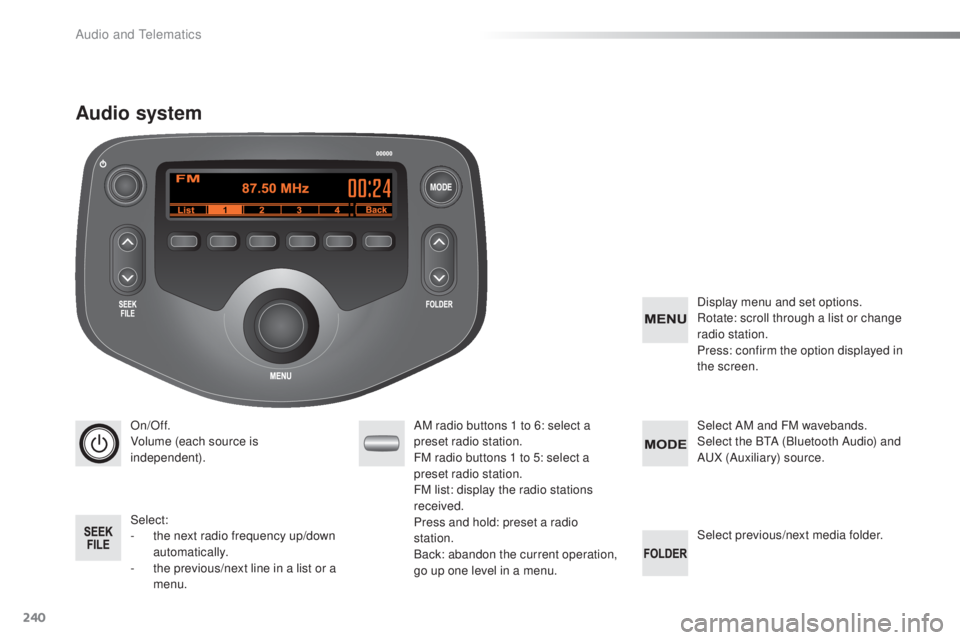
On/Off.
Volume (each source is
independent).
Select:
-
t
he next radio frequency up/down
automatically.
-
t
he previous/next line in a list or a
menu. AM radio buttons 1 to 6: select a
preset radio station.
FM radio buttons 1 to 5: select a
preset radio station.
FM
list: display the radio stations
received.
Press and hold: preset a radio
station.
Back: abandon the current operation,
go up one level in a menu. Display menu and set options.
Rotate: scroll through a list or change
radio station.
Press: confirm the option displayed in
the screen.
Select AM and FM
wavebands.
Select the BtA ( Bluetooth Audio) and
A
uX
(Auxiliary) source.
Select previous/next media folder.
Audio system
Audio and telematics
Page 243 of 268
241
108_en_Chap10b_Autoradio-toyota-2_ed01-2016
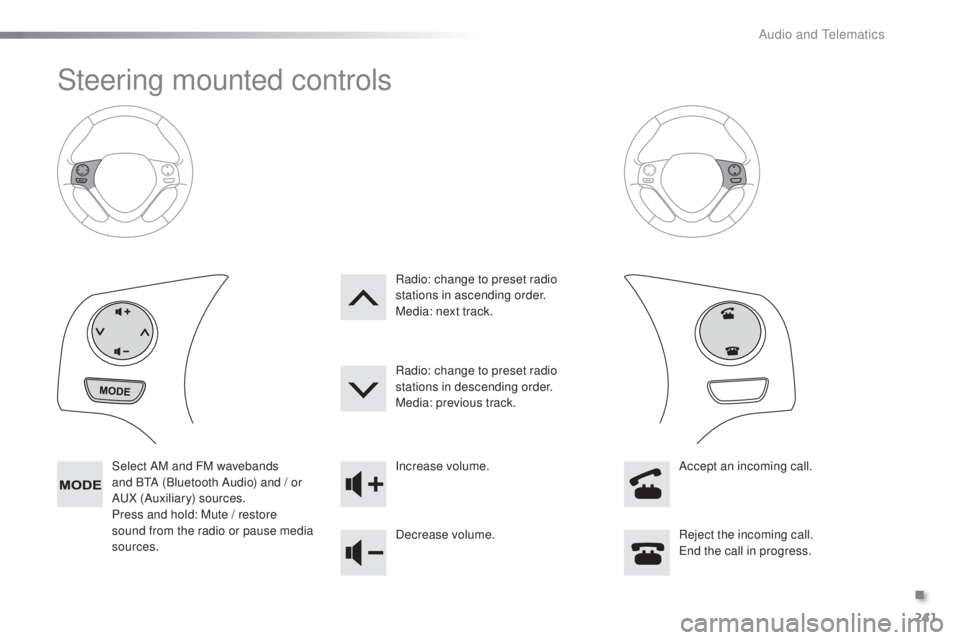
Steering mounted controls
Select AM and FM wavebands
and BtA (
Bluetooth Audio) and / or
A
uX
(Auxiliary) sources.
Press and hold: Mute / restore
sound from the radio or pause media
sources. Increase volume.
Decrease volume.
Reject the incoming call.
en
d the call in progress.
Radio: change to preset radio
stations in ascending order.
Media: next track.
Radio: change to preset radio
stations in descending order.
Media: previous track.
Accept an incoming call.
.
Audio and telematics
Page 247 of 268
245
108_en_Chap10b_Autoradio-toyota-2_ed01-2016
Media
uSB player
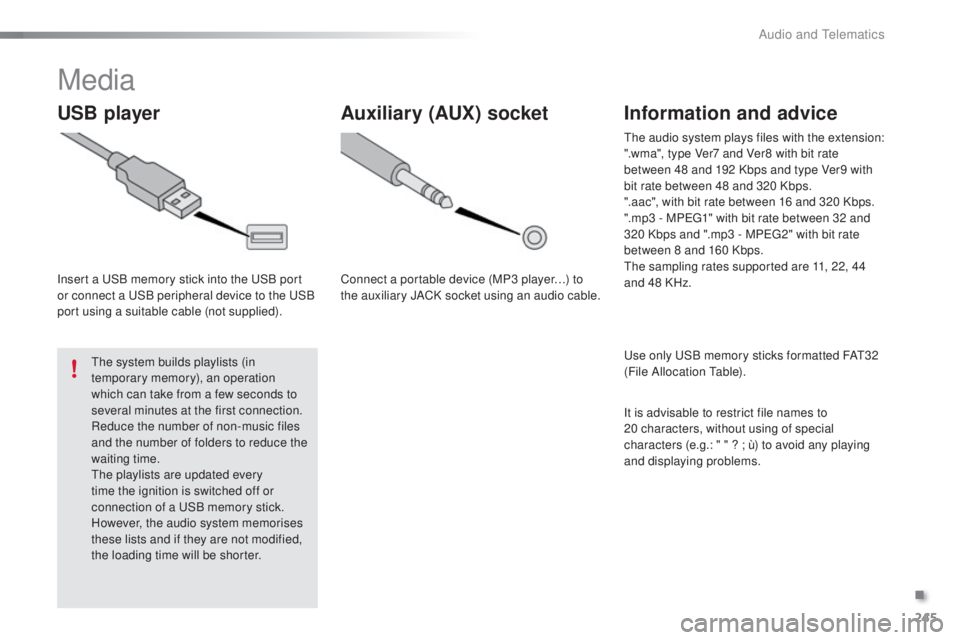
Insert a uSB memory stick into the uS B port
or connect a uS B peripheral device to the uS B
port using a suitable cable (not supplied).
th
e system builds playlists (in
temporary memory), an operation
which can take from a few seconds to
several minutes at the first connection.
Reduce the number of non-music files
and the number of folders to reduce the
waiting time.
th
e playlists are updated every
time the ignition is switched off or
connection of a
u
S
B memory stick.
However, the audio system memorises
these lists and if they are not modified,
the loading time will be shorter.
Auxiliary (AuX ) socket
Connect a portable device (MP3 player…) to
the auxiliary JACK socket using an audio cable.
Information and advice
use only uS B memory sticks formatted FAt3 2
(File Allocation ta ble).
th
e audio system plays files with the extension:
".wma", type Ver7 and Ver8 with bit rate
between 48 and 192 Kbps and type Ver9 with
bit rate between 48 and 320 Kbps.
".aac", with bit rate between 16 and 320 Kbps.
".mp3 - MP
e
g
1
" with bit rate between 32 and
320 Kbps and ".mp3 - MP
e
g
2
" with bit rate
between 8 and 160 Kbps.
th
e sampling rates supported are 11, 22, 44
and 48 KHz.
It is advisable to restrict file names to
20
characters, without using of special
characters (e.g.: " " ?
; ù) to avoid any playing
and displaying problems.
.
Audio and telematics
Page 248 of 268
246
108_en_Chap10b_Autoradio-toyota-2_ed01-2016
Audio streaming Connecting Apple® players
Streaming allows audio files on your telephone
to be played via the vehicle's speakers.
You can also view, activate or deactivate
system settings related to the Bluetooth
function.Select "Bluetooth", then "
Pairing".
Press on " M
eN
u
" t
o display the list.
tu
rn the knob to select "Bluetooth",
press to display the list.
Once connected for streaming, the
telephone is considered as a media
source.
If play does not start automatically, it
may be necessary to start audio play
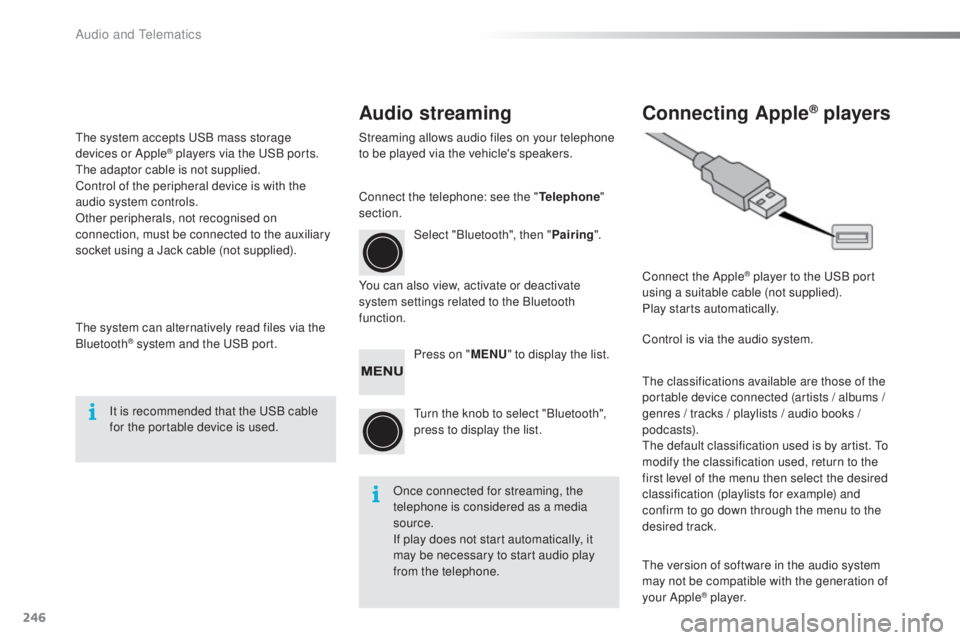
from the telephone. Connect the Apple
® player to the uS
B port
using a suitable cable (not supplied).
Play starts automatically.
Control is via the audio system.
th
e classifications available are those of the
portable device connected (artists / albums
/
genres / tracks / playlists / audio books
/
podcasts).
th
e default classification used is by artist. t
o
m
odify the classification used, return to the
first level of the menu then select the desired
classification (playlists for example) and
confirm to go down through the menu to the
desired track.
th
e version of software in the audio system
may not be compatible with the generation of
your Apple
® p l aye r.
Connect the telephone: see the "
tel
ephone
"
section.
th
e system accepts
u
S
B mass storage
devices or Apple
® players via the uS B ports. th
e adaptor cable is not supplied.
Control of the peripheral device is with the
audio system controls.
Other peripherals, not recognised on
connection, must be connected to the auxiliary
socket using a Jack cable (not supplied).
th
e system can alternatively read files via the
Bluetooth
® system and the uS B port.
It is recommended that the u
S
B cable
for the portable device is used.
Audio and telematics
Page 257 of 268
255
108_en_Chap11_index-alpha_ed01-2016
ABS .......................................................107, 108
Accessories .................................................. 142
Accessory socket, 12V
.............................63, 64
Access to rear seats (3 -door)
.........................47
Active City Brake
................................... 11
0 , 112
Adjusting the steering wheel
..........................51
Adjusting the temperature
............ 5
4, 55, 57, 58
Advice on care and maintenance
.................152
Advice on driving
............................................ 70
Airbags
.................................................... 18, 118
Airbags, curtain
..................................... 12
1, 12 2
Airbags, front ......................................... 118 , 12 2
Airbags, lateral
...................................... 120, 12 2
Air conditioning
........................................... 9, 53
Air conditioning, automatic
.............................57
Air conditioning, manual
.................................55
Air distribution adjustment
.................54, 55, 58
Air filter
.......................................................... 151
Air flow adjustment
............................54, 55, 58
Air intake/recirculation
..............................56, 58
Air vents
.......................................................... 52
Anti-lock braking system (ABS)
...................................... 10
7, 108
Audible warning
............................................ 10 6
Audio cable
.................................... 65, 198, 245
Audio streaming (Bluetooth)
................. 2
01, 24 6
Audio system
................................................. 235
Automatic illumination of headlamps
........................................ 99, 101
Auxiliary
......................................... 65, 198, 245Battery for electronic
key
.................................................................37
Battery, remote control
........................................................... 33
Bl
uetooth
(telephone)
..........................................20 4, 247
Bonnet
...........................................................146
Boot
.................................................................39
Brake discs/pads ........................................... 152
Brake lamps
..................................................166
Bulbs (changing)
...............................
............163
Capacity, fuel tank
..............................
..........13 8
CD
.................................................................19 9
Central locking
...................................32, 34, 38
Changing a bulb
............................................163
Changing a fuse
............................................168
Changing a wheel
.........................................15 8
Changing a wiper blade
................................14 4
Changing the electronic key battery
....................................................37
Changing the remote control battery
..............33
Changing the time
.....................................29, 30
Checking levels
......................................
14 8 -15 0
Checking the levels
.......................................148
Checking tyre pressures (using the kit)
..............................
................15 6
Checks
...............
....................................147-152
Child lock
...............................
........................137
Children
...............................
....117, 11 9 , 12 3 -12 7
Child seats, general
..............................123 -125
Child seats, conventional
..............................129DAB (Digital Audio
Broadcasting)
.....................................19 6, 243
Daytime running lamps
..............................
..............................99
Deactivating the passenger airbag
.......................................................... 11
9
Demisting/defrosting, front
...............................................................60
Demisting/defrosting, rear
...............................
.................................61
Dimensions
...................................................183
Dipstick
................
..........................................148
Direction indicators
.......................103, 16 4, 166
Display screen, instrument panel
...............................
............13
Door pockets
................................................... 63
D
oors
...............................................................38
Dynamic stability
c ontrol (DSC)
............................17, 24, 107-109
A
CD
Child seats, ISOFIX ...................................... 13 3
Closing the boot .............................................. 39
Closing the doors
............................................ 35
Clutch
............................................................ 151
Colour screen, touch ..................................... 185
Connection, iPhone
...................................... 2
12
Connection, MirrorLink
.................................216
Connectors, audio
.......................... 6
5, 198, 245
Control, emergency boot release
...................40
Control stalk, lighting
...................................... 98
C
ourtesy lamp ................................................. 62
Cup holder
...............................
........................63
Battery
............................................ 151, 17 7-179
Battery, charging
........................................... 179
B
.
Alphabetical index