phone PEUGEOT 108 2016 User Guide
[x] Cancel search | Manufacturer: PEUGEOT, Model Year: 2016, Model line: 108, Model: PEUGEOT 108 2016Pages: 268, PDF Size: 6.17 MB
Page 205 of 268
203
108_en_Chap10a_Autoradio-toyota-tactile-1_ed01-2016
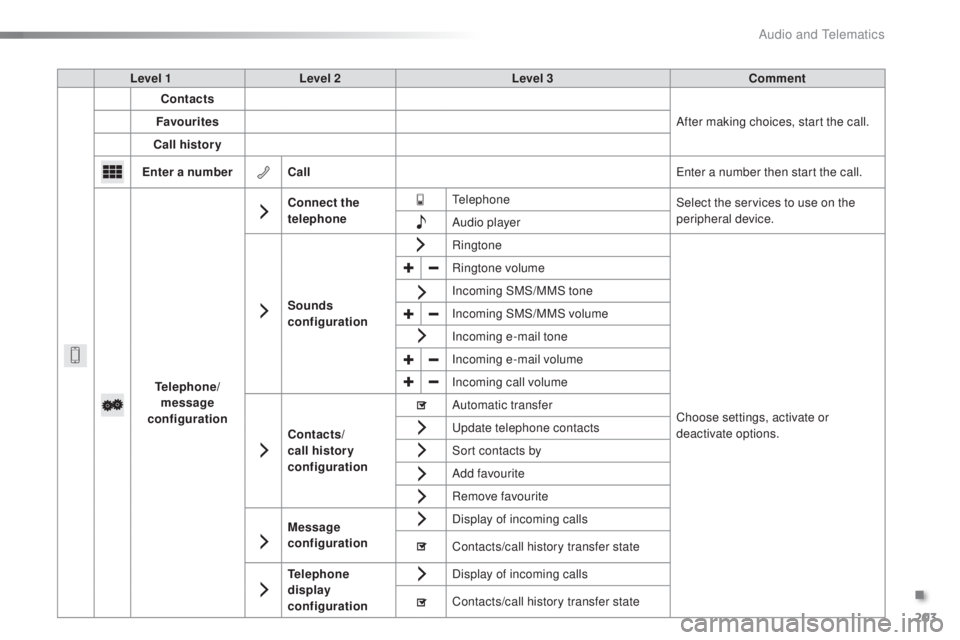
Level 1 Level 2 Level 3 Comment
Contacts
After making choices, start the call.
Favourites
Call history
en
ter a number Call
en
ter a number then start the call.
tel
ephone/
message
configuration Connect the
telephone
te
lephoneSelect the services to use on the
peripheral device.
Audio player
Sounds
configuration Ringtone
Choose settings, activate or
deactivate options.
Ringtone volume
Incoming SMS/MMS tone
Incoming SMS/MMS volume
Incoming e-mail tone
Incoming e-mail volume
Incoming call volume
Contacts/
call histor y
configuration Automatic transfer
u
pdate telephone contacts
Sort contacts by
Add favourite
Remove favourite
Message
configuration Display of incoming calls
Contacts/call history transfer state
tel
ephone
display
configuration Display of incoming calls
Contacts/call history transfer state
.
Audio and telematics
Page 206 of 268
204
108_en_Chap10a_Autoradio-toyota-tactile-1_ed01-2016
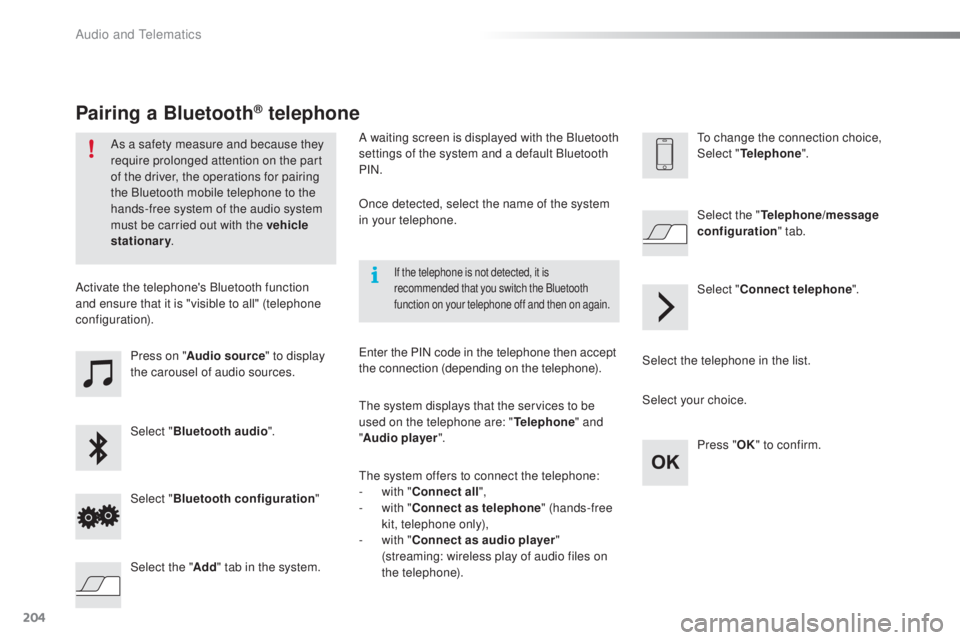
Press on "Audio source " to display
the carousel of audio sources.
Select " Bluetooth audio ".
Select " Bluetooth configuration "
Activate the telephone's Bluetooth function
and ensure that it is "visible to all" (telephone
configuration).
Select the telephone in the list.Select "
Connect telephone ".
Select the "
tel
ephone/message
configuration " tab.
Select your choice.
Select the " Add" tab in the system. Press "
oK
"
to confirm.
If the telephone is not detected, it is
recommended that you switch the Bluetooth
function on your telephone off and then on again.
As a safety measure and because they
require prolonged attention on the part
of the driver, the operations for pairing
the Bluetooth mobile telephone to the
hands-free system of the audio system
must be carried out with the vehicle
stationary.
Pairing a Bluetooth® telephone
A waiting screen is displayed with the Bluetooth
settings of the system and a default Bluetooth
PIN.
Once detected, select the name of the system
in your telephone.
th
e system displays that the services to be
used on the telephone are: "
tel
ephone" and
" Audio player ".
th
e system offers to connect the telephone:
-
w
ith "Connect all",
-
w
ith "Connect as telephone " (hands-free
kit, telephone only),
-
w
ith "Connect as audio player "
(streaming: wireless play of audio files on
the telephone).
en
ter the PIN code in the telephone then accept
the connection (depending on the telephone).to c hange the connection choice,
Select "tel ephone".
Audio and telematics
Page 207 of 268
205
108_en_Chap10a_Autoradio-toyota-tactile-1_ed01-2016
the services available depend on
the network, the SIM card and the
compatibility of the Bluetooth telephone
used. Check the telephone manual and
with your network provider for details of
the services available to you.
th
e profiles compatible with the system
are: HFP, OPP, PBAP, A2DP, AVRCP,
M A P.
th
is function allows the connection or
disconnection of a peripheral device as
well as the deletion of a pairing.
Automatic reconnection
When the ignition is switched on, the last
telephone connected when the ignition was
switched off reconnects automatically, if this
connection made had been activated during the
pairing procedure (see previous pages).
Connection is confirmed by the display of a
message and the name of the telephone.
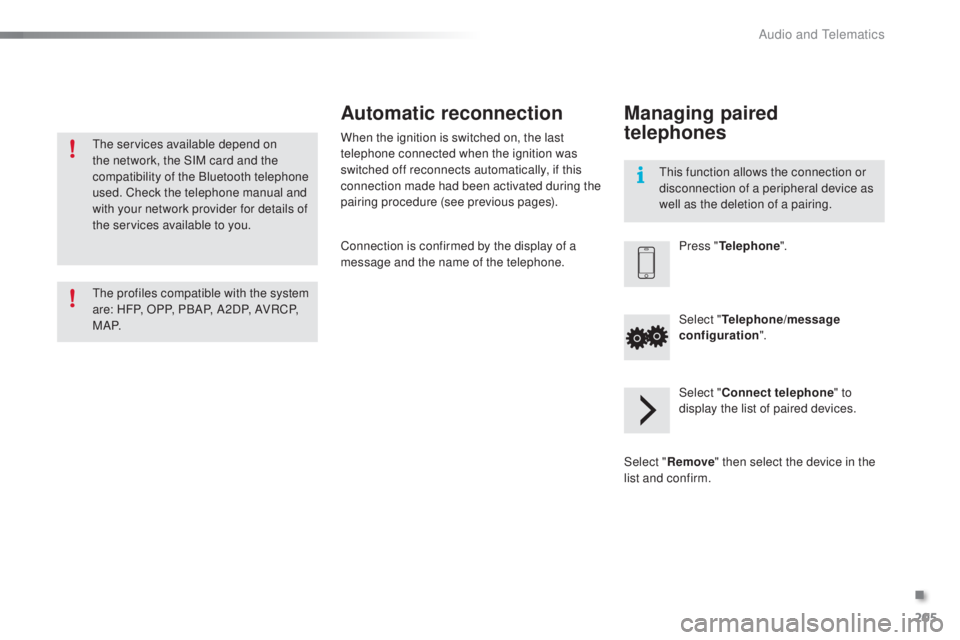
Managing paired
telephones
Press "telephone ".
Select "
tel
ephone/message
configuration ".
Select " Connect telephone " to
display the list of paired devices.
Select " Remove " then select the device in the
list and confirm.
.
Audio and telematics
Page 208 of 268
206
108_en_Chap10a_Autoradio-toyota-tactile-1_ed01-2016
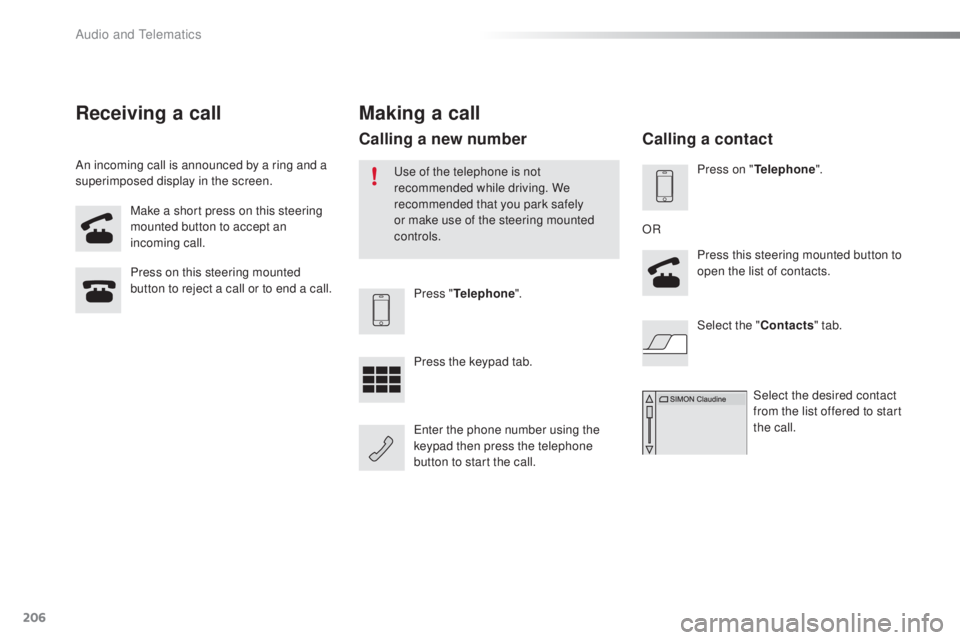
Make a short press on this steering
mounted button to accept an
incoming call.
Press on this steering mounted
button to reject a call or to end a call.
Press "
tel
ephone".
Press the keypad tab.
en
ter the phone number using the
keypad then press the telephone
button to start the call.
Receiving a call
An incoming call is announced by a ring and a
superimposed display in the screen.
Making a call
use of the telephone is not
recommended while driving. We
recommended that you park safely
or make use of the steering mounted
controls.
Calling a new number
Press on "tel ephone".
Press this steering mounted button to
open the list of contacts.
OR
Select the " Contacts" tab.
Select the desired contact
from the list offered to start
the call.
Calling a contact
Audio and telematics
Page 209 of 268
207
108_en_Chap10a_Autoradio-toyota-tactile-1_ed01-2016
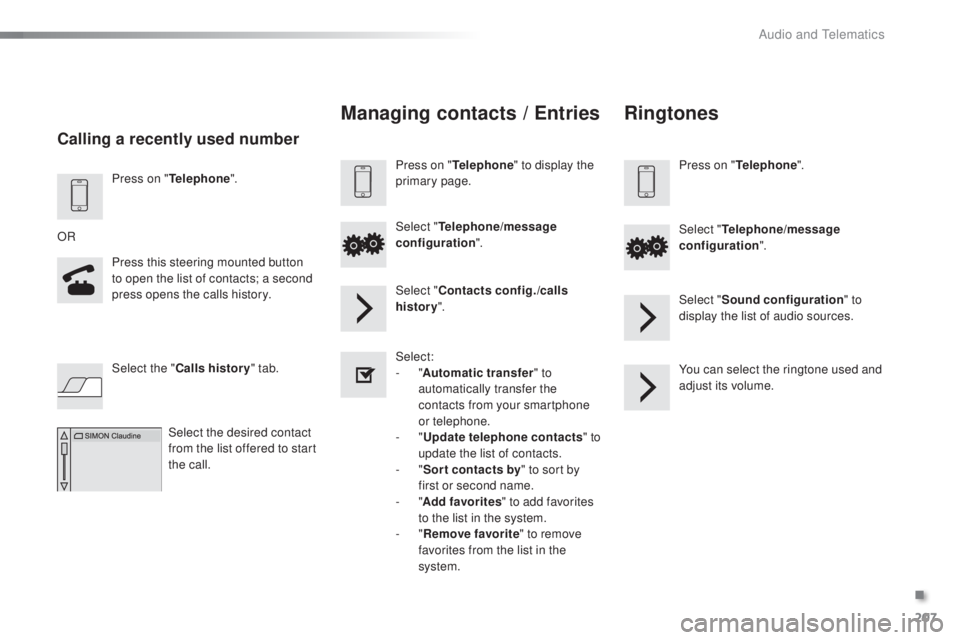
Press on "telephone".
Press this steering mounted button
to open the list of contacts; a second
press opens the calls history.
OR
Select the " Calls history " tab.
Select the desired contact
from the list offered to start
the call.
Calling a recently used number
Managing contacts / ent ries
Press on "telephone" to display the
primary page.
Select "
tel
ephone/message
configuration ".
Select " Contacts config./calls
history ".
Select:
-
"Automatic transfer " to
automatically transfer the
contacts from your smartphone
or telephone.
-
"
up
date telephone contacts " to
update the list of contacts.
-
"Sor t contacts by " to sort by
first or second name.
-
"Add favorites " to add favorites
to the list in the system.
-
"Remove favorite " to remove
favorites from the list in the
system.
Ringtones
Press on "tel ephone".
Select "
tel
ephone/message
configuration ".
Select " Sound configuration " to
display the list of audio sources.
You can select the ringtone used and
adjust its volume.
.
Audio and telematics
Page 213 of 268
211
108_en_Chap10a_Autoradio-toyota-tactile-1_ed01-2016
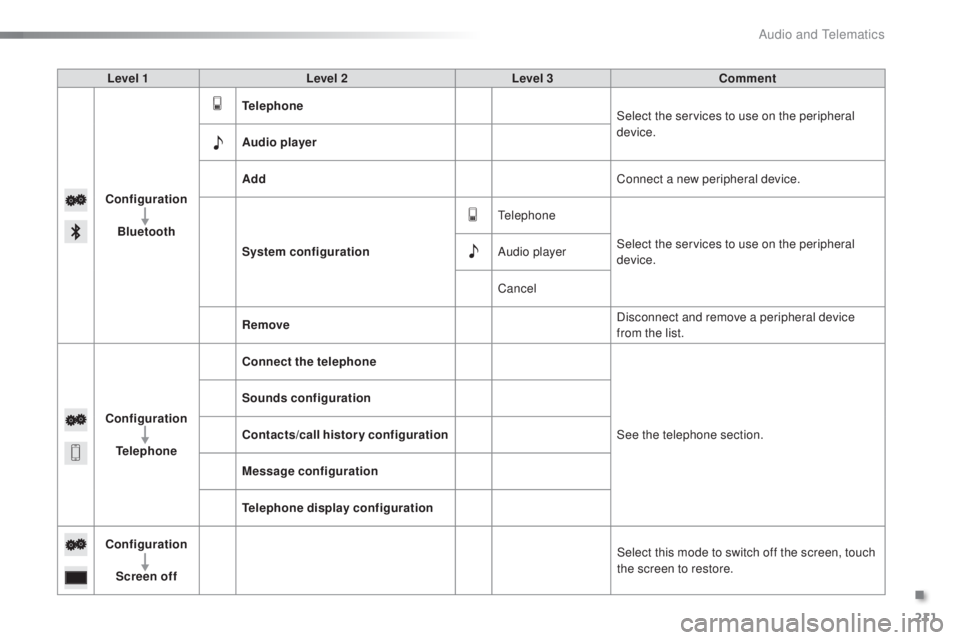
Level 1 Level 2 Level 3 Comment
Configuration Bluetooth
tel
ephone Select the services to use on the peripheral
device.
Audio player
Add Connect a new peripheral device.
System configuration
te
lephoneSelect the services to use on the peripheral
device.
Audio player
Cancel
Remove Disconnect and remove a peripheral device
from the list.
Configuration
tel
ephone Connect the telephone
See the telephone section.
Sounds configuration
Contacts/call history configuration
Message configuration
te
lephone display configuration
Configuration Screen off Select this mode to switch off the screen, touch
the screen to restore.
.
Audio and telematics
Page 214 of 268
212
108_en_Chap10a_Autoradio-toyota-tactile-1_ed01-2016
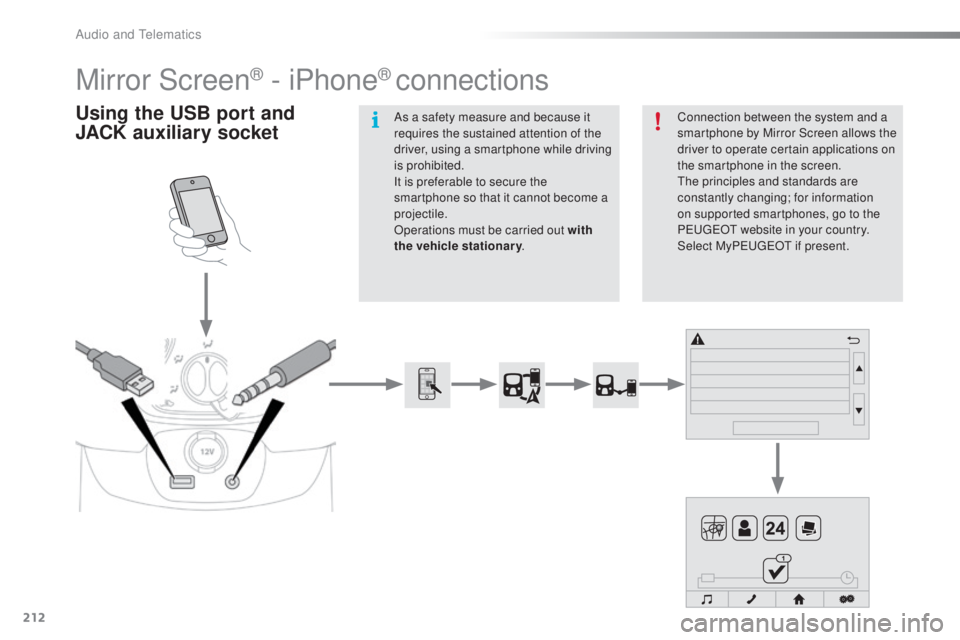
Mirror Screen® - iPhone® connections
using the uS B port and
JACK auxiliary socketConnection between the system and a
smartphone by Mirror Screen allows the
driver to operate certain applications on
the smartphone in the screen.
th
e principles and standards are
constantly changing; for information
on supported smartphones, go to the
P
e
uge
Ot
website in your country.
Select MyP
e
uge
Ot i
f present.
As a safety measure and because it
requires the sustained attention of the
driver, using a smartphone while driving
is prohibited.
It is preferable to secure the
smartphone so that it cannot become a
projectile.
Operations must be carried out with
the vehicle stationary
.
Audio and telematics
Page 215 of 268
213
108_en_Chap10a_Autoradio-toyota-tactile-1_ed01-2016
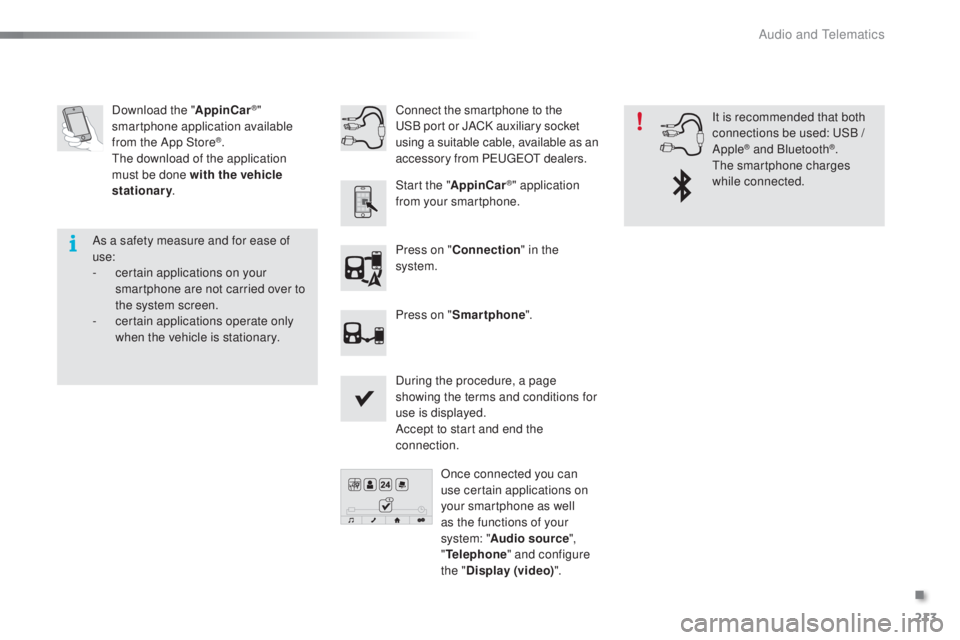
Download the "AppinCar®"
smartphone application available
from the App Store
®.th
e download of the application
must be done with the vehicle
stationary .
Press on "Connection " in the
system.
During the procedure, a page
showing the terms and conditions for
use is displayed.
Accept to start and end the
connection. Press on " Smartphone ".
Once connected you can
use certain applications on
your smartphone as well
as the functions of your
system: " Audio source ",
"
tel
ephone" and configure
the " Display (video) ".
Connect the smartphone to the
uS
B port or JACK auxiliary socket
using a suitable cable, available as an
accessory from Pe ugeOt d ealers.
Start the " AppinCar
®" application
from your smartphone. It is recommended that both
connections be used:
u
S
B /
Apple
® and Bluetooth®.th
e smartphone charges
while connected.
As a safety measure and for ease of
use:
-
c
ertain applications on your
smartphone are not carried over to
the system screen.
-
c
ertain applications operate only
when the vehicle is stationary.
.
Audio and telematics
Page 217 of 268
215
108_en_Chap10a_Autoradio-toyota-tactile-1_ed01-2016
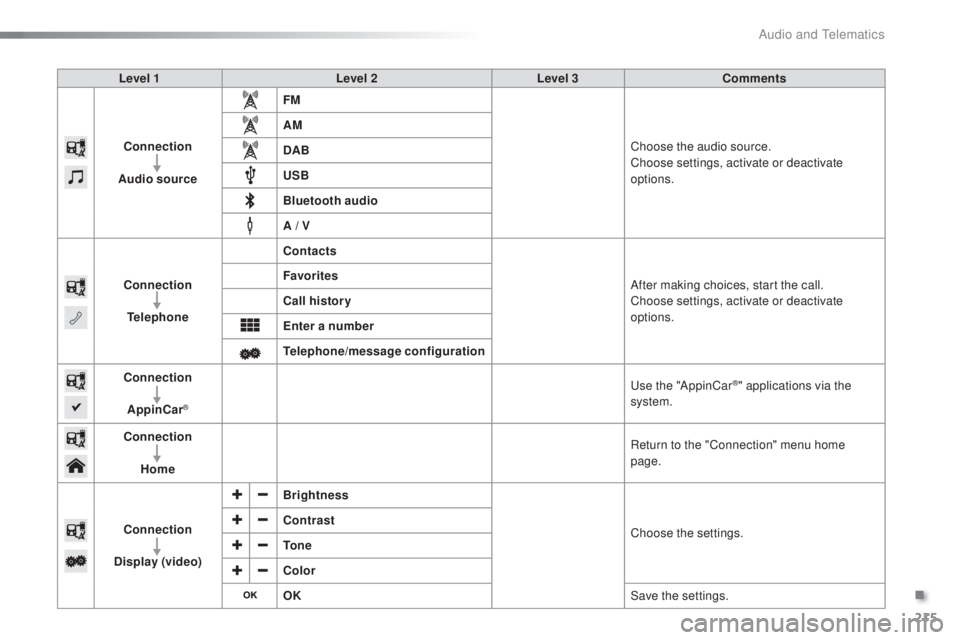
Level 1 Level 2Level 3Comments
Connection
Audio source FM
Choose the audio source.
Choose settings, activate or deactivate
options.
AM
DAB
u
SB
Bluetooth audio
A / V
Connection
tel
ephone Contacts
After making choices, start the call.
Choose settings, activate or deactivate
options.
Favorites
Call history
en
ter a number
te
lephone/message configuration
Connection
AppinCar
®
use the "AppinCar®" applications via the
system.
Connection Home Return to the "Connection" menu home
page.
Connection
Display (video) Brightness
Choose the settings.
Contrast
to
n e
Color
oK S
ave the settings.
.
Audio and telematics
Page 218 of 268
216
108_en_Chap10a_Autoradio-toyota-tactile-1_ed01-2016
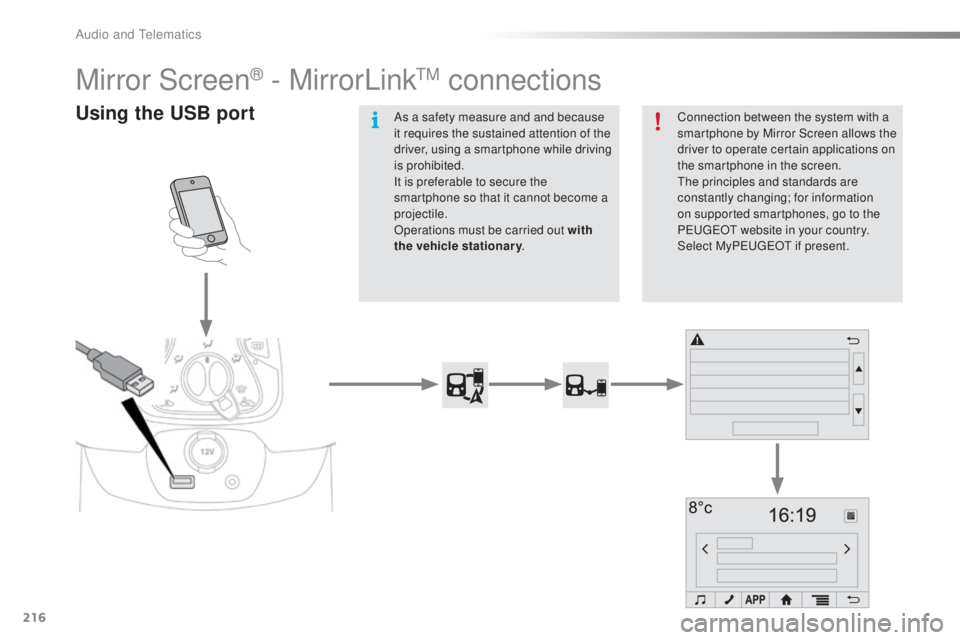
Mirror Screen® - MirrorLinktM connections
using the uS B portConnection between the system with a
smartphone by Mirror Screen allows the
driver to operate certain applications on
the smartphone in the screen.
th
e principles and standards are
constantly changing; for information
on supported smartphones, go to the
P
e
uge
Ot
website in your country.
Select My Peuge
O
t if present.
As a safety measure and and because
it requires the sustained attention of the
driver, using a smartphone while driving
is prohibited.
It is preferable to secure the
smartphone so that it cannot become a
projectile.
Operations must be carried out with
the
vehicle stationary .
Audio and telematics