change time PEUGEOT 108 2018 User Guide
[x] Cancel search | Manufacturer: PEUGEOT, Model Year: 2018, Model line: 108, Model: PEUGEOT 108 2018Pages: 180, PDF Size: 7.14 MB
Page 87 of 180
85
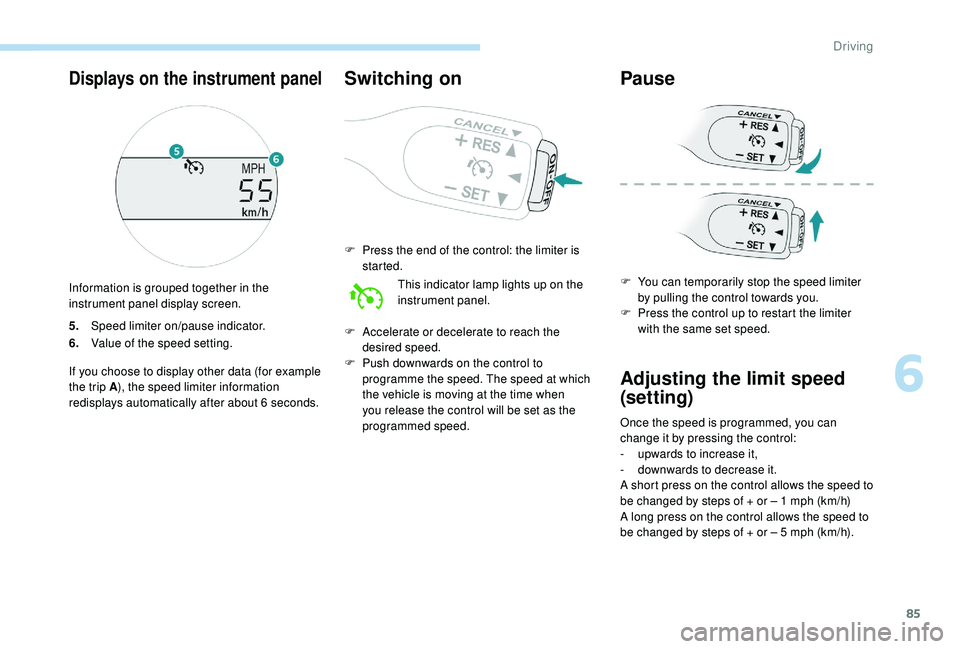
5.Speed limiter on/pause indicator.
6. Value of the speed setting.
If you choose to display other data (for example
the trip A ), the speed limiter information
redisplays automatically after about 6
seconds.
Switching on
F Press the end of the control: the limiter is started.
This indicator lamp lights up on the
instrument panel.
F
A
ccelerate or decelerate to reach the
desired speed.
F
P
ush downwards on the control to
programme the speed. The speed at which
the vehicle is moving at the time when
you release the control will be set as the
programmed speed.
Pause
F You can temporarily stop the speed limiter by pulling the control towards you.
F
P
ress the control up to restart the limiter
with the same set speed.
Adjusting the limit speed
(set ting)
Once the speed is programmed, you can
change it by pressing the control:
-
u
pwards to increase it,
-
d
ownwards to decrease it.
A short press on the control allows the speed to
be changed by steps of + or – 1
mph (km/h)
A long press on the control allows the speed to
be changed by steps of + or – 5
mph (km/h).
Displays on the instrument panel
Information is grouped together in the
instrument panel display screen.
6
Driving
Page 102 of 180
100
Take care when working under the bonnet,
as certain areas of the engine may be
extremely hot (risk of burns) and the
cooling fan could start at any time (even
with the ignition off).
Used products
Avoid prolonged contact of used oil or
fluids with the skin.
Most of these fluids are harmful to health
or indeed very corrosive.Do not discard used oil or fluids into
sewers or onto the ground.
Take used oil to a
PEUGEOT dealer
or a
qualified workshop and dispose
of in the containers reser ved for this
purpose.
Engine oil level
The check is carried out either
using the oil level indicator on the
instrument panel when the ignition is
switched on, for vehicles equipped
with an electric gauge, or using the
dipstick. To ensure that the reading is correct, your
vehicle must be parked on a
level sur face
with the engine stopped for more than
30
minutes.
It is normal to top up the oil level between
two ser vices (or oil changes). PEUGEOT
recommends that you check the level, and top
up, if necessary, every 3,000 miles (5,000 km).
Checking using the dipstick
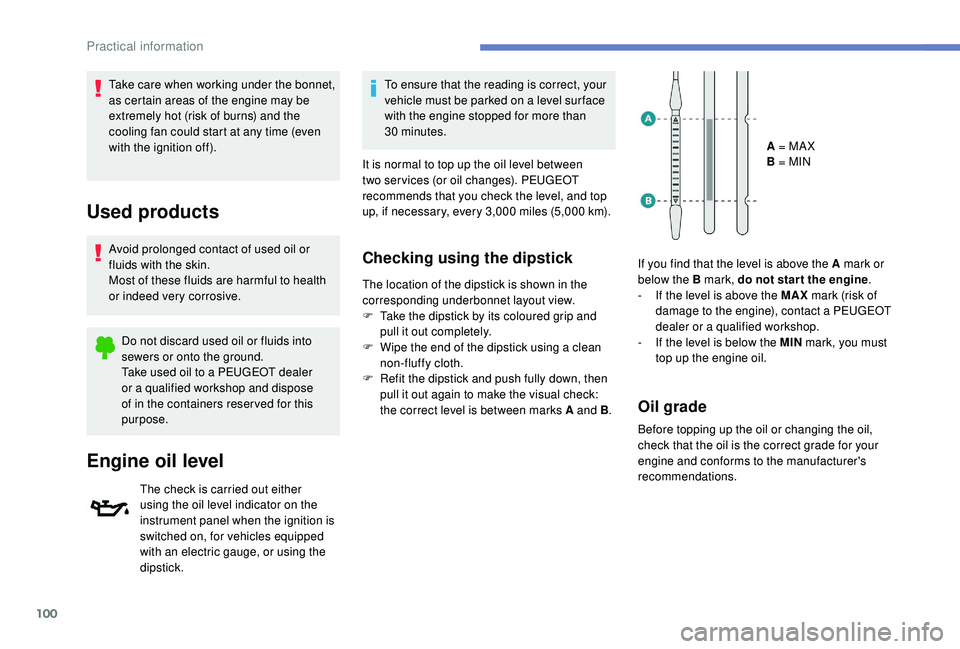
The location of the dipstick is shown in the
corresponding underbonnet layout view.
F
T
ake the dipstick by its coloured grip and
pull it out completely.
F
W
ipe the end of the dipstick using a clean
non-fluffy cloth.
F
R
efit the dipstick and push fully down, then
pull it out again to make the visual check:
the correct level is between marks A and B .A = MA X
B = MIN
If you find that the level is above the A mark or
below the B mark, do not star t the engine .
- I f the level is above the MAX mark (risk of
damage to the engine), contact a
PEUGEOT
dealer or a
qualified workshop.
-
I
f the level is below the MIN mark, you must
top up the engine oil.
Oil grade
Before topping up the oil or changing the oil,
check that the oil is the correct grade for your
engine and conforms to the manufacturer's
recommendations.
Practical information
Page 104 of 180
102
Checks
Unless otherwise indicated, check these
components in accordance with the
manufacturer's service schedule.
Other wise, have them checked by a PEUGEOT
dealer or a
qualified workshop.
12 V battery
The battery does not require any
maintenance.
However, check regularly that the
terminals are correctly tightened
(versions without quick release terminals)
and that the connections are clean.
For more information on the precautions
to take before starting work on the 12 V
battery , refer to the corresponding
section.
Air filter
Depending on the environment
(e.g. dusty atmosphere) and the
use of the vehicle (e.g. city driving),
replace it twice as often if
necessary .
Passenger compartment
filter
Depending on the environment
(e.g. dusty atmosphere) and the
use of the vehicle (e.g. city driving),
replace it twice as often if
necessary. A clogged passenger compartment
filter may have an adverse effect on
the per formance of the air conditioning
system and generate undesirable odours.
Oil filter
Change the oil filter each time the
engine oil is changed.
Manual gearbox
The gearbox does not require any
maintenance (no oil change).
Clutch
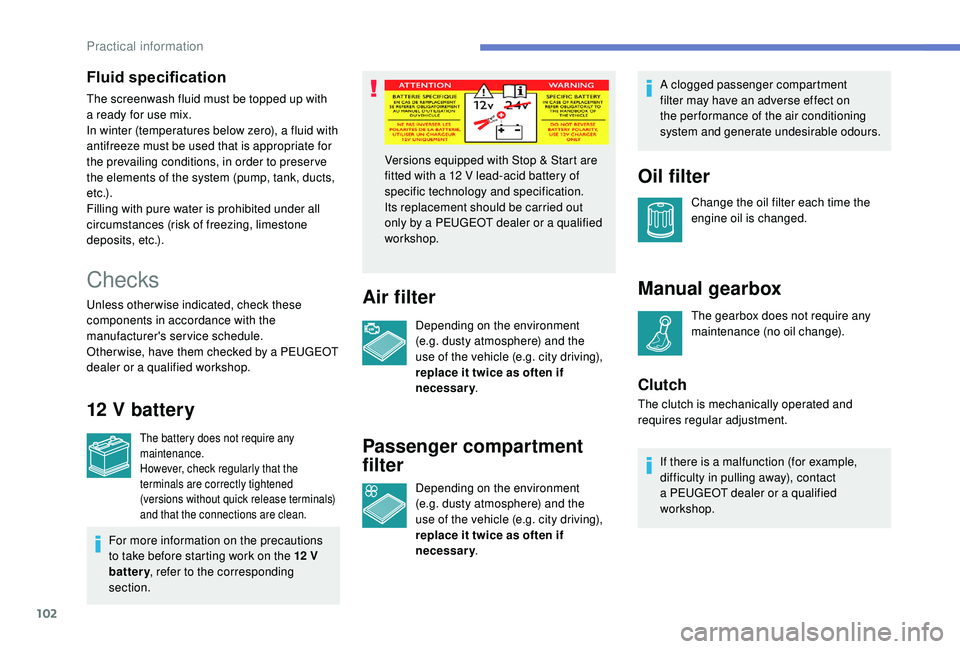
Versions equipped with Stop & Start are
fitted with a
12 V lead-acid battery of
specific technology and specification.
Its replacement should be carried out
only by a
PEUGEOT dealer or a qualified
workshop.
The clutch is mechanically operated and
requires regular adjustment.If there is a
malfunction (for example,
difficulty in pulling away), contact
a
PEUGEOT dealer or a qualified
workshop.
Fluid specification
The screenwash fluid must be topped up with
a ready for use mix.
In winter (temperatures below zero), a fluid with
antifreeze must be used that is appropriate for
the prevailing conditions, in order to preser ve
the elements of the system (pump, tank, ducts,
e t c .) .
Filling with pure water is prohibited under all
circumstances (risk of freezing, limestone
deposits, etc.).
Practical information
Page 105 of 180
103
Brake pads
Brake wear depends on the style
of driving, particularly in the case
of vehicles used in town, over short
distances. It may be necessary to
have the condition of the brakes
checked, even between vehicle
services.
Unless there is a
leak in the circuit, a drop in
the brake fluid level indicates that the brake
pads are worn.
Brake disc/drum wear
For information on checking
brake disc/drum wear, contact
a
PEUGEOT dealer or a qualified
workshop.
Parking brake
If excessive travel or a loss of
e ffectiveness of this system is
noticed, the parking brake must
be checked, even between two
services.
This system must be checked by a
PEUGEOT
dealer or a
qualified workshop.
Wheels and tyres
The pressure must be checked on
all tyres, including the spare wheel,
when the tyres are "cold", at least
once a month and before a long
j o u r n ey. Driving with worn or damaged tyres reduces
braking efficiency and control of the vehicle's
steering. Regular inspections of the condition
of tyres (tread and sides) and rims are
recommended as well as making sure that
valves are fitted.
Using different size wheels and tyres from
those specified can affect the lifetime of tyres,
wheel rotation, ground clearance and the
speedometer reading and have an adverse
effect on road holding.
Fitting different tyres on the front and rear axles
can cause the ESC to mistime.
Only use products recommended by
PEUGEOT or products of equivalent
quality and specification.
In order to optimise the operation of
components as important as those in the
braking system, PEUGEOT selects and
offers very specific products.
After washing the vehicle, dampness, or
in wintry conditions, ice can form on the
brake discs and pads: braking efficiency
may be reduced. Make light brake
applications to dry and defrost the brakes.
ETG gearbox
The ETG gearbox does not require
any maintenance (no oil change).
The pressures given on the tyre pressure label
are valid for "cold" tyres. If you have driven for
more than 10
minutes or more than 6 miles
(10
kilometres) at more than 31 mph (50 km/h),
0.3
bar (30 kPa) should be added to the values
given on the label.
Under-inflation increases fuel consumption.
Non-compliant tyre pressure causes premature
wear on tyres and has an adverse effect on the
vehicle's road holding – Risk of an accident!
7
Practical information
Page 115 of 180
113
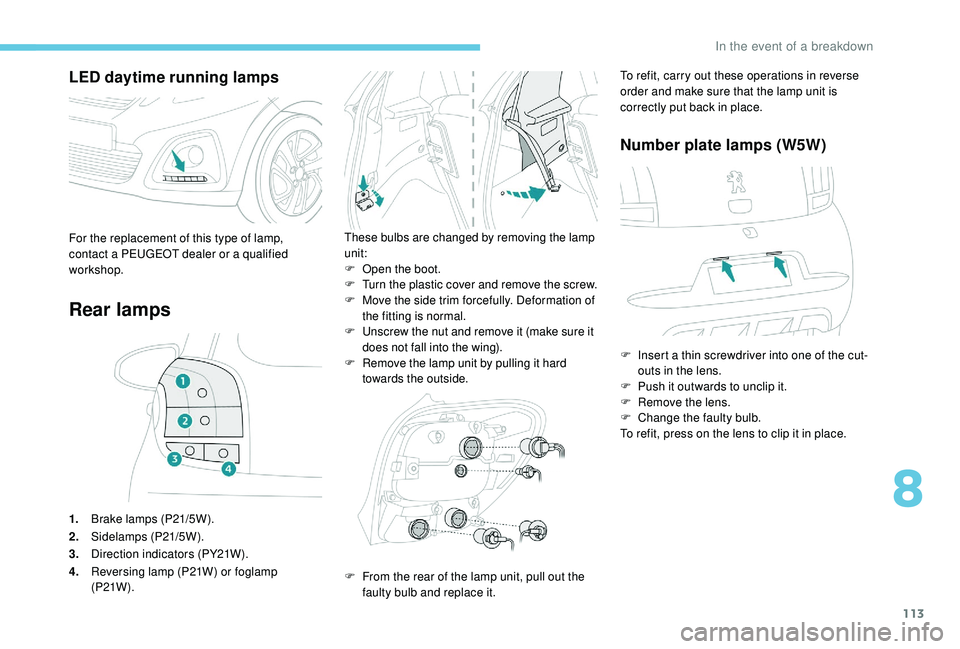
LED daytime running lamps
Rear lamps
1.Brake lamps (P21/5W).
2. Sidelamps (P21/5W).
3. Direction indicators (PY21W).
4. Reversing lamp (P21W) or foglamp
(P21W ).
These bulbs are changed by removing the lamp
unit:
F
O
pen the boot.
F
T
urn the plastic cover and remove the screw.
F
M
ove the side trim forcefully. Deformation of
the fitting is normal.
F
U
nscrew the nut and remove it (make sure it
does not fall into the wing).
F
R
emove the lamp unit by pulling it hard
towards the outside.For the replacement of this type of lamp,
contact a PEUGEOT dealer or a qualified
workshop.
F
F
rom the rear of the lamp unit, pull out the
faulty bulb and replace it. To refit, carry out these operations in reverse
order and make sure that the lamp unit is
correctly put back in place.
Number plate lamps (W5W)
F Insert a
thin screwdriver into one of the cut-
outs in the lens.
F
P
ush it outwards to unclip it.
F
R
emove the lens.
F
C
hange the faulty bulb.
To refit, press on the lens to clip it in place.
8
In the event of a breakdown
Page 139 of 180
9
If "DAB AF " tracking is enabled, there
is a lag of a few seconds while the
system switches to "FM" analogue radio,
sometimes with a
change in volume.
Once the digital signal quality becomes
good again, the system automatically
changes back to "DAB".
If the "DAB" station being listened to is
not available, or if the " DAB AF" is not
enabled, the sound is muted when the
quality of the digital signal becomes too
p o o r.
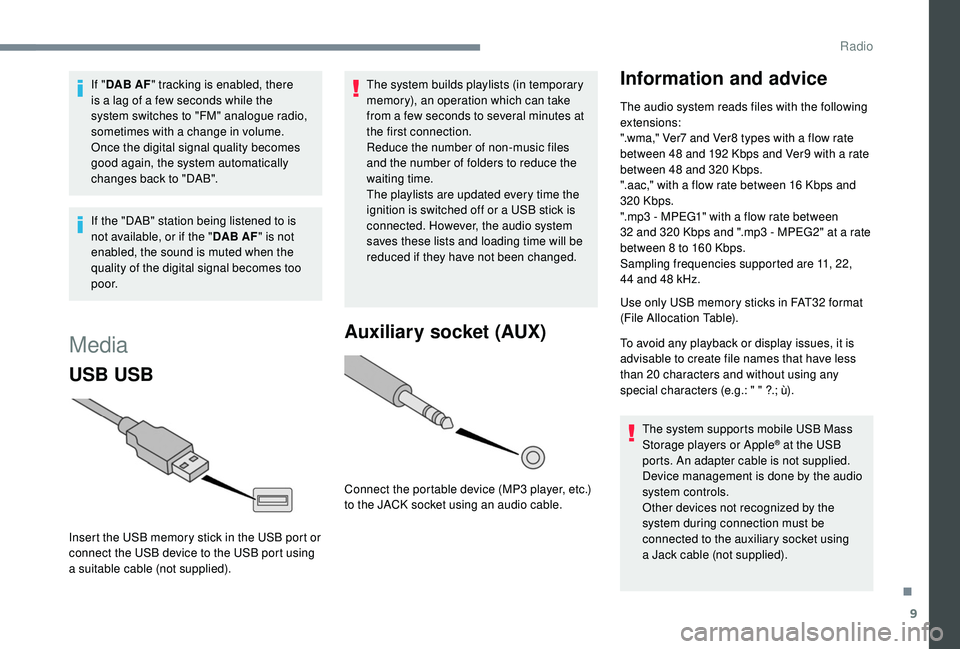
Media
USB USB
Insert the USB memory stick in the USB port or
connect the USB device to the USB port using
a
suitable cable (not supplied). The system builds playlists (in temporary
memory), an operation which can take
from a
few seconds to several minutes at
the first connection.
Reduce the number of non-music files
and the number of folders to reduce the
waiting time.
The playlists are updated every time the
ignition is switched off or a USB stick is
connected. However, the audio system
saves these lists and loading time will be
reduced if they have not been changed.
Auxiliary socket (AUX)
Connect the portable device (MP3 player, etc.)
t o the JACK socket using an audio cable.
Information and advice
The audio system reads files with the following
extensions:
".wma," Ver7
and Ver8 types with a flow rate
between 48
and 192 Kbps and Ver9 with a rate
between 48
and 320 Kbps.
".aac," with a
flow rate between 16 Kbps and
320
Kbps.
".mp3 - MPEG1" with a
flow rate between
32
and 320 Kbps and ".mp3 - MPEG2" at a rate
between 8
to 160 Kbps.
Sampling frequencies supported are 11, 22,
44
and 48 kHz.
Use only USB memory sticks in FAT32
format
(File Allocation Table).
To avoid any playback or display issues, it is
advisable to create file names that have less
than 20
characters and without using any
special characters (e.g.: " " ?.; ù).
The system supports mobile USB Mass
Storage players or Apple
® at the USB
ports. An adapter cable is not supplied.
Device management is done by the audio
system controls.
Other devices not recognized by the
system during connection must be
connected to the auxiliary socket using
a
Jack cable (not supplied).
.
Radio
Page 147 of 180
17
I cannot find some radio stations in the list of
stations received.The station is no longer being received or its
name has changed in the list.
The name of the radio station changes. Instead of their names, some radio stations
transmit other information (song title, for
example).
The system interprets this data as the name of
the station.
QUESTION RESPONSESOLUTION
There is a
difference in sound quality between
the various audio sources (radio, USB, etc.). To enable optimum listening quality, the audio
settings (Volume, Treble, Medium, Bass)
can be adapted to different sound sources,
which may generate audible differences when
changing source (radio, USB, etc.).Check that the audio settings are suited to the
sources being listened to. It is recommended
to set automatic adjustment of sound (Low,
Medium, High) in the audio configurations.
Check the quality and format of your recording.
With the engine off, the system cuts off after
several minutes of use. When the engine is switched off, the time for
which the system will operate depends on the
state of charge of the battery.
The cut off is normal: the system switches to
energy economy mode and cuts off to prevent
the vehicle's battery becoming discharged.Start the vehicle's engine to increase the state
of charge of the battery.
Settings, configuration
.
Radio
Page 151 of 180
3
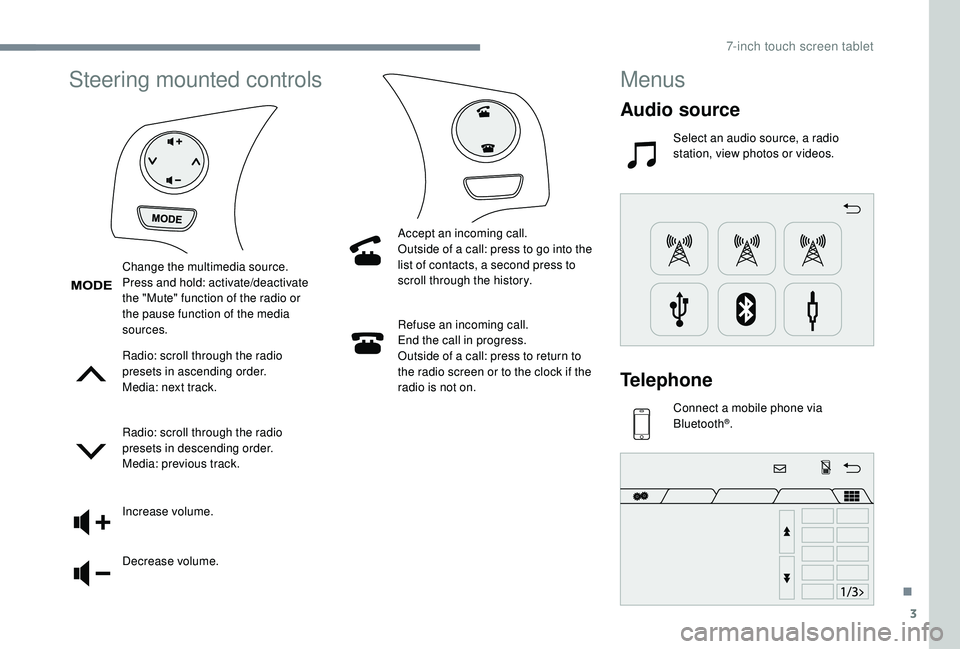
Steering mounted controls
Radio: scroll through the radio
presets in ascending order.
Media: next track.
Radio: scroll through the radio
presets in descending order.
Media: previous track.
Increase volume.
Decrease volume.Refuse an incoming call.
End the call in progress.
Outside of a call: press to return to
the radio screen or to the clock if the
radio is not on.
Change the multimedia source.
Press and hold: activate/deactivate
the "Mute" function of the radio or
the pause function of the media
sources.
Accept an incoming call.
Outside of a call: press to go into the
list of contacts, a second press to
scroll through the history.
Menus
Audio source
Select an audio source, a radio
station, view photos or videos.
Telephone
Connect a mobile phone via
Bl uetooth®.
.
7-inch touch screen tablet
Page 153 of 180
5
The synchronisation of the smartphone
allows users to display smartphone
applications, which are compatible with
the CarPlay
® technology, on the vehicle's
screen when the smartphone's CarPlay®
function has been previously activated.
As the processes and standards are
constantly changing, it is recommended
that you keep your smar tphone's
operating system updated .
For the list of eligible smartphones, go
to the Brand's internet website in your
c o u nt r y.
Connect the USB cable. The
smartphone charges when
connected by the USB cable.
Press " CarPlay " to display the
CarPlay
® inter face.
When the CarPlay
® inter face is displayed on
the system screen, the menu bar is displayed
by default on the left-hand side of the screen.
Depending on the driver's side, you can change
the position of the menu bar, to the left-hand or
right-hand side.
Press "Configuration ".
Select " Connection ". Select "
Steering wheel position ", then select
the desired position.
For this modification to be taken into account,
disconnect and then reconnect the smartphone.
On connecting the USB cable, the
CarPlay® function deactivates the
system's Bluetooth® mode.
MirrorLinkTM smartphone
connection
Available depending on country of sale.
As a safety measure and because it
requires sustained attention by the driver,
using a
smartphone when driving is
prohibited.
All operations must be done with the
vehicle stationary . The synchronisation of the smartphone
allows users to display smartphone
applications, which are compatible with
the MirrorLink
TM technology, on the
vehicle's screen.
As the processes and standards
are constantly changing, for the
communication process between the
smartphone and the system to operate,
it is essential that the smartphone be
unlocked; update the operating system
of the smar tphone as well as the date
and time of the smar tphone and the
system .
For the list of eligible smartphones, go
to the Brand's internet website in your
c o u nt r y.
As a
safety measure, applications can
only be viewed with the vehicle stationary;
display is interrupted once the vehicle is
moving.
The " MirrorLink
TM" function requires
the use of a
compatible smartphone and
compatible applications.
You have two connection options in
MirrorLink
TM mode.
.
7-inch touch screen tablet
Page 155 of 180
7
Press "Android Auto " to start the
application in the system.
During the procedure, several
screen pages relating to certain
functions are displayed.
Accept to start and complete the
connection.
Different audio sources remain accessible in
the margin of the Android Auto display, using
touch buttons in the upper bar.
Access to the menus for the system is possible
at any time using the dedicated buttons.
There may be a
wait for the availability of
applications, depending on the quality of
your network.
Radio
Selecting a station
Press " Audio source " to show the
rolling display of audio sources.
Select " FM". Select the "
Station" tab then
select a station among the stations
received.
Select " FM radio configuration "
then " Update the list of stations "
to refresh the list.
If necessary, select a change of
source by pressing the short cut
" Audio source " in the upper bar.
Select " AM" or " DAB" (depending on
equipment).
The external environment (hills, buildings,
tunnels, multi-storey or basement car
parks, etc.) may block reception, including
RDS tracking. This behaviour is normal
in the propagation of radio waves and
does not indicate any failure of the audio
system.
Changing a frequency
Press "Audio source " to show the
rolling display of audio sources. Select "
FM".
Select the " Manual" tab to search
for a
station.
Press the buttons step by step to
per form a frequency search up or
down.
OR Press the automatic buttons to
per form a frequency search up or
down.
OR Turn the button at the bottom right of
the screen to search for a lower or
higher frequency.
Presetting a station
Select a station or frequency (refer
t o the "Changing a frequency"
section).
Select the " Presets" tab, then make
a
long press on one of the numbered
locations.
.
7-inch touch screen tablet