light PEUGEOT 108 2018 User Guide
[x] Cancel search | Manufacturer: PEUGEOT, Model Year: 2018, Model line: 108, Model: PEUGEOT 108 2018Pages: 180, PDF Size: 7.14 MB
Page 37 of 180
35
To raise the head restraint, pull it upwards.
To lower it, press the catch A then push down
the head restraint.
To remove it:
-
s
lightly tilt the backrest,
-
m
ove the head restraint to the high position,
-
p
ress the catch A while pulling the head
restraint upwards.
To reinstall it:
-
s
lightly tilt the backrest,
-
i
nsert the rods of the head restraint into the
holes.
To reach the low position, press the catch A .
Mirrors
Manual door mirrors
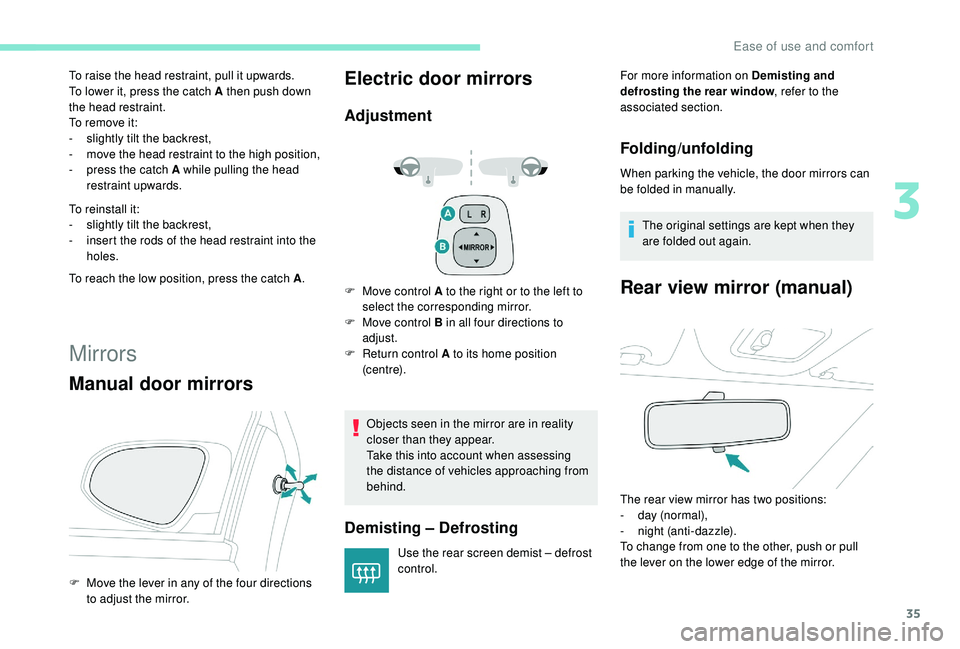
F Move the lever in any of the four directions
to adjust the mirror.
Electric door mirrors
Adjustment
F Move control A to the right or to the left to select the corresponding mirror.
F
M
ove control B in all four directions to
adjust.
F
R
eturn control A to its home position
(c e nt r e).
Objects seen in the mirror are in reality
closer than they appear.
Take this into account when assessing
the distance of vehicles approaching from
behind.
Demisting – Defrosting
Use the rear screen demist – defrost
control. For more information on Demisting and
defrosting the rear window
, refer to the
associated section.
Folding/unfolding
When parking the vehicle, the door mirrors can
be folded in manually.
The original settings are kept when they
are folded out again.
Rear view mirror (manual)
The rear view mirror has two positions:
- d ay (normal),
-
n
ight (anti-dazzle).
To change from one to the other, push or pull
the lever on the lower edge of the mirror.
3
Ease of use and comfort
Page 39 of 180
37
The condensation created by the air
conditioning results in a discharge of water
under the vehicle which is per fectly normal.
The air conditioning system does not
contain chlorine and does not present
any danger to the ozone layer.
Heating
The heating system only operates with the
engine running.
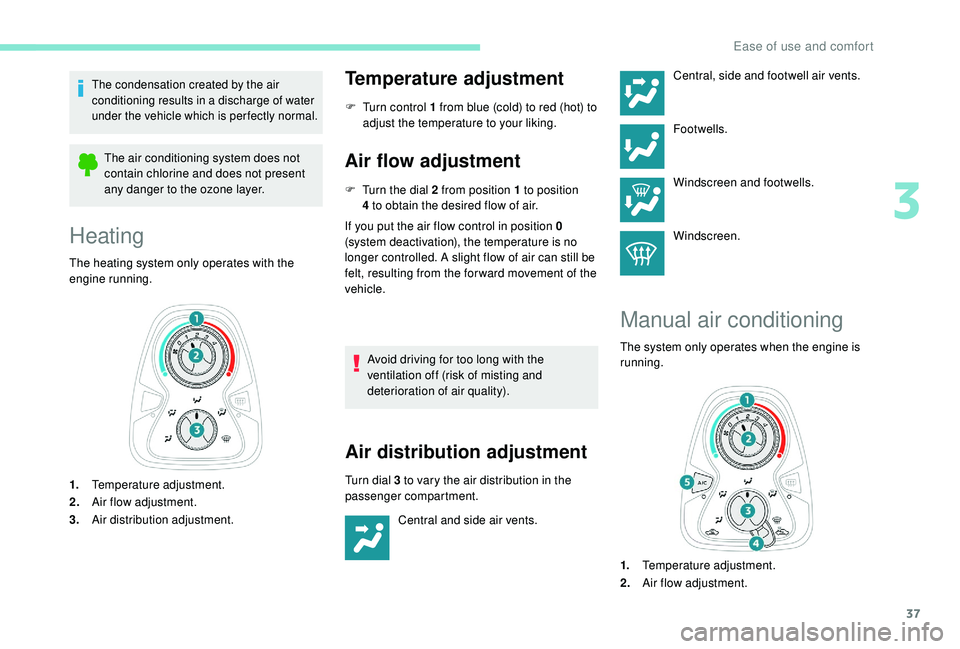
1. Temperature adjustment.
2. Air flow adjustment.
3. Air distribution adjustment.
Temperature adjustment
F Turn control 1 from blue (cold) to red (hot) to
adjust the temperature to your liking.
Air flow adjustment
F Turn the dial 2 from position 1 to position
4 to obtain the desired flow of air.
If you put the air flow control in position 0
(system deactivation), the temperature is no
longer controlled. A slight flow of air can still be
felt, resulting from the for ward movement of the
vehicle.
Avoid driving for too long with the
ventilation off (risk of misting and
deterioration of air quality).
Air distribution adjustment
Turn dial 3 to vary the air distribution in the
p assenger compartment.
Central and side air vents. Central, side and footwell air vents.
Footwells.
Windscreen and footwells.
Windscreen.
Manual air conditioning
The system only operates when the engine is
running.
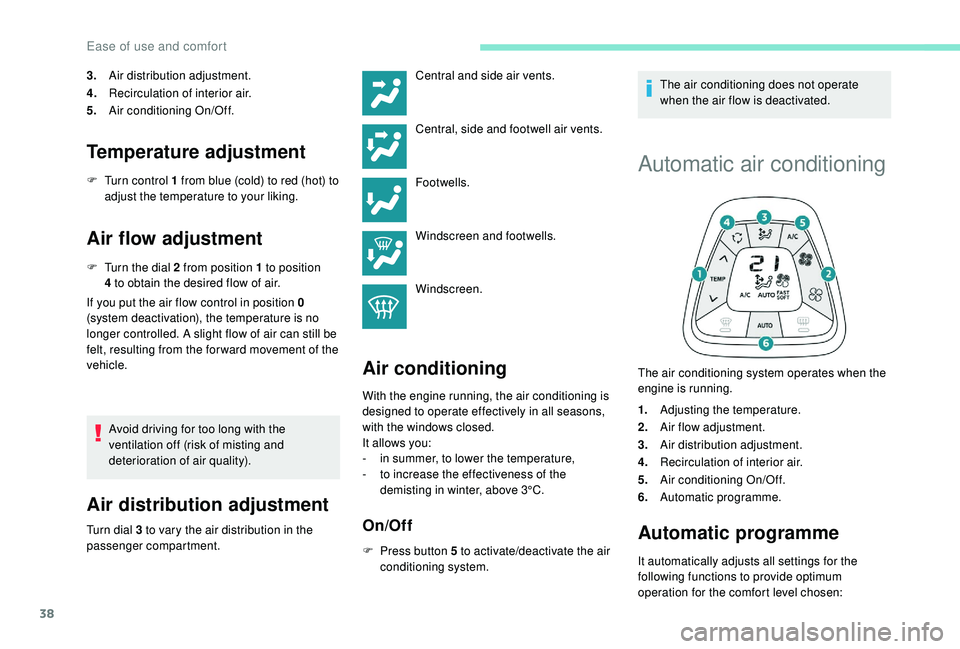
1.
Temperature adjustment.
2. Air flow adjustment.
3
Ease of use and comfort
Page 40 of 180
38
3.Air distribution adjustment.
4. Recirculation of interior air.
5. Air conditioning On/Off.
Temperature adjustment
F Turn control 1 from blue (cold) to red (hot) to
adjust the temperature to your liking.
Air flow adjustment
F Turn the dial 2 from position 1 to position
4 to obtain the desired flow of air.
If you put the air flow control in position 0
(system deactivation), the temperature is no
longer controlled. A slight flow of air can still be
felt, resulting from the for ward movement of the
vehicle.
Avoid driving for too long with the
ventilation off (risk of misting and
deterioration of air quality).
Air distribution adjustment
Turn dial 3 to vary the air distribution in the
p assenger compartment.
Air conditioning
Central and side air vents.
Central, side and footwell air vents.
Footwells.
Windscreen and footwells.
Windscreen.
With the engine running, the air conditioning is
designed to operate effectively in all seasons,
with the windows closed.
It allows you:
-
i
n summer, to lower the temperature,
-
t
o increase the effectiveness of the
demisting in winter, above 3°C.
On/Off
F Press button 5 to activate/deactivate the air
conditioning system. The air conditioning does not operate
when the air flow is deactivated.
Automatic air conditioning
The air conditioning system operates when the
engine is running.
1.
Adjusting the temperature.
2. Air flow adjustment.
3. Air distribution adjustment.
4. Recirculation of interior air.
5. Air conditioning On/Off.
6. Automatic programme.
Automatic programme
It automatically adjusts all settings for the
following functions to provide optimum
operation for the comfort level chosen:
Ease of use and comfort
Page 42 of 180
40
Deactivating the system
F Press air flow button 2 (empty fan) until the fan symbol disappears.
This action deactivates all functions of the air
conditioning system.
Temperature is no longer regulated. A slight air
flow can still be felt however, resulting from the
for ward movement of the vehicle.
Pressing the 6 " AUTO" button again reactivates
the system with the values in use at the time it
was switched off.
Avoid driving for long periods with the
system deactivated (risk of misting and
deterioration of air quality).
Recirculation of interior air
Recirculation of interior air isolates the
passenger compartment from exterior odours
and fumes.
Return to exterior air intake as soon as possible
to avoid deterioration of the air quality and the
formation of mist.Avoid using recirculation of interior air for
prolonged periods – Risk of misting and
deterioration of the air quality!
With a manual air conditioning
system
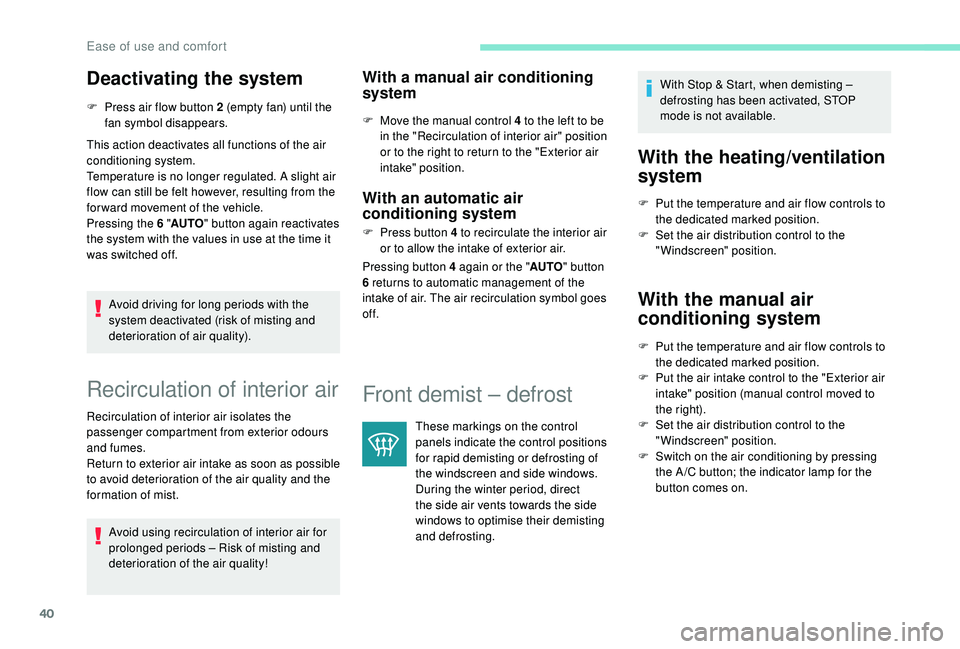
F Move the manual control 4 to the left to be
in the "Recirculation of interior air" position
or to the right to return to the "Exterior air
intake" position.
With an automatic air
conditioning system
F Press button 4 to recirculate the interior air
or to allow the intake of exterior air.
Pressing button 4
again or the "AUTO" button
6
returns to automatic management of the
intake of air. The air recirculation symbol goes
of f.
Front demist – defrost
These markings on the control
panels indicate the control positions
for rapid demisting or defrosting of
the windscreen and side windows.
During the winter period, direct
the side air vents towards the side
windows to optimise their demisting
and defrosting. With Stop & Start, when demisting –
defrosting has been activated, STOP
mode is not available.
With the heating/ventilation
system
F Put the temperature and air flow controls to
the dedicated marked position.
F
S
et the air distribution control to the
"Windscreen" position.
With the manual air
conditioning system
F Put the temperature and air flow controls to the dedicated marked position.
F
P
ut the air intake control to the "Exterior air
intake" position (manual control moved to
the right).
F
S
et the air distribution control to the
"Windscreen" position.
F
S
witch on the air conditioning by pressing
the A /C button; the indicator lamp for the
button comes on.
Ease of use and comfort
Page 43 of 180
41
With the automatic air
conditioning system
F Press the dedicated button, its indicator lamp comes on.
F
T
o switch it off, press this button again; its
indicator lamp goes off.
The other settings (air flow, air distribution,
etc.) are controlled automatically.
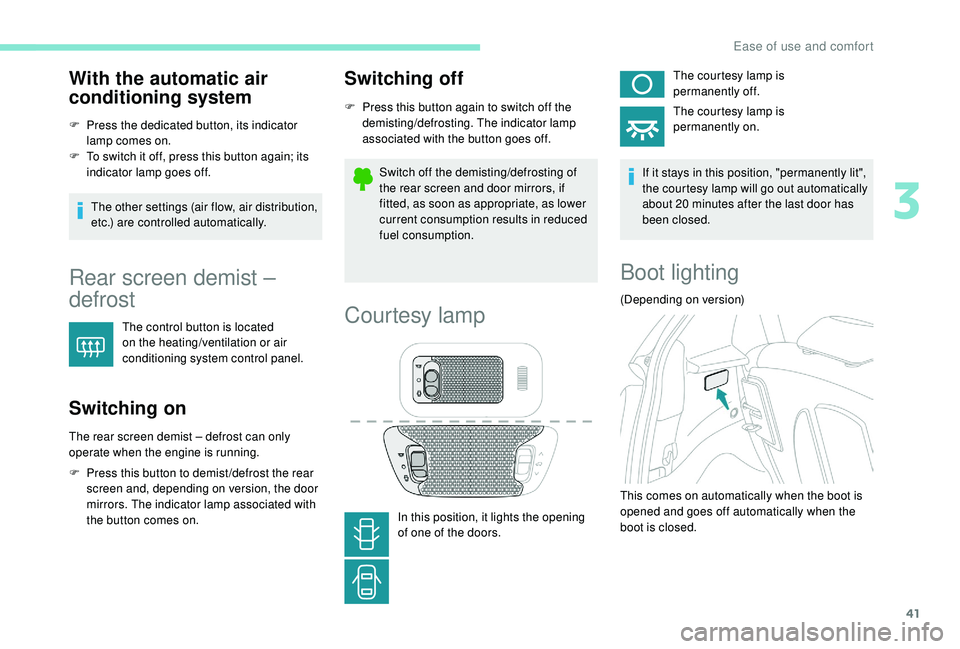
Rear screen demist –
defrost
The control button is located
on the heating/ventilation or air
conditioning system control panel.
Switching on
The rear screen demist – defrost can only
operate when the engine is running.
F
P
ress this button to demist /defrost the rear
screen and, depending on version, the door
mirrors. The indicator lamp associated with
the button comes on.
Switching off
F Press this button again to switch off the demisting/defrosting. The indicator lamp
associated with the button goes off.
Switch off the demisting/defrosting of
the rear screen and door mirrors, if
fitted, as soon as appropriate, as lower
current consumption results in reduced
fuel consumption.
Courtesy lamp
In this position, it lights the opening
of one of the doors. The courtesy lamp is
permanently off.
The courtesy lamp is
permanently on.
If it stays in this position, "permanently lit",
the courtesy lamp will go out automatically
about 20 minutes after the last door has
been closed.
Boot lighting
(Depending on version)
This comes on automatically when the boot is
opened and goes off automatically when the
boot is closed.
3
Ease of use and comfort
Page 48 of 180
46
Lighting control stalk
Main lighting
The various front and rear lamps of the vehicle
are designed to adapt the driver's visibility
progressively according to the climatic
conditions:
-
s
idelamps, to be seen,
-
d
ipped beam headlamps to see without
dazzling other drivers,
-
m
ain beam headlamps to see clearly when
the road is clear.
Additional lighting
Other lamps are provided to meet the
requirements of particular driving conditions:
-
a
rear foglamp,
-
f
ront foglamps,
-
d
aytime running lamps to be more visible
during the day.
In some weather conditions (e.g. low
temperature or humidity), the presence
of misting on the internal sur face of the
glass of the headlamps and rear lamps is
normal; it disappears after the lamps have
been on for a
few minutes. Travelling abroad
If planning to use your vehicle in a
country
that drives on the other side of the road,
the headlamp dipped beams must be
adjusted to avoid dazzling oncoming
drivers.
Contact a PEUGEOT dealer or a qualified
workshop.
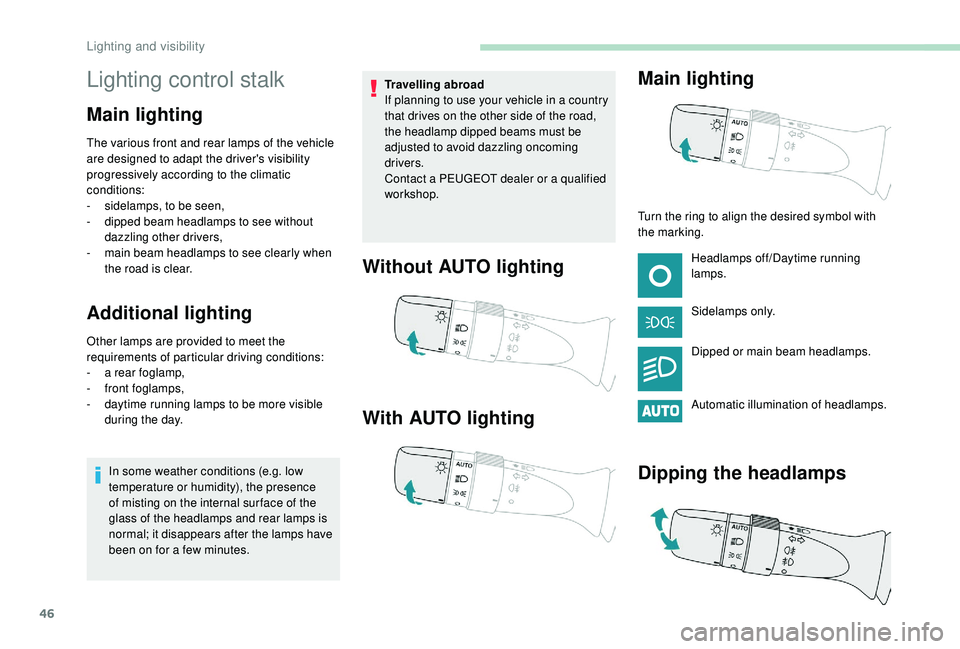
Without AUTO lighting
With AUTO lighting Main lighting
Turn the ring to align the desired symbol with
the marking.
Headlamps off/Daytime running
lamps.
Sidelamps only.
Dipped or main beam headlamps.
Automatic illumination of headlamps.
Dipping the headlamps
Lighting and visibility
Page 49 of 180
47
In the lighting off and sidelamps modes, the
driver can switch on the main beam headlamps
temporarily ("headlamp flash"), for as long as
the stalk is kept pulled.
Displays
Illumination of the corresponding indicator
lamp in the instrument panel confirms that the
lighting selected is switched on.
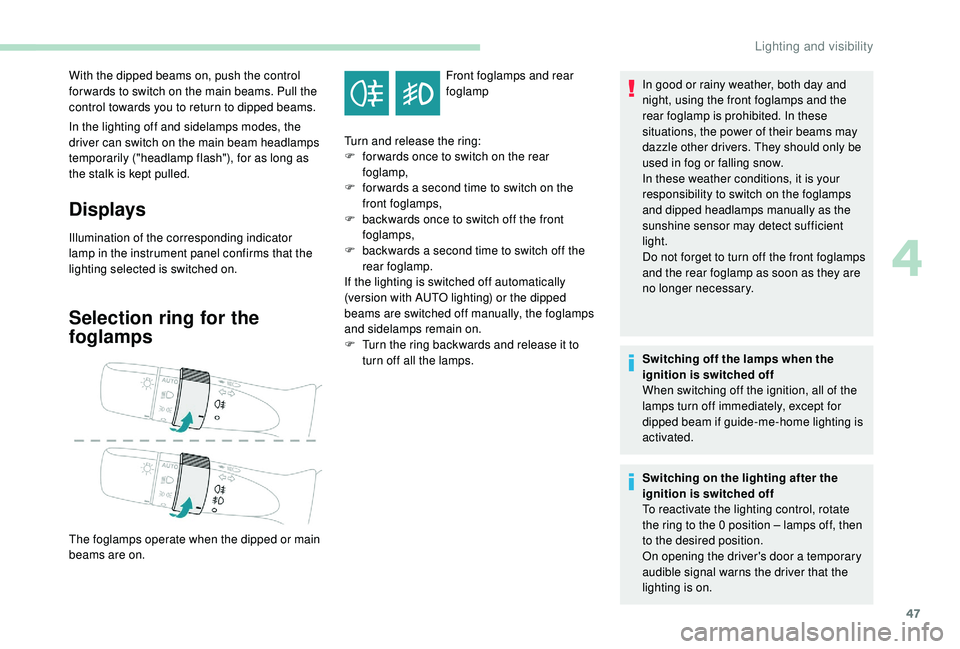
Selection ring for the
foglamps
Front foglamps and rear
foglamp
With the dipped beams on, push the control
for wards to switch on the main beams. Pull the
control towards you to return to dipped beams.
The foglamps operate when the dipped or main
beams are on. Turn and release the ring:
F
f
or wards once to switch on the rear
foglamp,
F
f
or wards a
second time to switch on the
front foglamps,
F
b
ackwards once to switch off the front
foglamps,
F
b
ackwards a
second time to switch off the
rear foglamp.
If the lighting is switched off automatically
(version with AUTO lighting) or the dipped
beams are switched off manually, the foglamps
and sidelamps remain on.
F
T
urn the ring backwards and release it to
turn off all the lamps. In good or rainy weather, both day and
night, using the front foglamps and the
rear foglamp is prohibited. In these
situations, the power of their beams may
dazzle other drivers. They should only be
used in fog or falling snow.
In these weather conditions, it is your
responsibility to switch on the foglamps
and dipped headlamps manually as the
sunshine sensor may detect sufficient
light.
Do not forget to turn off the front foglamps
and the rear foglamp as soon as they are
no longer necessary.
Switching off the lamps when the
ignition is switched off
When switching off the ignition, all of the
lamps turn off immediately, except for
dipped beam if guide-me-home lighting is
activated.
Switching on the lighting after the
ignition is switched off
To reactivate the lighting control, rotate
the ring to the 0
position – lamps off, then
to the desired position.
On opening the driver's door a
temporary
audible signal warns the driver that the
lighting is on.
4
Lighting and visibility
Page 50 of 180
48
Automatic headlamp
illumination
Switching on
F Turn the ring to the "AUTO" position.
Switching off
F Turn the ring to another position.
In fog or snow, the sunshine sensor may
detect sufficient light. The lamps will not
come on automatically.
Do not cover the light sensor, the
associated functions would no longer be
controlled.
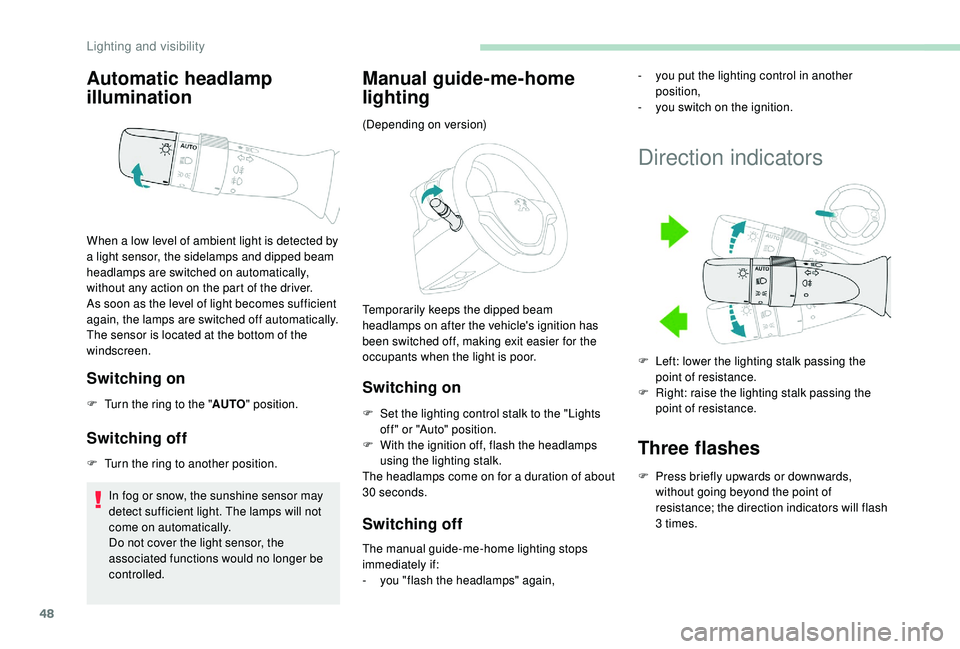
Manual guide-me-home
lighting
Switching on
F Set the lighting control stalk to the "Lights off " or "Auto" position.
F
W
ith the ignition off, flash the headlamps
using the lighting stalk.
The headlamps come on for a
duration of about
30
seconds.
Switching off
The manual guide-me-home lighting stops
immediately if:
-
y
ou "flash the headlamps" again,
When a
low level of ambient light is detected by
a
light sensor, the sidelamps and dipped beam
headlamps are switched on automatically,
without any action on the part of the driver.
As soon as the level of light becomes sufficient
again, the lamps are switched off automatically.
The sensor is located at the bottom of the
windscreen. (Depending on version)
Temporarily keeps the dipped beam
headlamps on after the vehicle's ignition has
been switched off, making exit easier for the
occupants when the light is poor.
Direction indicators
Three flashes
F Press briefly upwards or downwards,
without going beyond the point of
resistance; the direction indicators will flash
3
times.
-
y
ou put the lighting control in another
position,
-
y
ou switch on the ignition.
F
L
eft: lower the lighting stalk passing the
point of resistance.
F
R
ight: raise the lighting stalk passing the
point of resistance.
Lighting and visibility
Page 51 of 180
49
Headlamp adjustment
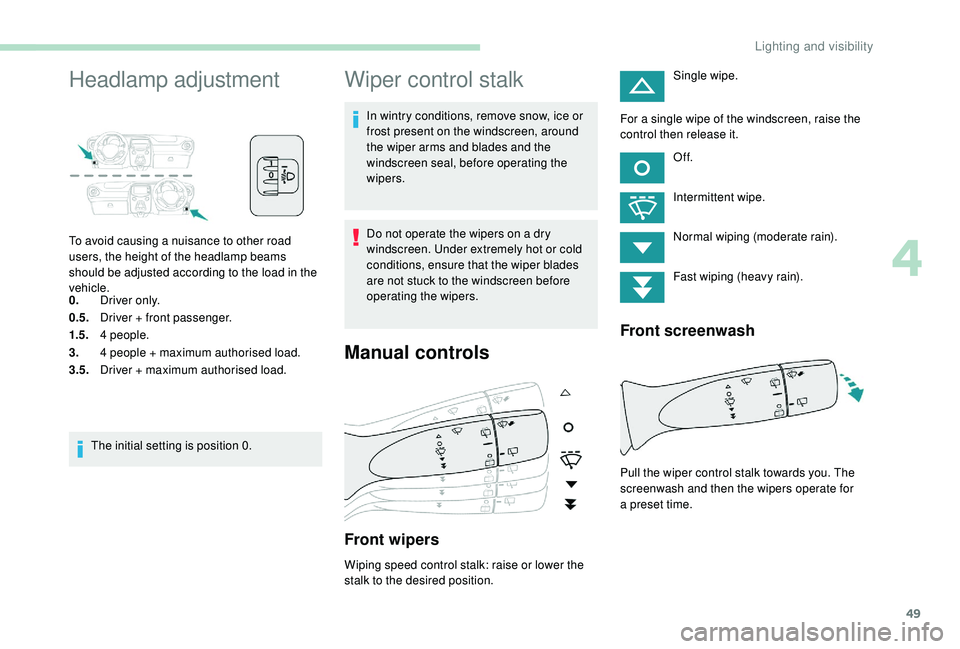
To avoid causing a nuisance to other road
u sers, the height of the headlamp beams
should be adjusted according to the load in the
vehicle.
0. Driver only.
0.5. Driver + front passenger.
1.5. 4
people.
3. 4
people + maximum authorised load.
3.5. Driver + maximum authorised load.
The initial setting is position 0.
Wiper control stalk
In wintry conditions, remove snow, ice or
frost present on the windscreen, around
the wiper arms and blades and the
windscreen seal, before operating the
wipers.
Do not operate the wipers on a
dry
windscreen. Under extremely hot or cold
conditions, ensure that the wiper blades
are not stuck to the windscreen before
operating the wipers.
Manual controls
Front wipers
Wiping speed control stalk: raise or lower the
stalk to the desired position. Single wipe.
For a single wipe of the windscreen, raise the
control then release it.
Of f.
Intermittent wipe.
Normal wiping (moderate rain).
Fast wiping (heavy rain).
Front screenwash
Pull the wiper control stalk towards you. The
screenwash and then the wipers operate for
a
preset time.
4
Lighting and visibility
Page 52 of 180
50
Rear wiper
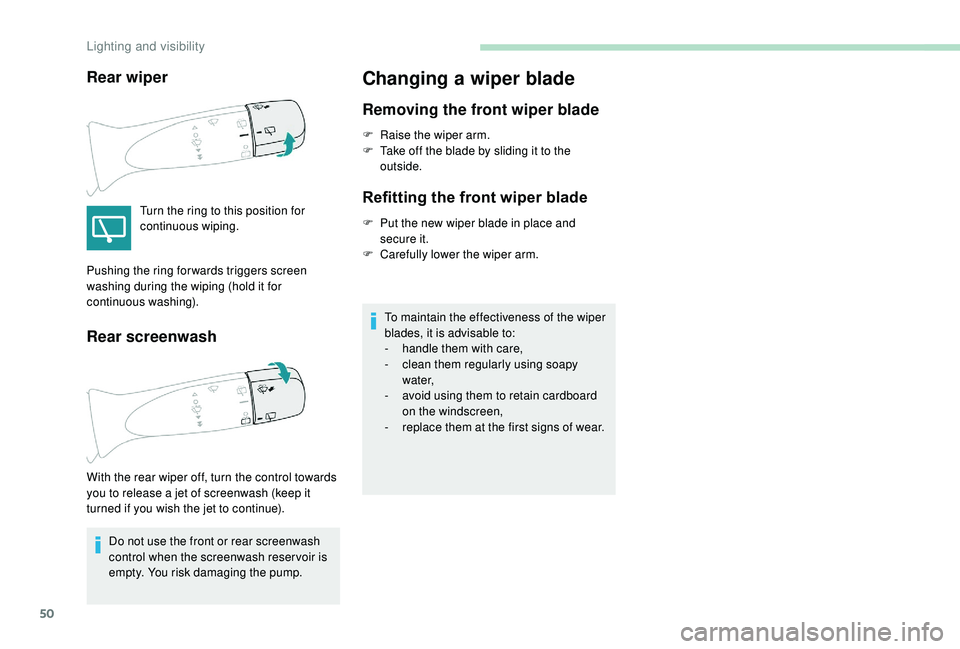
Turn the ring to this position for
continuous wiping.
Rear screenwash
Do not use the front or rear screenwash
control when the screenwash reser voir is
empty. You risk damaging the pump.
Changing a wiper blade
Removing the front wiper blade
F Raise the wiper arm.
F T ake off the blade by sliding it to the
outside.
Refitting the front wiper blade
F Put the new wiper blade in place and secure it.
F
C
arefully lower the wiper arm.
To maintain the effectiveness of the wiper
blades, it is advisable to:
-
h
andle them with care,
-
c
lean them regularly using soapy
water,
-
a
void using them to retain cardboard
on the windscreen,
-
r
eplace them at the first signs of wear.
Pushing the ring for wards triggers screen
washing during the wiping (hold it for
continuous washing).
With the rear wiper off, turn the control towards
you to release a
jet of screenwash (keep it
turned if you wish the jet to continue).
Lighting and visibility