light PEUGEOT 108 2018 Owner's Guide
[x] Cancel search | Manufacturer: PEUGEOT, Model Year: 2018, Model line: 108, Model: PEUGEOT 108 2018Pages: 180, PDF Size: 7.14 MB
Page 81 of 180
79
If you stop the vehicle but keep the engine
running, you must always move the gear
selector to the neutral position N.
A continuous audible signal sounds if you
turn the ignition switch to " OFF" while the
vehicle is in 2nd, 3rd, 4th or 5th gear.
If this happens, turn the ignition switch
to " ON ", move the gear selector to the
position N , return it to position E , M or R,
then turn the ignition switch to " OFF".
If the vehicle is on a
slope, use the brake
to stop the vehicle from moving and place
the gear selector to position N , E or R.
In all cases, you must apply the parking
brake to immobilise the vehicle.
Before doing anything in the engine
compartment, make sure that the gear
selector is in neutral N and the parking
brake is applied.Operating limits
When on a slope or when hill start assist is
a ctivated, never keep the vehicle stationary
using the accelerator: you could damage the
clutch.
In these situations, an audible signal sounds.
F
I
n that case, move the gear selector to
position N .
F
W
ait 15 minutes before moving off again, to
allow the clutch to cool down.
Operating faults
With the ignition on, lighting of this
warning lamp indicates a gearbox
fault.
Contact a
PEUGEOT dealer or
a
qualified workshop.
If N flashes in the instrument panel together
with an audible signal for a
long period of time:
-
m
ake sure that the ignition switch is
correctly set to the " ON" position,
-
m
ove the gear selector to N , then return it to
E , M or R .
If 1
flashes in the instrument panel:
-
m
ove the gear selector to E or M , then
return it to N .
If R flashes in the instrument panel:
-
m ove the gear selector to R , then return it to N.
Gear shift indicator
System which reduces fuel consumption by
recommending the most appropriate gear.
Operation
Depending on the driving situation and the
equipment of your vehicle, the system can
recommend you to change gear.
Gear shift recommendations are for information
only. In fact, the road layout, the traffic density
and safety remain the deciding factors when
choosing the best gear. The driver therefore
remains responsible for deciding whether or not
to follow the indications issued by the system.
This function cannot be deactivated.
Example:
-
Y
ou are in third gear.
-
Y
ou press the accelerator pedal.
-
T
he system may suggest that you engage
a
higher gear.
6
Driving
Page 83 of 180
81
Operation
Going into engine STOP mode
This indicator lamp comes on in the
instrument panel and the engine
goes into standby automatically:
-
w
hen the vehicle is stationary, you put the
gearbox into neutral and release the clutch
pedal.
Stop & Starttime counters
A partial time counter counts the periods in
STOP mode during a journey. For your convenience during parking
manoeuvres, STOP mode is not available
for a
few seconds after coming out of
reverse gear.
Stop & Start does not change features
of the vehicle such as braking, power
steering…
Never refuel with the engine in STOP
mode; you must switch off the ignition.
Special cases: STOP mode not
available
Stop & Start
The Stop & Start system puts the engine
temporarily into standby – STOP mode – during
traffic stops (red lights, traffic jams, etc.). The
engine restarts automatically – START mode
– as soon as you want to move off. Restarting
occurs instantly, quickly and silently.
Per fect for urban use, the Stop & Start system
reduces fuel consumption and exhaust
emissions as well as the noise level when
stationary. -
t
he engine is needed to maintain
a comfortable temperature in the passenger
compartment,
-
d
emisting is active,
-
s
ome special conditions (battery charge,
engine temperature, braking assistance,
vehicle stopped on a
steep slope, high
altitude…) where the engine is needed to
assure control of a
system.
Going into engine START mode
This indicator lamp goes off and the
engine restarts automatically:
-
w
hen you fully depress the clutch pedal.
Special case: START invoked
automatically
START mode is invoked automatically if:
- y
ou open the driver's door,
-
y
ou open the bonnet,
-
y
ou unfasten the driver's seat belt,
-
s
ome temporary conditions apply (battery
charge, engine temperature, braking
assistance, vehicle on a
steep slope,
adjustment of the air conditioning, …) where
it is necessary for control of a
system or of
the vehicle.
It is displayed in the trip computer as soon as
the Stop & Start acts.
Press one of the "
DISP" buttons to return to the
previous display.
A global time counter counts the periods in
STOP mode since the last reset to zero.
When it is displayed, press for more than two
seconds on one of the " DISP" buttons to reset
to zero.
STOP mode does not activate, mainly when:
-
t
he driver's door is open,
-
t
he driver's seat belt is not fastened,
6
Driving
Page 84 of 180
82
Operating fault
In the event of a fault with the
s ystem, this warning lamp flashes in
the instrument panel.
Have it checked by a
PEUGEOT dealer or
a
qualified workshop.
Maintenance
Before doing anything under the bonnet,
deactivate the Stop & Start system to
avoid any risk of injury resulting from an
automatic change to START mode.
The Stop & Start system requires a
12 V
battery of specific technology and
specification.
All work on this type of battery must be
carried out only by a
PEUGEOT dealer or
a
qualified workshop.
For more information on the 12
V batter y,
refer to the corresponding section. Driving on flooded roads
Before driving in a
flooded area, it is
strongly recommended that you deactivate
the Stop & Start system.
For more information on Driving advice ,
particularly on flooded roads, refer to the
corresponding section.
Deactivation/Manual
reactivation
Press this button at any time to deactivate the
system.
Deactivation is confirmed by the
illumination of this indicator lamp in
the instrument panel.
If the system has been deactivated in STOP
mode, the engine restarts immediately.
Press this button again.
The system is active again; this is confirmed by
the indicator lamp going off in the instrument
panel.
The system reactivates automatically every
time the engine is started by the driver.
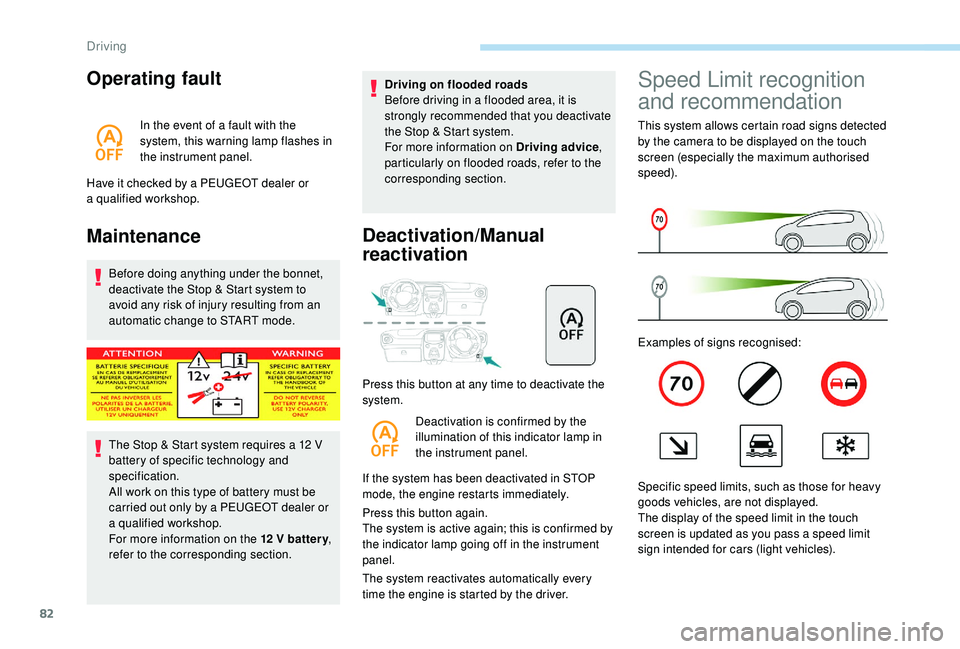
Speed Limit recognition
and recommendation
This system allows certain road signs detected
by the camera to be displayed on the touch
screen (especially the maximum authorised
speed).
Examples of signs recognised:
Specific speed limits, such as those for heavy
goods vehicles, are not displayed.
The display of the speed limit in the touch
screen is updated as you pass a
speed limit
sign intended for cars (light vehicles).
Driving
Page 86 of 180
84
- when towing,
- d riving with a space-saver type spare wheel
or snow chains fitted,
-
p
uncture repair using the temporary repair
kit,
-
y
oung drivers, etc.
The following situations may inter fere with the
operation of the system or prevent it working:
-
p
oor visibility (inadequate street lighting,
falling snow, rain, fog),
-
w
indscreen area located in front of the
camera: dirty, misted, frost-covered, snow-
covered, damaged or covered by a
sticker,
-
f
ault with the camera,
-
h
idden road signs (other vehicles,
vegetation, snow),
-
s
peed limit signs that do not conform to the
standard, are damaged or distorted.
If an app on your smart phone is used
via Mirror Screen, the sign displayed by
the system may be temporarily hidden. It
will be redisplayed as soon as you pass
another sign.Speed limiter
System which prevents the
vehicle from exceeding the speed
programmed by the driver.
The limiter is switched on manually: this
can be done regardless of the vehicle speed.
However, if you are travelling at less than
18
mph (30 km/h), the programmed speed will
be set at 18
mph (30 km/h).
The speed limiter is paused using the control.
The programmed speed can be exceeded
temporarily by pressing the accelerator firmly
beyond the point of resistance.
To return to the programmed speed, simply
release the accelerator pedal until the set limit
speed has been reached again.
The programmed speed is erased when
the ignition is switched off.
The limiter cannot, under any
circumstances, replace respect for speed
limits, nor the vigilance of the driver.
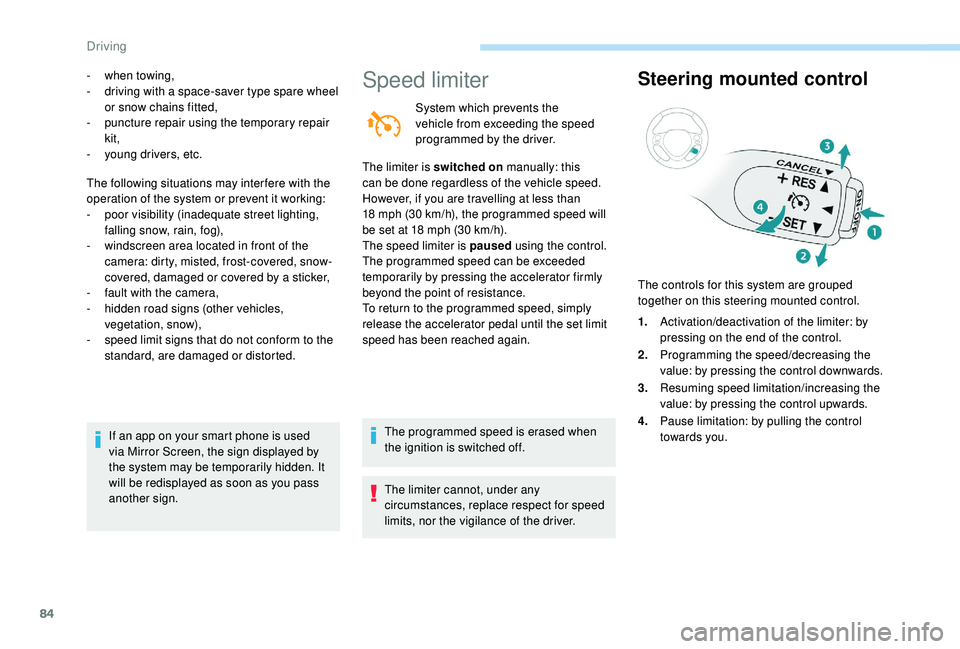
Steering mounted control
The controls for this system are grouped
together on this steering mounted control.
1.Activation/deactivation of the limiter: by
pressing on the end of the control.
2. Programming the speed/decreasing the
value: by pressing the control downwards.
3. Resuming speed limitation/increasing the
value: by pressing the control upwards.
4. Pause limitation: by pulling the control
towards you.
Driving
Page 87 of 180
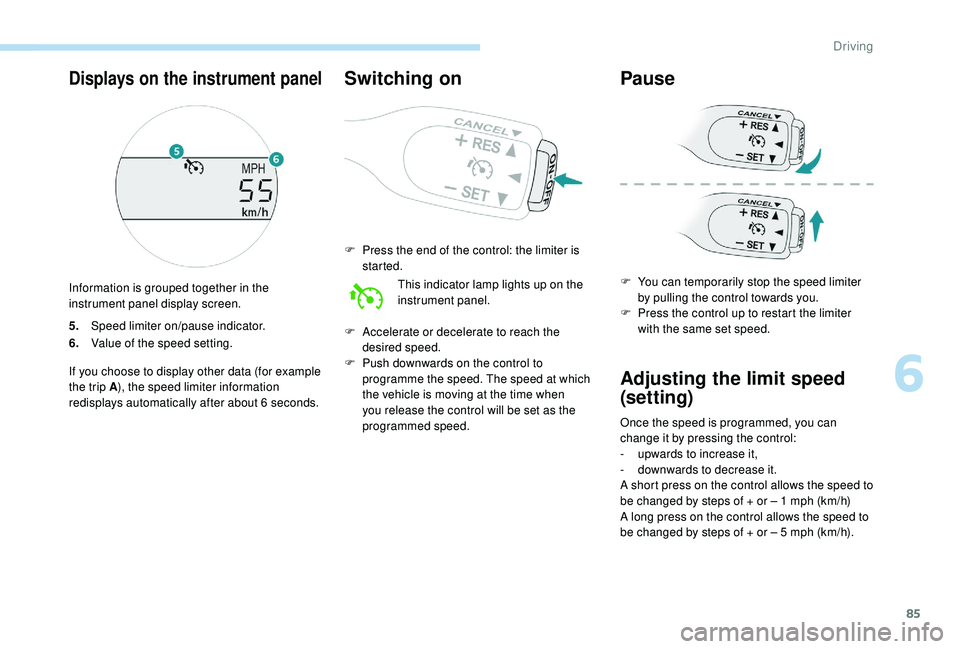
85
5.Speed limiter on/pause indicator.
6. Value of the speed setting.
If you choose to display other data (for example
the trip A ), the speed limiter information
redisplays automatically after about 6
seconds.
Switching on
F Press the end of the control: the limiter is started.
This indicator lamp lights up on the
instrument panel.
F
A
ccelerate or decelerate to reach the
desired speed.
F
P
ush downwards on the control to
programme the speed. The speed at which
the vehicle is moving at the time when
you release the control will be set as the
programmed speed.
Pause
F You can temporarily stop the speed limiter by pulling the control towards you.
F
P
ress the control up to restart the limiter
with the same set speed.
Adjusting the limit speed
(set ting)
Once the speed is programmed, you can
change it by pressing the control:
-
u
pwards to increase it,
-
d
ownwards to decrease it.
A short press on the control allows the speed to
be changed by steps of + or – 1
mph (km/h)
A long press on the control allows the speed to
be changed by steps of + or – 5
mph (km/h).
Displays on the instrument panel
Information is grouped together in the
instrument panel display screen.
6
Driving
Page 90 of 180
88
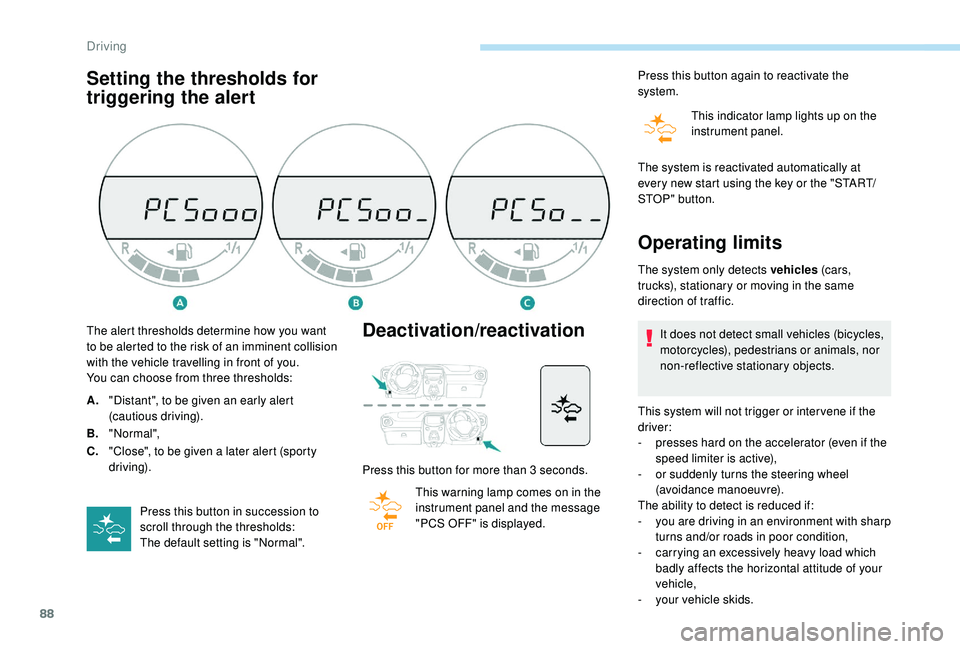
Setting the thresholds for
triggering the alertDeactivation/reactivation
Press this button for more than 3 seconds.
T his warning lamp comes on in the
instrument panel and the message
"PCS OFF" is displayed. Press this button again to reactivate the
system.
This indicator lamp lights up on the
instrument panel.
The alert thresholds determine how you want
to be alerted to the risk of an imminent collision
with the vehicle travelling in front of you.
You can choose from three thresholds:
A. "Distant", to be given an early alert
(cautious driving).
B. "Normal",
C. "Close", to be given a
later alert (sporty
driving).
Press this button in succession to
scroll through the thresholds:
The default setting is "Normal". The system is reactivated automatically at
every new start using the key or the "START/
STOP " button.
Operating limits
The system only detects vehicles
(c ar s,
trucks), stationary or moving in the same
direction of traffic.
It does not detect small vehicles (bicycles,
motorcycles), pedestrians or animals, nor
non-reflective stationary objects.
This system will not trigger or inter vene if the
driver:
-
p
resses hard on the accelerator (even if the
speed limiter is active),
-
o
r suddenly turns the steering wheel
(avoidance manoeuvre).
The ability to detect is reduced if:
-
y
ou are driving in an environment with sharp
turns and/or roads in poor condition,
-
c
arrying an excessively heavy load which
badly affects the horizontal attitude of your
vehicle,
-
y
our vehicle skids.
Driving
Page 91 of 180
89
When weather conditions are difficult
(extremely heavy rain, snow, fog, hail,
etc.), braking distances increase, which
may reduce the system's ability to avoid
a
collision.
The driver must therefore remain
particularly cautious.
Never let snow build up on the bonnet
or any object above the bonnet nor at
the front of the roof: this could enter the
field of vision of the sensor and obstruct
detection.
Unwanted triggering
- passing a vehicle travelling in the other
direction, at a crossroads, when your
vehicle is turning left or right,
-
i
f the vehicle in front of you kicks up water or
snow,
-
i
f your vehicle stops very close to an
overhanging wall or other vehicles,
-
w
hen your vehicle quickly draws close to
a
vehicle in front,
-
i
f the vehicle is raised or lowered,
-
i
f the vehicle is passing through a plastic
curtain,
-
i
f you are driving in fog or smoke,
-
i
f the sensor is misaligned (replacement
after a
collision).
Operating faults
Sensor fault
Operation of the laser sensor may be
disrupted by accumulation of dirt, formation
of condensation on the windscreen or
the presence of a component causing an
obstruction (e.g. an open bonnet).
If this happens, you are alerted by
the flashing of this warning lamp in
the instrument panel. Do not stick or other wise attach any object
on the windscreen in front of the sensor.
System fault
If there is a system fault, you are
a lerted by the flashing of this
warning lamp in the instrument
panel.
Have the system checked by a
PEUGEOT
dealer or a
qualified workshop.
In the event of an impact to the
windscreen at the sensor, deactivate the
system and contact a
PEUGEOT dealer
or a
qualified workshop to have your
windscreen replaced.
Do not attempt to remove, adjust or test
the sensor.
Only a
PEUGEOT dealer or a qualified
workshop is able to work on the system.
The system may detect a
risk of imminent
collision, particularly in the following conditions:
-
d
etection of an object close to the edge of
the road going into a
bend (safety rail, street
light, road sign),
-
d
etection of a
structure at the top or bottom
of a
sharp slope (advertising hoarding,
public lighting),
-
d
etection of reflective objects (central
reser vation, etc.) on the road,
-
d
etection of the top bar of a
bridge or
a
signal gantry,
-
p
assing a
vehicle travelling in the other
direction in a
corner, Use windscreen demisting and regularly clean
the area of the windscreen in front of the
sensor.
6
Driving
Page 92 of 180
90
Lane departure warning
system
System that detects involuntary crossing of
longitudinal markings of roads, using a camera
that recognises the continuous or broken lines.
To increase your safety, the camera analyses
the image then triggers a
warning if the driver's
attention drops and the vehicle drifts over
a
lane marking (speed greater than 30 mph
(50
km/h)).
This system is particularly suited to motor ways
and dual carriageways.
The lane departure warning system
cannot under any circumstances replace
the need for vigilance on the part of the
driver.
You must obser ve the driving regulations
and take a
break every two hours.
When driving with snow chains or with the
spare wheel fitted, you must deactivate
the system.
Activation
Detection
You are alerted by an audible signal and the
lighting of a warning lamp in the instrument panel.
No warning is given while the direction indicator
is flashing and for approximately 20 seconds
after the direction indicator is switched off.
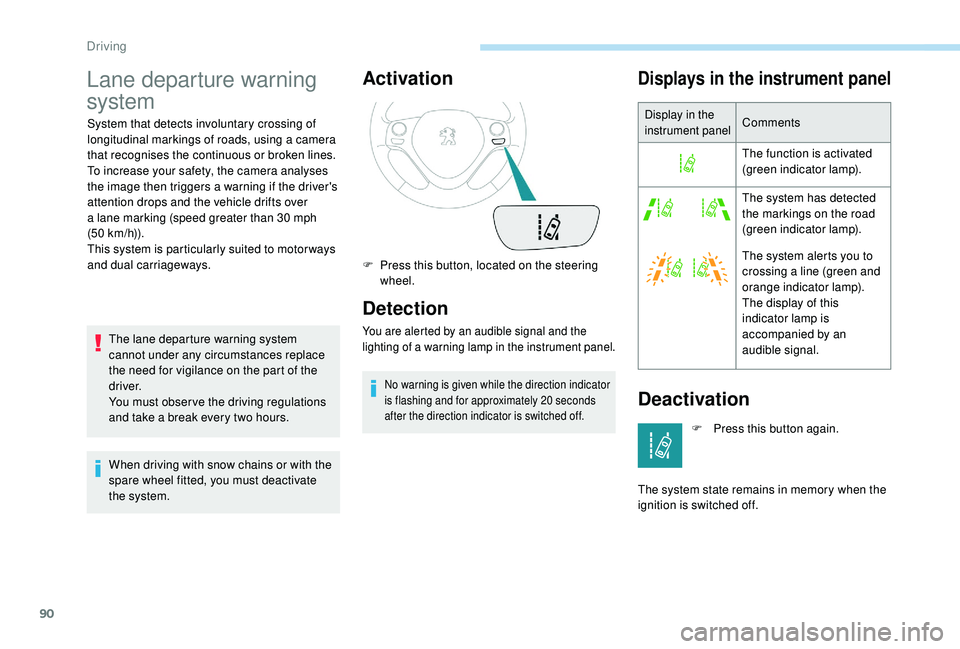
Displays in the instrument panel
Display in the
instrument panelComments
The function is activated
(green indicator lamp).
The system has detected
the markings on the road
(green indicator lamp).
The system alerts you to
crossing a
line (green and
orange indicator lamp).
The display of this
indicator lamp is
accompanied by an
audible signal.
Deactivation
F Press this button, located on the steering wheel.
F
P
ress this button again.
The system state remains in memory when the
ignition is switched off.
Driving
Page 93 of 180
91
Operating fault
If there is a fault, this warning lamp
( orange) comes on in the instrument
panel.
Contact a
PEUGEOT dealer or a qualified
workshop without delay.
Detection may be disrupted:
-
I
f the road markings are worn.
-
I
f there is little contrast between the
road markings and the road surface,
-
I
f the windscreen is dirty.
-
I
n certain extreme weather conditions:
fog, heavy rain, snow, bright sunlight
or direct exposure to the sun (low sun,
leaving a
tunnel, etc.), and shadows.
Reversing camera
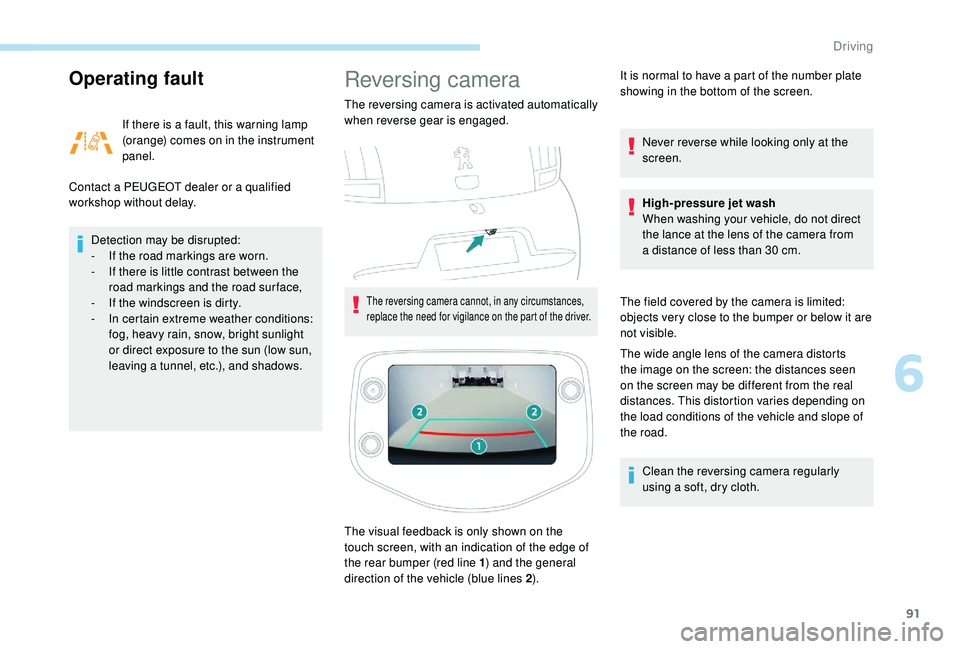
The reversing camera is activated automatically
when reverse gear is engaged.
The reversing camera cannot, in any circumstances,
replace the need for vigilance on the part of the driver.
The visual feedback is only shown on the
touch screen, with an indication of the edge of
the rear bumper (red line 1 ) and the general
direction of the vehicle (blue lines 2 ).It is normal to have a
part of the number plate
showing in the bottom of the screen.
Never reverse while looking only at the
screen.
High-pressure jet wash
When washing your vehicle, do not direct
the lance at the lens of the camera from
a distance of less than 30 cm.
The field covered by the camera is limited:
objects very close to the bumper or below it are
not visible.
The wide angle lens of the camera distorts
the image on the screen: the distances seen
on the screen may be different from the real
distances. This distortion varies depending on
the load conditions of the vehicle and slope of
the road. Clean the reversing camera regularly
using a soft, dry cloth.
6
Driving
Page 98 of 180
96
Fuel tank
The capacity of the tank is about 35 litres.
Low fuel level
When the fuel in the tank reaches
a low level, this warning lamp
comes on in the instrument panel,
accompanied by an audible warning.
The message "LO FUEL" is displayed instead
of the range.
You have about 5
litres of fuel left.
In certain driving conditions and depending on
the engine in your vehicle, your range may be
less than 30
miles (50 km).
If you run out of fuel, the emission
control warning lamp may come on
in the instrument panel. It will go out
automatically after several engine starts.
Refuelling
Refuelling must be done with the engine and
ignition off (ignition switch to " LOCK" or
" OFF "). Opening the filler cap may create a
noise
caused by an inrush of air. This is entirely
normal and results from the sealing of the fuel
system.
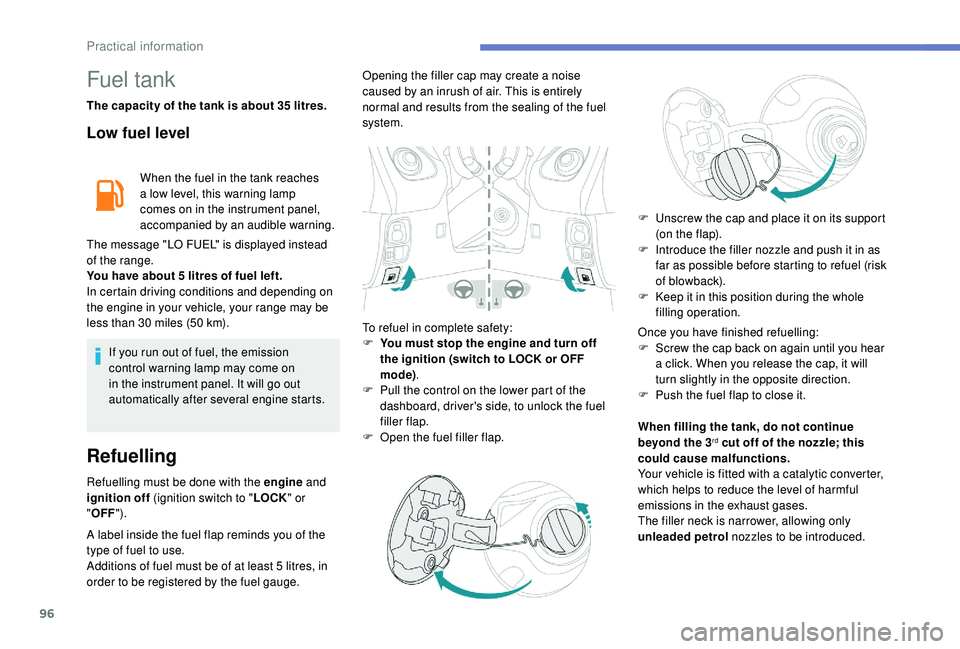
To refuel in complete safety:
F
Y
ou must stop the engine and turn off
the ignition (switch to LOCK or OFF
mode) .
F
P
ull the control on the lower part of the
dashboard, driver's side, to unlock the fuel
filler flap.
F
O
pen the fuel filler flap.
A label inside the fuel flap reminds you of the
type of fuel to use.
Additions of fuel must be of at least 5 litres, in
order to be registered by the fuel gauge. F
U
nscrew the cap and place it on its support
(on the flap).
F
I
ntroduce the filler nozzle and push it in as
far as possible before starting to refuel (risk
of blowback).
F
K
eep it in this position during the whole
filling operation.
Once you have finished refuelling:
F
S
crew the cap back on again until you hear
a click. When you release the cap, it will
turn slightly in the opposite direction.
F
P
ush the fuel flap to close it.
When filling the tank, do not continue
beyond the 3
rd cut off of the nozzle; this
could cause malfunctions.
Your vehicle is fitted with a
catalytic converter,
which helps to reduce the level of harmful
emissions in the exhaust gases.
The filler neck is narrower, allowing only
unleaded petrol nozzles to be introduced.
Practical information