instrument panel PEUGEOT 108 2018 Owner's Manual
[x] Cancel search | Manufacturer: PEUGEOT, Model Year: 2018, Model line: 108, Model: PEUGEOT 108 2018Pages: 180, PDF Size: 7.14 MB
Page 84 of 180
82
Operating fault
In the event of a fault with the
s ystem, this warning lamp flashes in
the instrument panel.
Have it checked by a
PEUGEOT dealer or
a
qualified workshop.
Maintenance
Before doing anything under the bonnet,
deactivate the Stop & Start system to
avoid any risk of injury resulting from an
automatic change to START mode.
The Stop & Start system requires a
12 V
battery of specific technology and
specification.
All work on this type of battery must be
carried out only by a
PEUGEOT dealer or
a
qualified workshop.
For more information on the 12
V batter y,
refer to the corresponding section. Driving on flooded roads
Before driving in a
flooded area, it is
strongly recommended that you deactivate
the Stop & Start system.
For more information on Driving advice ,
particularly on flooded roads, refer to the
corresponding section.
Deactivation/Manual
reactivation
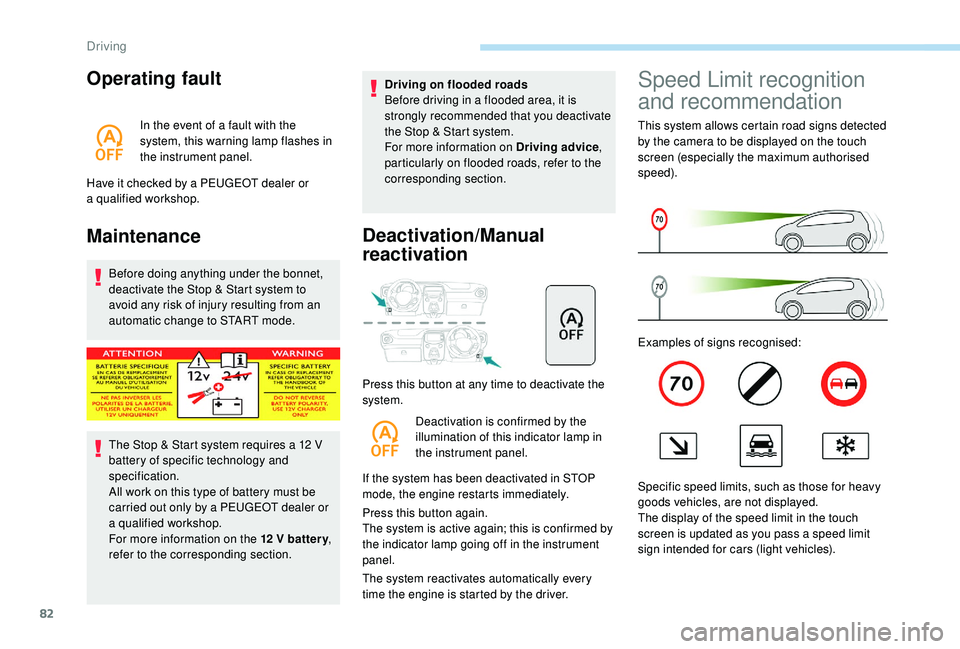
Press this button at any time to deactivate the
system.
Deactivation is confirmed by the
illumination of this indicator lamp in
the instrument panel.
If the system has been deactivated in STOP
mode, the engine restarts immediately.
Press this button again.
The system is active again; this is confirmed by
the indicator lamp going off in the instrument
panel.
The system reactivates automatically every
time the engine is started by the driver.
Speed Limit recognition
and recommendation
This system allows certain road signs detected
by the camera to be displayed on the touch
screen (especially the maximum authorised
speed).
Examples of signs recognised:
Specific speed limits, such as those for heavy
goods vehicles, are not displayed.
The display of the speed limit in the touch
screen is updated as you pass a
speed limit
sign intended for cars (light vehicles).
Driving
Page 85 of 180
83
The units for the speed limits (mph or
km/h) depend on the country you are
driving in.
It should be taken into account so that you
obser ve the speed limit.
For the system to operate correctly when
you change country, the units for speed in
the instrument panel must be those for the
country you are driving in.
The automatic reading of road signs is
a driving assistance system and does not
always display speed limits correctly.
The speed limit signs present on the road
always take priority over the display by the
system.
The system cannot in any circumstances
replace the need for vigilance on the part
of the driver.
The driver must observe the driving
regulations and must adapt the speed of
the vehicle to suit the weather and traffic.
It is possible for the system to not display
the speed limit if it does not detect a
speed
limit sign within a
preset period.
The system is designed to detect signs
that conform to the Vienna Convention on
road signs. To maintain correct operation of the
system: regularly clean the area in front of
the camera.
The internal sur face of the windscreen can
also become misted around the camera.
In humid and cold weather, demist the
windscreen regularly.
Activation/deactivation
F In the touch screen, select
the " Configuration " menu
then " General " and activate
" Configuration of traffic signs
recognition ".
Activation is taken into account after about
1
second.
Set the associated alerts ( no aler t, visual
alerts or visual and sound alerts ):
F
I
n " Speeding alert ", set "Notification
alert " then " Level of notification ".
F
I
n " Overtaking alert ", set "Notification
alert ".
Display
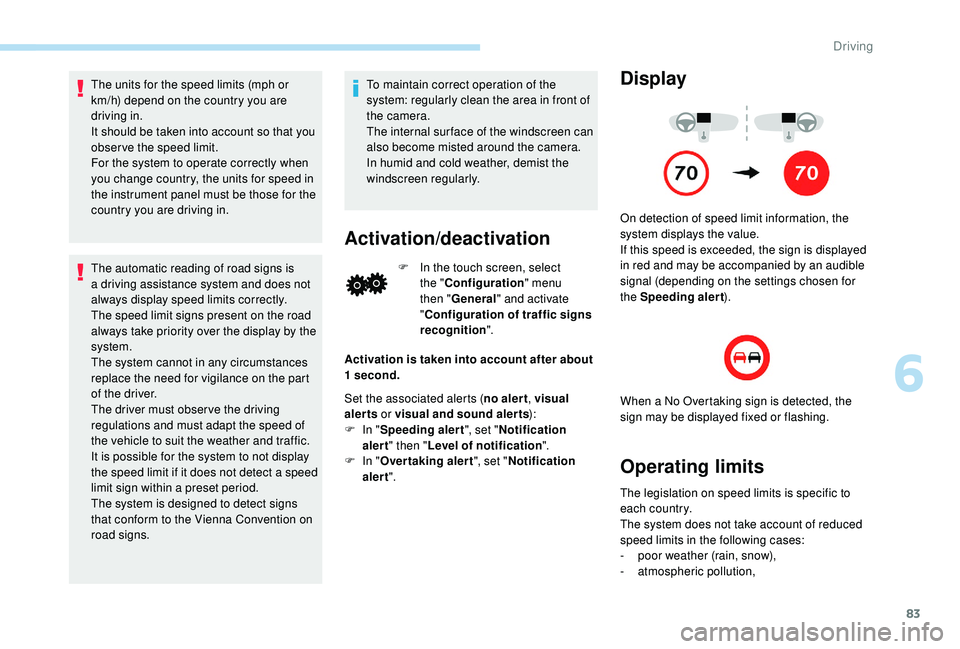
On detection of speed limit information, the
system displays the value.
If this speed is exceeded, the sign is displayed
in red and may be accompanied by an audible
signal (depending on the settings chosen for
the Speeding alert ).
When a
No Overtaking sign is detected, the
sign may be displayed fixed or flashing.
Operating limits
The legislation on speed limits is specific to
each country.
The system does not take account of reduced
speed limits in the following cases:
-
p
oor weather (rain, snow),
-
a
tmospheric pollution,
6
Driving
Page 87 of 180
85
5.Speed limiter on/pause indicator.
6. Value of the speed setting.
If you choose to display other data (for example
the trip A ), the speed limiter information
redisplays automatically after about 6
seconds.
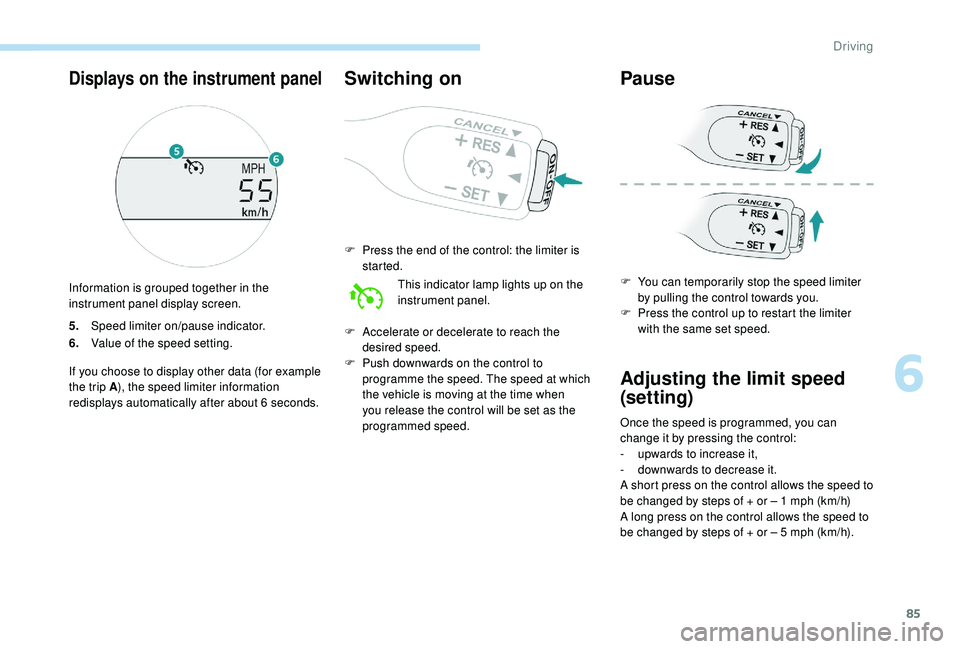
Switching on
F Press the end of the control: the limiter is started.
This indicator lamp lights up on the
instrument panel.
F
A
ccelerate or decelerate to reach the
desired speed.
F
P
ush downwards on the control to
programme the speed. The speed at which
the vehicle is moving at the time when
you release the control will be set as the
programmed speed.
Pause
F You can temporarily stop the speed limiter by pulling the control towards you.
F
P
ress the control up to restart the limiter
with the same set speed.
Adjusting the limit speed
(set ting)
Once the speed is programmed, you can
change it by pressing the control:
-
u
pwards to increase it,
-
d
ownwards to decrease it.
A short press on the control allows the speed to
be changed by steps of + or – 1
mph (km/h)
A long press on the control allows the speed to
be changed by steps of + or – 5
mph (km/h).
Displays on the instrument panel
Information is grouped together in the
instrument panel display screen.
6
Driving
Page 88 of 180
86
Temporarily exceeding the
speed setting
F Press firmly on the accelerator pedal,
going beyond the point of resistance, to
exceed the programmed speed limit.
The speed limiter is deactivated temporarily
and the displayed programmed speed flashes.
An audible signal accompanies the
flashing of the programmed speed when
exceeding the speed is not due to an
action by the driver (steep hill…).
As soon as the vehicle's speed returns to the
programmed value, the limiter operates again:
the display of the programmed speed becomes
steady again.
Switching off
F Press the end of the control: the display of information on the speed limiter disappears.
Operating fault
If this warning lamp comes on in
the instrument panel it signals
a
malfunction of the limiter. Have it checked by a
PEUGEOT dealer or
a
qualified workshop.
The use of mats not approved by
PEUGEOT may inter fere with the
operation of the speed limiter.
To avoid any risk of jamming of the pedals:
-
e
nsure that mats are secured correctly,
-
n
ever place one mat on top of another.
Active City Brake
Active City Brake is a driving assistance
s ystem that aims to avoid a frontal collision or
to reduce the speed of an impact if the driver
does not react or reacts too late (brake applied
too late).
This system has been designed to improve driving
safety.
It remains the driver's responsibility to continuously
monitor the state of the traffic and to assess the
distances and relative speeds of other vehicles.
Active City Brake cannot in any circumstances
replace the need for vigilance on the part of the
driver.
Never look at the laser sensor through
an optical instrument (magnifying glass,
microscope…) at a
distance of less than
10
centimetres: risk of eye injury.
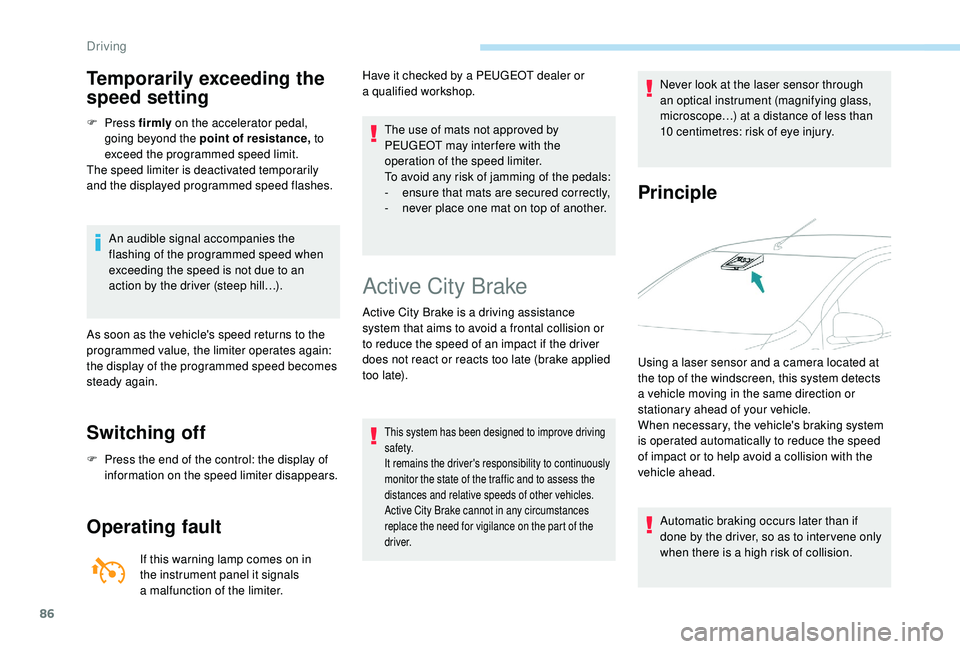
Principle
Using a laser sensor and a camera located at
t he top of the windscreen, this system detects
a
vehicle moving in the same direction or
stationary ahead of your vehicle.
When necessary, the vehicle's braking system
is operated automatically to reduce the speed
of impact or to help avoid a
collision with the
vehicle ahead.
Automatic braking occurs later than if
done by the driver, so as to inter vene only
when there is a
high risk of collision.
Driving
Page 89 of 180
87
Conditions of activation
Active City Brake functions if the following
conditions are met:
•
T
he engine is running.
•
T
he vehicle is moving for ward.
•
For triggering the pre-collision warning :
-
t
he speed is between 9 and 87 mph
(15
and 140 km/h),
-
t
he difference in speed between your
vehicle and the one in front is more than
about 9
mph (15 km/h).
•
For help in braking :
-
t
he speed is between about 19 and
50
mph (30 and 80 km/h),
-
t
he difference in speed between your
vehicle and the one in front is more than
about 19
mph (30 km/h).
•
For automatic pre-collision braking :
-
t
he speed is between about 6 and
50
mph (10 and 80 km/h),
-
t
he difference in speed between your
vehicle and the one in front is more than
about 6
mph (10 km/h)
•
t
he braking assistance systems (ABS,
EBFD, EBA) are not faulty.
•
T
he trajectory control systems (TRC, DSC)
hare not deactivated or faulty.
•
T
he vehicle is not making a sharp turn.
•
T
he system has not triggered in the last ten
seconds.
Operation
Three functional stages are possible:
• P re-collision warning : if risk of a
collision
with a
vehicle is detected, a warning lamp
comes on, accompanied by an audible
signal, to warn the driver to take avoiding
action. The triggering thresholds of the
warning can be set.
•
Br
aking assistance : increases the braking
started by the driver, but only if a
risk of
collision is detected.
•
A
utomatic pre-collision braking : if
your vehicle is approaching the vehicle
in front of you too quickly, the system
will automatically engage the brakes to
reduce the speed of impact. The collision
can be automatically avoided if the speed
difference between your vehicle and the
one in front of you is not more than 18
mph
(30
km/h).Then you are alerted by the display
of this warning indicator in the
instrument panel, accompanied by
an audible signal.
The brake lamps of your vehicle are lit to warn
other users.
The automatic braking can lead to the complete
stop of the vehicle if the situation requires. Unless the driver de-clutches quickly
enough during automatic braking,
triggering of the system may cause the
engine to stall.
6
Driving
Page 90 of 180
88
Setting the thresholds for
triggering the alertDeactivation/reactivation
Press this button for more than 3 seconds.
T his warning lamp comes on in the
instrument panel and the message
"PCS OFF" is displayed. Press this button again to reactivate the
system.
This indicator lamp lights up on the
instrument panel.
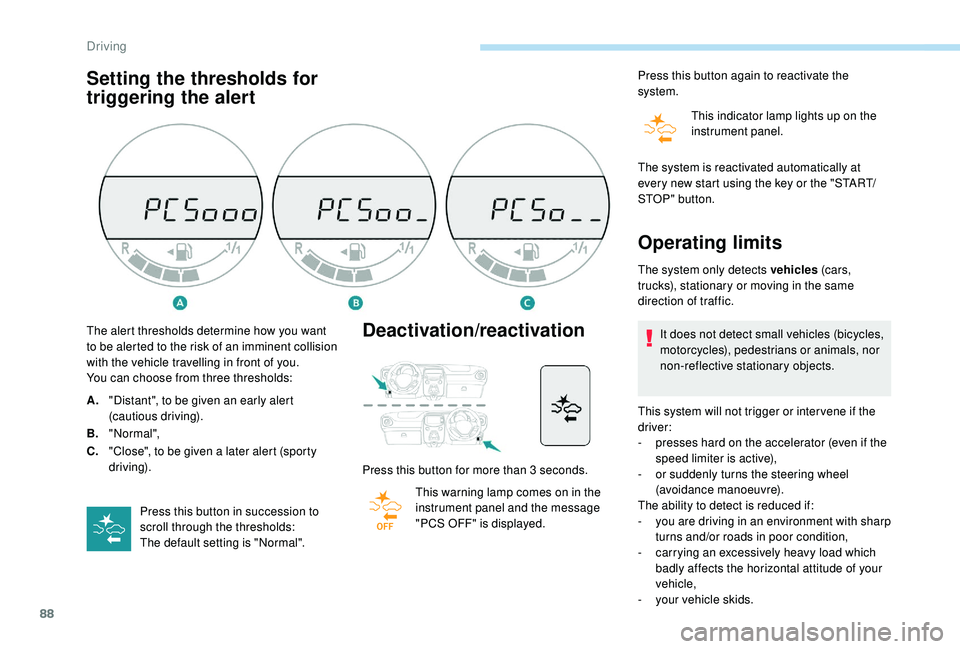
The alert thresholds determine how you want
to be alerted to the risk of an imminent collision
with the vehicle travelling in front of you.
You can choose from three thresholds:
A. "Distant", to be given an early alert
(cautious driving).
B. "Normal",
C. "Close", to be given a
later alert (sporty
driving).
Press this button in succession to
scroll through the thresholds:
The default setting is "Normal". The system is reactivated automatically at
every new start using the key or the "START/
STOP " button.
Operating limits
The system only detects vehicles
(c ar s,
trucks), stationary or moving in the same
direction of traffic.
It does not detect small vehicles (bicycles,
motorcycles), pedestrians or animals, nor
non-reflective stationary objects.
This system will not trigger or inter vene if the
driver:
-
p
resses hard on the accelerator (even if the
speed limiter is active),
-
o
r suddenly turns the steering wheel
(avoidance manoeuvre).
The ability to detect is reduced if:
-
y
ou are driving in an environment with sharp
turns and/or roads in poor condition,
-
c
arrying an excessively heavy load which
badly affects the horizontal attitude of your
vehicle,
-
y
our vehicle skids.
Driving
Page 91 of 180
89
When weather conditions are difficult
(extremely heavy rain, snow, fog, hail,
etc.), braking distances increase, which
may reduce the system's ability to avoid
a
collision.
The driver must therefore remain
particularly cautious.
Never let snow build up on the bonnet
or any object above the bonnet nor at
the front of the roof: this could enter the
field of vision of the sensor and obstruct
detection.
Unwanted triggering
- passing a vehicle travelling in the other
direction, at a crossroads, when your
vehicle is turning left or right,
-
i
f the vehicle in front of you kicks up water or
snow,
-
i
f your vehicle stops very close to an
overhanging wall or other vehicles,
-
w
hen your vehicle quickly draws close to
a
vehicle in front,
-
i
f the vehicle is raised or lowered,
-
i
f the vehicle is passing through a plastic
curtain,
-
i
f you are driving in fog or smoke,
-
i
f the sensor is misaligned (replacement
after a
collision).
Operating faults
Sensor fault
Operation of the laser sensor may be
disrupted by accumulation of dirt, formation
of condensation on the windscreen or
the presence of a component causing an
obstruction (e.g. an open bonnet).
If this happens, you are alerted by
the flashing of this warning lamp in
the instrument panel. Do not stick or other wise attach any object
on the windscreen in front of the sensor.
System fault
If there is a system fault, you are
a lerted by the flashing of this
warning lamp in the instrument
panel.
Have the system checked by a
PEUGEOT
dealer or a
qualified workshop.
In the event of an impact to the
windscreen at the sensor, deactivate the
system and contact a
PEUGEOT dealer
or a
qualified workshop to have your
windscreen replaced.
Do not attempt to remove, adjust or test
the sensor.
Only a
PEUGEOT dealer or a qualified
workshop is able to work on the system.
The system may detect a
risk of imminent
collision, particularly in the following conditions:
-
d
etection of an object close to the edge of
the road going into a
bend (safety rail, street
light, road sign),
-
d
etection of a
structure at the top or bottom
of a
sharp slope (advertising hoarding,
public lighting),
-
d
etection of reflective objects (central
reser vation, etc.) on the road,
-
d
etection of the top bar of a
bridge or
a
signal gantry,
-
p
assing a
vehicle travelling in the other
direction in a
corner, Use windscreen demisting and regularly clean
the area of the windscreen in front of the
sensor.
6
Driving
Page 92 of 180
90
Lane departure warning
system
System that detects involuntary crossing of
longitudinal markings of roads, using a camera
that recognises the continuous or broken lines.
To increase your safety, the camera analyses
the image then triggers a
warning if the driver's
attention drops and the vehicle drifts over
a
lane marking (speed greater than 30 mph
(50
km/h)).
This system is particularly suited to motor ways
and dual carriageways.
The lane departure warning system
cannot under any circumstances replace
the need for vigilance on the part of the
driver.
You must obser ve the driving regulations
and take a
break every two hours.
When driving with snow chains or with the
spare wheel fitted, you must deactivate
the system.
Activation
Detection
You are alerted by an audible signal and the
lighting of a warning lamp in the instrument panel.
No warning is given while the direction indicator
is flashing and for approximately 20 seconds
after the direction indicator is switched off.
Displays in the instrument panel
Display in the
instrument panelComments
The function is activated
(green indicator lamp).
The system has detected
the markings on the road
(green indicator lamp).
The system alerts you to
crossing a
line (green and
orange indicator lamp).
The display of this
indicator lamp is
accompanied by an
audible signal.
Deactivation
F Press this button, located on the steering wheel.
F
P
ress this button again.
The system state remains in memory when the
ignition is switched off.
Driving
Page 93 of 180
91
Operating fault
If there is a fault, this warning lamp
( orange) comes on in the instrument
panel.
Contact a
PEUGEOT dealer or a qualified
workshop without delay.
Detection may be disrupted:
-
I
f the road markings are worn.
-
I
f there is little contrast between the
road markings and the road surface,
-
I
f the windscreen is dirty.
-
I
n certain extreme weather conditions:
fog, heavy rain, snow, bright sunlight
or direct exposure to the sun (low sun,
leaving a
tunnel, etc.), and shadows.
Reversing camera
The reversing camera is activated automatically
when reverse gear is engaged.
The reversing camera cannot, in any circumstances,
replace the need for vigilance on the part of the driver.
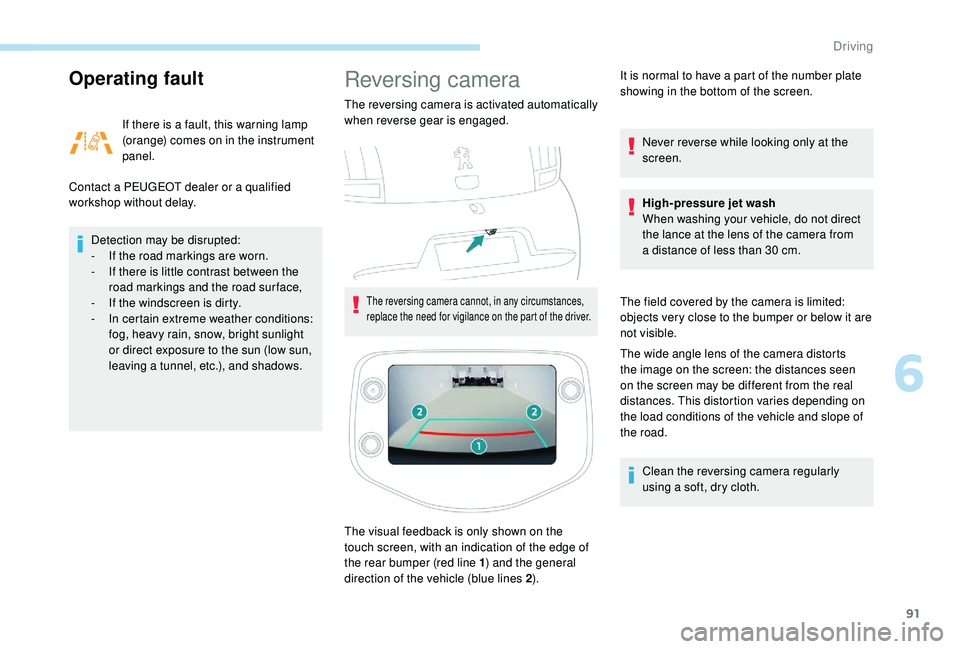
The visual feedback is only shown on the
touch screen, with an indication of the edge of
the rear bumper (red line 1 ) and the general
direction of the vehicle (blue lines 2 ).It is normal to have a
part of the number plate
showing in the bottom of the screen.
Never reverse while looking only at the
screen.
High-pressure jet wash
When washing your vehicle, do not direct
the lance at the lens of the camera from
a distance of less than 30 cm.
The field covered by the camera is limited:
objects very close to the bumper or below it are
not visible.
The wide angle lens of the camera distorts
the image on the screen: the distances seen
on the screen may be different from the real
distances. This distortion varies depending on
the load conditions of the vehicle and slope of
the road. Clean the reversing camera regularly
using a soft, dry cloth.
6
Driving
Page 95 of 180
93
F If you have a compressor (for example the
one provided in the temporary puncture
repair kit), check the pressure of all four
tyres. If it is not possible to do this check
immediately, drive carefully at reduced
speed.
or
F
I
n the event of a puncture, use the
temporary puncture repair kit or the spare
wheel (depending on equipment).
The alert is kept active until the system is
reinitialised.
Reinitialisation
Before reinitialising the system, ensure
that the pressures of the four tyres
are correct for the conditions of use
of the vehicle and conform to the
recommendations on the tyre pressure
label.
The under-inflation alert can only be relied
on if the reinitialisation of the system has
been done with the pressures in the four
tyres correctly adjusted.
The under-inflation detection system
does not give a
warning if a pressure is
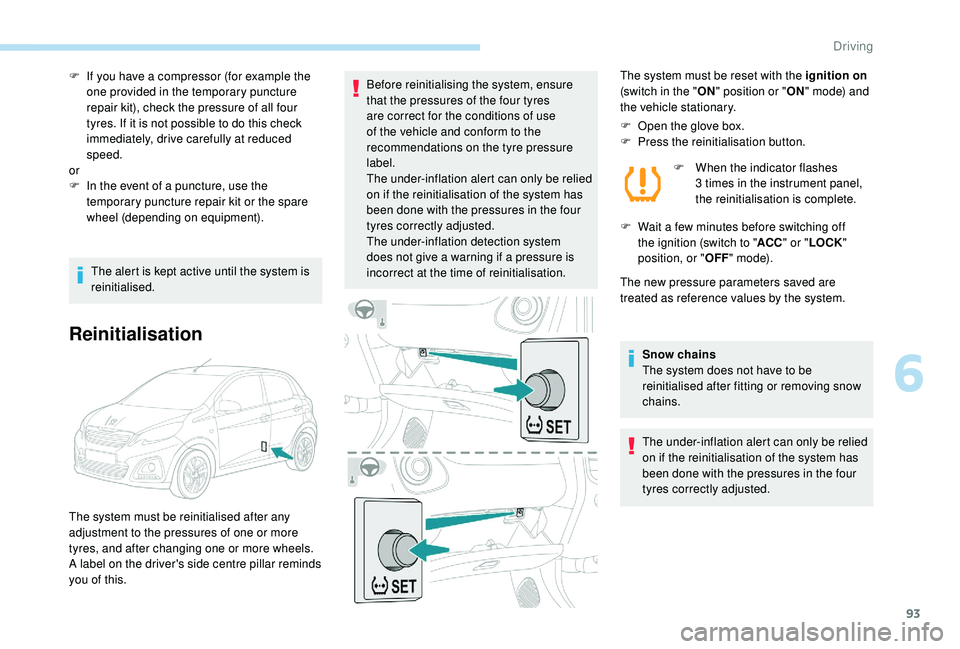
incorrect at the time of reinitialisation. The system must be reset with the ignition on
(switch in the " ON" position or " ON" mode) and
the vehicle stationary.
F
O
pen the glove box.
F
P
ress the reinitialisation button.F
W
hen the indicator flashes
3
times in the instrument panel,
the reinitialisation is complete.
F
W
ait a few minutes before switching off
the ignition (switch to " ACC" or " LOCK "
position, or " OFF" m o d e).
The new pressure parameters saved are
treated as reference values by the system.
Snow chains
The system does not have to be
reinitialised after fitting or removing snow
chains.
The under-inflation alert can only be relied
on if the reinitialisation of the system has
been done with the pressures in the four
tyres correctly adjusted.
The system must be reinitialised after any
adjustment to the pressures of one or more
tyres, and after changing one or more wheels.
A label on the driver's side centre pillar reminds
you of this.
6
Driving