key PEUGEOT 108 2018 Owner's Manual
[x] Cancel search | Manufacturer: PEUGEOT, Model Year: 2018, Model line: 108, Model: PEUGEOT 108 2018Pages: 180, PDF Size: 7.14 MB
Page 100 of 180
98
Energy economy mode
(Only for vehicles equipped with the Keyless
Entry and Starting system.)
System which manages the duration of use of
certain functions to conser ve a sufficient level
of charge in the battery.
After the engine has stopped, you can still
use functions such as the audio system,
windscreen wipers, dipped beam headlamps,
courtesy lamps, etc. for a
max. combined time
of 20
minutes.
This period may be greatly reduced if the
battery is not fully charged.
Entry into the mode
Once this time has elapsed, the active
functions are put on standby.
Exiting the mode
These functions will be automatically restored
the next time the vehicle is used.
To restore the use of these functions
immediately, start the engine and allow it run
for at least 5
minutes. Let the engine run for the duration
specified to ensure that the battery charge
is sufficient.
Do not repeatedly and continuously restart
the engine in order to charge the battery.
A flat battery prevents the engine from
starting.
For more information on the 12
V batter y
,
refer to the corresponding section.
Fitting roof bars
Maximum authorised weight on the roof
bars, with a loading height not exceeding
40
cm (except bicycle carriers): 40 kg.
If the height exceeds 40
cm, adapt the
speed of the vehicle to the profile of the
road to avoid damaging the roof bars.
Please refer to national legislation
to comply with the regulations for
transporting objects that are longer than
the vehicle.
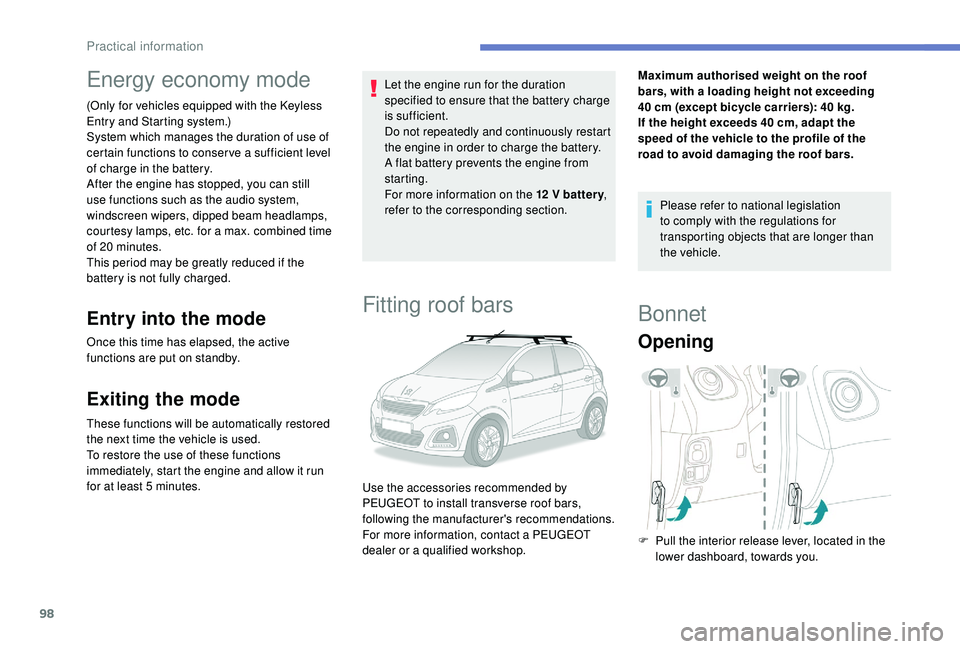
Use the accessories recommended by
PEUGEOT to install transverse roof bars,
following the manufacturer's recommendations.
For more information, contact a
PEUGEOT
dealer or a
qualified workshop.
Bonnet
Opening
F Pull the interior release lever, located in the lower dashboard, towards you.
Practical information
Page 119 of 180
117
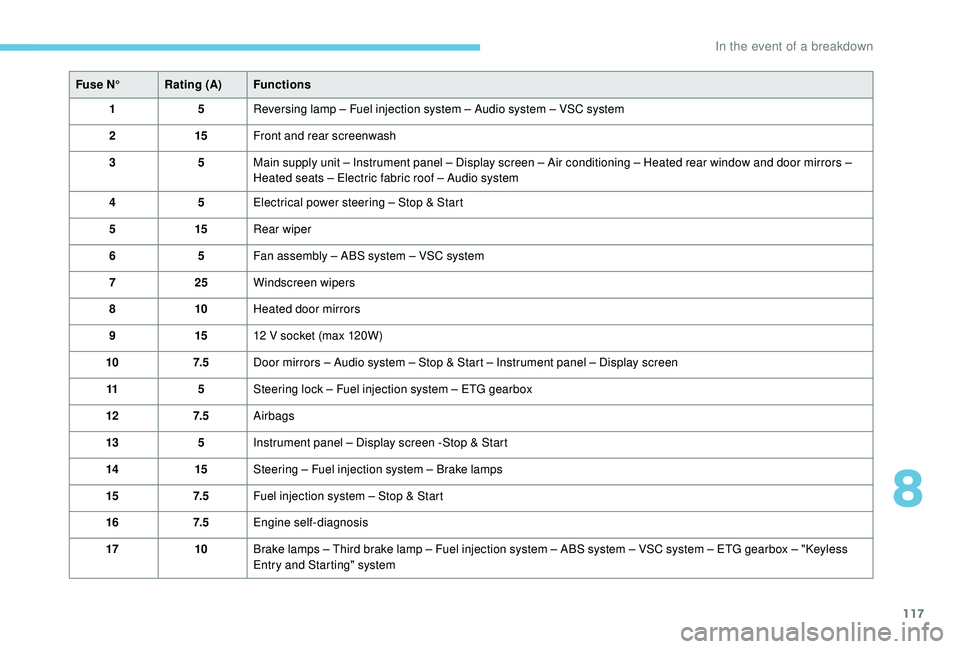
Fuse N°Rating (A) Functions
1 5Reversing lamp – Fuel injection system – Audio system – VSC system
2 15Front and rear screenwash
3 5Main supply unit – Instrument panel – Display screen – Air conditioning – Heated rear window and door mirrors –
Heated seats – Electric fabric roof – Audio system
4 5Electrical power steering – Stop & Start
5 15Rear wiper
6 5Fan assembly – ABS system – VSC system
7 25Windscreen wipers
8 10Heated door mirrors
9 1512
V socket (max 120W)
10 7. 5Door mirrors – Audio system – Stop & Start – Instrument panel – Display screen
11 5Steering lock – Fuel injection system – ETG gearbox
12 7. 5Airbags
13 5Instrument panel – Display screen -Stop & Start
14 15Steering – Fuel injection system – Brake lamps
15 7. 5Fuel injection system – Stop & Start
16 7. 5Engine self-diagnosis
17 10Brake lamps – Third brake lamp – Fuel injection system – ABS system – VSC system – ETG gearbox – "Keyless
Entry and Starting" system
8
In the event of a breakdown
Page 120 of 180
118
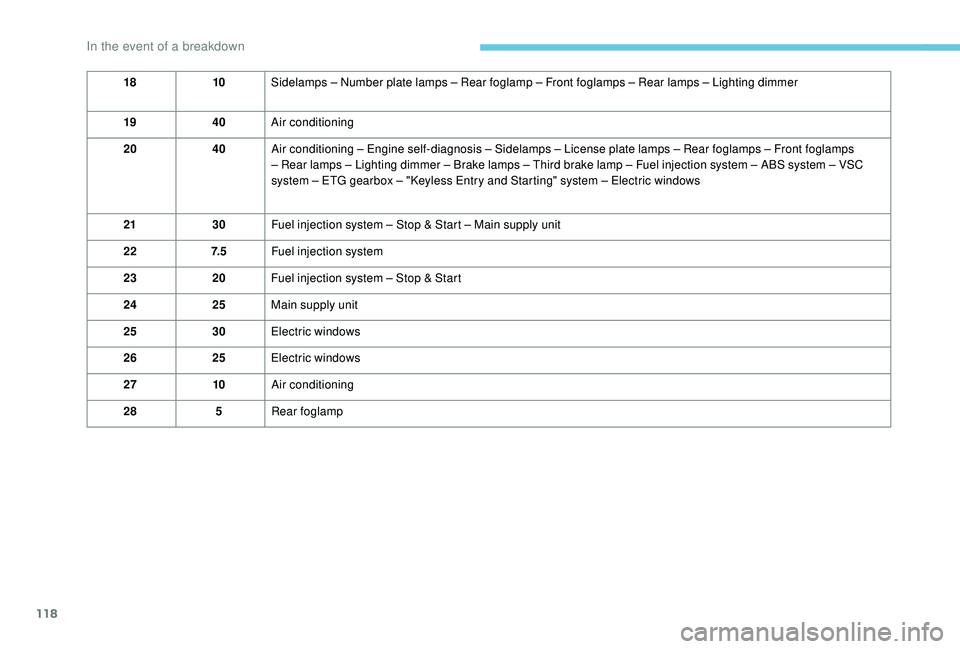
1810Sidelamps – Number plate lamps – Rear foglamp – Front foglamps – Rear lamps – Lighting dimmer
19 40Air conditioning
20 40Air conditioning – Engine self-diagnosis – Sidelamps – License plate lamps – Rear foglamps – Front foglamps
– Rear lamps – Lighting dimmer – Brake lamps – Third brake lamp – Fuel injection system – ABS system – VSC
system – ETG gearbox – "Keyless Entry and Starting" system – Electric windows
21 30Fuel injection system – Stop & Start – Main supply unit
22 7. 5Fuel injection system
23 20Fuel injection system – Stop & Start
24 25Main supply unit
25 30Electric windows
26 25Electric windows
27 10Air conditioning
28 5Rear foglamp
In the event of a breakdown
Page 122 of 180
120
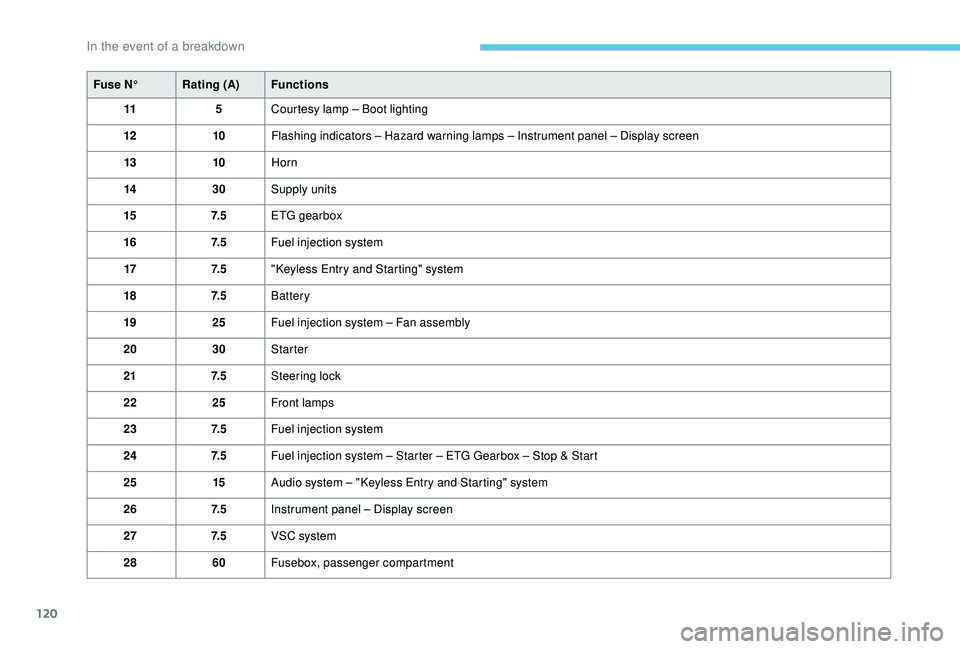
Fuse N°Rating (A) Functions
11 5Courtesy lamp – Boot lighting
12 10Flashing indicators – Hazard warning lamps – Instrument panel – Display screen
13 10Horn
14 30Supply units
15 7. 5ETG gearbox
16 7. 5Fuel injection system
17 7. 5"Keyless Entry and Starting" system
18 7. 5Battery
19 25Fuel injection system – Fan assembly
20 30Starter
21 7. 5Steering lock
22 25Front lamps
23 7. 5Fuel injection system
24 7. 5Fuel injection system – Starter – ETG Gearbox – Stop & Start
25 15Audio system – "Keyless Entry and Starting" system
26 7. 5Instrument panel – Display screen
27 7. 5VSC system
28 60Fusebox, passenger compartment
In the event of a breakdown
Page 131 of 180
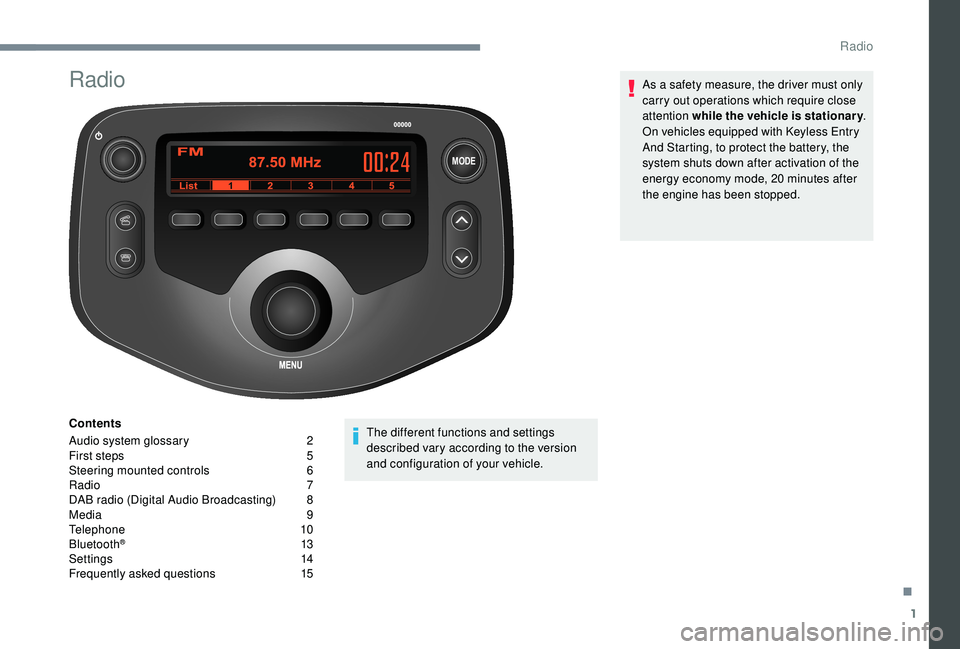
1
MODE
Radio
Contents
Audio system glossary
2
F
irst steps
5
S
teering mounted controls
6
R
adio
7
D
AB radio (Digital Audio Broadcasting)
8
M
edia
9
T
elephone
1
0
Bluetooth
® 13
S
ettings
1 4
Frequently asked questions
1
5The different functions and settings
described vary according to the version
and configuration of your vehicle. As a safety measure, the driver must only
carry out operations which require close
attention while the vehicle is stationary .
On vehicles equipped with Keyless Entry
And Starting, to protect the battery, the
system shuts down after activation of the
energy economy mode, 20 minutes after
the engine has been stopped.
.
Radio
Page 132 of 180
2
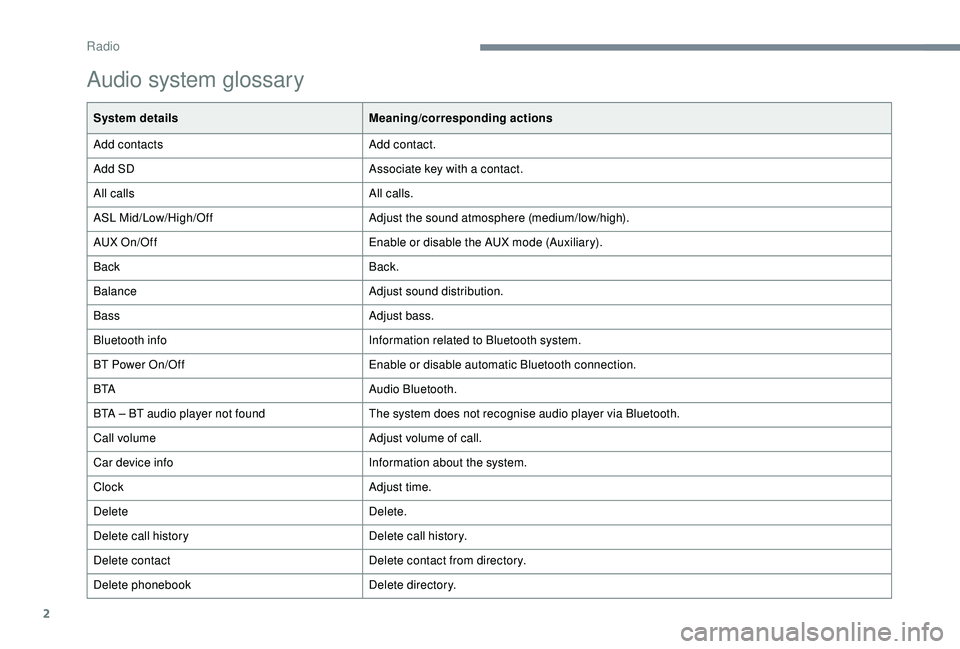
Audio system glossary
System detailsMeaning/corresponding actions
Add contacts Add contact.
Add SD Associate key with a
contact.
All calls All calls.
ASL Mid/Low/High/Off Adjust the sound atmosphere (medium/low/high).
AUX On/Off Enable or disable the AUX mode (Auxiliary).
Back Back.
Balance Adjust sound distribution.
Bass Adjust bass.
Bluetooth info Information related to Bluetooth system.
BT Power On/Off Enable or disable automatic Bluetooth connection.
B TA Audio Bluetooth.
BTA – BT audio player not found The system does not recognise audio player via Bluetooth.
Call volume Adjust volume of call.
Car device info Information about the system.
Clock Adjust time.
Delete Delete.
Delete call history Delete call history.
Delete contact Delete contact from directory.
Delete phonebook Delete directory.
Radio
Page 133 of 180
3
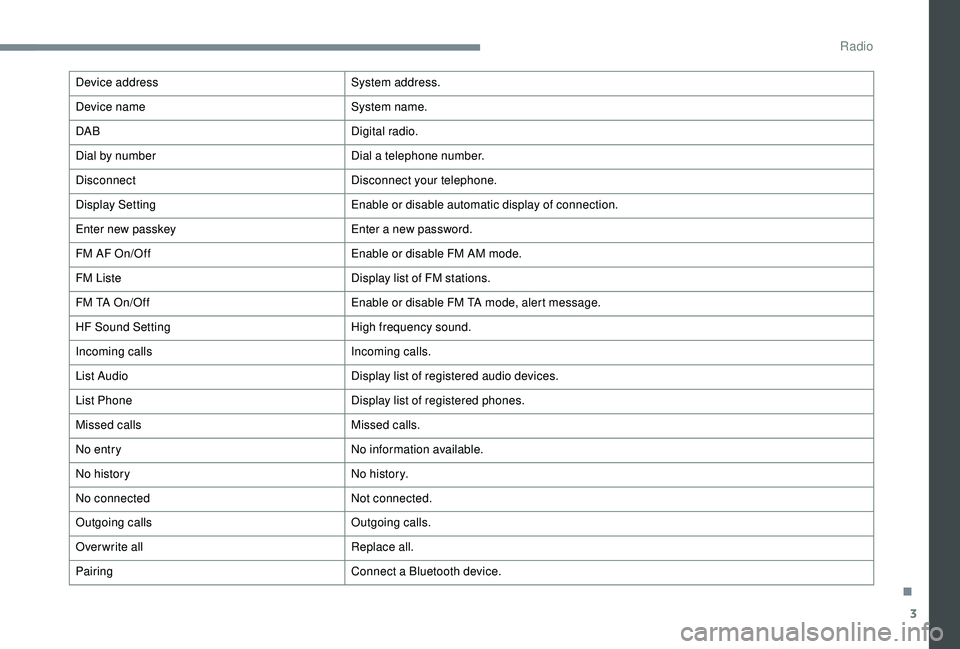
Device addressSystem address.
Device name System name.
DAB Digital radio.
Dial by number Dial a
telephone number.
Disconnect Disconnect your telephone.
Display Setting Enable or disable automatic display of connection.
Enter new passkey Enter a
new password.
FM AF On/Off Enable or disable FM AM mode.
FM Liste Display list of FM stations.
FM TA On/Off Enable or disable FM TA mode, alert message.
HF Sound Setting High frequency sound.
Incoming calls Incoming calls.
List Audio Display list of registered audio devices.
List Phone Display list of registered phones.
Missed calls Missed calls.
No entry No information available.
No history N o h i sto r y.
No connected Not connected.
Outgoing calls Outgoing calls.
Overwrite all Replace all.
Pairing Connect a
Bluetooth device.
.
Radio
Page 134 of 180
4
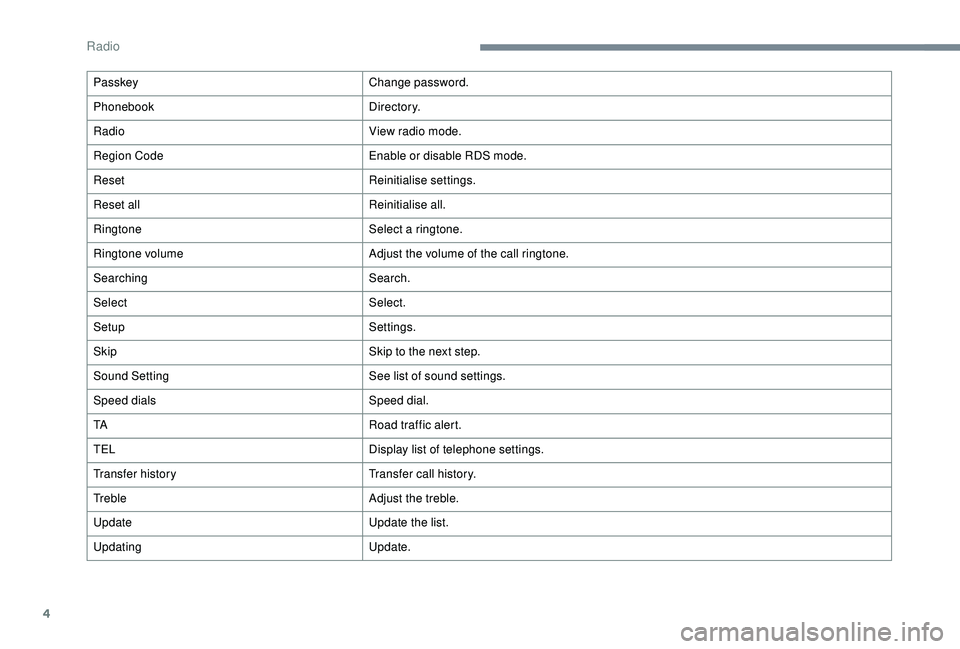
PasskeyChange password.
Phonebook D i r e c to r y.
Radio View radio mode.
Region Code Enable or disable RDS mode.
Reset Reinitialise settings.
Reset all Reinitialise all.
Ringtone Select a
ringtone.
Ringtone volume Adjust the volume of the call ringtone.
Searching Search.
Select Select.
Setup Settings.
Skip Skip to the next step.
Sound Setting See list of sound settings.
Speed dials Speed dial.
TA Road traffic alert.
TEL Display list of telephone settings.
Transfer history Transfer call history.
Treble Adjust the treble.
Update Update the list.
Updating Update.
Radio
Page 141 of 180
11
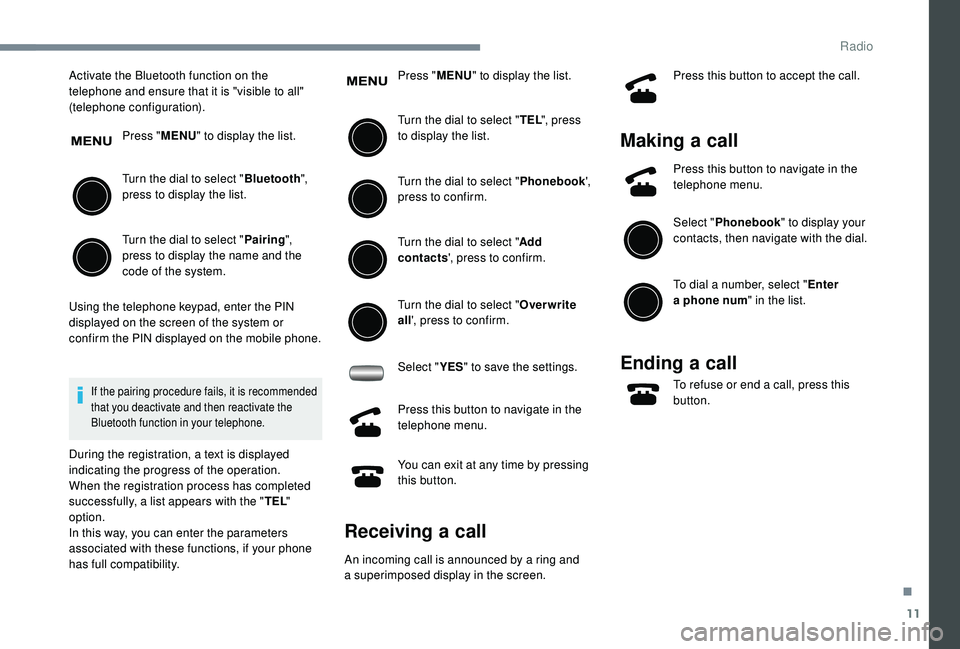
Activate the Bluetooth function on the
telephone and ensure that it is "visible to all"
(telephone configuration).Press "MENU" to display the list.
Turn the dial to select " Bluetooth",
press to display the list.
Turn the dial to select " Pairing",
press to display the name and the
code of the system.
Using the telephone keypad, enter the PIN
displayed on the screen of the system or
confirm the PIN displayed on the mobile phone.
If the pairing procedure fails, it is recommended
that you deactivate and then reactivate the
Bluetooth function in your telephone.
During the registration, a text is displayed
indicating the progress of the operation.
When the registration process has completed
successfully, a list appears with the " TEL"
option.
In this way, you can enter the parameters
associated with these functions, if your phone
has full compatibility. Press "
MENU" to display the list.
Turn the dial to select " TEL", press
to display the list.
Turn the dial to select " Phonebook',
press to confirm.
Turn the dial to select " Add
contacts ', press to confirm.
Turn the dial to select " Overwrite
all ', press to confirm.
Select " YES" to save the settings.
Press this button to navigate in the
telephone menu.
You can exit at any time by pressing
this button.
Receiving a call
An incoming call is announced by a ring and
a superimposed display in the screen. Press this button to accept the call.
Making a
call
Press this button to navigate in the
telephone menu.
Select "Phonebook " to display your
contacts, then navigate with the dial.
To dial a
number, select " Enter
a
phone num " in the list.
Ending a call
To refuse or end a call, press this
b utton.
.
Radio
Page 142 of 180
12
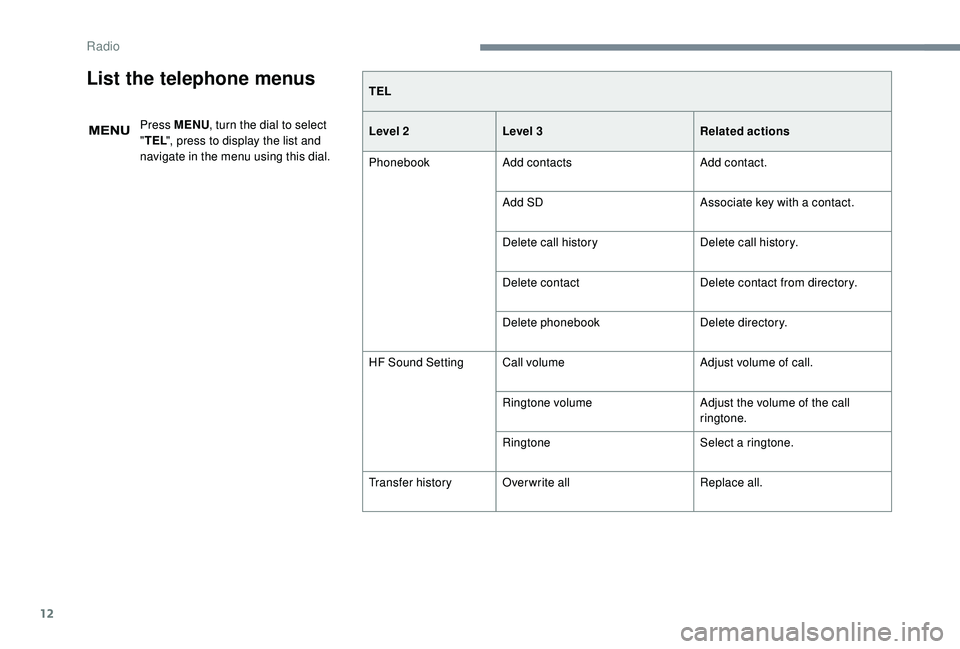
TEL
Level 2Level 3 Related actions
Phonebook Add contacts Add contact.
Add SD Associate key with a
contact.
Delete call history Delete call history.
Delete contact Delete contact from directory.
Delete phonebook Delete directory.
HF Sound Setting Call volume Adjust volume of call.
Ringtone volume Adjust the volume of the call
ringtone.
Ringtone Select a
ringtone.
Transfer history Overwrite all Replace all.List the telephone menus
Press MENU, turn the dial to select
" TEL ", press to display the list and
navigate in the menu using this dial.
Radio