key PEUGEOT 108 2018 User Guide
[x] Cancel search | Manufacturer: PEUGEOT, Model Year: 2018, Model line: 108, Model: PEUGEOT 108 2018Pages: 180, PDF Size: 7.14 MB
Page 28 of 180
26
Check that the light on the electronic key
flashes 4 times.
While this function is activated, the "
K
eyless
Entry and Starting" system is inoperative.
To reactivate the electronic key, press one of
the buttons (open or closed padlock).
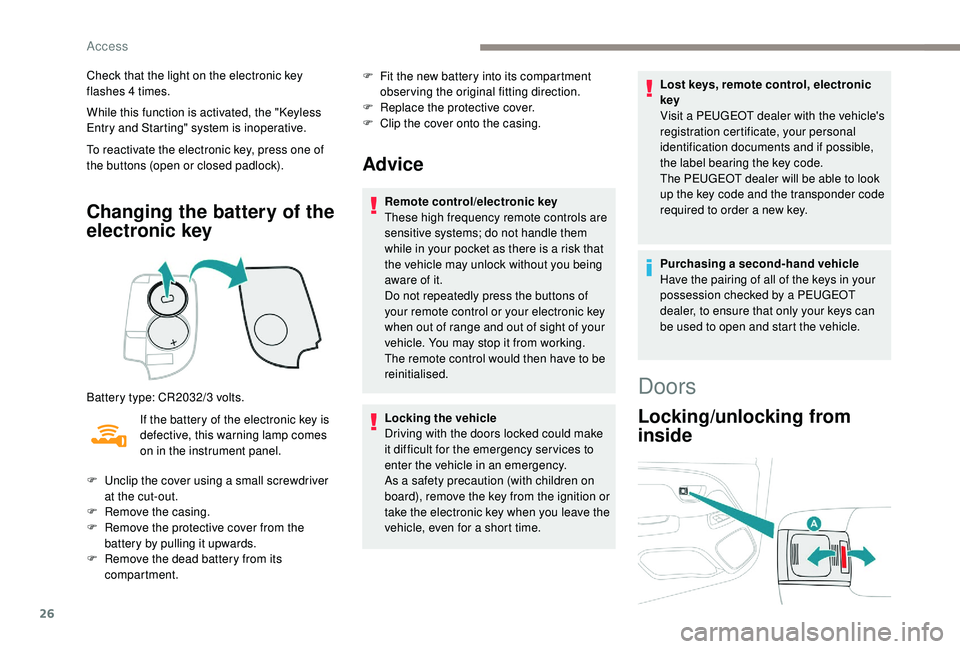
Changing the battery of the
electronic key
Battery type: CR2032/3 volts.
I f the battery of the electronic key is
defective, this warning lamp comes
on in the instrument panel. F
F
it the new battery into its compartment
observing the original fitting direction.
F
R
eplace the protective cover.
F
C
lip the cover onto the casing.
Advice
Remote control/electronic key
These high frequency remote controls are
sensitive systems; do not handle them
while in your pocket as there is a
risk that
the vehicle may unlock without you being
aware of it.
Do not repeatedly press the buttons of
your remote control or your electronic key
when out of range and out of sight of your
vehicle. You may stop it from working.
The remote control would then have to be
reinitialised.
Locking the vehicle
Driving with the doors locked could make
it difficult for the emergency ser vices to
enter the vehicle in an emergency.
As a
safety precaution (with children on
board), remove the key from the ignition or
take the electronic key when you leave the
vehicle, even for a
short time. Lost keys, remote control, electronic
key
Visit a
PEUGEOT dealer with the vehicle's
registration certificate, your personal
identification documents and if possible,
the label bearing the key code.
The PEUGEOT dealer will be able to look
up the key code and the transponder code
required to order a new key.
Purchasing a
second-hand vehicle
Have the pairing of all of the keys in your
possession checked by a
PEUGEOT
dealer, to ensure that only your keys can
be used to open and start the vehicle.
F
U
nclip the cover using a
small screwdriver
at the cut-out.
F
R
emove the casing.
F
R
emove the protective cover from the
battery by pulling it upwards.
F
R
emove the dead battery from its
compartment.
Doors
Locking/unlocking from
inside
Access
Page 29 of 180
27
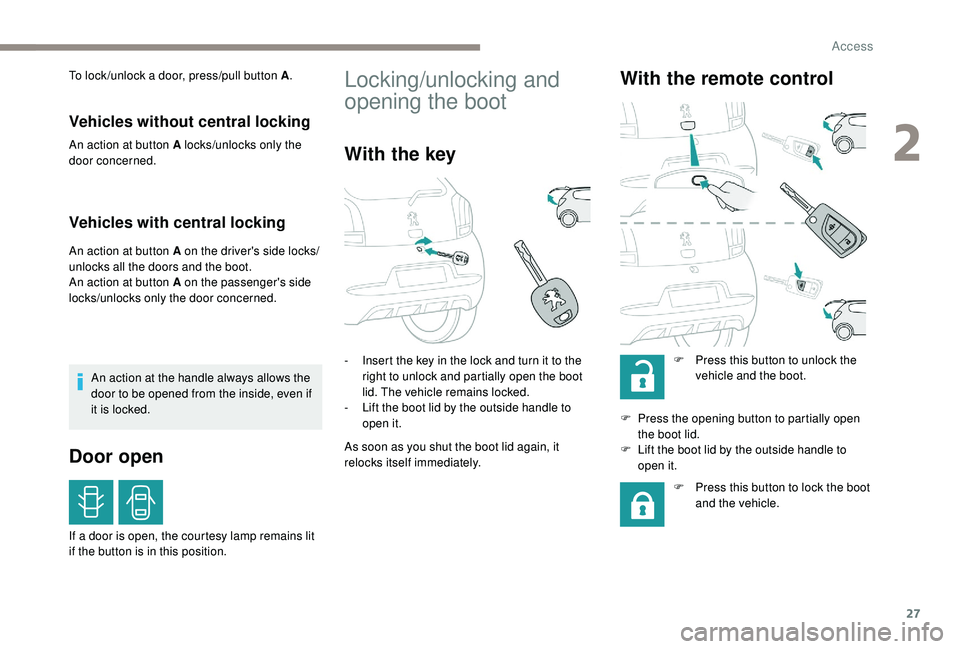
To lock /unlock a door, press/pull button A.
Vehicles without central locking
An action at button A locks/unlocks only the
door concerned.
Vehicles with central locking
An action at button A on the driver's side locks/
unlocks all the doors and the boot.
An action at button A on the passenger's side
locks/unlocks only the door concerned.
An action at the handle always allows the
door to be opened from the inside, even if
it is locked.
Door open
If a door is open, the courtesy lamp remains lit
i f the button is in this position.
Locking/unlocking and
opening the boot
With the key
- Insert the key in the lock and turn it to the right to unlock and partially open the boot
lid. The vehicle remains locked.
-
L
ift the boot lid by the outside handle to
open it.
As soon as you shut the boot lid again, it
relocks itself immediately.
With the remote control
F Press this button to unlock the vehicle and the boot.
F
P
ress the opening button to partially open
the boot lid.
F
L
ift the boot lid by the outside handle to
open it.
F
P
ress this button to lock the boot
and the vehicle.
2
Access
Page 30 of 180
28
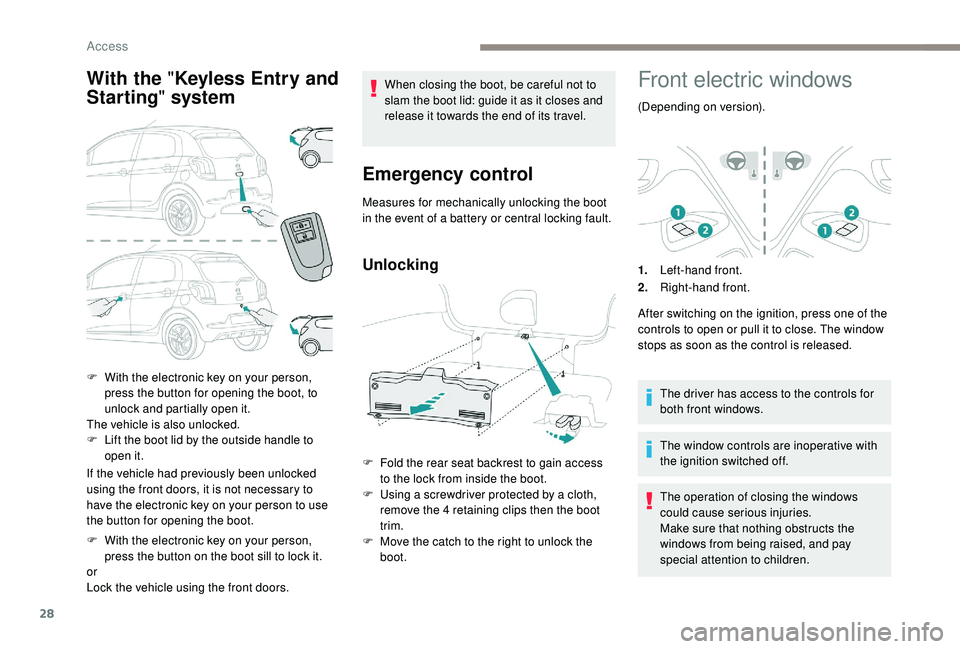
With the " Keyless Entry and
Starting " system
If the vehicle had previously been unlocked
using the front doors, it is not necessary to
have the electronic key on your person to use
the button for opening the boot.
F
W
ith the electronic key on your person,
press the button on the boot sill to lock it.
or
Lock the vehicle using the front doors. When closing the boot, be careful not to
slam the boot lid: guide it as it closes and
release it towards the end of its travel.
Emergency control
Measures for mechanically unlocking the boot
in the event of a
battery or central locking fault.
Unlocking
F Fold the rear seat backrest to gain access to the lock from inside the boot.
F
U
sing a screwdriver protected by a cloth,
remove the 4
retaining clips then the boot
trim.
F
M
ove the catch to the right to unlock the
boot.
Front electric windows
(Depending on version).
1. Left-hand front.
2. Right-hand front.
After switching on the ignition, press one of the
controls to open or pull it to close. The window
stops as soon as the control is released.
The driver has access to the controls for
both front windows.
The window controls are inoperative with
the ignition switched off.
The operation of closing the windows
could cause serious injuries.
Make sure that nothing obstructs the
windows from being raised, and pay
special attention to children.
F
W
ith the electronic key on your person,
press the button for opening the boot, to
unlock and partially open it.
The vehicle is also unlocked.
F
L
ift the boot lid by the outside handle to
open it.
Access
Page 33 of 180
31
Precautions in use
Never put objects on the open or closed
roof.
Do not sit or place anything on the
crossbar of the roof when it is open.
To avoid damaging the roof, do not open it
if there is snow or ice present.
Never use sharp tools to remove snow or
ice that has built up on the roof.
To prevent creases appearing in the
canvas, it is recommended not to leave
the roof open for long periods.
It is not recommended to operate the
vehicle's air conditioning system when the
roof is open.
If the vehicle is to be parked outside for
a long period, it is advisable to protect the
roof using a
tarpaulin.
It is advisable to close the roof when you
park the vehicle.
Even if the roof is closed, it is safer not to
leave any valuables inside the vehicle.
When you leave the vehicle, turn off
the ignition and remove the key (or take
the electronic key with you) to prevent
unintentional operation of the roof.
Advice on care
General recommendations on the care and
maintenance of your vehicle are given in the
warranty and maintenance record.
Fabric roof
Before washing the fabric, remove as
much dirt as possible using a soft brush or
a
vacuum cleaner.
To avoid damaging the roof:
-
n
ever use a high-pressure washer,
-
n
ever clean your vehicle in an
automatic roller-brush car wash.
Allow the vehicle to dry in the shade and
avoid exposing it to direct sunlight.
To remove stains, dab them (never rub
them) with a
sponge and some soapy
water, then immediately rinse the fabric
with clean water.
Immediately remove bird droppings or
plant resins, their caustic nature could
damage the fabric. For regular care of the fabric and to keep
its original appearance, we recommend
using the environmentally friendly product
"Insect removal" product" from the
"TECHNATURE" range. To obtain this
product, visit a
PEUGEOT dealer.
Never use chemical products, detergents,
stain removers, solvents, alcohol, petrol,…
to clean the fabric.
To waterproof the fabric, use only
waterproofing products specifically for
fabric hoods.
Acoustic air deflector
We recommend that you clean the
acoustic air deflector with care , using
a
soft brush.
2
Access
Page 63 of 180
61
Deactivating the
passenger's front airbag
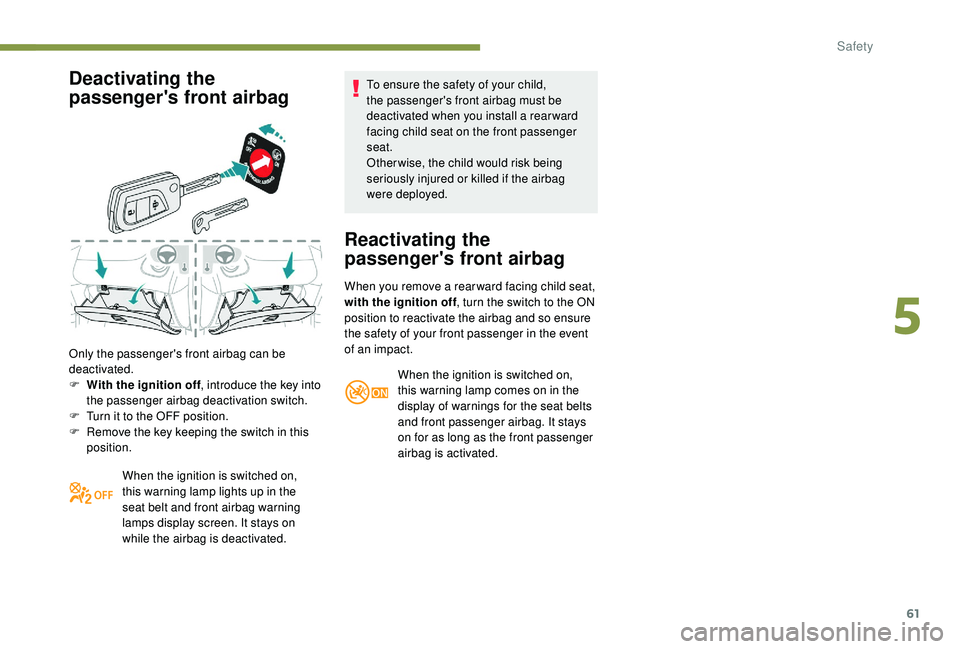
Only the passenger's front airbag can be
deactivated.
F
W
ith the ignition off , introduce the key into
the passenger airbag deactivation switch.
F
T
urn it to the OFF position.
F
R
emove the key keeping the switch in this
position.
When the ignition is switched on,
this warning lamp lights up in the
seat belt and front airbag warning
lamps display screen. It stays on
while the airbag is deactivated. To ensure the safety of your child,
the passenger's front airbag must be
deactivated when you install a
rear ward
facing child seat on the front passenger
seat.
Otherwise, the child would risk being
seriously injured or killed if the airbag
were deployed.
Reactivating the
passenger's front airbag
When you remove a rear ward facing child seat,
w ith the ignition off , turn the switch to the ON
position to reactivate the airbag and so ensure
the safety of your front passenger in the event
of an impact.
When the ignition is switched on,
this warning lamp comes on in the
display of warnings for the seat belts
and front passenger airbag. It stays
on for as long as the front passenger
airbag is activated.
5
Safety
Page 73 of 180
71
Children at the rear
At rear seating positions, always leave
sufficient space between the front seat
and:
-
a "
rear ward facing" child seat,
-
t
he child's feet for a child seat fitted
forward facing.
To do this, move the front seat for wards
and, if necessary, move its backrest into
the upright position.
For optimal installation of the forward
facing child seat, verify that its backrest is
as close as possible to the backrest of the
vehicle seat, if possible in contact with it.
Children at the front
The legislation on carrying children on the
front passenger seat is specific to each
country. Refer to the legislation in force in
the country in which you are driving.
Deactivate the front passenger airbag
when a "rear ward facing" child seat is
installed on the front passenger seats.
Other wise, there is a
risk of serious or
fatal injury to the child if the airbag is
deployed. Installing a
booster seat
The chest part of the seat belt must be
positioned on the child's shoulder without
touching the neck.
Ensure that the lap part of the seat belt
passes correctly over the child's thighs.
We recommend using a
booster seat with
a
backrest, equipped with a belt guide at
shoulder level.
Additional protections
To prevent accidental opening of the doors
and rear windows, use the child lock.
Take care not to open the rear windows by
more than one third.
To protect young children from the rays
of the sun, fit side blinds on the rear
windows.
As a
safety precaution, do not leave:
-
a c
hild or children alone and
unattended in a
vehicle,
-
a c
hild or an animal in a vehicle
which is exposed to the sun, with the
windows closed,
-
t
he keys within reach of children inside
the vehicle.Child lock
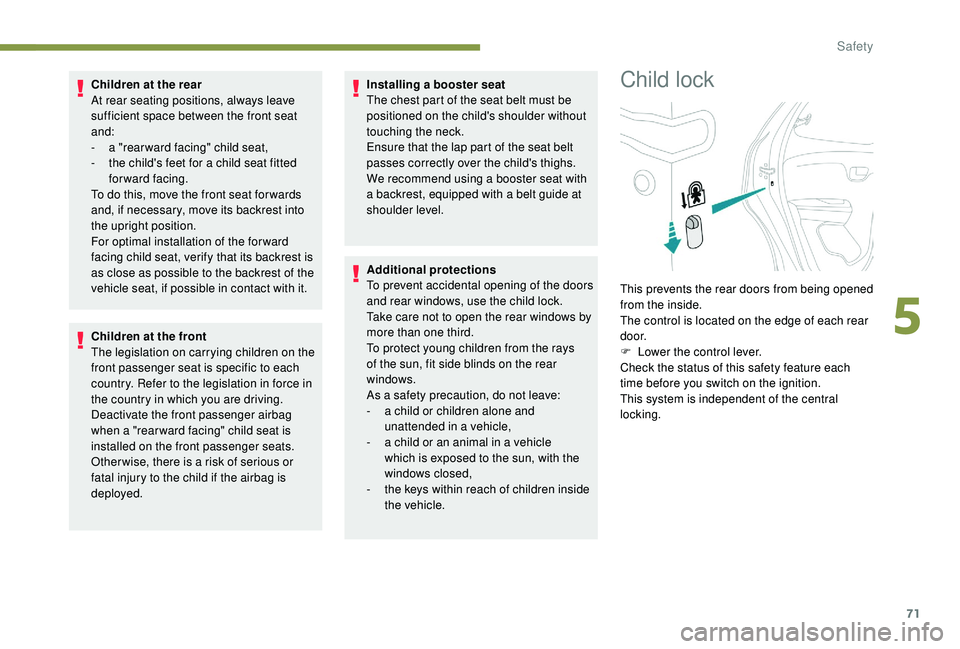
This prevents the rear doors from being opened
from the inside.
The control is located on the edge of each rear
d o o r.
F
L
ower the control lever.
Check the status of this safety feature each
time before you switch on the ignition.
This system is independent of the central
locking.
5
Safety
Page 75 of 180
73
Starting/Switching off the
engine with the key
Ignition switch
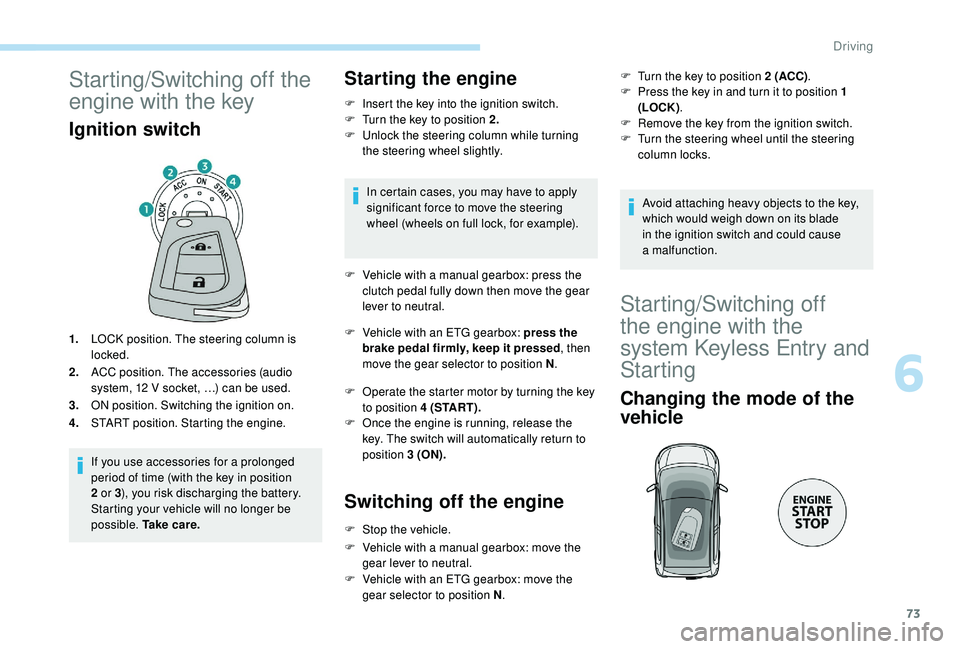
1.LOCK position. The steering column is
locked.
2. ACC position. The accessories (audio
system, 12
V socket, …) can be used.
3. ON position. Switching the ignition on.
4. START position. Starting the engine.
If you use accessories for a
prolonged
period of time (with the key in position
2
or 3), you risk discharging the battery.
Starting your vehicle will no longer be
possible. Ta k e c a r e .
Starting the engine
F Insert the key into the ignition switch.
F T urn the key to position 2.
F
U
nlock the steering column while turning
the steering wheel slightly.
In certain cases, you may have to apply
significant force to move the steering
wheel (wheels on full lock, for example).
F
V
ehicle with a manual gearbox: press the
clutch pedal fully down then move the gear
lever to neutral.
F
V
ehicle with an ETG gearbox: press the
brake pedal firmly, keep it pressed , then
move the gear selector to position N .
F
O
perate the starter motor by turning the key
to position 4 (START).
F
O
nce the engine is running, release the
key. The switch will automatically return to
position 3 (ON).
Switching off the engine
F Stop the vehicle.
F
V
ehicle with a manual gearbox: move the
gear lever to neutral.
F
V
ehicle with an ETG gearbox: move the
gear selector to position N .F
T
urn the key to position 2 (ACC)
.
F
P
ress the key in and turn it to position 1
(LOCK) .
F
R
emove the key from the ignition switch.
F
T
urn the steering wheel until the steering
column locks.
Avoid attaching heavy objects to the key,
which would weigh down on its blade
in the ignition switch and could cause
a
malfunction.
Starting/Switching off
the engine with the
system
K
eyless Entry and
Starting
Changing the mode of the
vehicle
6
Driving
Page 76 of 180
74
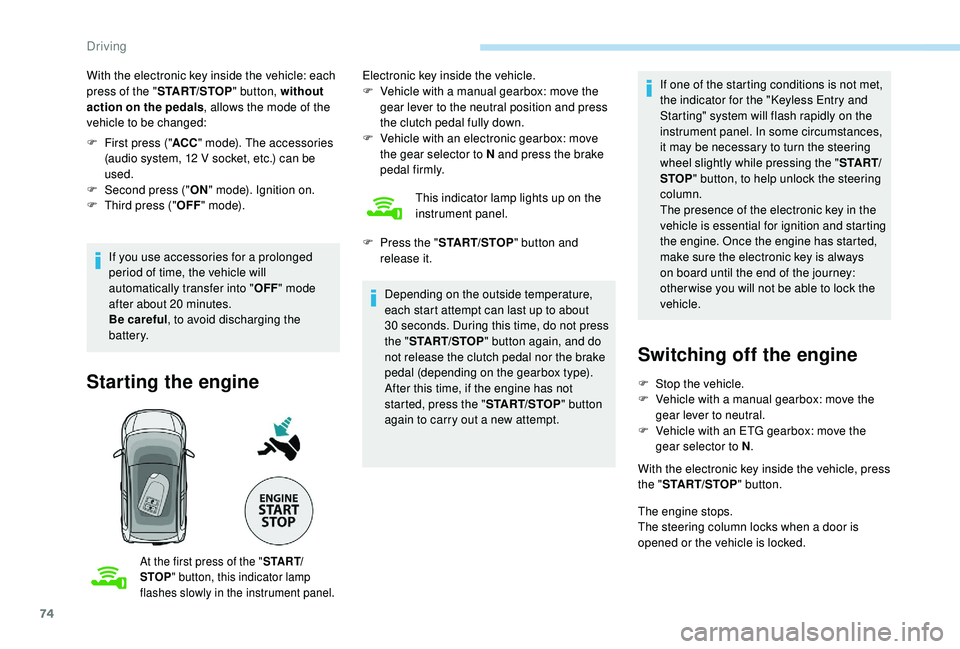
With the electronic key inside the vehicle: each
press of the "START/STOP " button, without
action on the pedals , allows the mode of the
vehicle to be changed:
F
F
irst press (" ACC" mode). The accessories
(audio system, 12
V socket, etc.) can be
used.
F
Sec
ond press (" ON" mode). Ignition on.
F
T
hird press (" OFF" m o d e).
If you use accessories for a
prolonged
period of time, the vehicle will
automatically transfer into " OFF" mode
after about 20
minutes.
Be careful , to avoid discharging the
battery.
Starting the engine
At the first press of the " S TA R T/
STOP " button, this indicator lamp
flashes slowly in the instrument panel.
Electronic key inside the vehicle.
F V ehicle with a manual gearbox: move the
gear lever to the neutral position and press
the clutch pedal fully down.
F
V
ehicle with an electronic gearbox: move
the gear selector to N and press the brake
pedal firmly.
This indicator lamp lights up on the
instrument panel.
Depending on the outside temperature,
each start attempt can last up to about
30
seconds. During this time, do not press
the " START/STOP " button again, and do
not release the clutch pedal nor the brake
pedal (depending on the gearbox type).
After this time, if the engine has not
started, press the " START/STOP" button
again to carry out a
new attempt.
F
P
ress the " START/STOP " button and
release it. If one of the starting conditions is not met,
the indicator for the "Keyless Entry and
Starting" system will flash rapidly on the
instrument panel. In some circumstances,
it may be necessary to turn the steering
wheel slightly while pressing the "
S TA R T/
STOP " button, to help unlock the steering
column.
The presence of the electronic key in the
vehicle is essential for ignition and starting
the engine. Once the engine has started,
make sure the electronic key is always
on board until the end of the journey:
other wise you will not be able to lock the
vehicle.
Switching off the engine
F Stop the vehicle.
F V ehicle with a manual gearbox: move the
gear lever to neutral.
F
V
ehicle with an ETG gearbox: move the
gear selector to N .
With the electronic key inside the vehicle, press
the " START/STOP " button.
The engine stops.
The steering column locks when a
door is
opened or the vehicle is locked.
Driving
Page 77 of 180
75
If the vehicle is not immobilised, the
engine will not stop.
An audible signal sounds continuously when
you open the driver's door and the vehicle is in
" ACC " mode.
F
P
ress the " START/STOP " button again to
go into " OFF" mode.
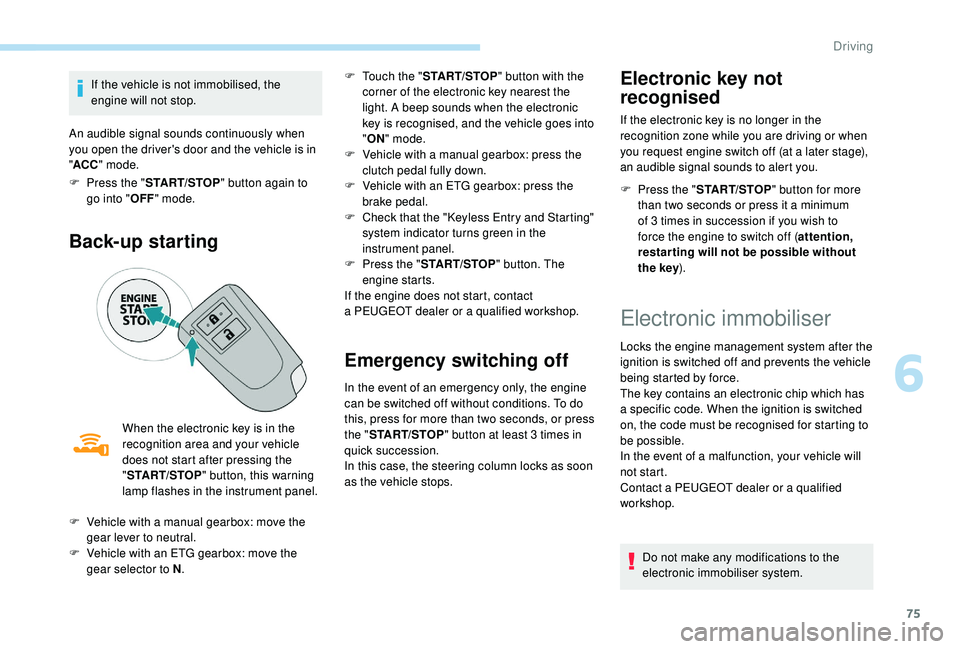
Back-up starting
When the electronic key is in the
recognition area and your vehicle
does not start after pressing the
"START/STOP " button, this warning
lamp flashes in the instrument panel. F
T
ouch the "
START/STOP " button with the
corner of the electronic key nearest the
light. A beep sounds when the electronic
key is recognised, and the vehicle goes into
" ON " mode.
F
V
ehicle with a manual gearbox: press the
clutch pedal fully down.
F
V
ehicle with an ETG gearbox: press the
brake pedal.
F
C
heck that the "Keyless Entry and Starting"
system indicator turns green in the
instrument panel.
F
P
ress the "
START/STOP " button. The
engine starts.
If the engine does not start, contact
a PEUGEOT dealer or a qualified workshop.
Emergency switching off
In the event of an emergency only, the engine
can be switched off without conditions. To do
this, press for more than two seconds, or press
the "
START/STOP " button at least 3
times in
quick succession.
In this case, the steering column locks as soon
as the vehicle stops.
Electronic key not
recognised
If the electronic key is no longer in the
recognition zone while you are driving or when
you request engine switch off (at a
later stage),
an audible signal sounds to alert you.
F
P
ress the " START/STOP " button for more
than two seconds or press it a
minimum
of 3
times in succession if you wish to
force the engine to switch off ( attention,
restar ting will not be possible without
the key ).
F
V
ehicle with a
manual gearbox: move the
gear lever to neutral.
F
V
ehicle with an ETG gearbox: move the
gear selector to N .
Electronic immobiliser
Locks the engine management system after the
ignition is switched off and prevents the vehicle
being started by force.
The key contains an electronic chip which has
a
specific code. When the ignition is switched
on, the code must be recognised for starting to
be possible.
In the event of a
malfunction, your vehicle will
not start.
Contact a
PEUGEOT dealer or a qualified
workshop.
Do not make any modifications to the
electronic immobiliser system.
6
Driving
Page 90 of 180
88
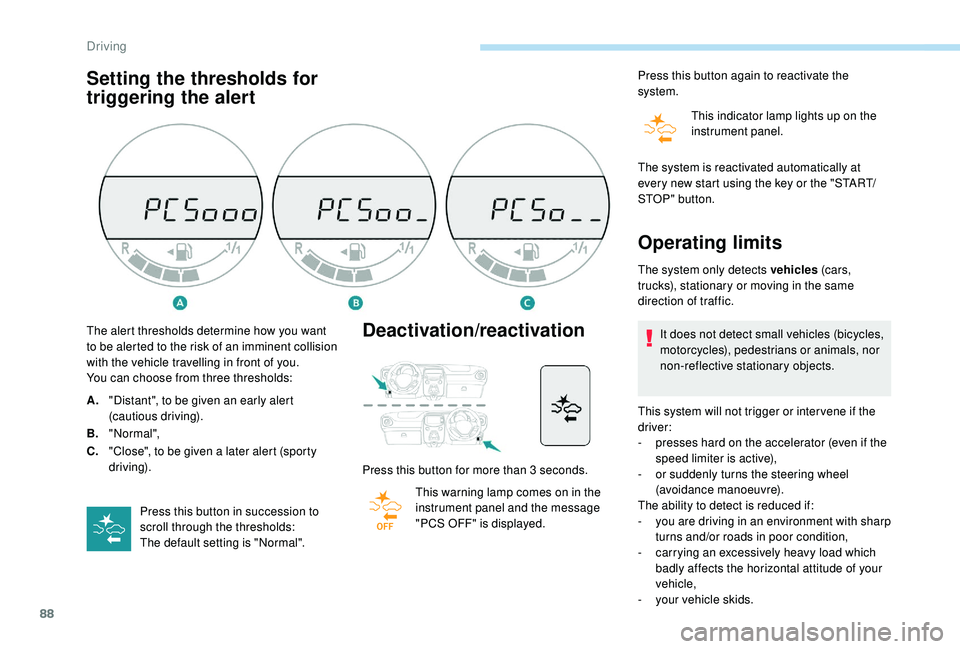
Setting the thresholds for
triggering the alertDeactivation/reactivation
Press this button for more than 3 seconds.
T his warning lamp comes on in the
instrument panel and the message
"PCS OFF" is displayed. Press this button again to reactivate the
system.
This indicator lamp lights up on the
instrument panel.
The alert thresholds determine how you want
to be alerted to the risk of an imminent collision
with the vehicle travelling in front of you.
You can choose from three thresholds:
A. "Distant", to be given an early alert
(cautious driving).
B. "Normal",
C. "Close", to be given a
later alert (sporty
driving).
Press this button in succession to
scroll through the thresholds:
The default setting is "Normal". The system is reactivated automatically at
every new start using the key or the "START/
STOP " button.
Operating limits
The system only detects vehicles
(c ar s,
trucks), stationary or moving in the same
direction of traffic.
It does not detect small vehicles (bicycles,
motorcycles), pedestrians or animals, nor
non-reflective stationary objects.
This system will not trigger or inter vene if the
driver:
-
p
resses hard on the accelerator (even if the
speed limiter is active),
-
o
r suddenly turns the steering wheel
(avoidance manoeuvre).
The ability to detect is reduced if:
-
y
ou are driving in an environment with sharp
turns and/or roads in poor condition,
-
c
arrying an excessively heavy load which
badly affects the horizontal attitude of your
vehicle,
-
y
our vehicle skids.
Driving