key PEUGEOT 108 2018 Owner's Guide
[x] Cancel search | Manufacturer: PEUGEOT, Model Year: 2018, Model line: 108, Model: PEUGEOT 108 2018Pages: 180, PDF Size: 7.14 MB
Page 143 of 180
13
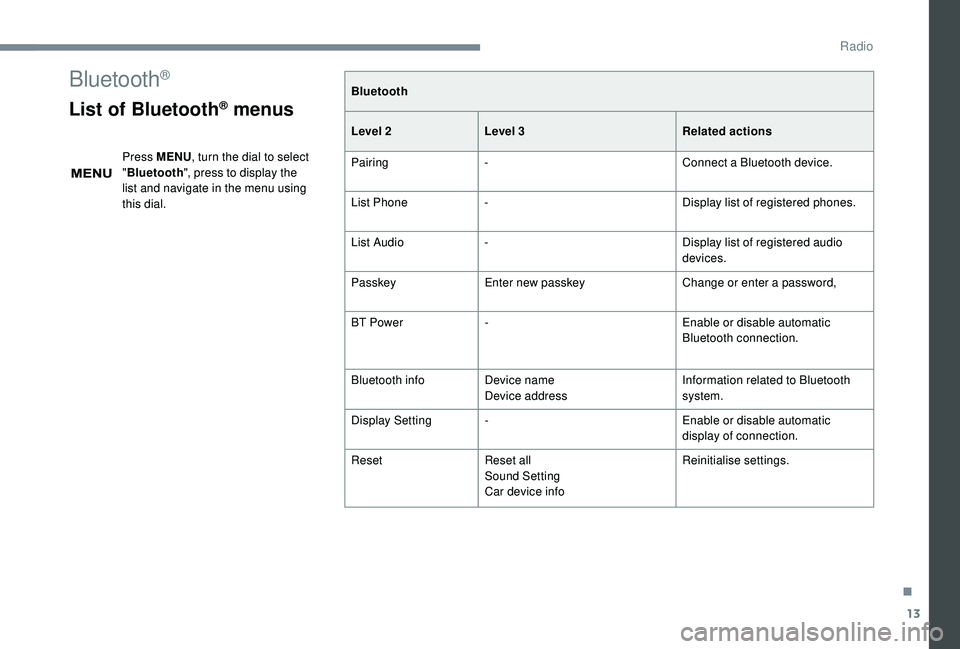
Bluetooth®
List of Bluetooth® menus
Press MENU, turn the dial to select
" Bluetooth ", press to display the
list and navigate in the menu using
this dial. Bluetooth
Level 2
Level 3 Related actions
Pairing - Connect a
Bluetooth device.
List Phone - Display list of registered phones.
List Audio - Display list of registered audio
devices.
Passkey Enter new passkey Change or enter a
password,
BT Power - Enable or disable automatic
Bluetooth connection.
Bluetooth info Device name
Device address Information related to Bluetooth
system.
Display Setting - Enable or disable automatic
display of connection.
Reset Reset all
Sound Setting
Car device info Reinitialise settings.
.
Radio
Page 146 of 180
16
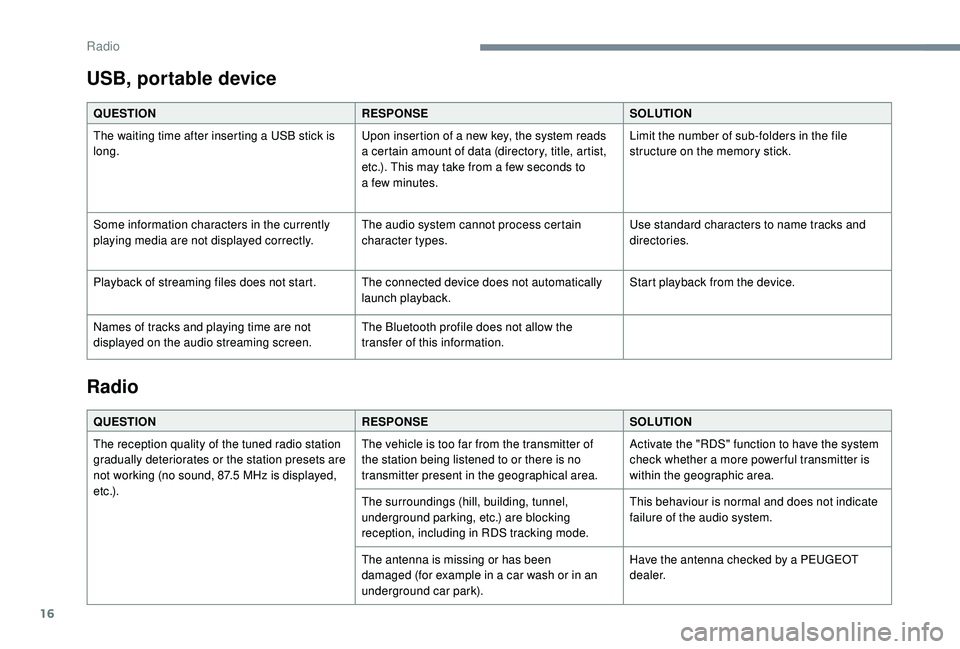
USB, portable device
QUESTIONRESPONSESOLUTION
The waiting time after inserting a USB stick is
long. Upon insertion of a
new key, the system reads
a
certain amount of data (directory, title, artist,
etc.). This may take from a
few seconds to
a
few minutes.Limit the number of sub-folders in the file
structure on the memory stick.
Some information characters in the currently
playing media are not displayed correctly. The audio system cannot process certain
character types.Use standard characters to name tracks and
directories.
Playback of streaming files does not start. The connected device does not automatically launch playback.Start playback from the device.
Names of tracks and playing time are not
displayed on the audio streaming screen. The Bluetooth profile does not allow the
transfer of this information.
Radio
QUESTION
RESPONSESOLUTION
The reception quality of the tuned radio station
gradually deteriorates or the station presets are
not working (no sound, 87.5
MHz is displayed,
e t c .) . The vehicle is too far from the transmitter of
the station being listened to or there is no
transmitter present in the geographical area.
Activate the "RDS" function to have the system
check whether a
more power ful transmitter is
within the geographic area.
The surroundings (hill, building, tunnel,
underground parking, etc.) are blocking
reception, including in RDS tracking mode. This behaviour is normal and does not indicate
failure of the audio system.
The antenna is missing or has been
damaged (for example in a
car wash or in an
underground car park). Have the antenna checked by a
PEUGEOT
dealer.
Radio
Page 149 of 180
1
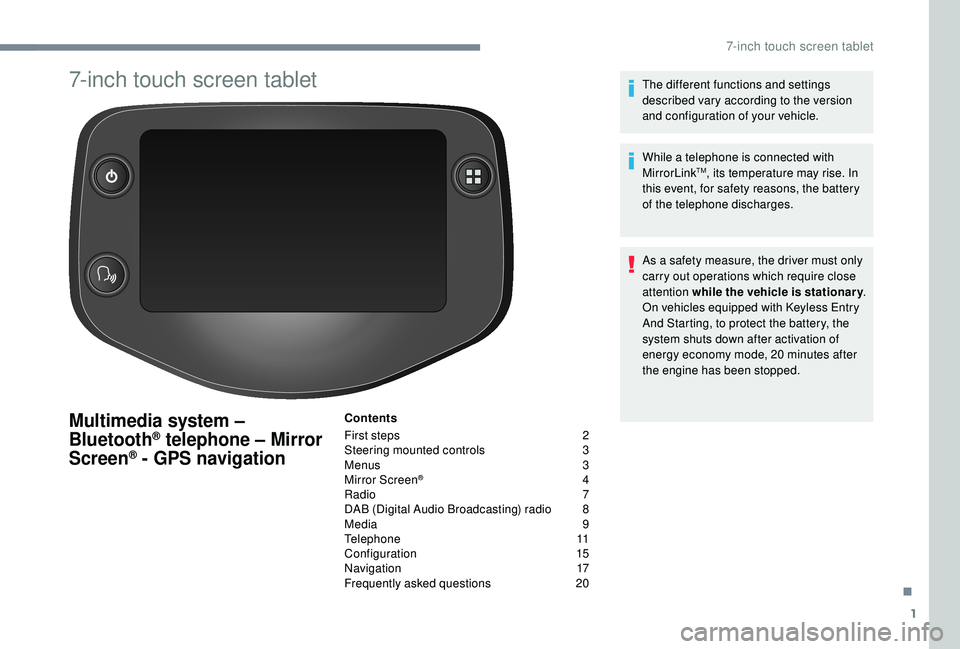
7-inch touch screen tablet
Multimedia system –
Bluetooth® telephone – Mirror
Screen® - GPS navigation
Contents
First steps
2
S
teering mounted controls
3
M
enus
3
M
irror Screen
® 4
R
adio
7
D
AB (Digital Audio Broadcasting) radio
8
M
edia
9
T
elephone
1
1
Configuration
1
5
Navigation
1
7
Frequently asked questions
20T
he different functions and settings
described vary according to the version
and configuration of your vehicle.
While a telephone is connected with
MirrorLink
TM, its temperature may rise. In
this event, for safety reasons, the battery
of the telephone discharges.
As a
safety measure, the driver must only
carry out operations which require close
attention while the vehicle is stationary .
On vehicles equipped with Keyless Entry
And Starting, to protect the battery, the
system shuts down after activation of
energy economy mode, 20
minutes after
the engine has been stopped.
.
7-inch touch screen tablet
Page 161 of 180
13
Select "Telephone/message
configuration ".
Select " Connect the telephone "
to display a
list of the paired
peripherals.
Select " Remove " then select the peripheral
device in the list and confirm.
Receiving a call
An incoming call is announced by a ring and
a superimposed display in the screen.
Make a
short press on this steering
mounted button to accept an
incoming call.
Make a
short press on this steering
mounted button to reject the call or
to end the conversation.
Making a call
Calling a new number
You are strongly advised NOT to use the
telephone while driving. We recommend
that you park safely or make use of the
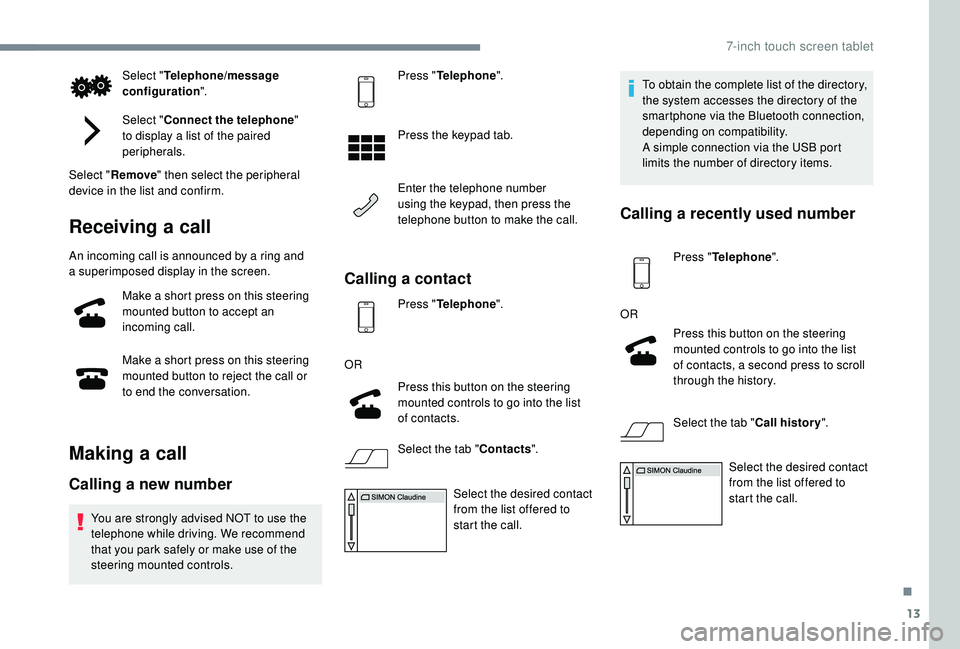
steering mounted controls. Press "
Telephone ".
Press the keypad tab.
Enter the telephone number
using the keypad, then press the
telephone button to make the call.
Calling a contact
Press "Telephone ".
OR Press this button on the steering
mounted controls to go into the list
of contacts.
Select the tab " Contacts".
Select the desired contact
from the list offered to
start the call. To obtain the complete list of the directory,
the system accesses the directory of the
smartphone via the Bluetooth connection,
depending on compatibility.
A simple connection via the USB port
limits the number of directory items.
Calling a
recently used number
Press "Telephone ".
OR Press this button on the steering
mounted controls to go into the list
of contacts, a second press to scroll
through the history.
Select the tab " Call history".
Select the desired contact
from the list offered to
start the call.
.
7-inch touch screen tablet
Page 165 of 180
17
Navigation
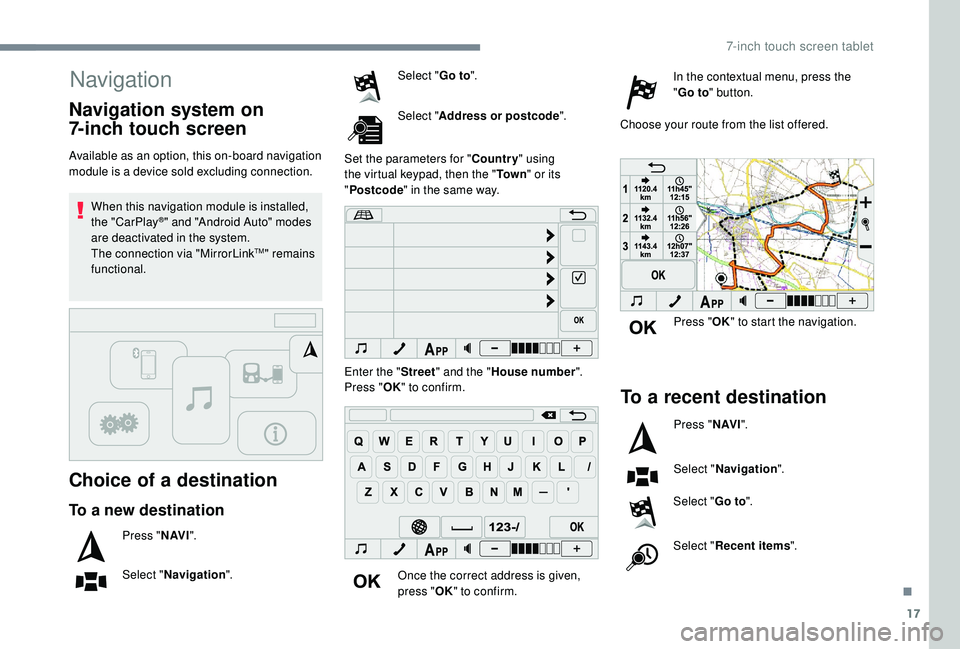
Choice of a destination
Available as an option, this on-board navigation
module is a device sold excluding connection.When this navigation module is installed,
the "CarPlay
®" and "Android Auto" modes
are deactivated in the system.
The connection via "MirrorLink
TM" remains
functional.
To a new destination
Press " N AV I".
Select " Navigation ". Select "
Go to".
Select " Address or postcode ".
Set the parameters for " Country" using
the virtual keypad, then the " To w n" or its
" Postcode " in the same way.
Enter the " Street" and the " House number ".
Press " OK" to confirm.
Once the correct address is given,
press " OK" to confirm. In the contextual menu, press the
"
Go to " button.
Choose your route from the list offered.
Navigation system on
7-inch touch screen
Press " OK" to start the navigation.
To a recent destination
Press " N AV I".
Select " Navigation ".
Select " Go to".
Select " Recent items ".
.
7-inch touch screen tablet
Page 166 of 180
18
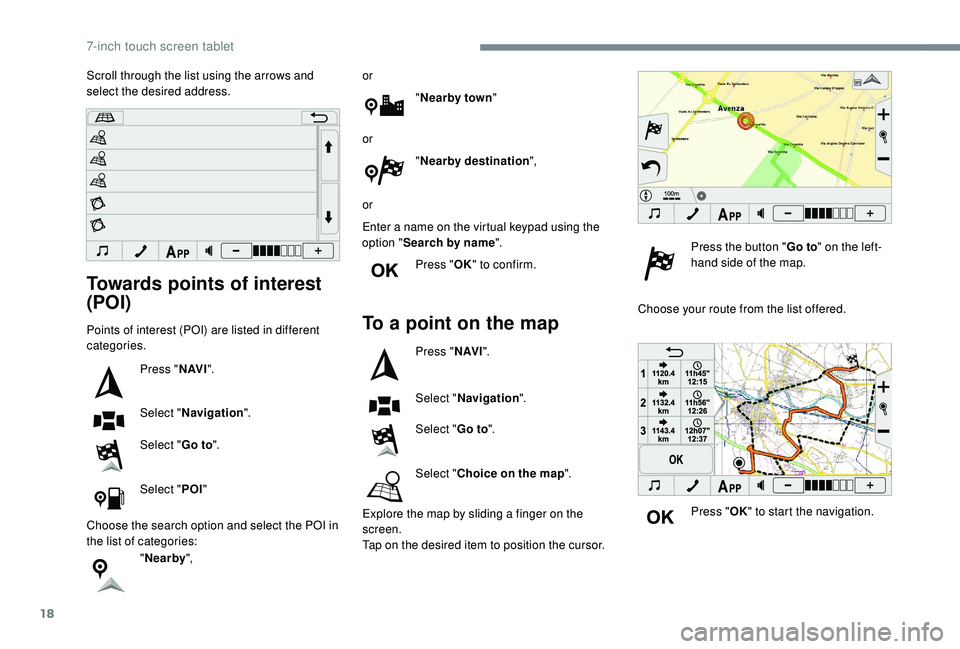
Towards points of interest
(POI)
Points of interest (POI) are listed in different
categories.Press "N AV I".
Select " Navigation ".
Select " Go to".
Select " POI"
Choose the search option and select the POI in
the list of categories: "Nearby ", or
"Nearby town "
or "Nearby destination ",
or
Enter a name on the virtual keypad using the
option " Search by name ".
Press " OK" to confirm.To a point on the map
Press " N AV I".
Select " Navigation ".
Select " Go to".
Select " Choice on the map ".
Explore the map by sliding a
finger on the
screen.
Tap on the desired item to position the cursor. Press the button "
Go to" on the left-
hand side of the map.
Choose your route from the list offered.
Press "OK" to start the navigation.
Scroll through the list using the arrows and
select the desired address.
7-inch touch screen tablet
Page 167 of 180
19
98765
43210
S
N
N
E
44
009
23
21
21
32
EW
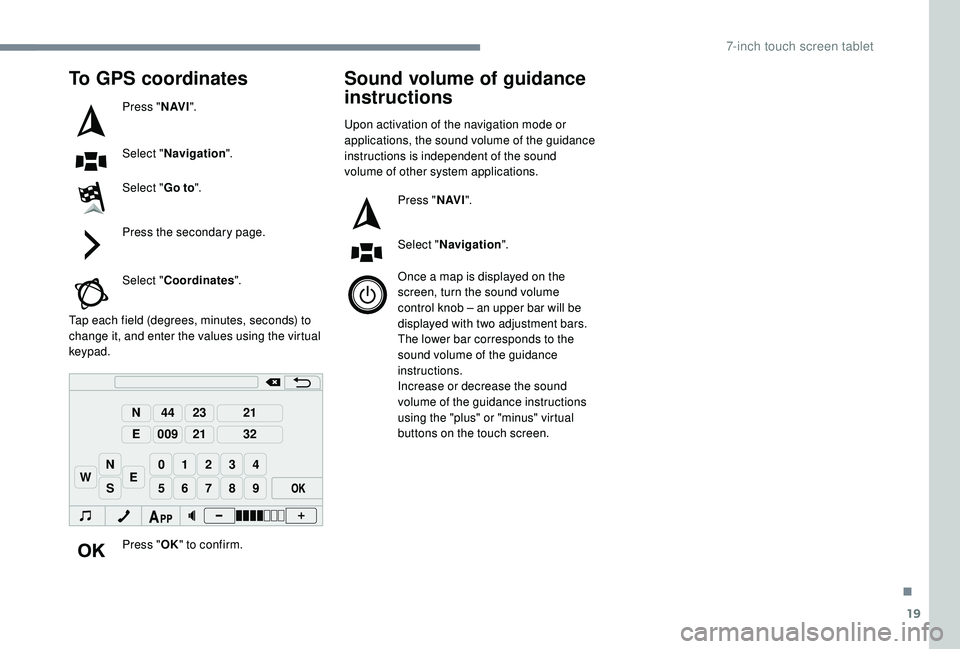
To GPS coordinates
Press "N AV I".
Select " Navigation ".
Select " Go to".
Press the secondary page.
Select " Coordinates ".
Tap each field (degrees, minutes, seconds) to
change it, and enter the values using the virtual
keypad.
Press "OK" to confirm.
Sound volume of guidance
instructions
Upon activation of the navigation mode or
applications, the sound volume of the guidance
instructions is independent of the sound
volume of other system applications.
Press "N AV I".
Select " Navigation ".
Once a
map is displayed on the
screen, turn the sound volume
control knob – an upper bar will be
displayed with two adjustment bars.
The lower bar corresponds to the
sound volume of the guidance
instructions.
Increase or decrease the sound
volume of the guidance instructions
using the "plus" or "minus" virtual
buttons on the touch screen.
.
7-inch touch screen tablet
Page 172 of 180
170
ABS .................................................................52
Accessories .................................................... 51
Access to rear seats (3 -door)
.........................33
Active City Brake
...............................
..15, 8 6 - 89
Adjusting seat
........................................... 32, 34
Adjusting the air distribution
...........................37
Adjusting the air flow
....................................... 37
A
djusting the temperature
........................37- 4 0
Adjusting the time
..................................... 20 -21
Advice on care and maintenance
...................99
Advice on driving
............................................ 72
Airbags
...............................
...........14, 56 -58, 60
Airbags, curtain
............................................... 58
Airbags, front ....................................... 57- 5 8 , 61
Airbags, lateral
.......................................... 57- 5 8
Air conditioning
........................................... 6, 38
Air conditioning, automatic
.......................38-40
Air conditioning, manual
........................... 3
7, 4 0
Air intake
................................................... 38-40
Air vents
.......................................................... 36
Anti-lock braking system (ABS)
......................52
Apple CarPlay connection
................................4
Audible warning
.............................................. 51
A
udio streaming (Bluetooth)
................10, 10 -11
Audio system
..................................................... 1Boot
.................................................................27
Brake discs
....................................................103
Brake lamps
...............................
...................113
Brakes
.....................................................11, 1 0 3
Bulbs (changing)
.....................................111 -112
Battery
............................................ 102, 121-123
Battery, charging
........................................... 123
Battery, electronic key
....................................26
Battery, remote control
...................................23
Bluetooth (hands-free)
......................... 1
0 , 11 -12
Bluetooth (telephone)
........................... 1
0 , 11 -12
Bonnet
....................................................... 98-99 Control stalk, lighting
......................................46
Control stalk, wipers
.......................................49
C
ourtesy lamp .................................................41
Cup holder
.......................................................42
DAB (Digital Audio Broadcasting) – Digital radio
..................8, 8 -9
Daytime running lamps
...................................46
Deactivating the passenger airbag
.....5 7, 6 0 - 6 1
Defrosting
.......................................36-37, 40-41
Defrosting, front
..............................................40
Demisting
..................................................36-40
Demisting, front
............................................... 40
D
emisting, rear
................................................41
Demisting, rear screen
...................................41
Dimensions
..............................
.....................126
Dipstick
................
...................................10 0 -101
Direction indicators
..........................4 8 , 112 -113
Display screen
................................................18
Display screen, instrument panel
.................8-9
Door pockets
...............................
....................42
Doors
.........................................................26-27
Driving economically ......................................... 6
DSC
.................................................................14
Dynamic stability control (DSC)
.....13 -14, 52- 5 3
Cable, audio
......................................................9
Cable, Jack
.......................................................9
Capacity, fuel tank
..........................................96
CD
...................................................................10
CD, MP3
..........................................................10
Central locking
.......................................... 2
2-24
Changing a
bulb
......................................111
-112
Changing a
fuse
..............................11
4 -11 6 , 11 9
Changing a
wheel
...................1
0 7-1 0 8 , 11 0 -111
Changing a
wiper blade
..................................50
C
hanging the electronic key battery
...............26
C
hanging the remote control battery
..............23
Checking the levels
.................................9 9 -10 2
Checking tyre pressures (using the kit) ...104, 10 6
Checks
............................................. 99, 102-103
Checks, routine
...................................... 102-103
Children
.......................................... 66-68, 70-71
Children (safety)
.............................................. 71
Child seats
................. 5
5 -56, 59 - 60, 64- 65, 70
Child seats, conventional
................................ 64
Child seats, i-Size
........................................... 70
Child seats, ISOFIX
.................................. 66 -70
Closing the boot
.............................................. 27
Closing the doors
............................................ 24
Clutch
...................................................... 12, 102
Connection, MirrorLink
..................................... 5
Control, emergency boot release
................... 28
Control, heated seats
...................................... 33
A
B
DC
Alphabetical index
Page 173 of 180
171
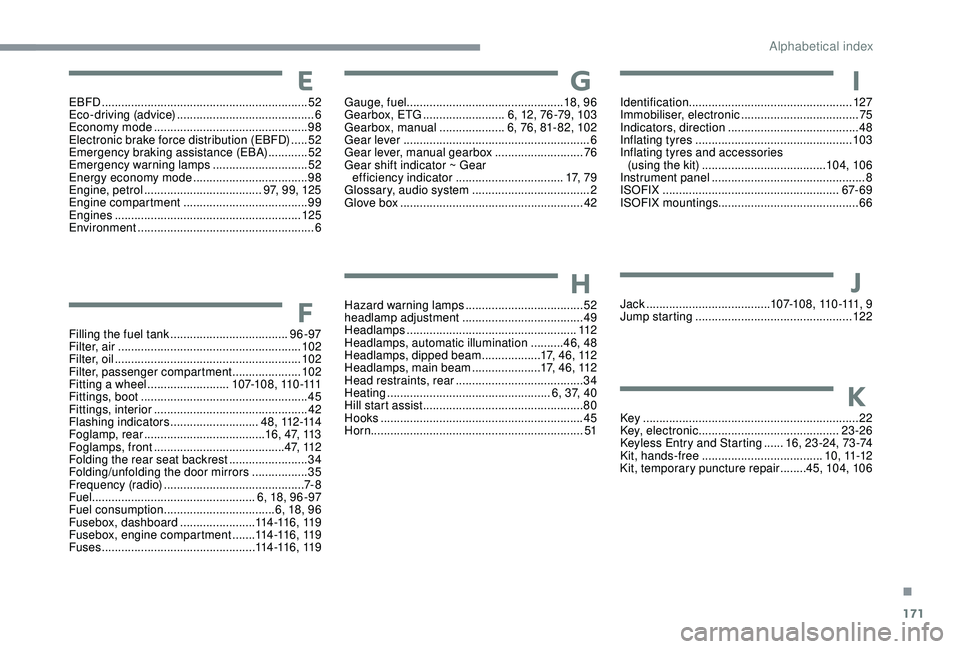
EBFD ............................................................... 52
Eco-driving (advice) .......................................... 6
Economy mode
............................................... 98
E
lectronic brake force distribution (EBFD)
.....52
Emergency braking assistance (EBA)
............52
Emergency warning lamps
.............................52
Energy economy mode
................................... 98
E
ngine, petrol
...............................
.....97, 99, 125
Engine compartment
...................................... 99
E
ngines
......................................................... 125
Environment
...................................................... 6
Filling the fuel tank
.................................... 96 -97
Filter, air
........................................................ 102
Filter, oil
................
......................................... 102
Filter, passenger compartment
.....................102
Fitting a
wheel ......................... 1 0 7-1 0 8 , 11 0 -111
Fittings, boot
................................................... 45
Fittings, interior
............................................... 42
F
lashing indicators
...........................4 8 , 112 -114
Foglamp, rear
..................................... 16, 47, 113
Foglamps, front
........................................ 4 7, 11 2
Folding the rear seat backrest
........................34
Folding/unfolding the door mirrors
................. 35
F
requency (radio)
........................................... 7- 8
Fuel .................................................. 6, 18, 96 -97
Fuel consumption
.................................. 6, 18, 96
Fusebox, dashboard
.......................114 -11 6 , 11 9
Fusebox, engine compartment
.......114 -11 6 , 11 9
Fuses
............................................... 11
4 -11 6 , 11 9Gauge, fuel
................................................ 18, 9 6
Gearbox, ETG
.........................6, 12, 76 -79, 103
Gearbox, manual
....................6, 76, 81- 82, 102
Gear lever
.........................................................6
Gear lever, manual gearbox
...........................76
Gear shift indicator ~ Gear efficiency indicator
.................................17, 7 9
Glossary, audio system
....................................2
Glove box
........................................................42
Hazard warning lamps
....................................52
headlamp adjustment
.....................................49
Headlamps
....................................................112
Headlamps, automatic illumination
..........46, 48
Headlamps, dipped beam
..................17, 46, 112
Headlamps, main beam
.....................17, 46, 112
Head restraints, rear
.......................................34
Heating
.................................................. 6
, 37, 40
Hill start assist
.................................................80
Hooks
..............................................................45
Horn ................................................................. 51Identification
.................................................. 127
Immobiliser, electronic
....................................75
Indicators, direction
........................................48
Inflating tyres
................................................103
Inflating tyres and accessories (using the kit)
......................................104, 10 6
Instrument panel
...............................................8
ISOFIX
......................................................67- 6 9
ISOFIX mountings ........................................... 66
Jack
...............................
.......1 0 7-1 0 8 , 11 0 -111, 9
Jump starting
................................................12 2
Key
..................................................................22
Key, electronic
...........................................23-26
Keyless Entry and Starting
......1
6, 23 -24, 73 -74
Kit, hands-free
..................................... 1
0 , 11 -12
Kit, temporary puncture repair
........45, 104, 10 6E
F
G
H
I
J
K
.
Alphabetical index