audio PEUGEOT 2008 2013 Service Manual
[x] Cancel search | Manufacturer: PEUGEOT, Model Year: 2013, Model line: 2008, Model: PEUGEOT 2008 2013Pages: 324, PDF Size: 8.39 MB
Page 280 of 324
04
278
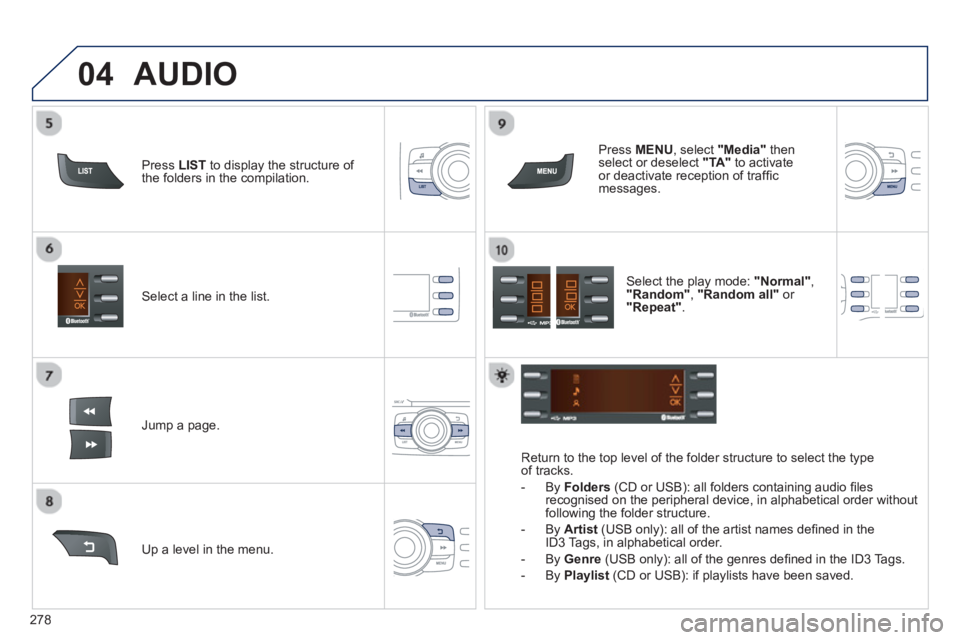
Select a line in the list.
Jump a page.
Pr
ess MENU
, select "Media"
thenselect or deselect "TA"
to activate or deactivate reception of traffi c messages.
U
p a level in the menu.
AUDIO
Return to the top level of the folder structure to select the typeof tracks.
-
By Folders
(CD or USB): all folders containing audio fi les recognised on the peripheral device, in alphabetical order withoutfollowing the folder structure.
- B
y Artist(USB only): all of the artist names defi ned in the
ID3 Tags, in alphabetical order.
- B
y Genre
(USB only): all of the genres defi ned in the ID3 Tags.
-
By Playlist
(CD or USB): if playlists have been saved.
Pr
ess LISTto display the structure of
the folders in the compilation.
Select the play mode: "Normal" ,"Random" , "Random all"or
"Repeat" .
Page 281 of 324
04AUDIO
iPod ®
or PORTABLE PLAYER
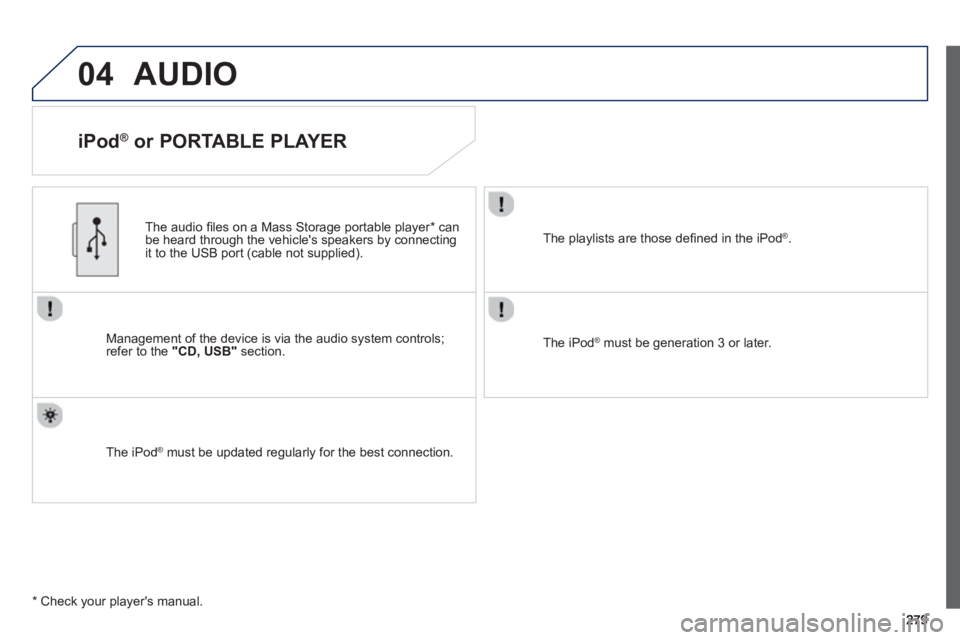
Management of the device is via the audio system controls; refer to the "CD, USB"section.
The audio
fi les on a Mass Storage portable player *
can
be heard through the vehicle's speakers by connectingit to the USB port (cable not supplied).
The iPod Æ must be updated regularly for the best connection. Æ
The playlists are those defi ned in the iPod®.
The iPod®
must be generation 3 or later.
®
*
Check your player's manual.
Page 282 of 324
04
280
AUDIO
STREAMING - PLAYING AUDIO FILES VIA BLUETOOTH
DEPENDING ON THE COMPATIBILITY OF THE PHONE
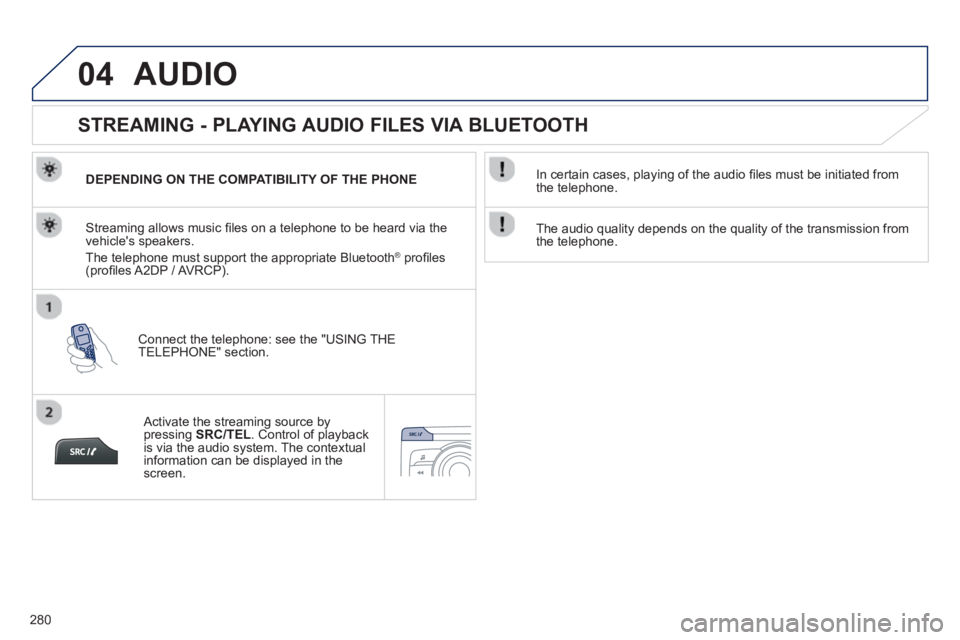
Connect the telephone: see the "USING THE
TELEPHONE" section.
Streaming allows music fi les on a telephone to be heard via the
vehicle's speakers.
The telephone must support the appropriate Bluetooth Æprofi les (profi les A2DP / AV RCP).
Activate the streaming source by pressing SRC/TEL
. Control of playbackis via the audio system. The contextualinformation can be displayed in the screen.
In certain cases, pla
ying of the audio fi les must be initiated from
the telephone.
The audio qualit
y depends on the quality of the transmission from
the telephone.
Page 283 of 324
05
281
USING THE TELEPHONE
PAIRING A TELEPHONE / FIRST CONNECTION
The services offered depend on the network, the SIM card and the compatibility of the Bluetooth telephone used.
Consult your telephone's manual and your operator to fi nd out which services are available to you.
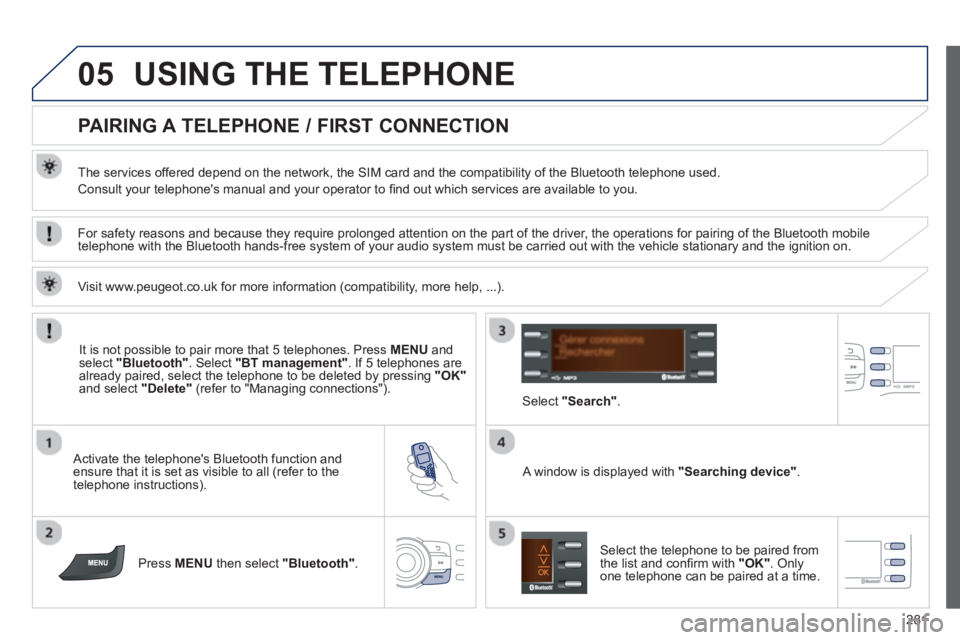
Activate the telephone's Bluetooth function andensure that it is set as visible to all (refer to the
telephone instructions).
Press MENU
then select "Bluetooth".
A window is displayed with"
Searching device ".
Select the telephone to be paired from
the list and confi rm with "OK". Onlyone telephone can be paired at a time.
Select"
Search ".
For safety reasons and because they require prolonged attention on the part of the driver, the operations for pairing of the Bluetooth mobile
telephone with the Bluetooth hands-free system of your audio system must be carried out with the vehicle stationary and the ignition on.
It is not possible to pair more that 5 telephones. Press MENUand select "Bluetooth"
. Select "BT management"
. If 5 telephones are
already paired, select the telephone to be deleted by pressing "OK"and select "Delete"
(refer to "Managing connections").
Visit www.peu
geot.co.uk for more information (compatibility, more help, ...).
Page 285 of 324
05
283
USING THE TELEPHONE
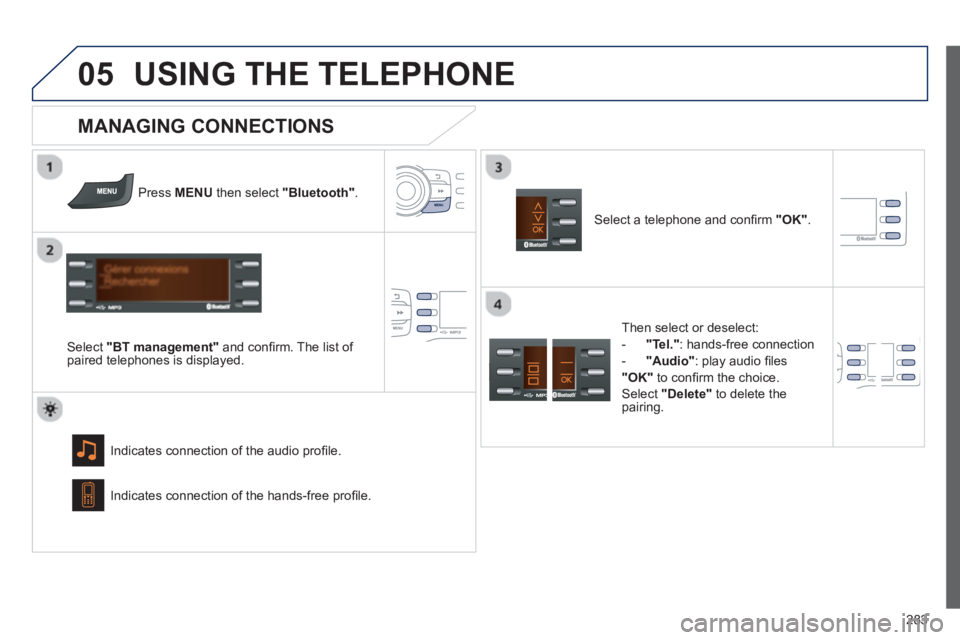
Press MENU then select "Bluetooth"
.
Select "BT management"
and confi rm. The list of
paired telephones is displayed.
Indicates connection of the audio profi le.
MANAGING CONNECTIONS
Select a telephone and confi rm "OK".
Indicates connection o
f the hands-free profi le.
Then select or deselect:
- "Tel."
: hands-free connection
-
"Audio"
: play audio fi les
"OK"to confi rm the choice.
Select "Delete"
to delete the
pairing.
Page 289 of 324
06
287
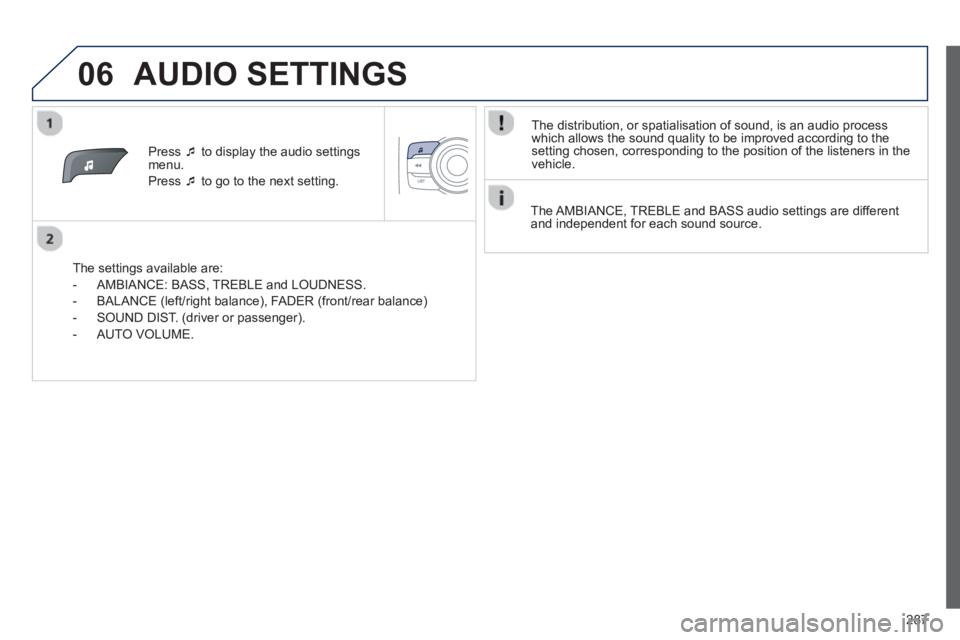
Press ‘to display the audio settings menu.
Press ‘to go to the next setting.
The settings available are:
- AMBIANCE: BASS
, TREBLE and LOUDNESS.
- BALAN
CE (left/right balance), FADER (front/rear balance)
- SOUND DIST. (driver or passenger).
- A
UTO VOLUME.
The distribution, or spatialisation of sound, is an audio process
w
hich allows the sound quality to be improved according to the setting chosen, corresponding to the position of the listeners in the
vehicle.
AUDIO SETTINGS
The AMBIANCE, TREBLE and BASS audio settings are different
and independent for each sound source.
Page 292 of 324
290
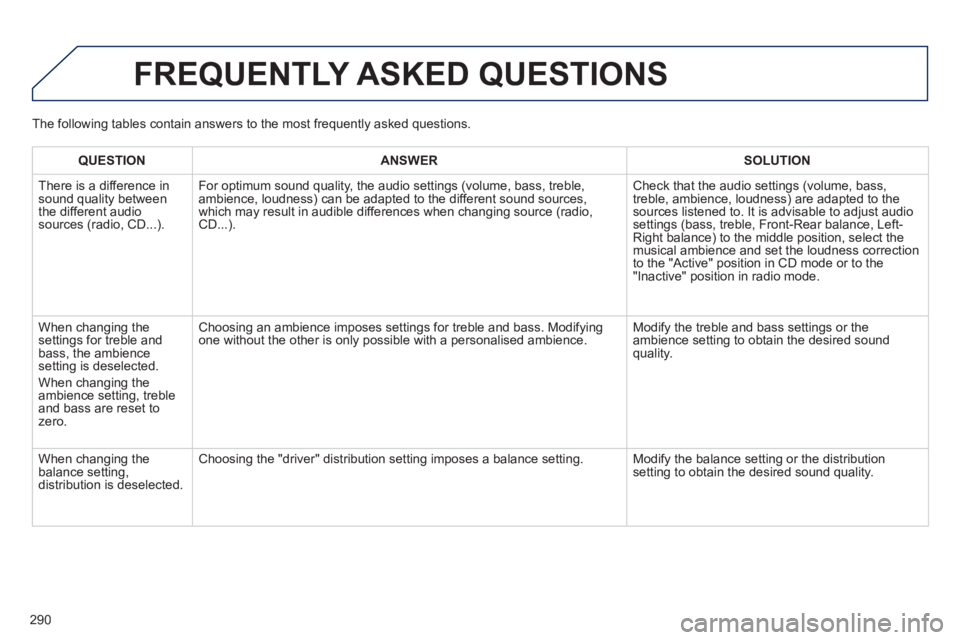
FREQUENTLY ASKED QUESTIONS
QUESTIONANSWER SOLUTION
There is a difference in sound quality between
the different audiosources (radio, CD...). For optimum sound qualit
y, the audio settings (volume, bass, treble, ambience, loudness) can be adapted to the different sound sources,
which may result in audible differences when changing source (radio,
CD...).
Check that the audio settings (volume, bass,
treble, ambience, loudness) are adapted to thesources listened to. It is advisable to adjust audio settings (bass, treble, Front-Rear balance, Left-Right balance) to the middle position, select the musical ambience and set the loudness correction
to the "Active" position in CD mode or to the "Inactive" position in radio mode.
When chan
ging the settings for treble and
bass, the ambience
setting is deselected.
When chan
ging the
ambience setting, treble and bass are reset to zero.
Choosing an ambience imposes settings for treble and bass. Modifyingone without the other is only possible with a personalised ambience. Modify the treble and bass settings or the
ambience setting to obtain the desired sound quality.
When chan
ging the
balance setting, distribution is deselected.
Choosing the "driver" distribution setting imposes a balance setting. Modify the balance setting or the distribution setting to obtain the desired sound quality. The
following tables contain answers to the most frequently asked questions.
Page 293 of 324
291
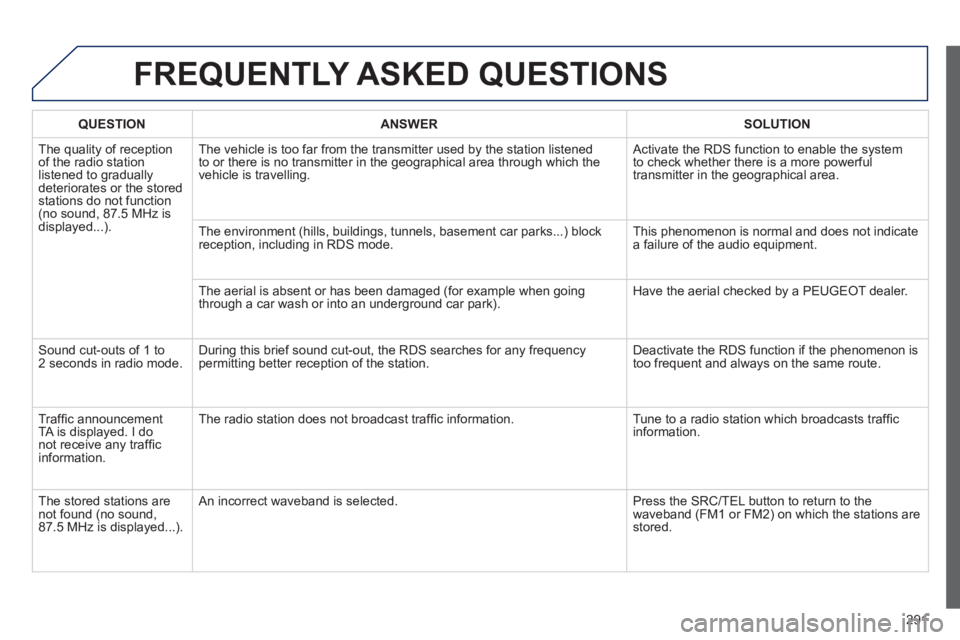
FREQUENTLY ASKED QUESTIONS
QUESTIONANSWERSOLUTION
The quality of receptionof the radio station
listened to gradually
deteriorates or the stored stations do not function(no sound, 87.5 MHz is
displayed...). The vehicle is too
far from the transmitter used by the station listened
to or there is no transmitter in the geographical area through which the
vehicle is travelling. Activate the RDS function to enable the system
to check whether there is a more powerful
transmitter in the geographical area.
The environment
(hills, buildings, tunnels, basement car parks...) block reception, including in RDS mode. This phenomenon is normal and does not indicate
a failure of the audio equipment.
The aerial is absent or has been damaged
(for example when going
through a car wash or into an underground car park). Have the aerial checked by a PEUGEOT dealer.
Sound cut-outs of 1 to
2 seconds in radio mode.During this brief sound cut-out, the RDS searches for any frequency
permitting better reception of the station. Deactivate the RDS function if the phenomenon is
too frequent and always on the same route.
Tr
affi c announcement
TA is displayed. I donot receive any traffi c
information.Th
e radio station does not broadcast traffi c information. Tune to a radio station which broadcasts traffi c
information.
Th
e stored stations arenot found (no sound, 87.5 MHz is displayed...). An in
correct waveband is selected. Press the SRC/TEL button to return to the
waveband (FM1 or FM2) on which the stations arestored.
Page 294 of 324
292
FREQUENTLY ASKED QUESTIONS
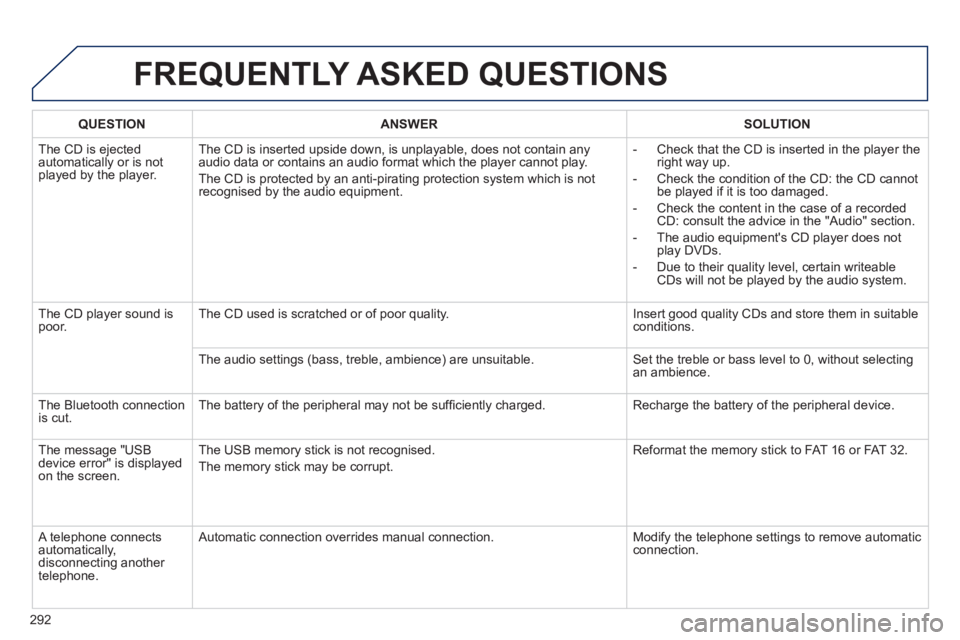
QUESTIONANSWERSOLUTION
The CD is ejected
automatically or is not played by the player. The
CD is inserted upside down, is unplayable, does not contain any audio data or contains an audio format which the player cannot play.
The
CD is protected by an anti-pirating protection system which is not recognised by the audio equipment.
-
Check that the CD is inserted in the player the
right way up.
-
Check the condition of the CD: the CD cannot
be played if it is too damaged.
-
Check the content in the case of a recordedCD: consult the advice in the "Audio" section.
- The audio equipment's CD pla
yer does not
play DVDs.
-
Due to their quality level, certain writeableCDs will not be played by the audio system.
The
CD player sound ispoor.The CD used is scratched or of poor quality. Insert good quality CDs and store them in suitable conditions.
The audio settin
gs (bass, treble, ambience) are unsuitable. Set the treble or bass level to 0, without selectingan ambience.
Th
e Bluetooth connection
is cut. The battery of the peripheral may not be suffi ciently charged. Recharge the battery of the peripheral device.
The messa
ge "USB
device error" is displayedon the screen.The USB memor
y stick is not recognised.
The memor
y stick may be corrupt. Reformat the memor
y stick to FAT 16 or FAT 32.
A telephone connects
automatically,
disconnecting another
telephone. A
utomatic connection overrides manual connection. Modify the telephone settings to remove automatic connection.
Page 295 of 324
293
FREQUENTLY ASKED QUESTIONS
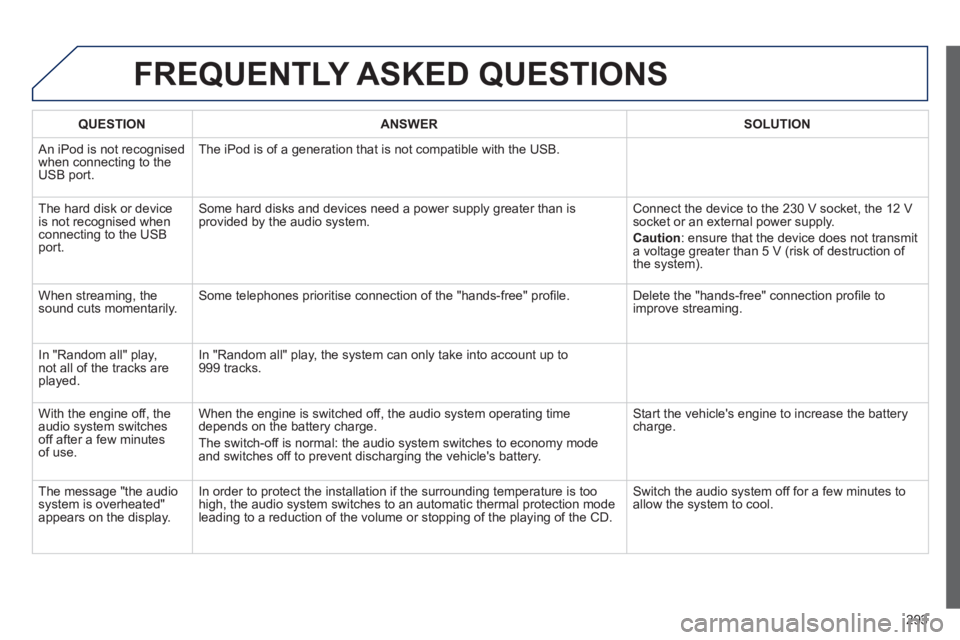
QUESTIONANSWERSOLUTION
An iPod is not recognisedwhen connecting to the
USB port.The iPod is o
f a generation that is not compatible with the USB.
Th
e hard disk or deviceis not recognised whenconnecting to the USBport. Some hard disks and devices need a power suppl
y greater than is
provided by the audio system. Connect the device to the 230 V socket, the 12 V socket or an external power supply.
Caution
:
ensure that the device does not transmit
a voltage greater than 5 V (risk of destruction of
the system).
When streaming, the
sound cuts momentarily. Some telephones prioritise connection of the "hands-free" profi le. Delete the "hands-free" connection profi le to
improve streaming.
In "Random all" pla
y,not all of the tracks areplayed.In "Random all" pla
y, the system can only take into account up to 999 tracks.
With the en
gine off, the
audio system switches off after a few minutes of use. When the en
gine is switched off, the audio system operating time
depends on the battery charge.
The switch-off is normal: the audio s
ystem switches to economy mode and switches off to prevent discharging the vehicle's battery. Start the vehicle's en
gine to increase the batterycharge.
The messa
ge "the audio system is overheated"
appears on the display. In order to protect the installation i
f the surrounding temperature is too
high, the audio system switches to an automatic thermal protection mode leading to a reduction of the volume or stopping of the playing of the CD.
Switch the audio system off for a few minutes to
allow the system to cool.