audio PEUGEOT 2008 2014 User Guide
[x] Cancel search | Manufacturer: PEUGEOT, Model Year: 2014, Model line: 2008, Model: PEUGEOT 2008 2014Pages: 336, PDF Size: 9.35 MB
Page 218 of 336
01
216
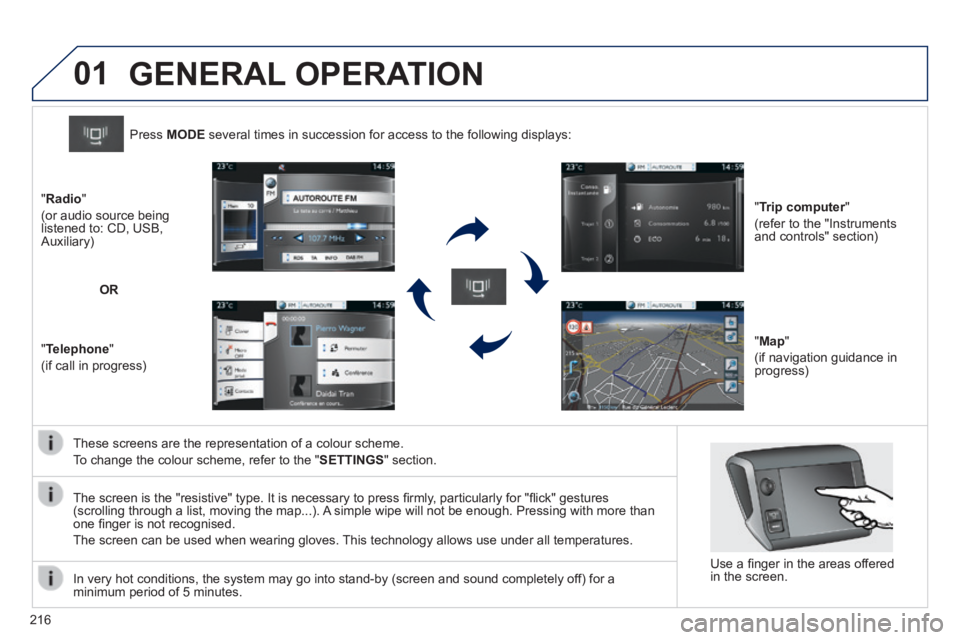
These screens are the representation of a colour scheme.
To change the colour scheme, refer to the " SETTINGS " section.
Press MODE several times in succession for access to the following displays:
" Trip computer " Trip computer " Trip computer
(refer to the "Instruments and controls" section)
" Map "
(if navigation guidance in progress)
" Radio "
(or audio source being listened to: CD, USB, Auxiliary)
" Telephone "
(if call in progress)
OR
GENERAL OPERATION
In very hot conditions, the system may go into stand-by (screen and sou\
nd completely off) for a minimum period of 5 minutes.
Use a fi nger in the areas offered in the screen.
The screen is the "resistive" type. It is necessary to press fi rmly, particularly for "fl ick" gestures (scrolling through a list, moving the map...). A simple wipe will not be enough. Pressing with more than one fi nger is not recognised.
The screen can be used when wearing gloves. This technology allows use under all temperatures.
Page 219 of 336
02
217
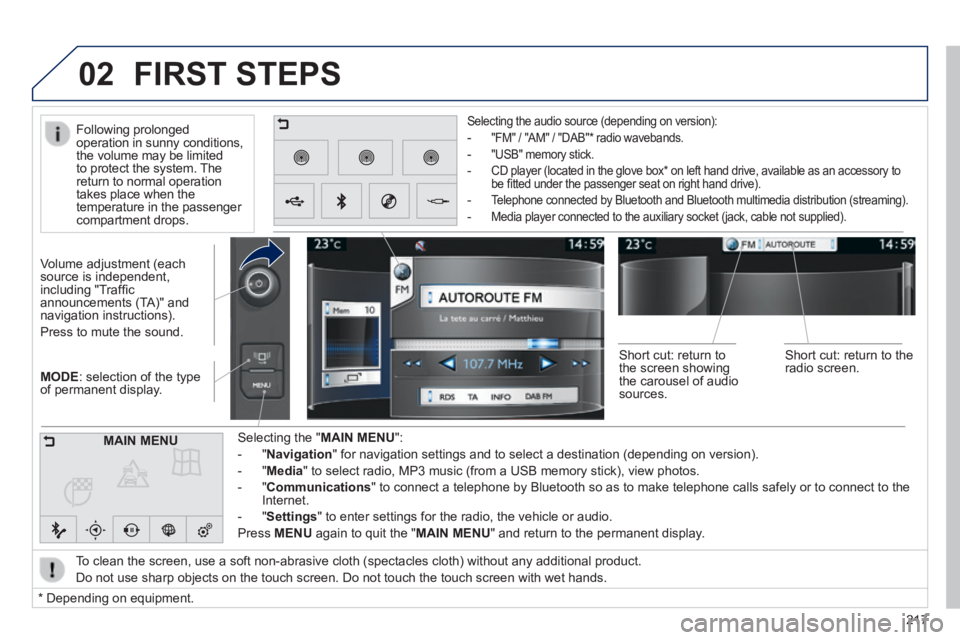
MODE : selection of the type of permanent display.
Volume adjustment (each source is independent, including "Traffi c announcements (TA)" and navigation instructions).
Press to mute the sound.
Selecting the " MAIN MENU ":
- " Navigation " for navigation settings and to select a destination (depending on ver\
sion).
- " Media " to select radio, MP3 music (from a USB memory stick), view photos.
- " Communications " to connect a telephone by Bluetooth so as to make telephone calls safe\
ly or to connect to the Internet.
- " Settings " to enter settings for the radio, the vehicle or audio.
Press MENU again to quit the " MAIN MENU " and return to the permanent display.
Selecting the audio source (depending on version):
- "FM" / "AM" / "DAB" * radio wavebands.
- "USB" memory stick.
- CD player (located in the glove box * on left hand drive, available as an accessory to be fi tted under the passenger seat on right hand drive).
- Telephone connected by Bluetooth and Bluetooth multimedia distribution (streaming).
- Media player connected to the auxiliary socket (jack, cable not supplie\
d).
To clean the screen, use a soft non-abrasive cloth (spectacles cloth) w\
ithout any additional product.
Do not use sharp objects on the touch screen. Do not touch the touch scr\
een with wet hands.
FIRST STEPS
* Depending on equipment.
MAIN MENU
Following prolonged operation in sunny conditions, the volume may be limited to protect the system. The return to normal operation takes place when the temperature in the passenger compartment drops.
Short cut: return to the screen showing the carousel of audio sources.
Short cut: return to the radio screen.
Page 220 of 336
03
218
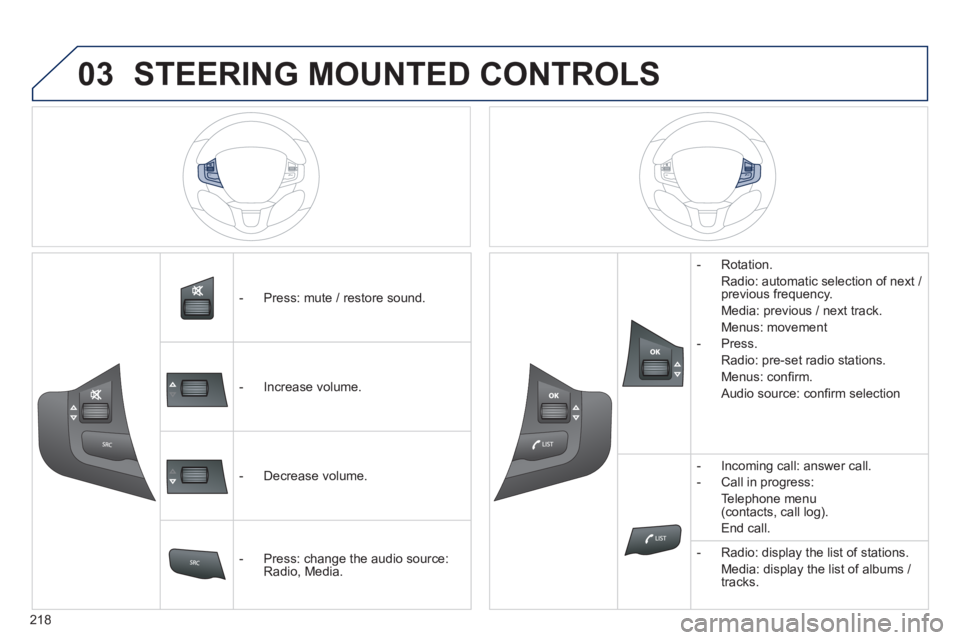
- Press: mute / restore sound.
- Increase volume.
- Decrease volume.
- Press: change the audio source: Radio, Media.
- Rotation.
Radio: automatic selection of next / previous frequency.
Media: previous / next track.
Menus: movement
- Press.
Radio: pre-set radio stations.
Menus: confi rm.
Audio source: confi rm selection
- Incoming call: answer call.
- Call in progress:
Telephone menu (contacts, call log).
End call.
- Radio: display the list of stations.
Media: display the list of albums / tracks.
STEERING MOUNTED CONTROLS
Page 224 of 336
05
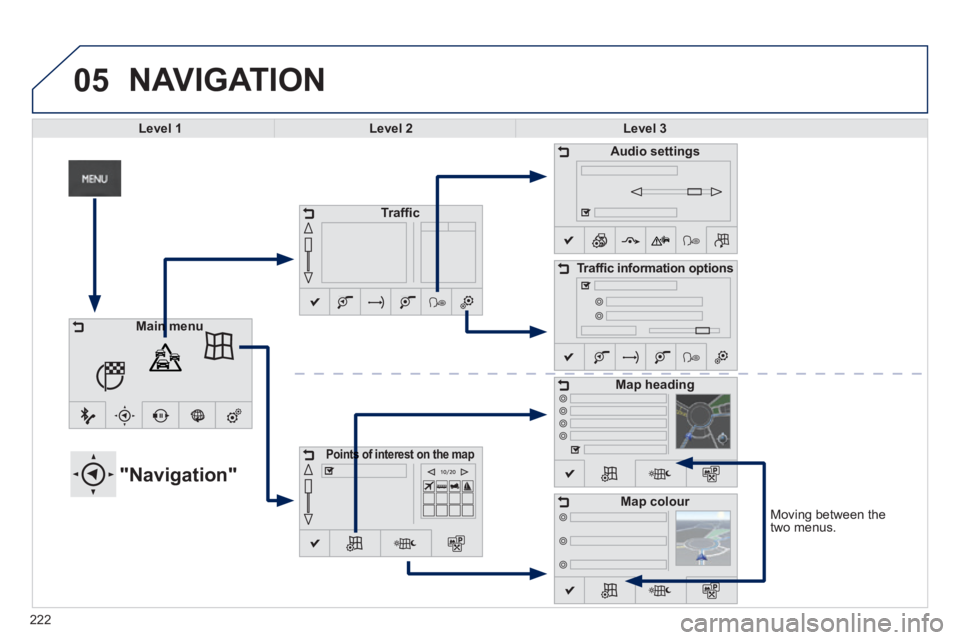
Moving between the two menus.
NAVIGATION
Level 1Level 2Level 3
"Navigation"
Traffi c
Points of interest on the mapPoints of interest on the map
Audio settings
Traffi c information options
Map heading
Map colour
Main menuMain menu
222
Page 225 of 336
223223223
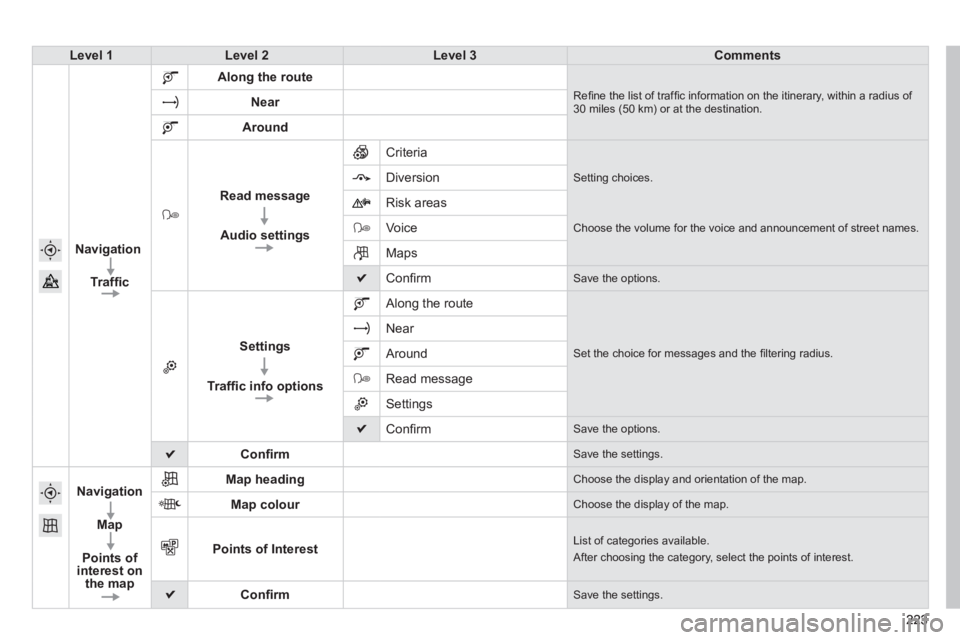
Level 1Level 2Level 3Comments
Navigation
Traffi c
Along the route
Refi ne the list of traffi c information on the itinerary, within a radius of 30 miles (50 km) or at the destination. Near
Around
Read message
Audio settings
Criteria
Setting choices. Diversion
Risk areas
Voice Choose the volume for the voice and announcement of street names.
Maps
Confi rm Save the options.
Settings
Traffi c info options
Along the route
Set the choice for messages and the fi ltering radius.
Near
Around
Read message
Settings
Confi rm Save the options.
Confi rm Save the settings.
Navigation
Map
Points of interest on the map
Map heading Choose the display and orientation of the map.
Map colour Choose the display of the map.
Points of Interest List of categories available.
After choosing the category, select the points of interest.
Confi rm Save the settings.
Page 235 of 336
05
233
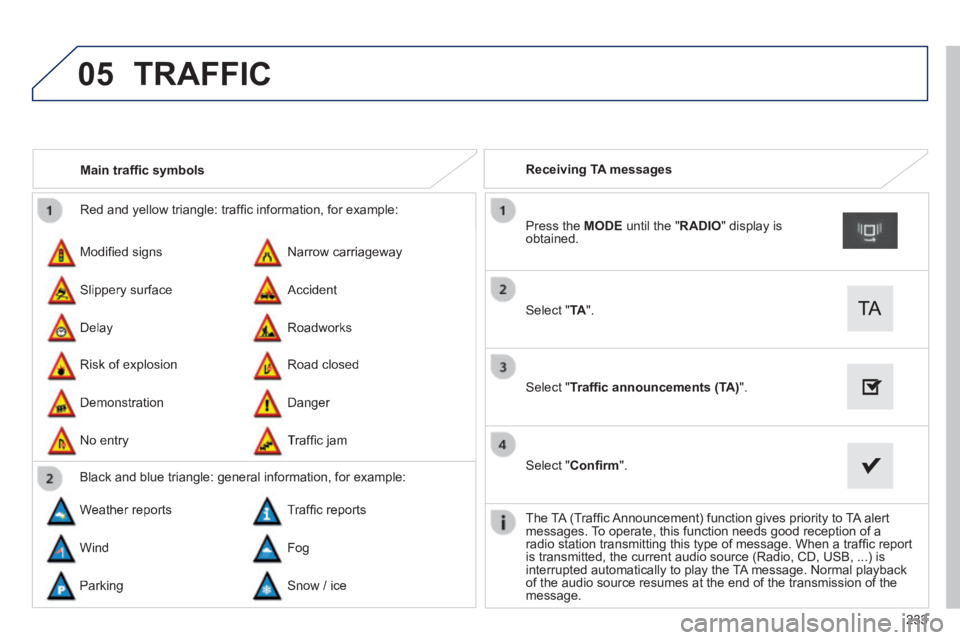
Red and yellow triangle: traffi c information, for example:
Modifi ed signs
Risk of explosion
Narrow carriageway
Road closed
Slippery surface
Demonstration
Accident
Danger
Delay
No entry
Roadworks
Traffi c jam
Main traffi c symbols
Black and blue triangle: general information, for example:
Weather reports Traffi c reports
Wind Fog
Parking Snow / ice
Receiving TA messages
Select " TA ".
Press the MODE until the " RADIO " display is obtained.
Select " Traffi c announcements (TA) ".
Select " Confi rm ".
The TA (Traffi c Announcement) function gives priority to TA alert messages. To operate, this function needs good reception of a radio station transmitting this type of message. When a traffi c report is transmitted, the current audio source (Radio, CD, USB, ...) is interrupted automatically to play the TA message. Normal playback of the audio source resumes at the end of the transmission of the message.
TRAFFIC
Page 239 of 336
05
237
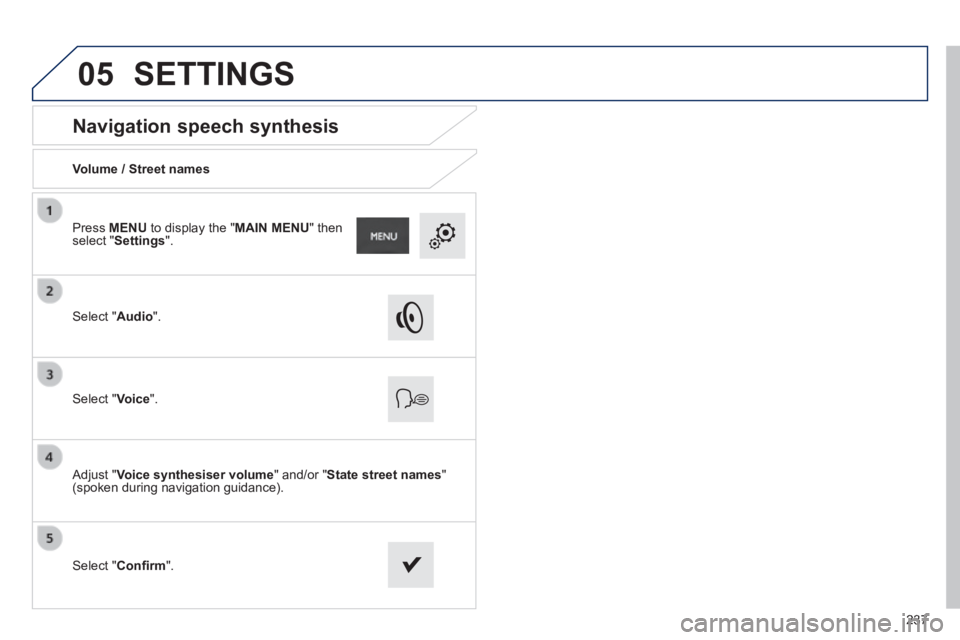
Navigation speech synthesis
Volume / Street names
Select " Audio ".
Select " Voice ".
Adjust " Voice synthesiser volume " and/or " State street names " (spoken during navigation guidance).
Select " Confi rm ".
Press MENU to display the " MAIN MENU " then select " Settings ".
SETTINGS
Page 241 of 336
239
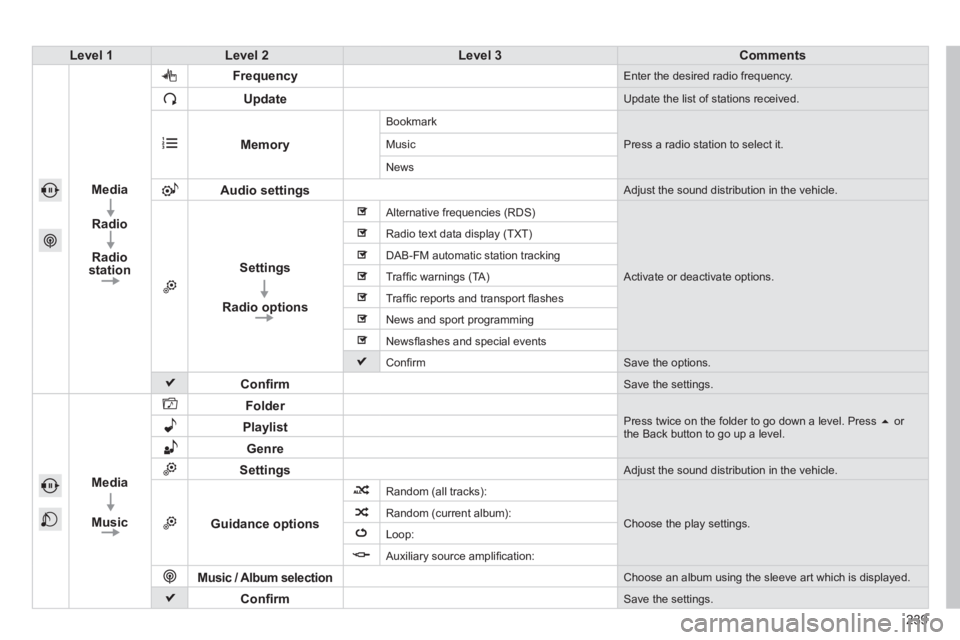
Level 1Level 2Level 3Comments
Media
Radio
Radio station
Frequency Enter the desired radio frequency.
Update Update the list of stations received.
Memory
Bookmark
Press a radio station to select it. Music
News
Audio settings Adjust the sound distribution in the vehicle.
Settings
Radio options
Alternative frequencies (RDS)
Activate or deactivate options.
Radio text data display (TXT)
DAB-FM automatic station tracking
Traffi c warnings (TA)
Traffi c reports and transport fl ashes
News and sport programming
Newsfl ashes and special events
Confi rm Save the options.
Confi rm Save the settings.
Media
Music
Folder Press twice on the folder to go down a level. Press or the Back button to go up a level. Playlist
Genre
Settings Adjust the sound distribution in the vehicle.
Guidance options
Random (all tracks):
Choose the play settings. Random (current album):
Loop:
Auxiliary source amplifi cation:
Music / Album selection Choose an album using the sleeve art which is displayed.
Confi rm Save the settings.
Page 244 of 336
 may prevent reception, even in RDS station tracking mode. This phenomenon is norma")
06
Selecting a station
The exterior environment (hills, buildings, tunnel, car park, below gro\
und...) may prevent reception, even in RDS station tracking mode. This phenomenon is normal in the propagation of radio waves and is in no\
way indicative of a fault with the audio system.
Select " Radio ".
Press MENU to display the " MAIN MENU " then select " Media ".
Select a radio station from the list offered.
If necessary, select changing the source.
Press the MODE button until RADIO is displayed.
Select " FM Radio " or " AM Radio ".
OR
Select " Update " to refresh the list.
RADIO
242
Page 248 of 336
06
246
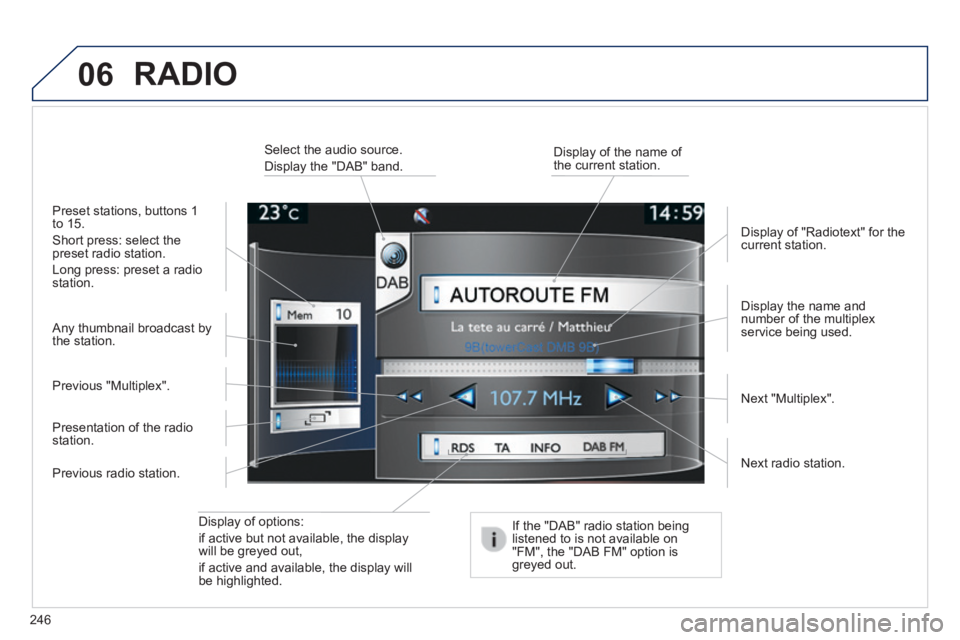
Display of options:
if active but not available, the display will be greyed out,
if active and available, the display will be highlighted.
Display the name and number of the multiplex service being used.
Preset stations, buttons 1 to 15.
Short press: select the preset radio station.
Long press: preset a radio station.
Display of "Radiotext" for the current station.
Select the audio source.
Display the "DAB" band. Display of the name of the current station.
If the "DAB" radio station being listened to is not available on "FM", the "DAB FM" option is greyed out.
Any thumbnail broadcast by the station.
Next radio station.
Next "Multiplex". Previous "Multiplex".
Previous radio station.
Presentation of the radio station.
RADIO