key PEUGEOT 2008 2014 Owner's Guide
[x] Cancel search | Manufacturer: PEUGEOT, Model Year: 2014, Model line: 2008, Model: PEUGEOT 2008 2014Pages: 336, PDF Size: 9.35 MB
Page 221 of 336
04
219
PEUGEOT CONNECT APPS
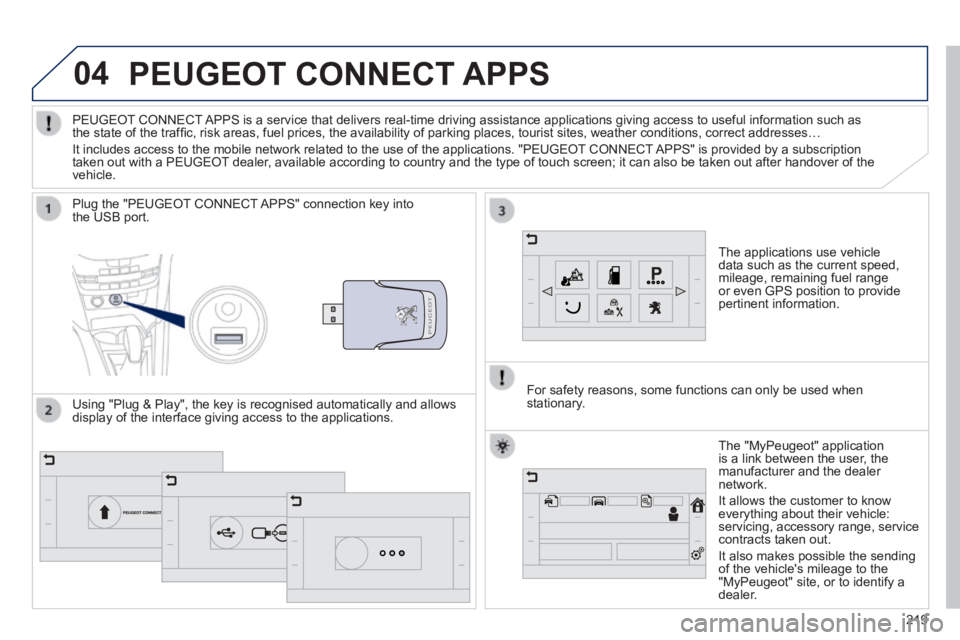
The applications use vehicle data such as the current speed, mileage, remaining fuel range or even GPS position to provide pertinent information.
Plug the "PEUGEOT CONNECT APPS" connection key into the USB port.
The "MyPeugeot" application is a link between the user, the manufacturer and the dealer network.
It allows the customer to know everything about their vehicle: servicing, accessory range, service contracts taken out.
It also makes possible the sending of the vehicle's mileage to the "MyPeugeot" site, or to identify a dealer.
PEUGEOT CONNECT APPS is a service that delivers real-time driving assistance application\
s giving access to useful information such as the state of the traffi c, risk areas, fuel prices, the availability of parking places, tourist sites, weather conditions, correct addresses…
It includes access to the mobile network related to the use of the appli\
cations. "PEUGEOT CONNECT APPS" is provided by a subscription taken out with a PEUGEOT dealer, available according to country and the type of touch screen; it can al\
so be taken out after handover of the vehicle.
For safety reasons, some functions can only be used when stationary. Using "Plug & Play", the key is recognised automatically and allows display of the interface giving access to the applications.
Page 245 of 336
06
243
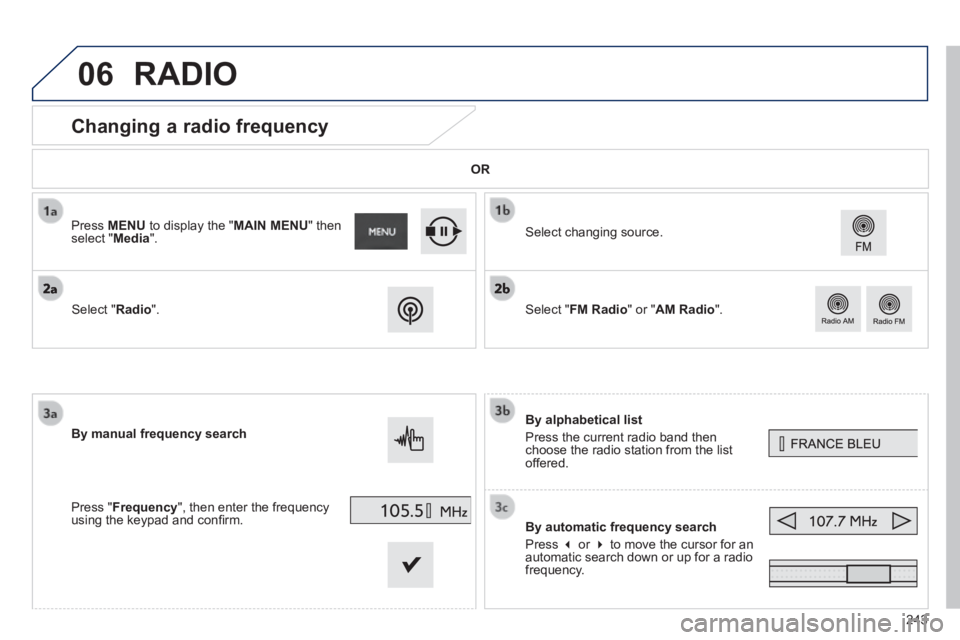
Changing a radio frequency
By alphabetical list
Press the current radio band then choose the radio station from the list offered.
By automatic frequency search
Press or to move the cursor for an automatic search down or up for a radio frequency.
Select changing source.
By manual frequency search
Press " Frequency ", then enter the frequency using the keypad and confi rm.
Select " Radio ".
Press MENU to display the " MAIN MENU " then select " Media ".
Select " FM Radio " or " AM Radio ".
OR
RADIO
Page 257 of 336
255
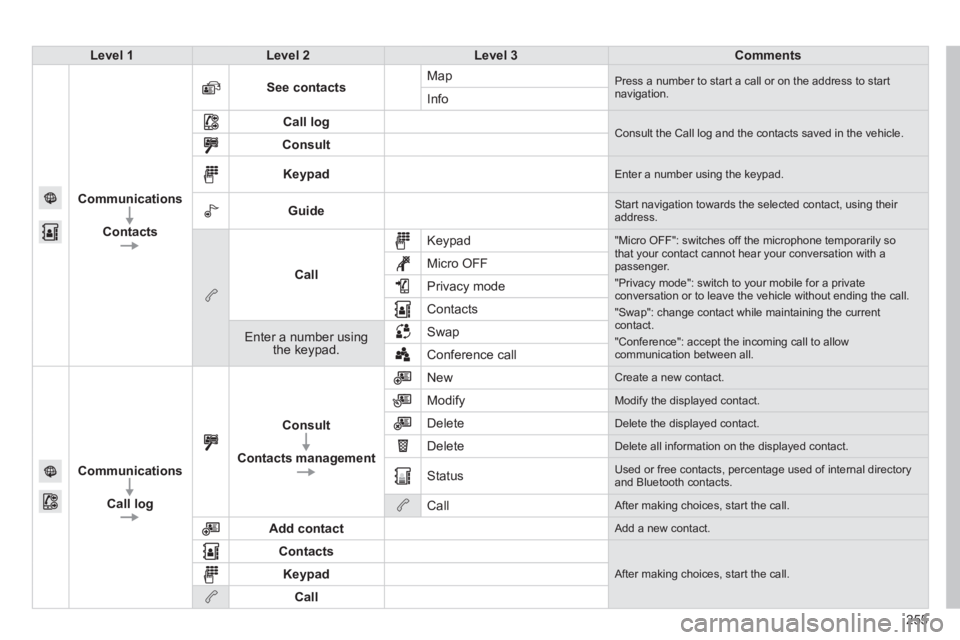
Level 1Level 2Level 3Comments
Communications
Contacts
See contacts Map Press a number to start a call or on the address to start navigation. Info
Call log Consult the Call log and the contacts saved in the vehicle. Consult
Keypad Enter a number using the keypad.
Guide Start navigation towards the selected contact, using their address.
Call
Keypad "Micro OFF": switches off the microphone temporarily so that your contact cannot hear your conversation with a passenger.
"Privacy mode": switch to your mobile for a private conversation or to leave the vehicle without ending the call.
"Swap": change contact while maintaining the current contact.
"Conference": accept the incoming call to allow communication between all.
Micro OFF
Privacy mode
Contacts
Enter a number using the keypad.
Swap
Conference call
Communications
Call log
Consult
Contacts management
New Create a new contact.
Modify Modify the displayed contact.
Delete Delete the displayed contact.
Delete Delete all information on the displayed contact.
Status Used or free contacts, percentage used of internal directory and Bluetooth contacts.
Call After making choices, start the call.
Add contact Add a new contact.
Contacts
After making choices, start the call. Keypad
Call
Page 259 of 336
257
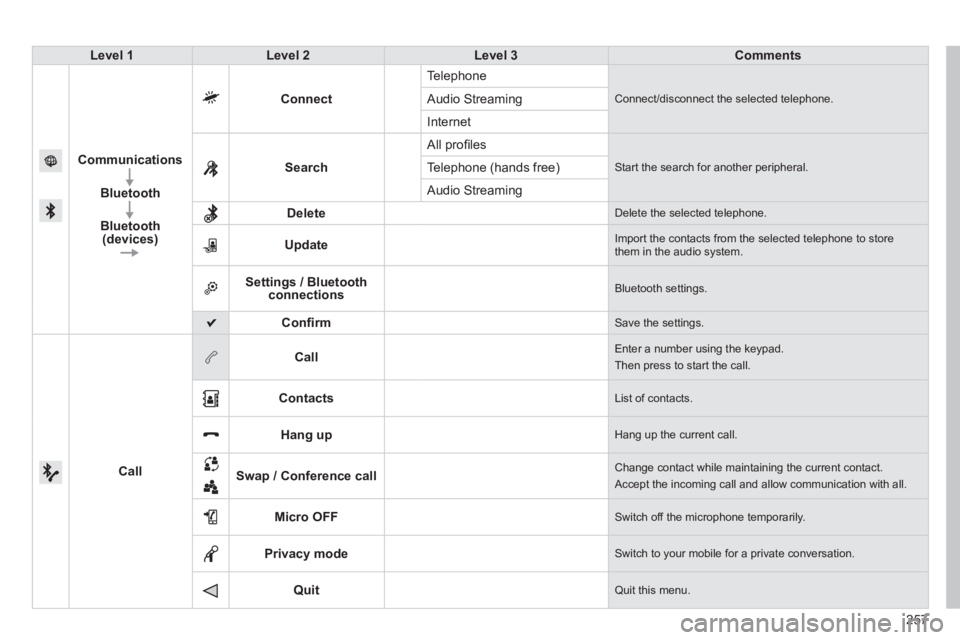
Level 1Level 2Level 3Comments
Communications
Bluetooth
Bluetooth (devices)
Connect
Telephone
Connect/disconnect the selected telephone. Audio Streaming
Internet
Search
All profi les
Start the search for another peripheral . Telephone (hands free)
Audio Streaming
Delete Delete the selected telephone.
Update Import the contacts from the selected telephone to store them in the audio system.
Settings / Bluetooth connections Bluetooth settings.
Confi rm Save the settings.
Call
Call Enter a number using the keypad.
Then press to start the call.
Contacts List of contacts.
Hang up Hang up the current call.
Swap / Conference call Change contact while maintaining the current contact.
Accept the incoming call and allow communication with all.
Micro OFF Switch off the microphone temporarily.
Privacy mode Switch to your mobile for a private conversation.
Quit Quit this menu.
Page 263 of 336
07
261
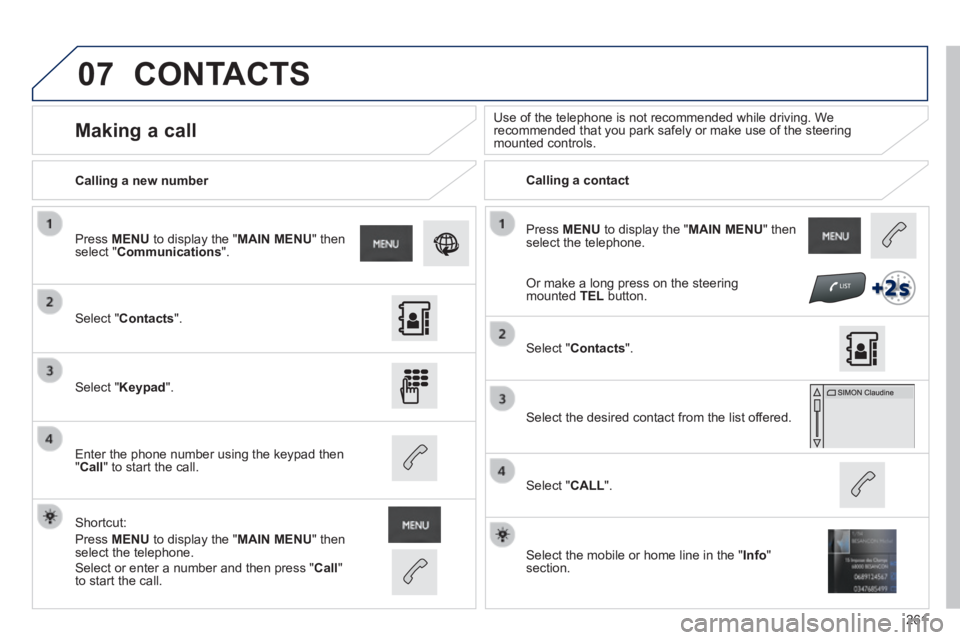
Press MENU to display the " MAIN MENU " then select the telephone.
Calling a new number Calling a contact
Making a call Use of the telephone is not recommended while driving. We recommended that you park safely or make use of the steering mounted controls.
Select " Contacts ".
Press MENU to display the " MAIN MENU " then select " Communications ".
Select " Keypad ".
Enter the phone number using the keypad then " Call " to start the call.
Shortcut:
Press MENU to display the " MAIN MENU " then select the telephone.
Select " Contacts ".
Select the desired contact from the list offered.
Select the mobile or home line in the " Info " section.
Select " CALL ".
CONTACTS
Select or enter a number and then press " Call " to start the call.
Or make a long press on the steering mounted TEL button.
Page 277 of 336
FREQUENTLY ASKED QUESTIONS
275
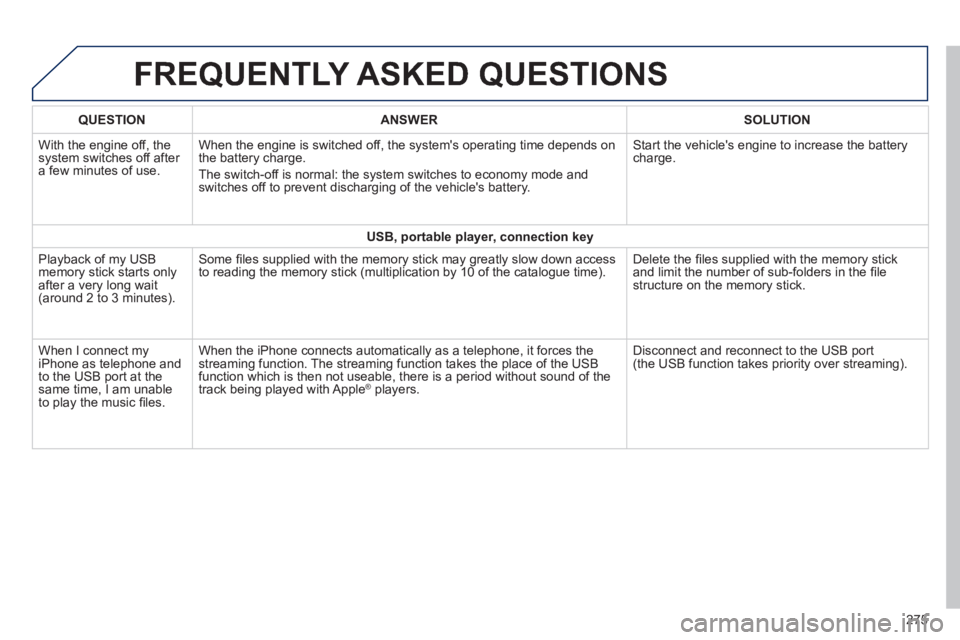
QUESTIONANSWERSOLUTION
With the engine off, the system switches off after a few minutes of use.
When the engine is switched off, the system's operating time depends on the battery charge.
The switch-off is normal: the system switches to economy mode and switches off to prevent discharging of the vehicle's battery.
Start the vehicle's engine to increase the battery charge.
USB, portable player, connection key
Playback of my USB memory stick starts only after a very long wait (around 2 to 3 minutes).
Some fi les supplied with the memory stick may greatly slow down access to reading the memory stick (multiplication by 10 of the catalogue time\
). Delete the fi les supplied with the memory stick and limit the number of sub-folders in the fi le structure on the memory stick.
When I connect my iPhone as telephone and to the USB port at the same time, I am unable to play the music fi les.
When the iPhone connects automatically as a telephone, it forces the streaming function. The streaming function takes the place of the USB function which is then not useable, there is a period without sound of t\
he track being played with Apple ® players. ® players. ®
Disconnect and reconnect to the USB port (the USB function takes priority over streaming).
Page 292 of 336
05
290
USING THE TELEPHONE
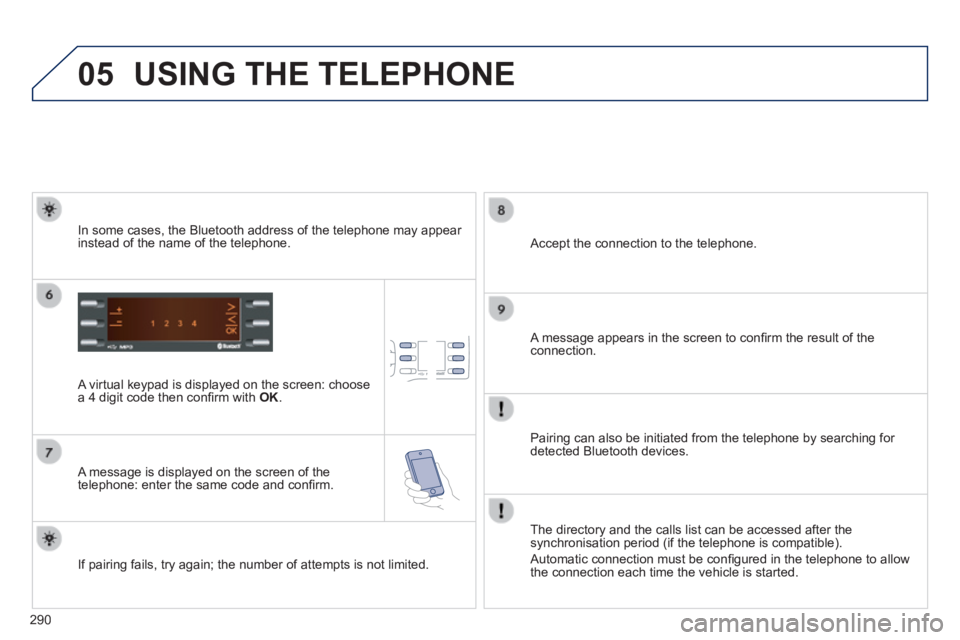
A virtual keypad is displayed on the screen: choose a 4 digit code then confi rm with OK .
A message is displayed on the screen of the telephone: enter the same code and confi rm.
A message appears in the screen to confi rm the result of the connection.
Pairing can also be initiated from the telephone by searching for detected Bluetooth devices.
Accept the connection to the telephone.
If pairing fails, try again; the number of attempts is not limited.
The directory and the calls list can be accessed after the synchronisation period (if the telephone is compatible).
Automatic connection must be confi gured in the telephone to allow the connection each time the vehicle is started.
In some cases, the Bluetooth address of the telephone may appear instead of the name of the telephone.
Page 321 of 336

.
319
Visual search
Exterior
Remote control key 44-50 - opening / closing - anti-theft protection - guide-me-home lighting - starting - battery
Boot 55 - opening / closing - emergency release Temporary puncture repair kit 151-156
Wipers 117-120 Changing a wiper blade 120, 182
Changing bulbs 169-171 - rear lamps - 3 rd brake lamp - number plate lamps - foglamp - reversing lamp
Fuel tank, misfuel prevention 19 4 -197
Panoramic sunroof 56 Roof bars 187 Accessories 188-189
Electronic stability programme 125-127 Snow chains 164 Tyre pressures 156, 212 Changing a wheel 157-163 - tools - removing / refitting
Lighting controls 108 -114 LED lamps 112 Daytime running lamps 112 Headlamp beam adjustment 115 Cornering lighting 116 Changing bulbs 165-168 - front lamps - foglamps - direction indicator repeaters
Door mirrors 61- 62
Doors 44- 49 - opening / closing - central locking - emergency control Alarm 51-52 Electric windows 53 -54
Parking sensors 102-103 Park Assist 104-107 Towbar 185 -18 6 Towing 183 -18 4
Page 327 of 336
.
325
Alphabetical index
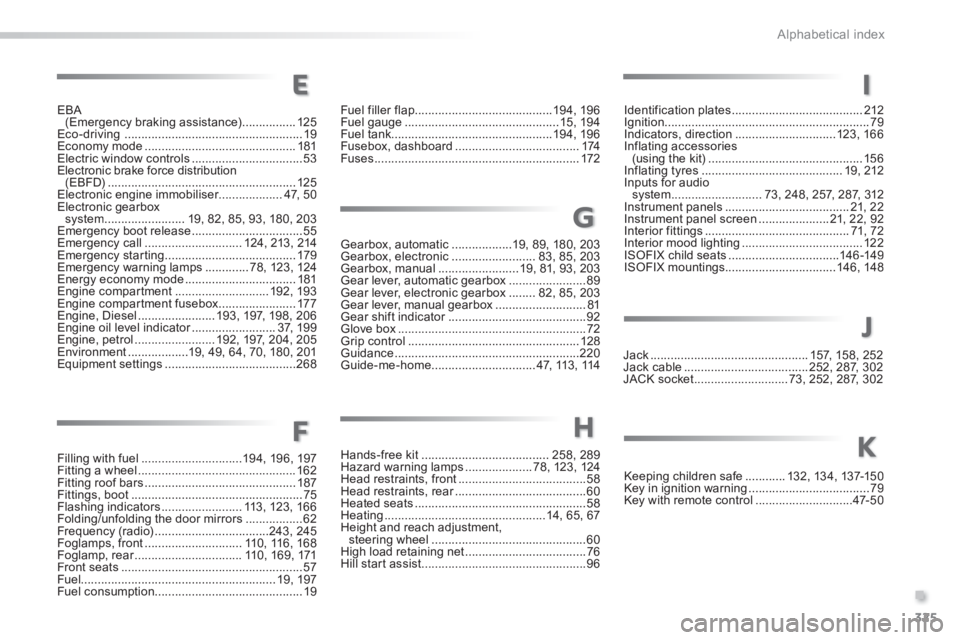
Filling with fuel ..............................19 4, 19 6, 197Fitting a wheel ...............................................162Fitting roof bars .............................................187Fittings, boot ...................................................75Flashing indicators ........................113, 123, 166Folding/unfolding the door mirrors .................62Frequency (radio) ..................................243, 245Foglamps, front .............................110, 116, 168Foglamp, rear ................................Foglamp, rear ................................Foglamp, rear110, 169, 171Front seats ......................................................57Fuel..........................................................19, 197Fuel consumption ............................................19
Gearbox, automatic ..................19, 89, 180, 203Gearbox, electronic .........................83, 85, 203Gearbox, manual ........................19, 81, 93, 203Gear lever, automatic gearbox .......................89Gear lever, electronic gearbox ........82, 85, 203Gear lever, manual gearbox ...........................81Gear shift indicator .........................................Gear shift indicator .........................................Gear shift indicator92Glove box ........................................................72Grip control ...................................................128Guidance .......................................................220Guide-me-home ...............................47, 113 , 114
Identification plates .......................................212Ignition .............................................................79Indicators, direction ..............................123, 16 6Inflating accessories (using the kit) ..............................................15 6Inflating tyres ..........................................19, 212Inputs for audio system ...........................73, 248, 257, 287, 312Instrument panels .....................................21, 2 2Instrument panel screen .....................21, 22, 92Interior fittings ...........................................71, 72Interior mood lighting ....................................12 2ISOFIX child seats .................................146 -149ISOFIX mountings.................................146, 148
Jack ...............................................157, 15 8, 252Jack cable .....................................252, 287, 302JACK socket ............................73, 252, 287, 302
Keeping children safe ............132, 13 4, 137-15 0Key in ignition warning ....................................79Key with remote control .............................47- 5 0
E
FH
G
I
J
K
EBA (Emergency braking assistance) ................125Eco-driving .....................................................19Economy mode .............................................181Electric window controls .................................53Electronic brake force distribution (EBFD) ........................................................125Electronic engine immobiliser...................4 7, 5 0Electronic gearbox system ........................19, 82, 85, 93, 180, 203Emergency boot release .................................55Emergency call .............................124, 213, 214Emergency starting .......................................179Emergency warning lamps .............78, 123, 124Energy economy mode .................................181Engine compartment ............................192, 193Engine compartment fusebox .......................17 7Engine, Diesel .......................193, 197, 198, 20 6Engine oil level indicator .........................Engine oil level indicator .........................Engine oil level indicator3 7, 1 9 9Engine, petrol ........................192, 197, 204, 205Environment ..................19, 49, 64, 70, 180, 201Equipment settings .......................................268
Fuel filler flap .........................................19 4, 19 6Fuel gauge ..............................................15, 19 4Fuel tank................................................19 4, 19 6Fusebox, dashboard .....................................174Fuses .............................................................172
Hands-free kit ......................................258, 289Hazard warning lamps ....................78, 123, 124Head restraints, front ......................................58Head restraints, rear .......................................Head restraints, rear .......................................Head restraints, rear60Heated seats ...................................................58Heating ................................................14, 65, 67Height and reach adjustment, steering wheel ..............................................60High load retaining net ....................................76Hill start assist .................................................96