phone PEUGEOT 2008 2015 User Guide
[x] Cancel search | Manufacturer: PEUGEOT, Model Year: 2015, Model line: 2008, Model: PEUGEOT 2008 2015Pages: 340, PDF Size: 8.4 MB
Page 271 of 340
269
2008_en_Chap12b_SMEGplus_ed01-2015
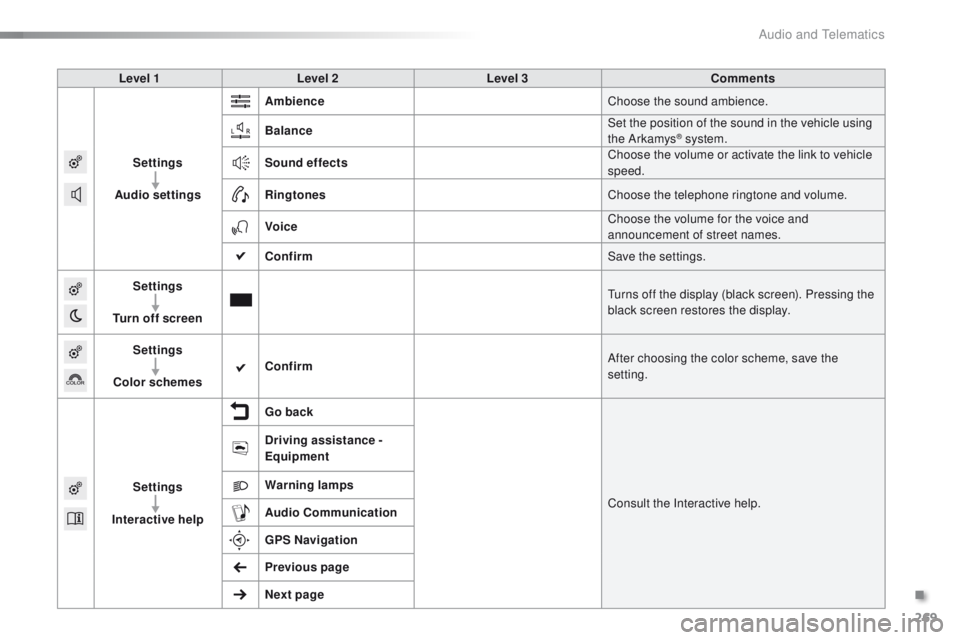
Level 1Level 2 Level 3 Comments
Settings
Audio settings Ambience
Choose the sound ambience.
Balance Set the position of the sound in the vehicle using
the Arkamys
® system.
Sound effects Choose the volume or activate the link to vehicle
speed.
Ringtones Choose the telephone ringtone and volume.
Voice Choose the volume for the voice and
announcement of street names.
Confirm Save the settings.
Settings
Turn off screen Turns off the display (black screen). Pressing the
black screen restores the display.
Settings
Color schemes Confirm
After choosing the color scheme, save the
setting.
Settings
Interactive help Go back
Consult the Interactive help.
Driving assistance -
Equipment
Warning lamps
Audio
Communication
GPS Navigation
Previous page
Next page
.
Audio and Telematics
Page 280 of 340
278
2008_en_Chap12b_SMEGplus_ed01-2015
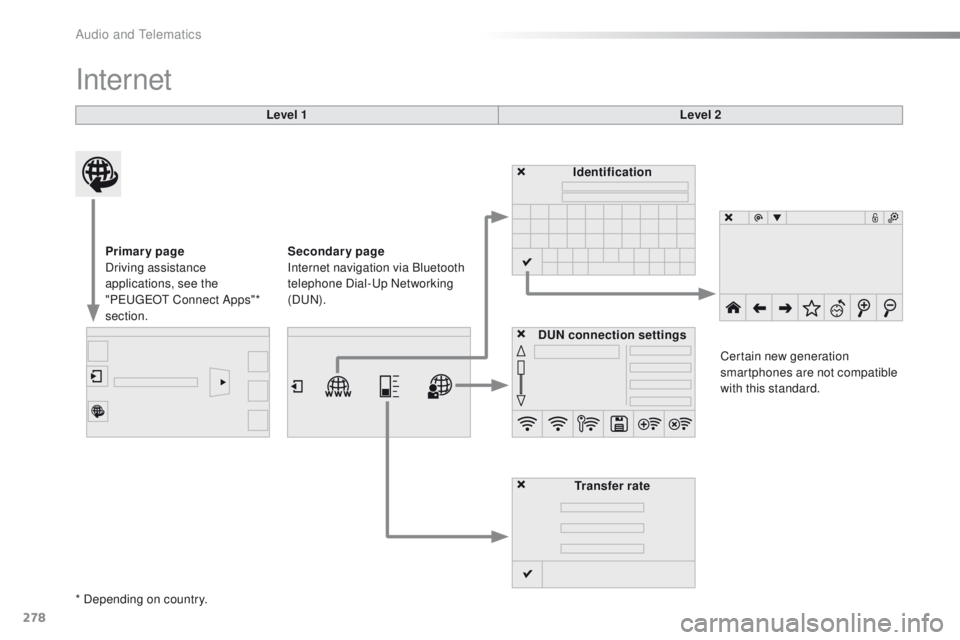
Internet
Level 1Level 2
Primary page
Driving assistance
applications, see the
"PEUGEOT Connect Apps"*
section. Identification
DUN connection settings Transfer rate Certain new generation
smartphones are not compatible
with this standard.
Secondary page
Internet navigation via Bluetooth
telephone Dial-Up Networking
(DUN).
* Depending on country.
Audio and Telematics
Page 282 of 340
280
2008_en_Chap12b_SMEGplus_ed01-2015
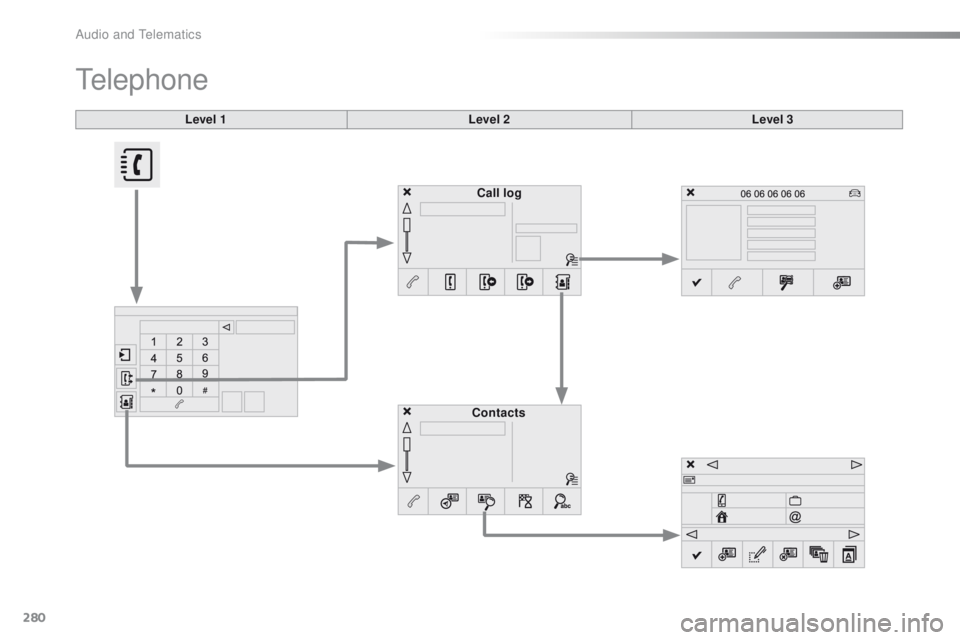
Level 1
Telephone
Level 2Level 3
Contacts Call log
Audio and Telematics
Page 283 of 340
281
2008_en_Chap12b_SMEGplus_ed01-2015
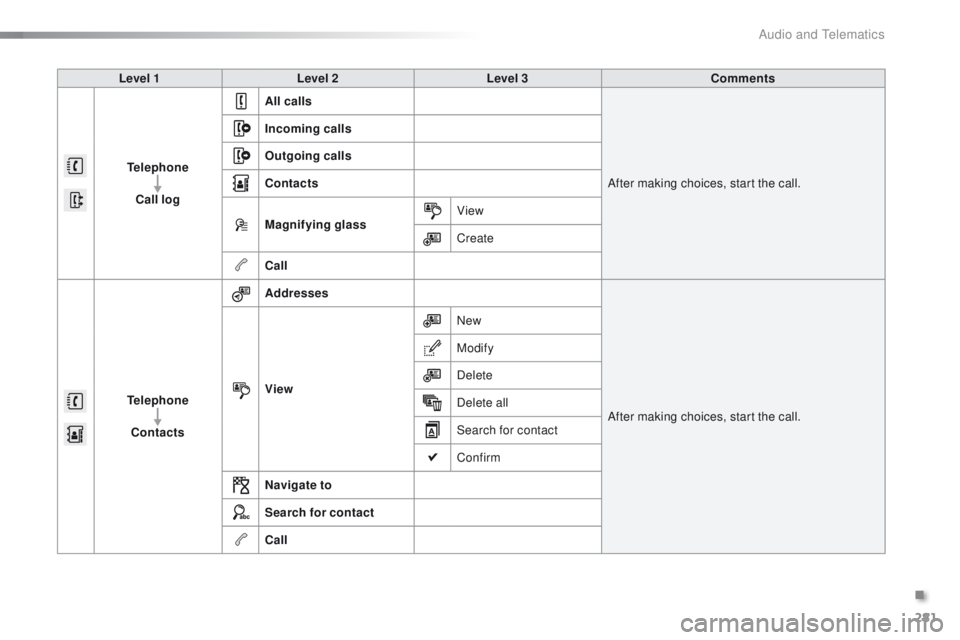
Level 1Level 2 Level 3 Comments
Telephone Call log All calls
After making choices, start the call.
Incoming calls
Outgoing calls
Contacts
Magnifying glass
View
Create
Call
Telephone Contacts Addresses
After making choices, start the call.
View New
Modify
Delete
Delete all
Search for contact
Confirm
Navigate to
Search for contact
Call
.
Audio and Telematics
Page 284 of 340
282
2008_en_Chap12b_SMEGplus_ed01-2015
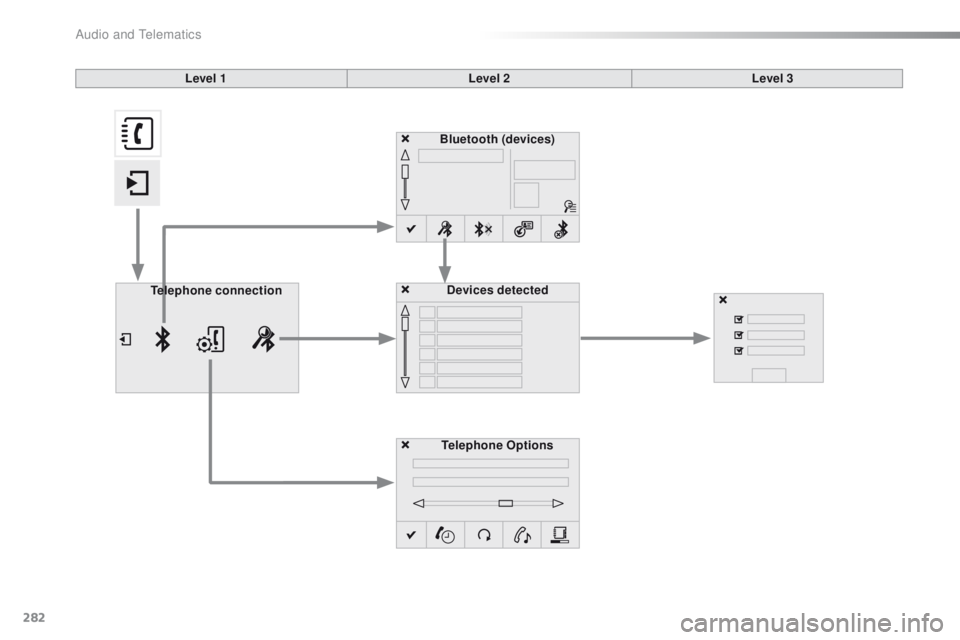
Bluetooth (devices)Telephone Options Devices detected
Telephone connection
Level 1
Level 2Level 3
Audio and Telematics
Page 285 of 340
283
2008_en_Chap12b_SMEGplus_ed01-2015
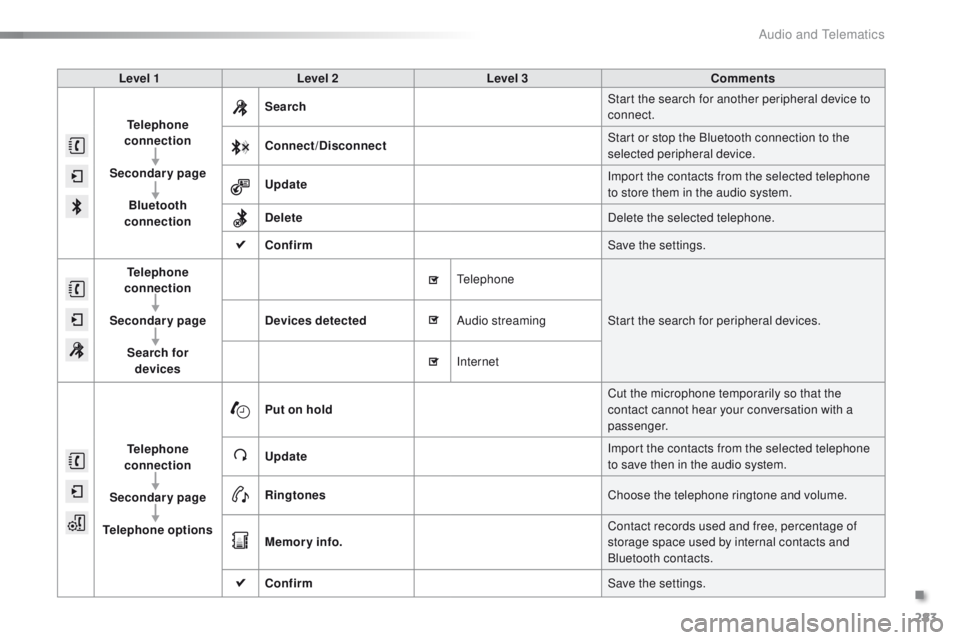
Level 1Level 2 Level 3 Comments
Telephone
connection
Secondary page Bluetooth
connection Search
Start the search for another peripheral device to
connect.
Connect /Disconnect Start or stop the Bluetooth connection to the
selected peripheral device.
Update Import the contacts from the selected telephone
to store them in the audio system.
Delete Delete the selected telephone.
Confirm Save the settings.
Telephone
conn ection
Secondary page Search for devices Devices detected
Telephone
Start the search for peripheral devices.
Audio streaming
Internet
Telephone
connection
Secondary page
Telephone options Put on hold
Cut the microphone temporarily so that the
contact cannot hear your conversation with a
passenger.
Update Import the contacts from the selected telephone
to save then in the audio system.
Ringtones Choose the telephone ringtone and volume.
Memory info. Contact records used and free, percentage of
storage space used by internal contacts and
Bluetooth contacts.
Confirm Save the settings.
.
Audio and Telematics
Page 286 of 340
284
2008_en_Chap12b_SMEGplus_ed01-2015
Pairing a Bluetooth®
telephone
For reasons of safety and because they
require prolonged attention on the part
of the driver, the operations for pairing
the Bluetooth mobile telephone to the
hands-free system of the audio system
must be carried out with the vehicle
stationary .
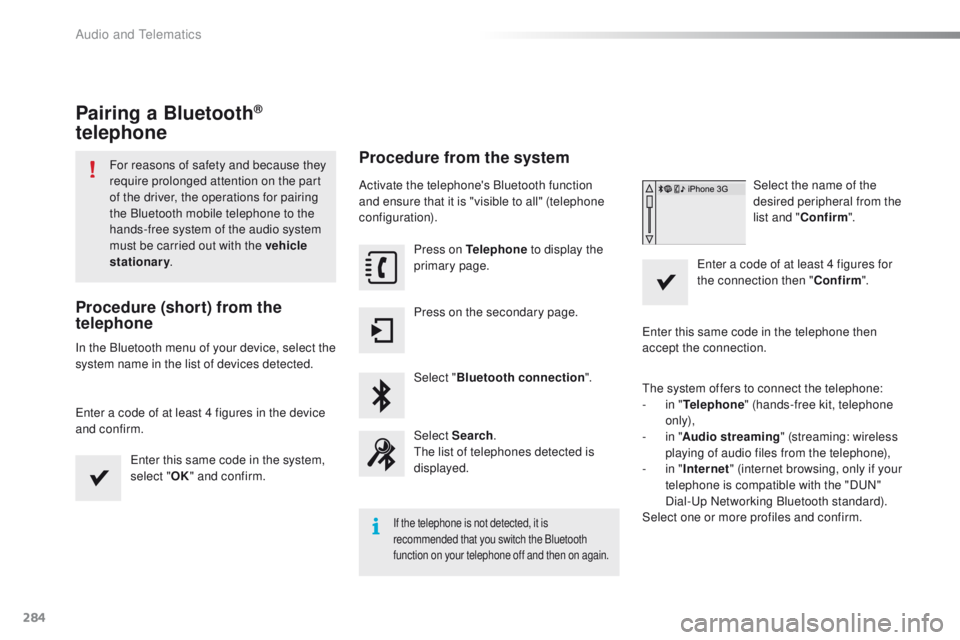
Procedure (short) from the
telephone
In the Bluetooth menu of your device, select the
system name in the list of devices detected.
Enter a code of at least 4 figures in the device
and confirm.
Enter this same code in the system,
select "OK" and confirm.
Procedure from the system
Activate the telephone's Bluetooth function
and ensure that it is "visible to all" (telephone
configuration).
Press on Telephone to display the
primary page.
Press on the secondary page.
Select " Bluetooth connection ".
Select Search .
The list of telephones detected is
displayed.
If the telephone is not detected, it is
recommended that you switch the Bluetooth
function on your telephone off and then on again.
Select the name of the
desired peripheral from the
list and " Confirm ".
Enter a code of at least 4 figures for
the connection then " Confirm".
Enter this same code in the telephone then
accept the connection.
The system offers to connect the telephone:
-
i
n " Telephone " (hands-free kit, telephone
only),
-
i
n " Audio streaming " (streaming: wireless
playing of audio files from the telephone),
-
i
n " Internet " (internet browsing, only if your
telephone is compatible with the "DUN"
Dial-Up Networking Bluetooth standard).
Select one or more profiles and confirm.
Audio and Telematics
Page 287 of 340
285
2008_en_Chap12b_SMEGplus_ed01-2015
The services available depend on
the network, the SIM card and the
compatibility of the Bluetooth telephone
used. Check the telephone manual and
with your network provider for details of
the services available to you.
The ability of the system to connect
with only one profile depends on the
telephone. The three profiles may all
connect by default.
Visit www.peugeot.co.uk for more information
(compatibility, additional help, ...).
The recognised telephone
appears in the list.
Depending on your telephone, you may be
asked to accept automatic connection every
time the ignition is switched on. On return to the vehicle, if the last telephone
connected is present again, it is reconnected
automatically and within around 30 seconds
after switching on the ignition the pairing is
done without any action on your part, with
(Bluetooth activated).
To modify the automatic connection mode,
select the telephone in the list then select the
desired profile.Depending on the type of telephone,
the system will ask you to accept or not
the transfer of your contacts.
If not, select " Update".
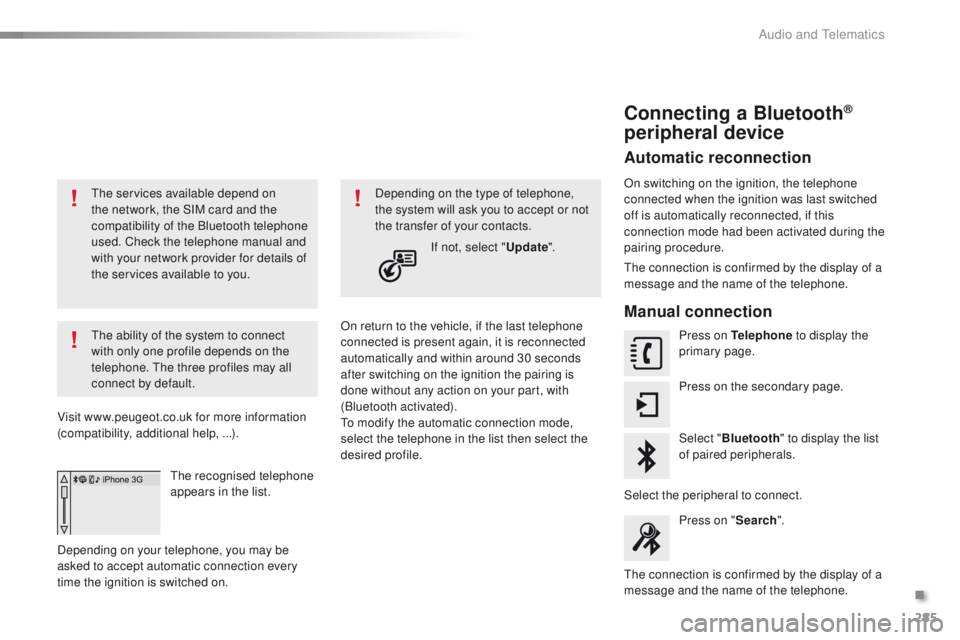
Connecting a Bluetooth®
peripheral device
Automatic reconnection
On switching on the ignition, the telephone
connected when the ignition was last switched
off is automatically reconnected, if this
connection mode had been activated during the
pairing procedure.
The connection is confirmed by the display of a
message and the name of the telephone.
Manual connection
Press on Telephone to display the
primary page.
Press on the secondary page.
Select " Bluetooth " to display the list
of paired peripherals.
Select the peripheral to connect. Press on " Search".
The connection is confirmed by the display of a
message and the name of the telephone.
.
Audio and Telematics
Page 288 of 340
286
2008_en_Chap12b_SMEGplus_ed01-2015
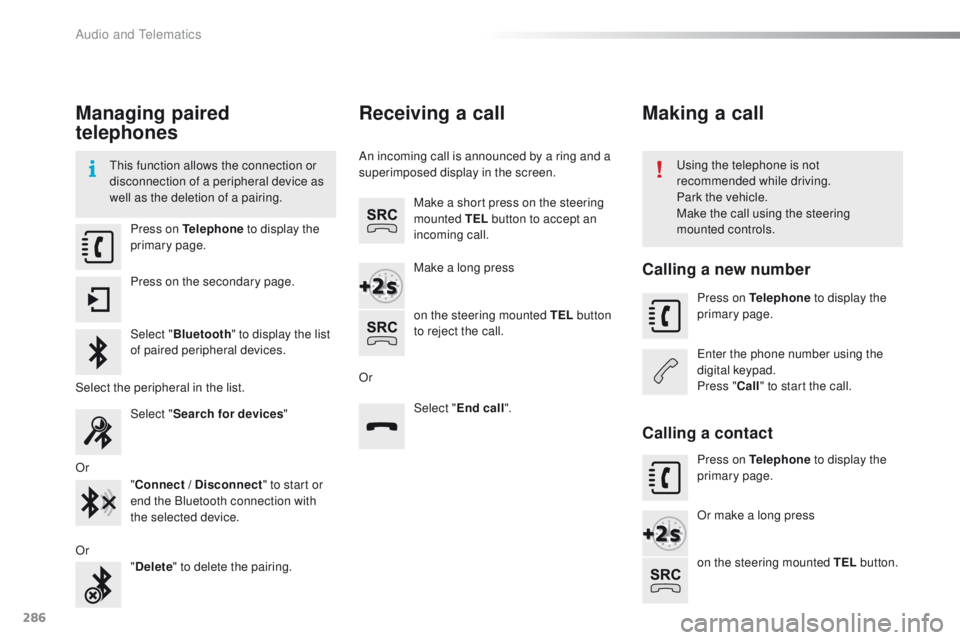
Managing paired
telephones
This function allows the connection or
disconnection of a peripheral device as
well as the deletion of a pairing.Using the telephone is not
recommended while driving.
Park the vehicle.
Make the call using the steering
mounted controls.
Press on Telephone
to display the
primary page.
Press on the secondary page.
Select " Bluetooth " to display the list
of paired peripheral devices.
Select the peripheral in the list. Select "Search for devices "
Or "Connect / Disconnect " to start or
end the Bluetooth connection with
the selected device.
Or "Delete " to delete the pairing.
Receiving a call
An incoming call is announced by a ring and a
superimposed display in the screen.
Make a short press on the steering
mounted TEL button to accept an
incoming call.
Make a long press
on the steering mounted TEL button
to reject the call.
Or Select "End call".
Making a call
Calling a new number
Press on Telephone to display the
primary page.
Enter the phone number using the
digital keypad.
Press " Call" to start the call.
Calling a contact
Press on Telephone to display the
primary page.
Or make a long press
on the steering mounted TEL button.
Audio and Telematics
Page 289 of 340
287
2008_en_Chap12b_SMEGplus_ed01-2015
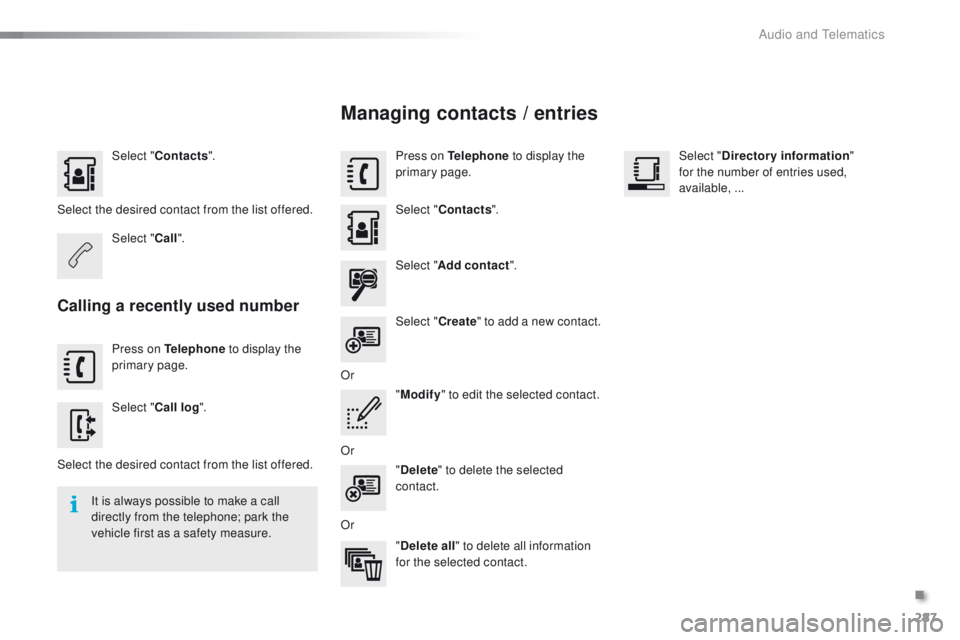
Select "Contacts ".
Select the desired contact from the list offered. Select "Call".
Calling a recently used number
Press on Telephone to display the
primary page.
Select " Call log ".
Select the desired contact from the list offered. It is always possible to make a call
directly from the telephone; park the
vehicle first as a safety measure.
Managing contacts / entries
Press on Telephone to display the
primary page.
Select " Contacts ".
Select " Add contact ".
Select " Create" to add a new contact.
Or "Modify " to edit the selected contact.
Or "Delete " to delete the selected
contact.
Or "Delete all " to delete all information
for the selected contact. Select "
Directory information "
for the number of entries used,
available,
...
.
Audio and Telematics