display PEUGEOT 2008 2016 Owners Manual
[x] Cancel search | Manufacturer: PEUGEOT, Model Year: 2016, Model line: 2008, Model: PEUGEOT 2008 2016Pages: 450, PDF Size: 14.16 MB
Page 362 of 450
360
2008_en_Chap13_index-alpha_ed01-2016
Emergency warning lamps .....................7 8, 135
Emissions control system, SCR .............25, 175
Energy economy mode
.................................219
Engine compartment
...........................235, 236
Engine, Diesel
......... 1
8, 173, 174, 236, 247, 249
Engine oil level indicator
...............................237
Engine, petrol
....................... 173, 235, 243, 245
Environment
.......... 1
2, 46, 70, 98, 181, 214, 239
Filling the fuel tank
........................1
70, 172, 173
Filter, particle
........................................239, 240
Fitting a wheel
...............................
................19 9
Fitting roof bars
............................................. 230
Fittings, boot
................................................... 75
F
ittings, interior
......................................... 71, 72
Flap, fuel filler
...............................
.........170, 172
Flashing indicators
........................122, 135, 203
Foglamp, rear
...............................
.119, 206, 207
Foglamps, front
............................. 119, 125, 205
Folding/unfolding the door mirrors
.................60
Frequency (radio)
.........................282, 330, 350
Fuel .......................................................... 12, 173
Fuel consumption
...................................... 12
, 4 0
Fuel tank ................................................ 170, 172
Fusebox, dashboard
.............................210, 212
Fusebox, engine compartment
.....................213
Fuses
............................................................. 208Gauge, fuel
........................................ 14, 15, 170
Gearbox, automatic
............12, 91, 95, 214, 241
Gearbox, electronic ....12, 72, 84, 87, 100, 214, 241
Gearbox, manual ...................... 12, 83, 100, 241
Gear lever, automatic gearbox
....................... 91
G
ear lever, electronic gearbox
.................84, 87
Gear lever, manual gearbox
........................... 83
Gear shift indicator
......................................... 99
Glove box
........................................................ 72
Grip control
................................................... 143
Guide-me-home
.............................. 4 5, 12 2, 123
Identification plates
....................................... 25
3
Ignition switch
................................................. 80
Imm
obiliser, electronic
.............................. 45, 47
Indicator, coolant temperature
........................ 33
I
ndicator, engine oil level ........................ 31, 237
Indicator lamps, operation
........................ 16, 20
F
G
I
DAB (Digital Audio Broadcasting) -
Digital radio ................................................. 284
Date (setting)
...............................
....................42
Daytime running lamps
..............................
....................118 , 12 1
Daytime running lamps, LED
................................................. 121
Deactivating the passenger airbag
.................................................. 15
3, 15 8
Demisting/defrosting
....................................... 70
Dials and gauges
...............
..................................... 14, 15
Dimensions
................................................... 252
Dipstick
................
.................................... 31, 237
Directional lighting
........................................ 125
Direction indicators
..............122, 135, 203, 206
Display screen, instrument panel
...............................
......14, 15
Door pockets
................................................... 71
D
oors
............................................................... 48
Driving abroad ............................................... 124
Driving economically ....................................... 12
Dynamic stability c ontrol (DSC)
........................23, 140, 142, 143
D
EBA (Emergency braking assistance) ..........140
Eco-driving (advice) ........................................ 12
Economy mode
............................................. 219
Electronic brake force distribution (EBFD)
..................................... 140
Electronic gearbox
............................84, 87, 241
Emergency call
..................................... 13
6, 25 4 Hazard warning lamps
............................
78, 135
Headlamps, automatic illumination
..............
123
Headlamps
............................................
117, 203
Head restraints, front ......................................
57
Head restraints, rear .......................................
59
Heating
................................................
64, 65, 67
Hill start assist
...............................................
10
3
H
E
Alphabetical index
Page 377 of 450
2
Monitoring
Touch screen
For For Forsafety reasons, the driver , the driver , the drivermustonly carry out operations that require close attention with the vehicle stationary. Some functions are not accessible when driving.
It gives access to: - menus for adjusting settings for vehicle functions and systems, - audio and display configuration menus, - audio system and telephone controls and the display of associated information.
And, depending on equipment, it allows: - the display of alert messages and the visual parking sensors information, - access to the controls for the navigation system and Internet services, and the display of associated information.
General operation
Recommendations
It is necessary to press firmly, particularly for "flick" gestures (scrolling through lists, moving the map, etc.). A light wipe is not enough. The screen does not recognise pressing with more than one finger. This technology allows use at all temperatures and when wearing gloves. Do not use pointed objects on the touch screen. Do not touch the touch screen with wet hands. Uses a soft clean cloth to clean the touch screen.
State of indicator lamps
Some buttons contain an indicator lamp that gives the state of the corresponding function. Green indicator: you have switched on the corresponding function. Orange indicator: you have switched off the corresponding function.
Principles
Press the " MENU " button for access to the different menus, then press the virtual buttons on the touch screen. Each menu is displayed over one or two pages (primary page and secondary page).
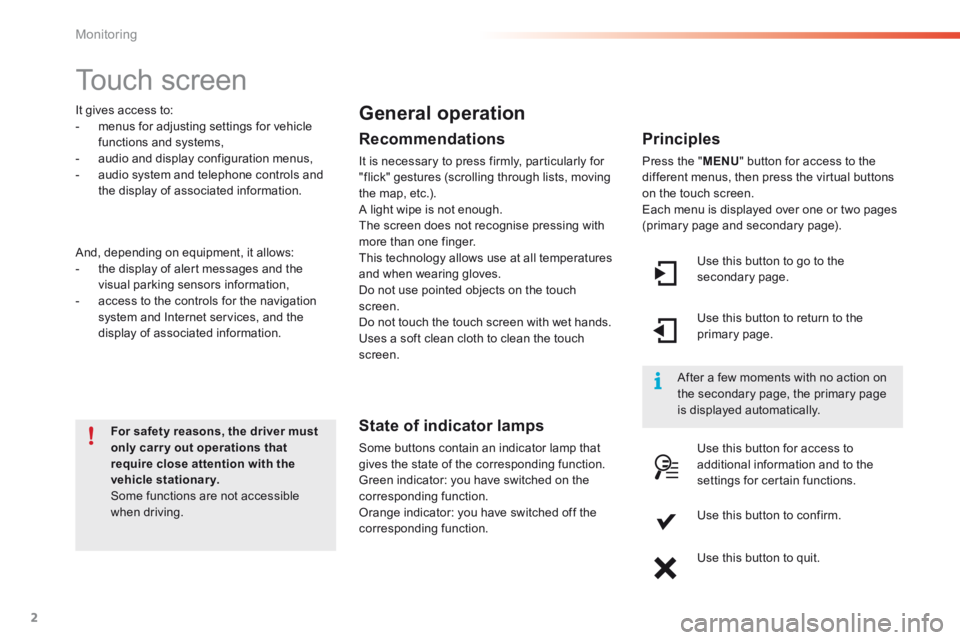
Use this button to go to the secondary page.
After a few moments with no action on the secondary page, the primary page is displayed automatically.
Use this button to return to the primary page.
Use this button for access to additional information and to the settings for certain functions.
Use this button to confirm.
Use this button to quit.
Page 378 of 450
1
3
Monitoring
2008-additif_en_Chap01_controle-de-marche_ed01-2016
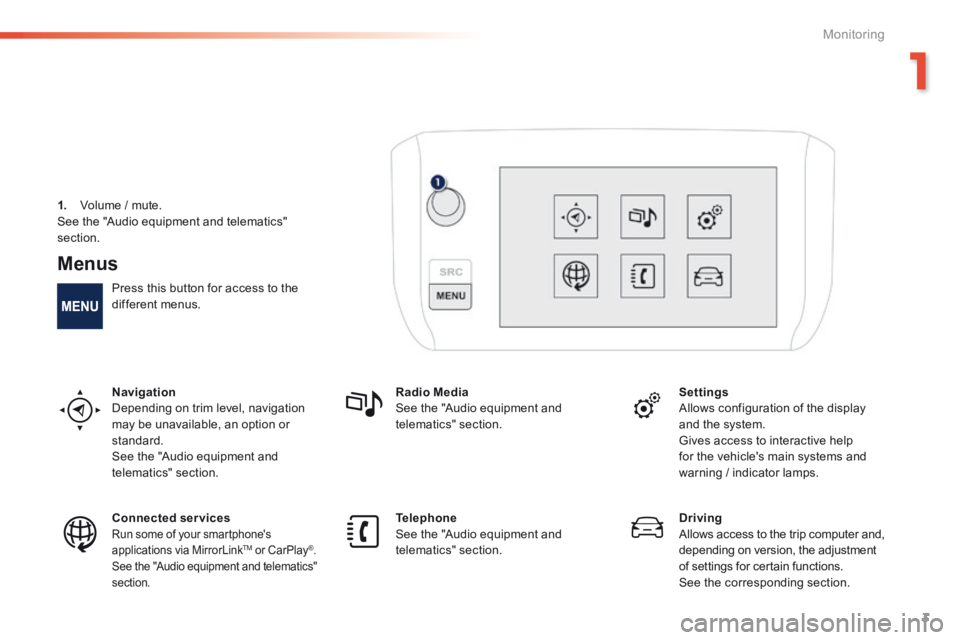
Menus
Press this button for access to the different menus.
Navigation Depending on trim level, navigation may be unavailable, an option or standard. See the "Audio equipment and telematics" section.
Radio Media See the "Audio equipment and telematics" section.
Settings Allows configuration of the display and the system.
Gives access to interactive help for the vehicle's main systems and warning / indicator lamps.
Connected services Run some of your smartphone's applications via MirrorLink TMapplications via MirrorLink TMapplications via MirrorLink or CarPlay®. See the "Audio equipment and telematics" section.
Telephone See the "Audio equipment and telematics" section.
Driving Allows access to the trip computer and, depending on version, the adjustment of settings for certain functions. See the corresponding section.
1. Volume / mute. See the "Audio equipment and telematics"
section.
Page 387 of 450
13
2008-additif_en_Chap12b_SMEGplus_ed01-2016
7-inch touch screen
GPS satellite navigation - Multimedia audio - Bluetooth® telephone
Contents
First steps 14
S
teering mounted controls
16
M
e n u s
17
Na
vigation
1
8
Navigation - Guidance
26
Tr
a f fi c
3 0
R
adio Media
32
Ra
dio
3
8
DAB (Digital Audio Broadcasting) radio
40
M
edia
42
S
ettings
4
6
Connected services
54
M
irrorLink
TM 54
Car
Play® 58
Te
lephone
6
0
Frequently asked questions
68
T
he system is protected in such a way that it will only operate in
your vehicle. As a safety measure, the driver should only carry out operations
which require prolonged attention while the vehicle is stationary.
The display of an energy economy mode message signals that
electrical systems operating are going into standby.
Refer to the energy economy mode section.
.
Audio and Telematics
Page 388 of 450
14
2008-additif_en_Chap12b_SMEGplus_ed01-2016
First steps
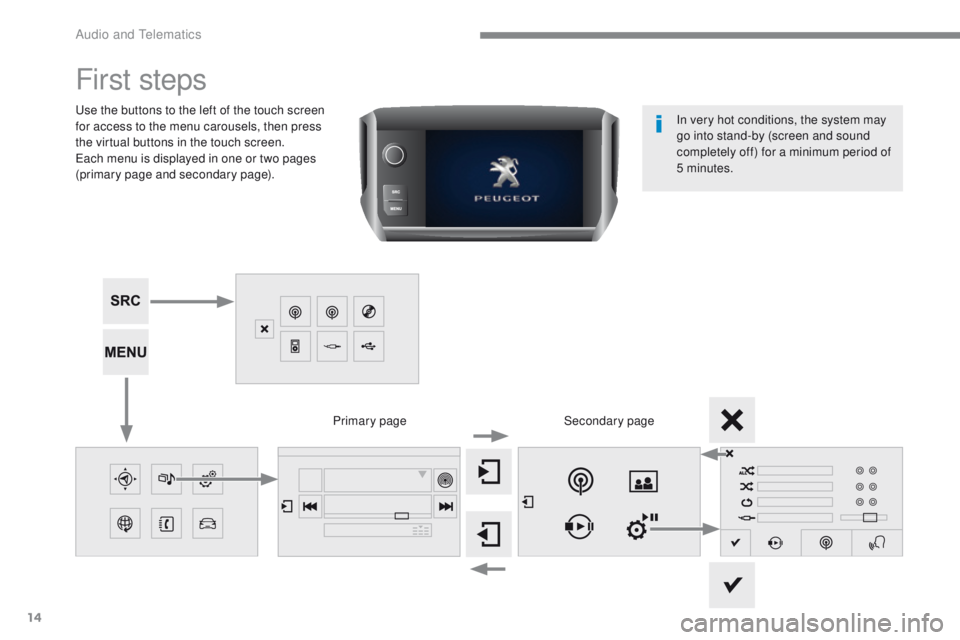
Use the buttons to the left of the touch screen
for access to the menu carousels, then press
the virtual buttons in the touch screen.
Each menu is displayed in one or two pages
(primary page and secondary page).Secondary page
Primary page In very hot conditions, the system may
go into stand-by (screen and sound
completely off) for a minimum period of
5 minutes.
Audio and Telematics
Page 389 of 450
15
2008-additif_en_Chap12b_SMEGplus_ed01-2016
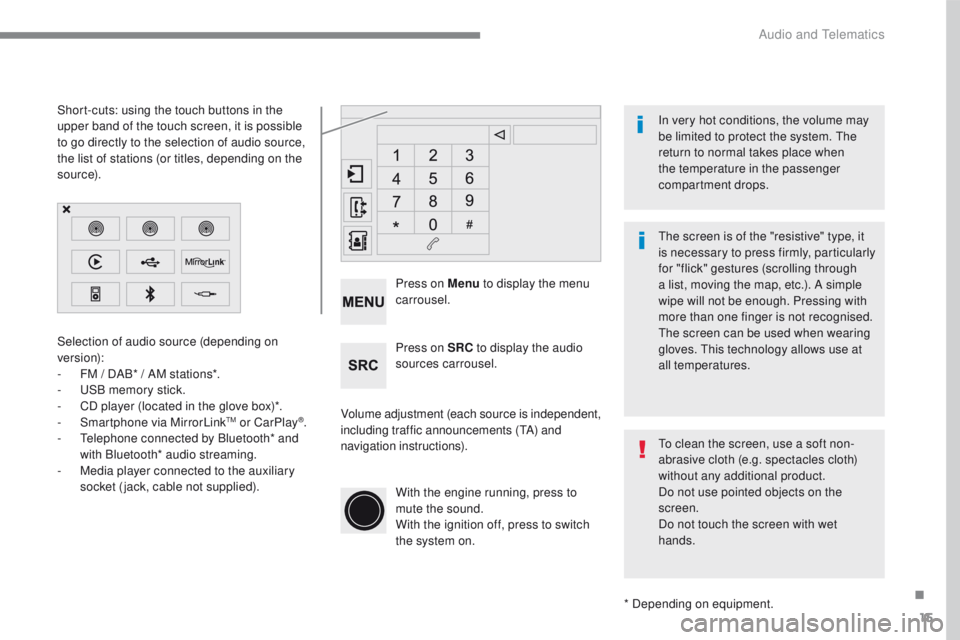
Selection of audio source (depending on
version):
-
FM / D
AB* / AM stations*.
-
US
B memory stick.
-
CD p
layer (located in the glove box)*.
-
Sm
artphone via MirrorLink
TM or CarPlay®.
- Te
lephone connected by Bluetooth* and
with Bluetooth* audio streaming.
-
Me
dia player connected to the auxiliary
socket (jack, cable not supplied).
* Depending on equipment.
Short-cuts: using the touch buttons in the
upper
b
and of the touch screen, it is possible
to go directly to the selection of audio source,
the list of stations (or titles, depending on the
s o u r c e).
The screen is of the "resistive" type, it
is necessary to press firmly, particularly
for "flick" gestures (scrolling through
a list, moving the map, etc.). A simple
wipe will not be enough. Pressing with
more than one finger is not recognised.
The screen can be used when wearing
gloves. This technology allows use at
all temperatures. In very hot conditions, the volume may
be limited to protect the system. The
return to normal takes place when
the temperature in the passenger
compartment drops.
To clean the screen, use a soft non-
abrasive cloth (e.g. spectacles cloth)
without any additional product.
Do not use pointed objects on the
screen.
Do not touch the screen with wet
hands.
Volume adjustment (each source is independent,
including traffic announcements (
TA) and
navigation instructions). Press on Menu
to display the menu
carrousel.
Press on SRC to display the audio
sources carrousel.
With the engine running, press to
mute the sound.
With the ignition off, press to switch
the system on.
.
Audio and Telematics
Page 390 of 450
16
2008-additif_en_Chap12b_SMEGplus_ed01-2016
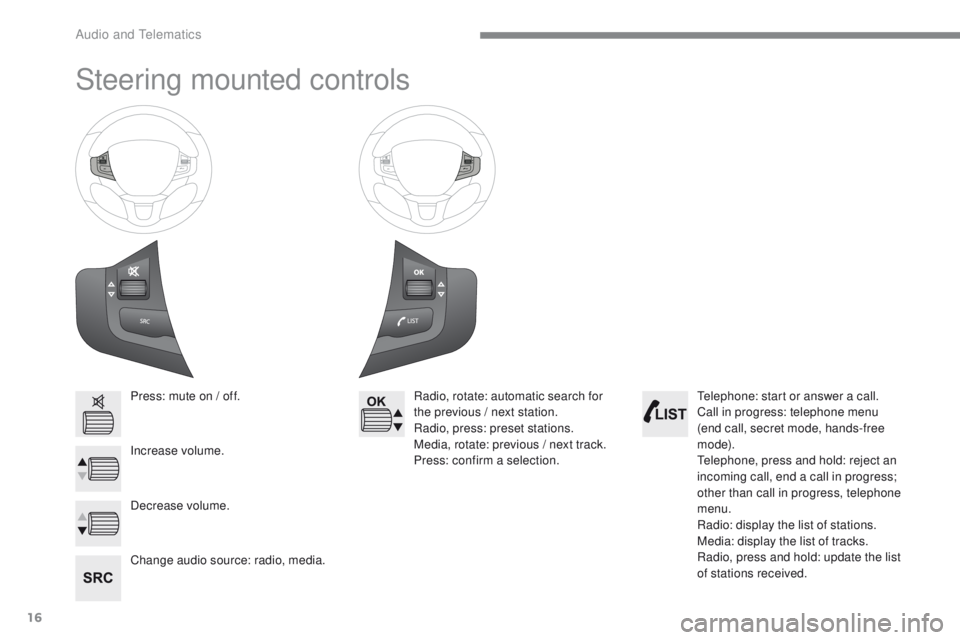
Steering mounted controls
Press: mute on / off.
Increase volume.
Change audio source: radio, media.Radio, rotate: automatic search for
the previous / next station.
Radio, press: preset stations.
Media, rotate: previous / next track.
Press: confirm a selection.
Decrease volume. Telephone: start or answer a call.
Call in progress: telephone menu
(end call, secret mode, hands-free
m o d e).
Telephone, press and hold: reject an
incoming call, end a call in progress;
other than call in progress, telephone
menu.
Radio: display the list of stations.
Media: display the list of tracks.
Radio, press and hold: update the list
of stations received.
Audio and Telematics
Page 391 of 450
17
2008-additif_en_Chap12b_SMEGplus_ed01-2016
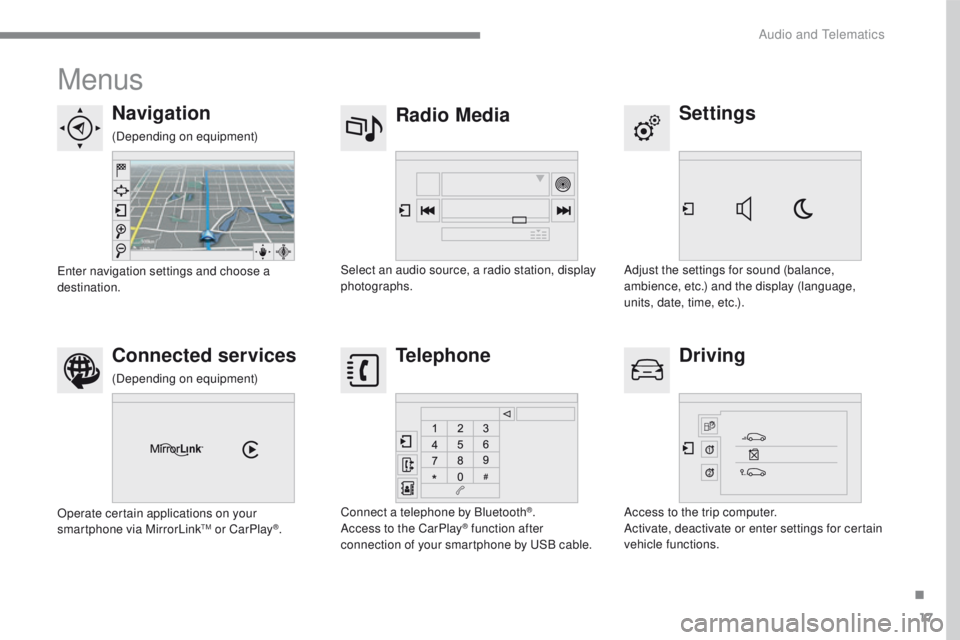
Menus
Settings
Radio Media
Navigation
Driving
Connected services Telephone
Adjust the settings for sound (balance,
ambience, etc.) and the display (language,
units, date, time, etc.).
Select an audio source, a radio station, display
photographs.
Enter navigation settings and choose a
destination.
Access to the trip computer.
Activate, deactivate or enter settings for certain
vehicle functions.
Operate certain applications on your
smartphone via MirrorLink
TM or CarPlay®.
Connect a telephone by Bluetooth
®.
Access to the CarPlay® function after
connection of your smartphone by USB cable.
(Depending on equipment)
(Depending on equipment)
.
Audio and Telematics
Page 393 of 450
19
2008-additif_en_Chap12b_SMEGplus_ed01-2016
Level 1Level 2 Level 3 Comments
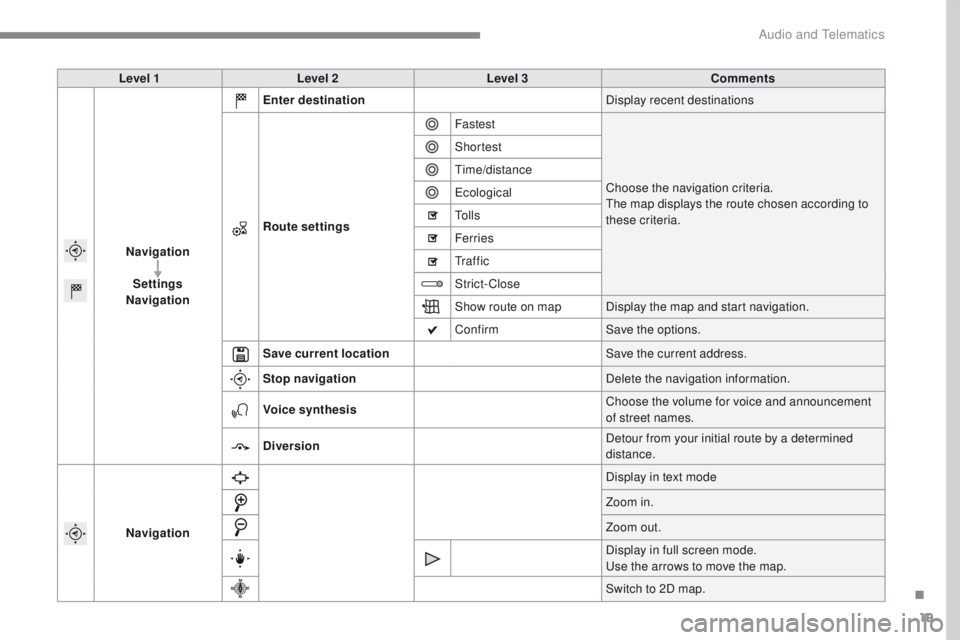
Navigation Settings
Navigation Enter destination
Display recent destinations
Route settings Fastest
Choose the navigation criteria.
The map displays the route chosen according to
these criteria.
Shortest
Time/distance
Ecological
To l l s
Ferries
Tr a f f i c
Strict-Close
Show route on map
Display the map and start navigation.
Confirm Save the options.
Save current location Save the current address.
Stop navigation Delete the navigation information.
Voice synthesis Choose the volume for voice and announcement
of street names.
Diversion Detour from your initial route by a determined
distance.
Navigation Display in text mode
Zoom in.
Zoom out.
Display in full screen mode.
Use the arrows to move the map.
Switch to 2D map.
.
Audio and Telematics
Page 395 of 450
21
2008-additif_en_Chap12b_SMEGplus_ed01-2016
Level 1Level 2 Level 3 Comments
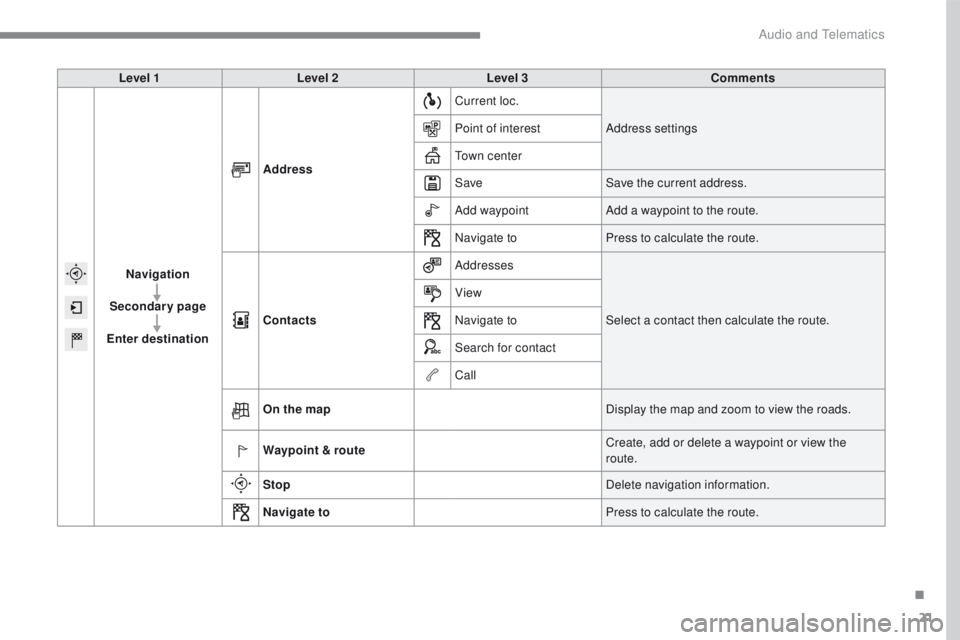
Navigation
Secondary page
Enter destination Address
Current loc.
Address settings
Point of interest
Town center
Save Save the current address.
Add waypoint Add a waypoint to the route.
Navigate to Press to calculate the route.
Contacts Addresses
Select a contact then calculate the route.
View
Navigate to
Search for contact
Call
On the map Display the map and zoom to view the roads.
Waypoint & route Create, add or delete a waypoint or view the
route.
Stop Delete navigation information.
Navigate to Press to calculate the route.
.
Audio and Telematics