window PEUGEOT 2008 2016 Owner's Manual
[x] Cancel search | Manufacturer: PEUGEOT, Model Year: 2016, Model line: 2008, Model: PEUGEOT 2008 2016Pages: 450, PDF Size: 14.16 MB
Page 219 of 450
217
2008_en_Chap09_info-pratiques_ed01-2016
Follow the instructions for use provided
by the manufacturer of the charger.
Never reverse polarities.
It is not necessary to disconnect the
battery.F
S
witch off the ignition.
F
S
witch off all electrical consumers (audio
system, lighting, wipers, ...).
F
S
witch off the charger B before connecting
the cables to the battery, so as to avoid any
dangerous sparks.
F
E
nsure that the charger cables are in good
condition.
F R aise the plastic cover, if your vehicle has
one, on the (+) terminal.
F
C
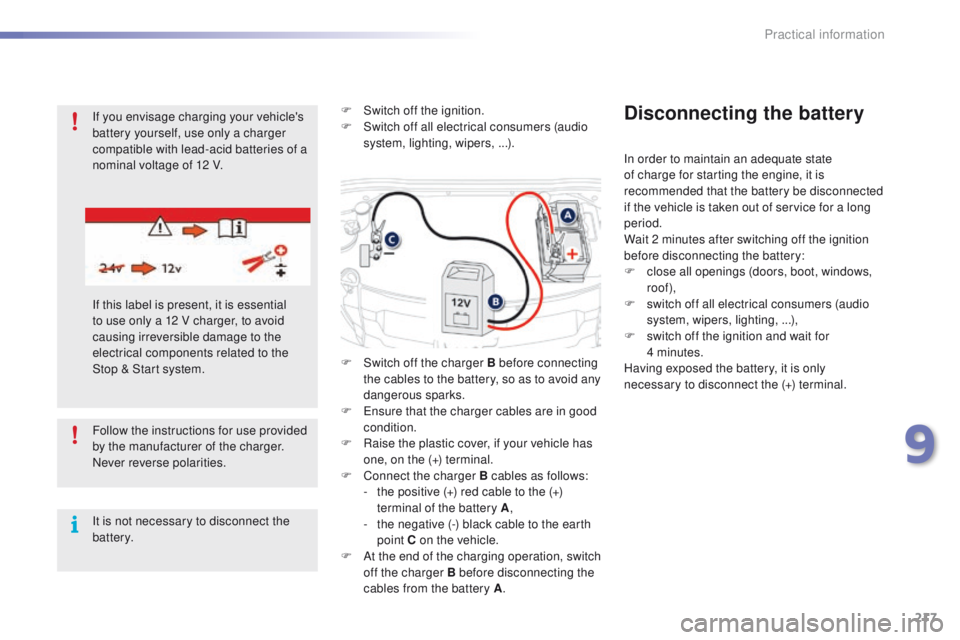
onnect the charger B cables as follows:
-
t
he positive (+) red cable to the (+)
terminal of the battery A ,
-
t
he negative (-) black cable to the earth
point C on the vehicle.
F
A
t the end of the charging operation, switch
off the charger B before disconnecting the
cables from the battery A .
Disconnecting the battery
In order to maintain an adequate state
of charge for starting the engine, it is
recommended that the battery be disconnected
if the vehicle is taken out of service for a long
period.
Wait 2 minutes after switching off the ignition
before disconnecting the battery:
F
c
lose all openings (doors, boot, windows,
roof),
F
s
witch off all electrical consumers (audio
system, wipers, lighting, ...),
F
s
witch off the ignition and wait for
4
minutes.
Having exposed the battery, it is only
necessary to disconnect the (+) terminal.
If you envisage charging your vehicle's
battery yourself, use only a charger
compatible with lead-acid batteries of a
nominal voltage of 12 V.
If this label is present, it is essential
to use only a 12 V charger, to avoid
causing irreversible damage to the
electrical components related to the
Stop & Start system.
9
Practical information
Page 220 of 450
218
2008_en_Chap09_info-pratiques_ed01-2016
Never try to charge a frozen battery.
If the battery has been frozen, have it
checked by a PEUGEOT dealer or a
qualified workshop, who will check that
the internal components have not been
damaged and the casing is not cracked,
which could cause a leak of toxic and
corrosive acid.The Stop & Start system may not be
operational during the trip following the
first engine start.
In this case, the system will only be
available again after a continuous
period of immobilisation of the vehicle,
a period which depends on the ambient
temperature and the state of charge of
the battery (up to about 8 hours).
Quick-release terminal
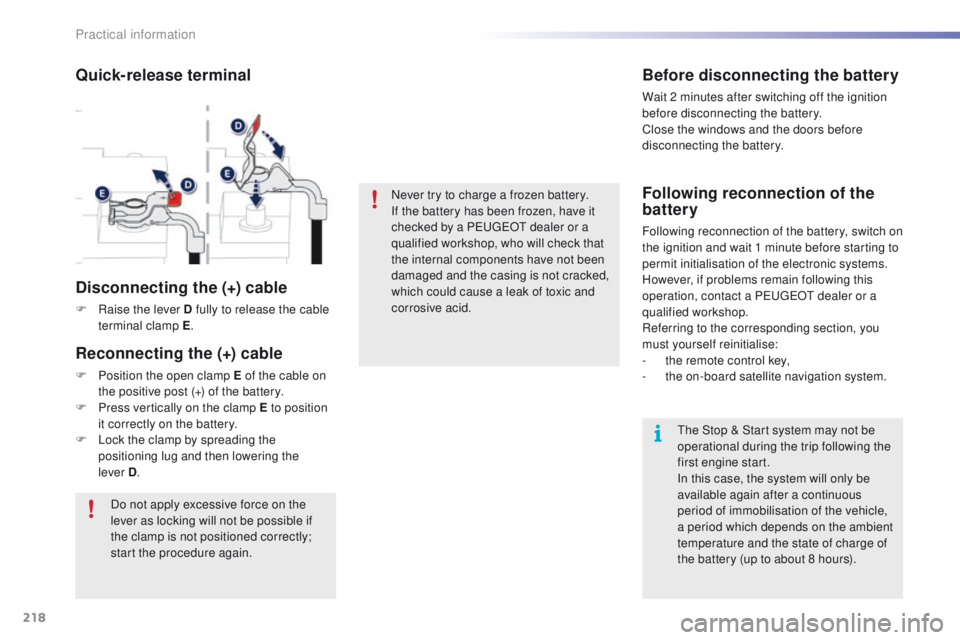
Disconnecting the (+) cable
F Raise the lever D fully to release the cable terminal clamp E .
Do not apply excessive force on the
lever as locking will not be possible if
the clamp is not positioned correctly;
start the procedure again.
Before disconnecting the battery
Wait 2 minutes after switching off the ignition
before disconnecting the battery.
Close the windows and the doors before
disconnecting the battery.
Following reconnection of the
battery
Following reconnection of the battery, switch on
the ignition and wait 1 minute before starting to
permit initialisation of the electronic systems.
However, if problems remain following this
operation, contact a PEUGEOT dealer or a
qualified workshop.
Referring to the corresponding section, you
must yourself reinitialise:
-
t
he remote control key,
-
t
he on-board satellite navigation system.
Reconnecting the (+) cable
F Position the open clamp E of the cable on the positive post (+) of the battery.
F
P
ress vertically on the clamp E to position
it correctly on the battery.
F
L
ock the clamp by spreading the
positioning lug and then lowering the
lever
D.
Practical information
Page 233 of 450
231
2008_en_Chap09_info-pratiques_ed01-2016
Accessories
A wide range of accessories and genuine parts is available from the PEUGEOT dealer network.
These accessories and parts are all suitable for your vehicle and benefit from PEUGEOT's
recommendation and warranty.
Conversion kits
You can obtain an "Enterprise" kit to convert a
private car into a trade vehicle.
"Comfort":
door deflectors, side blinds and rear blind,
cigarette lighter, boot dividers, coat hanger
fixed to head restraint, front and rear parking
sensors...
"Transport solutions":
boot liner, luggage net, roof bars, bicycle
carrier on roof bars, ski carrier, roof box, ....*
T
o avoid any risk of jamming of the pedals:
-
e
nsure that the mat is positioned and
secured correctly,
-
n
ever fit one mat on top of another.
"Styling":
gear lever knob, spoiler, styling strips, alloy
wheels, trims, chromed mirror shells, mirror
personalisation kits, wheel caps and exterior
stickers.....
"Safety and security":
anti-theft alarm, window engraving, wheel
security bolts, child seats and booster
cushions, breathalyzer, first aid kit, warning
triangle, high visibility jacket, stolen vehicle
tracking system, temporary puncture repair kit,
snow chains, non-slip covers, front foglamps
kit, dog guard...
"Protection":
mats*, seat covers compatible with lateral
airbags, mud flaps, door sill protectors, bumper
protection strips, aluminium foot rest...
9
Practical information
Page 327 of 450
325
2008_en_Chap12b_SMEGplus_ed01-2016
QUESTIONANSWER SOLUTION
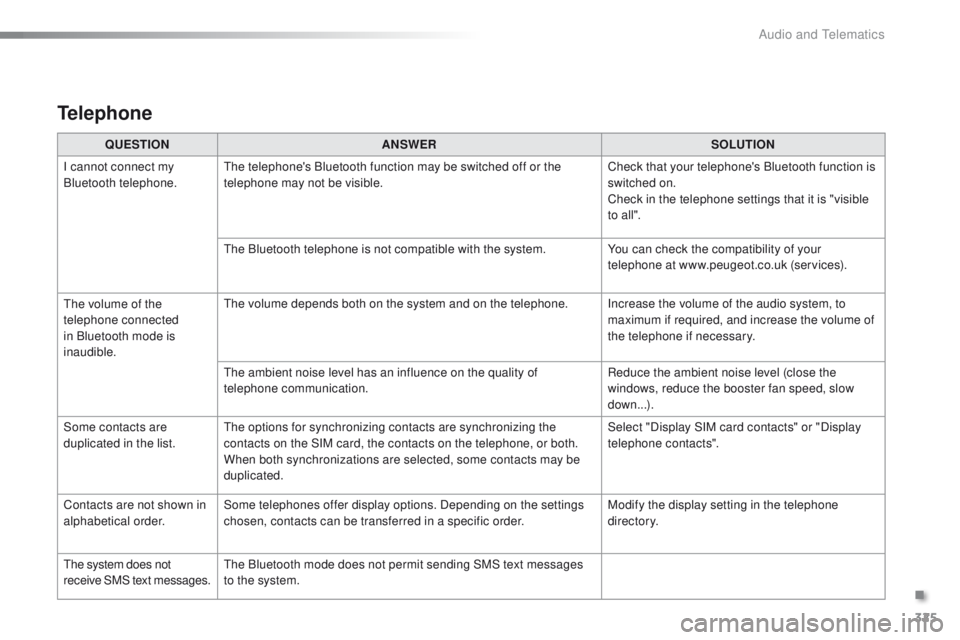
I cannot connect my
Bluetooth telephone. The telephone's Bluetooth function may be switched off or the
telephone may not be visible. Check that your telephone's Bluetooth function is
switched on.
Check in the telephone settings that it is "visible
to all ".
The Bluetooth telephone is not compatible with the system. You can check the compatibility of your
telephone at www.peugeot.co.uk (services).
The volume of the
telephone connected
in Bluetooth mode is
inaudible. The volume depends both on the system and on the telephone. Increase the volume of the audio system, to
maximum if required, and increase the volume of
the telephone if necessary.
The ambient noise level has an influence on the quality of
telephone communication. Reduce the ambient noise level (close the
windows, reduce the booster fan speed, slow
down...).
Some contacts are
duplicated in the list. The options for synchronizing contacts are synchronizing the
contacts on the SIM card, the contacts on the telephone, or both.
When both synchronizations are selected, some contacts may be
duplicated. Select "Display SIM card contacts" or "Display
telephone contacts".
Contacts are not shown in
alphabetical order. Some telephones offer display options. Depending on the settings
chosen, contacts can be transferred in a specific order. Modify the display setting in the telephone
di r e c to r y.
The system does not
receive SMS text messages. The Bluetooth mode does not permit sending SMS text messages
to the system.
Telephone
.
Audio and Telematics
Page 338 of 450
336
2008_en_Chap12c_RDE2_ed01-2016
Telephone
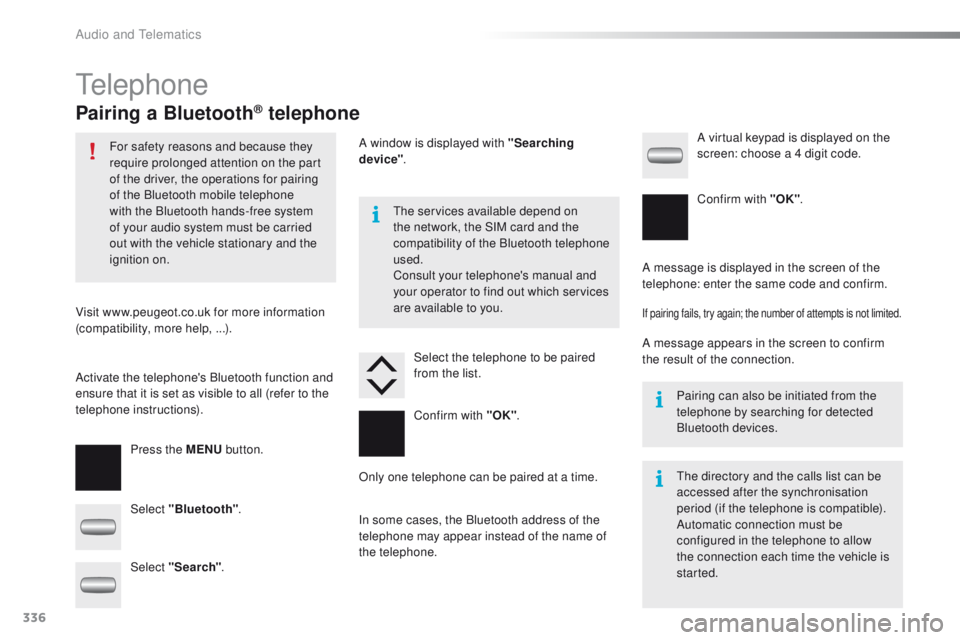
Pairing a Bluetooth® telephone
For safety reasons and because they
require prolonged attention on the part
of the driver, the operations for pairing
of the Bluetooth mobile telephone
with the Bluetooth hands-free system
of your audio system must be carried
out with the vehicle stationary and the
ignition on.
Visit www.peugeot.co.uk for more information
(compatibility, more help,
...).
Activate the telephone's Bluetooth function and
ensure that it is set as visible to all (refer to the
telephone instructions). Press the MENU button. The services available depend on
the network, the SIM card and the
compatibility of the Bluetooth telephone
used.
Consult your telephone's manual and
your operator to find out which services
are available to you.
Only one telephone can be paired at a time. A message is displayed in the screen of the
telephone: enter the same code and confirm.
If pairing fails, try again; the number of attempts is not limited.
A message appears in the screen to confirm
the result of the connection.
Pairing can also be initiated from the
telephone by searching for detected
Bluetooth devices.
The directory and the calls list can be
accessed after the synchronisation
period (if the telephone is compatible).
Automatic connection must be
configured in the telephone to allow
the connection each time the vehicle is
started.
Select "Bluetooth"
. Select the telephone to be paired
from the list. A virtual keypad is displayed on the
screen: choose a 4 digit code.
Select "Search" . A window is displayed with "Searching
device"
.
In some cases, the Bluetooth address of the
telephone may appear instead of the name of
the telephone. Confirm with "OK"
. Confirm with "OK"
.
Audio and Telematics
Page 361 of 450
359
2008_en_Chap13_index-alpha_ed01-2016
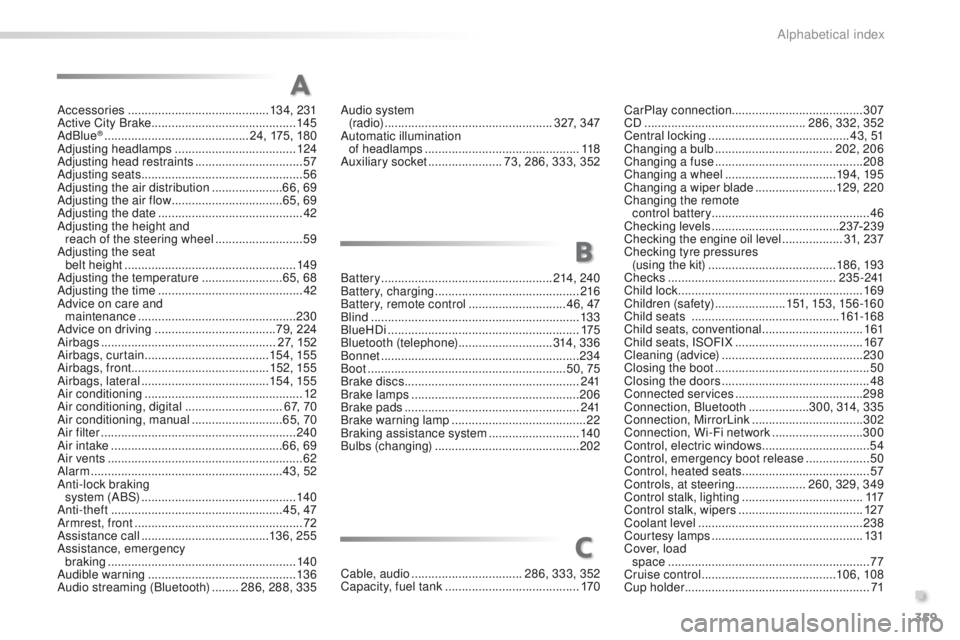
Accessories .......................................... 13 4, 231
Active City Brake ........................................... 14
5
AdBlue
® ............................... ............24, 175, 180
Adjusting headlamps .................................... 124
Adjusting head restraints
................................ 57
Adjusting seats
................................................ 56
Adjusting the air distribution
.....................66, 69
Adjusting the air flow
................................. 65, 69
Adjusting the date
........................................... 42
Adjusting the height and reach of the steering wheel
.......................... 59
A
djusting the seat
belt height
...............................
....................149
Adjusting the temperature
........................ 6
5, 68
Adjusting the time
........................................... 42
Advice on care and maintenance
............................................... 23
0
Advice on driving
.................................... 79, 224
Airbags
.................................................... 27, 152
Airbags, curtain
..................................... 15
4, 155
Airbags, front ......................................... 152, 155
Airbags, lateral
...................................... 15 4, 155
Air conditioning
............................................... 12
Air conditioning, digital
............................. 67, 70
Air conditioning, manual
........................... 65, 70
Air filter
.......................................................... 240
Air intake
................................................... 66, 69
Air vents
.......................................................... 62
Alarm
......................................................... 43, 52
Anti-lock braking system (ABS)
.............................................. 14
0
Anti-theft
................................................... 45, 47
Armrest, front
.................................................. 72
Assistance call
...................................... 13 6, 25 5
Assistance, emergency braking
...............
......................................... 140
Audible warning
............................................ 13 6
Audio streaming (Bluetooth)
........ 2
86, 288, 335Battery
...................................................214, 240
Battery, charging
...........................................216
Battery, remote control
............................. 4
6, 47
Blind
..............................................................13 3
BlueHDi
.........................................................175
Bluetooth (telephone)
............................314, 3 3 6
Bonnet
...........................................................234
Boot
...........................................................50, 75
Brake discs
.................................................... 2
41
Brake lamps
...............................
...................206
Brake pads
....................................................2 41
Brake warning lamp
........................................22
Braking assistance system
...........................14
0
Bulbs (changing)
...............................
............202
A
B
CarPlay connection ....................................... 307
CD ................................................ 286, 332, 352
Central locking
.......................................... 4 3 , 51
Changing a bulb
................................... 202, 206
Changing a fuse
............................................ 208
Changing a wheel
................................. 19 4, 195
Changing a wiper blade
........................129, 2 20
Changing the remote control battery ............................................... 46
Checking levels
...................................... 23
7-239
Checking the engine oil level
..................31, 237
Checking tyre pressures (using the kit)
..............................
........18 6, 193
Checks
...............
................................... 2 3 5 - 2 41
Child lock
...............................
........................169
Children (safety)
..................... 15
1, 153, 15 6 -16 0
Child seats
..............................
..............161-168
Child seats, conventional
..............................161
Child seats, ISOFIX
...................................... 16
7
Cleaning (advice)
.......................................... 23
0
Closing the boot
.............................................. 50
Closing the doors
............................................ 48
Connected services
...................................... 29
8
Connection, Bluetooth
..................300, 314, 335
Connection, MirrorLink
.................................302
Connection, Wi-Fi network
...........................300
Control, electric windows
................................54
Control, emergency boot release
...................50
Control, heated seats
...................................... 57
Controls, at steering..................... 260, 329, 349
Control stalk, lighting
.................................... 11
7
Control stalk, wipers
..................................... 127
Coolant level
................................................. 238
Courtesy lamps
............................................. 131
Cover, load space
............................................................ 77
Cruise control
........................................ 10
6, 108
Cup holder
...............................
........................71
Audio system
(r adi o)
.................................................. 327, 347
Automatic illumination of headlamps
.............................................. 118
Auxiliary socket
...................... 73, 286, 333, 352
Cable, audio
................................. 286, 333, 352
Capacity, fuel tank
..............................
.......... 170
C
.
Alphabetical index
Page 365 of 450
363
2008_en_Chap13_index-alpha_ed01-2016
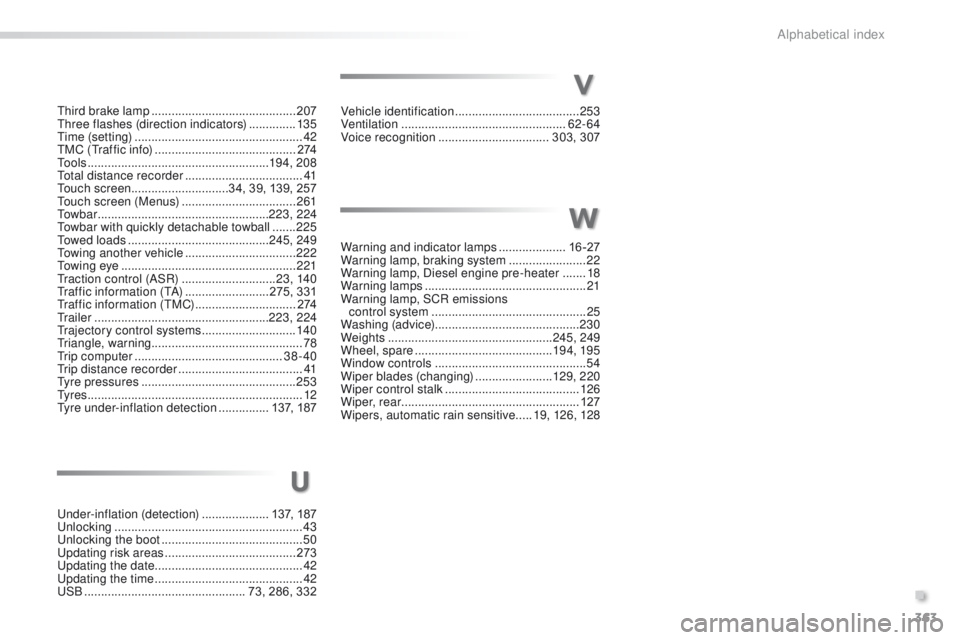
Under-inflation (detection) ....................1 37, 187
Unlocking .............................. ..........................43
Unlocking the boot
.......................................... 50
Updating risk areas
....................................... 2
73
Updating the date
............................................ 42
Updating the time
............................................ 42
USB
................................................ 73, 286, 332Vehicle identification
.....................................
253
Ventilation
..............................
...................
62- 64
Voice recognition
.................................
303, 307
Warning and indicator lamps
....................
16 -27
Warning lamp, braking system
.......................
22
Warning lamp, Diesel engine pre-heater
.......
18
Warning lamps
................................................
21
Warning lamp, SCR emissions control system
..............................................
25
W
ashing (advice)
........................................... 230
Weights
.................................................
245, 249
Wheel, spare
.........................................
19 4, 195
Window controls
.............................................
54
Wiper blades (changing)
....................... 12
9, 2 20
Wiper control stalk ........................................
126
Wiper, rear ..................................................... 127
Wipers, automatic rain sensitive
.....
19, 126, 128
U
Third brake lamp ........................................... 207
Three flashes (direction indicators) ..............13 5
Time (setting)
..............................
....................42
TMC (Traffic info)
.......................................... 2
74
To o l s
......................................................19 4, 208
Total distance recorder
...................................41
Touch screen ............................. 34, 39, 139, 257
Touch screen (Menus)
..................................261
To w b a r
................................................... 223, 224
Towbar with quickly detachable towball
.......225
Towed loads
.......................................... 245, 249
Towing another vehicle
................................. 2
22
Towing eye
.................................................... 221
Traction control (ASR)
............................23, 140
Traffic information (TA)
.........................275, 331
Traffic information (TMC)
.............................. 2
74
Tr a i l e r
.................................................... 223, 224
Trajectory control systems
............................140
Triangle, warning ............................................. 78
Trip computer
............................................ 38-40
Trip distance recorder
..................................... 41
Tyre pressures
.............................................. 253
Ty r e s
................................................................ 12
Tyre under-inflation detection
...............137, 187
V
W
.
Alphabetical index
Page 449 of 450
75
2008-additif_en_Chap12b_SMEGplus_ed01-2016
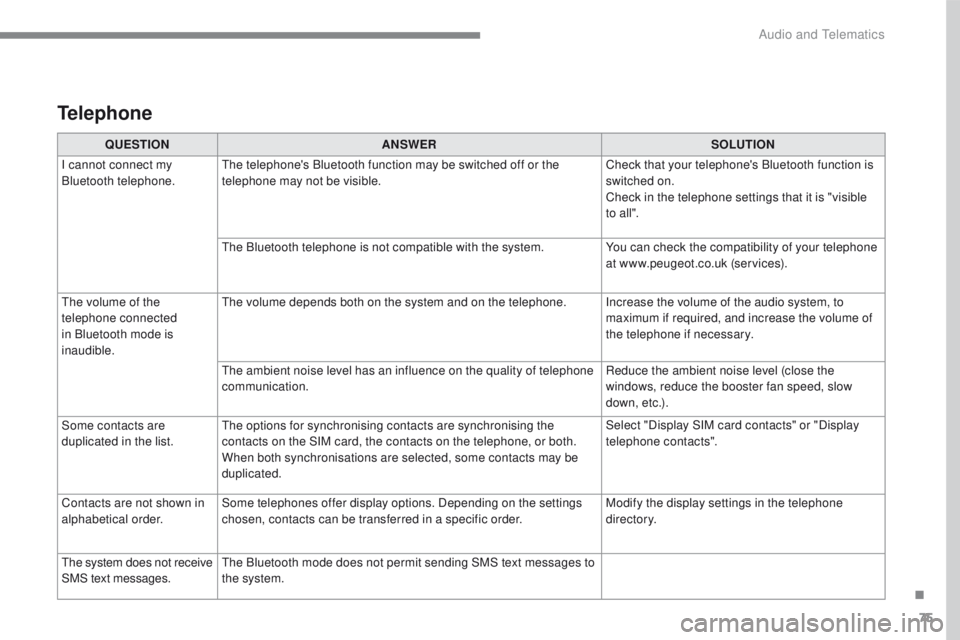
QUESTIONANSWER SOLUTION
I cannot connect my
Bluetooth telephone. The telephone's Bluetooth function may be switched off or the
telephone may not be visible. Check that your telephone's Bluetooth function is
switched on.
Check in the telephone settings that it is "visible
to all ".
The Bluetooth telephone is not compatible with the system. You can check the compatibility of your telephone
at www.peugeot.co.uk (services).
The volume of the
telephone connected
in Bluetooth mode is
inaudible. The volume depends both on the system and on the telephone. Increase the volume of the audio system, to
maximum if required, and increase the volume of
the telephone if necessary.
The ambient noise level has an influence on the quality of telephone
communication. Reduce the ambient noise level (close the
windows, reduce the booster fan speed, slow
down, etc.).
Some contacts are
duplicated in the list. The options for synchronising contacts are synchronising the
contacts on the SIM card, the contacts on the telephone, or both.
When both synchronisations are selected, some contacts may be
duplicated. Select "Display SIM card contacts" or "Display
telephone contacts".
Contacts are not shown in
alphabetical order. Some telephones offer display options. Depending on the settings
chosen, contacts can be transferred in a specific order. Modify the display settings in the telephone
di r e c to r y.
The system does not receive
SMS text messages. The Bluetooth mode does not permit sending SMS text messages to
the system.
Telephone
.
Audio and Telematics