engine PEUGEOT 2008 2016 Owner's Guide
[x] Cancel search | Manufacturer: PEUGEOT, Model Year: 2016, Model line: 2008, Model: PEUGEOT 2008 2016Pages: 450, PDF Size: 14.16 MB
Page 65 of 450
63
2008_en_Chap03_confort_ed01-2016
In order for these systems to be fully effective, follow the operation and maintenance
guidelines below:
F
T
o obtain an even air distribution, take care not to obstruct the exterior air intake grilles
located at the base of the windscreen, the nozzles, the vents and the air outlets, as well
as the air extractor located in the boot.
F
D
o not cover the sunshine sensor, located on the dashboard; this is used for regulation
of the air conditioning system.
F
O
perate the air conditioning system for at least 5 to 10 minutes, once or twice a month
to keep it in per fect working order.
F
E
nsure that the passenger compartment filter is in good condition and have the filter
elements replaced regularly.
W
e recommend the use of a combined passenger compartment filter. Thanks to its
special active additive, it contributes to the purification of the air breathed by the
occupants and the cleanliness of the passenger compartment (reduction of allergic
symptoms, bad odours and greasy deposits).
F
T
o ensure correct operation of the air conditioning system, you are also advised to have
it checked regularly as recommended in the warranty and maintenance record.
F
I
f the system does not produce cold air, switch it off and contact a PEUGEOT dealer or
a qualified workshop.
When towing the maximum load on a steep gradient in high temperatures, switching off the
air conditioning increases the available engine power and so improves the towing ability.
Recommendations for ventilation and air conditioning
If after an extended stop in sunshine,
the interior temperature is very high, first
ventilate the passenger compartment for
a few moments.
Put the air flow control at a setting high
enough to quickly change the air in the
passenger compartment.
The air conditioning system does not
contain chlorine and does not present
any danger to the ozone layer.
The condensation created by the air
conditioning results in a discharge
of water under the vehicle which is
perfectly normal.
Stop & Start
The heating and air conditioning systems only work when the engine is running.
To maintain a comfortable temperature in the passenger compartment, you can temporarily
deactivate the Stop & Start system.
For more information on Stop & Start, refer to the corresponding section.
3
Comfort
Page 69 of 450
67
2008_en_Chap03_confort_ed01-2016
Dual-zone digital air conditioning
AUTO mode
Automatic programme
When the engine is cold, the air flow will
only reach its optimum level gradually
to prevent too great a distribution of
c o l d a i r.
In cold weather, it favours the
distribution of warm air to the
windscreen, the side windows and the
footwells only.Offers the best compromise between
a comfortable temperature and quiet
operation. Provides soft and quiet operation by
limiting air flow.
Provides strong and effective air flow.
F
P
ress the "AUTO" button
repeatedly. The indicator lamp
comes on at the first press; the
mode activated appears in the
digital air conditioning screen:
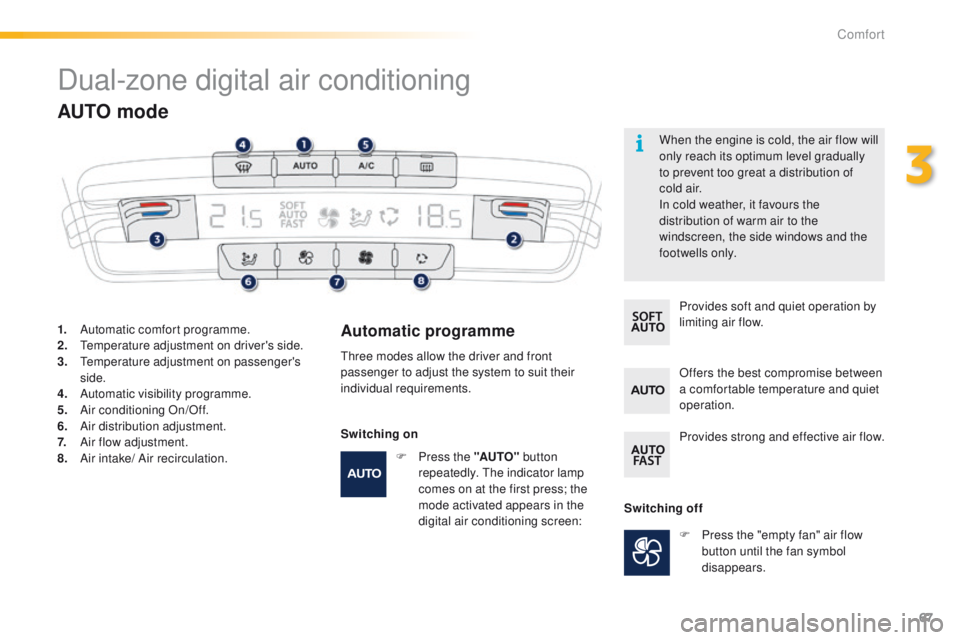
1.
A
utomatic comfort programme.
2.
T
emperature adjustment on driver's side.
3.
T
emperature adjustment on passenger's
side.
4.
A
utomatic visibility programme.
5.
A
ir conditioning On/Off.
6.
A
ir distribution adjustment.
7.
A
ir flow adjustment.
8.
A
ir intake/ Air recirculation. Three modes allow the driver and front
passenger to adjust the system to suit their
individual requirements.
Switching offF
P
ress the "empty fan" air flow
button until the fan symbol
disappears.
Switching on
3
Comfort
Page 72 of 450
70
2008_en_Chap03_confort_ed01-2016
F Switch off the demisting/defrosting of the rear screen and door mirrors
as soon as appropriate, as lower
current consumption results in
reduced fuel consumption.
Front demist - defrost Rear screen
demist
-
defrost
The control button is located on the
air conditioning system control panel.
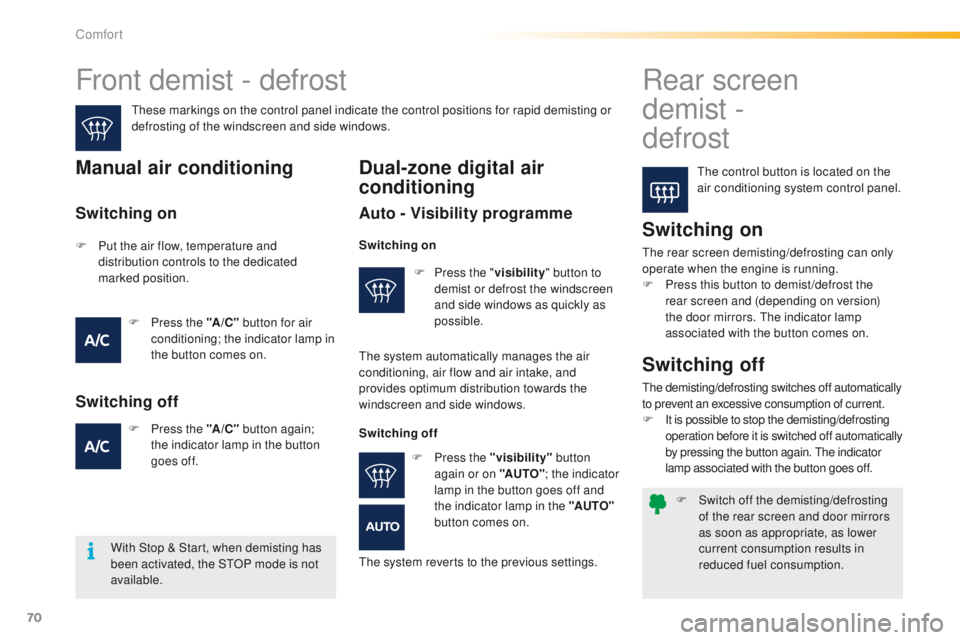
These markings on the control panel indicate the control positions for rapid demisting or
defrosting of the windscreen and side windows.Manual air conditioning
Switching on
The rear screen demisting/defrosting can only
operate when the engine is running.
F
P
ress this button to demist /defrost the
rear screen and (depending on version)
the door mirrors. The indicator lamp
associated with the button comes on.
With Stop & Start, when demisting has
been activated, the STOP mode is not
available.
Switching off
The demisting/defrosting switches off automatically
to prevent an excessive consumption of current.
F
I
t is possible to stop the demisting/defrosting
operation before it is switched off automatically
by pressing the button again. The indicator
lamp associated with the button goes off.
Dual-zone digital air
conditioning
Auto - Visibility programme
F Press the " visibility" button to
demist or defrost the windscreen
and side windows as quickly as
possible.
Switching on
F Put the air flow, temperature and distribution controls to the dedicated
marked position.
F
P
ress the "A /C " button for air
conditioning; the indicator lamp in
the button comes on.
F
P
ress the "A /C " button again;
the indicator lamp in the button
goes
off.
Switching off
Switching on
The system automatically manages the air
conditioning, air flow and air intake, and
provides optimum distribution towards the
windscreen and side windows.
Switching offF
P
ress the "visibility" button
again or on "AUTO" ; the indicator
lamp in the button goes off and
the indicator lamp in the "AUTO"
button comes on.
The system reverts to the previous settings.
Comfort
Page 81 of 450
79
2008_en_Chap05_conduite_ed01-2016
Driving recommendations
Observe the driving regulations and remain
vigilant whatever the traffic conditions.
Pay close attention to the traffic and keep your
hands on the wheel so that you are ready to
react at any time to any eventuality.
On a long journey, a break every two hours is
strongly recommended.
In difficult weather, drive smoothly, anticipate
the need to brake and increase the distance
from other vehicles.If you are obliged to drive through water:Important!
Driving on flooded roads
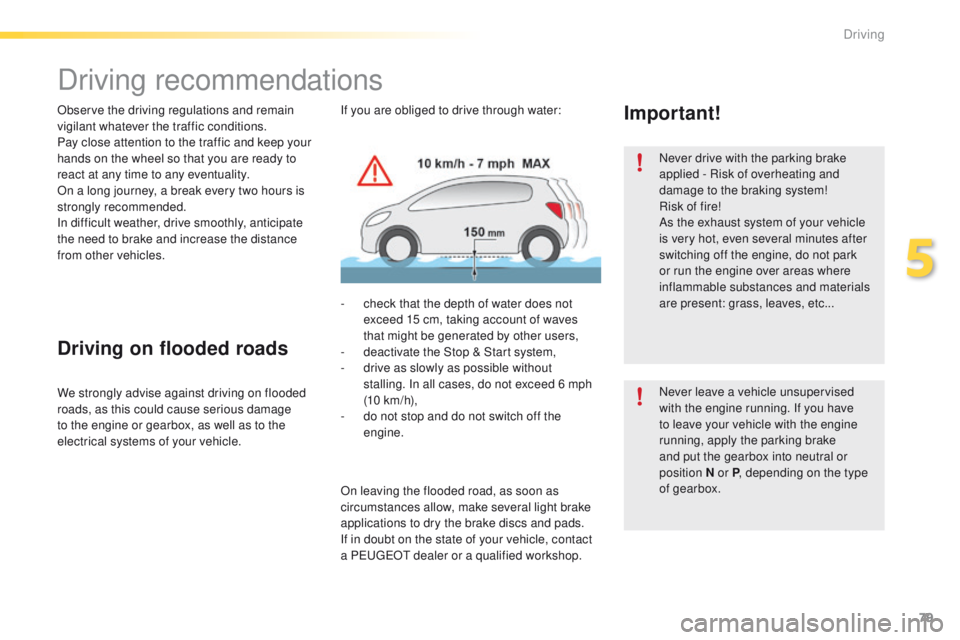
- check that the depth of water does not exceed 15 cm, taking account of waves
that might be generated by other users,
-
d
eactivate the Stop & Start system,
-
d
rive as slowly as possible without
stalling. In all cases, do not exceed 6 mph
(10
km/h),
-
d
o not stop and do not switch off the
engine.
We strongly advise against driving on flooded
roads, as this could cause serious damage
to the engine or gearbox, as well as to the
electrical systems of your vehicle.
On leaving the flooded road, as soon as
circumstances allow, make several light brake
applications to dry the brake discs and pads.
If in doubt on the state of your vehicle, contact
a PEUGEOT dealer or a qualified workshop. Never drive with the parking brake
applied - Risk of overheating and
damage to the braking system!
Risk of fire!
As the exhaust system of your vehicle
is very hot, even several minutes after
switching off the engine, do not park
or run the engine over areas where
inflammable substances and materials
are present: grass, leaves, etc...
Never leave a vehicle unsupervised
with the engine running. If you have
to leave your vehicle with the engine
running, apply the parking brake
and put the gearbox into neutral or
position
N or P, depending on the type
of gearbox.
5
Driving
Page 82 of 450
80
2008_en_Chap05_conduite_ed01-2016
Starting - Switching off the engine
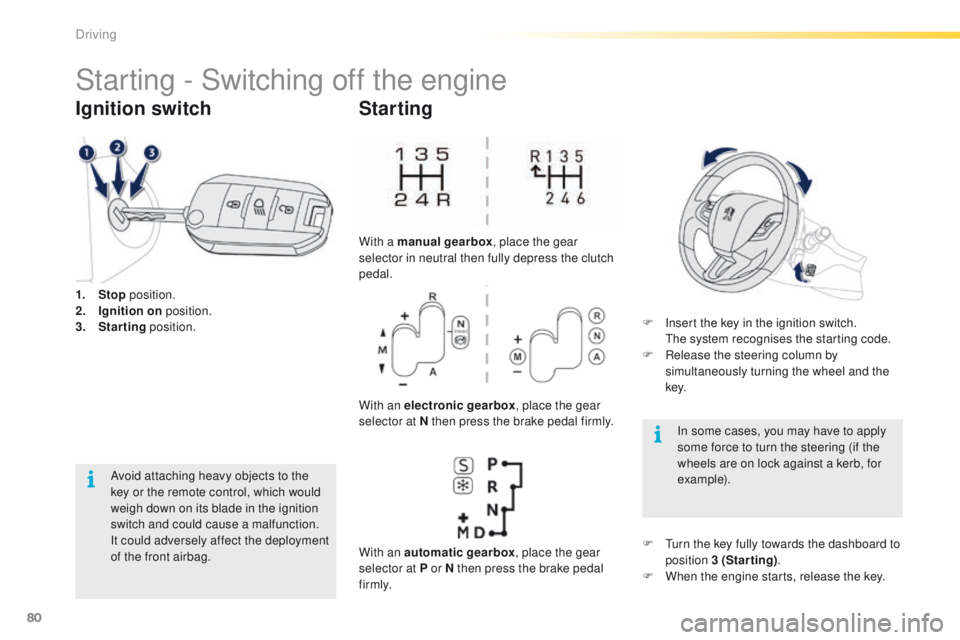
1. Stop position.
2. I gnition on position.
3.
S
tarting position.
Ignition switch
Avoid attaching heavy objects to the
key or the remote control, which would
weigh down on its blade in the ignition
switch and could cause a malfunction.
It could adversely affect the deployment
of the front airbag.
Starting
With a manual gearbox , place the gear
selector in neutral then fully depress the clutch
pedal.
With an electronic gearbox , place the gear
selector at N then press the brake pedal firmly.
With an automatic gearbox , place the gear
selector at P or N then press the brake pedal
f i r m l y. F
I
nsert the key in the ignition switch.
T
he system recognises the starting code.
F
R
elease the steering column by
simultaneously turning the wheel and the
key.
In some cases, you may have to apply
some force to turn the steering (if the
wheels are on lock against a kerb, for
example).
F
T
urn the key fully towards the dashboard to
position 3 (Starting) .
F
W
hen the engine starts, release the key.
Driving
Page 83 of 450
81
2008_en_Chap05_conduite_ed01-2016
Key left in the "Ignition on"
position
If the key has been left in the ignition
switch at position 2 (Ignition on),
the ignition will be switched off
automatically after one hour.
To switch the ignition back on, turn the
key to position 1 (Stop) , then back to
position 2 (Ignition on) .
F
Imm
obilise the vehicle.
F
T
urn the key fully towards you to
position 1 (Stop) .
F
R
emove the key from the ignition switch.
F
T
o lock the steering column, turn the wheel
until the lock engages.
Switching off
Free-wheeling
For safety reasons, do not free-wheel.
Other wise, some vehicle functions will
no longer be active.
Switching off the engine leads to a loss
of braking assistance.
To facilitate unlocking of the steering
wheel, it is recommended that you
place the wheels in the straight ahead
position before switching off the engine.
5
Driving
Page 85 of 450
83
2008_en_Chap05_conduite_ed01-2016
6-speed manual gearbox
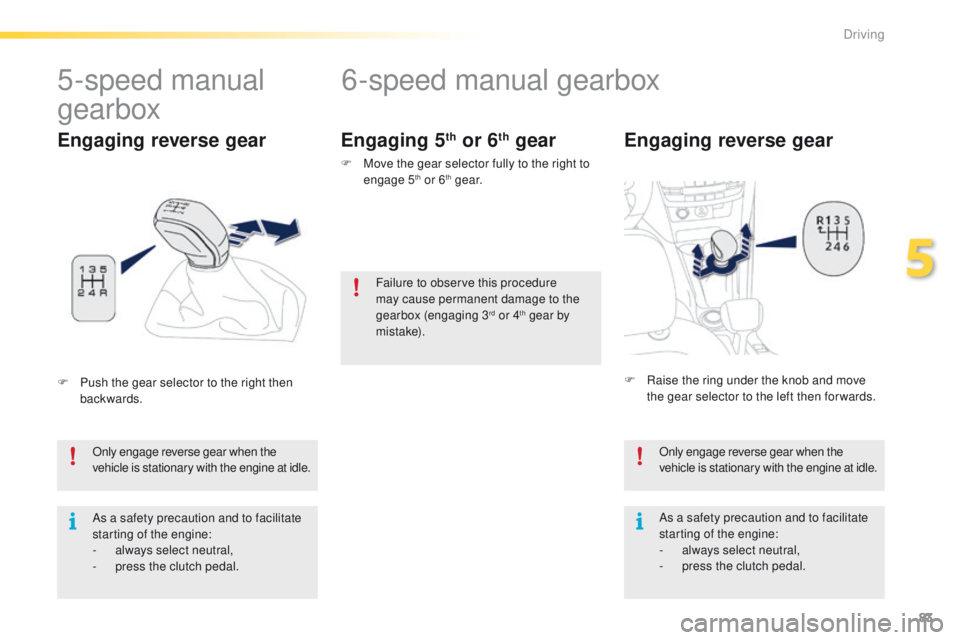
Engaging reverse gear
Only engage reverse gear when the
vehicle is stationary with the engine at idle.
As a safety precaution and to facilitate
starting of the engine:
-
a
lways select neutral,
-
p
ress the clutch pedal.
5-speed manual
gearbox
F Push the gear selector to the right then backwards.
Engaging reverse gear Engaging 5th or 6th gear
F Move the gear selector fully to the right to
engage 5th or 6th g e a r.
F
R
aise the ring under the knob and move
the gear selector to the left then for wards.
As a safety precaution and to facilitate
starting of the engine:
-
a
lways select neutral,
-
p
ress the clutch pedal.
Only engage reverse gear when the
vehicle is stationary with the engine at idle.
Failure to observe this procedure
may cause permanent damage to the
gearbox (engaging 3
rd or 4th gear by
m i st a ke).
5
Driving
Page 86 of 450
84
2008_en_Chap05_conduite_ed01-2016
5-speed electronically controlled gearbox
which offers a choice between the ease of
automatic operation or the pleasure of manual
gear changing.
Three driving modes are offered:
-
a
utomated mode for automatic control
of the gears by the gearbox, without any
action by the driver.
-
m
anual mode for sequential changing
of the gears by the driver, using the gear
selector or the steering mounted control
paddles.
-
a
uto sequential mode for overtaking, for
example, remaining in the automated mode
while using the functions of the sequential
mode.
5-speed electronic gearbox
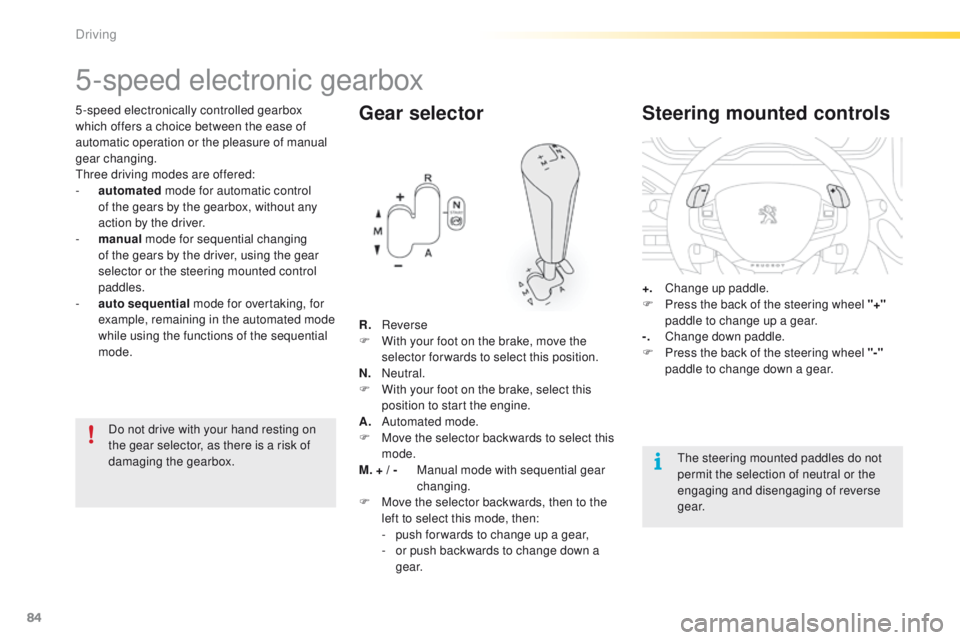
Gear selector
R. Reverse
F W ith your foot on the brake, move the
selector forwards to select this position.
N.
N
eutral.
F
W
ith your foot on the brake, select this
position to start the engine.
A.
A
utomated mode.
F
M
ove the selector backwards to select this
mode.
M. + / -
M
anual mode with sequential gear
changing.
F
M
ove the selector backwards, then to the
left to select this mode, then:
-
p
ush for wards to change up a gear,
-
o
r push backwards to change down a
g e a r.
Steering mounted controls
+. Change up paddle.
F P ress the back of the steering wheel "+"
paddle to change up a gear.
-.
C
hange down paddle.
F
P
ress the back of the steering wheel "-"
paddle to change down a gear.
The steering mounted paddles do not
permit the selection of neutral or the
engaging and disengaging of reverse
g e a r.
Do not drive with your hand resting on
the gear selector, as there is a risk of
damaging the gearbox.
Driving
Page 87 of 450
85
2008_en_Chap05_conduite_ed01-2016
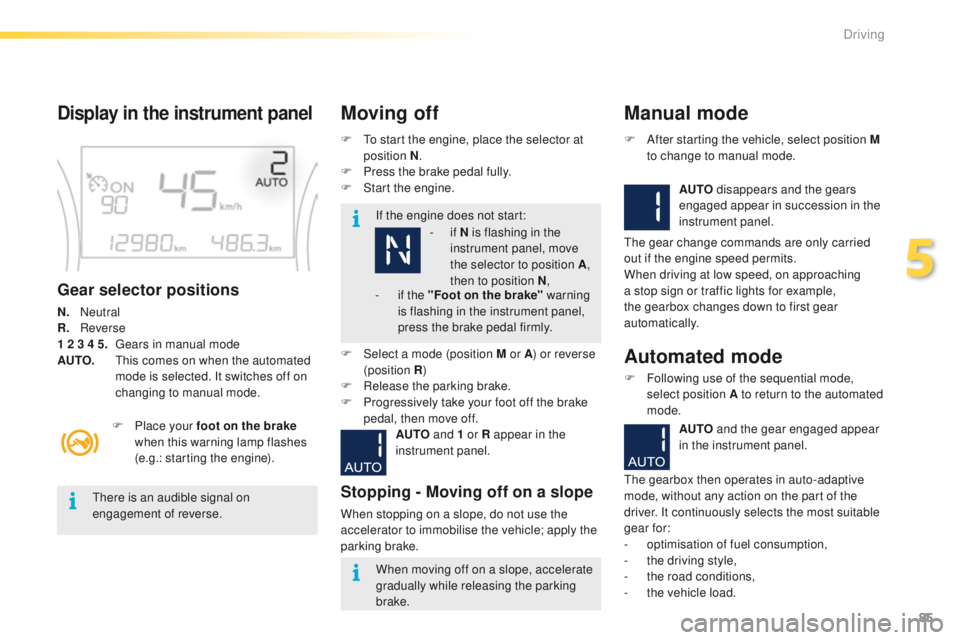
Display in the instrument panel
Gear selector positions
N. Neutral
R . Reverse
1 2 3 4 5.
G
ears in manual mode
AUTO.
T
his comes on when the automated
mode is selected. It switches off on
changing to manual mode. F
T
o start the engine, place the selector at
position N .
F
P
ress the brake pedal fully.
F
S
tart the engine.
Moving off
If the engine does not start:
F
P
lace your foot on the brake
when this warning lamp flashes
(e.g.: starting the engine).
There is an audible signal on
engagement of reverse.
When moving off on a slope, accelerate
gradually while releasing the parking
brake.
F
Sel
ect a mode (position M or A ) or reverse
(position R )
F
R
elease the parking brake.
F
P
rogressively take your foot off the brake
pedal, then move off.
AUTO and 1 or R appear in the
instrument panel.
Stopping - Moving off on a slope
When stopping on a slope, do not use the
accelerator to immobilise the vehicle; apply the
parking brake.
Manual mode
AUTO disappears and the gears
engaged appear in succession in the
instrument panel.
F
A
fter starting the vehicle, select position M
to change to manual mode.
The gear change commands are only carried
out if the engine speed permits.
When driving at low speed, on approaching
a stop sign or traffic lights for example,
the gearbox changes down to first gear
automatically.
Automated mode
F Following use of the sequential mode, select position A to return to the automated
mode.
-
i
f
N is flashing in the
instrument panel, move
the selector to position A ,
then to position N ,
-
i
f the "Foot on the brake" warning
is flashing in the instrument panel,
press the brake pedal firmly.
AUTO and the gear engaged appear
in the instrument panel.
The gearbox then operates in auto-adaptive
mode, without any action on the part of the
driver. It continuously selects the most suitable
gear for:
-
o
ptimisation of fuel consumption,
-
t
he driving style,
-
t
he road conditions,
-
t
he vehicle load.
5
Driving
Page 88 of 450
86
2008_en_Chap05_conduite_ed01-2016
You must press the brake pedal firmly
while starting the engine.
Never select neutral N while the vehicle
is moving.
Only engage reverse gear R when the
vehicle is immobilised, with your foot on
the brake pedal.
In all cases, you must apply the parking
brake to immobilise the vehicle.
For best acceleration, when overtaking
another vehicle for example, press the
accelerator pedal firmly to pass the
point of resistance.
"Auto sequential" mode
In the automated mode, you can resume
control temporarily at any time using the
steering mounted control paddles.
The use of these paddles permits manual
selection of the gears in situations which
require a more rapid change-down than in
the automated mode (arrival at a roundabout,
leaving a car park with a steep gradient,
over taking...).
The gearbox engages the required gear if
the engine speed permits. AUTO
remains
displayed on the instrument panel.
After a few moments, the gearbox resumes
automatic control of the gears.
Stopping the vehicle
Before switching off the engine, you can
change to position N to be in neutral.
In this case, you must apply the parking
brake to immobilise the vehicle.
Reinitialisation
Following disconnection of the battery, the
gearbox must be reinitialised.
F
S
witch on the ignition.
AUTO and - appear in the instrument
panel.
F
Sel
ect position N .
F
P
ress the brake pedal.
F
W
ait approximately 30 seconds until N or a
gear appears in the instrument panel.
F
R
elease the brake pedal.
The gearbox is operational again.
Operating fault
With the ignition on, if this
warning lamp comes on and
AUTO flashes, accompanied by
an audible signal and a message in the screen,
this indicates a gearbox fault.
Have it checked by a PEUGEOT dealer or a
qualified workshop.
Driving