steering PEUGEOT 2008 2016 Owner's Guide
[x] Cancel search | Manufacturer: PEUGEOT, Model Year: 2016, Model line: 2008, Model: PEUGEOT 2008 2016Pages: 450, PDF Size: 14.16 MB
Page 262 of 450
260
2008_en_Chap12b_SMEGplus_ed01-2016
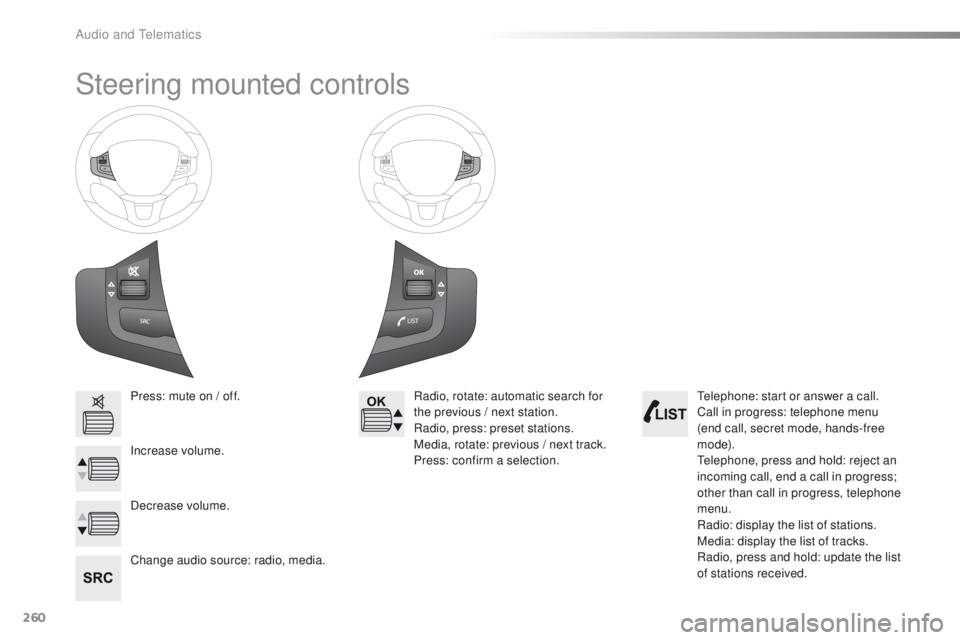
Steering mounted controls
Press: mute on / off.
Increase volume.
Change audio source: radio, media.Radio, rotate: automatic search for
the previous / next station.
Radio, press: preset stations.
Media, rotate: previous / next track.
Press: confirm a selection.
Decrease volume. Telephone: start or answer a call.
Call in progress: telephone menu
(end call, secret mode, hands-free
m o d e).
Telephone, press and hold: reject an
incoming call, end a call in progress;
other than call in progress, telephone
menu.
Radio: display the list of stations.
Media: display the list of tracks.
Radio, press and hold: update the list
of stations received.
Audio and Telematics
Page 288 of 450
286
2008_en_Chap12b_SMEGplus_ed01-2016
Media
USB playerSelecting the source
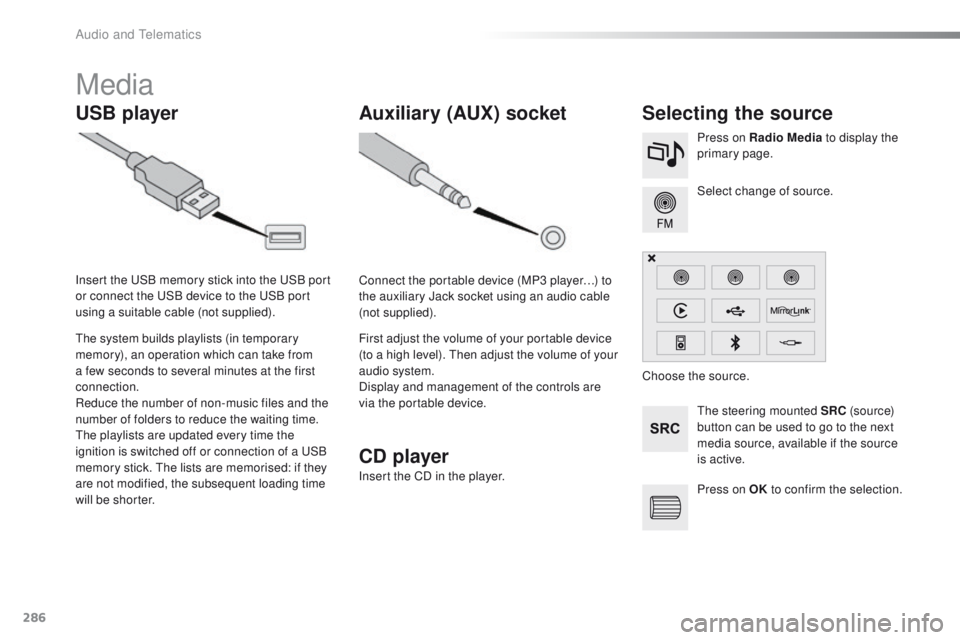
The steering mounted SRC (s o u r c e)
button can be used to go to the next
media source, available if the source
is active. Select change of source. Press on Radio Media to display the
primary page.
The system builds playlists (in temporary
memory), an operation which can take from
a few seconds to several minutes at the first
connection.
Reduce the number of non-music files and the
number of folders to reduce the waiting time.
The playlists are updated every time the
ignition is switched off or connection of a USB
memory stick. The lists are memorised: if they
are not modified, the subsequent loading time
will be shorter. Insert the USB memory stick into the USB port
or connect the USB device to the USB port
using a suitable cable (not supplied).
Auxiliary (AUX) socket
Connect the portable device (MP3 player…) to
the auxiliary Jack socket using an audio cable
(not supplied).
First adjust the volume of your portable device
(to a high level). Then adjust the volume of your
audio system.
Display and management of the controls are
via the portable device. Choose the source.
CD player
Insert the CD in the player.
Press on OK to confirm the selection.
Audio and Telematics
Page 318 of 450
316
2008_en_Chap12b_SMEGplus_ed01-2016
Managing paired
telephones
This function allows the connection or
disconnection of a peripheral device as
well as the deletion of a pairing.Using the telephone is not
recommended while driving.
Park the vehicle.
Make the call using the steering
mounted controls.
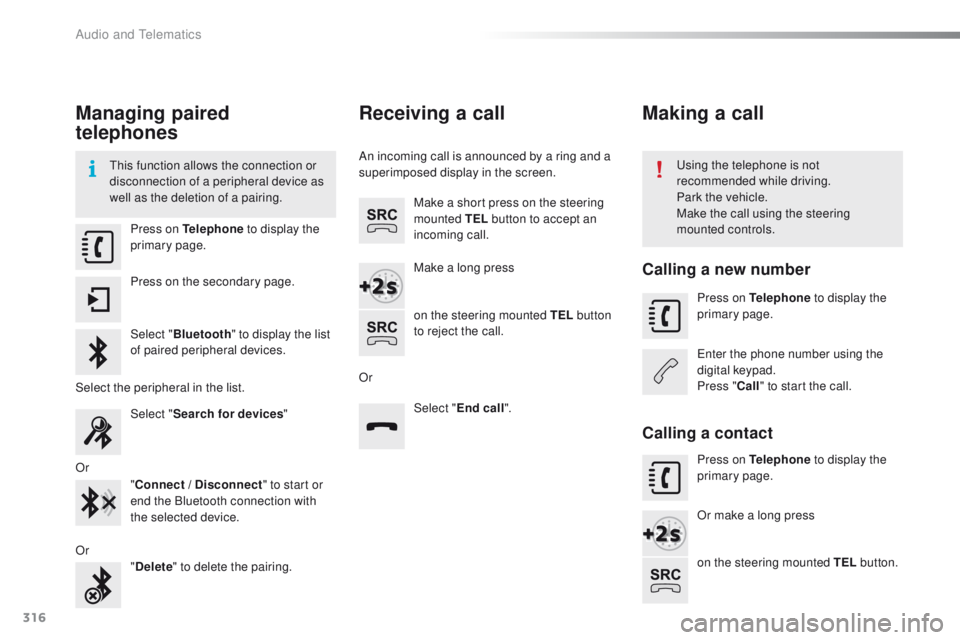
Press on Telephone
to display the
primary page.
Press on the secondary page.
Select " Bluetooth " to display the list
of paired peripheral devices.
Select the peripheral in the list. Select "Search for devices "
Or "Connect / Disconnect " to start or
end the Bluetooth connection with
the selected device.
Or "Delete " to delete the pairing.
Receiving a call
An incoming call is announced by a ring and a
superimposed display in the screen.
Make a short press on the steering
mounted TEL button to accept an
incoming call.
Make a long press
on the steering mounted TEL button
to reject the call.
Or Select "End call".
Making a call
Calling a new number
Press on Telephone to display the
primary page.
Enter the phone number using the
digital keypad.
Press " Call" to start the call.
Calling a contact
Press on Telephone to display the
primary page.
Or make a long press
on the steering mounted TEL button.
Audio and Telematics
Page 322 of 450
320
2008_en_Chap12b_SMEGplus_ed01-2016
Radio
QUESTIONANSWER SOLUTION
The quality of reception of
the radio station listened
to gradually deteriorates
or the stored stations do
not function (no sound,
87.5
Mhz is displayed...). The vehicle is too far from the transmitter used by the station
listened to or there is no transmitter in the geographical area
through which the vehicle is travelling.
Activate the "RDS" function by means of the
short-cut menu to enable the system to check
whether there is a more power ful transmitter in
the geographical area.
The environment (hills, buildings, tunnels, basement car parks...)
block reception, including in RDS mode. This phenomenon is normal and does not indicate
a fault with the audio system.
The aerial is absent or has been damaged (for example when going
through a car wash or into an underground car park). Have the aerial checked by a PEUGEOT dealer.
I cannot find some radio
stations in the list of
stations received. The station is not received or its name has changed in the list. Press and hold the "List" button at the steering
mounted controls to update the list of stations
received or press on the system update function:
"Update list".
Some radio stations send other information in place of their name
(the title of the song for example).
The system interprets this information as the name of the station.
The name of the radio
station changes.
Audio and Telematics
Page 329 of 450
327
2008_en_Chap12c_RDE2_ed01-2016
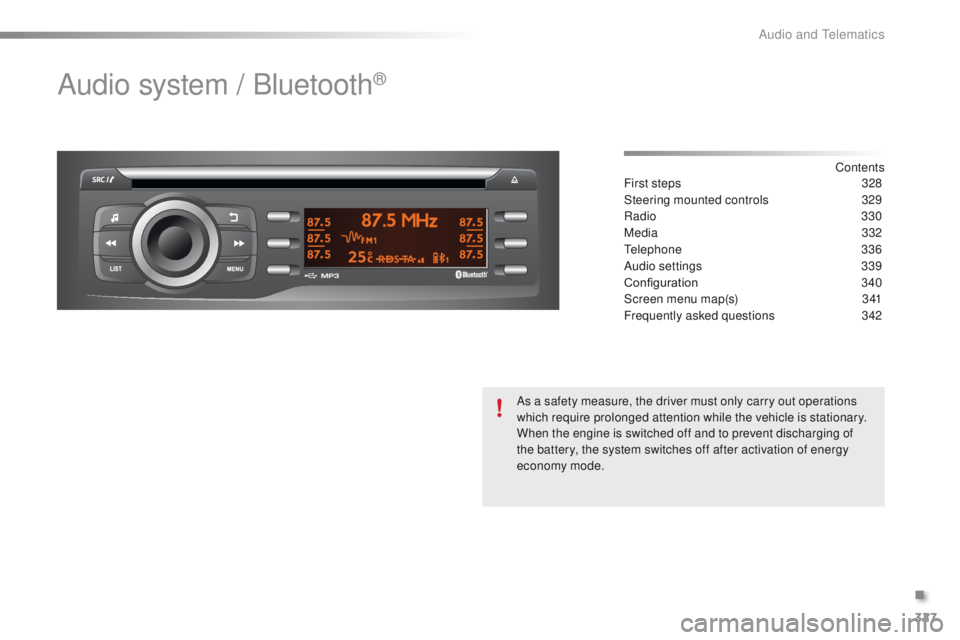
Audio system / Bluetooth®
Contents
First steps 32 8
Steering mounted controls
3
29
Radio
330
Media
3
32
Telephone
336
Audio settings
3
39
Configuration
3
40
Screen menu map(s)
3
41
Frequently asked questions
3
42
As a safety measure, the driver must only carry out operations
which require prolonged attention while the vehicle is stationary.
When the engine is switched off and to prevent discharging of
the battery, the system switches off after activation of energy
economy mode.
.
Audio and Telematics
Page 331 of 450
329
2008_en_Chap12c_RDE2_ed01-2016
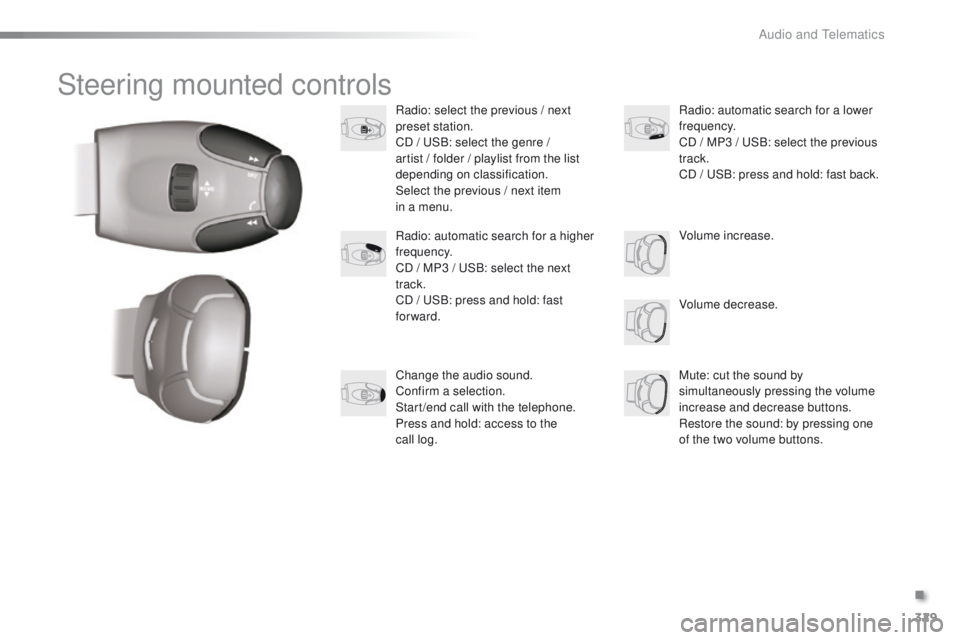
Steering mounted controls
Radio: select the previous / next
preset station.
CD / USB: select the genre /
artist / folder / playlist from the list
depending on classification.
Select the previous / next item
in a menu.Volume decrease.
Radio: automatic search for a higher
frequency.
CD / MP3 / USB: select the next
track.
CD / USB: press and hold: fast
forward.
Mute: cut the sound by
simultaneously pressing the volume
increase and decrease buttons.
Restore the sound: by pressing one
of the two volume buttons. Radio: automatic search for a lower
frequency.
CD / MP3 / USB: select the previous
track.
CD / USB: press and hold: fast back.
Change the audio sound.
Confirm a selection.
Start /end call with the telephone.
Press and hold: access to the
call
log. Volume increase.
.
Audio and Telematics
Page 337 of 450
335
2008_en_Chap12c_RDE2_ed01-2016
Bluetooth® audio streaming
Streaming allows music files on a telephone to
be heard via the vehicle's speakers.
Connect the telephone: see the "Telephone"
section.
In the " Bluetooth : Audio" menu, select the
telephone to connect.
The audio system connects automatically to a
newly paired telephone.
Control of playback is via the audio system. The control
of common tracks is possible via the audio system
control buttons and the steering mounted controls**.
Contextual information can be displayed in the screen.
Activate the streaming source by
pressing the SRC/TEL * button.
Connecting Apple® players
Connect the Apple® player to the USB port
using a suitable cable (not supplied).
Play starts automatically.
Management of the device is via the audio
system controls.
The classifications available are those on the
portable player connected (artists / albums /
genres / playlist s/ audiobooks / podcasts).
The software version of the audio system may
not be compatible with the generation of your
Apple
® p l aye r.
The audio quality depends on the quality of the
transmission from the telephone.
*
I
n certain cases, the play of audio files must
be initiated from the keypad.
** If the telephone supports the function.
.
Audio and Telematics
Page 349 of 450
347
2008_en_Chap12d_RDE1_ed01-2016
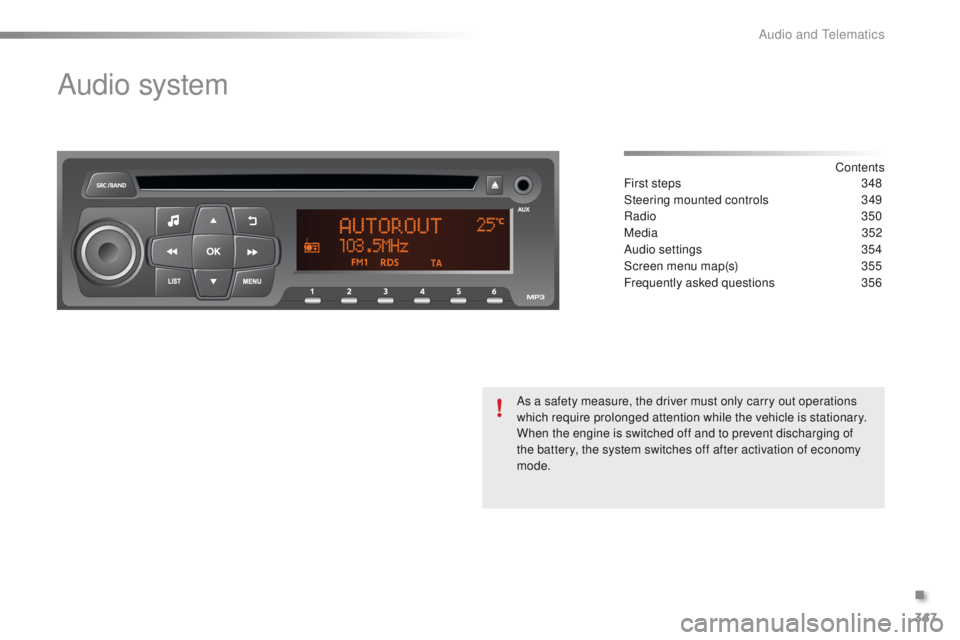
Audio system
Contents
First steps
3 48
Steering mounted controls
3
49
Radio
350
Media
3
52
Audio settings
3
54
Screen menu map(s)
3
55
Frequently asked questions
3
56
As a safety measure, the driver must only carry out operations
which require prolonged attention while the vehicle is stationary.
When the engine is switched off and to prevent discharging of
the battery, the system switches off after activation of economy
mode.
.
Audio and Telematics
Page 351 of 450
349
2008_en_Chap12d_RDE1_ed01-2016
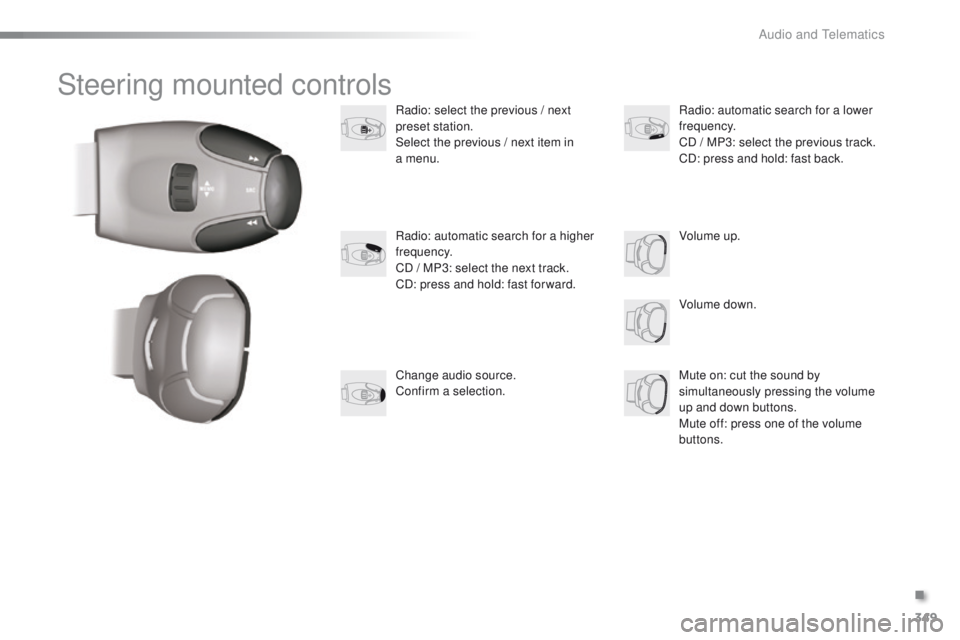
Steering mounted controls
Radio: select the previous / next
preset station.
Select the previous / next item in
a menu.
Volume down.
Radio: automatic search for a higher
frequency.
CD / MP3: select the next track.
CD: press and hold: fast for ward.
Mute on: cut the sound by
simultaneously pressing the volume
up and down buttons.
Mute off: press one of the volume
buttons. Radio: automatic search for a lower
frequency.
CD / MP3: select the previous track.
CD: press and hold: fast back.
Change audio source.
Confirm a selection. Volume up.
.
Audio and Telematics
Page 361 of 450
359
2008_en_Chap13_index-alpha_ed01-2016
Accessories .......................................... 13 4, 231
Active City Brake ........................................... 14
5
AdBlue
® ............................... ............24, 175, 180
Adjusting headlamps .................................... 124
Adjusting head restraints
................................ 57
Adjusting seats
................................................ 56
Adjusting the air distribution
.....................66, 69
Adjusting the air flow
................................. 65, 69
Adjusting the date
........................................... 42
Adjusting the height and reach of the steering wheel
.......................... 59
A
djusting the seat
belt height
...............................
....................149
Adjusting the temperature
........................ 6
5, 68
Adjusting the time
........................................... 42
Advice on care and maintenance
............................................... 23
0
Advice on driving
.................................... 79, 224
Airbags
.................................................... 27, 152
Airbags, curtain
..................................... 15
4, 155
Airbags, front ......................................... 152, 155
Airbags, lateral
...................................... 15 4, 155
Air conditioning
............................................... 12
Air conditioning, digital
............................. 67, 70
Air conditioning, manual
........................... 65, 70
Air filter
.......................................................... 240
Air intake
................................................... 66, 69
Air vents
.......................................................... 62
Alarm
......................................................... 43, 52
Anti-lock braking system (ABS)
.............................................. 14
0
Anti-theft
................................................... 45, 47
Armrest, front
.................................................. 72
Assistance call
...................................... 13 6, 25 5
Assistance, emergency braking
...............
......................................... 140
Audible warning
............................................ 13 6
Audio streaming (Bluetooth)
........ 2
86, 288, 335Battery
...................................................214, 240
Battery, charging
...........................................216
Battery, remote control
............................. 4
6, 47
Blind
..............................................................13 3
BlueHDi
.........................................................175
Bluetooth (telephone)
............................314, 3 3 6
Bonnet
...........................................................234
Boot
...........................................................50, 75
Brake discs
.................................................... 2
41
Brake lamps
...............................
...................206
Brake pads
....................................................2 41
Brake warning lamp
........................................22
Braking assistance system
...........................14
0
Bulbs (changing)
...............................
............202
A
B
CarPlay connection ....................................... 307
CD ................................................ 286, 332, 352
Central locking
.......................................... 4 3 , 51
Changing a bulb
................................... 202, 206
Changing a fuse
............................................ 208
Changing a wheel
................................. 19 4, 195
Changing a wiper blade
........................129, 2 20
Changing the remote control battery ............................................... 46
Checking levels
...................................... 23
7-239
Checking the engine oil level
..................31, 237
Checking tyre pressures (using the kit)
..............................
........18 6, 193
Checks
...............
................................... 2 3 5 - 2 41
Child lock
...............................
........................169
Children (safety)
..................... 15
1, 153, 15 6 -16 0
Child seats
..............................
..............161-168
Child seats, conventional
..............................161
Child seats, ISOFIX
...................................... 16
7
Cleaning (advice)
.......................................... 23
0
Closing the boot
.............................................. 50
Closing the doors
............................................ 48
Connected services
...................................... 29
8
Connection, Bluetooth
..................300, 314, 335
Connection, MirrorLink
.................................302
Connection, Wi-Fi network
...........................300
Control, electric windows
................................54
Control, emergency boot release
...................50
Control, heated seats
...................................... 57
Controls, at steering..................... 260, 329, 349
Control stalk, lighting
.................................... 11
7
Control stalk, wipers
..................................... 127
Coolant level
................................................. 238
Courtesy lamps
............................................. 131
Cover, load space
............................................................ 77
Cruise control
........................................ 10
6, 108
Cup holder
...............................
........................71
Audio system
(r adi o)
.................................................. 327, 347
Automatic illumination of headlamps
.............................................. 118
Auxiliary socket
...................... 73, 286, 333, 352
Cable, audio
................................. 286, 333, 352
Capacity, fuel tank
..............................
.......... 170
C
.
Alphabetical index