light PEUGEOT 2008 2016 Owners Manual
[x] Cancel search | Manufacturer: PEUGEOT, Model Year: 2016, Model line: 2008, Model: PEUGEOT 2008 2016Pages: 450, PDF Size: 14.16 MB
Page 5 of 450
.
2008_en_Chap00a_sommaire_ed01-2016
General safety recommendations 134
Direction indicators
1
35
Hazard warning lamps
1
35
H or n
13
6
Emergency or assistance call
1
36
Under-inflation detection
1
37
ESC system
1
40
Grip control
1
43
Active City Brake
1
45
Front seat belts
1
49
Airbags
152
Safety
Fuel tank 1 70
Misfuel prevention (Diesel) 1 72
Running out of fuel (Diesel)
1
74
AdBlue
® and SCR system
(BlueHDi Diesel) 1 75
Temporary puncture repair kit
1
83
Changing a wheel
1
94
Snow chains
2
01
Changing a bulb
2
02
Changing a fuse
2
08
12 V battery
2
14
Changing a wiper blade
2
20
To w i n g
2 2 1
Towing a trailer
2
23
Towbar with quickly detachable towball
2
25
Fitting roof bars
2
30
Advice on care and maintenance
2
30
Accessories
2
31
Practical information
Bonnet 234
Petrol engines 2 35
Diesel engines
2
36
Checking levels
2
37
Checks
240
Checks
General information 2 42
Petrol engines 2 43
Petrol weights
2
45
Diesel engines
2
47
Diesel weights
2
49
Dimensions
252
Identification markings
2
53
Technical data
Emergency call 254
Assistance call 2 55
7-inch touch screen
2
57
Audio system / Bluetooth
3
27
Audio system
3
47
Audio equipment and telematics
Alphabetical index
Carrying children 1 56
Deactivating the passenger's front airbag 1 58
ISOFIX child seats
1
65
Child lock
1
69
Child safety
Lighting 1 17
Headlamp adjustment 1 24
Cornering lighting
1
25
Wiper controls
1
26
Lighting dimmer
1
30
Courtesy lamps
1
31
Interior mood lighting
1
32
Panoramic glazed sunroof
1
33
Visibility
Contents
Page 6 of 450
4
2008_en_Chap00b_vue-ensemble_ed01-2016
Exterior
Remote control key 43 - 47
- locking/unlocking
the vehicle
-
l
ocating the vehicle
-
gu
ide-me-home lighting
-
a
nti-theft protection
-
alarm
-
battery
Starting - Switching off the engine
8
0 - 81 Boot
50
-
ope
ning / closing
-
em
ergency release
Temporary puncture repair kit
1
83-193
W iper s
126 -129
Changing a wiper blade
1
29, 219
Changing bulbs
2
06-207
-
r
ear lamps
-
3
rd brake lamp
-
n
umber plate lamps
-
foglamp
-
r
eversing lamp
Fuel tank, misfuel p r eve nt i o n
17
0 -173
Panoramic glazed sunroof
1
33
Roof bars
2
30
Accessories
231-232
Electronic stability programme (ESC)
1
40 -142
Snow chains
2
01
Ty r e pressures
1
86, 193, 253
Changing a wheel
1
94-200
-
tools
-
r
emoving / refitting
Lighting
1
17-123
LED lamps
121
Daytime running lamps
1
21
Headlamp beam adjustment
1
24
Cornering lighting
1
25
Changing bulbs
2
02-205
-
f
ront lamps
-
foglamps
-
d
irection indicator repeaters
Door mirrors
6
0
Doors
48 - 49
-
ope
ning / closing
-
em
ergency control
Locking/unlocking from the inside
5
1
Alarm
52-53
Electric windows
5
4-55 P a r k i n g s e n s o r s
11
0 -111
Reversing camera
1
12
P a r k A s s i s t
11
3 -11 6
Towbar
223-229
Towing
221-222
Over view
Page 8 of 450
6
2008_en_Chap00b_vue-ensemble_ed01-2016
Instruments and controls
Courtesy lamps 131
Interior mood lighting 1 32
Rear view mirror
6
1
Emergency / Assistance call
1
36, 254-255
Manual parking brake
8
2Manual gearbox
8
3
5-speed electronic gearbox
8
4- 86
6-speed electronic gearbox
87
-90
Automatic gearbox
9
1-94
Automatic gearbox ( E AT 6)
9 5 - 9 8
Gear shift indicator
99
Stop & Start
1
00 -102
Hill start assist
1
03
Dashboard fuses
2
08-212
USB port / Auxiliary socket
7
2-73 Heating, ventilation
6
5-69
Manual air conditioning
6
5-66
Dual-zone air conditioning
6
7- 69
Front demisting / defrosting
7
0
Rear screen demisting/
defrosting
70
B
luetooth audio system
3
27-345
Door mirrors
6
0
Electric windows, deactivating
5
4-55 Audio system
3
47-358
Glove box fuses
2
08 -209, 212
Touch screen
2
57-325
Opening the bonnet
2
34
Over view
Page 9 of 450
7
2008_en_Chap00b_vue-ensemble_ed01-2016
P a r k i n g s e n s o r s 110 -111
P a r k A s s i s t 11 3 -11 6
DSC/ASR system
1
40
Stop & Start
1
00 -102
Under-inflation detection
1
37-139
Alarm
52-53
Electric child lock
1
69
Instrument panels
1
4-15
Warning lamps
1
6-27
Trip computer
3
8 - 40
Distance recorders
4
1
Setting the date/time
4
2
Indicators
28-33
Gear shift indicator 99
Lighting dimmer
1
30
Lighting controls
1
17-123
Direction indicators
1
35Speed limiter
1
04-105
Cruise control
1
06 -107
Memorising speeds
1
08-109Touch screen
3
4-37
Trip computer with the touch screen
3
8 -39
Setting the date/time with the touch screen
4
2
Lighting dimmer with the touch screen
1
30
Headlamp beam adjustment
1
24 Wiper controls
1
26-129
Hazard warning lamps
1
35
Locking/unlocking from inside
5
1
Adjusting the steering wheel
5
9
H or n
13 6
Gr ip c ontrol
14
3 -14 4
.
Over view
Page 14 of 450
12
2008_en_Chap00c_eco-conduite_ed01-2016
Eco-driving
Eco-driving is a range of everyday practices that allow the motorist to optimise their fuel consumption and CO2 emissions.
Optimise the use of your gearbox
With a manual gearbox, move off gently and change up without waiting.
During acceleration change up early.
With an automatic or electronic gearbox, give preference to automatic
mode and avoid pressing the accelerator pedal heavily or suddenly.
The gear shift indicator invites you to engage the most suitable gear:
as soon as the indication is displayed in the instrument panel, follow it
straight away.
For vehicles fitted with an electronic or automatic gearbox, this
indicator appears only in manual mode.
Drive smoothly
Maintain a safe distance between vehicles, use engine braking rather
than the brake pedal, and press the accelerator progressively. These
practices contribute towards a reduction in fuel consumption and
CO
2 emissions and also help to reduce the background traffic noise.
If your vehicle has cruise control, make use of the system at speeds
above 25 mph (40 km/h) when the traffic is flowing well.
Control the use of your electrical
equipment
Before moving off, if the passenger compartment is too warm, ventilate it
by opening the windows and air vents before using the air conditioning.
Above 30 mph (50 km/h), close the windows and leave the air vents
open.
Remember to make use of equipment that can help keep the
temperature in the passenger compartment down (sunroof and window
blinds...).
Switch off the air conditioning, unless it has automatic regulation, as
soon as the desired temperature is attained.
Switch off the demisting and defrosting controls, if not automatic.
Switch off the heated seat as soon as possible.
Switch off the headlamps and front foglamps when the level of light
does not require their use.
Avoid running the engine before moving off, particularly in winter; your
vehicle will warm up much faster while driving.
As a passenger, if you avoid connecting your multimedia devices
(film, music, video game...), you will contribute towards limiting the
consumption of electrical energy, and so of fuel.
Disconnect your portable devices before leaving the vehicle.
Eco-driving
Page 16 of 450
14
LCD instrument panel
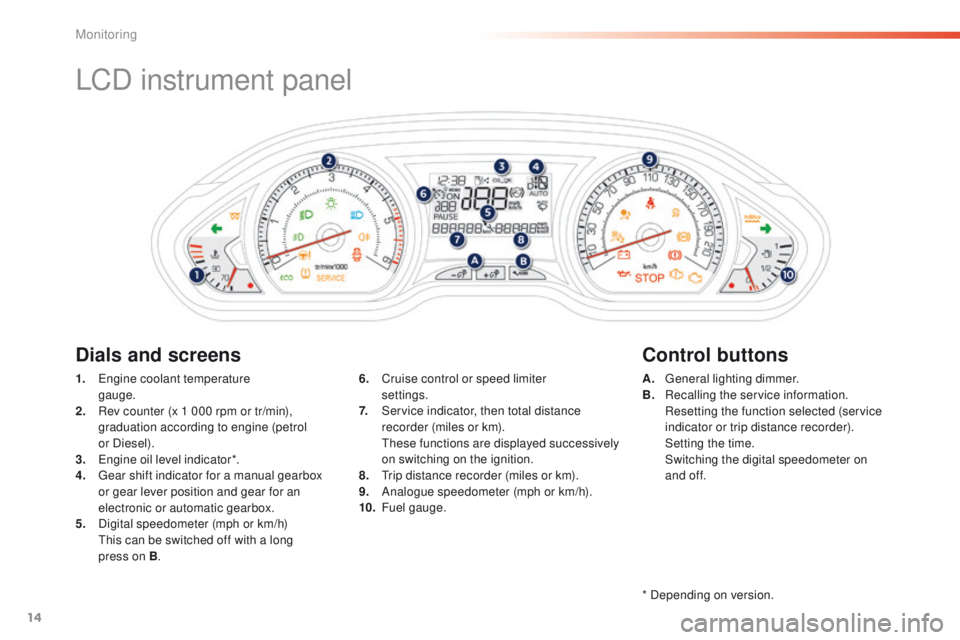
1. Engine coolant temperature gauge.
2.
R
ev counter (x 1 000 rpm or tr/min),
graduation according to engine (petrol
or Diesel).
3.
E
ngine oil level indicator*.
4.
G
ear shift indicator for a manual gearbox
or gear lever position and gear for an
electronic or automatic gearbox.
5.
D
igital speedometer (mph or km/h)
T
his can be switched off with a long
press on B . A. G
eneral lighting dimmer.
B. R ecalling the service information.
R
esetting the function selected (service
indicator or trip distance recorder).
S
etting the time.
S
witching the digital speedometer on
and of f.
6. C
ruise control or speed limiter
settings.
7.
S
ervice indicator, then total distance
recorder (miles or km).
T
hese functions are displayed successively
on switching on the ignition.
8.
T
rip distance recorder (miles or km).
9.
A
nalogue speedometer (mph or km/h).
10.
F
uel gauge.
Dials and screens Control buttons
* Depending on version.
Monitoring
Page 17 of 450
15
2008_en_Chap01_controle-de-marche_ed01-2016
Matrix instrument panel
Dials and screensControl buttons
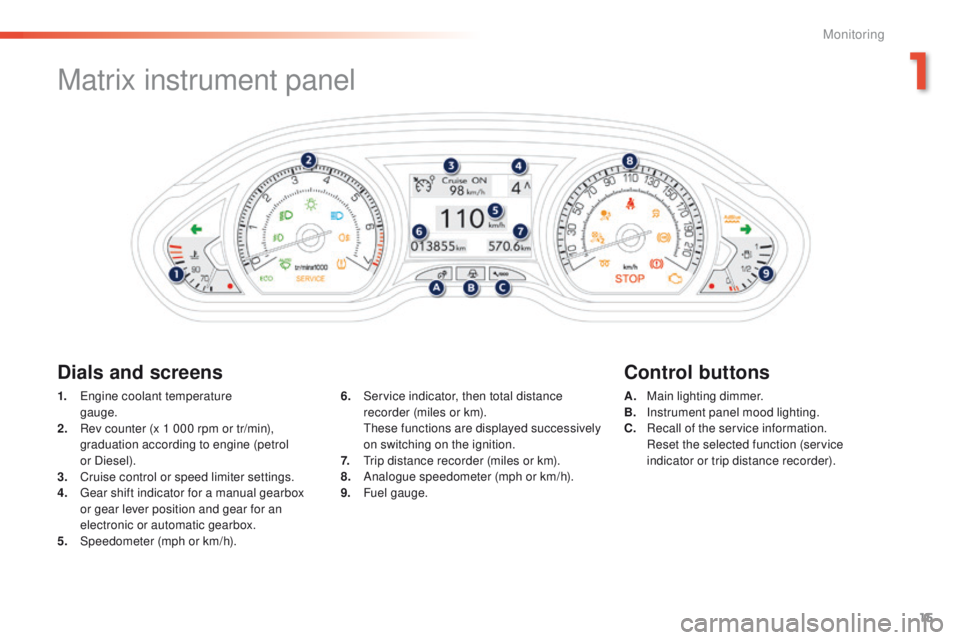
1. Engine coolant temperature
gauge.
2.
R
ev counter (x 1 000 rpm or tr/min),
graduation according to engine (petrol
or Diesel).
3.
C
ruise control or speed limiter settings.
4.
G
ear shift indicator for a manual gearbox
or gear lever position and gear for an
electronic or automatic gearbox.
5.
Spe
edometer (mph or km/h). A. M
ain lighting dimmer.
B. I nstrument panel mood lighting.
C.
R
ecall of the service information.
R
eset the selected function (service
indicator or trip distance recorder).
6. S
ervice indicator, then total distance
recorder (miles or km).
T
hese functions are displayed successively
on switching on the ignition.
7.
T
rip distance recorder (miles or km).
8.
A
nalogue speedometer (mph or km/h).
9.
F
uel gauge.
1
Monitoring
Page 18 of 450
16
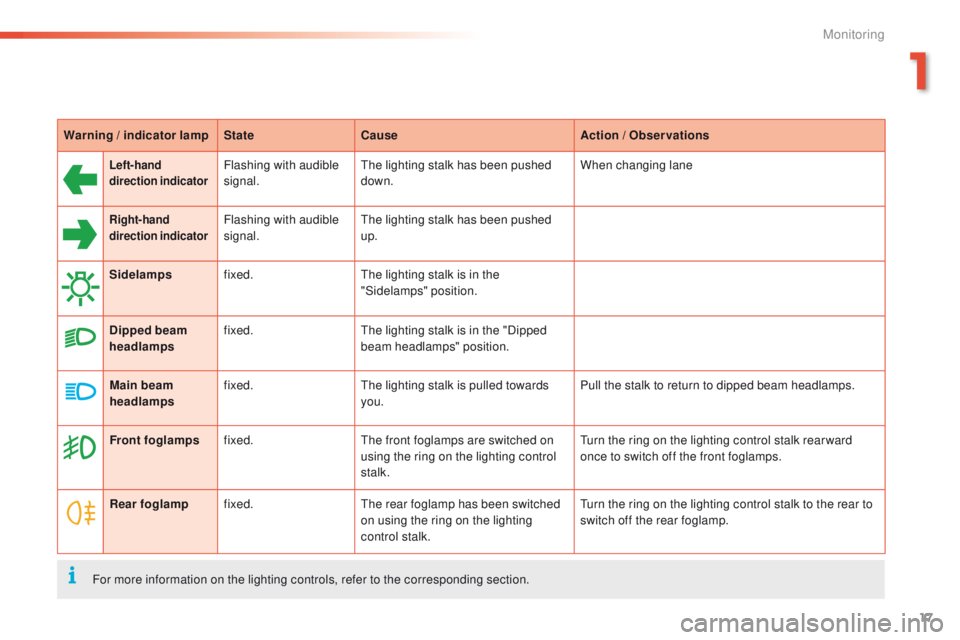
Library of indicator and warning lamps
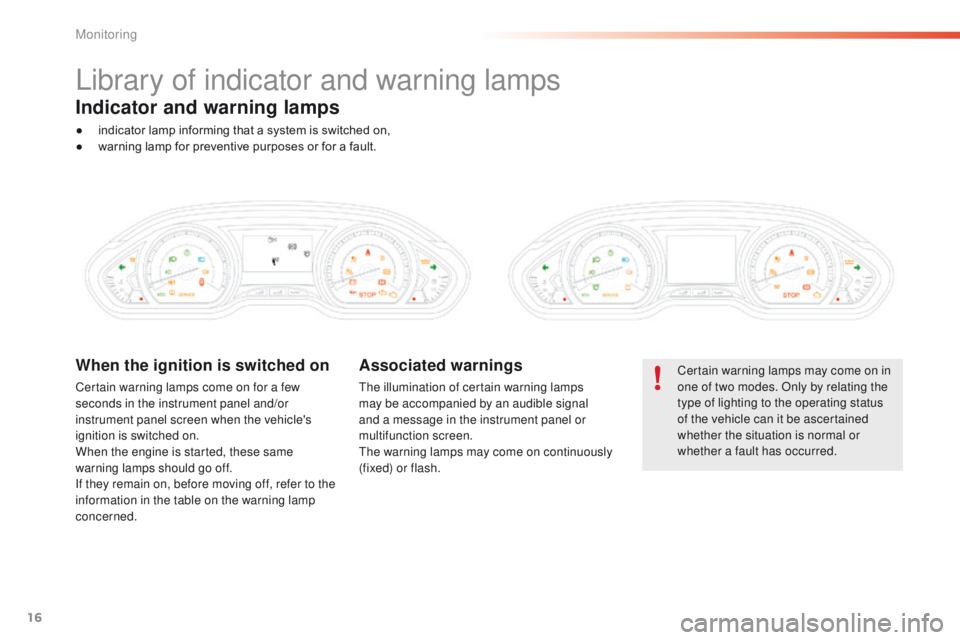
Certain warning lamps may come on in
one of two modes. Only by relating the
type of lighting to the operating status
of the vehicle can it be ascertained
whether the situation is normal or
whether a fault has occurred.When the ignition is switched on
Certain warning lamps come on for a few
seconds in the instrument panel and/or
instrument panel screen when the vehicle's
ignition is switched on.
When the engine is started, these same
warning lamps should go off.
If they remain on, before moving off, refer to the
information in the table on the warning lamp
concerned.
Associated warnings
The illumination of certain warning lamps
may be accompanied by an audible signal
and a message in the instrument panel or
multifunction screen.
The warning lamps may come on continuously
(fixed) or flash.
Indicator and warning lamps
● indicator lamp informing that a system is switched on,
● w arning lamp for preventive purposes or for a fault.
Monitoring
Page 19 of 450
17
2008_en_Chap01_controle-de-marche_ed01-2016
Warning / indicator lampStateCause Action / Observations
Left-hand
direction indicatorFlashing with audible
signal.The lighting stalk has been pushed
down. When changing lane
Right-hand
direction indicatorFlashing with audible
signal.The lighting stalk has been pushed
up.
Sidelamps fixed. The lighting stalk is in the
"Sidelamps" position.
Dipped beam
headlamps fixed.
The lighting stalk is in the "Dipped
beam headlamps" position.
Main beam
headlamps fixed.
The lighting stalk is pulled towards
you. Pull the stalk to return to dipped beam headlamps.
Front foglamps fixed. The front foglamps are switched on
using the ring on the lighting control
stalk. Turn the ring on the lighting control stalk rear ward
once to switch off the front foglamps.
Rear foglamp fixed. The rear foglamp has been switched
on using the ring on the lighting
control stalk. Turn the ring on the lighting control stalk to the rear to
switch off the rear foglamp.
For more information on the lighting controls, refer to the corresponding section.
1
Monitoring
Page 21 of 450
19
2008_en_Chap01_controle-de-marche_ed01-2016
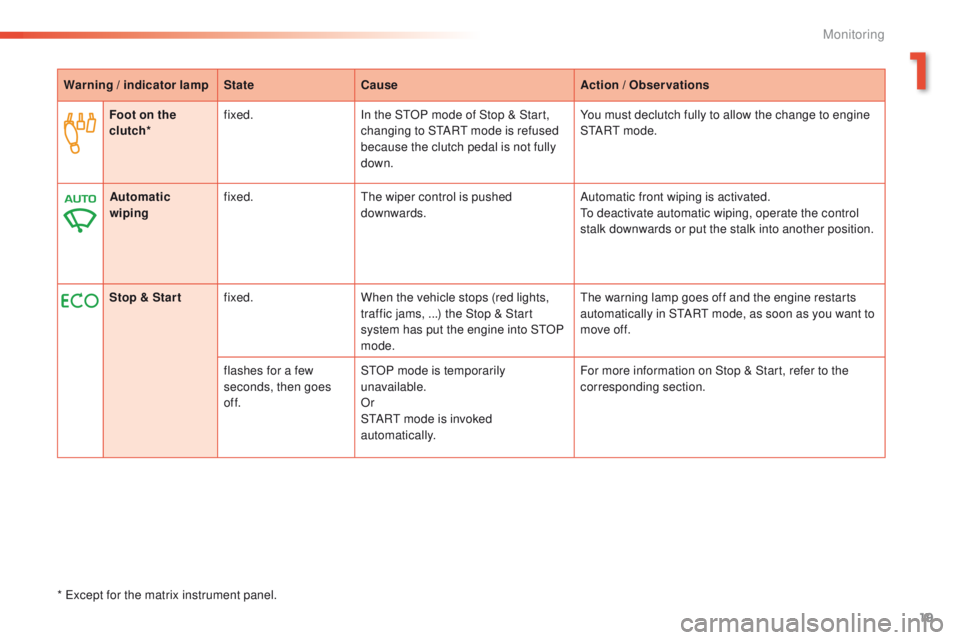
Warning / indicator lampStateCause Action / Observations
Foot on the
clutch* fixed.
In the STOP mode of Stop & Start,
changing to START mode is refused
because the clutch pedal is not fully
down. You must declutch fully to allow the change to engine
S TA R T m o d e .
Stop & Star t fixed. When the vehicle stops (red lights,
traffic jams,
...) the Stop & Start
system has put the engine into STOP
mode. The warning lamp goes off and the engine restarts
automatically in START mode, as soon as you want to
move off.
flashes for a few
seconds, then goes
of f. STOP mode is temporarily
unavailable.
Or
START mode is invoked
automatically. For more information on Stop & Start, refer to the
corresponding section.
Automatic
wiping
fixed.
The wiper control is pushed
downwards. Automatic front wiping is activated.
To deactivate automatic wiping, operate the control
stalk downwards or put the stalk into another position.
* Except for the matrix instrument panel.
1
Monitoring