stop start PEUGEOT 2008 2016 Owner's Guide
[x] Cancel search | Manufacturer: PEUGEOT, Model Year: 2016, Model line: 2008, Model: PEUGEOT 2008 2016Pages: 450, PDF Size: 14.16 MB
Page 236 of 450
234
2008_en_Chap10_verifications_ed01-2016
Bonnet
Before doing anything under the
bonnet, deactivate the Stop & Start
system to avoid any risk of injury
resulting from an automatic change to
S TA R T m o d e .
Closing
F Take the stay C out of its support slot.
F C lip the stay back into its housing.
F
L
ower the bonnet and release it at the end
of its travel.
F
P
ull the bonnet to check that it has latched
c o r r e c t l y.
F
L
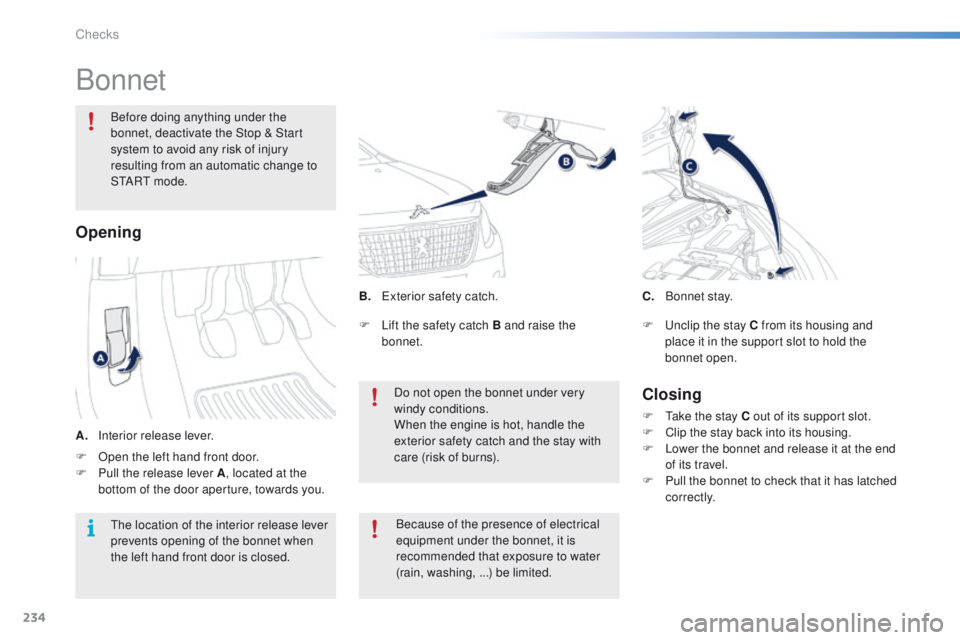
ift the safety catch B and raise the
bonnet.
Do not open the bonnet under very
windy conditions.
When the engine is hot, handle the
exterior safety catch and the stay with
care (risk of burns).
Opening
B. Exterior safety catch.
A.
I
nterior release lever. Because of the presence of electrical
equipment under the bonnet, it is
recommended that exposure to water
(rain, washing,
...) be limited.
The location of the interior release lever
prevents opening of the bonnet when
the left hand front door is closed. C. B
o n n et st ay.
F
U
nclip the stay C from its housing and
place it in the support slot to hold the
bonnet open.
F
O
pen the left hand front door.
F
P
ull the release lever A , located at the
bottom of the door aperture, towards you.
Checks
Page 242 of 450
240
2008_en_Chap10_verifications_ed01-2016
Checks
12 V battery
The battery does not require any maintenance.
However, check regularly that the terminals
are correctly tightened (versions without quick
release terminals) and that the connections
are clean.
Versions equipped with Stop & Start are
fitted with a 12 V lead-acid battery of specific
technology and specification.
Its replacement should be carried out only by a
PEUGEOT dealer or a qualified workshop.
Diesel
Particle filter
On a new vehicle, the first particle
filter regeneration operations may be
accompanied by a "burnt" smell, which
is normal.
Following prolonged operation of the
vehicle at very low speed or at idle,
you may, in exceptional circumstances,
notice the emission of water vapour at
the exhaust on acceleration. This does
not affect the behaviour of the vehicle
or the environment.
Unless other wise indicated, check these components in accordance with the warranty and maintenance record and according to your engine.
Other wise, have them checked by a PEUGEOT dealer or a qualified workshop.
Air filter and passenger compartment filter
Refer to the warranty and
maintenance record for details of
the replacement intervals for these
components.
Oil filter
Replace the oil filter each time the
engine oil is changed.
Refer to the warranty and
maintenance record for details of
the replacement interval for this
component.
When carrying out any operation on the 12 V
battery, refer to the corresponding section for
details of the precautions to be taken before
starting work.
Depending on the environment (e.g. dusty
atmosphere) and the use of the vehicle
(e.g. city driving), replace them twice as often
if necessary
.
A clogged passenger compartment filter may
have an adverse effect on the per formance
of the air conditioning system and generate
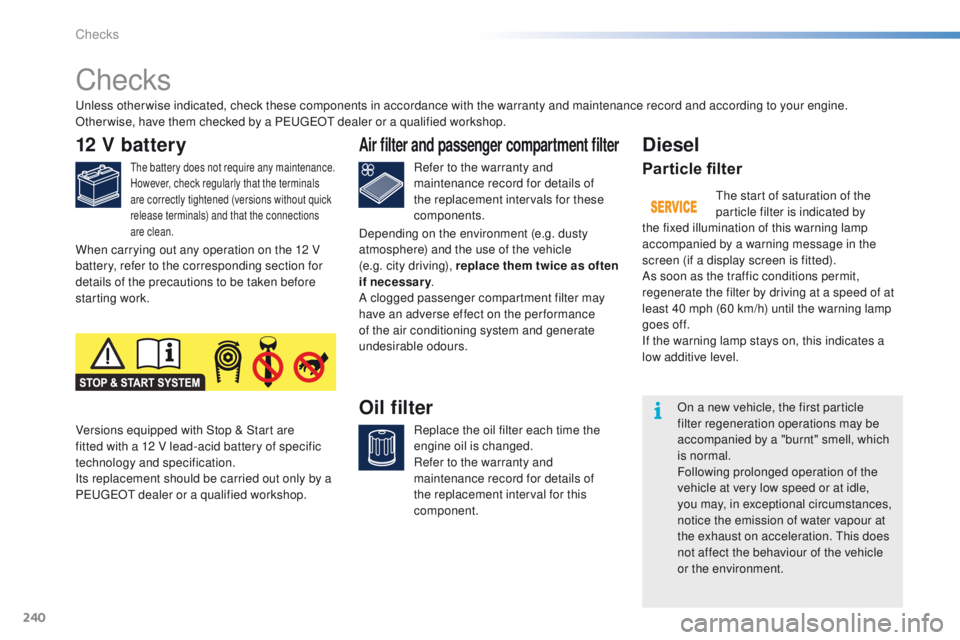
undesirable odours. The start of saturation of the
particle filter is indicated by
the fixed illumination of this warning lamp
accompanied by a warning message in the
screen (if a display screen is fitted).
As soon as the traffic conditions permit,
regenerate the filter by driving at a speed of at
least 40 mph (60 km/h) until the warning lamp
goes off.
If the warning lamp stays on, this indicates a
low additive level.
Checks
Page 265 of 450
263
2008_en_Chap12b_SMEGplus_ed01-2016
Level 1Level 2 Level 3 Comments
Navigation Settings
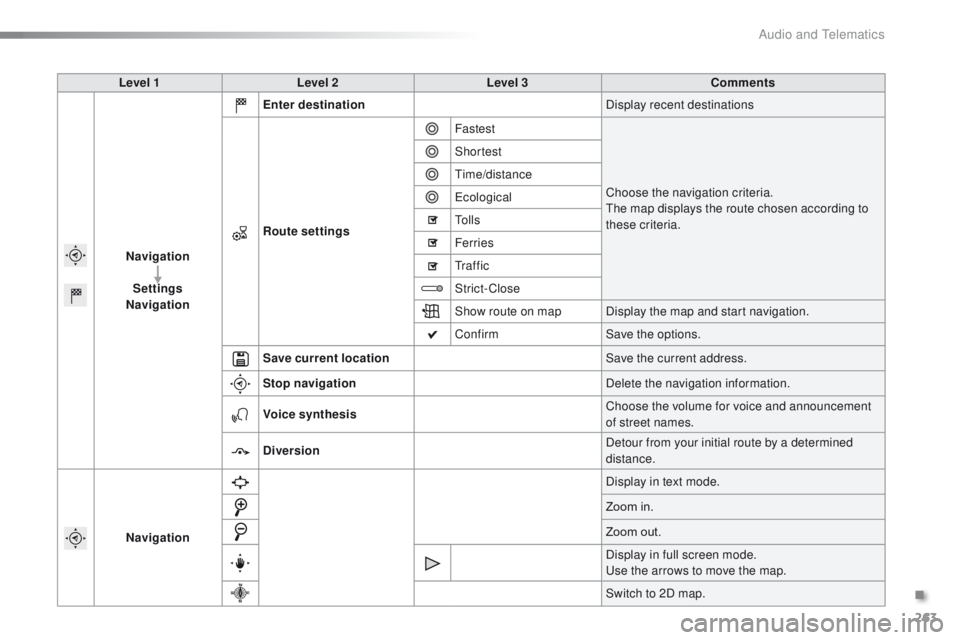
Navigation Enter destination
Display recent destinations
Route settings Fastest
Choose the navigation criteria.
The map displays the route chosen according to
these criteria.
Shortest
Time/distance
Ecological
To l l s
Ferries
Tr a f f i c
Strict-Close
Show route on map
Display the map and start navigation.
Confirm Save the options.
Save current location Save the current address.
Stop navigation Delete the navigation information.
Voice synthesis Choose the volume for voice and announcement
of street names.
Diversion Detour from your initial route by a determined
distance.
Navigation Display in text mode.
Zoom in.
Zoom out.
Display in full screen mode.
Use the arrows to move the map.
Switch to 2D map.
.
Audio and Telematics
Page 272 of 450
270
2008_en_Chap12b_SMEGplus_ed01-2016
Navigation - Guidance
Choosing a new destination
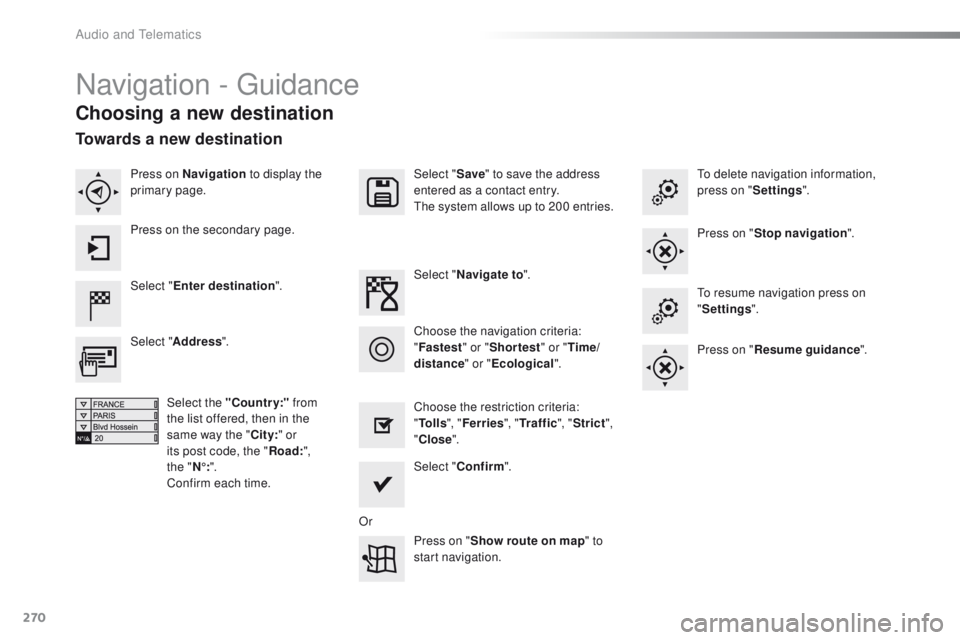
Select "Enter destination ". Select "
Save" to save the address
entered as a contact entry.
The system allows up to 200 entries.
Select " Confirm ".
Press on " Show route on map " to
start navigation.
Select "
Address ".
Select the "Country:" from
the list offered, then in the
same way the " City:" or
its post code, the " Road:",
the
"N°: ".
Confirm each time. Select "
Navigate to ".
Choose the restriction criteria:
" To l l s ", "Ferries ", "Tr a f f i c ", "Strict ",
" Close ".
Choose the navigation criteria:
"
Fastest " or "Shortest " or "Time/
distance " or "Ecological". To delete navigation information,
press on "
Settings".
Press on " Stop navigation ".
To resume navigation press on
" Settings ".
Press on " Resume guidance ".
Press on Navigation
to display the
primary page.
Press on the secondary page.
Towards a new destination
Or
Audio and Telematics
Page 315 of 450
313
2008_en_Chap12b_SMEGplus_ed01-2016
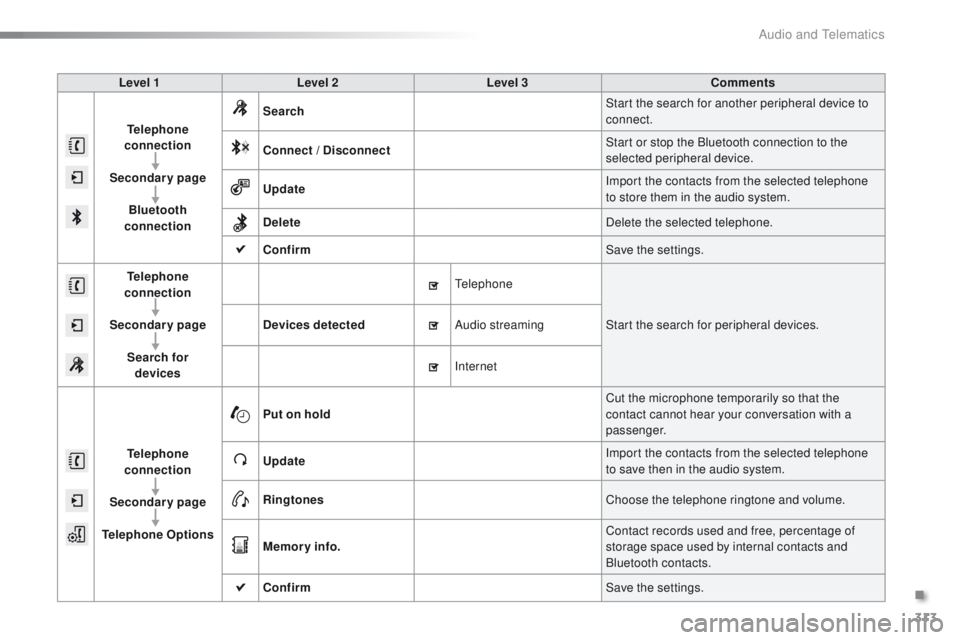
Level 1Level 2 Level 3 Comments
Telephone
connection
Secondary page Bluetooth
connection Search
Start the search for another peripheral device to
connect.
Connect / Disconnect Start or stop the Bluetooth connection to the
selected peripheral device.
Update Import the contacts from the selected telephone
to store them in the audio system.
Delete Delete the selected telephone.
Confirm Save the settings.
Telephone
conn ection
Secondary page Search for devices Devices detected
Telephone
Start the search for peripheral devices.
Audio streaming
Internet
Telephone
connection
Secondary page
Telephone Options Put on hold
Cut the microphone temporarily so that the
contact cannot hear your conversation with a
passenger.
Update Import the contacts from the selected telephone
to save then in the audio system.
Ringtones Choose the telephone ringtone and volume.
Memory info. Contact records used and free, percentage of
storage space used by internal contacts and
Bluetooth contacts.
Confirm Save the settings.
.
Audio and Telematics
Page 340 of 450
338
2008_en_Chap12c_RDE2_ed01-2016
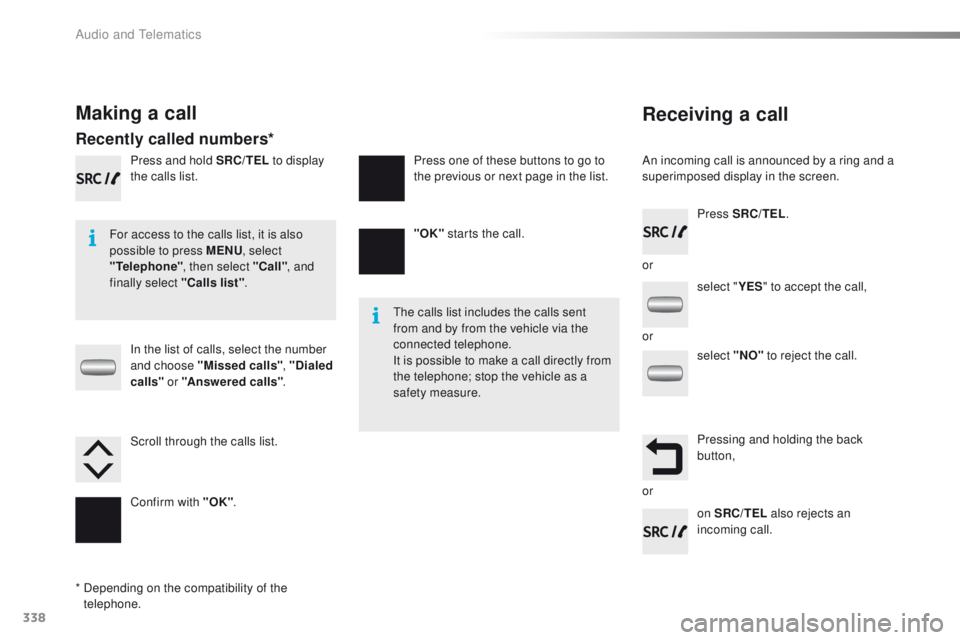
Receiving a call
An incoming call is announced by a ring and a
superimposed display in the screen.
For access to the calls list, it is also
possible to press MENU , select
"Telephone" , then select "Call" , and
finally select "Calls list" .
The calls list includes the calls sent
from and by from the vehicle via the
connected telephone.
It is possible to make a call directly from
the telephone; stop the vehicle as a
safety measure.
Making a call
Recently called numbers*
In the list of calls, select the number
and choose "Missed calls" , "Dialed
calls " or "Answered calls" .
Press and hold SRC/TEL
to display
the calls list.
Press SRC/TEL.
on SRC/TEL also rejects an
incoming call.
or
or
or
Scroll through the calls list.
Confirm with "OK"
. "OK"
starts the call.
Press one of these buttons to go to
the previous or next page in the list.
*
D
epending on the compatibility of the
telephone. select "
YES" to accept the call,
select "NO" to reject the call.
Pressing and holding the back
button,
Audio and Telematics
Page 347 of 450
345
2008_en_Chap12c_RDE2_ed01-2016
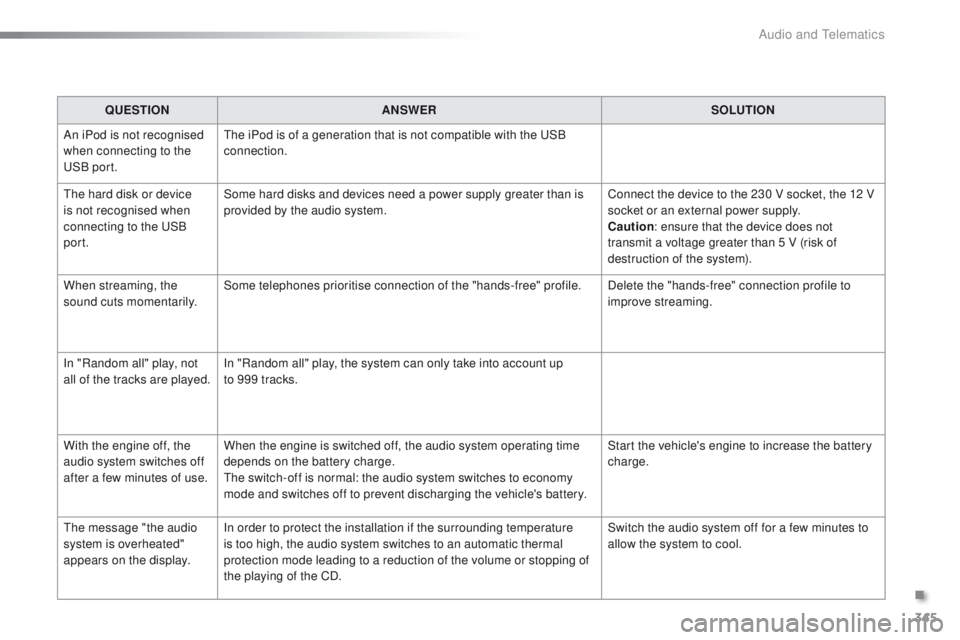
QUESTIONANSWER SOLUTION
An iPod is not recognised
when connecting to the
USB port. The iPod is of a generation that is not compatible with the USB
connection.
The hard disk or device
is not recognised when
connecting to the USB
port. Some hard disks and devices need a power supply greater than is
provided by the audio system.
Connect the device to the 230 V socket, the 12 V
socket or an external power supply.
Caution
: ensure that the device does not
transmit a voltage greater than 5 V (risk of
destruction of the system).
When streaming, the
sound cuts momentarily. Some telephones prioritise connection of the "hands-free" profile.
Delete the "hands-free" connection profile to
improve streaming.
In "Random all" play, not
all of the tracks are played. In "Random all" play, the system can only take into account up
to 999 tracks.
With the engine off, the
audio system switches off
after a few minutes of use. When the engine is switched off, the audio system operating time
depends on the battery charge.
The switch-off is normal: the audio system switches to economy
mode and switches off to prevent discharging the vehicle's battery. Start the vehicle's engine to increase the battery
charge.
The message "the audio
system is overheated"
appears on the display. In order to protect the installation if the surrounding temperature
is too high, the audio system switches to an automatic thermal
protection mode leading to a reduction of the volume or stopping of
the playing of the CD. Switch the audio system off for a few minutes to
allow the system to cool.
.
Audio and Telematics
Page 360 of 450
358
2008_en_Chap12d_RDE1_ed01-2016
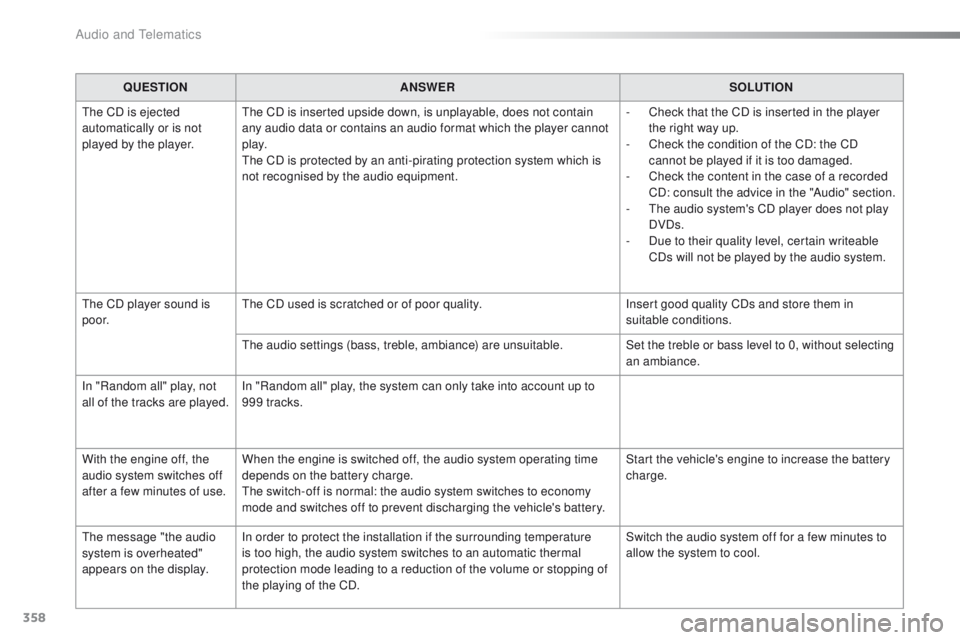
QUESTIONANSWER SOLUTION
The CD is ejected
automatically or is not
played by the player. The CD is inserted upside down, is unplayable, does not contain
any audio data or contains an audio format which the player cannot
p l ay.
The CD is protected by an anti-pirating protection system which is
not recognised by the audio equipment. -
C
heck that the CD is inserted in the player
the right way up.
-
C
heck the condition of the CD: the CD
cannot be played if it is too damaged.
-
C
heck the content in the case of a recorded
CD: consult the advice in the "Audio" section.
-
T
he audio system's CD player does not play
DVDs.
-
D
ue to their quality level, certain writeable
CDs will not be played by the audio system.
The CD player sound is
p o o r. The CD used is scratched or of poor quality.
Insert good quality CDs and store them in
suitable conditions.
The audio settings (bass, treble, ambiance) are unsuitable. Set the treble or bass level to 0, without selecting
an ambiance.
In "Random all" play, not
all of the tracks are played. In "Random all" play, the system can only take into account up to
999 tracks.
With the engine off, the
audio system switches off
after a few minutes of use. When the engine is switched off, the audio system operating time
depends on the battery charge.
The switch-off is normal: the audio system switches to economy
mode and switches off to prevent discharging the vehicle's battery. Start the vehicle's engine to increase the battery
charge.
The message "the audio
system is overheated"
appears on the display. In order to protect the installation if the surrounding temperature
is too high, the audio system switches to an automatic thermal
protection mode leading to a reduction of the volume or stopping of
the playing of the CD. Switch the audio system off for a few minutes to
allow the system to cool.
Audio and Telematics
Page 364 of 450
362
2008_en_Chap13_index-alpha_ed01-2016
Table of weights ....................................24 5, 249
Tables of engines .................................. 243, 247
Tables of fuses
.............................................. 208
Ta n k , f u e l
............................................... 170, 172
Technical data
....................................... 243-249
Telephone
............................................. 310, 33 6
Temperature, coolant
...................................... 33
T
S
Selector, gear .......................... 83, 84, 87, 91, 95
Serial number, vehicle .................................. 25
3
Service indicator
............................................. 28
Servicing
...............................
..........................12
Settings
...............
.........................290, 339, 354
Sidelamps
..................... 117, 121, 122, 204, 206
Side repeater
..............................
..................205
Snow chains
.......................................... 13
9, 201
Socket, 12 V accessory
..................................72
So
ckets, audio
.......................73, 286, 333, 352
Speed limiter
......................................... 104, 108
Starting the engine
......................................... 80
Starting using another battery
...................... 2
15
Station, radio
................................ 2
82, 330, 350
Stay, bonnet
.................................................. 234
Steering mounted controls, audio
.......................................... 260, 329, 349
Steering wheel, adjustment
............................59
Stop & Start
........................ 19, 40, 70, 100, 113,
170, 214, 218, 234, 240
Storage
...................................................... 71, 72
Stowing rings
.................................................. 75
Switching off the engine
................................. 80
S
ynchronising the remote control
...................46
Reminder, lighting on
.................................... 120
Remote control .......................................... 4
3 - 47
Removing a wheel
........................................ 197
Removing the mat
........................................... 74
Replacing bulbs
............................................ 202
Replacing fuses
..............................
.............. 208
Replacing the air filter
................................... 240
Replacing the oil filter
................................... 24
0
Replacing the passenger compartment filter
.... 240
Resetting the service indicator
....................... 30
Resetting the trip recorder
.............................. 41
Reversing camera
......................................... 112
Reversing lamp
..................................... 2
06, 207
Risk areas (update)
....................................... 273
Roof bars
....................................................... 23
0
Routine checks
..................................... 240, 241
Running out of fuel (Diesel)
.......................... 1
74
Petrol
............................................................. 173
PE
UGEOT C
onnect Assistance
................... 255
P
E
UGEOT
C
onnect Packs
........................... 255
P
E
UGEOT
C
onnect SOS
............................. 25
4
Player, Apple
® .............................. ........288, 335
Player, MP3 CD ............................ 286, 332, 352
Port, USB
....................................... 7
3, 286, 332
Pre-heater, Diesel
........................................... 18
Pressures, tyres
............................................ 253
Pre-tensioning seat belts
.............................. 151
Priming the fuel system
................................ 174
Protecting children
................. 151, 153, 15 6 -16 0
Puncture
........................................................ 183
Radio
............................................ 282, 330, 350
Radio, digital (Digital Audio Broadcasting - DAB)
................................... 284
Range, AdBlue
.............................................. 176
Range, fuel
...................................................... 40
RDS
............................................... 283, 331, 350
Rear foglamp ................................. 119, 206, 207
Rear screen, demisting
................................... 70
Recharging the battery
................................. 2
16
Recirculation, air
....................................... 66, 69
Reduction of electrical load
.......................... 219
Regeneration of the particle filter
.................24
0
Reinitialisation of the under-inflation detection system
......................................... 13 8
Reinitialising the remote control
..................... 46
R
eminder, key in ignition ................................. 81Safety, children
......................
15
1, 153, 15 6 -16 0
Screen, instrument panel
....................14, 15, 38
Screen menu map
...............262, 264, 268, 276,
278, 280, 290, 292, 294, 310, 312, 341, 355
Screenwash
..................................................126
Screenwash fluid level
..................................238
Screenwash, rear
..........................................127
SCR (Selective Catalytic Reduction)
............175
Seat belts
....................................... 1
4 9 -151, 161
Seats, front
...............................
.......................56
Seats, heated
..................................................57
Seats, rear
.......................................................58
R
Alphabetical index
Page 373 of 450
170
Practical information
2008-add_en_Chap09_info-pratiques_ed01-2016
Low fuel level
When the low fuel level is reached this warning lamp comes on in the instrument panel. There remains approximately 5 litres of fuel in the tank. When the warning lamp flashes, there is ver y little fuel left .
The key cannot be removed from the lock until the cap is refitted. Removing the filler cap may cause an inrush of air. This vacuum is per fectly normal and results from the sealing of the system.
Fuel tank
Fuel tank capacity: approximately 50 litres ( 45 litres for the BlueHDi Diesel engine).
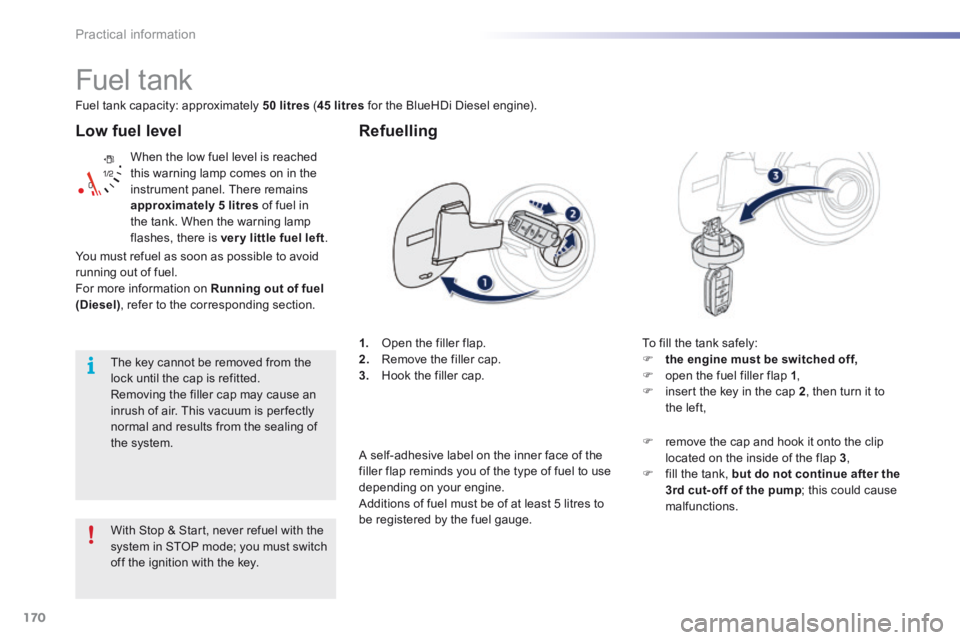
1. Open the filler flap. 2. Remove the filler cap. 3. Hook the filler cap.
Refuelling
To fill the tank safely: the engine must be switched off, open the fuel filler flap 1 , insert the key in the cap 2 , then turn it to the left,
With Stop & Start, never refuel with the
system in STOP mode; you must switch off the ignition with the key.
remove the cap and hook it onto the clip located on the inside of the flap 3 , fill the tank, but do not continue after the 3rd cut- off of the pump ; this could cause malfunctions.
You must refuel as soon as possible to avoid running out of fuel. For more information on Running out of fuel (Diesel) , refer to the corresponding section.
A self-adhesive label on the inner face of the filler flap reminds you of the type of fuel to use depending on your engine. Additions of fuel must be of at least 5 litres to be registered by the fuel gauge.