display PEUGEOT 2008 2016 Service Manual
[x] Cancel search | Manufacturer: PEUGEOT, Model Year: 2016, Model line: 2008, Model: PEUGEOT 2008 2016Pages: 450, PDF Size: 14.16 MB
Page 110 of 450
108
2008_en_Chap05_conduite_ed01-2016
Memorising speeds
Memorisation
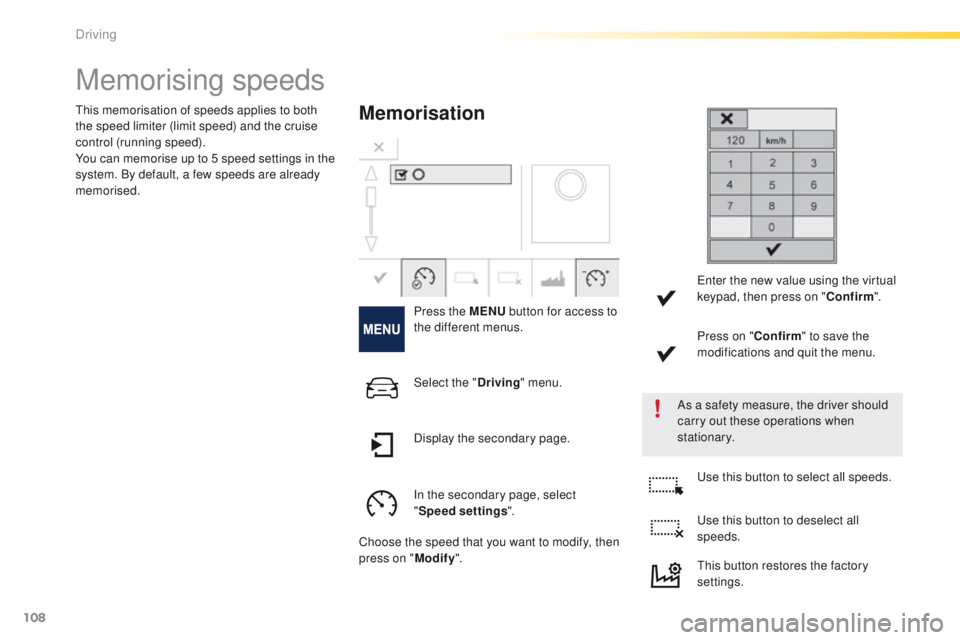
Press the MENU button for access to
the different menus.
As a safety measure, the driver should
carry out these operations when
stationary.
This memorisation of speeds applies to both
the speed limiter (limit speed) and the cruise
control (running speed).
You can memorise up to 5 speed settings in the
system. By default, a few speeds are already
memorised.
Select the "Driving" menu.
In the secondary page, select
" Speed settings ".
Choose the speed that you want to modify, then
press on " Modify". Use this button to select all speeds.
Use this button to deselect all
speeds.
Display the secondary page. Enter the new value using the virtual
keypad, then press on "
Confirm".
Press on " Confirm" to save the
modifications and quit the menu.
This button restores the factory
settings.
Driving
Page 111 of 450
109
2008_en_Chap05_conduite_ed01-2016
Selection
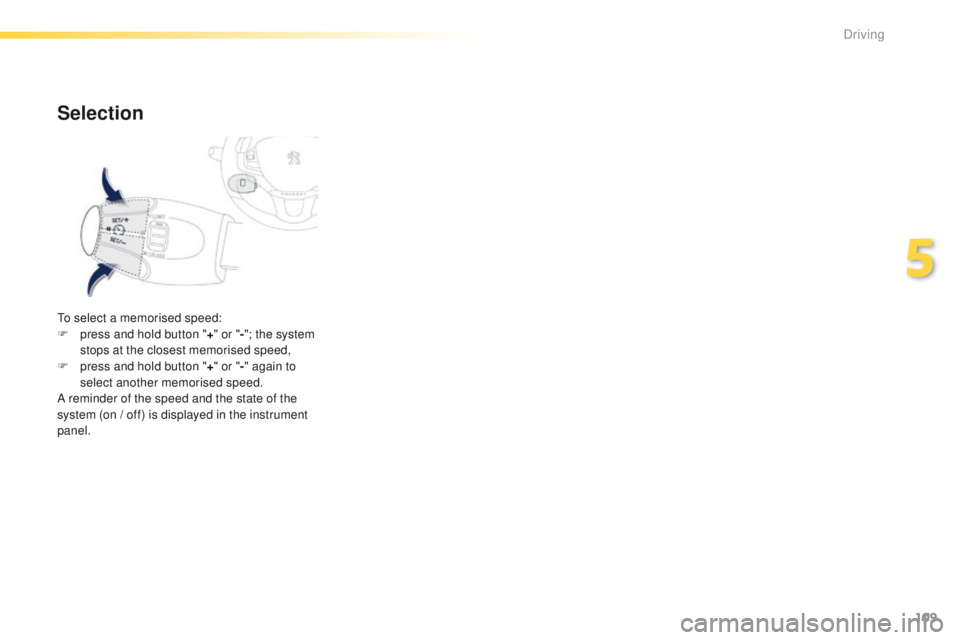
To select a memorised speed:
F p ress and hold button " +" or " -"; the system
stops at the closest memorised speed,
F
p
ress and hold button " +" or " -" again to
select another memorised speed.
A reminder of the speed and the state of the
system (on / off) is displayed in the instrument
panel.
5
Driving
Page 112 of 450
110
2008_en_Chap05_conduite_ed01-2016
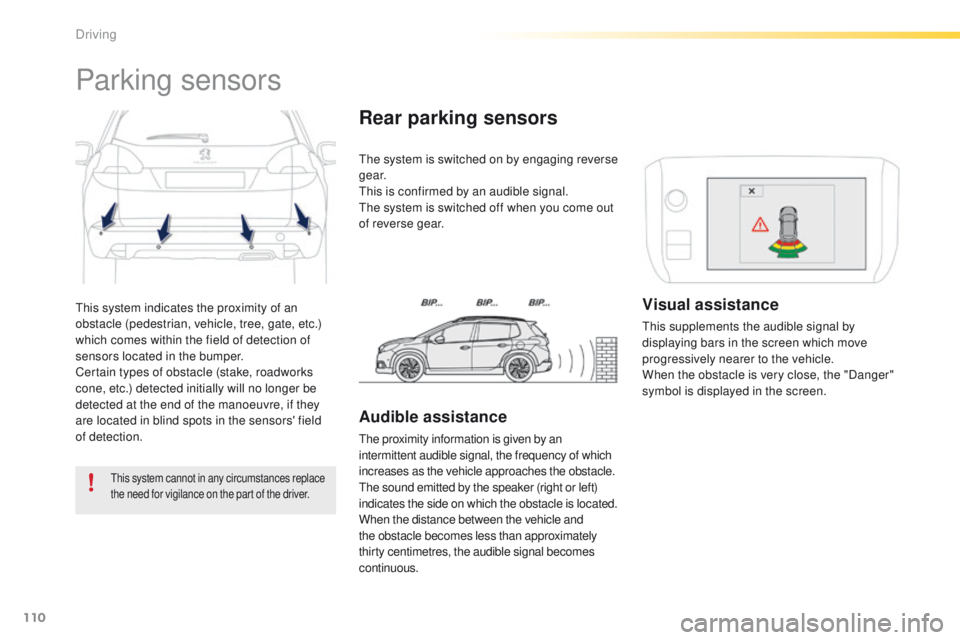
This system indicates the proximity of an
obstacle (pedestrian, vehicle, tree, gate, etc.)
which comes within the field of detection of
sensors located in the bumper.
Certain types of obstacle (stake, roadworks
cone, etc.) detected initially will no longer be
detected at the end of the manoeuvre, if they
are located in blind spots in the sensors' field
of detection.
Parking sensors
This system cannot in any circumstances replace
the need for vigilance on the part of the driver.
The system is switched on by engaging reverse
g e a r.
This is confirmed by an audible signal.
The system is switched off when you come out
of reverse gear.
Rear parking sensors
Audible assistance
The proximity information is given by an
intermittent audible signal, the frequency of which
increases as the vehicle approaches the obstacle.
The sound emitted by the speaker (right or left)
indicates the side on which the obstacle is located.
When the distance between the vehicle and
the obstacle becomes less than approximately
thirty centimetres, the audible signal becomes
continuous.
Visual assistance
This supplements the audible signal by
displaying bars in the screen which move
progressively nearer to the vehicle.
When the obstacle is very close, the "Danger"
symbol is displayed in the screen.
Driving
Page 113 of 450
111
2008_en_Chap05_conduite_ed01-2016
In bad weather or in winter, ensure
that the sensors are not covered with
mud, ice or snow. When reverse gear is
engaged, an audible signal (long beep)
indicates that the sensors may be dirty.
Certain sound sources (motorcycle,
lorry, pneumatic drill, etc.) may trigger
the audible signals of the parking
sensor system.In the event of a malfunction of
the system, when reverse gear
is engaged this warning lamp
is displayed in the instrument panel and/or a
message appears in the screen, accompanied
by an audible signal (short beep).
Contact a PEUGEOT dealer or a qualified
workshop.
Operating fault
The function will be deactivated
automatically if a trailer is being towed
or a bicycle carrier is fitted (vehicle
fitted with a towbar or bicycle carrier
recommended by PEUGEOT).
Front parking sensors*
In addition to the rear parking sensors, the
front parking sensors are triggered when an
obstacle is detected in front and the speed of
the vehicle is still below 6 mph (10 km/h).
The front parking sensors are interrupted if
the vehicle stops for more than 3 seconds
in for ward gear, if no further obstacles are
detected or when the speed of the vehicle
exceeds 6 mph (10 km/h).
* Available only with the Park Assist system. The sound emitted by the speaker (front or
rear) indicates whether the obstacle is in front
or behind.
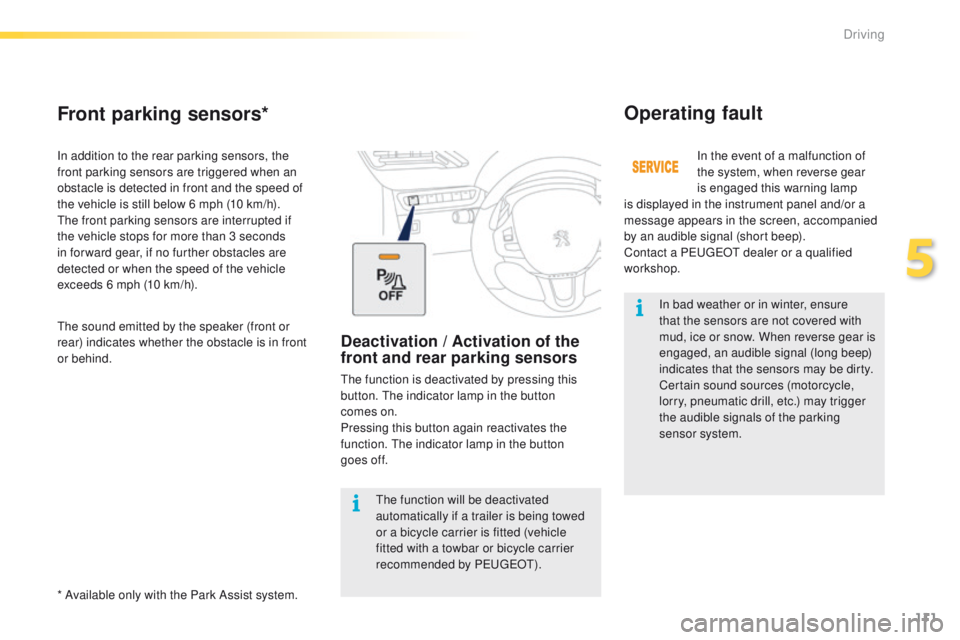
Deactivation / Activation of the
front and rear parking sensors
The function is deactivated by pressing this
button. The indicator lamp in the button
comes
on.
Pressing this button again reactivates the
function. The indicator lamp in the button
goes
off.
5
Driving
Page 114 of 450
112
2008_en_Chap05_conduite_ed01-2016
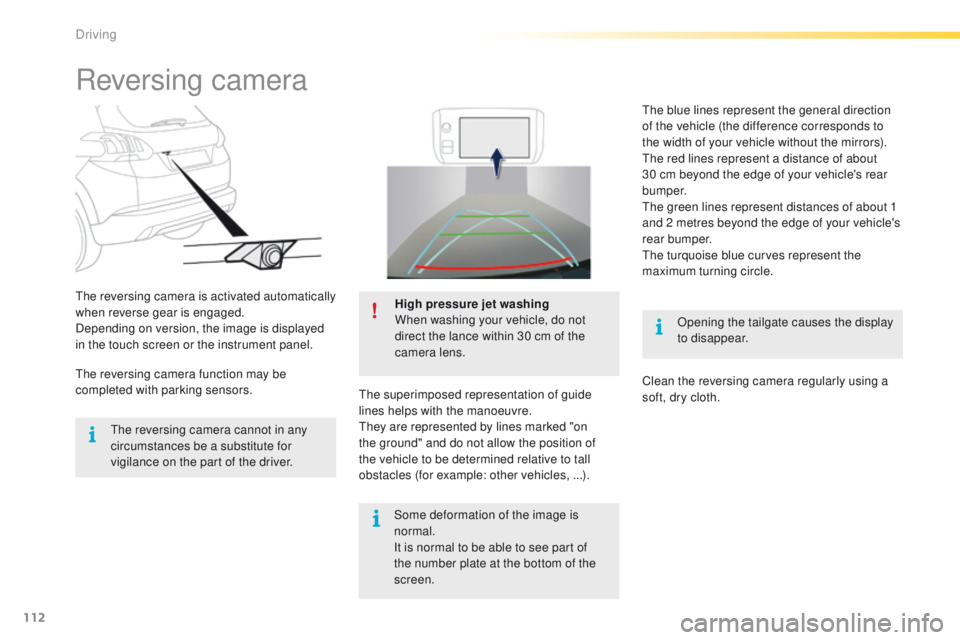
Reversing camera
Opening the tailgate causes the display
to disappear.
The reversing camera is activated automatically
when reverse gear is engaged.
Depending on version, the image is displayed
in the touch screen or the instrument panel.
High pressure jet washing
When washing your vehicle, do not
direct the lance within 30 cm of the
camera lens.
The superimposed representation of guide
lines helps with the manoeuvre.
They are represented by lines marked "on
the ground" and do not allow the position of
the vehicle to be determined relative to tall
obstacles (for example: other vehicles, ...).
The reversing camera cannot in any
circumstances be a substitute for
vigilance on the part of the driver.
The reversing camera function may be
completed with parking sensors. The blue lines represent the general direction
of the vehicle (the difference corresponds to
the width of your vehicle without the mirrors).
The red lines represent a distance of about
30 cm beyond the edge of your vehicle's rear
b u m p e r.
The green lines represent distances of about 1
and 2 metres beyond the edge of your vehicle's
rear bumper.
The turquoise blue curves represent the
maximum turning circle.
Clean the reversing camera regularly using a
soft, dry cloth.
Some deformation of the image is
normal.
It is normal to be able to see part of
the number plate at the bottom of the
screen.
Driving
Page 116 of 450
114
2008_en_Chap05_conduite_ed01-2016
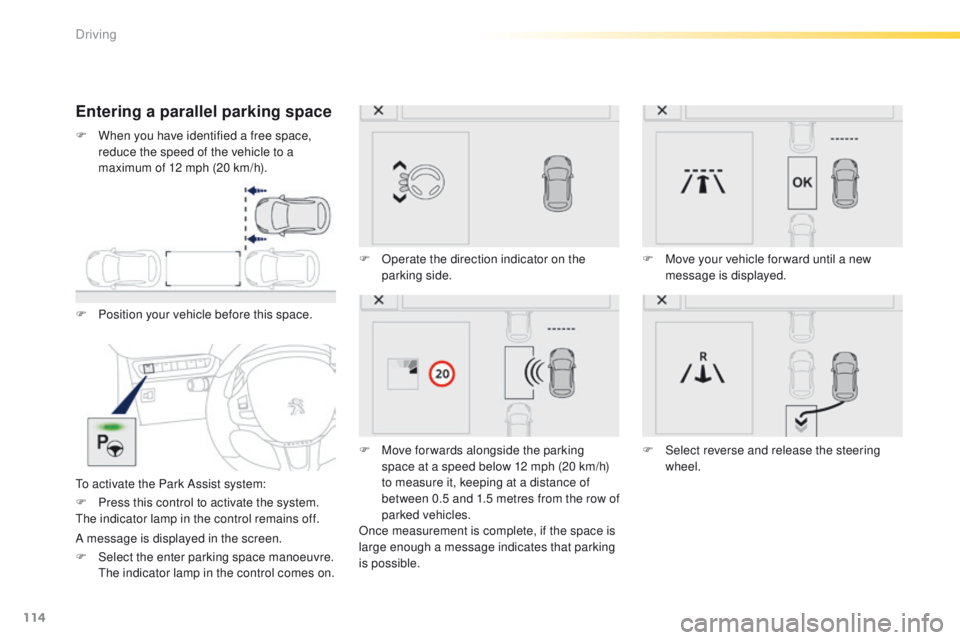
Entering a parallel parking space
F Position your vehicle before this space.
To activate the Park Assist system:F
O
perate the direction indicator on the
parking side.
F
M
ove for wards alongside the parking
space at a speed below 12 mph (20 km/h)
to measure it, keeping at a distance of
between 0.5 and 1.5 metres from the row of
parked vehicles.
Once measurement is complete, if the space is
large enough a message indicates that parking
is possible. F
M
ove your vehicle for ward until a new
message is displayed.
F
S
elect reverse and release the steering
wheel.
F
P
ress this control to activate the system.
The indicator lamp in the control remains off.
A message is displayed in the screen.
F
S
elect the enter parking space manoeuvre.
T
he indicator lamp in the control comes on.
F
W
hen you have identified a free space,
reduce the speed of the vehicle to a
maximum of 12 mph (20 km/h).
Driving
Page 117 of 450
115
2008_en_Chap05_conduite_ed01-2016
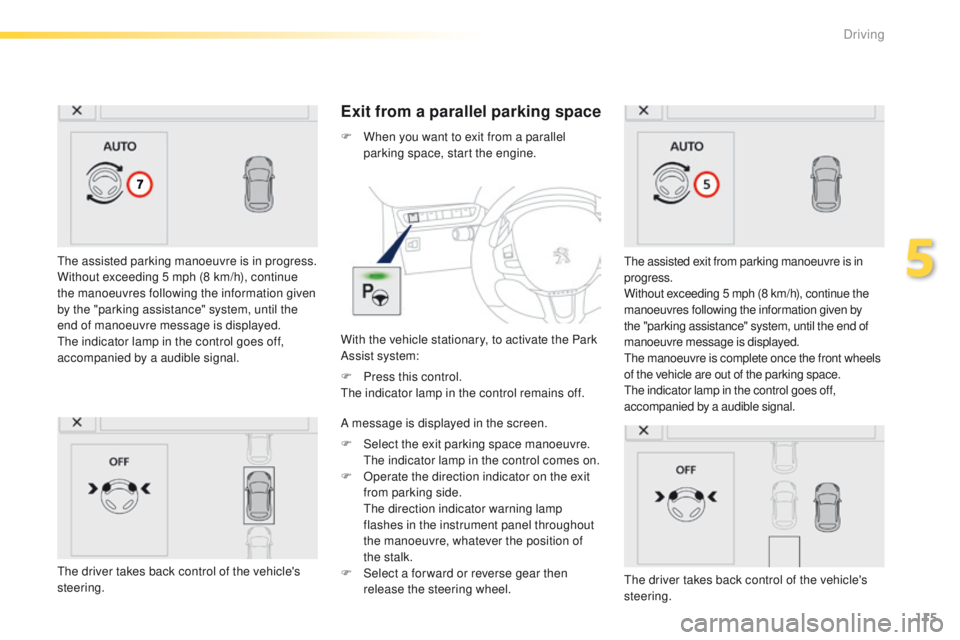
The assisted parking manoeuvre is in progress.
Without exceeding 5 mph (8 km/h), continue
the manoeuvres following the information given
by the "parking assistance" system, until the
end of manoeuvre message is displayed.
The indicator lamp in the control goes off,
accompanied by a audible signal.
Exit from a parallel parking space
With the vehicle stationary, to activate the Park
Assist system: F
W
hen you want to exit from a parallel
parking space, start the engine.
The assisted exit from parking manoeuvre is in
progress.
Without exceeding 5 mph (8 km/h), continue the
manoeuvres following the information given by
the "parking assistance" system, until the end of
manoeuvre message is displayed.
The manoeuvre is complete once the front wheels
of the vehicle are out of the parking space.
The indicator lamp in the control goes off,
accompanied by a audible signal.
F
P
ress this control.
The indicator lamp in the control remains off.
A message is displayed in the screen.
F
S
elect the exit parking space manoeuvre.
T
he indicator lamp in the control comes on.
F
O
perate the direction indicator on the exit
from parking side.
T
he direction indicator warning lamp
flashes in the instrument panel throughout
the manoeuvre, whatever the position of
the stalk.
F
S
elect a for ward or reverse gear then
release the steering wheel.
The driver takes back control of the vehicle's
steering.
The driver takes back control of the vehicle's
steering.
5
Driving
Page 118 of 450
116
2008_en_Chap05_conduite_ed01-2016
In bad weather and in winter, ensure
that the sensors are not covered by
road dirt, ice or snow.
In the event of a fault, have the system
checked by a PEUGEOT dealer or a
qualified workshop.
If the system is deactivated during a
manoeuvre, the drive should reactivate
it manually to repeat the measurement. If the lateral distance between your vehicle
and the space is too great, the system may
not be able to measure the space.
Anything projecting beyond the envelope
of the vehicle (long or wide load) is not
taken into account by the Park Assist
system during a manoeuvre.
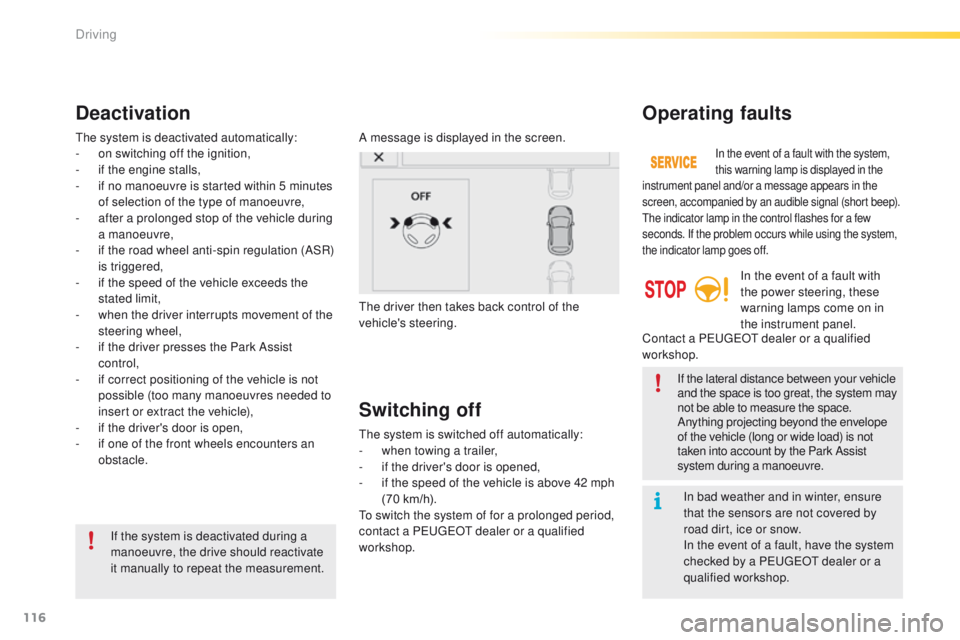
Deactivation
A message is displayed in the screen.
The driver then takes back control of the
vehicle's steering.
The system is deactivated automatically:
-
o
n switching off the ignition,
-
i
f the engine stalls,
-
i
f no manoeuvre is started within 5 minutes
of selection of the type of manoeuvre,
-
a
fter a prolonged stop of the vehicle during
a manoeuvre,
-
i
f the road wheel anti-spin regulation (ASR)
is triggered,
-
i
f the speed of the vehicle exceeds the
stated limit,
-
w
hen the driver interrupts movement of the
steering wheel,
-
i
f the driver presses the Park Assist
control,
-
i
f correct positioning of the vehicle is not
possible (too many manoeuvres needed to
insert or extract the vehicle),
-
i
f the driver's door is open,
-
i
f one of the front wheels encounters an
obstacle.
Switching off
The system is switched off automatically:
- w hen towing a trailer,
-
i
f the driver's door is opened,
-
i
f the speed of the vehicle is above 42 mph
(70 km/h).
To switch the system of for a prolonged period,
contact a PEUGEOT dealer or a qualified
workshop.
Operating faults
In the event of a fault with the system,
this warning lamp is displayed in the
instrument panel and/or a message appears in the
screen, accompanied by an audible signal (short beep).
The indicator lamp in the control flashes for a few
seconds. If the problem occurs while using the system,
the indicator lamp goes off.
In the event of a fault with
the power steering, these
warning lamps come on in
the instrument panel.
Contact a PEUGEOT dealer or a qualified
workshop.
Driving
Page 120 of 450
118
2008_en_Chap06_visibilite_ed01-2016
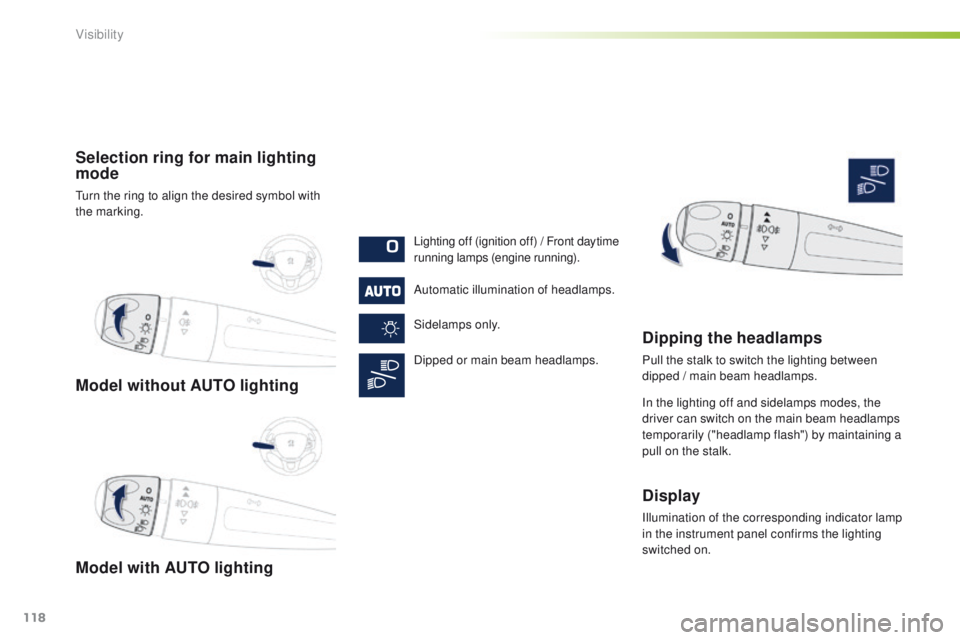
Model without AUTO lighting
Model with AUTO lighting Selection ring for main lighting
mode
Turn the ring to align the desired symbol with
the marking.Lighting off (ignition off) / Front daytime
running lamps (engine running).
Automatic illumination of headlamps.
Sidelamps only.
Dipped or main beam headlamps.
Dipping the headlamps
Pull the stalk to switch the lighting between
dipped / main beam headlamps.
In the lighting off and sidelamps modes, the
driver can switch on the main beam headlamps
temporarily ("headlamp flash") by maintaining a
pull on the stalk.
Display
Illumination of the corresponding indicator lamp
in the instrument panel confirms the lighting
switched on.
Visibility
Page 125 of 450
123
2008_en_Chap06_visibilite_ed01-2016
The sidelamps and dipped beam headlamps are
switched on automatically, without any action
on the part of the driver, when a low level of
external light is detected or in certain cases of
activation of the windscreen wipers.
As soon as the brightness returns to a sufficient
level or after the windscreen wipers are switched
off, the lamps are switched off automatically.
Automatic illumination of headlamps
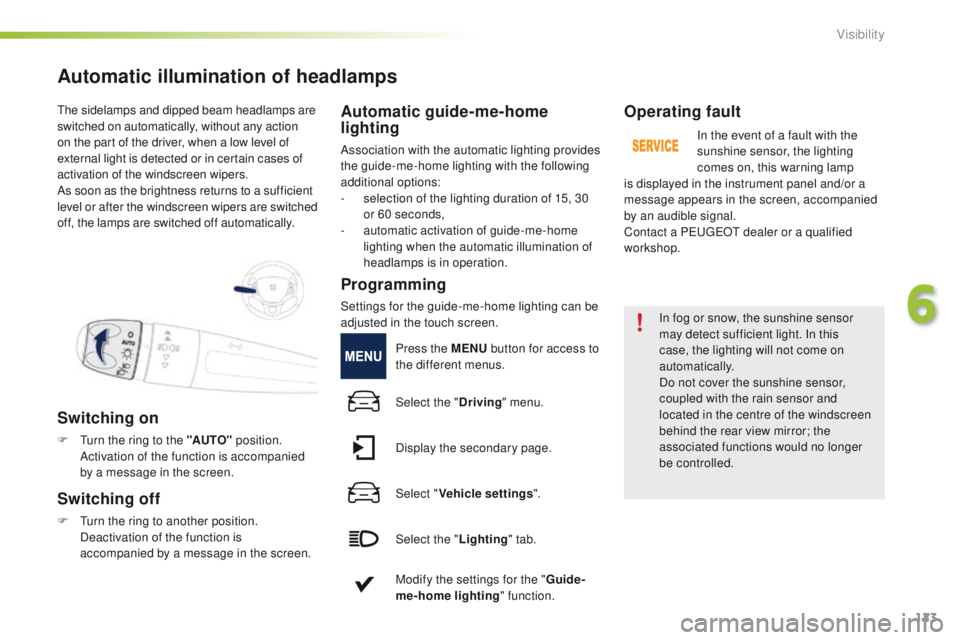
Switching on
F Turn the ring to the "AUTO" position.
Activation of the function is accompanied
by a message in the screen.
Switching off
F Turn the ring to another position. Deactivation of the function is
accompanied by a message in the screen.
Automatic guide-me-home
lighting
Association with the automatic lighting provides
the guide-me-home lighting with the following
additional options:
-
s
election of the lighting duration of 15, 30
or 60 seconds,
-
a
utomatic activation of guide-me-home
lighting when the automatic illumination of
headlamps is in operation.
Operating fault
In the event of a fault with the
sunshine sensor, the lighting
comes on, this warning lamp
is displayed in the instrument panel and/or a
message appears in the screen, accompanied
by an audible signal.
Contact a PEUGEOT dealer or a qualified
workshop.
In fog or snow, the sunshine sensor
may detect sufficient light. In this
case, the lighting will not come on
automatically.
Do not cover the sunshine sensor,
coupled with the rain sensor and
located in the centre of the windscreen
behind the rear view mirror; the
associated functions would no longer
be controlled.
Programming
Settings for the guide-me-home lighting can be
adjusted in the touch screen. Press the MENU button for access to
the different menus.
Select the " Driving" menu.
Display the secondary page.
Select " Vehicle settings ".
Select the " Lighting" tab.
Modify the settings for the " Guide-
me-home lighting " function.
6
Visibility