display PEUGEOT 2008 2016 Workshop Manual
[x] Cancel search | Manufacturer: PEUGEOT, Model Year: 2016, Model line: 2008, Model: PEUGEOT 2008 2016Pages: 450, PDF Size: 14.16 MB
Page 129 of 450
127
2008_en_Chap06_visibilite_ed01-2016
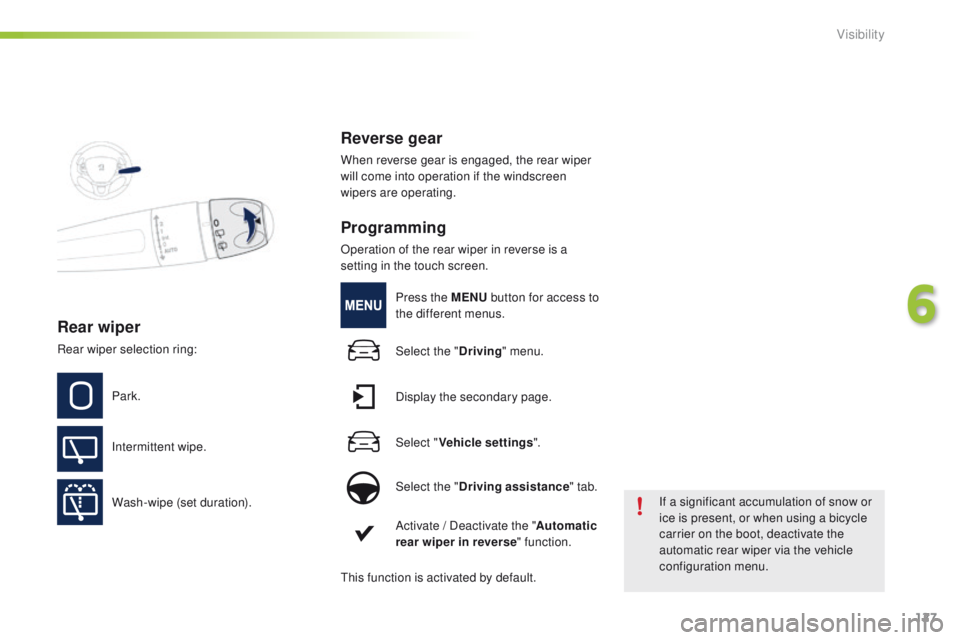
Rear wiper
Park.
Intermittent wipe.
Wash-wipe (set duration).
Reverse gear
When reverse gear is engaged, the rear wiper
will come into operation if the windscreen
wipers are operating.
Programming
Operation of the rear wiper in reverse is a
setting in the touch screen.If a significant accumulation of snow or
ice is present, or when using a bicycle
carrier on the boot, deactivate the
automatic rear wiper via the vehicle
configuration menu.
Rear wiper selection ring:
Press the MENU
button for access to
the different menus.
Select the " Driving" menu.
Display the secondary page.
Select " Vehicle settings ".
Select the " Driving assistance " tab.
Activate / Deactivate the " Automatic
rear wiper in reverse " function.
This function is activated by default.
6
Visibility
Page 130 of 450
128
2008_en_Chap06_visibilite_ed01-2016
Automatic rain sensitive
windscreen wipers
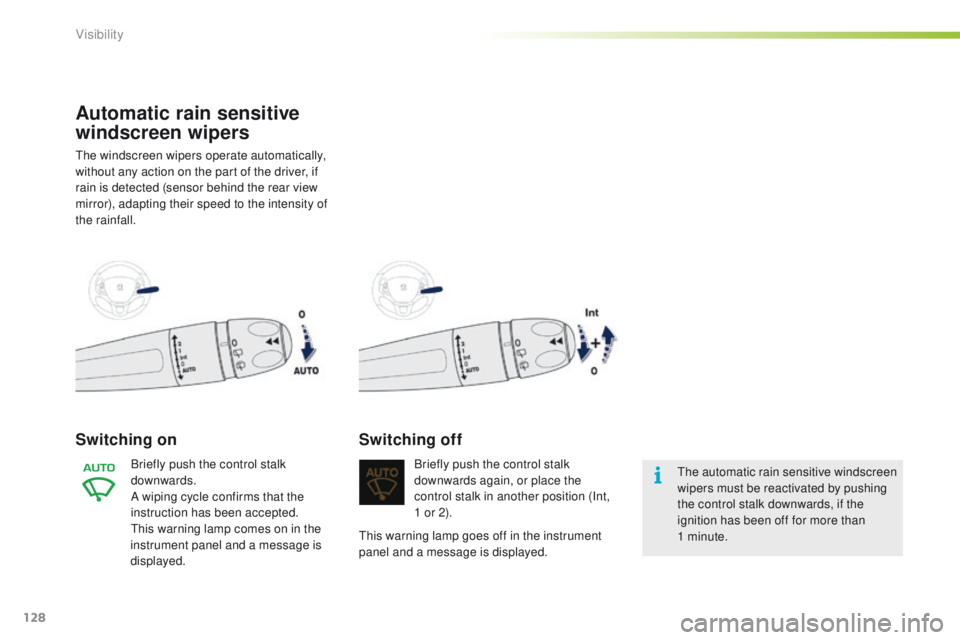
The windscreen wipers operate automatically,
without any action on the part of the driver, if
rain is detected (sensor behind the rear view
mirror), adapting their speed to the intensity of
the rainfall.
Switching on
Briefly push the control stalk
downwards.
A wiping cycle confirms that the
instruction has been accepted.
This warning lamp comes on in the
instrument panel and a message is
displayed. Briefly push the control stalk
downwards again, or place the
control stalk in another position (Int,
1 or 2).
Switching off
The automatic rain sensitive windscreen
wipers must be reactivated by pushing
the control stalk downwards, if the
ignition has been off for more than
1
minute.
This warning lamp goes off in the instrument
panel and a message is displayed.
Visibility
Page 132 of 450
130
2008_en_Chap06_visibilite_ed01-2016
Lighting dimmerSystem for the manual adjustment of the brightness of the instrument panel and the touch screen to
suit the ambient light level.
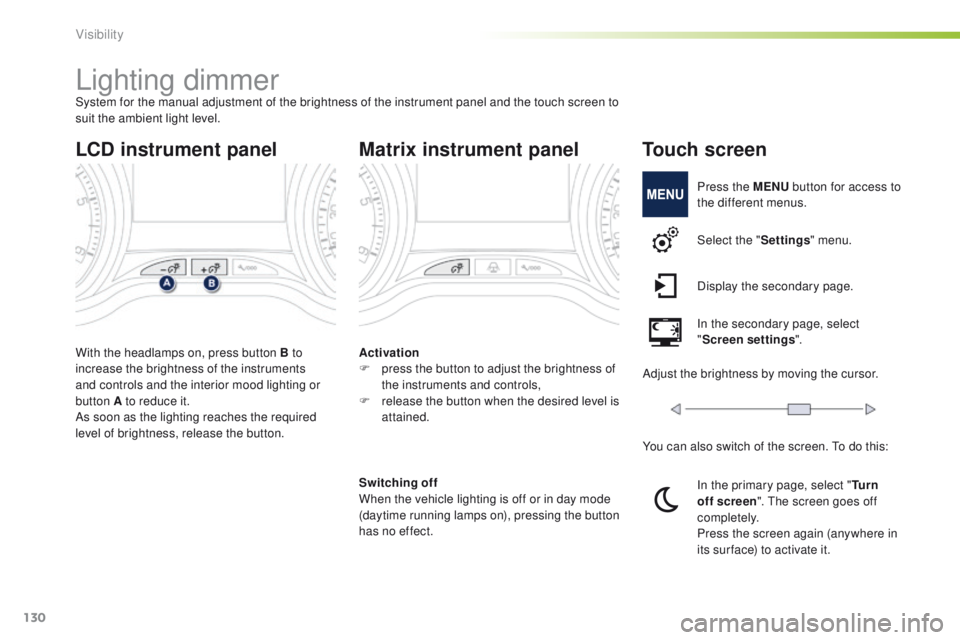
With the headlamps on, press button B to
increase the brightness of the instruments
and controls and the interior mood lighting or
button A to reduce it.
As soon as the lighting reaches the required
level of brightness, release the button.
LCD instrument panel
Activation
F p ress the button to adjust the brightness of
the instruments and controls,
F
r
elease the button when the desired level is
attained.
Matrix instrument panel
Switching off
When the vehicle lighting is off or in day mode
(daytime running lamps on), pressing the button
has no effect.
Touch screen
Press the MENU button for access to
the different menus.
Select the " Settings" menu.
Display the secondary page.
In the secondary page, select
" Screen settings ".
Adjust the brightness by moving the cursor.
You can also switch of the screen. To do this:
In the primary page, select " Tu r n
off screen ". The screen goes off
completely.
Press the screen again (anywhere in
its sur face) to activate it.
Visibility
Page 134 of 450
132
2008_en_Chap06_visibilite_ed01-2016
Interior mood lighting
Switching on
Switching off
The interior mood lighting switches off
automatically when the sidelamps are switched
of f.
Settings
The mood lighting settings can be adjusted in
the touch screen.
* Depending on version.
The dimmed passenger compartment lighting improves visibility in the vehicle when the light is poor.
Press the MENU button for access to
the different menus.
Select the " Driving" menu.
Display the secondary page.
Select " Vehicle settings ".
Select the " Lighting" tab.
Modify the settings of the " Mood
lighting " function.
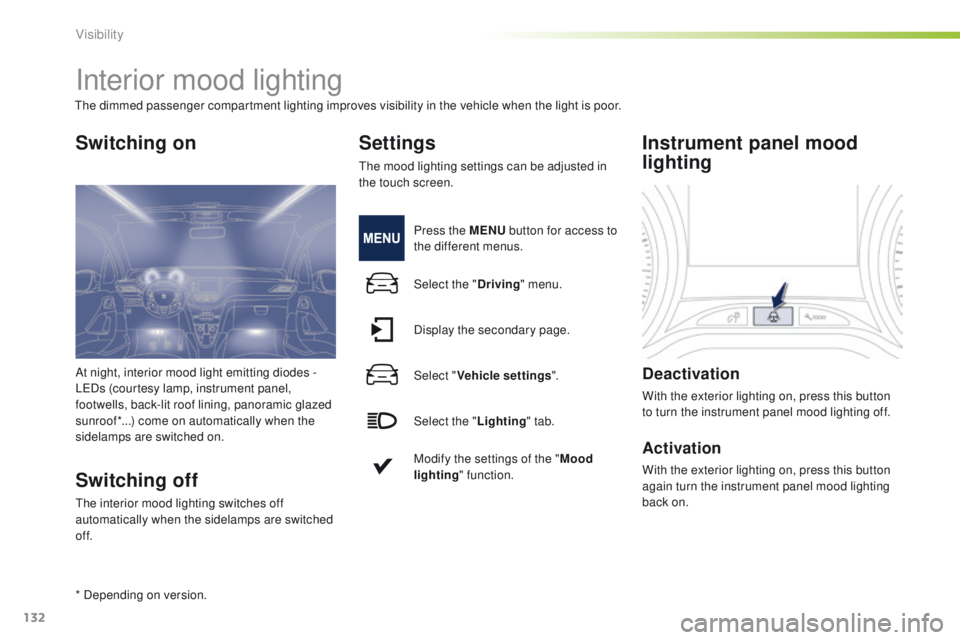
Instrument panel mood
lighting
Deactivation
With the exterior lighting on, press this button
to turn the instrument panel mood lighting off.
Activation
With the exterior lighting on, press this button
again turn the instrument panel mood lighting
back on.
At night, interior mood light emitting diodes
-
LEDs (courtesy lamp, instrument panel,
footwells, back-lit roof lining, panoramic glazed
sunroof*...) come on automatically when the
sidelamps are switched on.
Visibility
Page 140 of 450
138
2008_en_Chap07_securite_ed01-2016
Under-inflation alert
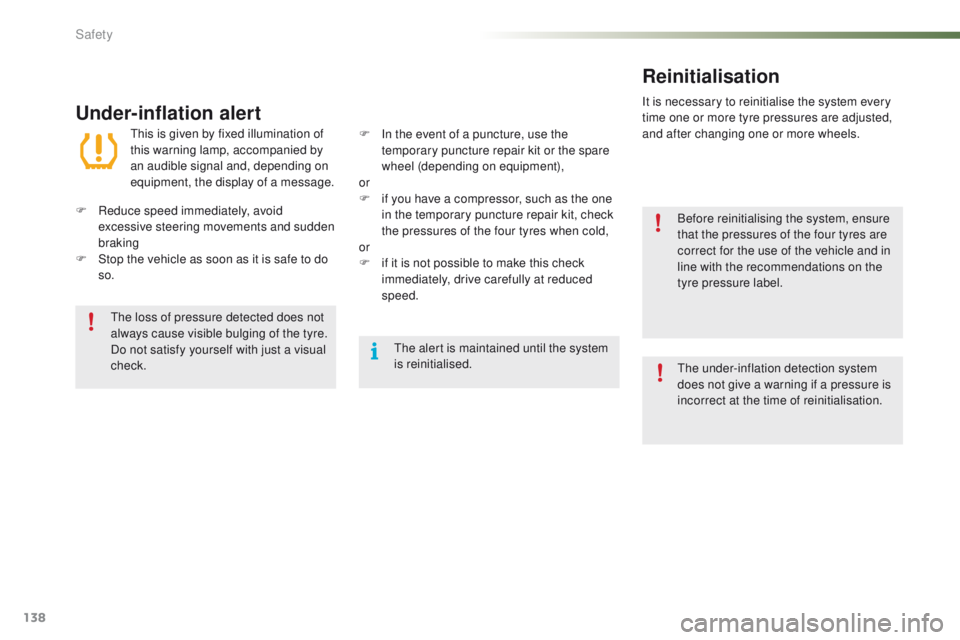
This is given by fixed illumination of
this warning lamp, accompanied by
an audible signal and, depending on
equipment, the display of a message.
F
R
educe speed immediately, avoid
excessive steering movements and sudden
braking
F
S
top the vehicle as soon as it is safe to do
so.
The loss of pressure detected does not
always cause visible bulging of the tyre.
Do not satisfy yourself with just a visual
check. Before reinitialising the system, ensure
that the pressures of the four tyres are
correct for the use of the vehicle and in
line with the recommendations on the
tyre pressure label.
The alert is maintained until the system
is reinitialised.
F
I n the event of a puncture, use the
temporary puncture repair kit or the spare
wheel (depending on equipment),
or
F
i
f you have a compressor, such as the one
in the temporary puncture repair kit, check
the pressures of the four tyres when cold,
or
F
i
f it is not possible to make this check
immediately, drive carefully at reduced
speed.
Reinitialisation
It is necessary to reinitialise the system every
time one or more tyre pressures are adjusted,
and after changing one or more wheels.
The under-inflation detection system
does not give a warning if a pressure is
incorrect at the time of reinitialisation.
Safety
Page 145 of 450
143
2008_en_Chap07_securite_ed01-2016
Grip control
Special patented traction control system which
improves traction on snow, mud and sand.
This system, the operation of which has been
optimised for each situation, allows you to
manoeuvre in most conditions of poor grip
(encountered during touring use).
Standard (ESC)
This mode is calibrated for a low level of wheel
spin, based on the different levels of grip
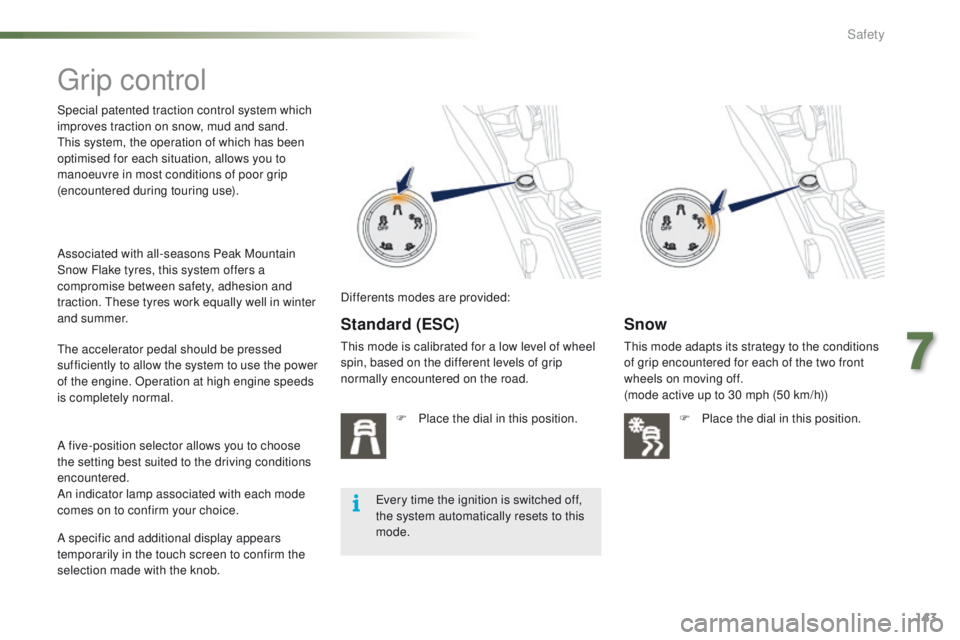
normally encountered on the road.F
P
lace the dial in this position.
Snow
This mode adapts its strategy to the conditions
of grip encountered for each of the two front
wheels on moving off.
(mode active up to 30 mph (50 km/h))F
P
lace the dial in this position.
The accelerator pedal should be pressed
sufficiently to allow the system to use the power
of the engine. Operation at high engine speeds
is completely normal.
A five-position selector allows you to choose
the setting best suited to the driving conditions
encountered.
An indicator lamp associated with each mode
comes on to confirm your choice.
Every time the ignition is switched off,
the system automatically resets to this
mode.
Associated with all-seasons Peak Mountain
Snow Flake tyres, this system offers a
compromise between safety, adhesion and
traction. These tyres work equally well in winter
and summer.
A specific and additional display appears
temporarily in the touch screen to confirm the
selection made with the knob.
Differents modes are provided:
7
Safety
Page 148 of 450
146
2008_en_Chap07_securite_ed01-2016
Operation
When your vehicle is too close to or
approaches the vehicle ahead too quickly the
system automatically applies the brakes to
avoid a collision.
The collision can be avoided automatically if the
difference in speed between your vehicle and the
vehicle ahead does not exceed 9 mph (15 km/h).
Above this threshold, the system will do what
is possible to avoid or reduce the accident by
lowering the speed of impact.
The automatic braking may bring the vehicle to
a complete stop if the situation requires it.
In this case, the vehicle is held stationary
temporarily (for about 1.5 seconds) to allow
the driver to take back control by pressing the
brake pedal. You are then alerted by the display of a
message.
The brake lamps on your vehicle come on to
warn other road users.After an impact, the system is
automatically put out of service: it no
longer operates.
You must go to a PEUGEOT dealer or a
qualified workshop to have the system
made operational again. During automatic braking, the driver
can always obtain a higher rate of
deceleration than that controlled by the
system, by pressing firmly on the brake
pedal. The triggering of the system may cause
the engine to stall, unless the driver
depresses the clutch pedal quickly
enough during automatic braking.
Safety
Page 149 of 450
147
2008_en_Chap07_securite_ed01-2016
Operating limits
The system only detects vehicles that are
stationary or moving in the same direction as
your vehicle.It does not detect small vehicles
(bicycles, motorcycles), pedestrians or
animals, nor non-reflective stationary
objects.
The system is not triggered or is interrupted if
the driver:
-
a
ccelerates strongly
-
o
r turns the steering wheel suddenly
(avoiding manoeuvre).With the touch screen
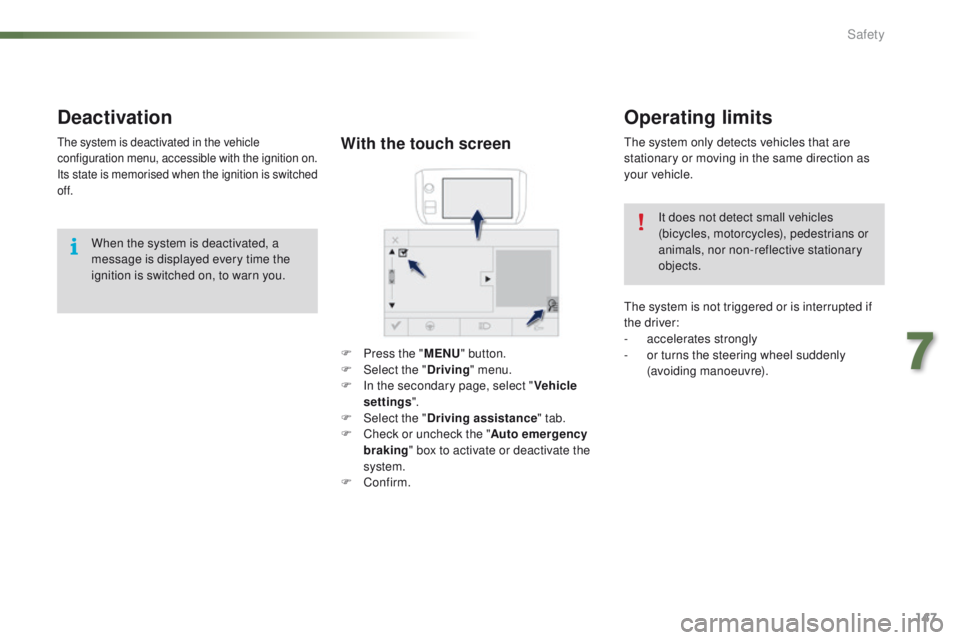
F Press the " MENU" button.
F Sel ect the " Driving" menu.
F
I
n the secondary page, select " Vehicle
settings ".
F
Sel
ect the " Driving assistance " tab.
F
C
heck or uncheck the " Auto emergency
braking " box to activate or deactivate the
system.
F
Confirm.
Deactivation
The system is deactivated in the vehicle
configuration menu, accessible with the ignition on.
Its state is memorised when the ignition is switched
of f.
When the system is deactivated, a
message is displayed every time the
ignition is switched on, to warn you.
7
Safety
Page 150 of 450
148
2008_en_Chap07_securite_ed01-2016
Operating faults
In the event of an impact to the
windscreen at the sensor, deactivate
the system and contact a PEUGEOT
dealer or a qualified workshop to have
your windscreen replaced.
Never try to remove, adjust or test the
sensor.
Only a PEUGEOT dealer or a qualified
workshop is able to work on the system.
When towing a trailer or when the
vehicle is being towed, the system must
be deactivated.
Do not stick or other wise fix any object on
the windscreen in front of the sensor.
Sensor fault
The operation of the laser sensor may suffer
inter ference from accumulations of dirt or
misting of the windscreen. In this case you are
warned by the display of a message.
Use the windscreen demisting and regularly
clean the area of the windscreen in front of the
sensor.
System fault
In the event of a malfunction of the system, you
are warned by an audible signal and the display
of the message "
Automatic braking system
fault ".
Have the system checked by a PEUGEOT
dealer or a qualified workshop.
In difficult weather conditions (very
heavy rain, snow, fog, hail...), braking
distances increase, which can reduce
the ability of the system to avoid a
collision.
The driver must therefore remain
particularly vigilant.
Never leave accumulations of snow or
any object projecting above the bonnet
or in front of the roof: this might fall into
the field of vision of the sensor and
generate a detection.
Safety
Page 178 of 450
176
2008_en_Chap09_info-pratiques_ed01-2016
Range indicators
Once the AdBlue® tank is on reserve or after
detection of a fault with the SCR emissions
control system, when the ignition is switched
on, an indicator displays an estimate of the
distance that can be covered, the range, before
engine starting is prevented.
In the event of simultaneous system fault and
low AdBlue
® level, the shortest range figure is
the one displayed.
In the event of the risk of non-starting related to a lack of AdBlue®
The engine start prevention system
required by regulations is activated
automatically once the AdBlue
® tank is
e m pt y. Range greater than 1 500 miles (2 400 km)
When the ignition is switched on, no
information on range is displayed automatically
in the instrument panel.
Pressing this button displays the driving range
temporarily.
Above 3 000 miles (5 000 km), the value is not
specified.
Practical information