service PEUGEOT 206 2003 User Guide
[x] Cancel search | Manufacturer: PEUGEOT, Model Year: 2003, Model line: 206, Model: PEUGEOT 206 2003Pages: 171, PDF Size: 2.12 MB
Page 27 of 171
26-05-2003
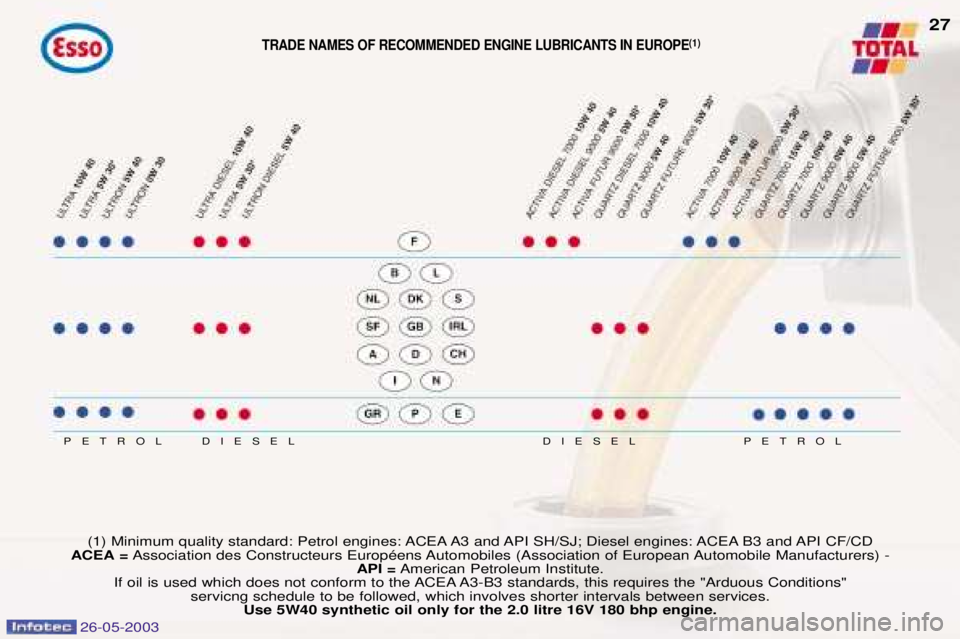
DIESEL
DIESEL
PETROL PETROL
(1) Minimum quality standard: Petrol engines: ACEA A3 and API SH/SJ; Diesel engines: ACEA B3 and API CF/CD
ACEA = Association des Constructeurs EuropŽens Automobiles (Association of European Automobile Manufacturers) -
API =American Petroleum Institute.
If oil is used which does not conform to the ACEA A3-B3 standards, this requires the "Arduous Conditions" servicng schedule to be followed, which involves shorter intervals between services.Use 5W40 synthetic oil only for the 2.0 litre 16V 180 bhp engine.
TRADE NAMES OF RECOMMENDED ENGINE LUBRICANTS IN EUROPE (1)
27
Page 29 of 171
26-05-2003
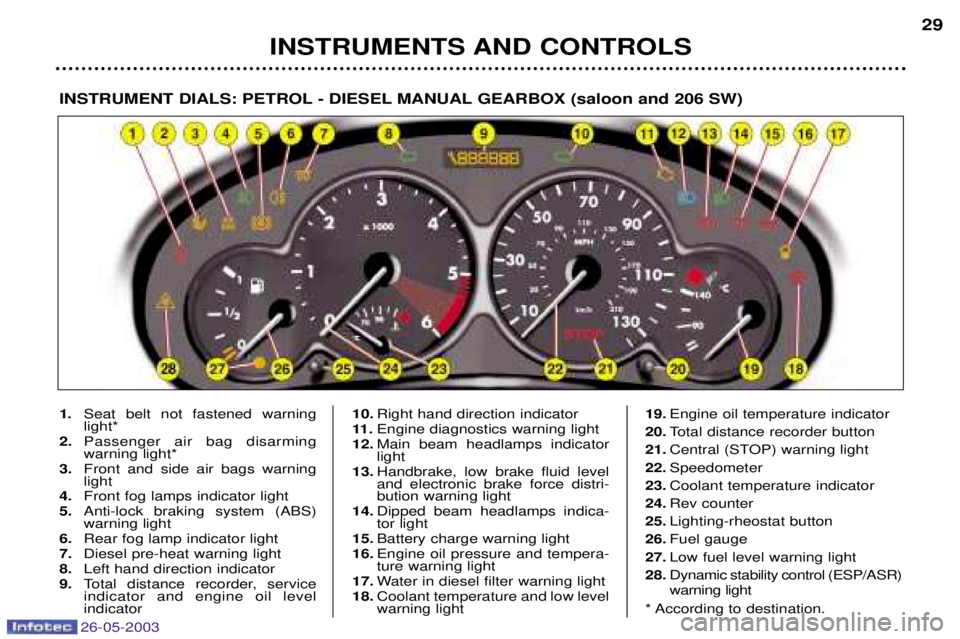
INSTRUMENTS AND CONTROLS29
INSTRUMENT DIALS: PETROL - DIESEL MANUAL GEARBOX (saloon and 206 SW)
1.
Seat belt not fastened warning light*
2. Passenger air bag disarmingwarning light*
3. Front and side air bags warninglight
4. Front fog lamps indicator light
5. Anti-lock braking system (ABS)warning light
6. Rear fog lamp indicator light
7. Diesel pre-heat warning light
8. Left hand direction indicator
9. Total distance recorder, serviceindicator and engine oil level indicator 10.
Right hand direction indicator
11 . Engine diagnostics warning light
12. Main beam headlamps indicatorlight
13. Handbrake, low brake fluid leveland electronic brake force distri-bution warning light
14. Dipped beam headlamps indica-tor light
15. Battery charge warning light
16. Engine oil pressure and tempera-ture warning light
17. Water in diesel filter warning light
18. Coolant temperature and low levelwarning light 19.
Engine oil temperature indicator
20. Total distance recorder button
21. Central (STOP) warning light
22. Speedometer
23. Coolant temperature indicator
24. Rev counter
25. Lighting-rheostat button
26. Fuel gauge
27. Low fuel level warning light
28. Dynamic stability control (ESP/ASR) warning light
* According to destination.
Page 30 of 171
26-05-2003
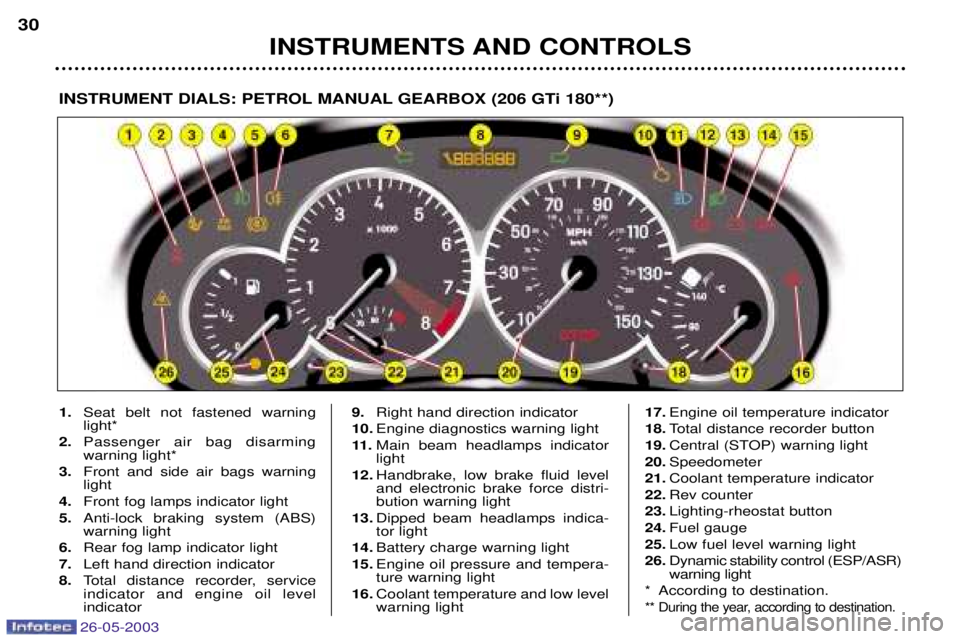
INSTRUMENTS AND CONTROLS
30
INSTRUMENT DIALS: PETROL MANUAL GEARBOX (206 GTi 180**)
1.
Seat belt not fastened warning light*
2. Passenger air bag disarmingwarning light*
3. Front and side air bags warninglight
4. Front fog lamps indicator light
5. Anti-lock braking system (ABS)warning light
6. Rear fog lamp indicator light
7. Left hand direction indicator
8. Total distance recorder, serviceindicator and engine oil level indicator 9.
Right hand direction indicator
10. Engine diagnostics warning light
11 . Main beam headlamps indicator light
12. Handbrake, low brake fluid leveland electronic brake force distri-bution warning light
13. Dipped beam headlamps indica-tor light
14. Battery charge warning light
15. Engine oil pressure and tempera-ture warning light
16. Coolant temperature and low level warning light 17.
Engine oil temperature indicator
18. Total distance recorder button
19. Central (STOP) warning light
20. Speedometer
21. Coolant temperature indicator
22. Rev counter
23. Lighting-rheostat button
24. Fuel gauge
25. Low fuel level warning light
26. Dynamic stability control (ESP/ASR) warning light
* According to destination.
** During the year, according to destination.
Page 31 of 171

26-05-2003
INSTRUMENTS AND CONTROLS31
INSTRUMENT DIALS: PETROL AUTOMATIC GEARBOX (saloon and 206 SW)
1.
Seat belt not fastened warning light*
2. Passenger air bag disarmingwarning light*
3. Front and side air bags warninglight
4. Front fog lamps indicator light
5. Anti-lock braking system (ABS)warning light
6. Rear fog lamp indicator light
7. Left hand direction indicator
8. Total distance recorder, serviceindicator and engine oil level indicator 9.
Right hand direction indicator
10. Engine diagnostics warning light
11 . Main beam headlamps indicator light
12. Handbrake, low brake fluid leveland electronic brake force distri- bution warning light
13. Dipped beam headlamps indica- tor light
14. Battery charge warning light
15. Engine oil pressure and tempera-ture warning light
16. Coolant temperature and lowlevel warning light
17. Operating programmes 18.
Gear indicator
19. Total distance recorder button
20. Central (STOP) warning light
21. Speedometer
22. Coolant temperature indicator
23. Rev counter
24. Lighting-rheostat button
25. Fuel gauge
26. Low fuel level warning light
27. Dynamic stability control (ESP/ASR) warning light
* According to destination.
Page 35 of 171

26-05-2003
Instrument panel display After switching on the ignition, three functions are shown in succession:
Ð service indicator (see corresponding section),
Ð engine oil level indicator,
Ð total distance recorder (total or trip distances).Note:the total or trip distances are displayed for 30 seconds when the ignition is switched off, on opening the driver's door,
as well as on locking and unlocking the vehicle. Engine oil level When the ignition is switched on, the engine oil level is indicated for approximately 10 seconds, after the servicing informati on.
Maximum oil level If the flashing of the six squares is confirmed by checking using the dipstick, a surplus of oil can cause damage to the engine.
Consult a PEUGEOT dealer without delay. Lack of oilFlashing of the six segments and "min" on the display indicate a lack of oil which can cause damage to the engine. If the lack of oil is confirmed by checking using the dipstick, it is essential to top up the level.
Oil level gauge fault Flashing of the six segments indicates a fault in the oil level gauge.There is a risk the engine will be damaged.
Consult a PEUGEOT dealer.
INSTRUMENTS AND CONTROLS 35
The level indicated when checking using the dipstick is only correct if the vehicle has been on level ground, with the engine stopped, for more than 10 minutes.
Page 54 of 171

26-05-2003
PTY function: Audio RD3 This allows you to listen to stations broadcasting a specific type of programme (news, culture, sport, rock etc.).With FMselected, press the "TA"button for more than two seconds to switch this function on or off.
To search for a PTYprogramme:
Ð select the PTYfunction,
Ð briefly press button Lor Nto scroll down the list of the various types of programmes offered,
Ð when the programme of your choice is displayed, keep button Lor Npressed for more than
two seconds to carry out an automatic search (after an automatic search the PTYfunction is
switched off).
In PTY mode the different types of programmes can be stored in the memory. To do this, press the preselection buttons
"1" to "6" for more than two seconds. Briefly press the corresponding button to recall the type of programme stored in
the memory.
EON system: Audio RD3
This connects stations which are part of the same network. It enables the broadcast of traffic information, by a station that is part of the same network as the station to which you are listening. This service is available when you have selected the TAtraffic information programme or the PTYfunction.
YOUR 206 IN DETAIL 51
Page 57 of 171
26-05-2003
YOUR 206 IN DETAIL
56
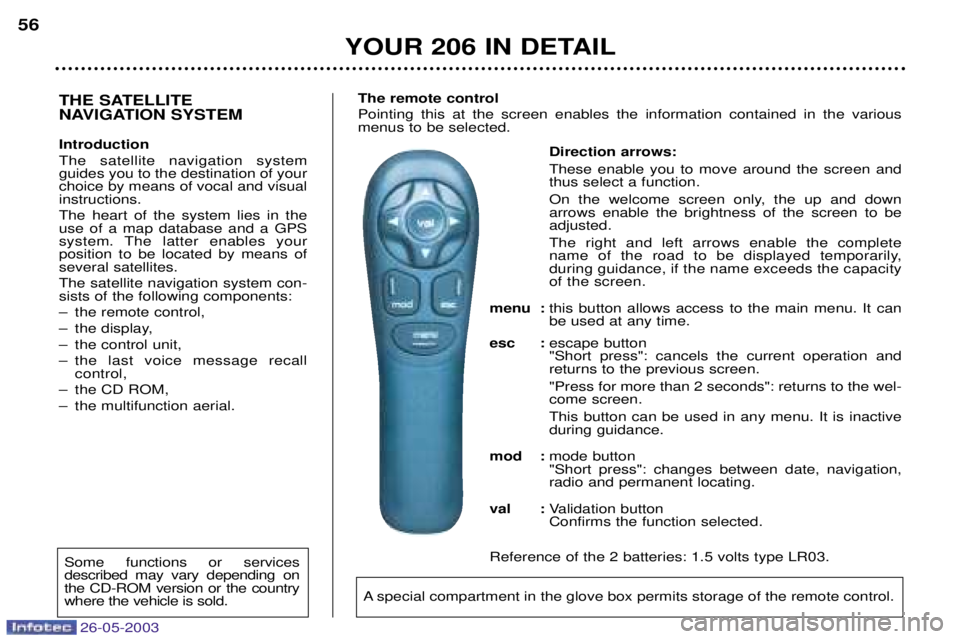
Direction arrows: These enable you to move around the screen and thus select a function.
On the welcome screen only, the up and down arrows enable the brightness of the screen to beadjusted. The right and left arrows enable the complete
name of the road to be displayed temporarily,during guidance, if the name exceeds the capacityof the screen.
menu : this button allows access to the main menu. It canbe used at any time.
esc : escape button"Short press": cancels the current operation andreturns to the previous screen. "Press for more than 2 seconds": returns to the wel- come screen. This button can be used in any menu. It is inactive during guidance.
mod : mode button"Short press": changes between date, navigation,radio and permanent locating.
val : Validation buttonConfirms the function selected.
Reference of the 2 batteries: 1.5 volts type LR03.
THE SATELLITE
NAVIGATION SYSTEM Introduction The satellite navigation system guides you to the destination of yourchoice by means of vocal and visualinstructions. The heart of the system lies in the use of a map database and a GPS
system. The latter enables yourposition to be located by means ofseveral satellites. The satellite navigation system con- sists of the following components:
Ð the remote control,
Ð the display,
Ð the control unit,
Ð the last voice message recall control,
Ð the CD ROM,
Ð the multifunction aerial. The remote control Pointing this at the screen enables the information contained in the various menus to be selected.
A special compartment in the glove box permits storage of the remote control.
Some functions or services described may vary depending onthe CD-ROM version or the countrywhere the vehicle is sold.
Page 60 of 171
26-05-2003
YOUR 206 IN DETAIL59
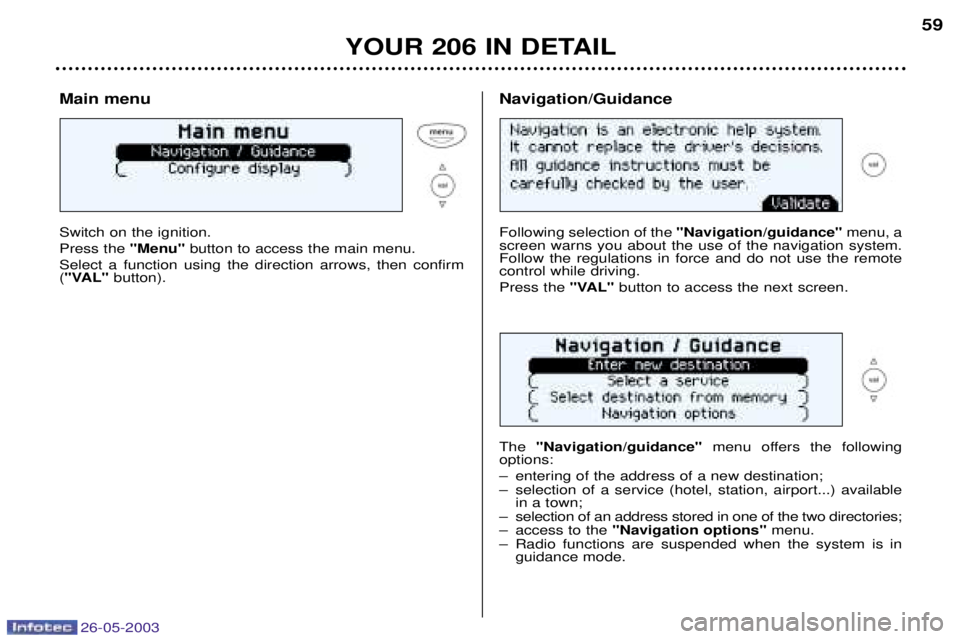
Main menu Switch on the ignition. Press the
"Menu"button to access the main menu.
Select a function using the direction arrows, then confirm ( "VAL" button).
Following selection of the "Navigation/guidance"menu, a
screen warns you about the use of the navigation system. Follow the regulations in force and do not use the remotecontrol while driving. Press the "VAL"button to access the next screen.
The "Navigation/guidance" menu offers the following
options:
Ð entering of the address of a new destination;
Ð selection of a service (hotel, station, airport...) available in a town;
Ð selection of an address stored in one of the two directories;
Ð access to the "Navigation options" menu.
Ð Radio functions are suspended when the system is in guidance mode.
Navigation/Guidance
Page 63 of 171
26-05-2003
YOUR 206 IN DETAIL
62
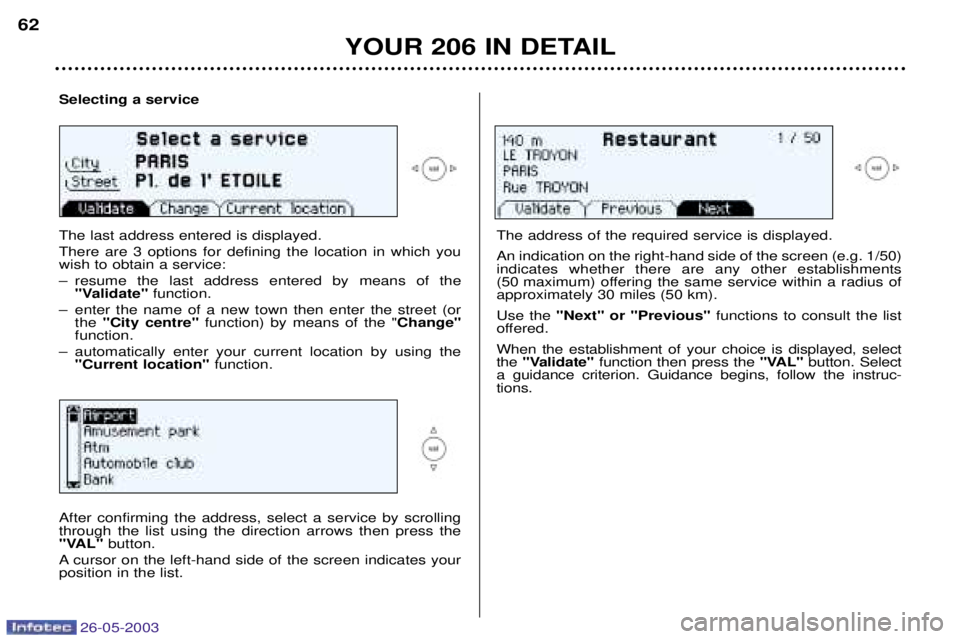
Selecting a service The last address entered is displayed. There are 3 options for defining the location in which you wish to obtain a service:
Ð resume the last address entered by means of the
"Validate" function.
Ð enter the name of a new town then enter the street (or the "City centre" function) by means of the " Change"
function.
Ð automatically enter your current location by using the "Current location" function.
The address of the required service is displayed. An indication on the right-hand side of the screen (e.g. 1/50) indicates whether there are any other establishments
(50 maximum) offering the same service within a radius ofapproximately 30 miles (50 km). Use the "Next" or "Previous" functions to consult the list
offered.When the establishment of your choice is displayed, select the "Validate" function then press the "VAL"button. Select
a guidance criterion. Guidance begins, follow the instruc-tions.
After confirming the address, select a service by scrollingthrough the list using the direction arrows then press the
"VAL" button.
A cursor on the left-hand side of the screen indicates yourposition in the list.
Page 90 of 171
26-05-2003
YOUR 206 IN DETAIL
88
Make a careful note of the number on each key. The key number is coded on
the label attached to the key. If the keys are lost, your PEUGEOT dealer can rapidly supply you with new keys.The high frequency remote control is a sensitive system; do not operate it while
it is in your pocket as there is a possibility that it may unlock your vehicle, without you being aware of it. The remote control does not operate when the key is in the ignition, even when the ignition is switched off, except for reprogramming. Driving with the doors locked may make access to the passenger compartment by the
emergency services more difficult in an emergency. As a safety precaution (with children on board), remove the ignition key when you leave the vehicle, even for a short time. Do not repeatedly press the button of your remote control out of range of your vehicle.
You run the risk of stopping it from working and the remote control would have to be reprogrammed. When purchasing a second-hand vehicle: Ð ensure that you are given the confidential card;
Ð have the key codes memorised by a PEUGEOT dealer, to ensure that the keys in your possession are the only ones which can start the vehicle.
Do not make any modifications to the electronic engine immobiliser system.
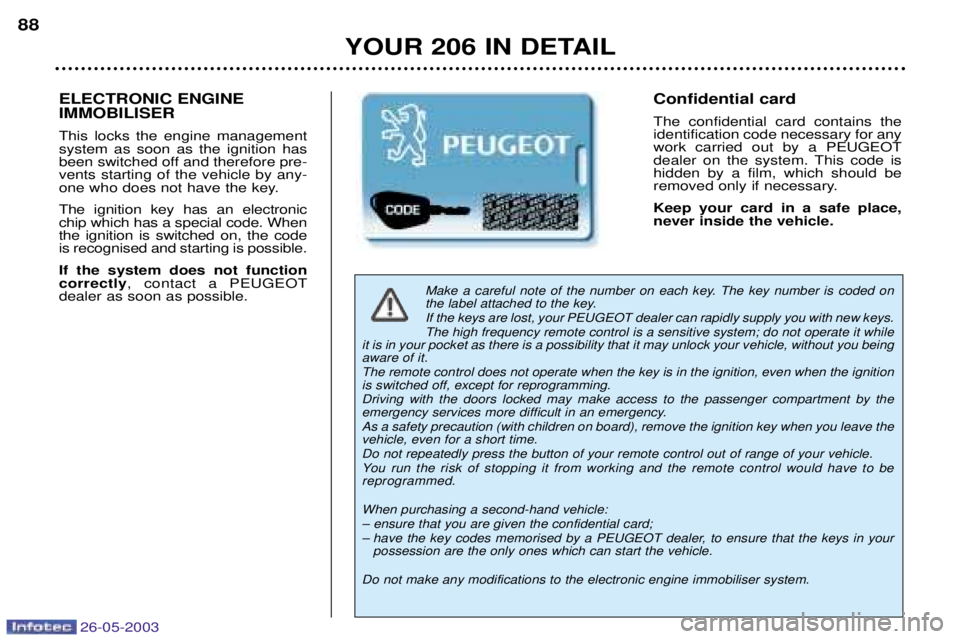
Confidential card The confidential card contains the identification code necessary for anywork carried out by a PEUGEOT
dealer on the system. This code ishidden by a film, which should be
removed only if necessary. Keep your card in a safe place, never inside the vehicle. ELECTRONIC ENGINE IMMOBILISER This locks the engine management system as soon as the ignition has
been switched off and therefore pre-vents starting of the vehicle by any-
one who does not have the key. The ignition key has an electronic chip which has a special code. Whenthe ignition is switched on, the codeis recognised and starting is possible. If the system does not function correctly , contact a PEUGEOT
dealer as soon as possible.