lock PEUGEOT 207 2008 User Guide
[x] Cancel search | Manufacturer: PEUGEOT, Model Year: 2008, Model line: 207, Model: PEUGEOT 207 2008Pages: 255, PDF Size: 13.06 MB
Page 57 of 255
!
i
54
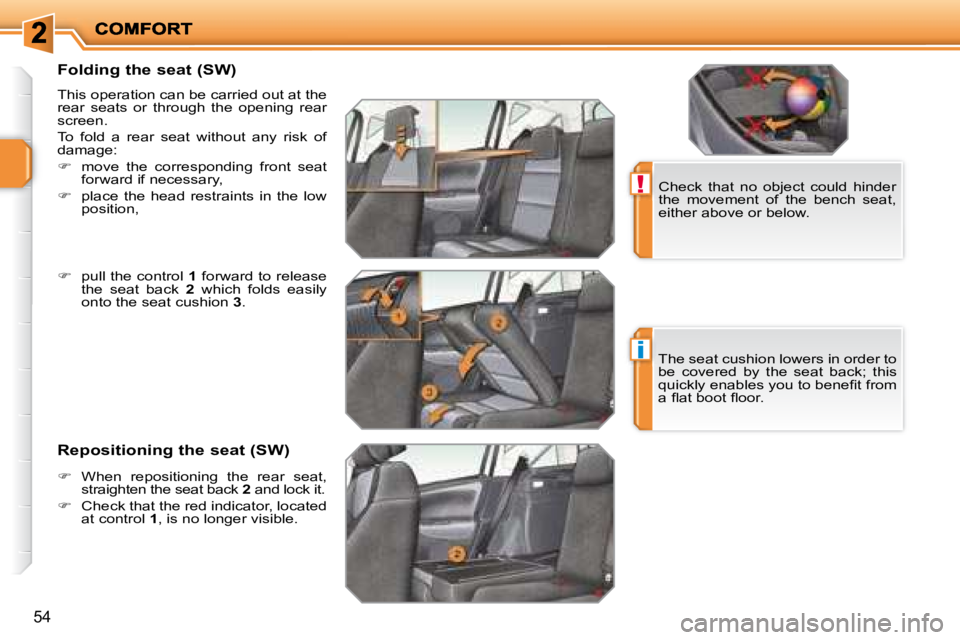
Folding the seat (SW)
This operation can be carried out at the
rear seats or through the opening rear
screen.
To fold a rear seat without any risk of
damage:
move the corresponding front seat
forward if necessary,
place the head restraints in the low
position, Check that no object could hinder
the movement of the bench seat,
either above or below.
Repositioning the seat (SW) The seat cushion lowers in order to
be covered by the seat back; this
quickly enables you to benefi t from
a fl at boot fl oor.
pull the control 1 forward to release
the seat back 2 which folds easily
onto the seat cushion 3 .
When repositioning the rear seat,
straighten the seat back 2 and lock it.
Check that the red indicator, located
at control 1 , is no longer visible.
Page 58 of 255
i
!
55
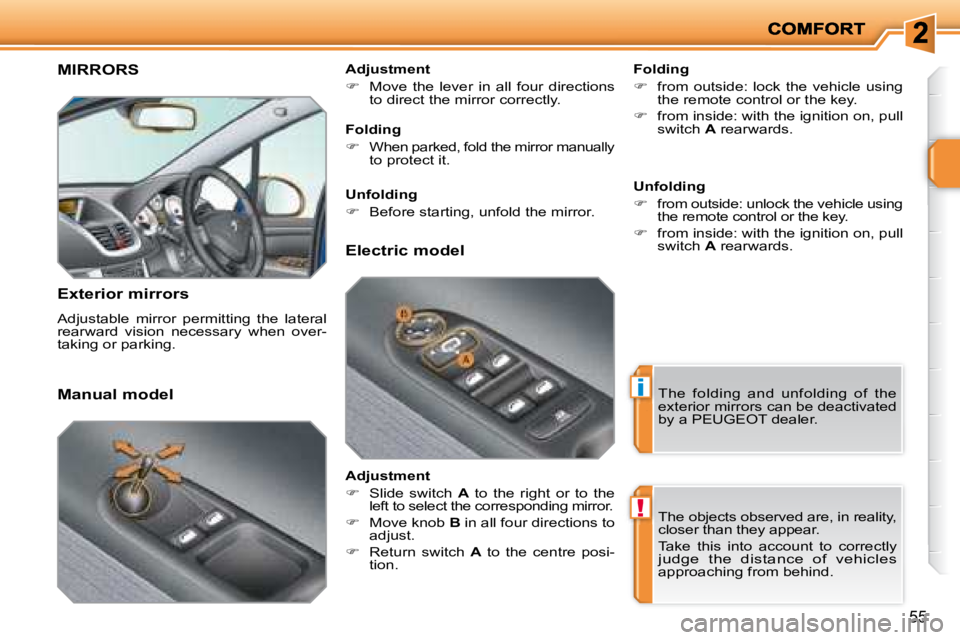
MIRRORS
Exterior mirrors
Adjustable mirror permitting the lateral
rearward vision necessary when over-
taking or parking. Folding
from outside: lock the vehicle using
the remote control or the key.
from inside: with the ignition on, pull
switch A rearwards.
Manual model Adjustment
Move the lever in all four directions
to direct the mirror correctly.
The folding and unfolding of the
exterior mirrors can be deactivated
by a PEUGEOT dealer.
Folding
When parked, fold the mirror manually
to protect it.
Unfolding
Before starting, unfold the mirror.
Electric model
Adjustment
Slide switch A to the right or to the
left to select the corresponding mirror.
Move knob B in all four directions to
adjust.
Return switch A to the centre posi-
tion. Unfolding
from outside: unlock the vehicle using
the remote control or the key.
from inside: with the ignition on, pull
switch A rearwards.
The objects observed are, in reality,
closer than they appear.
Take this into account to correctly
judge the distance of vehicles approaching from behind.
Page 60 of 255
!
i
57
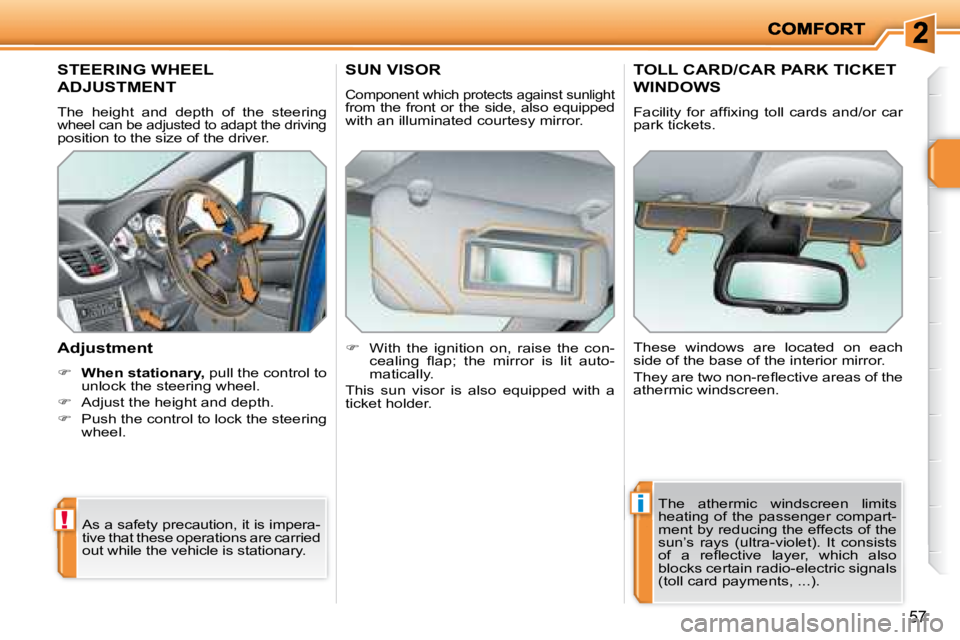
STEERING WHEEL
ADJUSTMENT
The height and depth of the steering wheel can be adjusted to adapt the driving position to the size of the driver.
Adjustment
When stationary, pull the control to
unlock the steering wheel.
Adjust the height and depth.
Push the control to lock the steering
wheel.
As a safety precaution, it is impera-
tive that these operations are carried
out while the vehicle is stationary.
SUN VISOR
Component which protects against sunlight from the front or the side, also equipped
with an illuminated courtesy mirror.
With the ignition on, raise the con-
cealing fl ap; the mirror is lit auto-
matically.
This sun visor is also equipped with a
ticket holder.
TOLL CARD/CAR PARK TICKET
WINDOWS
Facility for affi xing toll cards and/or car
park tickets.
These windows are located on each
side of the base of the interior mirror.
They are two non-refl ective areas of the
athermic windscreen.
The athermic windscreen limits
heating of the passenger compart-
ment by reducing the effects of the
sun’s rays (ultra-violet). It consists
of a refl ective layer, which also
blocks certain radio-electric signals
(toll card payments, ...).
Page 69 of 255
!
i
ACCESS
66
Deadlocking renders the exterior and
interior door controls inoperative.
It also deactivates the manual cen-
tralised control button.
Therefore, do not leave anyone
inside the vehicle when it is dead-
locked.
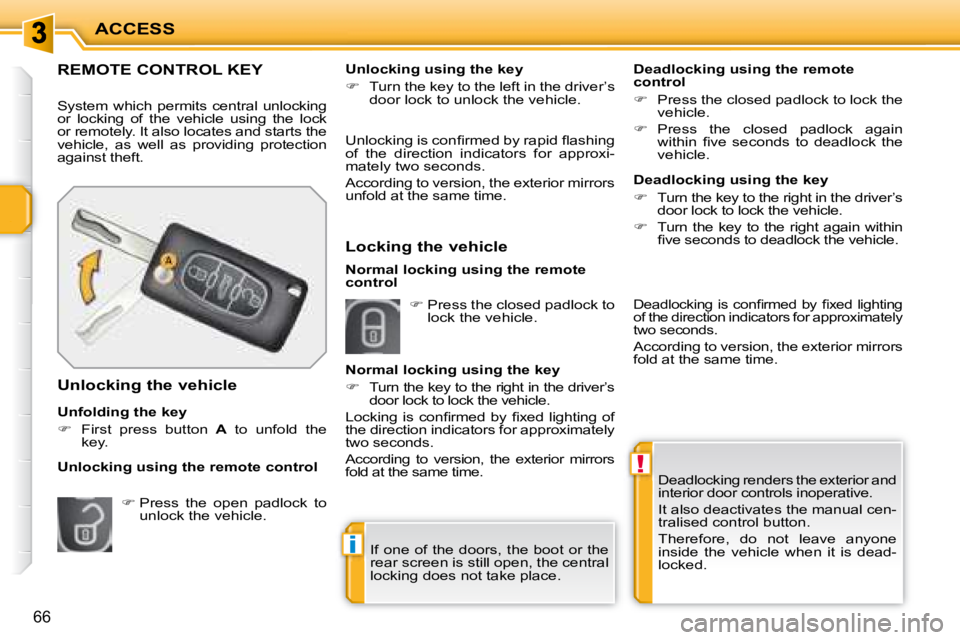
REMOTE CONTROL KEY
System which permits central unlocking
or locking of the vehicle using the lock
or remotely. It also locates and starts the
vehicle, as well as providing protection
against theft.
Unfolding the key
First press button A to unfold the
key.
Unlocking the vehicle Unlocking is confi rmed by rapid fl ashing
of the direction indicators for approxi-
mately two seconds.
According to version, the exterior mirrors
unfold at the same time.
Locking the vehicle
Deadlocking using the remote
control
Press the closed padlock to lock the
vehicle.
Press the closed padlock again
within fi ve seconds to deadlock the
vehicle.
Press the open padlock to
unlock the vehicle. Unlocking using the key
Turn the key to the left in the driver’s
door lock to unlock the vehicle.
Normal locking using the key
Turn the key to the right in the driver’s
door lock to lock the vehicle.
Locking is confi rmed by fi xed lighting of
the direction indicators for approximately
two seconds.
According to version, the exterior mirrors
fold at the same time.
Unlocking using the remote control Deadlocking using the key
Turn the key to the right in the driver’s
door lock to lock the vehicle.
Turn the key to the right again within
fi ve seconds to deadlock the vehicle.
Press the closed padlock to
lock the vehicle.
If one of the doors, the boot or the
rear screen is still open, the central
locking does not take place.
Normal locking using the remote
control
Deadlocking is confi rmed by fi xed lighting
of the direction indicators for approximately
two seconds.
According to version, the exterior mirrors
fold at the same time.
Page 70 of 255
i
i
67
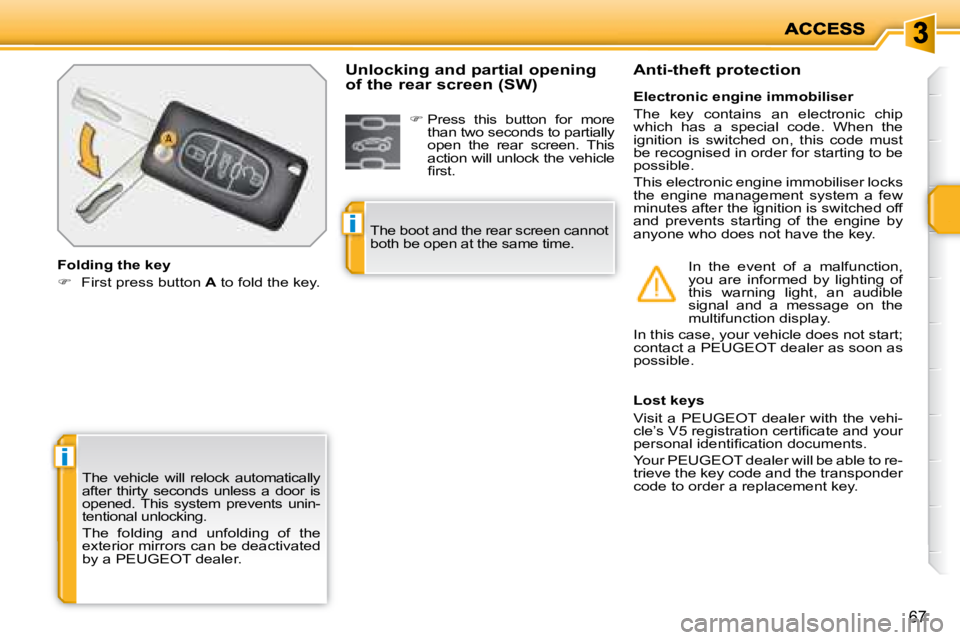
The vehicle will relock automatically
after thirty seconds unless a door is
opened. This system prevents unin-
tentional unlocking.
The folding and unfolding of the
exterior mirrors can be deactivated
by a PEUGEOT dealer.
Folding the key
First press button A to fold the key.
Lost keys
Visit a PEUGEOT dealer with the vehi-
cle’s V5 registration certifi cate and your
personal identifi cation documents.
Your PEUGEOT dealer will be able to re-
trieve the key code and the transponder
code to order a replacement key.
Electronic engine immobiliser
The key contains an electronic chip
which has a special code. When the
ignition is switched on, this code must
be recognised in order for starting to be
possible.
This electronic engine immobiliser locks
the engine management system a few
minutes after the ignition is switched off
and prevents starting of the engine by
anyone who does not have the key.
Anti-theft protection
In the event of a malfunction,
you are informed by lighting of
this warning light, an audible
signal and a message on the
multifunction display.
In this case, your vehicle does not start;
contact a PEUGEOT dealer as soon as
possible.
Unlocking and partial opening
of the rear screen (SW)
Press this button for more
than two seconds to partially
open the rear screen. This
action will unlock the vehicle
fi rst.
The boot and the rear screen cannot
both be open at the same time.
Page 71 of 255
i
ACCESS
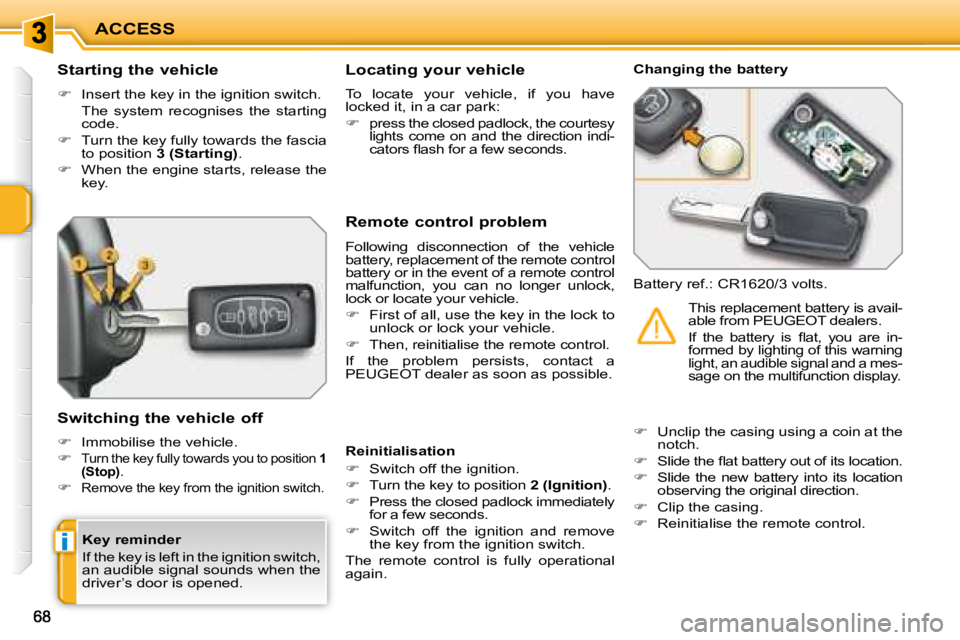
Starting the vehicle
Insert the key in the ignition switch.
The system recognises the starting code.
Turn the key fully towards the fascia
to position 3 (Starting) .
When the engine starts, release the
key.
Switching the vehicle off
Immobilise the vehicle.
Turn the key fully towards you to position 1
(Stop) .
Remove the key from the ignition switch.
Remote control problem
Following disconnection of the vehicle
battery, replacement of the remote control
battery or in the event of a remote control
malfunction, you can no longer unlock,
lock or locate your vehicle.
First of all, use the key in the lock to
unlock or lock your vehicle.
Then, reinitialise the remote control.
If the problem persists, contact a
PEUGEOT dealer as soon as possible. Changing the battery
Battery ref.: CR1620/3 volts.
Reinitialisation
Switch off the ignition.
Turn the key to position 2 (Ignition) .
Press the closed padlock immediately
for a few seconds.
Switch off the ignition and remove
the key from the ignition switch.
The remote control is fully operational
again.
Unclip the casing using a coin at the
notch.
Slide the fl at battery out of its location.
Slide the new battery into its location
observing the original direction.
Clip the casing.
Reinitialise the remote control. This replacement battery is avail-
able from PEUGEOT dealers.
If the battery is fl at, you are in-
formed by lighting of this warning
light, an audible signal and a mes-
sage on the multifunction display.
Locating your vehicle
To locate your vehicle, if you have
locked it, in a car park:
press the closed padlock, the courtesy
lights come on and the direction indi-
cators fl ash for a few seconds.
Key reminder
If the key is left in the ignition switch,
an audible signal sounds when the
driver’s door is opened.
Page 72 of 255
!
69
Keys
Make a careful note of the number of each key. This number is coded on the
label attached to the key.
If the keys are lost, your PEUGEOT dealer can rapidly supply you with new
keys. Do not throw the remote control
batteries away, they contain metals
which are harmful to the environ-
ment.
Take them to an approved collection
point.
Remote control
The high frequency remote control is a sensitive system; do not o perate it
while it is in your pocket as there is a possibility that it ma y unlock the vehicle,
without you being aware of it.
Do not repeatedly press the buttons of your remote control out of range and
out of sight of your vehicle.
You run the risk of stopping it from working and t he remote control would have to
be reprogrammed. The remote control does not operat e when the key is in the
ignition, even when the ignition is switched off, e xcept for reprogramming.
Locking the vehicle
Driving with the doors locked may make access to t he passenger compartment
by the emergency services more diffi cult in an emer gency.
As a safety precaution (with children on board), r emove the key from the ignition
when you leave the vehicle, even for a short time.
Anti-theft protection
Do not make any modifi cations to the electronic engine immobi liser system,
this could cause malfunctions.
When purchasing a second-hand vehicle
Have the key codes memorised by a PEUGEOT dealer, to ensure t hat the
keys in your possession are the only ones which can start the vehicle .
Page 73 of 255
i
i
67
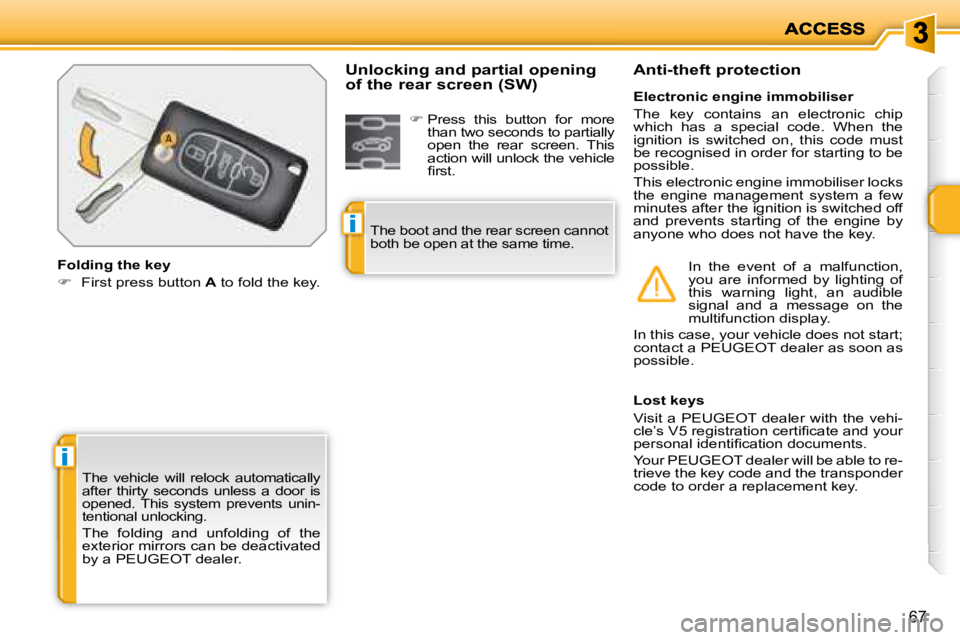
The vehicle will relock automatically
after thirty seconds unless a door is
opened. This system prevents unin-
tentional unlocking.
The folding and unfolding of the
exterior mirrors can be deactivated
by a PEUGEOT dealer.
Folding the key
First press button A to fold the key.
Lost keys
Visit a PEUGEOT dealer with the vehi-
cle’s V5 registration certifi cate and your
personal identifi cation documents.
Your PEUGEOT dealer will be able to re-
trieve the key code and the transponder
code to order a replacement key.
Electronic engine immobiliser
The key contains an electronic chip
which has a special code. When the
ignition is switched on, this code must
be recognised in order for starting to be
possible.
This electronic engine immobiliser locks
the engine management system a few
minutes after the ignition is switched off
and prevents starting of the engine by
anyone who does not have the key.
Anti-theft protection
In the event of a malfunction,
you are informed by lighting of
this warning light, an audible
signal and a message on the
multifunction display.
In this case, your vehicle does not start;
contact a PEUGEOT dealer as soon as
possible.
Unlocking and partial opening
of the rear screen (SW)
Press this button for more
than two seconds to partially
open the rear screen. This
action will unlock the vehicle
fi rst.
The boot and the rear screen cannot
both be open at the same time.
Page 74 of 255
i
ACCESS
Starting the vehicle
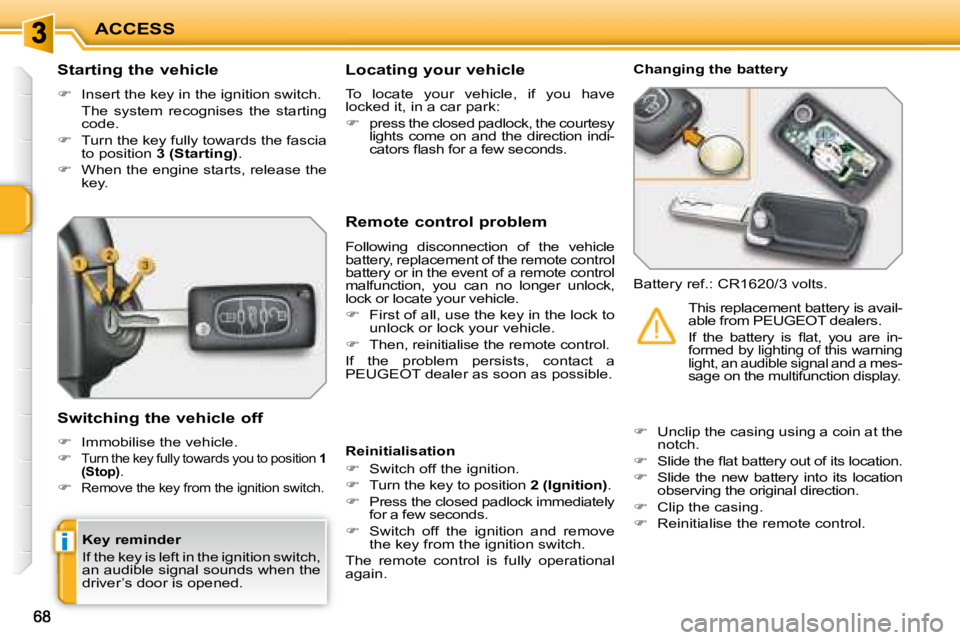
Insert the key in the ignition switch.
The system recognises the starting code.
Turn the key fully towards the fascia
to position 3 (Starting) .
When the engine starts, release the
key.
Switching the vehicle off
Immobilise the vehicle.
Turn the key fully towards you to position 1
(Stop) .
Remove the key from the ignition switch.
Remote control problem
Following disconnection of the vehicle
battery, replacement of the remote control
battery or in the event of a remote control
malfunction, you can no longer unlock,
lock or locate your vehicle.
First of all, use the key in the lock to
unlock or lock your vehicle.
Then, reinitialise the remote control.
If the problem persists, contact a
PEUGEOT dealer as soon as possible. Changing the battery
Battery ref.: CR1620/3 volts.
Reinitialisation
Switch off the ignition.
Turn the key to position 2 (Ignition) .
Press the closed padlock immediately
for a few seconds.
Switch off the ignition and remove
the key from the ignition switch.
The remote control is fully operational
again.
Unclip the casing using a coin at the
notch.
Slide the fl at battery out of its location.
Slide the new battery into its location
observing the original direction.
Clip the casing.
Reinitialise the remote control. This replacement battery is avail-
able from PEUGEOT dealers.
If the battery is fl at, you are in-
formed by lighting of this warning
light, an audible signal and a mes-
sage on the multifunction display.
Locating your vehicle
To locate your vehicle, if you have
locked it, in a car park:
press the closed padlock, the courtesy
lights come on and the direction indi-
cators fl ash for a few seconds.
Key reminder
If the key is left in the ignition switch,
an audible signal sounds when the
driver’s door is opened.
Page 75 of 255
!
69
Keys
Make a careful note of the number of each key. This number is coded on the
label attached to the key.
If the keys are lost, your PEUGEOT dealer can rapidly supply you with new
keys. Do not throw the remote control
batteries away, they contain metals
which are harmful to the environ-
ment.
Take them to an approved collection
point.
Remote control
The high frequency remote control is a sensitive system; do not o perate it
while it is in your pocket as there is a possibility that it ma y unlock the vehicle,
without you being aware of it.
Do not repeatedly press the buttons of your remote control out of range and
out of sight of your vehicle.
You run the risk of stopping it from working and t he remote control would have to
be reprogrammed. The remote control does not operat e when the key is in the
ignition, even when the ignition is switched off, e xcept for reprogramming.
Locking the vehicle
Driving with the doors locked may make access to t he passenger compartment
by the emergency services more diffi cult in an emer gency.
As a safety precaution (with children on board), r emove the key from the ignition
when you leave the vehicle, even for a short time.
Anti-theft protection
Do not make any modifi cations to the electronic engine immobi liser system,
this could cause malfunctions.
When purchasing a second-hand vehicle
Have the key codes memorised by a PEUGEOT dealer, to ensure t hat the
keys in your possession are the only ones which can start the vehicle .