ESP PEUGEOT 207 2011 Owner's Manual
[x] Cancel search | Manufacturer: PEUGEOT, Model Year: 2011, Model line: 207, Model: PEUGEOT 207 2011Pages: 248, PDF Size: 8.61 MB
Page 108 of 248
6SAFETY
106
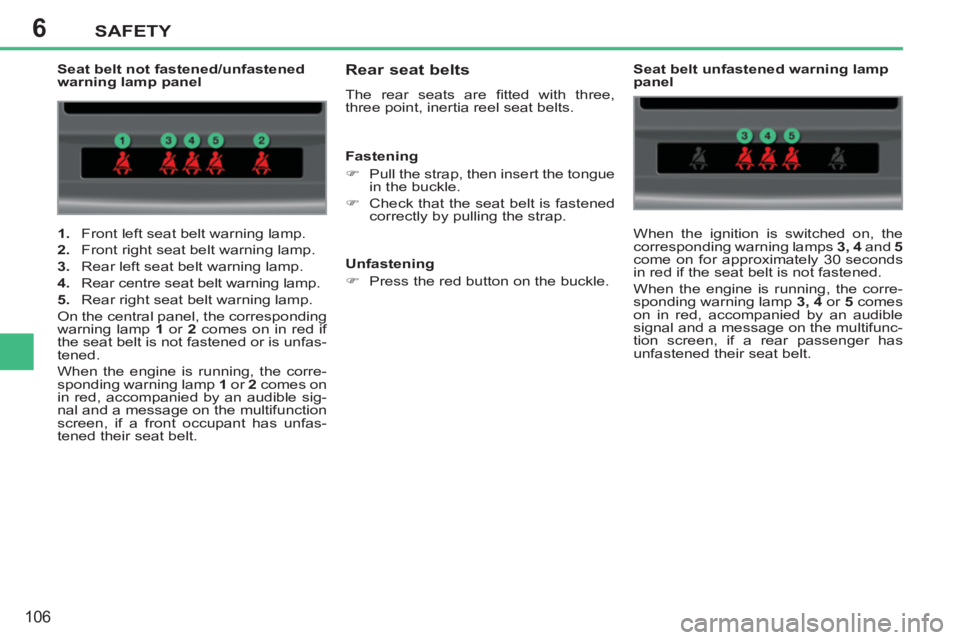
1.
Front left seat belt warning lamp.
2.
Front right seat belt warning lamp.
3.
Rear left seat belt warning lamp.
4.
Rear centre seat belt warning lamp.
5.
Rear right seat belt warning lamp.
On the central panel, the corresponding
warning lamp 1
or 2
comes on in red if
the seat belt is not fastened or is unfas-
tened.
When the engine is running, the corre-
sponding warning lamp 1
or 2
comes on
in red, accompanied by an audible sig-
nal and a message on the multifunction
screen, if a front occupant has unfas-
tened their seat belt.
Seat belt not fastened/unfastened
warning lamp panel
Rear seat belts
The rear seats are fi tted with three,
three point, inertia reel seat belts.
Seat belt unfastened warning lamp
panel
When the ignition is switched on, the
corresponding warning lamps 3, 4
and 5
come on for approximately 30 seconds
in red if the seat belt is not fastened.
When the engine is running, the corre-
sponding warning lamp 3, 4
or 5
comes
on in red, accompanied by an audible
signal and a message on the multifunc-
tion screen, if a rear passenger has
unfastened their seat belt.
Fastening
)
Pull the strap, then insert the tongue
in the buckle.
)
Check that the seat belt is fastened
correctly by pulling the strap.
Unfastening
)
Press the red button on the buckle.
Page 112 of 248
6
!
SAFETY
110
Lateral airbags *
System which protects the driver and
front passenger in the event of a seri-
ous side impact in order to limit the risk
of injury to the chest.
Each lateral airbag is fi tted in the front
seat back frame, on the door side.
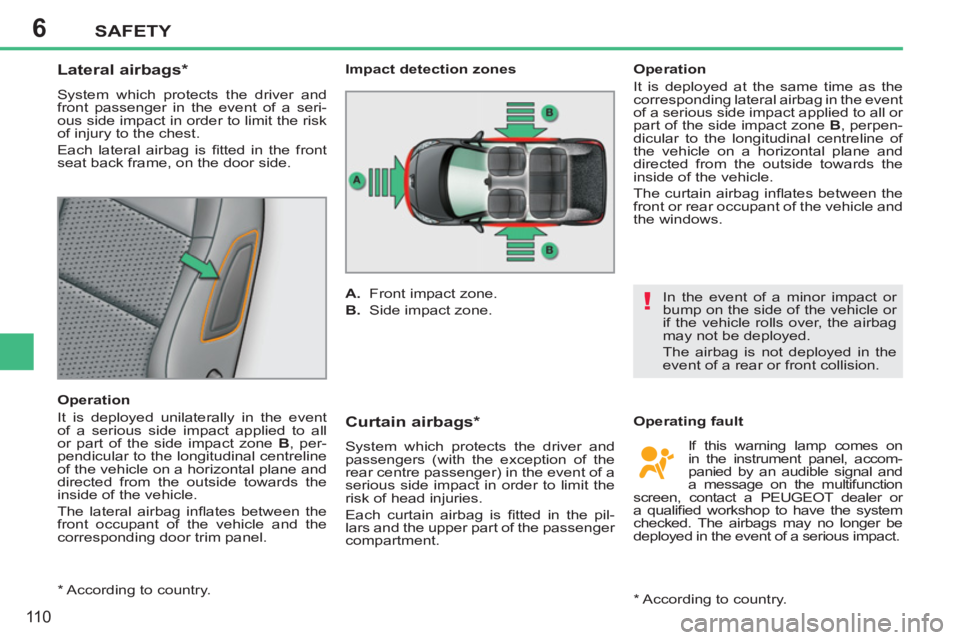
Operation
It is deployed unilaterally in the event
of a serious side impact applied to all
or part of the side impact zone B
, per-
pendicular to the longitudinal centreline
of the vehicle on a horizontal plane and
directed from the outside towards the
inside of the vehicle.
The lateral airbag infl ates between the
front occupant of the vehicle and the
corresponding door trim panel.
Curtain airbags *
System which protects the driver and
passengers (with the exception of the
rear centre passenger) in the event of a
serious side impact in order to limit the
risk of head injuries.
Each curtain airbag is fi tted in the pil-
lars and the upper part of the passenger
compartment. If this warning lamp comes on
in the instrument panel, accom-
panied by an audible signal and
a message on the multifunction
screen, contact a PEUGEOT dealer or
a qualifi ed workshop to have the system
checked. The airbags may no longer be
deployed in the event of a serious impact.
*
According to country.
Operating fault
Operation
It is deployed at the same time as the
corresponding lateral airbag in the event
of a serious side impact applied to all or
part of the side impact zone B
, perpen-
dicular to the longitudinal centreline of
the vehicle on a horizontal plane and
directed from the outside towards the
inside of the vehicle.
The curtain airbag infl ates between the
front or rear occupant of the vehicle and
the windows.
In the event of a minor impact or
bump on the side of the vehicle or
if the vehicle rolls over, the airbag
may not be deployed.
The airbag is not deployed in the
event of a rear or front collision.
Impact detection zones
A.
Front impact zone.
B.
Side impact zone.
* According to country.
Page 115 of 248
7
i
DRIVING
113
*
According to engine.
GEAR SHIFT INDICATOR *
System which reduces fuel consump-
tion by advising the driver to change up
a gear on vehicles fi tted with a manual
gearbox.
Operation
The system acts solely in the context of
economical driving.
Depending on the driving situation and
your vehicle's equipment, the system
may advise you to skip one or more
gears. You can follow this instruc-
tion without engaging the intermediate
gears.
The gear engagement recommenda-
tions must not be considered compulso-
ry. In fact, the confi guration of the road,
the amount of traffi c and safety remain
determining factors when choosing the
best gear. Therefore, the driver remains
responsible for deciding whether or not
to follow the advice given by the system.
This function cannot be deactivated.
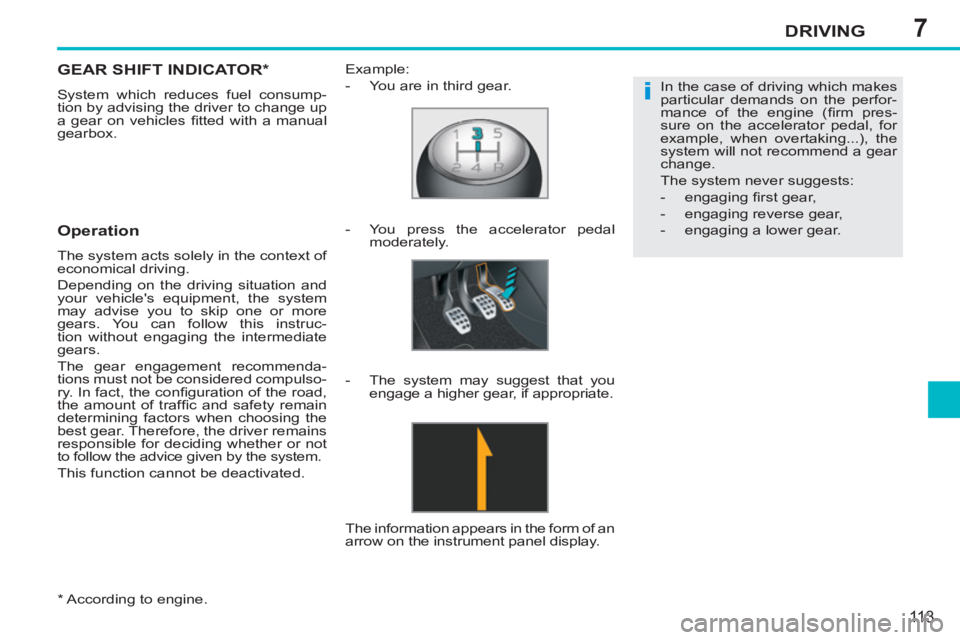
Example:
- You are in third gear.
The information appears in the form of an
arrow on the instrument panel display.
In the case of driving which makes
particular demands on the perfor-
mance of the engine (fi rm pres-
sure on the accelerator pedal, for
example, when overtaking...), the
system will not recommend a gear
change.
The system never suggests:
- engaging fi rst gear,
- engaging reverse gear,
- engaging a lower gear.
- You press the accelerator pedal
moderately.
- The system may suggest that you
engage a higher gear, if appropriate.
Page 116 of 248
7DRIVING
11 4
AUTOMATIC GEARBOX
Four-speed automatic gearbox which
offers a choice between the comfort of
fully automatic operation, enhanced by
sport and snow programmes, or manual
gear changing.
Therefore, four driving modes are of-
fered:
- automatic
operation for electronic
management of the gears by the
gearbox,
- sport
programme for a more dy-
namic style of driving,
- snow
programme to improve driv-
ing when traction is poor,
- manual
operation for sequential
changing of the gears by the driver.
Gear lever
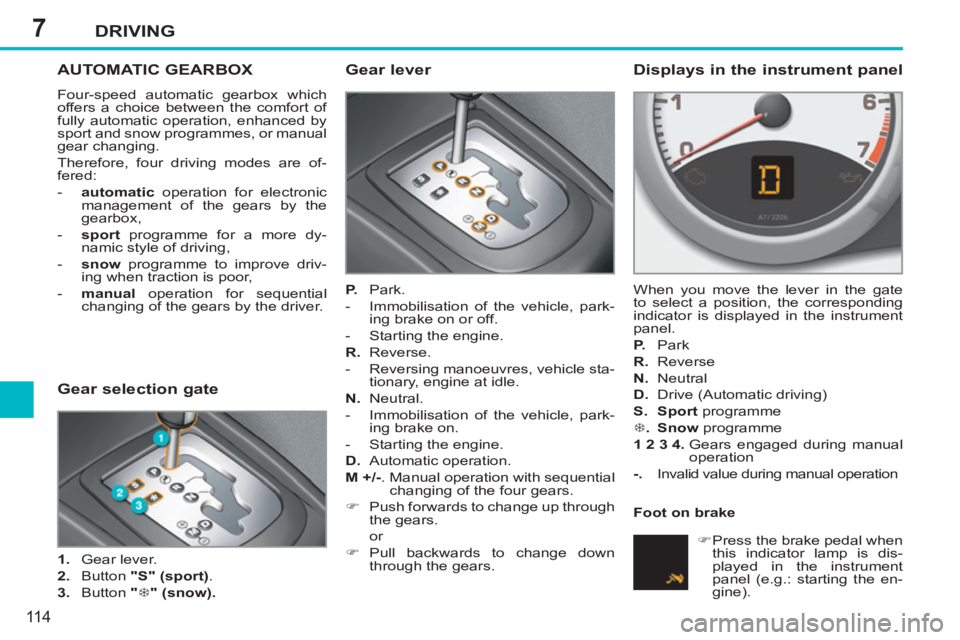
P.
Park.
- Immobilisation of the vehicle, park-
ing brake on or off.
- Starting the engine.
R.
Reverse.
- Reversing manoeuvres, vehicle sta-
tionary, engine at idle.
N.
Neutral.
- Immobilisation of the vehicle, park-
ing brake on.
- Starting the engine.
D.
Automatic operation.
M +/-
. Manual operation with sequential
changing of the four gears.
)
Push forwards to change up through
the gears.
or
)
Pull backwards to change down
through the gears.
Displays in the instrument panel
When you move the lever in the gate
to select a position, the corresponding
indicator is displayed in the instrument
panel.
P.
Park
R.
Reverse
N.
Neutral
D.
Drive (Automatic driving)
S.
Sport
programme
7
.
Snow
programme
1 2 3 4
.
Gears engaged during manual
operation
-.
Invalid value during manual operation
Gear selection gate
1.
Gear lever.
2.
Button "S"
(sport)
.
3.
Button "
7
"
(snow).
Foot on brake
)
Press the brake pedal when
this indicator lamp is dis-
played in the instrument
panel (e.g.: starting the en-
gine).
Page 119 of 248
7
i
DRIVING
11 7
SPEED LIMITER
System which prevents the vehicle from
exceeding the speed programmed by
the driver.
When the programmed speed limit is
reached, pressing the accelerator pedal
no longer has any effect.
The speed limiter is switched on
man-
ually: it requires a programmed speed
of at least 20 mph (30 km/h).
The speed limiter is switched off
by
manual operation of the control.
The programmed speed can be ex-
ceeded temporarily by pressing the ac-
celerator fi rmly.
To return to the programmed speed,
simply slow down to a speed below the
programmed speed.
The programmed speed remains in the
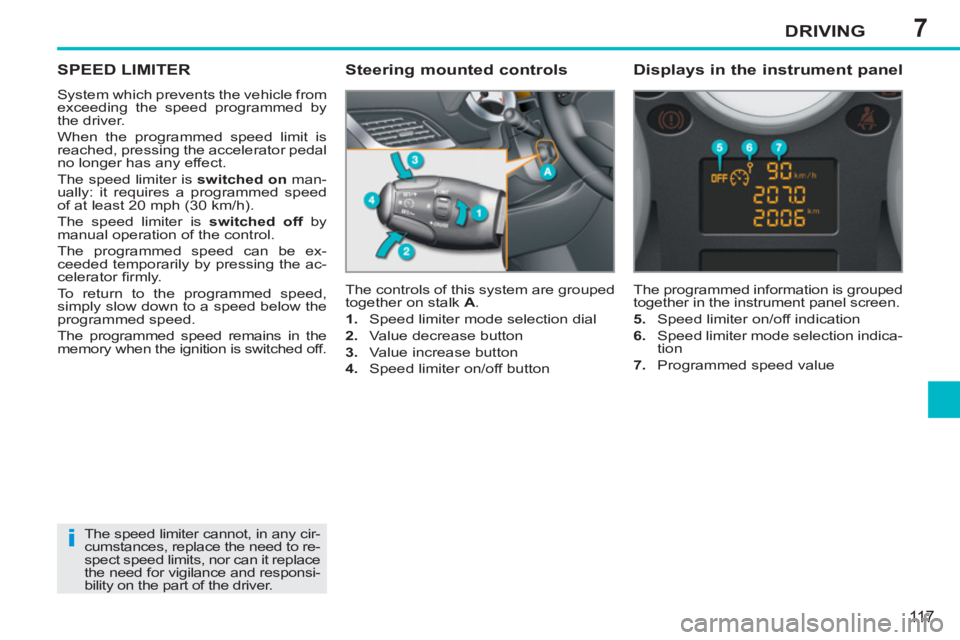
memory when the ignition is switched off. The controls of this system are grouped
together on stalk A
.
1.
Speed limiter mode selection dial
2.
Value decrease button
3.
Value increase button
4.
Speed limiter on/off button
The programmed information is grouped
together in the instrument panel screen.
5. Speed limiter on/off indication
6. Speed limiter mode selection indica-
tion
7. Programmed speed value
Steering mounted controls
Displays in the instrument panel
The speed limiter cannot, in any cir-
cumstances, replace the need to re-
spect speed limits, nor can it replace
the need for vigilance and responsi-
bility on the part of the driver.
Page 121 of 248
7
i
DRIVING
119
CRUISE CONTROL
System which automatically maintains
the speed of the vehicle at the value
programmed by the driver, without any
action on the accelerator pedal.
The cruise control is switched on
manually: it requires a minimum vehicle
speed of 25 mph (40 km/h), as well as
the engaging of:
- fourth gear on a manual gearbox,
- second gear on an automatic gear-
box in sequential mode,
- position D
on an automatic gear-
box.
The cruise control is switched off
man-
ually or by pressing the brake or clutch
pedal or on triggering of the ESP sys-
tem for safety reasons.
It is possible to exceed the programmed
speed temporarily by pressing the ac-
celerator pedal.
To return to the programmed speed,
simply release the accelerator pedal.
Switching off the ignition cancels any
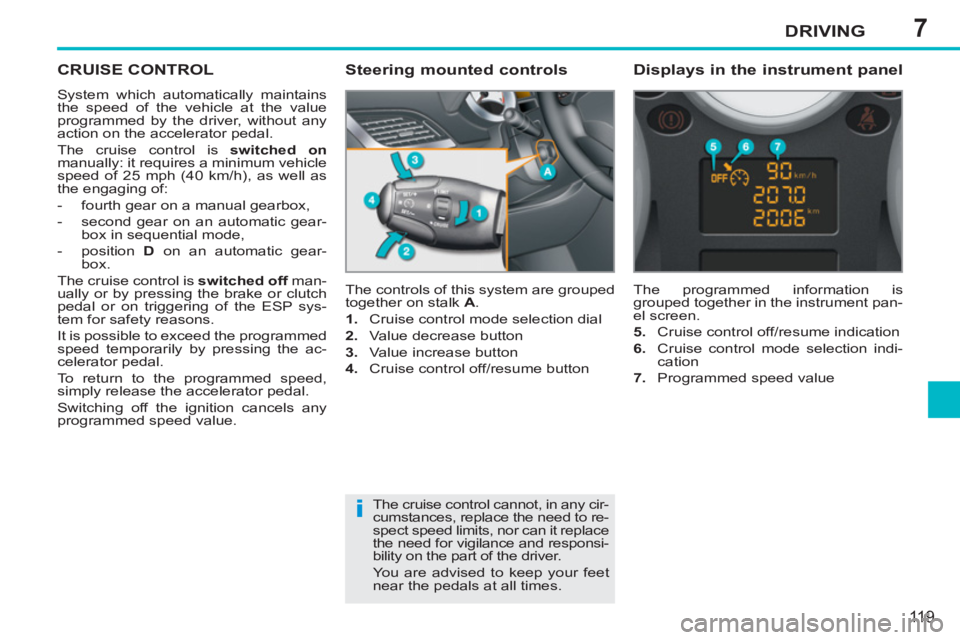
programmed speed value. The controls of this system are grouped
together on stalk A
.
1.
Cruise control mode selection dial
2.
Value decrease button
3.
Value increase button
4.
Cruise control off/resume button
The programmed information is
grouped together in the instrument pan-
el screen.
5.
Cruise control off/resume indication
6.
Cruise control mode selection indi-
cation
7.
Programmed speed value
Steering mounted controls
Displays in the instrument panel
The cruise control cannot, in any cir-
cumstances, replace the need to re-
spect speed limits, nor can it replace
the need for vigilance and responsi-
bility on the part of the driver.
You are advised to keep your feet
near the pedals at all times.
Page 123 of 248
7
i
i
DRIVING
121
VISUAL AND AUDIBLE
PARKING SENSORS
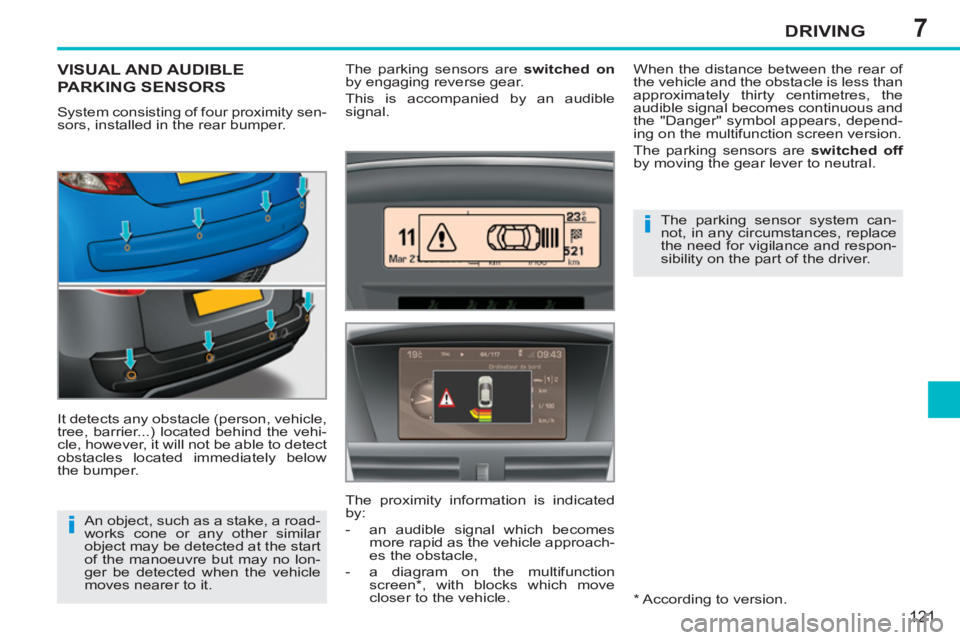
System consisting of four proximity sen-
sors, installed in the rear bumper.
It detects any obstacle (person, vehicle,
tree, barrier...) located behind the vehi-
cle, however, it will not be able to detect
obstacles located immediately below
the bumper. The parking sensors are switched on
by engaging reverse gear.
This is accompanied by an audible
signal.
* According to version. An object, such as a stake, a road-
works cone or any other similar
object may be detected at the start
of the manoeuvre but may no lon-
ger be detected when the vehicle
moves nearer to it. When the distance between the rear of
the vehicle and the obstacle is less than
approximately thirty centimetres, the
audible signal becomes continuous and
the "Danger" symbol appears, depend-
ing on the multifunction screen version.
The parking sensors are switched off
by moving the gear lever to neutral.
The parking sensor system can-
not, in any circumstances, replace
the need for vigilance and respon-
sibility on the part of the driver.
The proximity information is indicated
by:
- an audible signal which becomes
more rapid as the vehicle approach-
es the obstacle,
- a diagram on the multifunction
screen * , with blocks which move
closer to the vehicle.
Page 130 of 248
8CHECKS
128
CHECKING LEVELS
Check all of these levels regularly and
top them up if necessary, unless other-
wise indicated.
If a level drops signifi cantly, have the
corresponding system checked by a
PEUGEOT dealer or a qualifi ed work-
shop.
Take care when working under the bon-
net, as some parts of the engine can be
extremely hot (risk of burns).
Brake fluid level
Oil level
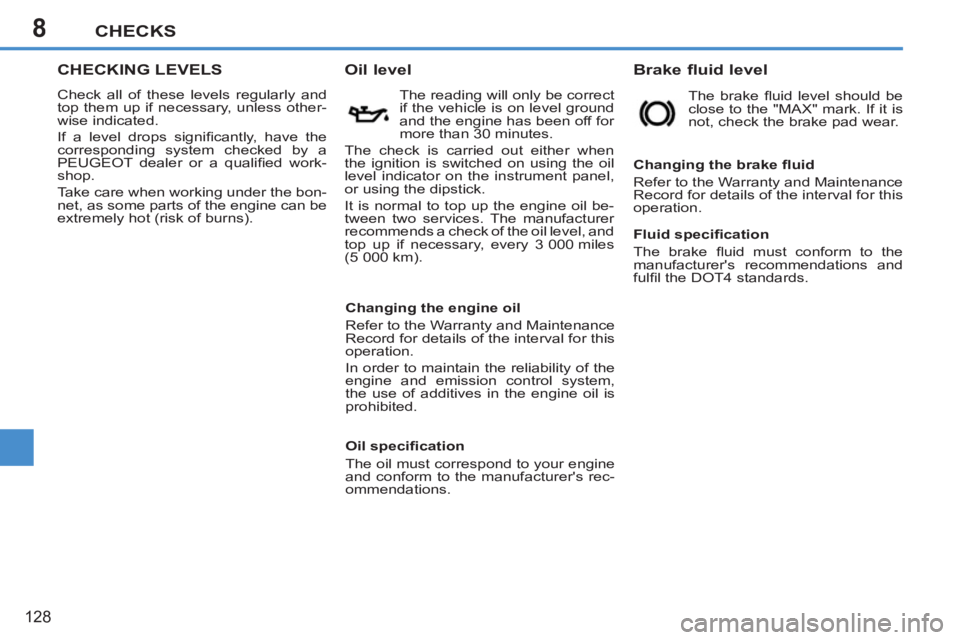
The reading will only be correct
if the vehicle is on level ground
and the engine has been off for
more than 30 minutes.
The check is carried out either when
the ignition is switched on using the oil
level indicator on the instrument panel,
or using the dipstick.
It is normal to top up the engine oil be-
tween two services. The manufacturer
recommends a check of the oil level, and
top up if necessary, every 3 000 miles
(5 000 km). The brake fl uid level should be
close to the "MAX" mark. If it is
not, check the brake pad wear.
Changing the brake fl uid
Refer to the Warranty and Maintenance
Record for details of the interval for this
operation.
Changing the engine oil
Refer to the Warranty and Maintenance
Record for details of the interval for this
operation.
In order to maintain the reliability of the
engine and emission control system,
the use of additives in the engine oil is
prohibited.
Oil specifi cation
The oil must correspond to your engine
and conform to the manufacturer's rec-
ommendations.
Fluid specifi cation
The brake fl uid must conform to the
manufacturer's recommendations and
fulfi l the DOT4 standards.
Page 145 of 248
9PRACTICAL INFORMATION
143
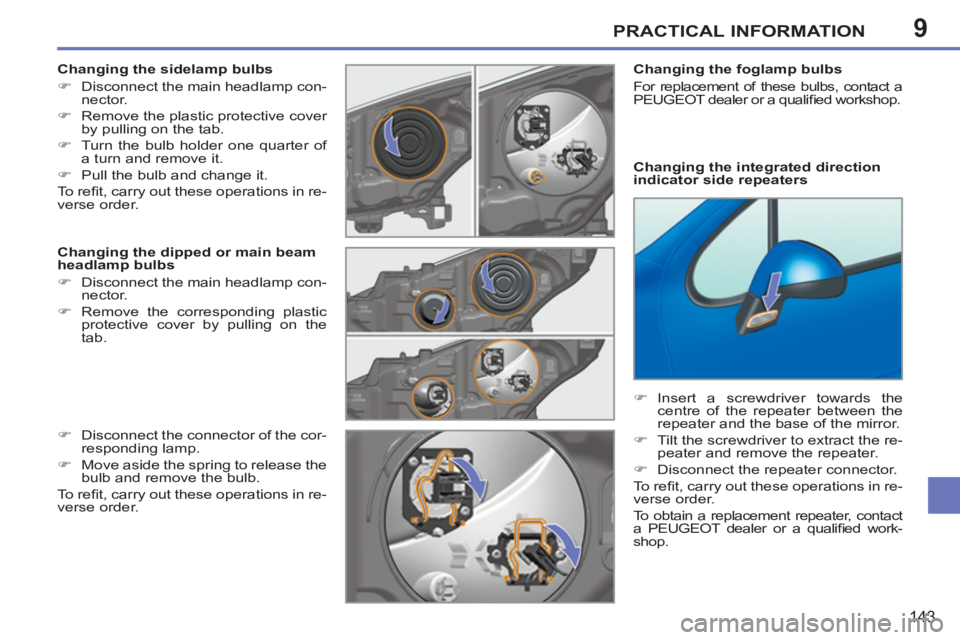
Changing the sidelamp bulbs
)
Disconnect the main headlamp con-
nector.
)
Remove the plastic protective cover
by pulling on the tab.
)
Turn the bulb holder one quarter of
a turn and remove it.
)
Pull the bulb and change it.
To r efi t, carry out these operations in re-
verse order.
Changing the dipped or main beam
headlamp bulbs
)
Disconnect the main headlamp con-
nector.
)
Remove the corresponding plastic
protective cover by pulling on the
tab.
)
Disconnect the connector of the cor-
responding lamp.
)
Move aside the spring to release the
bulb and remove the bulb.
To r efi t, carry out these operations in re-
verse order.
Changing the foglamp bulbs
For replacement of these bulbs, contact a
PEUGEOT dealer or a qualifi ed workshop.
Changing the integrated direction
indicator side repeaters
)
Insert a screwdriver towards the
centre of the repeater between the
repeater and the base of the mirror.
)
Tilt the screwdriver to extract the re-
peater and remove the repeater.
)
Disconnect the repeater connector.
To r efi t, carry out these operations in re-
verse order.
To obtain a replacement repeater, contact
a PEUGEOT dealer or a qualifi ed work-
shop.
Page 147 of 248
9
!
PRACTICAL INFORMATION
145
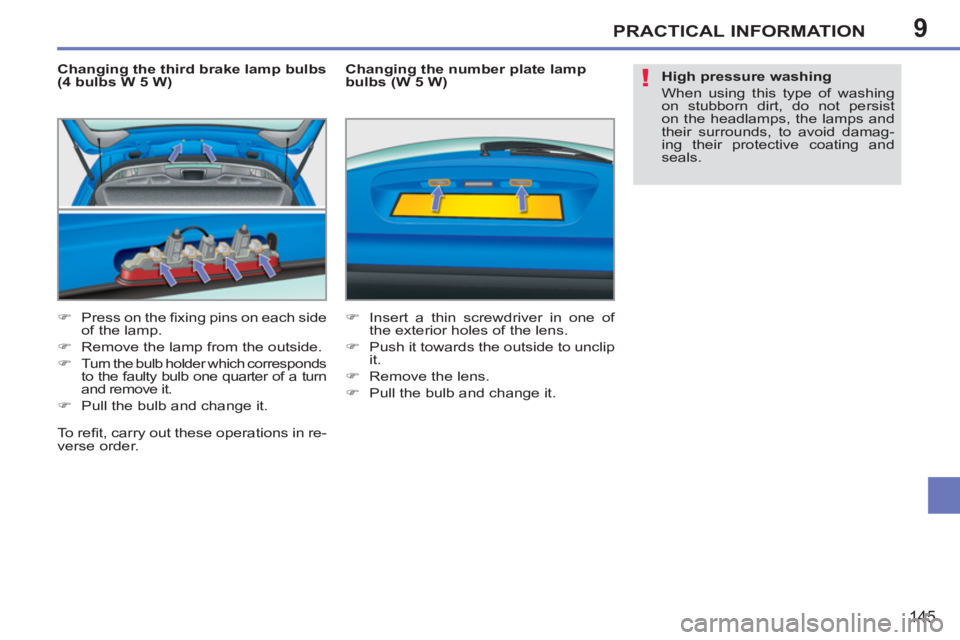
Changing the third brake lamp bulbs
(4 bulbs W 5 W)
)
Press on the fi xing pins on each side
of the lamp.
)
Remove the lamp from the outside.
)
Turn the bulb holder which corresponds
to the faulty bulb one quarter of a turn
and remove it.
)
Pull the bulb and change it.
Changing the number plate lamp
bulbs (W 5 W)
)
Insert a thin screwdriver in one of
the exterior holes of the lens.
)
Push it towards the outside to unclip
it.
)
Remove the lens.
)
Pull the bulb and change it.
To r efi t, carry out these operations in re-
verse order.
High pressure washing
When using this type of washing
on stubborn dirt, do not persist
on the headlamps, the lamps and
their surrounds, to avoid damag-
ing their protective coating and
seals.