lock PEUGEOT 207 2011 Owner's Guide
[x] Cancel search | Manufacturer: PEUGEOT, Model Year: 2011, Model line: 207, Model: PEUGEOT 207 2011Pages: 248, PDF Size: 8.61 MB
Page 123 of 248
7
i
i
DRIVING
121
VISUAL AND AUDIBLE
PARKING SENSORS
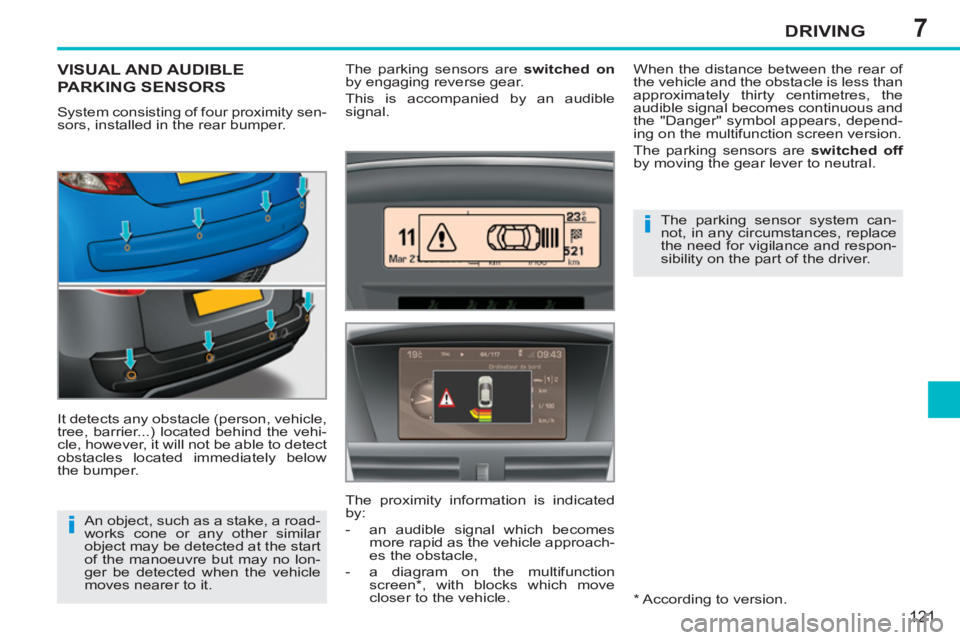
System consisting of four proximity sen-
sors, installed in the rear bumper.
It detects any obstacle (person, vehicle,
tree, barrier...) located behind the vehi-
cle, however, it will not be able to detect
obstacles located immediately below
the bumper. The parking sensors are switched on
by engaging reverse gear.
This is accompanied by an audible
signal.
* According to version. An object, such as a stake, a road-
works cone or any other similar
object may be detected at the start
of the manoeuvre but may no lon-
ger be detected when the vehicle
moves nearer to it. When the distance between the rear of
the vehicle and the obstacle is less than
approximately thirty centimetres, the
audible signal becomes continuous and
the "Danger" symbol appears, depend-
ing on the multifunction screen version.
The parking sensors are switched off
by moving the gear lever to neutral.
The parking sensor system can-
not, in any circumstances, replace
the need for vigilance and respon-
sibility on the part of the driver.
The proximity information is indicated
by:
- an audible signal which becomes
more rapid as the vehicle approach-
es the obstacle,
- a diagram on the multifunction
screen * , with blocks which move
closer to the vehicle.
Page 142 of 248
9
i
PRACTICAL INFORMATION
140
Parking the vehicle
Immobilise the vehicle where it
does not block traffi c: the ground
must be level, stable and non-
slippery.
Apply the parking brake, switch off
the ignition and engage fi rst gear *
to lock the wheels.
If necessary, place a chock under
the wheel diagonally opposite the
wheel to be changed.
You should ensure that the occu-
pants get out of the vehicle and
wait where they are safe.
Never go underneath a vehicle
raised using a jack; use an axle
stand.
Removing the wheel
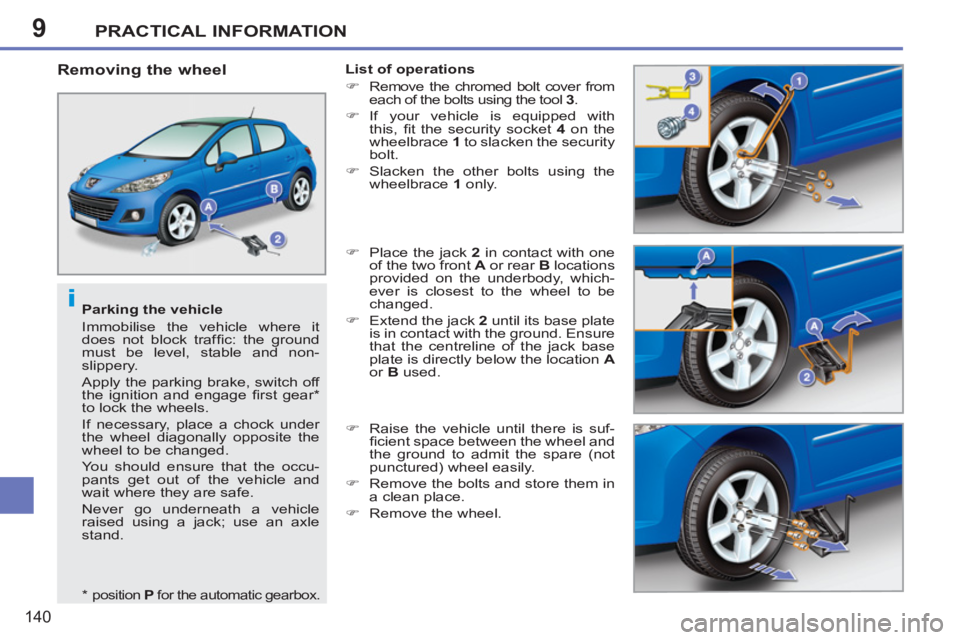
List of operations
)
Remove the chromed bolt cover from
each of the bolts using the tool 3
.
)
If your vehicle is equipped with
this, fi t the security socket 4
on the
wheelbrace 1
to slacken the security
bolt.
)
Slacken the other bolts using the
wheelbrace 1
only.
)
Place the jack 2
in contact with one
of the two front A
or rear B
locations
provided on the underbody, which-
ever is closest to the wheel to be
changed.
)
Extend the jack 2
until its base plate
is in contact with the ground. Ensure
that the centreline of the jack base
plate is directly below the location A
or B
used.
)
Raise the vehicle until there is suf-
fi cient space between the wheel and
the ground to admit the spare (not
punctured) wheel easily.
)
Remove the bolts and store them in
a clean place.
)
Remove the wheel.
*
position P
for the automatic gearbox.
Page 152 of 248
9PRACTICAL INFORMATION
150
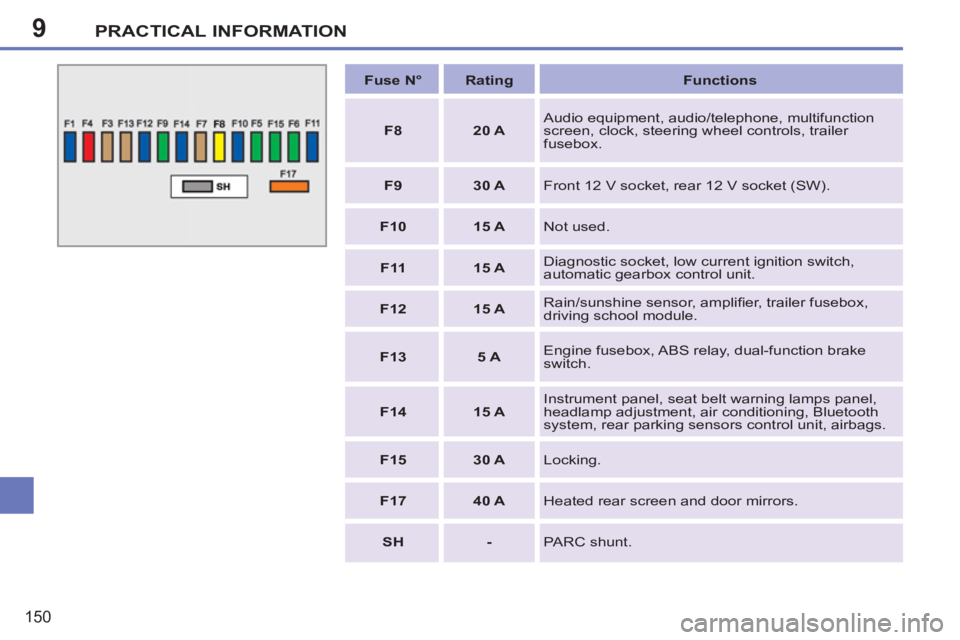
Fuse N°
Rating
Functions
F8
20 A
Audio equipment, audio/telephone, multifunction
screen, clock, steering wheel controls, trailer
fusebox.
F9
30 A
Front 12 V socket, rear 12 V socket (SW).
F10
15 A
Not used.
F11
15 A
Diagnostic socket, low current ignition switch,
automatic gearbox control unit.
F12
15 A
Rain/sunshine sensor, amplifi er, trailer fusebox,
driving school module.
F13
5 A
Engine fusebox, ABS relay, dual-function brake
switch.
F14
15 A
Instrument panel, seat belt warning lamps panel,
headlamp adjustment, air conditioning, Bluetooth
system, rear parking sensors control unit, airbags.
F15
30 A
Locking.
F17
40 A
Heated rear screen and door mirrors.
SH
-
PARC shunt.
Page 156 of 248
9
!
i
i
PRACTICAL INFORMATION
154
Do not charge the batteries with-
out disconnecting the terminals
fi rst.
Do not disconnect the terminals
while the engine is running.
The batteries contain harmful sub-
stances such as sulphuric acid
and lead. They must be disposed
of in accordance with regulations
and must not, in any circumstanc-
es, be discarded with household
waste.
Take used remote control batteries
and vehicle batteries to a special col-
lection point.
Charging the battery using a
battery charger
)
Disconnect the battery from the vehicle.
)
Follow the instructions for use pro-
vided by the manufacturer of the
charger.
)
Reconnect starting with the negative
terminal (-).
)
Check that the terminals and connec-
tors are clean. If they are covered with
sulphate (whitish or greenish deposit),
remove them and clean them.
It is advisable to disconnect the
battery if the vehicle is to be left
unused for more than one month.
Before disconnecting the
battery
Wait 2 minutes after switching off
the ignition before disconnecting
the battery.
Close the windows and the doors
before disconnecting the battery.
Following reconnection of the
battery
Following reconnection of the bat-
tery, switch on the ignition and wait
1 minute before starting to permit
initialisation of the electronic sys-
tems. However, if slight diffi cul-
ties are encountered following this
operation, contact a PEUGEOT
dealer or a qualifi ed workshop.
Referring to the corresponding
section, you must yourself reini-
tialise:
- the remote control key,
- the one-touch electric windows,
- the GPS satellite navigation
system.
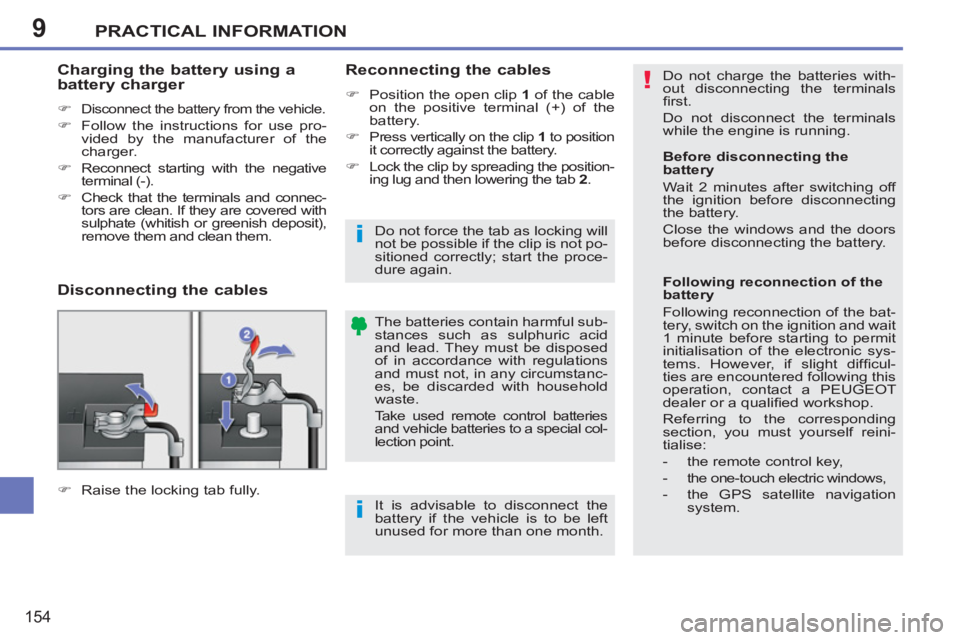
Disconnecting the cables
Reconnecting the cables
)
Position the open clip 1
of the cable
on the positive terminal (+) of the
battery.
)
Press vertically on the clip 1
to position
it correctly against the battery.
)
Lock the clip by spreading the position-
ing lug and then lowering the tab 2
.
)
Raise the locking tab fully.
Do not force the tab as locking will
not be possible if the clip is not po-
sitioned correctly; start the proce-
dure again.
Page 158 of 248
9
i
i
PRACTICAL INFORMATION
156
TOWING THE VEHICLE
Procedure for having your vehicle towed
or for towing another vehicle using a re-
movable towing eye.
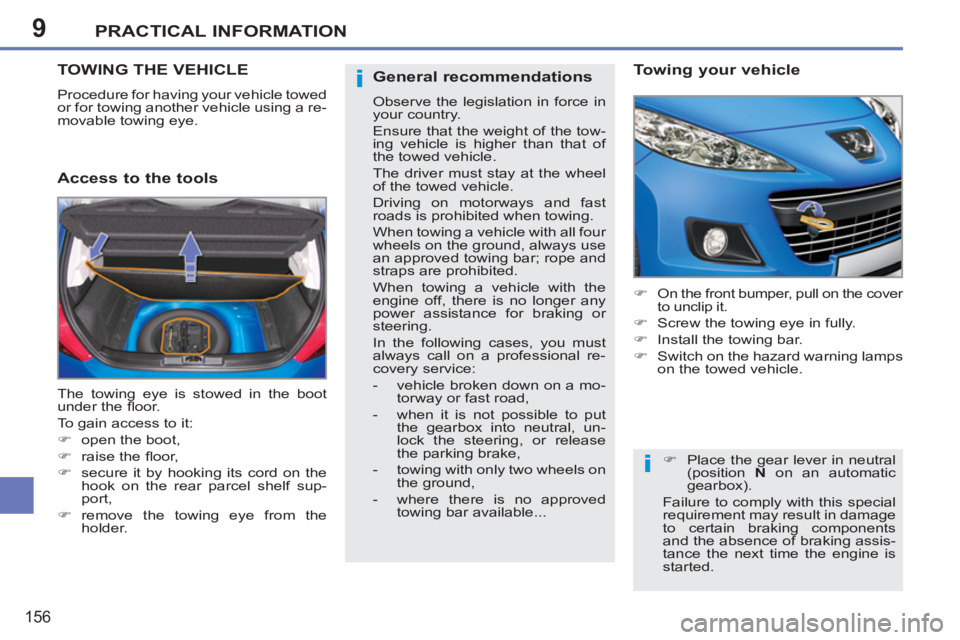
Access to the tools
Towing your vehicle
)
On the front bumper, pull on the cover
to unclip it.
)
Screw the towing eye in fully.
)
Install the towing bar.
)
Switch on the hazard warning lamps
on the towed vehicle.
The towing eye is stowed in the boot
under the fl oor.
To gain access to it:
)
open the boot,
)
raise the fl oor,
)
secure it by hooking its cord on the
hook on the rear parcel shelf sup-
port,
)
remove the towing eye from the
holder.
)
Place the gear lever in neutral
(position N
on an automatic
gearbox).
Failure to comply with this special
requirement may result in damage
to certain braking components
and the absence of braking assis-
tance the next time the engine is
started.
General recommendations
Observe the legislation in force in
your country.
Ensure that the weight of the tow-
ing vehicle is higher than that of
the towed vehicle.
The driver must stay at the wheel
of the towed vehicle.
Driving on motorways and fast
roads is prohibited when towing.
When towing a vehicle with all four
wheels on the ground, always use
an approved towing bar; rope and
straps are prohibited.
When towing a vehicle with the
engine off, there is no longer any
power assistance for braking or
steering.
In the following cases, you must
always call on a professional re-
covery service:
- vehicle broken down on a mo-
torway or fast road,
- when it is not possible to put
the gearbox into neutral, un-
lock the steering, or release
the parking brake,
- towing with only two wheels on
the ground,
- where there is no approved
towing bar available...
Page 185 of 248
183
03GENERAL OPERATION
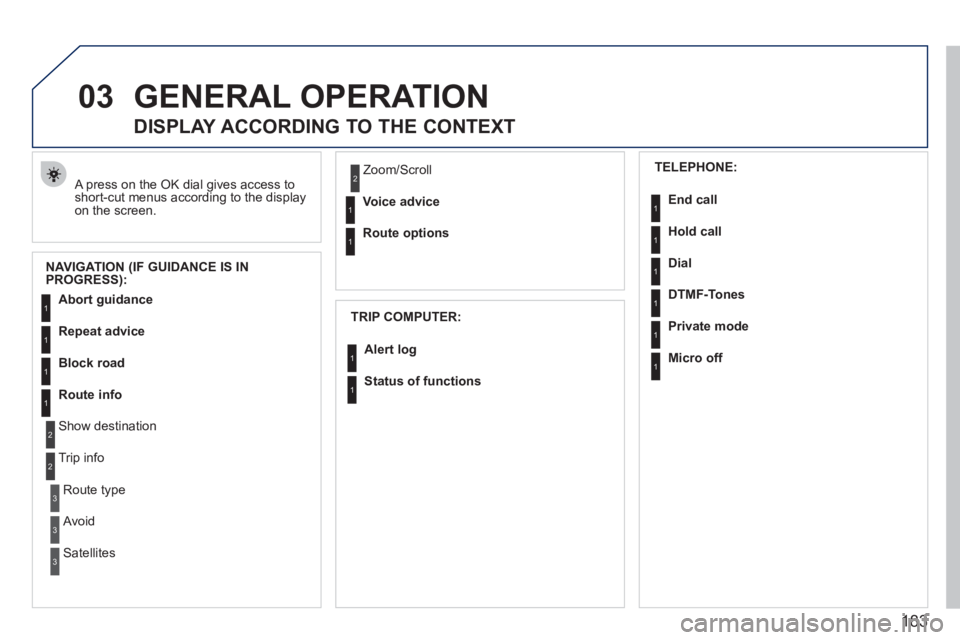
A press on the OK dial gives access to short-cut menus according to the displayon the screen.
DISPLAY ACCORDING TO THE CONTEXT
NAVIGATION (IF GUIDANCE IS IN
PROGRESS):
TRIP COMPUTER:
Abort guidance
Repeat advice
Block road
Route info
Show destination
Trip info
Route t
ype
Avoid
SatellitesZ
oom/Scroll
Voice advice
Route options
Alert log
Status of functions
1
2
3
3
2
1
1
1
3
1
1
1
1
2
TELEPHONE:
End call
Hold call
Dial
DTMF-Tones
Private mod
e
Micro off
1
1
1
1
1
1
Page 211 of 248
209
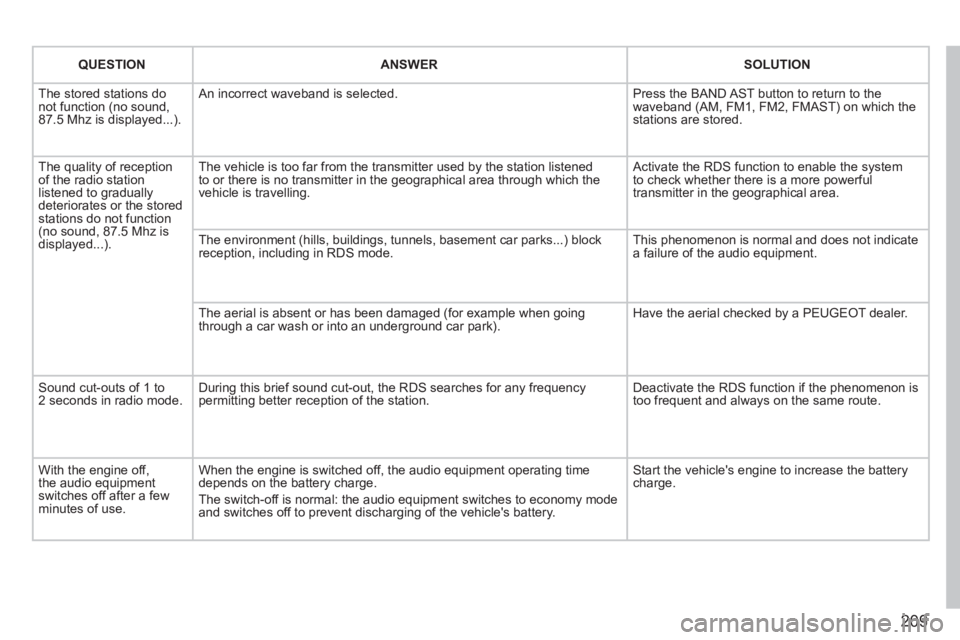
QUESTIONANSWERSOLUTION
The stored stations donot function (no sound, 87.5 Mhz is displayed...).
An incorrect waveband is selected. Press the BAND AST button to return to the waveband (AM, FM1, FM2, FMAST) on which thestations are stored.
The quality of receptionof the radio station listened to graduallydeteriorates or the stored stations do not function(no sound, 87.5 Mhz is displayed...).
The vehicle is too far from the transmitter used by the station listenedto or there is no transmitter in the geographical area through which the vehicle is travelling.
Activate the RDS function to enable the system to check whether there is a more powerful transmitter in the geographical area.
The environment (hills, buildings, tunnels, basement car parks...) block reception, including in RDS mode. This phenomenon is normal and does not indicate a failure of the audio equipment.
The aerial is absent or has been damaged (for example when goingthrough a car wash or into an underground car park).
Have the aerial checked by a PEUGEOT dealer.
Sound cut-outs of 1 to2 seconds in radio mode.During this brief sound cut-out, the RDS searches for any frequency permitting better reception of the station.
Deactivate the RDS function if the phenomenon is too frequent and always on the same route.
With the engine off, the audio equipment switches off after a few minutes of use.
When the engine is switched off, the audio equipment operating timedepends on the battery charge.
The switch-off is normal: the audio equipment switches to economy mode and switches off to prevent discharging of the vehicle's battery.
Start the vehicle's engine to increase the batterycharge.
Page 219 of 248
217
04
1
2
3
4
1
2
3
4
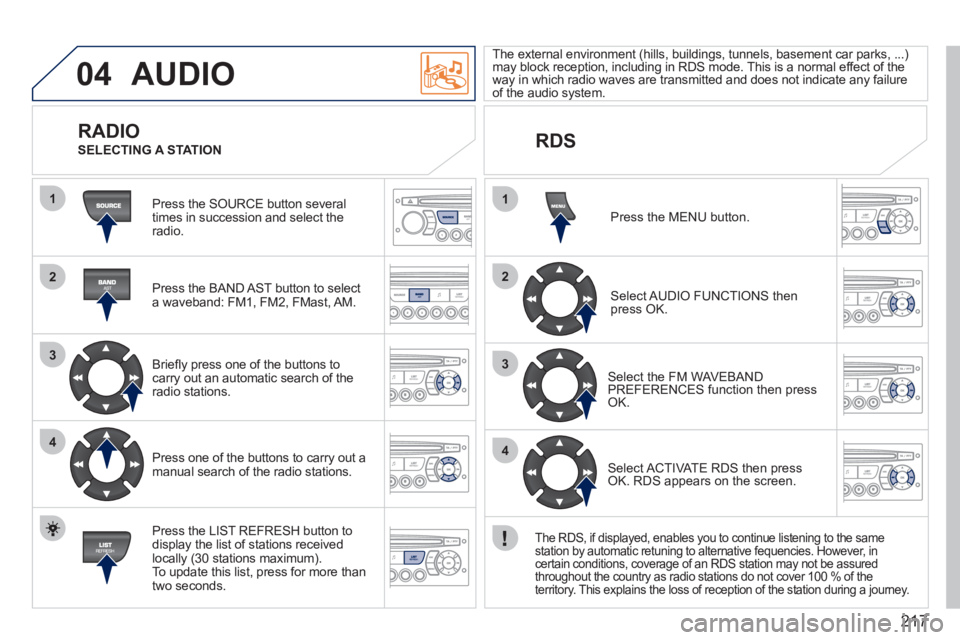
AUDIO
Press the SOURCE button several
times in succession and select theradio.
Press the BAND A
ST button to select
a waveband: FM1, FM2, FMast, AM.
Brie
fl y press one of the buttons to carry out an automatic search of theradio stations.
Press one of the buttons to carr
y out a manual search of the radio stations.
Press the LI
ST REFRESH button to
display the list of stations received
locally (30 stations maximum).
To update this list, press for more than
two seconds. The external environment
(hills, buildings, tunnels, basement car parks, ...) may block reception, including in RDS mode. This is a normal effect of the
way in which radio waves are transmitted and does not indicate any failure of the audio system.
RDS RADIO
SELECTING A STATION
Pr
ess the MENU button.
Select AUDIO FUNCTIONS thenpress OK.
Select the FM WAVEBANDPREFERENCES function then pressOK.
Select ACTIVATE RDS then pressOK. RDS appears on the screen.
The RDS, if displayed, enables you to continue listening to the same station by automatic retuning to alternative fequencies. However, incertain conditions, coverage of an RDS station may not be assured
throughout the country as radio stations do not cover 100 % of the
territory. This explains the loss of reception of the station during a journey.
Page 236 of 248
234
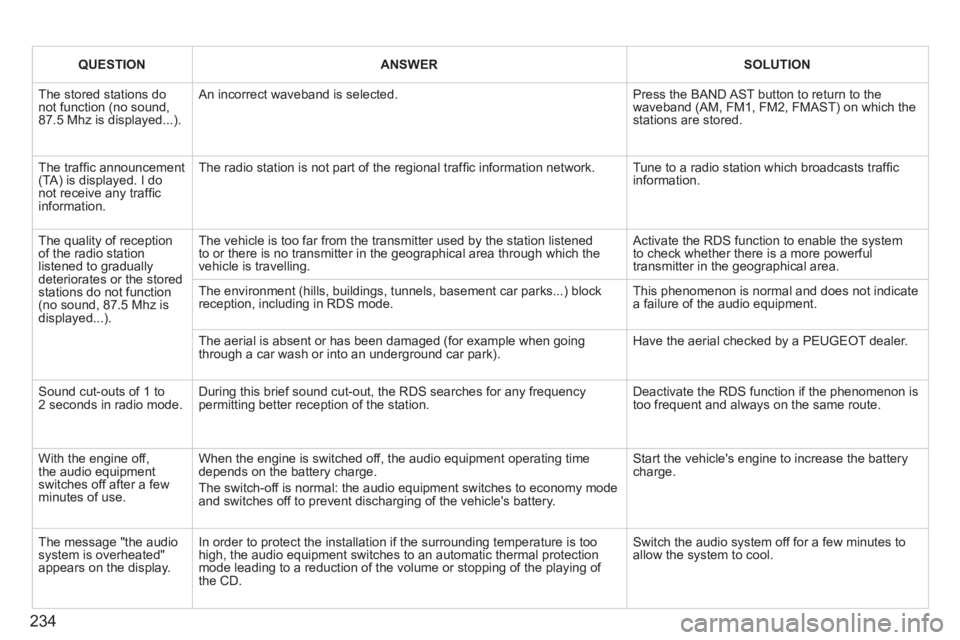
QUESTIONANSWERSOLUTION
The stored stations donot function (no sound, 87.5 Mhz is displayed...).
An incorrect waveband is selected.
Press the BAND AST button to return to the waveband (AM, FM1, FM2, FMAST) on which thestations are stored.
The traffi c announcement(TA) is displayed. I donot receive any traffi c information.
The radio station is not part of the regional traffi c information network.
Tune to a radio station which broadcasts traffi c information.
The quality of receptionof the radio station listened to graduallydeteriorates or the stored stations do not function(no sound, 87.5 Mhz is displayed...).
The vehicle is too far from the transmitter used by the station listenedto or there is no transmitter in the geographical area through which the vehicle is travelling.
Activate the RDS function to enable the system to check whether there is a more powerful transmitter in the geographical area.
The environment (hills, buildings, tunnels, basement car parks...) block reception, including in RDS mode.
This phenomenon is normal and does not indicate a failure of the audio equipment.
The aerial is absent or has been damaged (for example when goingthrough a car wash or into an underground car park).
Have the aerial checked by a PEUGEOT dealer.
Sound cut-outs of 1 to2 seconds in radio mode.During this brief sound cut-out, the RDS searches for any frequency permitting better reception of the station.
Deactivate the RDS function if the phenomenon is too frequent and always on the same route.
With the engine off, the audio equipment switches off after a few minutes of use.
When the engine is switched off, the audio equipment operating timedepends on the battery charge.
The switch-off is normal: the audio equipment switches to economy mode and switches off to prevent discharging of the vehicle's battery.
Start the vehicle's engine to increase the batterycharge.
The message "the audio system is overheated" appears on the display.
In order to protect the installation if the surrounding temperature is toohigh, the audio equipment switches to an automatic thermal protectionmode leading to a reduction of the volume or stopping of the playing of the CD.
Switch the audio system off for a few minutes toallow the system to cool.
Page 237 of 248
235
VISUAL SEARCH
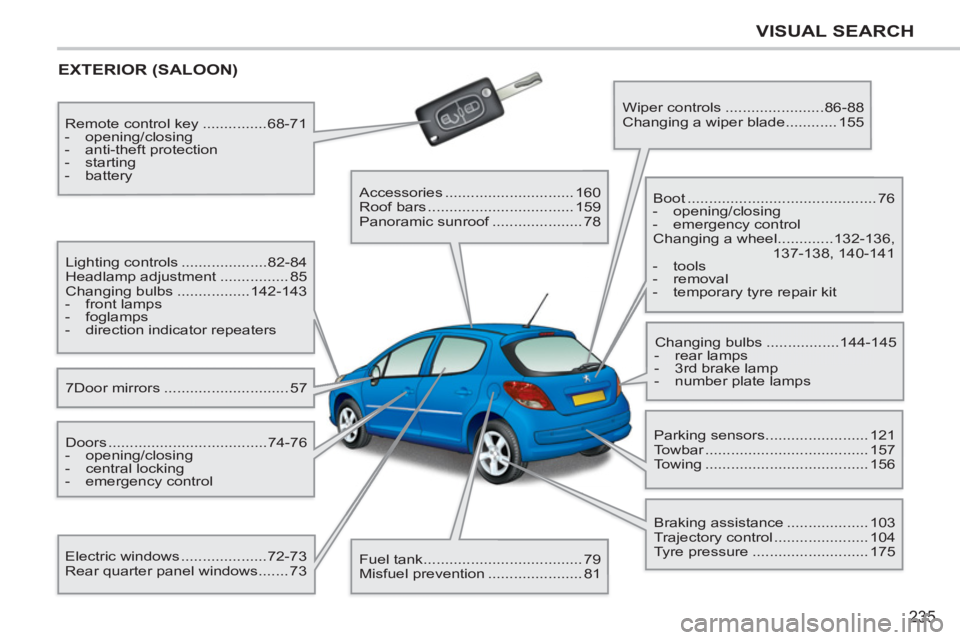
EXTERIOR (SALOON)
7Door mirrors ............................. 57 Lighting controls ....................82-84
Headlamp adjustment ................ 85
Changing bulbs .................142-143
- front lamps
- foglamps
- direction indicator repeaters
Electric windows ....................72-73
Rear quarter panel windows ....... 73 Doors .....................................74-76
- opening/closing
- central locking
- emergency control Remote control key ...............68-71
- opening/closing
- anti-theft protection
- starting
- battery
Accessories .............................. 160
Roof bars .................................. 159
Panoramic sunroof ..................... 78
Fuel tank ..................................... 79
Misfuel prevention ...................... 81 Wiper controls .......................86-88
Changing a wiper blade ............ 155
Boot ............................................ 76
- opening/closing
- emergency control
Changing a wheel .............132-136,
137-138, 140-141
- tools
- removal
- temporary tyre repair kit
Parking sensors ........................ 121
Towbar ...................................... 157
Towing ...................................... 156 Changing bulbs .................144-145
- rear lamps
- 3rd brake lamp
- number plate lamps
Braking assistance ................... 103
Trajectory control ...................... 104
Tyre pressure ........................... 175