key Peugeot 207 CC 2014 Owner's Guide
[x] Cancel search | Manufacturer: PEUGEOT, Model Year: 2014, Model line: 207 CC, Model: Peugeot 207 CC 2014Pages: 232, PDF Size: 11.11 MB
Page 150 of 232
9
!
i
PRACTICAL INFORMATION
148
207CC_EN_CHAP09_INFO PRATIQUES_ED01-2014
Do not charge the batteries without
disconnecting the terminals fi rst.
Do not disconnect the terminals
while the engine is running.
The batteries contain harmful sub-
stances such as sulphuric acid and
lead. They must be disposed of in
accordance with regulations and
must not, in any circumstances, be
discarded with household waste.
Take used remote control batteries
and vehicle batteries to a special
collection point.
Charging the battery using a battery charger
Disconnect the battery from the ve- hicle.
Follow the instructions for use pro- vided by the manufacturer of the
charger.
Reconnect starting with the nega- tive terminal (-).
Check that the terminals and connec- tors are clean. If they are covered with
sulphate (whitish or greenish deposit),
remove them and clean them.
It is advisable to disconnect the
battery if the vehicle is to be left un-
used for more than one month. Before disconnecting the
battery
Wait 2 minutes after switching off
the ignition before disconnecting
the battery.
Close the windows and the doors
before disconnecting the battery.
Following reconnection of the
battery
Following reconnection of the bat-
tery, switch on the ignition and wait
1 minute before starting to permit
initialisation of the electronic sys-
tems. However, if slight diffi culties
are encountered following this op-
eration, contact a PEUGEOT deal-
er or a qualifi ed workshop.
Referring to the corresponding sec-
tion, you must yourself reinitialise:
- the remote control key,
- the one-touch electric windows,
- the GPS satellite navigation
system (depending on version).
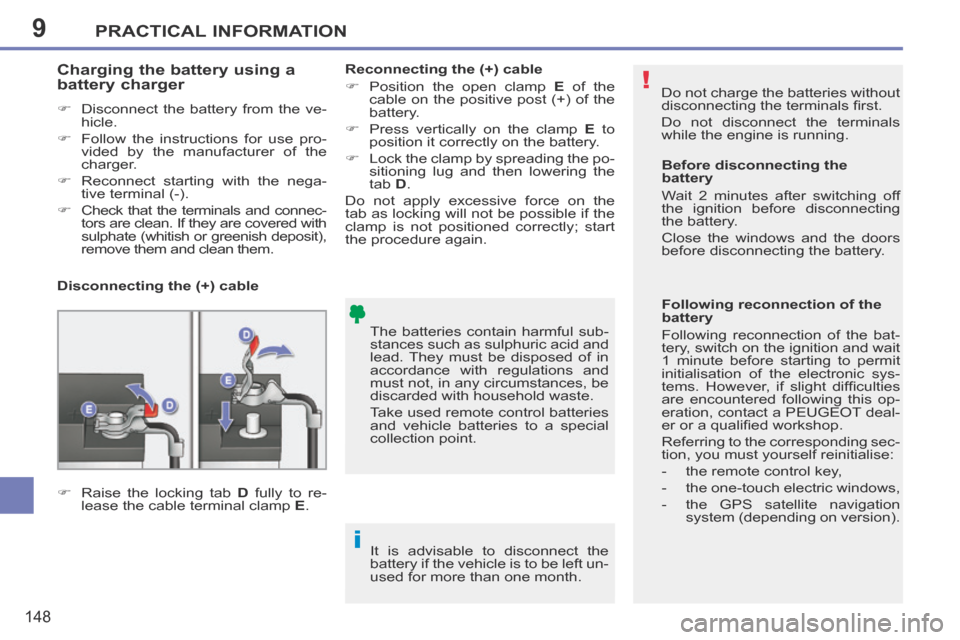
Disconnecting the (+) cable
Reconnecting the (+) cable
Position the open clamp
E of the
cable on the positive post (+) of the
battery.
Press vertically on the clamp E to
position it correctly on the battery.
Lock the clamp by spreading the po- sitioning lug and then lowering the
tab D .
Do not apply excessive force on the
tab as locking will not be possible if the
clamp is not positioned correctly; start
the procedure again.
Raise the locking tab D fully to re-
lease the cable terminal clamp E .
Page 171 of 232
169
04
1
2
3
5
6
4
207CC_EN_CHAP11B_RNEG_ED01-2014
NAVIGATION - GUIDANCE
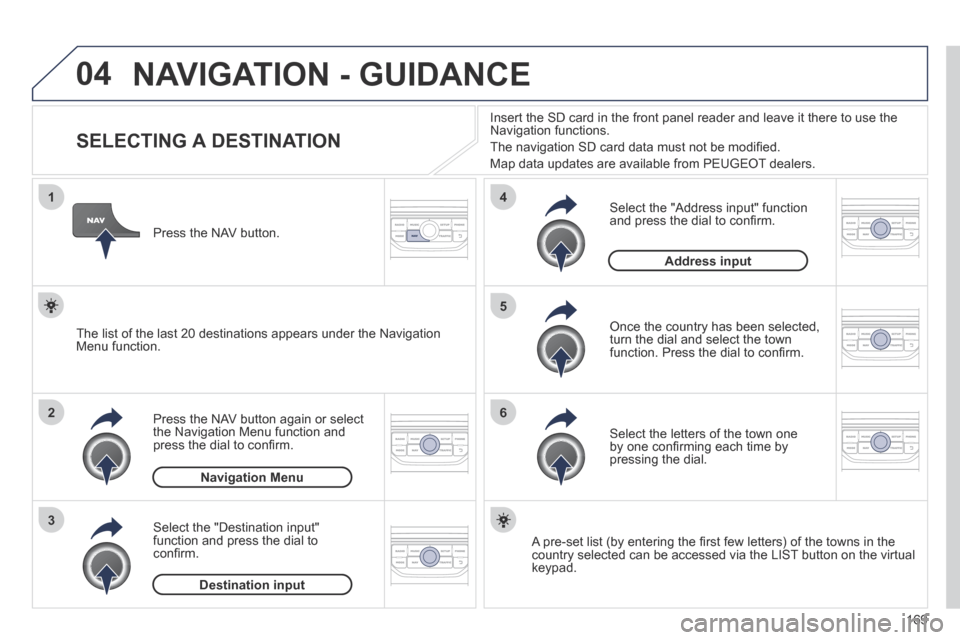
SELECTING A DESTINATION
Press the NAV button again or select the Navigation Menu function and press the dial to confi rm.
Select the "Destination input" function and press the dial to confi rm.
Press the NAV button.
Select the letters of the town one by one confi rming each time by pressing the dial.
Once the country has been selected, turn the dial and select the town function. Press the dial to confi rm.
Insert the SD card in the front panel reader and leave it there to use t\
he Navigation functions.
The navigation SD card data must not be modifi ed.
Map data updates are available from PEUGEOT dealers.
A pre-set list (by entering the fi rst few letters) of the towns in the country selected can be accessed via the LIST button on the virtual keypad.
Select the "Address input" function and press the dial to confi rm.
The list of the last 20 destinations appears under the Navigation Menu function.
Navigation Menu
Destination input
Address input
Page 172 of 232

170
04
7
8
9
207CC_EN_CHAP11B_RNEG_ED01-2014
To clear a destination; from steps 1 to 3, select "Choose from last desti\
nations".
A long press on one of the destinations displays a list of actions from w\
hich you can select:
Delete entry
Delete list
Repeat steps 5 to 7 for the "Street" and "House number" functions.
Turn the dial and select OK.
Press the dial to confi rm.
Select the "Save to address book" function to record the address entered in a directory fi le. Press the dial to confi rm the selection.
PEUGEOT Connect Navigation allows up to 500 contact fi les to be recorded.
To speed up the process, the post code can be entered directly after selecting the "Postal code" function.
Use the virtual keypad to enter the letters and digits.
Then select "Start route guidance" and the press the dial to confi rm.
During guidance, pressing the end of the lighting stalk repeats the last guidance instruction.
Map settings
You can zoom in/zoom out on the map using the dial.
It is possible to move the map or select its orientation via the short-cut menu of the FULL SCREEN MAP.
Press MODE until the map is displayed full screen. Press the dial then select "Map settings". Select "2.5D Map" or "2D Map" and in the latter case, select "North Up" or "Heading Up".
Select the route type:
"Fast route", "Short route" or "Optimized route" and press the dial to confi rm.
It is also possible to select a destination via "Choose from address book" or "Choose from last destinations".
Choose from last destinationsChoose from address book
Start route guidance
NAVIGATION - GUIDANCE
Page 176 of 232
174
04
8
6
7
4
3
5
2
1
207CC_EN_CHAP11B_RNEG_ED01-2014
NAVIGATION - GUIDANCE
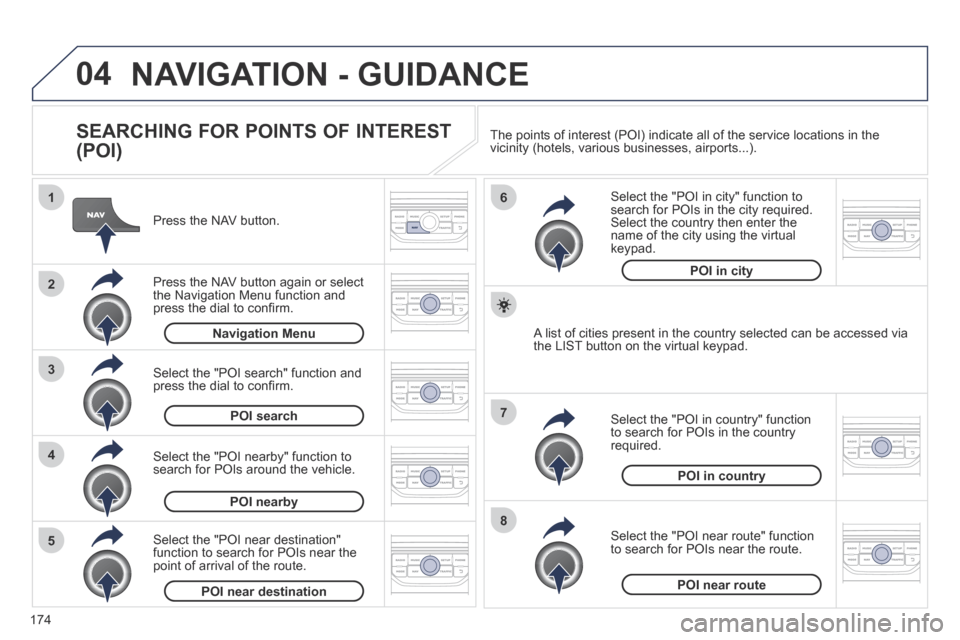
SEARCHING FOR POINTS OF INTEREST
(POI)
Press the NAV button.
Press the NAV button again or select the Navigation Menu function and press the dial to confi rm.
Select the "POI nearby" function to search for POIs around the vehicle.
Select the "POI search" function and press the dial to confi rm.
Navigation Menu
POI search
POI nearby
Select the "POI in city" function to search for POIs in the city required. Select the country then enter the name of the city using the virtual keypad.
Select the "POI near route" function to search for POIs near the route.
Select the "POI in country" function to search for POIs in the country required.
Select the "POI near destination" function to search for POIs near the point of arrival of the route.
POI near destinationPOI near route
POI in country
POI in city
A list of cities present in the country selected can be accessed via the LIST button on the virtual keypad.
The points of interest (POI) indicate all of the service locations in \
the vicinity (hotels, various businesses, airports...).
Page 181 of 232
179
06
3 2 1
1
207CC_EN_CHAP11B_RNEG_ED01-2014
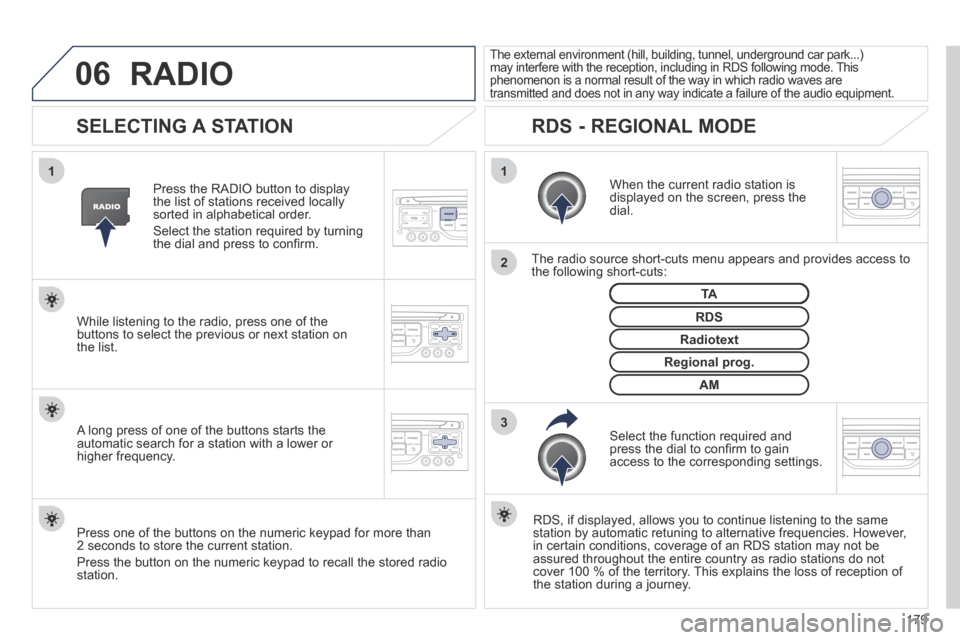
SELECTING A STATION
When the current radio station is displayed on the screen, press the dial.
The radio source short-cuts menu appears and provides access to the following short-cuts:
Select the function required and press the dial to confi rm to gain access to the corresponding settings.
TA
RDS, if displayed, allows you to continue listening to the same station by automatic retuning to alternative frequencies. However, in certain conditions, coverage of an RDS station may not be assured throughout the entire country as radio stations do not cover 100 % of the territory. This explains the loss of reception of the station during a journey.
The external environment (hill, building, tunnel, underground car park.\
..) may interfere with the reception, including in RDS following mode. This phenomenon is a normal result of the way in which radio waves are transmitted and does not in any way indicate a failure of the audio equi\
pment.
RDS - REGIONAL MODE
Press the RADIO button to display the list of stations received locally sorted in alphabetical order.
Select the station required by turning the dial and press to confi rm.
Regional prog.
Radiotext
RDS While listening to the radio, press one of the buttons to select the previous or next station on the list.
Press one of the buttons on the numeric keypad for more than 2 seconds to store the current station.
Press the button on the numeric keypad to recall the stored radio station.
AM
A long press of one of the buttons starts the automatic search for a station with a lower or higher frequency.
RADIO
Page 187 of 232
185
08
1
3 2
2
1
207CC_EN_CHAP11B_RNEG_ED01-2014
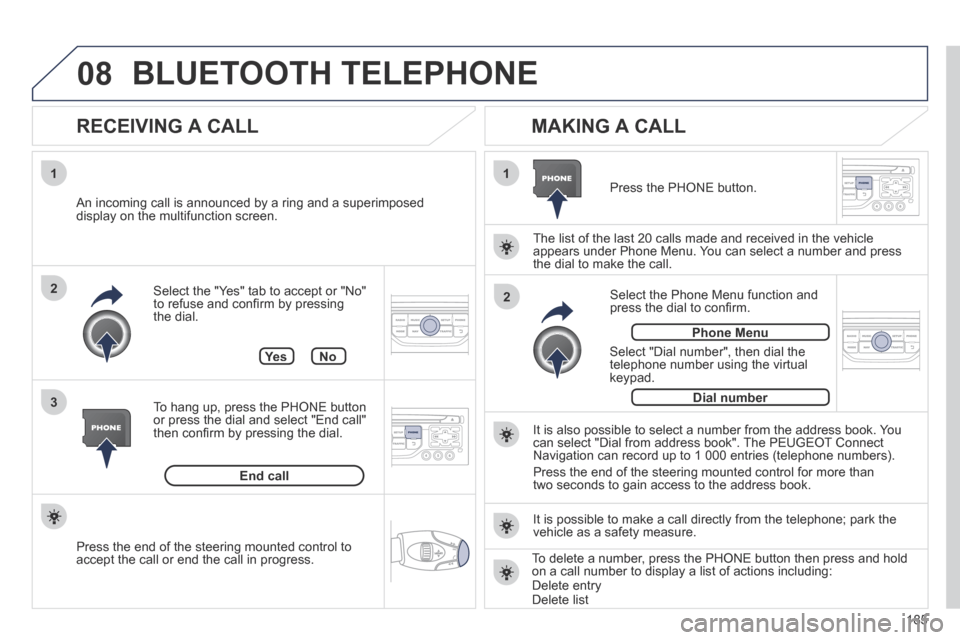
Select the "Yes" tab to accept or "No" to refuse and confi rm by pressing the dial.
RECEIVING A CALL
MAKING A CALL
An incoming call is announced by a ring and a superimposed display on the multifunction screen.
Ye s
To hang up, press the PHONE button or press the dial and select "End call" then confi rm by pressing the dial.
End call
Press the PHONE button.
Select "Dial number", then dial the telephone number using the virtual keypad.
Select the Phone Menu function and press the dial to confi rm.
The list of the last 20 calls made and received in the vehicle appears under Phone Menu. You can select a number and press the dial to make the call.
No
It is also possible to select a number from the address book. You can select "Dial from address book". The PEUGEOT Connect Navigation can record up to 1 000 entries (telephone numbers).
Press the end of the steering mounted control for more than two seconds to gain access to the address book.
Phone Menu
Dial number
It is possible to make a call directly from the telephone; park the vehicle as a safety measure.
BLUETOOTH TELEPHONE
Press the end of the steering mounted control to accept the call or end the call in progress. To delete a number, press the PHONE button then press and hold on a call number to display a list of actions including: Delete entry Delete list
Page 207 of 232
205
06
1
2
3
4
5
6
7
8
9
MENU
OK
BLUETOOTH
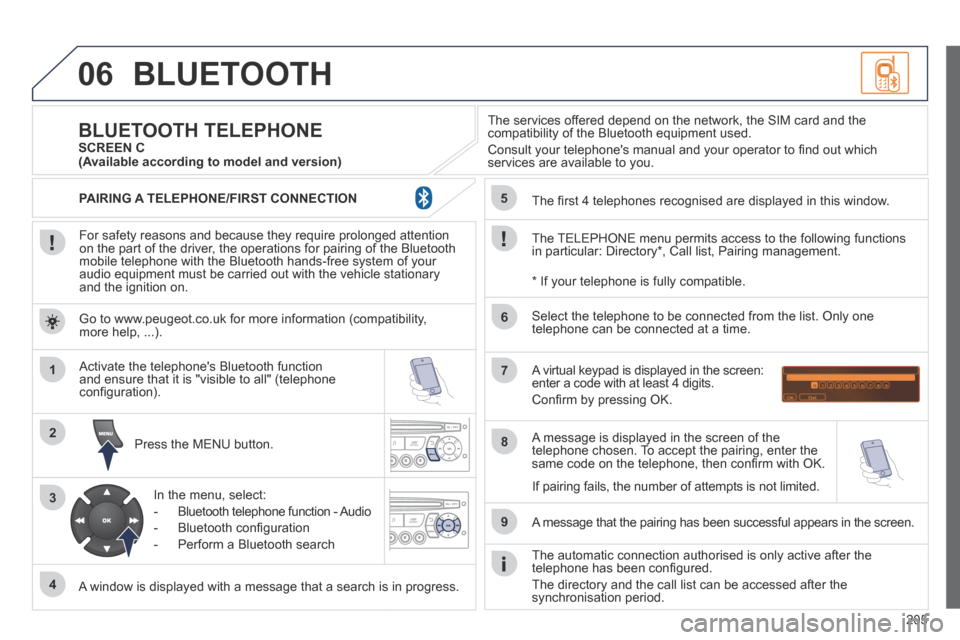
For safety reasons and because they require prolonged attention on the part of the driver, the operations for pairing of the Bluetooth mobile telephone with the Bluetooth hands-free system of your audio equipment must be carried out with the vehicle stationary and the ignition on.
Press the MENU button.
A window is displayed with a message that a search is in progress.
Activate the telephone's Bluetooth function and ensure that it is "visible to all" (telephone confi guration).
In the menu, select:
- Bluetooth telephone function - Audio
- Bluetooth confi guration
- Perform a Bluetooth search
The services offered depend on the network, the SIM card and the compatibility of the Bluetooth equipment used.
Consult your telephone's manual and your operator to fi nd out which services are available to you.
BLUETOOTH TELEPHONE SCREEN C
The TELEPHONE menu permits access to the following functions in particular: Directory * , Call list, Pairing management.
The fi rst 4 telephones recognised are displayed in this window.
A virtual keypad is displayed in the screen: enter a code with at least 4 digits.
Confi rm by pressing OK.
A message that the pairing has been successful appears in the screen.
Select the telephone to be connected from the list. Only one telephone can be connected at a time.
A message is displayed in the screen of the telephone chosen. To accept the pairing, enter the same code on the telephone, then confi rm with OK.
The automatic connection authorised is only active after the telephone has been confi gured.
The directory and the call list can be accessed after the synchronisation period.
(Available according to model and version)
* If your telephone is fully compatible.
If pairing fails, the number of attempts is not limited.
Go to www.peugeot.co.uk for more information (compatibility, more help, ...).
PAIRING A TELEPHONE/FIRST CONNECTION
Page 208 of 232
206
06
1
2
1
2
1
OK
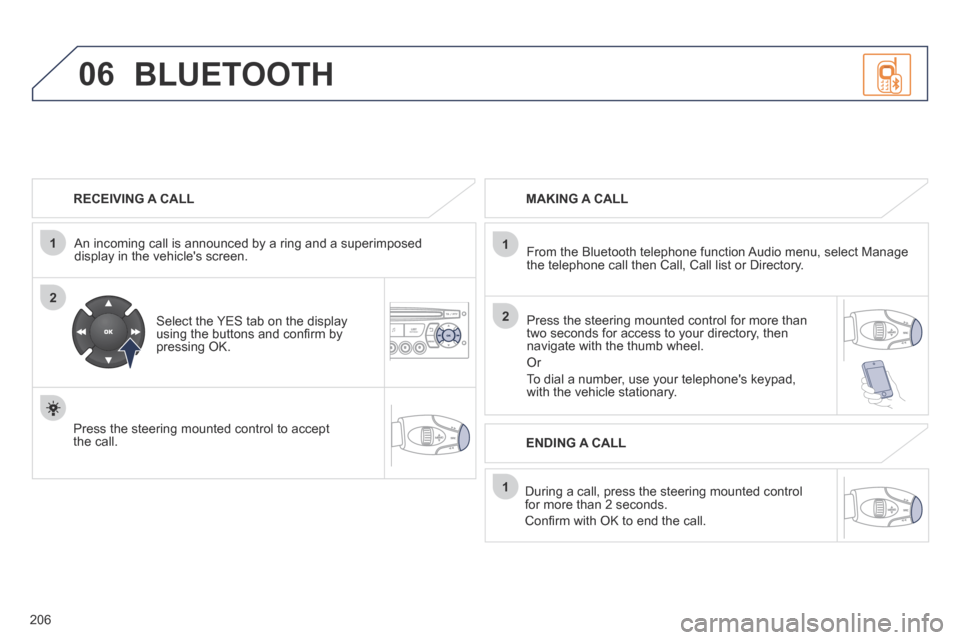
RECEIVING A CALL
An incoming call is announced by a ring and a superimposed display in the vehicle's screen.
Select the YES tab on the display using the buttons and confi rm by pressing OK.
Press the steering mounted control to accept the call.
MAKING A CALL
From the Bluetooth telephone function Audio menu, select Manage the telephone call then Call, Call list or Directory.
Press the steering mounted control for more than two seconds for access to your directory, then navigate with the thumb wheel.
Or
To dial a number, use your telephone's keypad, with the vehicle stationary.
During a call, press the steering mounted control for more than 2 seconds.
Confi rm with OK to end the call.
BLUETOOTH
ENDING A CALL
Page 209 of 232
207
1
2
3
SOURCE
06
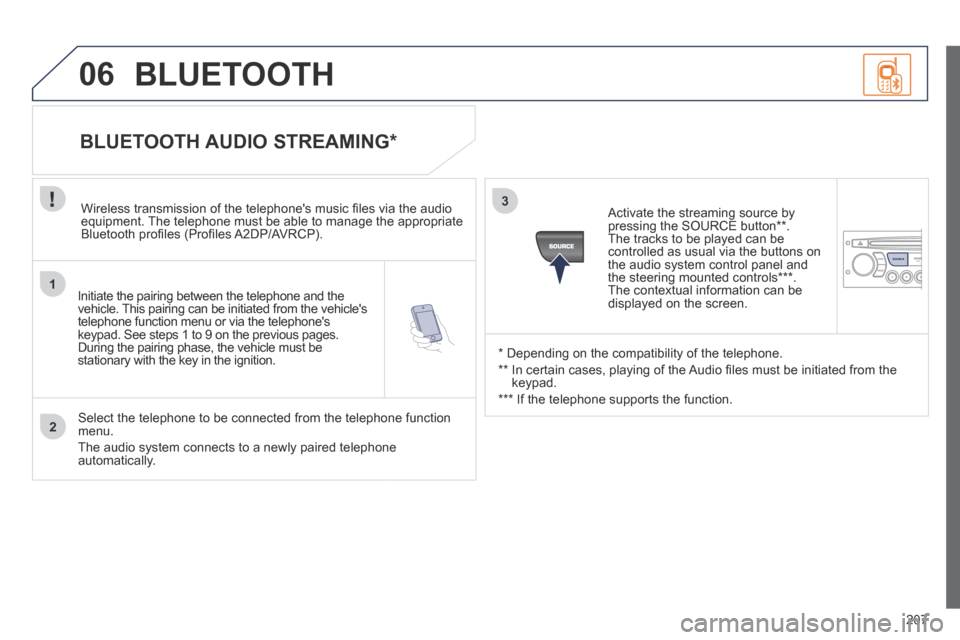
Initiate the pairing between the telephone and the vehicle. This pairing can be initiated from the vehicle's telephone function menu or via the telephone's keypad. See steps 1 to 9 on the previous pages. During the pairing phase, the vehicle must be stationary with the key in the ignition.
Select the telephone to be connected from the telephone function menu.
The audio system connects to a newly paired telephone automatically.
BLUETOOTH AUDIO STREAMING *
Wireless transmission of the telephone's music fi les via the audio equipment. The telephone must be able to manage the appropriate Bluetooth profi les (Profi les A2DP/AVRCP).
* Depending on the compatibility of the telephone.
** In certain cases, playing of the Audio fi les must be initiated from the keypad.
*** If the telephone supports the function.
Activate the streaming source by pressing the SOURCE button ** . The tracks to be played can be controlled as usual via the buttons on the audio system control panel and the steering mounted controls *** . The contextual information can be displayed on the screen.
BLUETOOTH
Page 217 of 232
215
VISUAL SEARCH
207CC_EN_CHAP12_RECHERCHE VISUELLE_ED01-2014
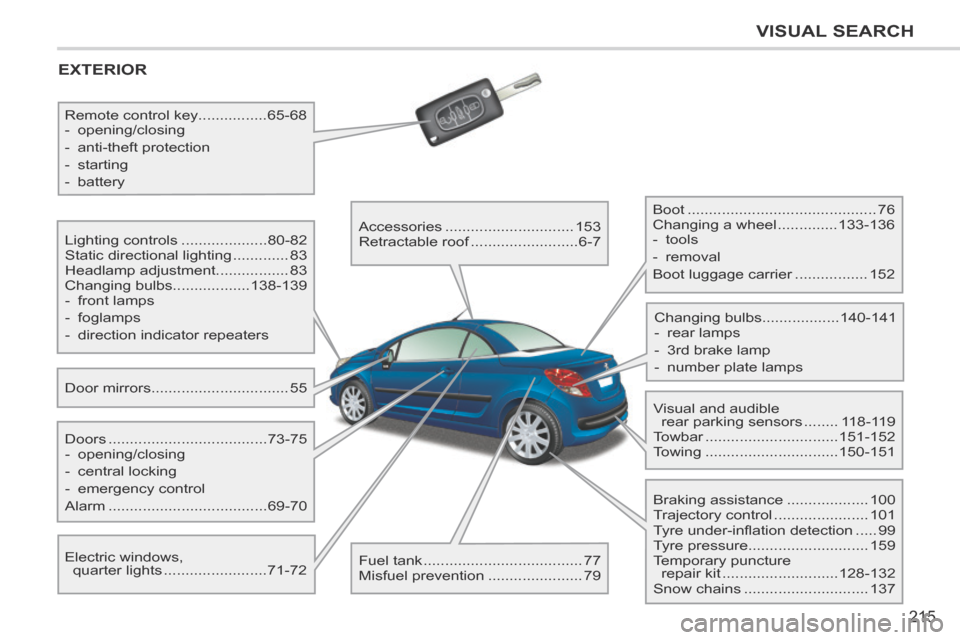
EXTERIOR
Door mirrors ................................55
Lighting controls ....................
80-82
Static directional lighting ............. 83
Headlamp adjustment .................83
Changing bulbs ..................138-139
- front lamps
- foglamps
- direction indicator repeaters
Electric windows, quarter lights ........................ 71-72
Doors .....................................
73-75
- opening/closing
- central locking
- emergency control
Alarm ..................................... 69-70
Remote control key
................65-68
- opening/closing
- anti-theft protection
- starting
- battery
Accessories ..............................153
Retractable roof ......................... 6-7
Fuel tank ..................................... 77
Misfuel prevention ...................... 79 Boot ............................................
76
Changing a wheel .............. 133-136
- tools
- removal
Boot luggage carrier ................. 152
Visual and audible rear parking sensors ........ 118-119
Towbar ............................... 151-152
Towing ............................... 150-151
Changing bulbs
..................140-141
- rear lamps
- 3rd brake lamp
- number plate lamps
Braking assistance ................... 100
Trajectory control ...................... 101
Tyre under-infl ation detection ..... 99
Tyre pressure ............................ 159
Temporary puncture repair kit ........................... 128-132
Snow chains ............................. 137