battery PEUGEOT 208 2021 Workshop Manual
[x] Cancel search | Manufacturer: PEUGEOT, Model Year: 2021, Model line: 208, Model: PEUGEOT 208 2021Pages: 276, PDF Size: 8.02 MB
Page 186 of 276
184
Technical data
Electric motor
Model codes:ZKXZ
Braked trailer (within the GTW limit) (kg)
on a 10% or 12% gradient 0
Unbraked trailer (kg) 0
Maximum authorised nose weight (kg) 0
Electric motor
Technology Synchronous with permanent magnets
Max. power : EC standard (kW)/(hp) 100/136
Traction battery
Technology Lithium-Ion
Installed capacity (kWh) 50
Domestic charging Mode 2
Alternating current (AC) voltage
Rating (A) 230 (single-phase)
8 or 16
Accelerated charging Mode 3
Alternating current (AC) voltage
Rating (A) 230 (single-phase or three-phase)
16 or 32
Superfast charging Mode 4
Direct current (DC) voltage 400
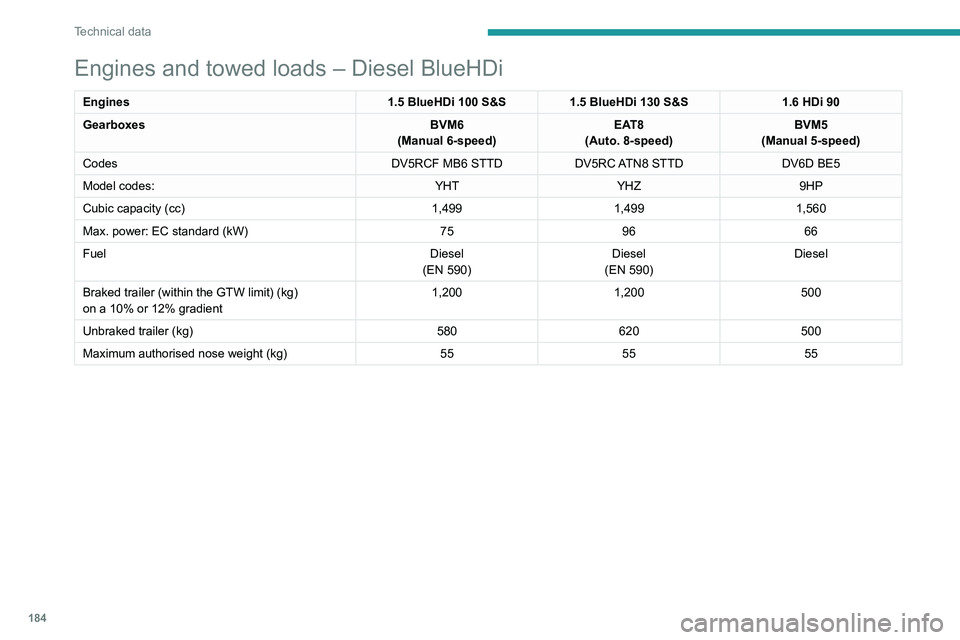
Engines and towed loads – Diesel BlueHDi
Engines1.5 BlueHDi 100 S&S1.5 BlueHDi 130 S&S 1.6 HDi 90
Gearboxes BVM6
(Manual 6-speed) EAT8
(Auto. 8-speed) BVM5
(Manual 5-speed)
Codes DV5RCF MB6 STTDDV5RC ATN8 STTD DV6D BE5
Model codes: YHTYHZ 9HP
Cubic capacity (cc) 1,4991,4991,560
Max. power: EC standard (kW) 759666
Fuel Diesel
(EN
590)Diesel
(EN
590)Diesel
Braked trailer (within the GTW limit) (kg)
on a 10% or 12% gradient 1,200
1,200 500
Unbraked trailer (kg) 580620500
Maximum authorised nose weight (kg) 555555
Page 187 of 276
185
Technical data
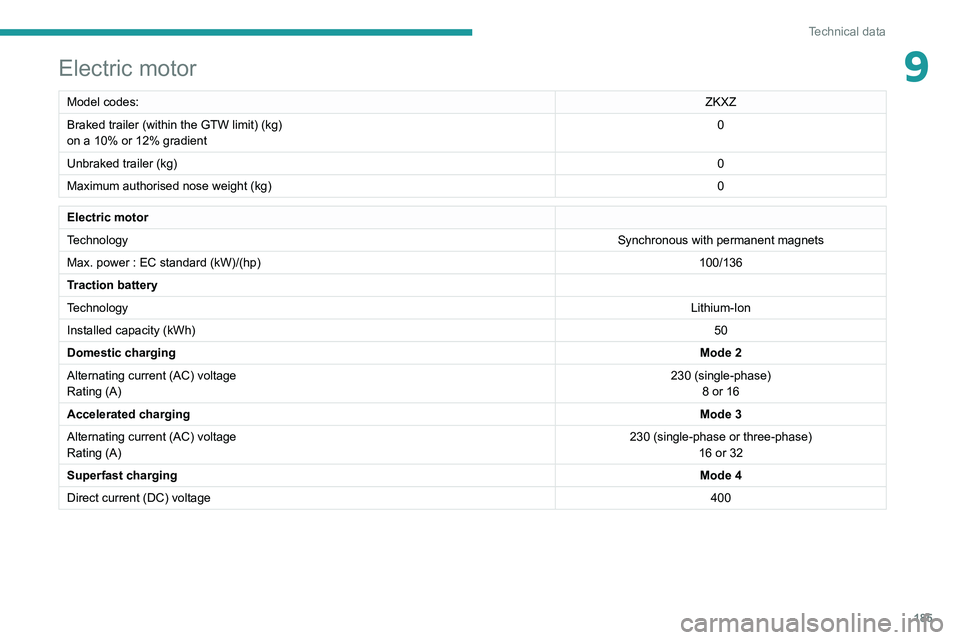
9Electric motor
Model codes:ZKXZ
Braked trailer (within the GTW limit) (kg)
on a 10% or 12% gradient 0
Unbraked trailer (kg) 0
Maximum authorised nose weight (kg) 0
Electric motor
TechnologySynchronous with permanent magnets
Max. power : EC standard (kW)/(hp) 100/136
Traction battery
Technology Lithium-Ion
Installed capacity (kWh) 50
Domestic charging Mode 2
Alternating current (AC) voltage
Rating (A) 230 (single-phase)
8 or 16
Accelerated charging Mode 3
Alternating current (AC) voltage
Rating (A) 230 (single-phase or three-phase)
16 or 32
Superfast charging Mode 4
Direct current (DC) voltage 400
Page 197 of 276
195
Touch screen BLUETOOTH audio system
10Some radio stations send other information
in place of their name (the title of the song for
example).
The system interprets these details as the station
name.
►
Press the "
Radio Settings "
button then
select "Update list". The radio reception is
cut off while searching for available stations
(approximately 30
seconds).
Media
Playback of my USB memory stick starts only
after a very long wait (around 2 to 3 minutes).
Some files supplied with the memory stick may
greatly slow down access to reading the memory
stick (multiplication by 10 of the cataloguing
time).
►
Delete the files supplied with the memory
stick and limit the number of sub-folders in the
file structure on the memory stick.
Some characters in information about the
currently playing media are not displayed
correctly
.
The audio system is unable to process certain
types of character.
►
Use standard characters to name tracks and
folders.
Playback of streaming files does not start.
The connected device does not automatically
launch playback.
►
Start playback from the device.
T
rack names and playing times are not
displayed on the audio streaming screen. The Bluetooth profile does not allow the transfer
of this information.
Telephone
I cannot connect my Bluetooth telephone.
The telephone's Bluetooth function may be
switched off or the telephone may not be visible.
►
Check that the telephone has Bluetooth
switched on.
►
Check in the telephone settings that it is
"visible to all".
The Bluetooth telephone is not compatible with
the system.
►
Check the compatibility of the telephone on
the Brand's website (services).
The volume of the telephone connected in
Bluetooth mode is inaudible.
The volume depends on both the system and the
telephone.
Ambient noise affects the quality of the
telephone call.
►
Increase the volume of the audio system, to
maximum if required, and increase the volume of
the telephone if necessary
.
►
Reduce ambient noise (close windows,
reduce ventilation, slow down, etc.).
The contacts are not listed in alphabetical
order
.
Some telephones offer display options.
Depending on the settings chosen, contacts can
be transferred in a specific order.
►
Modify the telephone directory display
settings.
Settings
When the treble and bass settings are
changed, the ambience is deselected.
When the ambience is changed, the treble
and bass settings are reset.
Selecting an ambience imposes the treble and
bass settings, and vice versa.
►
Modify the treble and bass or ambience
settings to obtain the desired musical ambience.
There is a difference in sound quality
between audio sources.
T
o allow for optimal listening quality, the sound
settings can be tailored to different audio
sources, which can generate audible differences
when changing source.
►
Check that the sound settings are appropriate
to the sources listened to.
Adjust the sound
functions to the middle position.
When the engine is off, the system switches
off after several minutes of use.
When the engine is switched off, the system's
operating time depends on the state of charge of
the battery.
The switch-off is normal: the system
automatically goes into energy economy mode
and switches off to maintain an adequate charge
in the battery.
►
Start the vehicle’
s engine to increase the
charge of the battery.
Page 210 of 276
208
PEUGEOT Connect Radio
► Delete the files supplied with the memory
stick and limit the number of sub-folders in the
file structure on the memory stick.
Some characters in information about the
currently playing media are not displayed
correctly
.
The audio system is unable to process certain
types of character.
►
Use standard characters to name tracks and
folders.
Playback of streaming files does not start.
The connected device does not automatically
launch playback.
►
Start playback from the device.
T
rack names and playing times are not
displayed on the audio streaming screen.
The Bluetooth profile does not allow the transfer
of this information.
Telephone
I cannot connect my Bluetooth telephone.
The telephone's Bluetooth function may be
switched off or the device may not be visible.
►
Check that the telephone has Bluetooth
switched on.
►
Check in the telephone settings that it is
"visible to all".
The Bluetooth telephone is not compatible with
the system.
►
Check the compatibility of the telephone on
the Brand's website (services).
Android
Auto and/or CarPlay do not work. Android Auto and CarPlay may not activate if the
USB cables are of poor quality.
►
Use genuine USB cables to ensure
compatibility
.
Android Auto and/or CarPlay do not work.
Android Auto and CarPlay are not available in all
countries.
►
Check the Google
Android Auto or Apple
website to see which countries are supported.
The volume of the telephone connected in
Bluetooth mode is inaudible.
The volume depends on both the system and the
telephone.
►
Increase the volume of the audio system, to
maximum if required, and increase the volume of
the telephone if necessary
.
Ambient noise affects the quality of the
telephone call.
►
Reduce ambient noise (close windows, turn
down ventilation, slow down, etc.).
The contacts are not listed in alphabetical
order
.
Some telephones offer display options.
Depending on the settings chosen, contacts can
be transferred in a specific order.
►
Modify the telephone directory display
settings.
Settings
When the treble and bass settings are
changed, the ambience is deselected.
When the ambience is changed, the treble
and bass settings are reset. Selecting an ambience imposes the treble and
bass settings, and vice versa.
►
Modify the treble and bass or ambience
settings to obtain the desired musical ambience.
When the balance settings are changed, the
distribution is deselected.
When the distribution setting is changed, the
balance settings are deselected.
Selecting a distribution setting imposes the
balance settings, and vice versa.
►
Modify the balance setting or the distribution
setting to obtain the desired sound quality
.
There is a difference in sound quality
between audio sources.
To allow for optimal listening quality, the sound
settings can be tailored to different audio
sources, which can generate audible differences
when changing source.
►
Check that the sound settings are appropriate
to the sources listened to.
Adjust the sound
functions to the middle position.
When the engine is off, the system switches
off after several minutes of use.
When the engine is switched off, the system's
operating time depends on the state of charge of
the battery.
The switch-off is normal: the system
automatically goes into energy economy mode
and switches off to maintain an adequate charge
in the battery.
► Start the vehicle’ s engine to increase the
charge of the battery.
Page 235 of 276
233
PEUGEOT Connect Nav
12► Check that the sound settings are appropriate
to the sources listened to. W e recommend
setting the sound functions (Bass, Treble,
Balance) to the middle position, setting the
musical ambience to "None", setting loudness
correction to "Active" in USB mode and "Inactive"
in Radio mode.
►
In all cases, after applying sound settings,
adjust the volume level on the portable device (to
a high level) first.
Then adjust the volume level
on the audio system.
When the engine is off, the system switches
off after several minutes of use.
When the engine is switched off, the system's
operating time depends on the state of charge of
the battery.
The switch-off is normal: the system
automatically goes into energy economy mode
and switches off to maintain an adequate charge
in the battery.
►
Start the vehicle’
s engine to increase the
charge of the battery.
The date and time cannot be set.
Date and time settings are only available if
satellite synchronisation is deactivated.
►
Settings
menu/Options/Date-Time Setting.
Select the "Time" tab and deactivate "GPS
synchronisation" (UTC).
Page 236 of 276
234
Event data recorders
Event data recorders
Electronic control units are installed in your
vehicle. Control units process data which is
received by vehicle sensors, for example, or
which they generate themselves or exchange
amongst themselves. Some control units are
necessary for the safe functioning of your
vehicle, others assist you while you drive (driver
assistance systems), while others provide
comfort or infotainment functions.
The following contains general information about
data processing in the vehicle. You will find
additional information as to which specific data is
uploaded, stored and passed on to third parties
and for what purpose in your vehicle under
the key word Data Protection closely linked
to the references for the affected functional
characteristics in the relevant owner's manual
or in the general terms of sale. These are also
available online.
Operating data in the
vehicle
Control units process data for operation of the
vehicle.
This data includes, for example:
–
vehicle status information (e.g. speed,
movement delay
, lateral acceleration, wheel
rotation rate, "seat belts fastened" display)
–
ambient conditions (e.g. temperature, rain
sensor
, distance sensor) As a rule such data is transient and is not stored
for longer than an operational cycle, and only
processed on board the vehicle itself. Often
control units include data storage (including the
vehicle key). This is used to allow information
to be documented temporarily or permanently
on vehicle condition, component stress,
maintenance requirements and technical events
and errors.
Depending on technical equipment levels, the
data stored is as follows:
–
system component operating states (e.g. fill
level, tyre pressure, battery status)
–
faults and defects in important system
components (e.g. lights, brakes)
–
system reactions in special driving situations
(e.g. triggering of an airbag, actuation of the
stability control systems)
–
information on events damaging the vehicle
–
for electric vehicles the amount of charge in
the high-voltage battery
, estimated range
In special cases (e.g. if the vehicle has detected
a malfunction), it may be necessary to save data
that would otherwise just be volatile.
When you use services (e.g. repairs,
maintenance), the operating data saved can
be read together with the vehicle identification
number and used where necessary. Staff
working for the service network (e.g. garages,
manufacturers) or third parties (e.g. breakdown
services) can read the data from the vehicle.
The same applies to warranty work and quality
assurance measures. Data is generally read via the OBD (On-Board
Diagnostics) port prescribed by law in the
vehicle. The operating data read documents the
technical condition of the vehicle or individual
components and assists with fault diagnosis,
compliance with warranty obligations and quality
improvement. This data, in particular information
on component stress, technical events, operator
errors and other faults, is transmitted to the
manufacturer where appropriate, together
with the vehicle identification number. The
manufacturer is also subject to product liability.
The manufacturer potentially also uses operating
data from vehicles for product recalls. This data
can also be used to check customer warranty
and guarantee claims.
Fault memories in the vehicle can be reset by a
service company when carrying out servicing or
repairs or at your request.
Comfort and infotainment
functions
Comfort settings and custom settings can be
stored in the vehicle and changed or reset at any
time.
Depending on the equipment level in question,
these include
–
seat and steering wheel position settings
–
chassis and air conditioning settings
–
custom settings such as interior lighting
You can input your own data in the infotainment
functions for your vehicle as part of the selected
features.
Depending on the equipment level in question,
these include
– multimedia data such as music, videos or
photos for playback in an integrated multimedia
system
– address book data for use with an integrated
hands-free system or an integrated navigation
system
– input destinations
– data on the use of online services
This data for comfort and infotainment functions
can be stored locally in the vehicle or be kept on
a device that you have connected to the vehicle
(e.g. a smartphone, USB stick or MP3 player).
Data that you have input yourself can be deleted
at any time.
This data can only be transmitted out of the
vehicle at your request, particularly when using
online services in accordance with the settings
selected by you.
Smartphone integration,
e.g. Android Auto or Apple
CarPlay
If your vehicle is equipped accordingly, you can
connect your smartphone or another mobile
device to the vehicle so that you can control it
via the controls integrated in the vehicle. The
smartphone image and sound can be output
Page 239 of 276
237
Alphabetical index
3D digital instrument panel 10
A
ABS 68
Accelerated charging unit (Wallbox)
139
Accessories
65
Active Safety Brake
123–126
AdBlue®
20, 159
AdBlue® tank
160
Additive, Diesel
157
Adjusting headlamps
59
Adjusting head restraints
41
Adjusting seat
41–42
Adjusting the air distribution
47–48
Adjusting the air flow
47–48
Adjusting the date
207, 229
Adjusting the height and reach of
the steering wheel
43
Adjusting the lumbar support
42
Adjusting the seat angle
42
Adjusting the temperature
47–48
Adjusting the time
194, 206, 230
Advice on care and maintenance
55, 138, 162
Advice on driving
7, 84–85
Airbags
72–75
Airbags, curtain
73–74
Airbags, front
72–73, 76
Airbags, lateral
73
Air conditioning
46, 49
Air conditioning, automatic
48, 50
Air conditioning, manual
47
Air intake 49
Air vents
46
Alarm
38–39
Android Auto connection
203, 221
Anti-lock braking system (ABS)
68
Antitheft / Immobiliser
31
Apple CarPlay connection
203, 220
Applications
221
Assistance call
66–67
Assistance, emergency braking
68, 125
Audible warning
66
Audio streaming (Bluetooth)
191, 202, 225
B
Battery, 12 V 152, 157, 175–177
Battery, ancillaries
175
Battery, charging
176–177
Battery, remote control
35–36
Blanking screen (snow shield)
151
Blind
54
Blind spot sensors
122
BlueHDi
20, 157, 164
Bluetooth (hands-free)
192–193, 204, 226
Bluetooth (telephone)
192–193, 204–205, 226–227
Bodywork
162
Bonnet
153–154
Boot
37, 55
Brake discs
158
Brake lamps
174
Brakes
158
Braking 98
Braking assistance system
68
Braking, automatic emergency
123–126
Braking, dynamic emergency
90–91
Brightness
194, 206
Bulbs
173
Bulbs (changing)
171–173
C
Cable, audio 224
Cable, Jack
224
Capacity, fuel tank
136
Cap, fuel filler
136
Care of the bodywork
162
Central locking
33–34
Changing a bulb
171–173
Changing a fuse
175
Changing a wheel
165, 168
Changing a wiper blade
63
Changing the remote control battery
35
Changing to free-wheeling
178
Charge level indicator (Electric)
22
Charger, induction
52
Charger, wireless
52
Charging cable
140
Charging cable (Electric)
139
Charging connector (Electric)
139, 143, 145–146
Charging flap (Electric)
139, 143, 145–146
Charging system (Electric)
5, 8, 28, 137, 155
Page 240 of 276
238
Alphabetical index
Charging the traction battery
(Electric)
22, 137, 140, 143, 145–146
CHECK
23
Checking the engine oil level
19
Checking the levels
155–156
Checking tyre pressures
(using the kit)
166, 168
Checks
154, 157–159
Checks, routine
157–158
Child lock
82
Children
71, 77–81
Children (safety)
82
Child seats
71, 74–77
Child seats, conventional
76–77
Child seats, i-Size
81
Child seats, ISOFIX
78–80
Cleaning (advice)
138, 162
Closing the boot
33, 37
Closing the doors
33, 37
Collision Risk Alert
123–125
Configuration, vehicle
27
Connected applications
221
Connection, Bluetooth
192–193, 204–205, 221–222, 226–227
Connection, Wi-Fi network
222
Connectivity
220
Consumption figures
28
Container, AdBlue®
159–160
Control, emergency boot release
37
Control, emergency door
34–35
Control, heated seats
43
Controls, steering mounted
94–96
Control stalk, lighting
57–58Control stalk, wipers 61–62, 64
Control unit
139–140
Courtesy lamp, front
54
Courtesy lamps
53–54
Cover, load space
55
Cruise control
107, 109–111
Cruise control, adaptive
111
Cruise control by speed limit recognition
107
Cruise control, dynamic with
Stop function
107
D
DAB (Digital Audio Broadcasting) -
Digital radio
190, 201, 224
Date (setting)
207, 229
Daytime running lamps
58, 172
Deactivating the passenger airbag
72, 75–76
Deadlocking
31, 33
Deferred charging
28
Deferred charging (Electric)
28, 139, 143, 145
Defrosting
44, 50
Defrosting, front
50
Demisting
44, 50
Demisting, front
50
Demisting, rear
50
Demisting, rear screen
50
Dials and gauges
9–10
Digital instrument panel
10–11
Dimensions
186
Dipstick
19, 155
Direction indicators
58, 172–174
Display screen, instrument panel 9–10
Domestic charging
(Electric)
140, 144–146, 185
Doors
37
Drive Assist Plus
111
Driver’s attention warning
126–127
Drive selector (Electric)
97
Driving
84–85
Driving aids camera (warnings)
104
Driving aids (recommendations)
103
Driving economically
7
Driving modes
98–99
Dynamic stability control (DSC)
68–69
E
EBFD 68
Eco-driving (advice)
7
ECO mode
99
Economy mode
152
Electric motor
5, 8, 28, 137, 147,
155, 175, 178, 185
Electric windows
40
Electronic brake force distribution (EBFD)
68
Emergency braking assistance (EBA)
68
Emergency call
66–67
Emergency switching off
88–89
Emergency warning lamps
65, 164
Emissions control system, SCR
21, 159
Energy economy mode
152
Energy flows
28
Energy recovery
22, 98
Page 242 of 276
240
Alphabetical index
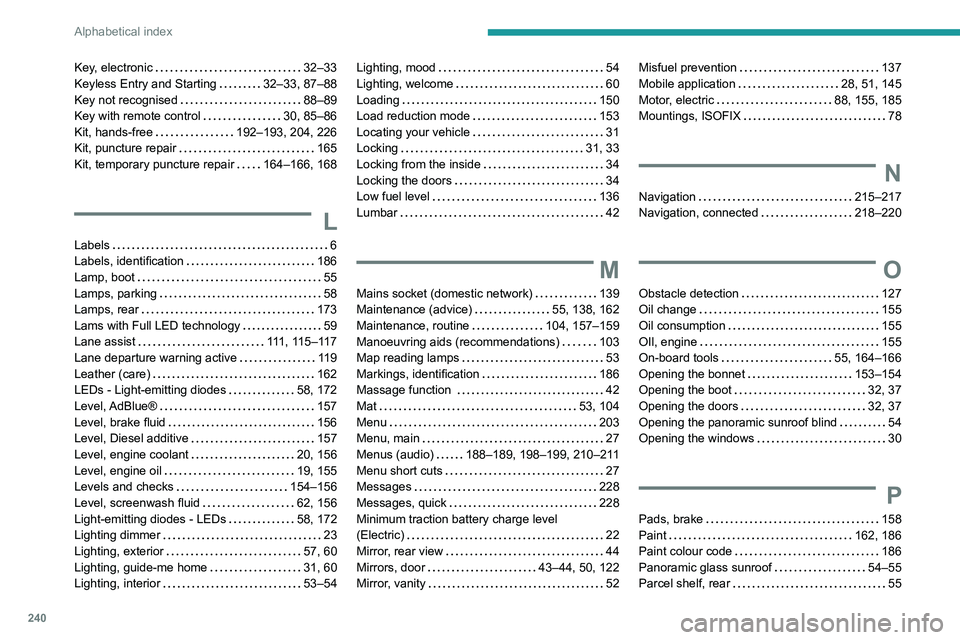
Key, electronic 32–33
Keyless Entry and Starting
32–33, 87–88
Key not recognised
88–89
Key with remote control
30, 85–86
Kit, hands-free
192–193, 204, 226
Kit, puncture repair
165
Kit, temporary puncture repair
164–166, 168
L
Labels 6
Labels, identification
186
Lamp, boot
55
Lamps, parking
58
Lamps, rear
173
Lams with Full LED technology
59
Lane assist
111, 115–117
Lane departure warning active
119
Leather (care)
162
LEDs - Light-emitting diodes
58, 172
Level, AdBlue®
157
Level, brake fluid
156
Level, Diesel additive
157
Level, engine coolant
20, 156
Level, engine oil
19, 155
Levels and checks
154–156
Level, screenwash fluid
62, 156
Light-emitting diodes - LEDs
58, 172
Lighting dimmer
23
Lighting, exterior
57, 60
Lighting, guide-me home
31, 60
Lighting, interior
53–54
Lighting, mood 54
Lighting, welcome
60
Loading
150
Load reduction mode
153
Locating your vehicle
31
Locking
31, 33
Locking from the inside
34
Locking the doors
34
Low fuel level
136
Lumbar
42
M
Mains socket (domestic network) 139
Maintenance (advice)
55, 138, 162
Maintenance, routine
104, 157–159
Manoeuvring aids (recommendations)
103
Map reading lamps
53
Markings, identification
186
Massage function
42
Mat
53, 104
Menu
203
Menu, main
27
Menus (audio)
188–189, 198–199, 210–211
Menu short cuts
27
Messages
228
Messages, quick
228
Minimum traction battery charge level
(Electric)
22
Mirror, rear view
44
Mirrors, door
43–44, 50, 122
Mirror, vanity
52
Misfuel prevention 137
Mobile application
28, 51, 145
Motor, electric
88, 155, 185
Mountings, ISOFIX
78
N
Navigation 215–217
Navigation, connected
218–220
O
Obstacle detection 127
Oil change
155
Oil consumption
155
OIl, engine
155
On-board tools
55, 164–166
Opening the bonnet
153–154
Opening the boot
32, 37
Opening the doors
32, 37
Opening the panoramic sunroof blind
54
Opening the windows
30
P
Pads, brake 158
Paint
162, 186
Paint colour code
186
Panoramic glass sunroof
54–55
Parcel shelf, rear
55
Page 243 of 276
241
Alphabetical index
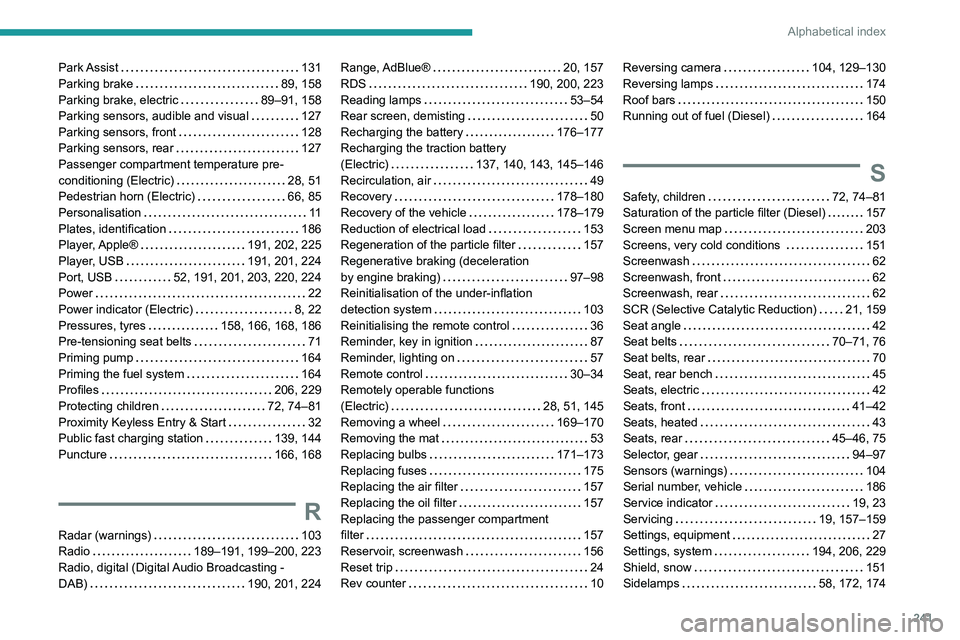
Park Assist 131
Parking brake
89, 158
Parking brake, electric
89–91, 158
Parking sensors, audible and visual
127
Parking sensors, front
128
Parking sensors, rear
127
Passenger compartment temperature pre-
conditioning (Electric)
28, 51
Pedestrian horn (Electric)
66, 85
Personalisation
11
Plates, identification
186
Player, Apple®
191, 202, 225
Player, USB
191, 201, 224
Port, USB
52, 191, 201, 203, 220, 224
Power
22
Power indicator (Electric)
8, 22
Pressures, tyres
158, 166, 168, 186
Pre-tensioning seat belts
71
Priming pump
164
Priming the fuel system
164
Profiles
206, 229
Protecting children
72, 74–81
Proximity Keyless Entry & Start
32
Public fast charging station
139, 144
Puncture
166, 168
R
Radar (warnings) 103
Radio
189–191, 199–200, 223
Radio, digital (Digital Audio Broadcasting -
DAB)
190, 201, 224
Range, AdBlue® 20, 157
RDS
190, 200, 223
Reading lamps
53–54
Rear screen, demisting
50
Recharging the battery
176–177
Recharging the traction battery
(Electric)
137, 140, 143, 145–146
Recirculation, air
49
Recovery
178–180
Recovery of the vehicle
178–179
Reduction of electrical load
153
Regeneration of the particle filter
157
Regenerative braking (deceleration
by engine braking)
97–98
Reinitialisation of the under-inflation
detection system
103
Reinitialising the remote control
36
Reminder, key in ignition
87
Reminder, lighting on
57
Remote control
30–34
Remotely operable functions
(Electric)
28, 51, 145
Removing a wheel
169–170
Removing the mat
53
Replacing bulbs
171–173
Replacing fuses
175
Replacing the air filter
157
Replacing the oil filter
157
Replacing the passenger compartment
filter
157
Reservoir, screenwash
156
Reset trip
24
Rev counter
10Reversing camera 104, 129–130
Reversing lamps
174
Roof bars
150
Running out of fuel (Diesel)
164
S
Safety, children 72, 74–81
Saturation of the particle filter (Diesel)
157
Screen menu map
203
Screens, very cold conditions
151
Screenwash
62
Screenwash, front
62
Screenwash, rear
62
SCR (Selective Catalytic Reduction)
21, 159
Seat angle
42
Seat belts
70–71, 76
Seat belts, rear
70
Seat, rear bench
45
Seats, electric
42
Seats, front
41–42
Seats, heated
43
Seats, rear
45–46, 75
Selector, gear
94–97
Sensors (warnings)
104
Serial number, vehicle
186
Service indicator
19, 23
Servicing
19, 157–159
Settings, equipment
27
Settings, system
194, 206, 229
Shield, snow
151
Sidelamps
58, 172, 174