cruise control PEUGEOT 3008 2013 Owners Manual
[x] Cancel search | Manufacturer: PEUGEOT, Model Year: 2013, Model line: 3008, Model: PEUGEOT 3008 2013Pages: 352, PDF Size: 15.64 MB
Page 5 of 352
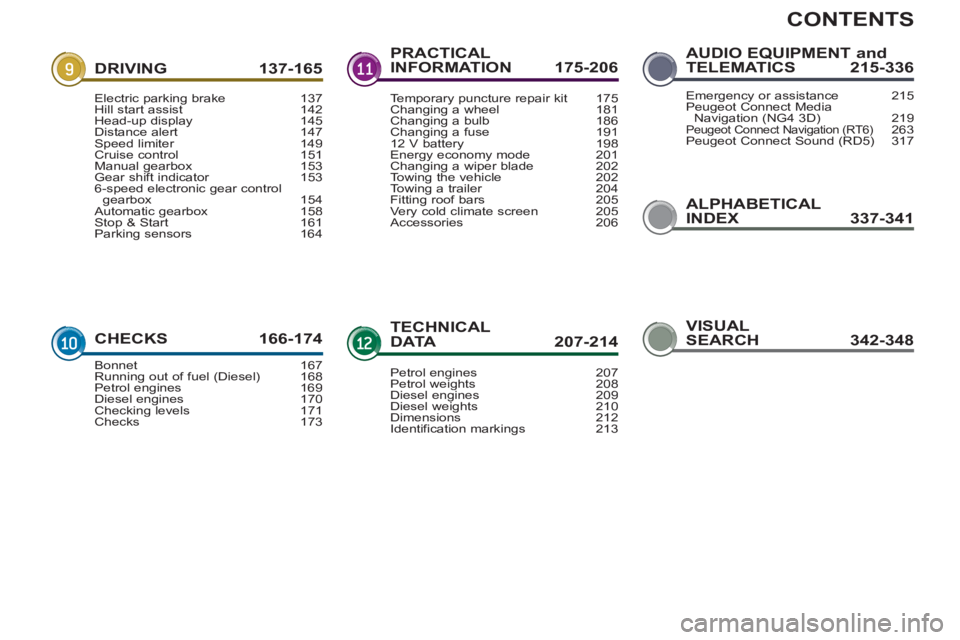
CONTENTS
ALPHABETICAL
INDEX 337-341
DRIVING 137-165
CHECKS 166-17
4
PRACTICAL
INFORMATION 175-206
TECHNICALDATA 207-214
AUDIO EQUIPMENT andTELEMATICS 215-336
Electric parking brake 137Hill start assist 142Head-up display 145Distance alert 147Speed limiter 149Cruise control 151Manual gearbox 153Gear shift indicator 1536-speed electronic gear control gearbox 154Automatic gearbox 158Stop & Start 161Parking sensors 164
Bonnet 167Running out of fuel (Diesel) 168Petrol engines 169Diesel engines 170Checking levels 171Checks 173
Temporary puncture repair kit 175Changing a wheel 181Changing a bulb 186Changing a fuse 19112 V battery 198Energy economy mode 201Changing a wiper blade 202
Towing the vehicle 202Towing a trailer 204Fitting roof bars 205Very cold climate screen 205Accessories 206
Petrol engines 207Petrol weights 208Diesel engines 209Diesel weights 210Dimensions 212
Identification markings 213
Emergency or assistance 215Peugeot Connect Media
Navigation (NG4 3D) 219Peugeot Connect Navigation (RT6)263Peugeot Connect Sound (RD5) 317
VISUAL
SEARCH 342-348
Page 10 of 352
8
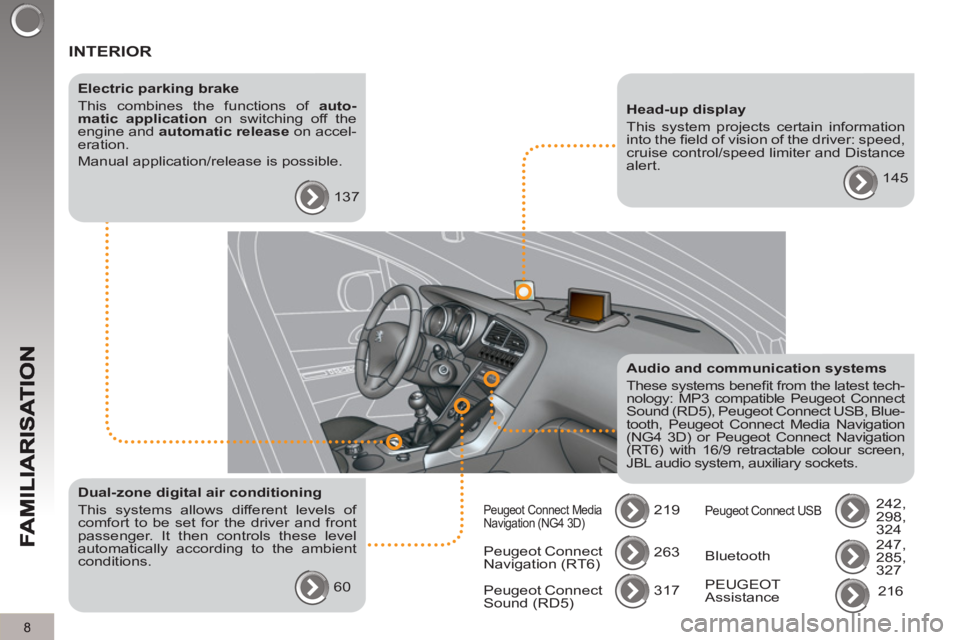
INTERIOR
Electric parking brake
This combines the functions of auto-
matic application
on switching off the
engine and automatic release
on accel-
eration.
Manual application/release is possible.
137
Audio and communication systems
These systems benefi t from the latest tech-
nology: MP3 compatible Peugeot Connect
Sound (RD5), Peugeot Connect USB, Blue-
tooth, Peugeot Connect Media Navigation
(NG4 3D) or Peugeot Connect Navigation
(RT6) with 16/9 retractable colour screen,
JBL audio system, auxiliary sockets.
219
Head-up display
This system projects certain information
into the fi eld of vision of the driver: speed,
cruise control/speed limiter and Distance
alert.
145
Dual-zone digital air conditioning
This systems allows different levels of
comfort to be set for the driver and front
passenger. It then controls these level
automatically according to the ambient
conditions.
60 Peugeot Connect
Navigation (RT6) 263
317
Peugeot Connect
Sound (RD5)
Peugeot Connect Media
Navigation (NG4 3D) Peugeot Connect USB
242,
298,
324
247,
285,
327 Bluetooth
PEUGEOT
Assistance 216
Page 11 of 352
9
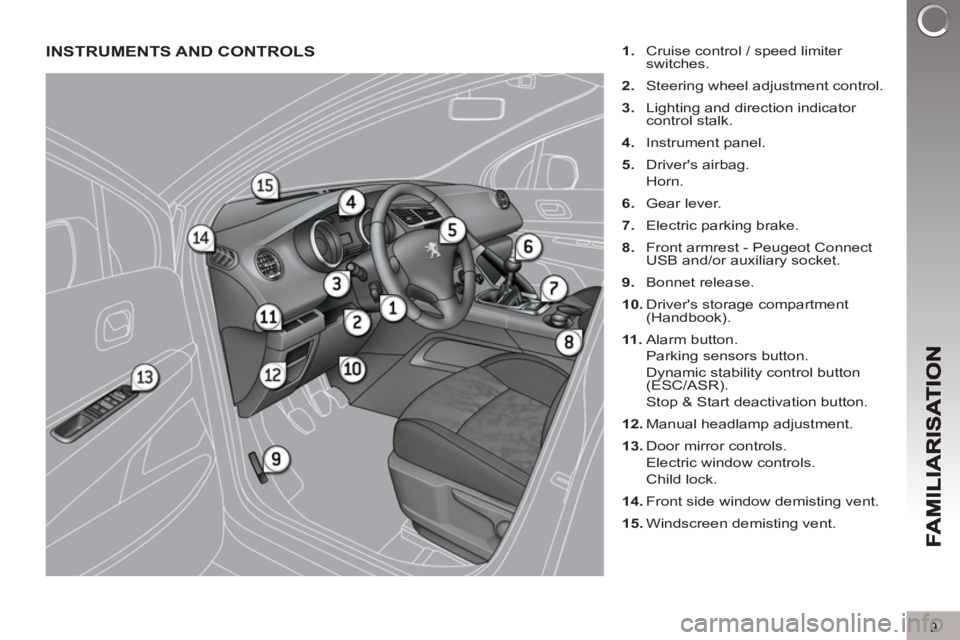
INSTRUMENTS AND CONTROLS
1.
Cruise control / speed limiter
switches.
2.
Steering wheel adjustment control.
3.
Lighting and direction indicator
control stalk.
4.
Instrument panel.
5.
Driver's airbag.
Horn.
6.
Gear lever.
7.
Electric parking brake.
8.
Front armrest - Peugeot Connect
USB and/or auxiliary socket.
9.
Bonnet release.
10.
Driver's storage compartment
(Handbook).
11 .
Alarm button.
Parking sensors button.
Dynamic stability control button
(ESC/ASR).
Stop & Start deactivation button.
12.
Manual headlamp adjustment.
13.
Door mirror controls.
Electric window controls.
Child lock.
14.
Front side window demisting vent.
15.
Windscreen demisting vent.
Page 25 of 352
23
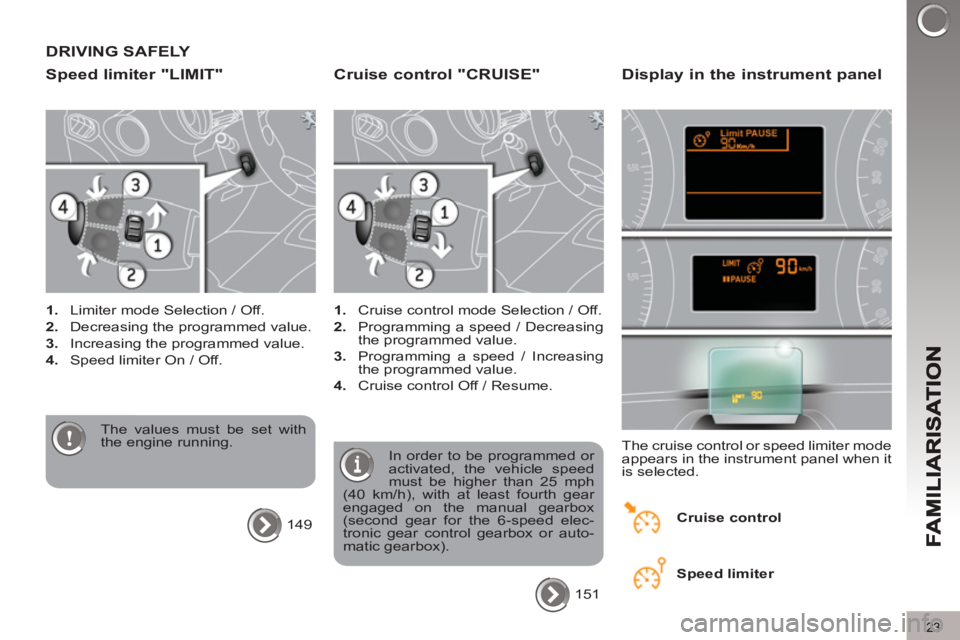
DRIVING SAFELY
S
peed limiter "LIMIT"
1.
Limiter mode Selection / Off.
2.
Decreasing the programmed value.
3.
Increasing the programmed value.
4.
Speed limiter On / Off.
The values must be set with
the engine running.
149
Cruise control "CRUISE"
1.
Cruise control mode Selection / Off.
2.
Programming a speed / Decreasing
the programmed value.
3.
Programming a speed / Increasing
the programmed value.
4.
Cruise control Off / Resume.
In order to be programmed or
activated, the vehicle speed
must be higher than 25 mph
(40 km/h), with at least fourth gear
engaged on the manual gearbox
(second gear for the 6-speed elec-
tronic gear control gearbox or auto-
matic gearbox).
151
Display in the instrument panel
The cruise control or speed limiter mode
appears in the instrument panel when it
is selected.
Cruise control
Speed limiter
Page 27 of 352
Optimise the use of your gearbox
With a manual gearbox, move off gen-
tly, change up without waiting and
drive by changing up quite soon. If
your vehicle has the system, the gear
shift indicator invites you to change up;
it is displayed in the instrument panel,
follow its instructions.
With an automatic or electronic gear-
box, stay in Drive "D"
or Auto "A"
, ac-
cording to the type of gearbox, without
pressing the accelerator pedal heavily
or suddenly.
Drive smoothly
Maintain a safe distance between ve-
hicles, use engine braking rather than
the brake pedal, and press the accel-
erator progressively. These practices
contribute towards a reduction in fuel
consumption and CO
2 emissions and
also helps reduce the background traf-
fi c noise.
If your vehicle has cruise control, make
use of the system at speeds above
25 mph (40 km/h) when the traffi c is
fl owing well.
Control the use of your electrical equipment
Before moving off, if the passenger
compartment is too warm, ventilate it by
opening the windows and air vents be-
fore using the air conditioning.
Above 30 mph (50 km/h), close the win-
dows and leave the air vents open.
Remember to make use of equipment
that can help keep the temperature in
the passenger compartment down (sun-
roof and window blinds...).
Switch off the air conditioning, unless
it has automatic digital regulation, as
soon as the desired temperature is at-
tained.
Switch off the demisting and defrosting
controls, if not automatic.
Switch off the heated seat as soon as
possible.
Switch off the headlamps and front
foglamps when the level of light does
not require their use.
Avoid running the engine before mov-
ing off, particularly in winter; your ve-
hicle will warm up much faster while
driving.
As a passenger, if you avoid connect-
ing your multimedia devices (fi lm, mu-
sic, video game...), you will contribute
towards limiting the consumption of
electrical energy, and so of fuel.
Disconnect your portable devices be-
fore leaving the vehicle.
ECO-DRIVING
25
Eco-driving is a range of everyday practices that allow the motorist to optimise their fuel consumption and CO2 emis-
sions.
Page 30 of 352
IN
S
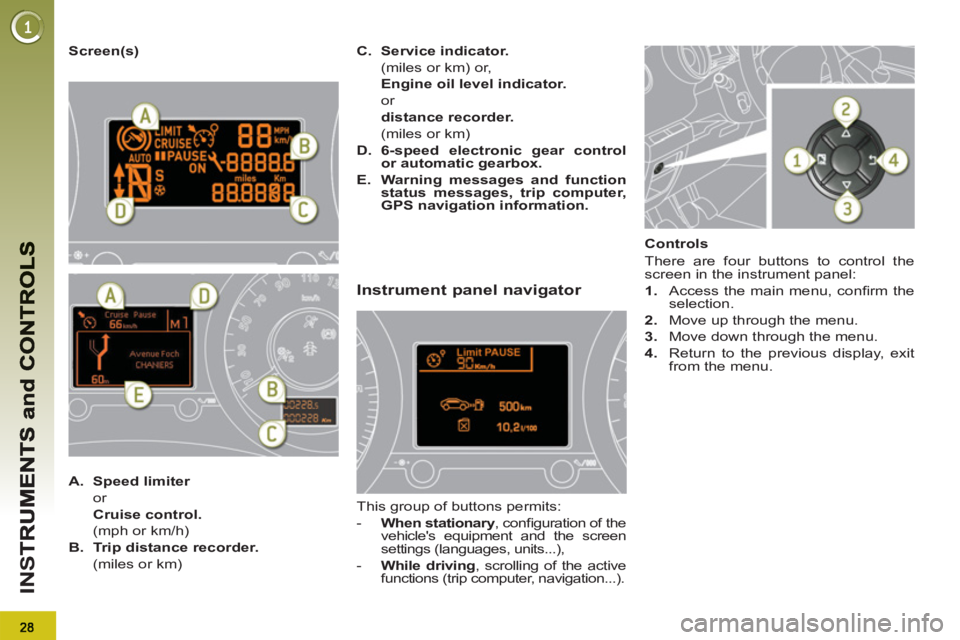
Screen(s)
A.
Speed limiter
or
Cruise control.
(mph or km/h)
B.
Trip distance recorder.
(miles or km)
C.
Service indicator.
(miles or km) or,
Engine oil level indicator.
or
distance recorder.
(miles or km)
D.
6-speed electronic gear control
or automatic gearbox.
E.
Warning messages and function
status messages, trip computer,
GPS navigation information.
Instrument panel navigator
This group of buttons permits:
- When stationary
, confi guration of the
vehicle's equipment and the screen
settings (languages, units...),
- While driving
, scrolling of the active
functions (trip computer, navigation...).
Controls
There are four buttons to control the
screen in the instrument panel:
1.
Access the main menu, confi rm the
selection.
2.
Move up through the menu.
3.
Move down through the menu.
4.
Return to the previous display, exit
from the menu.
Page 104 of 352
102
FITTINGS
To avoid any risk of jamming
of the pedals:
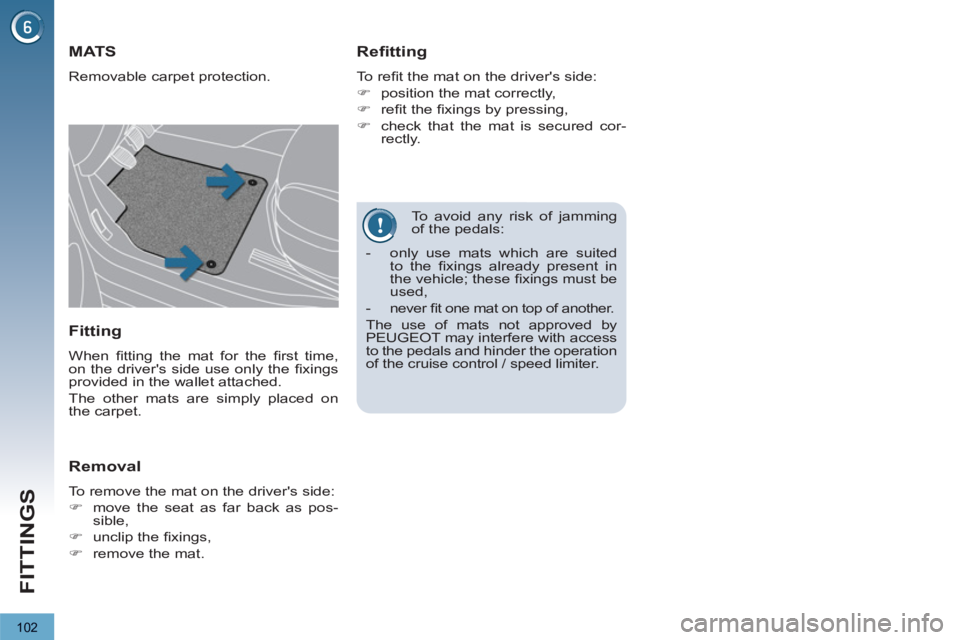
MATS
Removable carpet protection.
Refitting
To refi t the mat on the driver's side:
)
position the mat correctly,
)
refi t the fi xings by pressing,
)
check that the mat is secured cor-
rectly.
Fitting
When fi tting the mat for the fi rst time,
on the driver's side use only the fi xings
provided in the wallet attached.
The other mats are simply placed on
the carpet.
Removal
To remove the mat on the driver's side:
)
move the seat as far back as pos-
sible,
)
unclip the fi xings,
)
remove the mat.
- only use mats which are suited
to the fi xings already present in
the vehicle; these fi xings must be
used,
- never fi t one mat on top of another.
The use of mats not approved by
PEUGEOT may interfere with access
to the pedals and hinder the operation
of the cruise control / speed limiter.
Page 147 of 352
145
D
R
System which projects various informa-
tion onto a transparent strip in the fi eld
of vision of the driver so that they do not
have to take their eyes off the road.
This system operates when the engine
is running and the settings are stored
when the ignition is switched off.
HEAD-UP DISPLAY
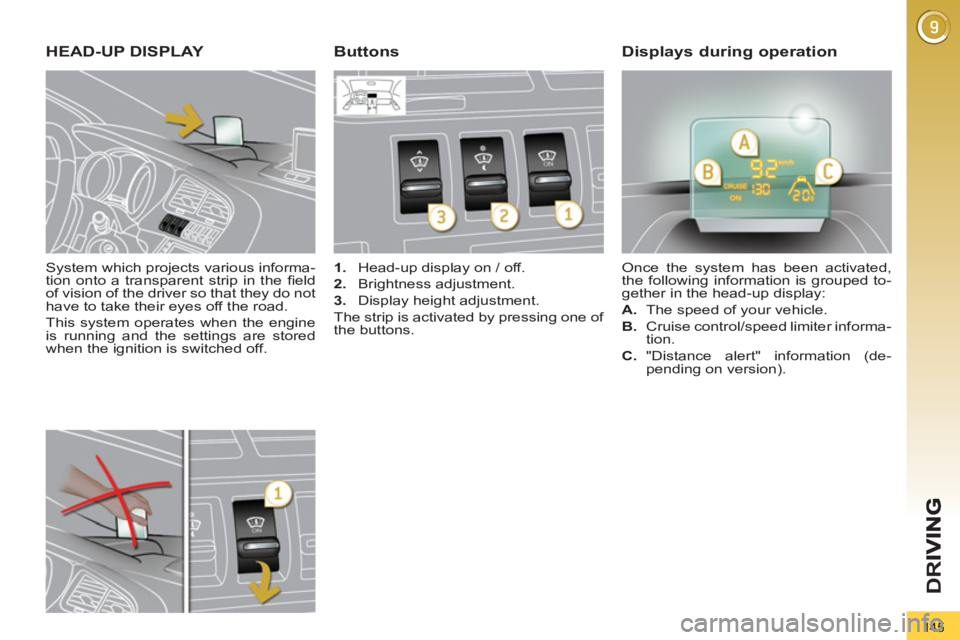
1.
Head-up display on / off.
2.
Brightness adjustment.
3.
Display height adjustment.
The strip is activated by pressing one of
the buttons. Once the system has been activated,
the following information is grouped to-
gether in the head-up display:
A.
The speed of your vehicle.
B.
Cruise control/speed limiter informa-
tion.
ButtonsDisplays during operation
C.
"Distance alert" information (de-
pending on version).
Page 153 of 352
151
D
R
CRUISE CONTROL
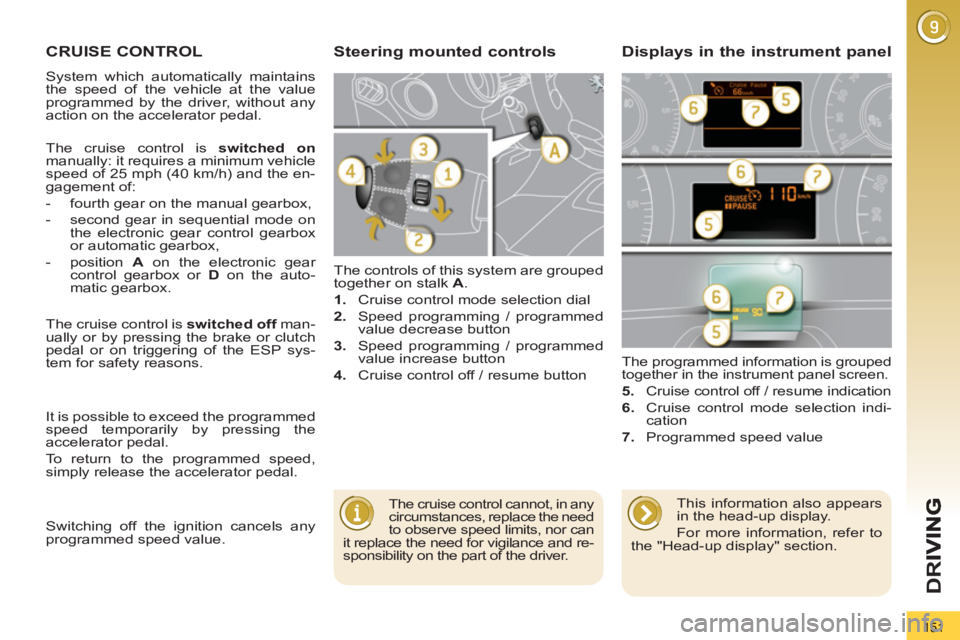
The controls of this system are grouped
together on stalk A
.
1.
Cruise control mode selection dial
2.
Speed programming / programmed
value decrease button
3.
Speed programming / programmed
value increase button
4.
Cruise control off / resume button The programmed information is grouped
together in the instrument panel screen.
5.
Cruise control off / resume indication
6.
Cruise control mode selection indi-
cation
7.
Programmed speed value
Steering mounted controls Displays in the instrument panel
The cruise control cannot, in any
circumstances, replace the need
to observe speed limits, nor can
it replace the need for vigilance and re-
sponsibility on the part of the driver.
The cruise control is switched on
manually: it requires a minimum vehicle
speed of 25 mph (40 km/h) and the en-
gagement of:
- fourth gear on the manual gearbox,
- second gear in sequential mode on
the electronic gear control gearbox
or automatic gearbox,
- position A
on the electronic gear
control gearbox or D
on the auto-
matic gearbox.
The cruise control is switched off
man-
ually or by pressing the brake or clutch
pedal or on triggering of the ESP sys-
tem for safety reasons.
It is possible to exceed the programmed
speed temporarily by pressing the
accelerator pedal.
To return to the programmed speed,
simply release the accelerator pedal.
This information also appears
in the head-up display.
For more information, refer to
the "Head-up display" section.
System which automatically maintains
the speed of the vehicle at the value
programmed by the driver, without any
action on the accelerator pedal.
Switching off the ignition cancels any
programmed speed value.
Page 154 of 352
152
D
R
I
When the cruise control is
switched on, be careful if you
maintain the pressure on one
of the programmed speed changing
buttons: this may result in a very rapid
change in the speed of your vehicle.
Do not use the cruise control on slip-
pery roads or in heavy traffi c.
On a steep descent, the cruise con-
trol will not be able to prevent the
vehicle from exceeding the pro-
grammed speed.
To avoid any risk of jamming of the
pedals:
- ensure that the mat is positioned
correctly,
- never fi t one mat on top of another.
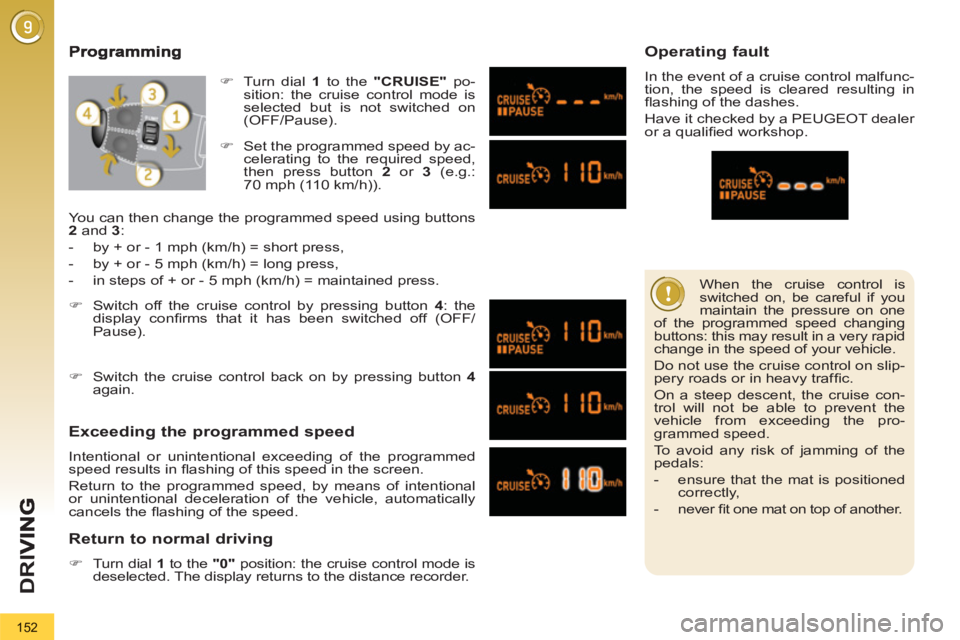
Exceeding the programmed speed
Intentional or unintentional exceeding of the programmed
speed results in fl ashing of this speed in the screen.
Return to the programmed speed, by means of intentional
or unintentional deceleration of the vehicle, automatically
cancels the fl ashing of the speed.
Return to normal driving
)
Turn dial 1
to the "0"
position: the cruise control mode is
deselected. The display returns to the distance recorder.
Operating fault
In the event of a cruise control malfunc-
tion, the speed is cleared resulting in
fl ashing of the dashes.
Have it checked by a PEUGEOT dealer
or a qualifi ed workshop.
)
Set the programmed speed by ac-
celerating to the required speed,
then press button 2
or 3
(e.g.:
70 mph (110 km/h)).
)
Switch off the cruise control by pressing button 4
: the
display confi rms that it has been switched off (OFF/
Pause).
)
Switch the cruise control back on by pressing button 4
again.
You can then change the programmed speed using buttons
2
and 3
:
- by + or - 1 mph (km/h) = short press,
- by + or - 5 mph (km/h) = long press,
- in steps of + or - 5 mph (km/h) = maintained press.
)
Turn dial 1
to the "CRUISE"
po-
sition: the cruise control mode is
selected but is not switched on
(OFF/Pause).