fault PEUGEOT 3008 2017 Repair Manual
[x] Cancel search | Manufacturer: PEUGEOT, Model Year: 2017, Model line: 3008, Model: PEUGEOT 3008 2017Pages: 566, PDF Size: 16.05 MB
Page 241 of 566
239
3008-2_en_Chap06_conduite_ed01-2016
Steering mounted controls
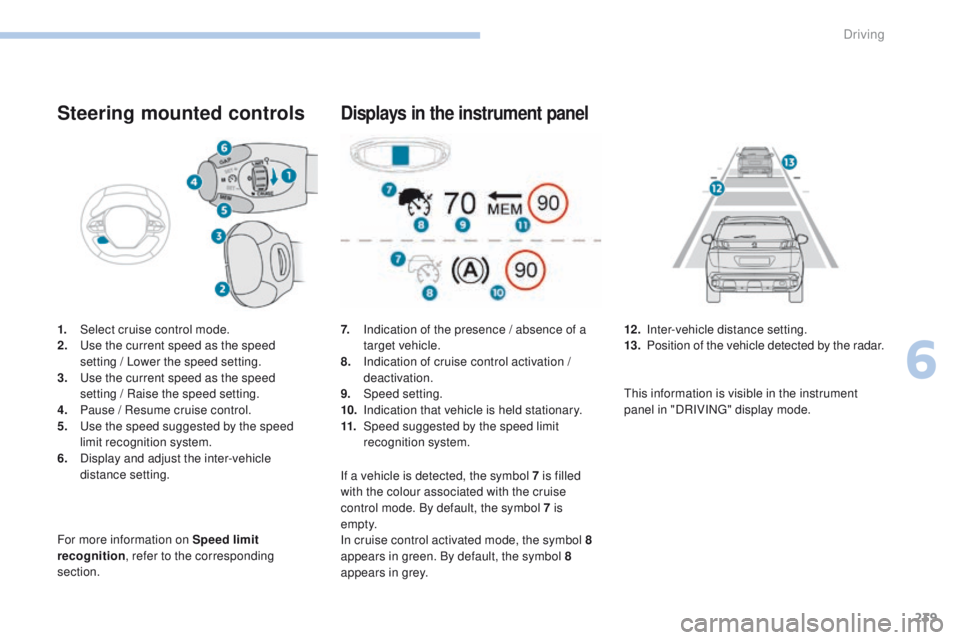
1. Select cruise control mode.
2. Use the current speed as the speed
setting
/ Lower the speed setting.
3.
U
se the current speed as the speed
setting
/ Raise the speed setting.
4.
P
ause / Resume cruise control.
5.
U
se the speed suggested by the speed
limit recognition system.
6.
D
isplay and adjust the inter-vehicle
distance setting.
For more information on Speed limit
recognition , refer to the corresponding
section.
Displays in the instrument panel
7. Indication of the presence / absence of a target vehicle.
8.
I
ndication of cruise control activation /
deactivation.
9.
Spe
ed setting.
10.
I
ndication that vehicle is held stationary.
11.
Spe
ed suggested by the speed limit
recognition system. 12 . I
nter-vehicle distance setting.
13. P osition of the vehicle detected by the radar.
If a vehicle is detected, the symbol 7
is filled
with the colour associated with the cruise
control mode. By default, the symbol 7 is
e m pt y.
In cruise control activated mode, the symbol
8
appears in green. By default, the symbol 8
appears in grey. This information is visible in the instrument
panel in "DRIVING" display mode.
6
Driving
Page 242 of 566
240
3008-2_en_Chap06_conduite_ed01-2016
Switching on
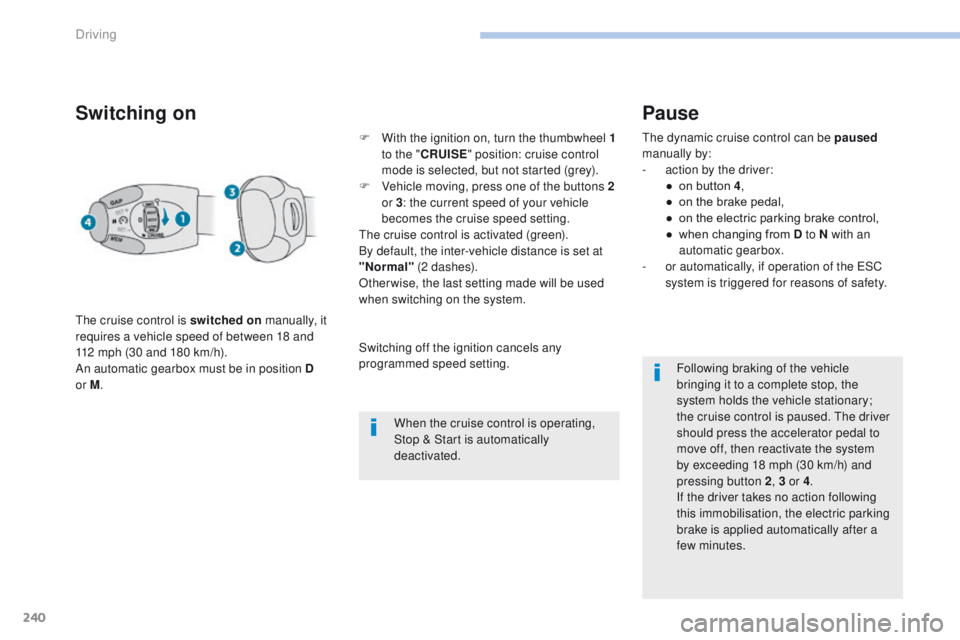
The cruise control is switched on manually, it
requires a vehicle speed of between 18 and
112 mph (30 and 180 km/h).
An automatic gearbox must be in position D
or M . F
W
ith the ignition on, turn the thumbwheel 1
to the " CRUISE " position: cruise control
mode is selected, but not started (grey).
F
V
ehicle moving, press one of the buttons 2
or 3 : the current speed of your vehicle
becomes the cruise speed setting.
The cruise control is activated (green).
By default, the inter-vehicle distance is set at
"Normal" (2 dashes).
Otherwise, the last setting made will be used
when switching on the system.
When the cruise control is operating,
Stop & Start is automatically
deactivated.
Pause
The dynamic cruise control can be paused
manually by:
-
a
ction by the driver:
●
o
n button 4 ,
●
o
n the brake pedal,
●
o
n the electric parking brake control,
●
w
hen changing from D to N with an
automatic gearbox.
-
o
r automatically, if operation of the ESC
system is triggered for reasons of safety.
Following braking of the vehicle
bringing it to a complete stop, the
system holds the vehicle stationary;
the cruise control is paused. The driver
should press the accelerator pedal to
move off, then reactivate the system
by exceeding 18
mph (30 km/h) and
pressing button
2, 3 or 4 .
If the driver takes no action following
this immobilisation, the electric parking
brake is applied automatically after a
few minutes.
Switching off the ignition cancels any
programmed speed setting.
Driving
Page 248 of 566
246
3008-2_en_Chap06_conduite_ed01-2016
Operating fault
Have the system checked by a PEUGEOT
dealer or a qualified workshop.In the event of a fault with the cruise
control, you are alerted by the
illumination of this warning lamp
and the display of a message in the
instrument panel, accompanied by an
audible signal.
The cruise control operates by day and at
night, in fog or moderate rainfall.
However, it is strongly recommended that
you always keep a safe distance from
vehicles ahead, according to the driving
conditions, the weather and the road
sur face.
Use the cruise control only where the
driving conditions allow running at a
constant speed and at an adequate safe
distance.
Do not use the cruise control in urban
areas, heavy traffic, on winding or steep
roads or on slippery or flooded sur faces.
In certain circumstances, it may not
be possible for the speed setting to be
maintained or even attained: loaded
vehicle, ascending a steep hill, ... The system is not intended for driving in the
following situations:
-
t
he front end of the vehicle has been
modified (addition of driving lamps),
-
d
riving on a racing circuit,
-
r
unning on a rolling road,
-
u
se of snow chains or non-slip covers.
As a safety measure, do not use the
system if the brake lamps are faulty.
Do not use the system if the front
bumper is damaged.
The operation of the radar, located in the
front bumper, may be disturbed in certain
weather conditions, for example: with
accumulations of snow, ice, mud, ...
Clean the front bumper, removing the snow,
mud, ... The use of mats not approved by
PEUGEOT may inter fere with the operation
of the cruise control.
To avoid any risk of jamming the pedals:
-
e
nsure that mats are secured correctly,
-
n
ever fit one mat on top of another.
Driving
Page 249 of 566
247
3008-2_en_Chap06_conduite_ed01-2016
Distance alert and Active Safety Brake
This system includes three functions:
- D istance alert (alert if there is a risk of
collision),
-
I
ntelligent emergency braking assistance,
-
A
ctive Safety Brake (automatic emergency
b r ak ing).
Points on the Active Safety Brake
function
The speed of the vehicle must be between 3
and 87 mph (5 and 140 km/h) when a moving
vehicle is detected.
The speed of the vehicle must not be higher
than 50 mph (80 km/h) when a stationary
vehicle is detected.
The speed of the vehicle must not be higher
than 36 mph (60 km/h) when a pedestrian is
detected.
The DSC system must not be deactivated or
faulty.
All occupants must have fastened their seat
belts.
Driving at steady speed on roads with few
bends is required.
This system is designed to assist the
driver and improve road safety.
It is the driver's responsibility to
continuously monitor the state of
the traffic, observing the driving
regulations.
This system does not avoid the need for
vigilance on the part of the driver.
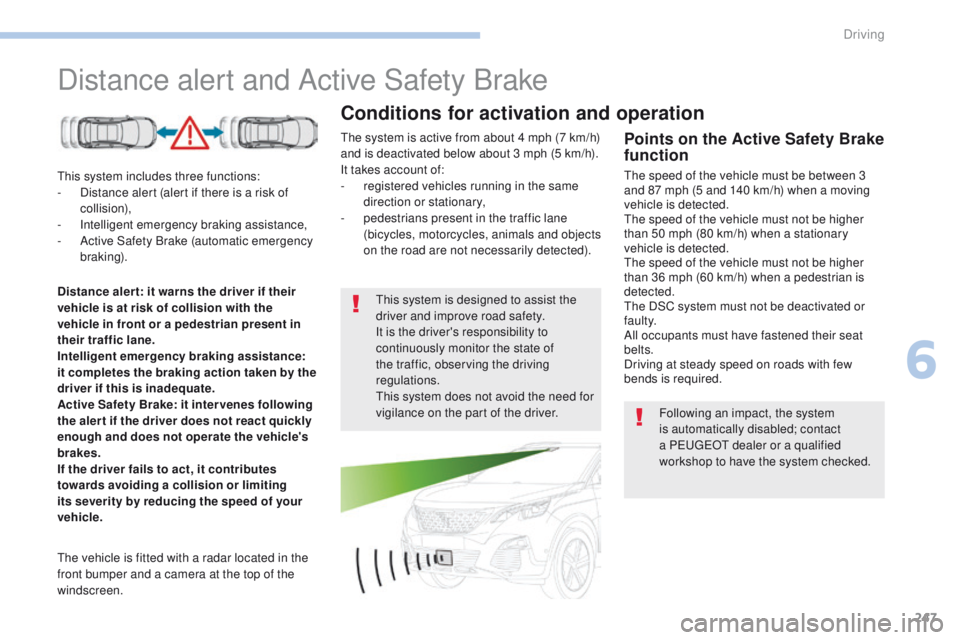
The vehicle is fitted with a radar located in the
front bumper and a camera at the top of the
windscreen.
Conditions for activation and operation
The system is active from about 4 mph (7 km/h)
and is deactivated below about 3 mph (5 km/h).
It takes account of:
-
r
egistered vehicles running in the same
direction or stationary,
-
p
edestrians present in the traffic lane
(bicycles, motorcycles, animals and objects
on the road are not necessarily detected).
Distance aler t: it warns the driver if their
vehicle is at risk of collision with the
vehicle in front or a pedestrian present in
their traffic lane.
Intelligent emergency braking assistance:
it completes the braking action taken by the
driver if this is inadequate.
Active Safety Brake: it inter venes following
the aler t if the driver does not react quickly
enough and does not operate the vehicle's
brakes.
If the driver fails to act, it contributes
towards avoiding a collision or limiting
its severity by reducing the speed of your
vehicle. Following an impact, the system
is automatically disabled; contact
a PEUGEOT dealer or a qualified
workshop to have the system checked.
6
Driving
Page 253 of 566
251
3008-2_en_Chap06_conduite_ed01-2016
Deactivation / ActivationOperating fault
In the event of a fault, you are alerted
by the illumination of this warning
lamp, accompanied by the display of
a message and an audible signal.
Clean the windscreen regularly,
particularly the area in front of the
camera.
Do not allow snow to accumulate on
the bonnet or roof of the vehicle as this
could mask the camera's view.
Clean the front bumper, removing mud,
snow, ...
If the front bumper is to be repainted,
contact a PEUGEOT dealer or a
qualified workshop. Certain types of
paint could inter fere with the operation
of the radar.
Check that the sensors (camera and radar) are
not covered by dirt, mud, frost, snow...
If the problem persists, contact a PEUGEOT
dealer or a qualified workshop to have the
system checked.
By default, the system is automatically
activated at every engine start.
The system can be deactivated or activated in
the vehicle settings menu in the screen.
Deactivation of the system is
signalled by the illumination of this
indicator lamp, accompanied by the
display of a message. There may be interference in the
operation of the camera or it may not
work at all in the following situations:
-
p
oor visibility (inadequate street
lighting, falling snow, heavy rain,
dense fog, ...),
-
d
azzle (headlamps of an
approaching vehicle on the other
side of the road, low sun, reflection
on a wet road, leaving a tunnel,
alternating between light and
shade, ...),
-
c
amera or radar masked (mud,
frost, snow, ...).
In these situations, detection
performance may be reduced.
6
Driving
Page 256 of 566
254
3008-2_en_Chap06_conduite_ed01-2016
Lane Departure Warning System
Activation / Deactivation
Select the "Driving assistance " tab, then
" Lane departure detection assistance. ".
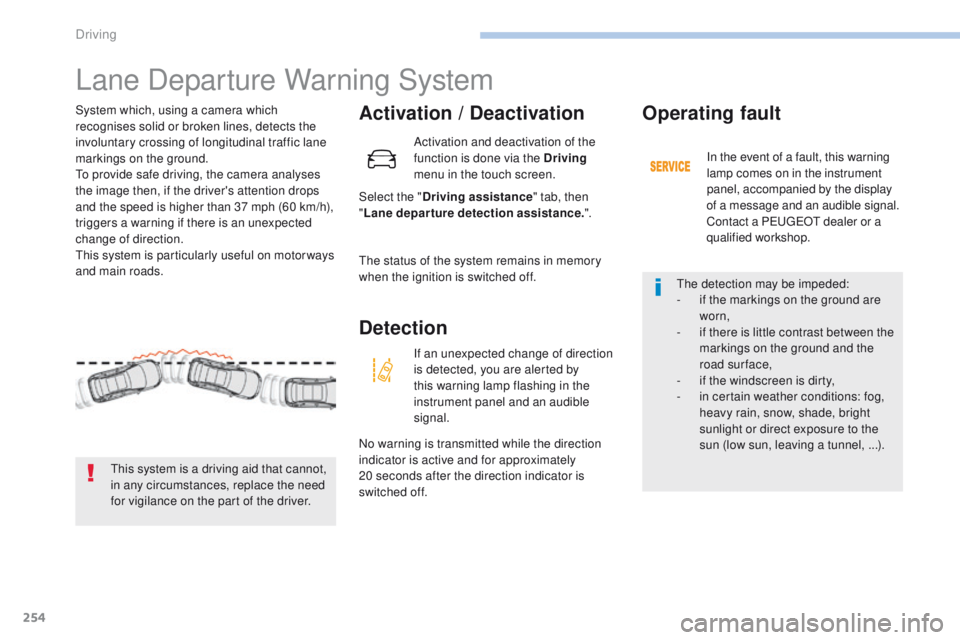
System which, using a camera which
recognises solid or broken lines, detects the
involuntary crossing of longitudinal traffic lane
markings on the ground.
To provide safe driving, the camera analyses
the image then, if the driver's attention drops
and the speed is higher than 37 mph (60 km/h),
triggers a warning if there is an unexpected
change of direction.
This system is particularly useful on motor ways
and main roads.
This system is a driving aid that cannot,
in any circumstances, replace the need
for vigilance on the part of the driver. Activation and deactivation of the
function is done via the Driving
menu in the touch screen.
The status of the system remains in memory
when the ignition is switched off.
Detection
If an unexpected change of direction
is detected, you are alerted by
this warning lamp flashing in the
instrument panel and an audible
signal.
No warning is transmitted while the direction
indicator is active and for approximately
20
seconds after the direction indicator is
switched off.
Operating fault
In the event of a fault, this warning
lamp comes on in the instrument
panel, accompanied by the display
of a message and an audible signal.
Contact a PEUGEOT dealer or a
qualified workshop.
The detection may be impeded:
-
i
f the markings on the ground are
worn,
-
i
f there is little contrast between the
markings on the ground and the
road surface,
-
i
f the windscreen is dirty,
-
i
n certain weather conditions: fog,
heavy rain, snow, shade, bright
sunlight or direct exposure to the
sun (low sun, leaving a tunnel, ...).
Driving
Page 261 of 566
259
3008-2_en_Chap06_conduite_ed01-2016
Activation / Deactivation
Activation / deactivation of the
system is done in the Driving menu
of the touch screen.
The state of the system stays in memory when
the ignition is switched off. In the event of a fault with the system, you are
alerted by the illumination of these warning
lamps in the instrument panel, accompanied by
the display of a message and an audible signal.
Have the system checked by a PEUGEOT
dealer or a qualified workshop.
Operating fault
Select the "
Driving assistance " tab then
" Help staying in lane ".
6
Driving
Page 264 of 566
262
3008-2_en_Chap06_conduite_ed01-2016
Operating fault
High pressure jet wash
When washing your vehicle, direct the
lance at least 30 cm away from the
sensors.The system may suffer temporary
interference in certain weather
conditions (rain, hail...).
In particular, driving on a wet sur face
or moving from a dry area to a wet area
can cause false alerts (for example, the
presence of a fog of water droplets in
the blind spot angle is interpreted as a
vehicle).
In bad or wintry weather, ensure that
the sensors are not covered by mud, ice
or snow.
Take care not to cover the warning zone
in the door mirrors or the detection
zones on the front and rear bumpers
with adhesive labels or other objects;
they may hamper the correct operation
of the system.
In the event of a fault, this warning lamp flashes
for a few moments in the instrument panel,
accompanied by illumination of the Service
warning lamp and the display of a message.
Contact a PEUGEOT dealer or a qualified
workshop to have the system checked.
In addition to the fixed warning lamp in the door
mirror on the side in question, a correction of
trajectory will be felt if you cross a lane marking
with the direction indicators on, to help you
avoid a collision.
Assisted Blind Spot
Monitoring System
Conditions for operation
The following systems must be activated:
-
B lind Spot Monitoring System,
-
A
ssisted Lane Departure Warning System.
For more information on the Blind Spot
Monitoring System and the Assisted Lane
Departure Warning System , refer to the
corresponding sections.
Driving
Page 266 of 566
264
3008-2_en_Chap06_conduite_ed01-2016
Front parking sensors
The system will be deactivated
automatically if a trailer is being
towed or a bicycle carrier is fitted on
a towbar (vehicle fitted with a towbar
installed in line with the manufacturer's
recommendations).In bad or wintry weather, ensure that
the sensors are not covered with mud,
ice or snow. When reverse gear is
engaged, an audible signal (long beep)
indicates that the sensors may be dirty.
Certain sound sources (motorcycle,
lorry, pneumatic drill, etc.) may trigger
the audible signals of the parking
sensor system.
The sound emitted by the speaker (front
or rear) indicates whether the obstacle
is in front or behind.
Deactivation / Activation
The deactivation or activation of the system
is done in the vehicle parameters menu in the
screen.
The state of the system is held in memory when
the ignition is switched off.
The parking sensors are deactivated while the
Park Assist system is measuring a space.
For more information on Park Assist
, refer to
the corresponding section.
Operating fault
High pressure jet wash
When washing your vehicle, do not
direct the lance within 30 cm of the
sensors. In the event of a fault, when reverse
gear is engaged this warning lamp
comes on in the instrument panel,
accompanied by the display of a
message and an audible signal
(short beep).
Contact a PEUGEOT dealer or a qualified
workshop to have the system checked.
In addition to the rear parking sensors, the
front parking sensors are triggered when an
obstacle is detected in front and the speed of
the vehicle is still below 6 mph (10 km/h).
The front parking sensors are interrupted if
the vehicle stops for more than three seconds
in for ward gear, if no further obstacles are
detected or when the speed of the vehicle
exceeds 6 mph (10 km/h).
Driving
Page 267 of 566
265
3008-2_en_Chap06_conduite_ed01-2016
Panoramic vision
General points
Visiopark 1 - Visiopark 2
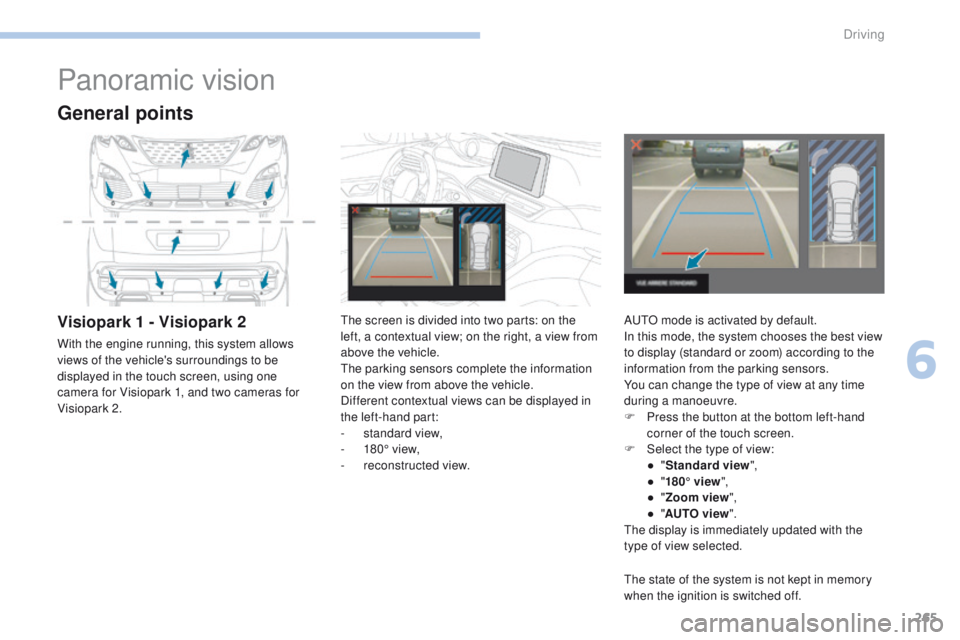
With the engine running, this system allows
views of the vehicle's surroundings to be
displayed in the touch screen, using one
camera for Visiopark 1, and two cameras for
Visiopark 2.The screen is divided into two parts: on the
left, a contextual view; on the right, a view from
above the vehicle.
The parking sensors complete the information
on the view from above the vehicle.
Different contextual views can be displayed in
the left-hand part:
-
s
tandard view,
-
1
80° view,
-
r
econstructed view.AUTO mode is activated by default.
In this mode, the system chooses the best view
to display (standard or zoom) according to the
information from the parking sensors.
You can change the type of view at any time
during a manoeuvre.
F
P
ress the button at the bottom left-hand
corner of the touch screen.
F
Sel
ect the type of view:
●
"St
andard view",
●
"1
80° view",
●
"Z
oom view",
●
"AU
TO view".
The display is immediately updated with the
type of view selected.
The state of the system is not kept in memory
when the ignition is switched off.
6
Driving