instrument panel PEUGEOT 3008 HYBRID 4 2011 User Guide
[x] Cancel search | Manufacturer: PEUGEOT, Model Year: 2011, Model line: 3008 Hybrid 4, Model: Peugeot 3008 Hybrid 4 2011Pages: 280, PDF Size: 16.5 MB
Page 46 of 280
44
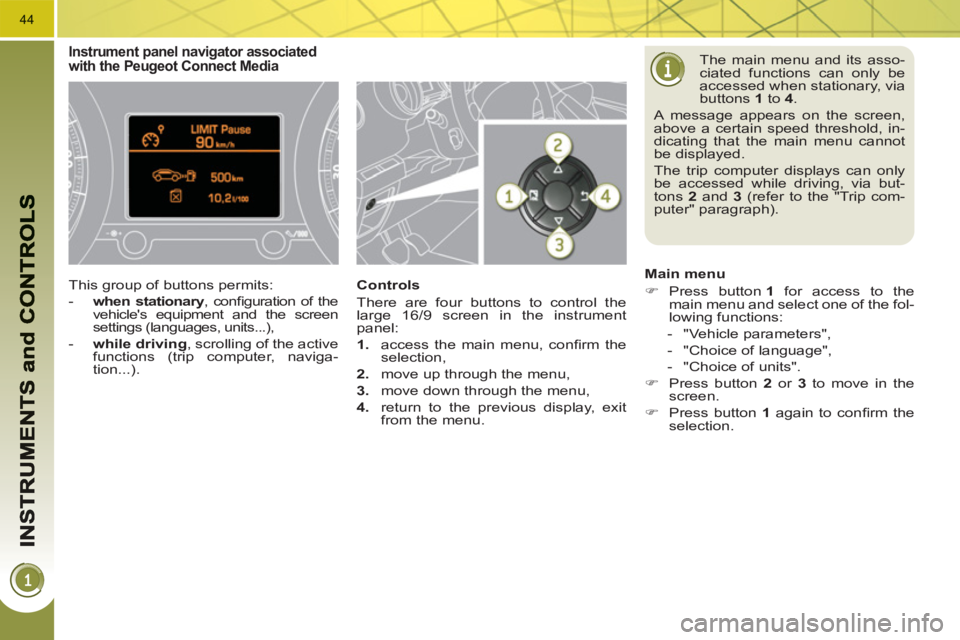
The main menu and its asso-
ciated functions can only be
accessed when stationary, via
buttons 1
to 4
.
A message appears on the screen,
above a certain speed threshold, in-
dicating that the main menu cannot
be displayed.
The trip computer displays can only
be accessed while driving, via but-
tons 2
and 3
(refer to the "Trip com-
puter" paragraph).
Main menu
)
Press button 1
for access to the
main menu and select one of the fol-
lowing functions:
- "Vehicle parameters",
- "Choice of language",
- "Choice of units".
)
Press button 2
or 3
to move in the
screen.
)
Press button 1
again to confi rm the
selection.
Instrument panel navigator associatedwith the Peugeot Connect Media
This group of buttons permits:
- when stationary
, confi guration of the
vehicle's equipment and the screen
settings (languages, units...),
- while driving
, scrolling of the active
functions (trip computer, naviga-
tion...).
Controls
There are four buttons to control the
large 16/9 screen in the instrument
panel:
1.
access the main menu, confi rm the
selection,
2.
move up through the menu,
3.
move down through the menu,
4.
return to the previous display, exit
from the menu.
Page 59 of 280
57
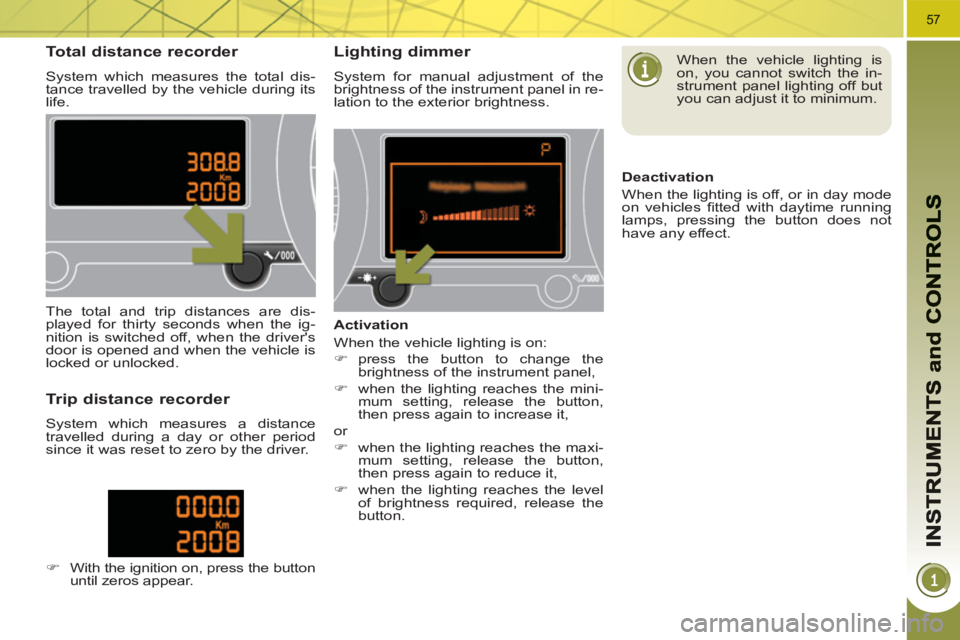
Total distance recorder
System which measures the total dis-
tance travelled by the vehicle during its
life.
Lighting dimmer
System for manual adjustment of the
brightness of the instrument panel in re-
lation to the exterior brightness.
The total and trip distances are dis-
played for thirty seconds when the ig-
nition is switched off, when the driver's
door is opened and when the vehicle is
locked or unlocked.
Trip distance recorder
System which measures a distance
travelled during a day or other period
since it was reset to zero by the driver.
)
With the ignition on, press the button
until zeros appear.
Activation
When the vehicle lighting is on:
)
press the button to change the
brightness of the instrument panel,
)
when the lighting reaches the mini-
mum setting, release the button,
then press again to increase it,
or
)
when the lighting reaches the maxi-
mum setting, release the button,
then press again to reduce it,
)
when the lighting reaches the level
of brightness required, release the
button.
When the vehicle lighting is
on, you cannot switch the in-
strument panel lighting off but
you can adjust it to minimum.
Deactivation
When the lighting is off, or in day mode
on vehicles fi tted with daytime running
lamps, pressing the button does not
have any effect.
Page 66 of 280
64
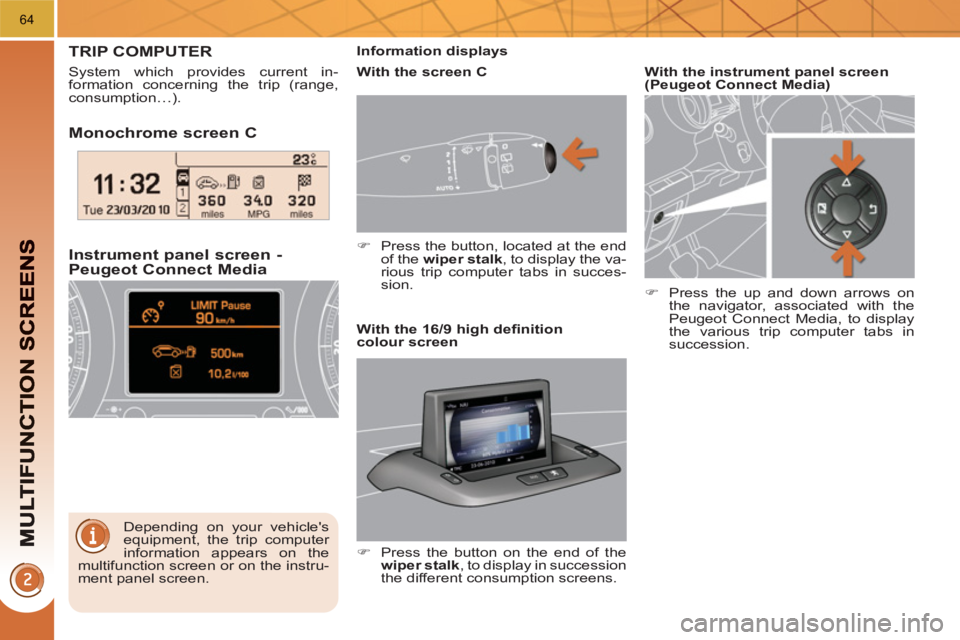
Monochrome screen C
Instrument
panel screen -Peugeot Connect Media
TRIP COMPUTER
System which provides current in-
formation concerning the trip (range,
consumption…).
Depending on your vehicle's
equipment, the trip computer
information appears on the
multifunction screen or on the instru-
ment panel screen.
Information displays
)
Press the button, located at the end
of the wiper stalk
, to display the va-
rious trip computer tabs in succes-
sion.
With the instrument panel screen
(Peugeot Connect Media)
)
Press the up and down arrows on
the navigator, associated with the
Peugeot Connect Media, to display
the various trip computer tabs in
succession.
With the screen C
With the 16/9 high defi nition
colour screen
)
Press the button on the end of the
wiper stalk
, to display in succession
the different consumption screens.
Page 67 of 280
65
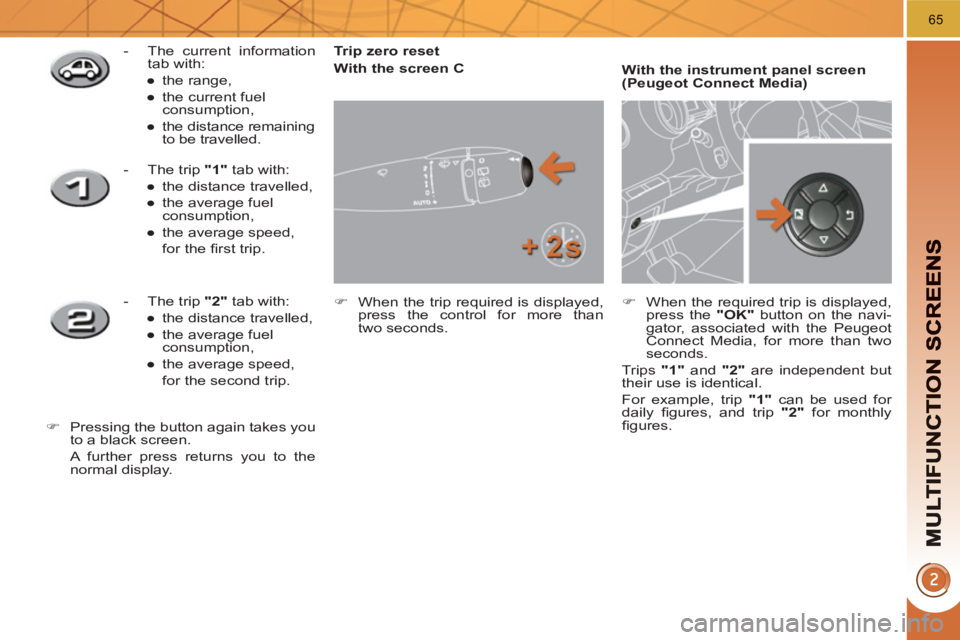
Trip zero reset
With the screen C
)
When the trip required is displayed,
press the control for more than
two seconds.
With the instrument panel screen
(Peugeot Connect Media)
)
When the required trip is displayed,
press the "OK"
button on the navi-
gator, associated with the Peugeot
Connect Media, for more than two
seconds.
Trips "1"
and "2"
are independent but
their use is identical.
For example, trip "1"
can be used for
daily fi gures, and trip "2"
for monthly
fi gures.
- The current information
tab with:
●
the range,
●
the current fuel
consumption,
●
the distance remaining
to be travelled.
- The trip "1"
tab with:
●
the distance travelled,
●
the average fuel
consumption,
●
the average speed,
for the fi rst trip.
- The trip "2"
tab with:
●
the distance travelled,
●
the average fuel
consumption,
●
the average speed,
for the second trip.
)
Pressing the button again takes you
to a black screen.
A further press returns you to the
normal display.
Page 96 of 280
94
The key cannot be removed
from the lock until the cap is
put back on the tank.
Opening the cap may trigger an in-
rush of air. This vacuum, which is
completely normal, is caused by the
sealing of the fuel system.
FUEL TANK
Capacity of the tank: approximately
56.5 litres.
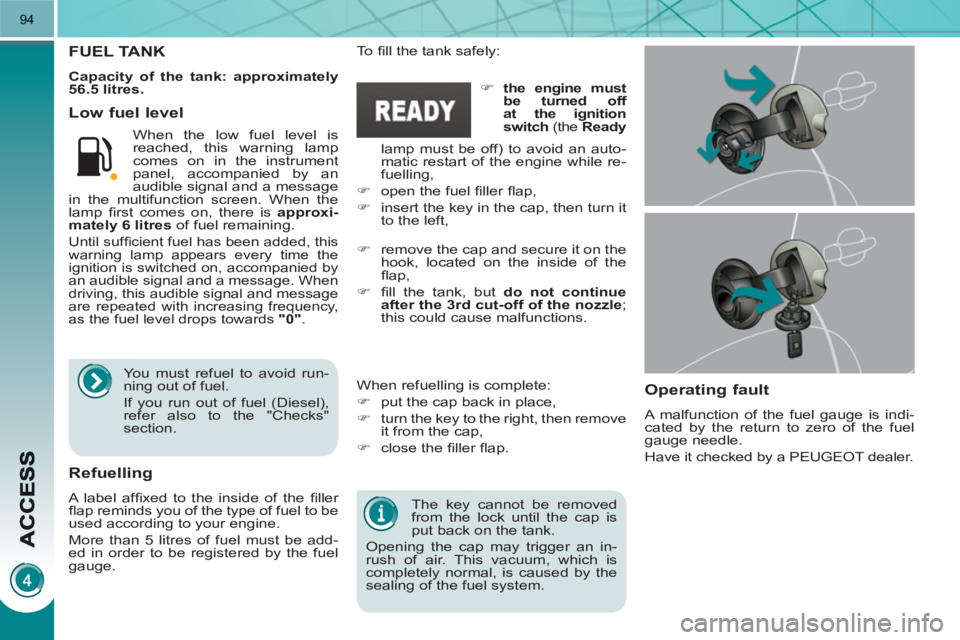
To fi ll the tank safely:
When refuelling is complete:
)
put the cap back in place,
)
turn the key to the right, then remove
it from the cap,
)
close the fi ller fl ap.
)
remove the cap and secure it on the
hook, located on the inside of the
fl ap,
)
fi ll the tank, but do not continue
after the 3rd cut-off of the nozzle
;
this could cause malfunctions.
Low fuel level
Operatin
g fault
A malfunction of the fuel gauge is indi-
cated by the return to zero of the fuel
gauge needle.
Have it checked by a PEUGEOT dealer.
Refuelling
A label affi xed to the inside of the fi ller
fl ap reminds you of the type of fuel to be
used according to your engine.
More than 5 litres of fuel must be add-
ed in order to be registered by the fuel
gauge. When the low fuel level is
reached, this warning lamp
comes on in the instrument
panel, accompanied by an
audible signal and a message
in the multifunction screen. When the
lamp fi rst comes on, there is approxi-
mately
6 litres
of fuel remaining.
Until suffi cient fuel has been added, this
warning lamp appears every time the
ignition is switched on, accompanied by
an audible signal and a message. When
driving, this audible signal and message
are repeated with increasing frequency,
as the fuel level drops towards "0"
.
You must refuel to avoid run-
ning out of fuel.
If you run out of fuel (Diesel),
refer also to the "Checks"
section.
)
the engine must
be turned off
at the ignition
switch
(the Ready
lamp must be off) to avoid an auto-
matic restart of the engine while re-
fuelling,
)
open the fuel fi ller fl ap,
)
insert the key in the cap, then turn it
to the left,
Page 98 of 280
96
LIGHTING CONTROLS
System for selection and control of the
various front and rear lamps providing
the vehicle's lighting.
Main lighting
The various front and rear lamps of
the vehicle are designed to adapt the
lighting progressively in relation to the
climatic conditions and so improve the
driver's visibility:
- sidelamps, to be seen,
- dipped beam headlamps to see
without dazzling other drivers,
- main beam headlamps to see clearly
when the road is clear,
- directional headlamps for improved
visibility when cornering.
Additional lighting
Other lamps are installed to fulfi l
the requirements of particular driving
conditions:
- a rear foglamp to be seen from a
distance,
-
front foglamps for even better visibility,
- daytime running lamps to be seen
during the day.
Programming
Various automatic lighting control modes
are also available according to the fol-
lowing options:
- guide-me-home lighting,
- automatic lighting,
- directional headlamps.
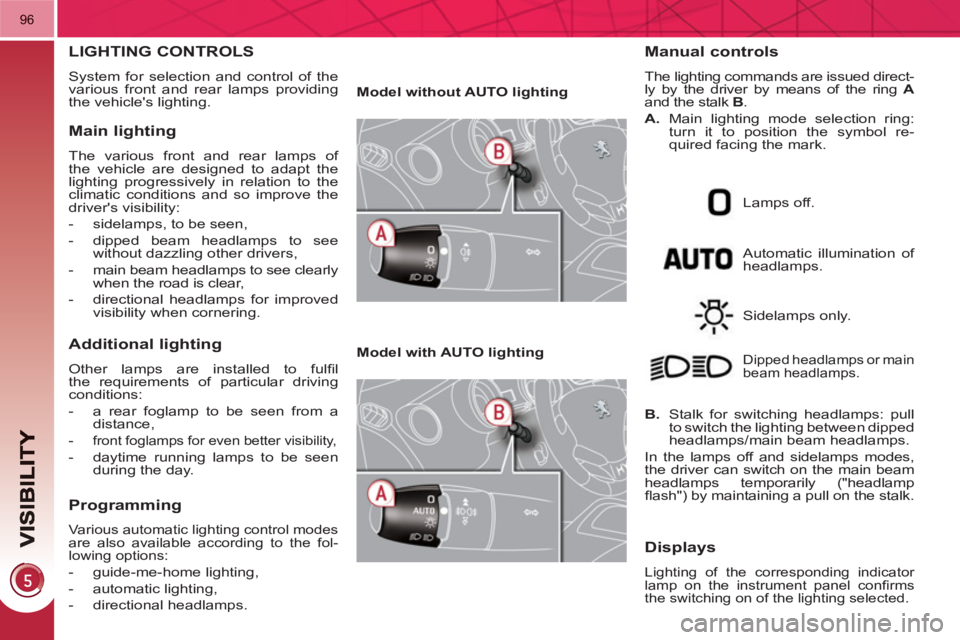
Model without AUTO lighting
Model with AUTO lighting
Automatic illumination of
headlamps.
Manual controls
The lighting commands are issued direct-
ly by the driver by means of the ring A
and the stalk B
.
A.
Main lighting mode selection ring:
turn it to position the symbol re-
quired facing the mark.
Lamps off.
Sidelamps only.
B.
Stalk for switching headlamps: pull
to switch the lighting between dipped
headlamps/main beam headlamps.
In the lamps off and sidelamps modes,
the driver can switch on the main beam
headlamps temporarily ("headlamp
fl ash") by maintaining a pull on the stalk.
Dipped headlamps or main
beam headlamps.
Displays
Lighting of the corresponding indicator
lamp on the instrument panel confi rms
the switching on of the lighting selected.
Page 100 of 280
98
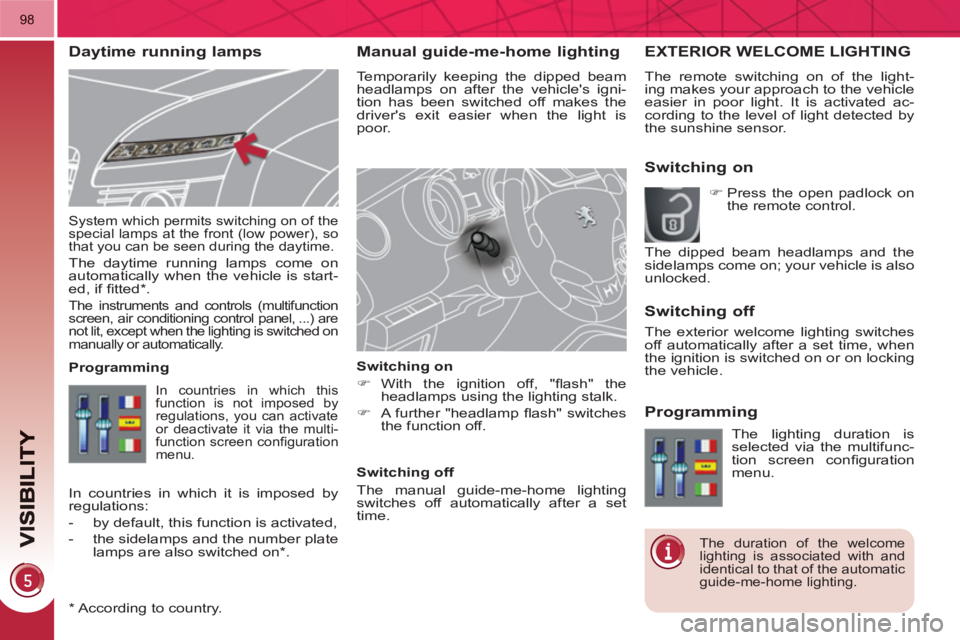
Manual guide-me-home lighting
Temporarily keeping the dipped beam
headlamps on after the vehicle's igni-
tion has been switched off makes the
driver's exit easier when the light is
poor.
Switching on
)
With the ignition off, "fl ash" the
headlamps using the lighting stalk.
)
A further "headlamp fl ash" switches
the function off.
Switching off
The manual guide-me-home lighting
switches off automatically after a set
time.
System which permits switching on of the
special lamps at the front (low power), so
that you can be seen during the daytime.
The daytime running lamps come on
automatically when the vehicle is start-
ed, if fi tted * .
The instruments and controls (multifunction
screen, air conditioning control panel, ...) are
not lit, except when the lighting is switched on
manually or automatically.
*
According to country.
EXTERIOR WELCOME LIGHTING
The remote switching on of the light-
ing makes your approach to the vehicle
easier in poor light. It is activated ac-
cording to the level of light detected by
the sunshine sensor.
Switching on
Switchin
g off
Programming
In countries in which this
function is not imposed by
regulations, you can activate
or deactivate it via the multi-
function screen confi guration
menu.
Programming
The lighting duration is
selected via the multifunc-
tion screen confi guration
menu.
The duration of the welcome
lighting is associated with and
identical to that of the automatic
guide-me-home lighting.
In countries in which it is imposed by
regulations:
- by default, this function is activated,
- the sidelamps and the number plate
lamps are also switched on * .
)
Press the open padlock on
the remote control.
The dipped beam headlamps and the
sidelamps come on; your vehicle is also
unlocked.
The exterior welcome lighting switches
off automatically after a set time, when
the ignition is switched on or on locking
the vehicle.
Daytime running lamps
Page 103 of 280
101
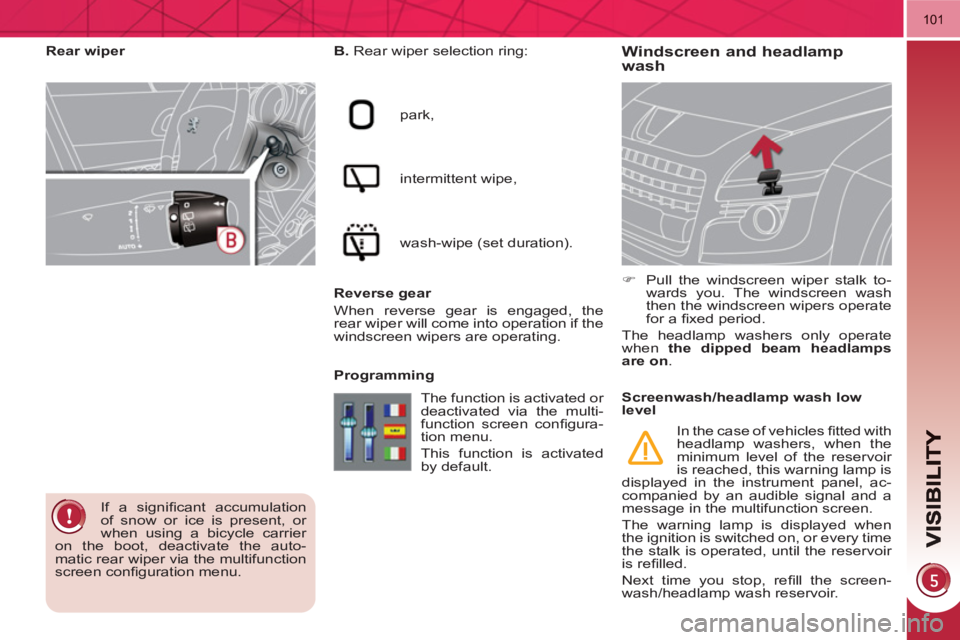
Windscreen and headlamp
wash
B.
Rear wiper selection ring:
park,
intermittent wipe,
wash-wipe (set duration).
Reverse gear
When reverse gear is engaged, the
rear wiper will come into operation if the
windscreen wipers are operating.
Programming
)
Pull the windscreen wiper stalk to-
wards you. The windscreen wash
then the windscreen wipers operate
for a fi xed period.
The headlamp washers only operate
when the dipped beam headlamps
are on
.
Rear wiper
If a signifi cant accumulation
of snow or ice is present, or
when using a bicycle carrier
on the boot, deactivate the auto-
matic rear wiper via the multifunction
screen confi guration menu. The function is activated or
deactivated via the multi-
function screen confi gura-
tion menu.
This function is activated
by default.
Screenwash/headlamp wash low
level
In the case of vehicles fi tted with
headlamp washers, when the
minimum level of the reservoir
is reached, this warning lamp is
displayed in the instrument panel, ac-
companied by an audible signal and a
message in the multifunction screen.
The warning lamp is displayed when
the ignition is switched on, or every time
the stalk is operated, until the reservoir
is refi lled.
Next time you stop, refi ll the screen-
wash/headlamp wash reservoir.
Page 135 of 280
133
If at least one of the two airbag
warning lamps come on con-
tinuously, do not install a child
seat on the front passenger seat.
Have the system checked by a
PEUGEOT dealer.
Operating fault
If this warning lamp comes on in
the instrument panel, accompa-
nied by an audible warning and
a message in the multifunction
screen, contact a PEUGEOT
dealer to have the system checked. The
airbags may no longer be deployed in the
event of a serious impact.
Reactivation
When you remove the child seat, turn
the switch to the "ON"
position to re-
activate the airbag and so assure the
safety of your front passenger in the
event of an impact.
With the ignition on, this warn-
ing lamp comes on in the seat
belt and passenger's front air-
bag warning lamps display for
approximately one minute, if
the passenger's front airbag is
activated. To assure the safety of your
child, the passenger's front
airbag must be deactivated
when you install a "rear facing" child
seat on the front passenger seat.
Otherwise, the child would risk being
seriously injured or killed if the airbag
were deployed.
According to version, this
warning lamp comes on either
in the instrument panel or in
the seat belt and passenger's
front airbag warning lamps
display when the ignition is on and until
the airbag is reactivated. If this warning lamp fl ashes,
contact a PEUGEOT dealer.
The passenger's front airbag
may no longer be deployed in
the event of a serious impact.
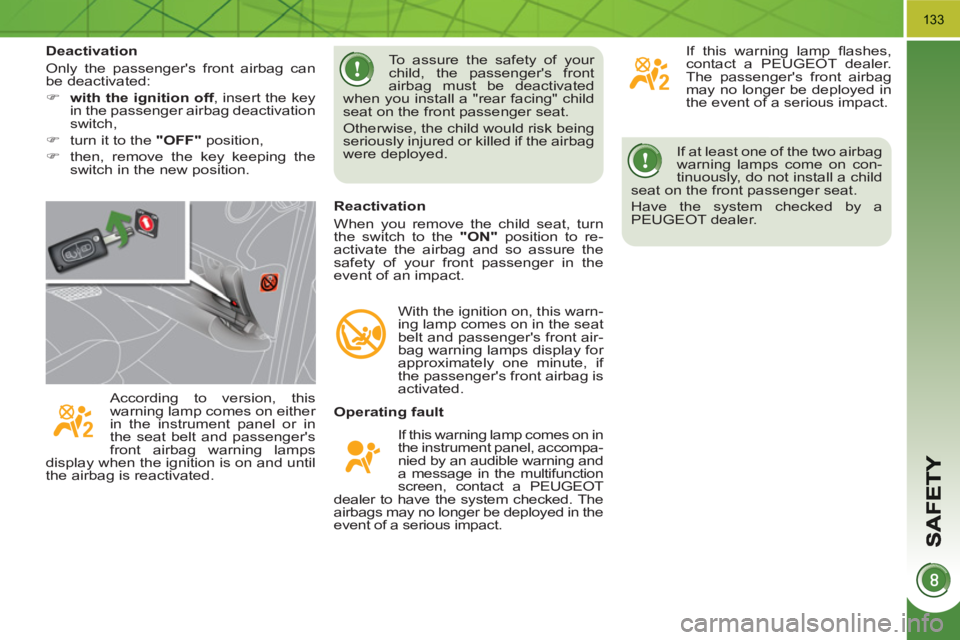
Deactivation
Only the passenger's front airbag can
be deactivated:
)
with the ignition off
, insert the key
in the passenger airbag deactivation
switch,
)
turn it to the "OFF"
position,
)
then, remove the key keeping the
switch in the new position.
Page 136 of 280
134
Lateral airbags
System which protects the driver and
front passenger in the event of a seri-
ous side impact in order to limit the risk
of injury to the chest.
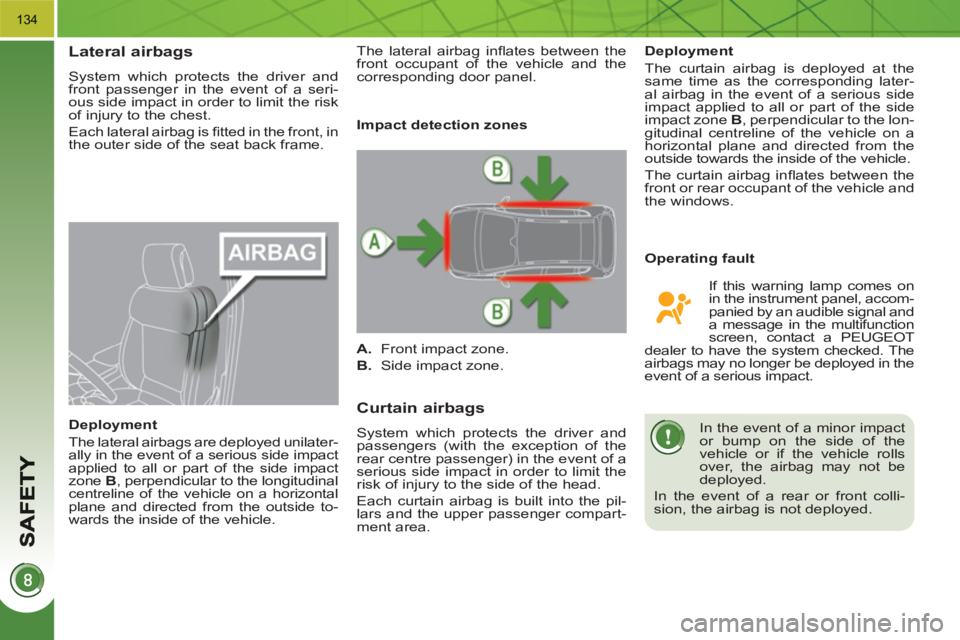
Each lateral airbag is fi tted in the front, in
the outer side of the seat back frame.
Deployment
The lateral airbags are deployed unilater-
ally in the event of a serious side impact
applied to all or part of the side impact
zone B
, perpendicular to the longitudinal
centreline of the vehicle on a horizontal
plane and directed from the outside to-
wards the inside of the vehicle.
Curtain airbags
System which protects the driver and
passengers (with the exception of the
rear centre passenger) in the event of a
serious side impact in order to limit the
risk of injury to the side of the head.
Each curtain airbag is built into the pil-
lars and the upper passenger compart-
ment area.
Operating fault
Deployment
The curtain airbag is deployed at the
same time as the corresponding later-
al airbag in the event of a serious side
impact applied to all or part of the side
impact zone B
, perpendicular to the lon-
gitudinal centreline of the vehicle on a
horizontal plane and directed from the
outside towards the inside of the vehicle.
The curtain airbag infl ates between the
front or rear occupant of the vehicle and
the windows.
In the event of a minor impact
or bump on the side of the
vehicle or if the vehicle rolls
over, the airbag may not be
deployed.
In the event of a rear or front colli-
sion, the airbag is not deployed.
Impact detection zones
A.
Front impact zone.
B.
Side impact zone.
If this warning lamp comes on
in the instrument panel, accom-
panied by an audible signal and
a message in the multifunction
screen, contact a PEUGEOT
dealer to have the system checked. The
airbags may no longer be deployed in the
event of a serious impact. The lateral airbag infl ates between the
front occupant of the vehicle and the
corresponding door panel.