warning Peugeot 301 2015 Owner's Manual
[x] Cancel search | Manufacturer: PEUGEOT, Model Year: 2015, Model line: 301, Model: Peugeot 301 2015Pages: 285, PDF Size: 13.55 MB
Page 3 of 285
KeyWarning:
this symbol marks warnings which it is essential to observe for your
own safety, for the safety of others or to avoid any risk of damaging
your vehicle.
Information:
this symbol draws your attention to additional information for better
use of your vehicle.
Protection of the environment:
this symbol accompanies advice relating to protection of
the environment.
Page reference:
this symbol invites you to refer to the pages which provide details of
the function.
Your vehicle is fitted with only some of the equipment described
in this document, depending on its trim level, version and the
specification for the country in which it was sold.
We draw your attention to the following point:
The fitting of electrical equipment or accessories which are
not recommended by PEUGEOT may result in a failure of your
vehicle's electronic system. Contact a PEUGEOT dealer to be
shown the recommended equipment and accessories.
Thank you for choosing a 301.
This Handbook has been designed to help you make the most
of your 301 in all circumstances.
WELCOME
Page 4 of 285
.
.
Instrument panel 10
Indicator and warning lamps
1
1
Service indicator
2
0
Distance recorders
2
2
Setting the date and time
2
3
Trip computer
2
4
Monochrome screen C (Audio system / Bluetooth)
2
6
MonitoringOver view
Remote control key 3
0
Alarm
3
4
Doors
36
Boot
37
Windows
39
Access
Front seats 4 0
Rear seats
4
2
Mirrors
4
3
Steering wheel adjustment
4
5
Ventilation
4
6
Heating
48
Manual air conditioning (without display screen)
4
8
Electronic air conditioning (with display screen)
5
0
Front demist - defrost
5
3
Rear screen demist - defrost
5
4
Comfort
Driving recommendations 60
Starting-switching off the engine
6
1
Parking brake
6
4
Manual gearbox
6
5
Electronic gearbox
6
6
Automatic gearbox
7
0
Gear shift indicator
7
4
Speed limiter
7
5
Cruise control
7
7
Rear parking sensors
7
9
Driving
Lighting control 81
Headlamp adjustment
8
6
Wiper control stalk
87
C
ourtesy lamps
8
9
Visibility
Eco-driving
Interior fittings 5
5
Boot fittings
5
8
Fittings
Contents
Page 5 of 285
.
.
Direction indicators 90
Hazard warning lamps
9
0
Horn
90
Under-inflation detection
9
1
Braking assistance systems
9
4
Trajectory control systems
9
5
Front seat belts
9
6
Airbags
9
9
Safety
Child seats 103
Deactivating the passenger's front airbag
1
06
ISOFIX mountings
1
12
Child lock
1
17
Child safety
Fuel tank 118
Misfuel prevention (Diesel)
1
19
Running out of fuel (Diesel)
1
21
Temporary puncture repair kit
1
22
Changing a wheel
1
28
Snow chains
1
35
Changing a bulb
1
36
Changing a fuse
1
42
Battery
1
47
Electrical energy economy mode
1
50
Changing a wiper blade
1
51
Towing the vehicle
1
52
Towing a trailer
1
54
Very cold climate screen(s)
1
56
Advice on care and maintenance
1
57
Accessories
157
Mats
159
Roof bars
1
60
Practical information
Petrol engines 1 71
Petrol weights
1
72
Diesel engine
1
73
Diesel weights
1
74
Dimensions
175
Identification markings
1
76
Technical data
Audio system / Bluetooth 177
Audio system
2
09
Audio equipment and telematics
Visual search
Alphabetical index
Checks
Bonnet
162
Petrol engines
1
63
Diesel engine
1
64
Checking levels
1
65
Checks
16
9
Contents
Page 6 of 285
4
91122 79
301_en_Chap00b_vue-ensemble_ed01-2014
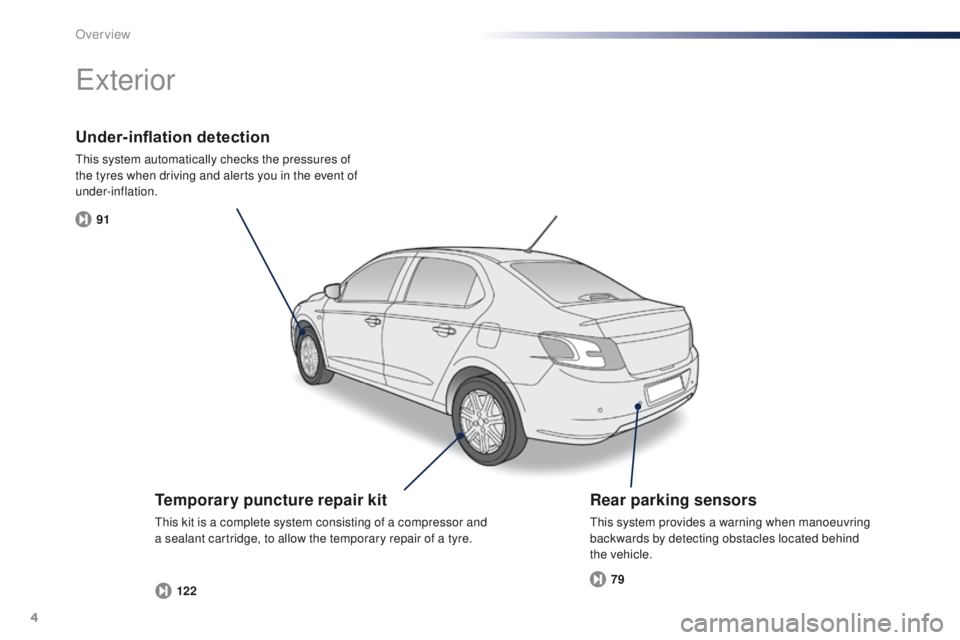
Under-inflation detection
This system automatically checks the pressures of
the tyres when driving and alerts you in the event of
under-inflation.
Exterior
Temporary puncture repair kit
This kit is a complete system consisting of a compressor and
a sealant cartridge, to allow the temporary repair of a tyre.
Rear parking sensors
This system provides a warning when manoeuvring
backwards by detecting obstacles located behind
the
vehicle.
Over view
Page 8 of 285
6
301_en_Chap00b_vue-ensemble_ed01-2014
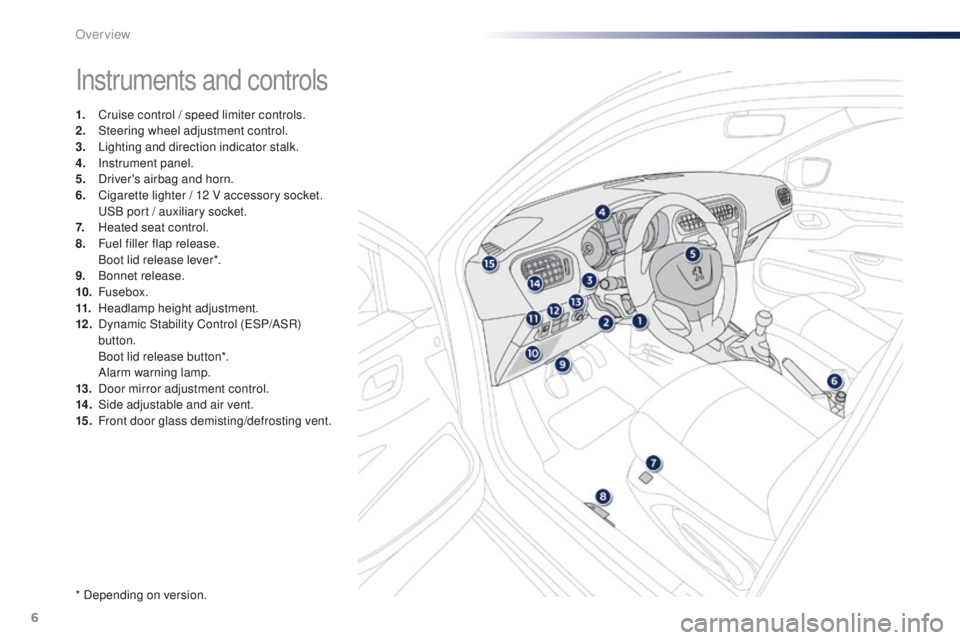
Instruments and controls
1. Cruise control / speed limiter controls.
2. Steering wheel adjustment control.
3.
L
ighting and direction indicator stalk.
4.
I
nstrument panel.
5.
D
river's airbag and horn.
6.
C
igarette lighter / 12 V accessory socket.
U
SB port / auxiliary socket.
7.
H
eated seat control.
8.
F
uel filler flap release.
B
oot lid release lever*.
9.
B
onnet release.
10.
Fusebox.
11.
H
eadlamp height adjustment.
12 .
D
ynamic Stability Control (ESP/ASR)
button.
B
oot lid release button*.
A
larm warning lamp.
13.
D
oor mirror adjustment control.
14 .
S
ide adjustable and air vent.
15.
F
ront door glass demisting/defrosting vent.
* Depending on version.
Over view
Page 9 of 285
7
301_en_Chap00b_vue-ensemble_ed01-2014
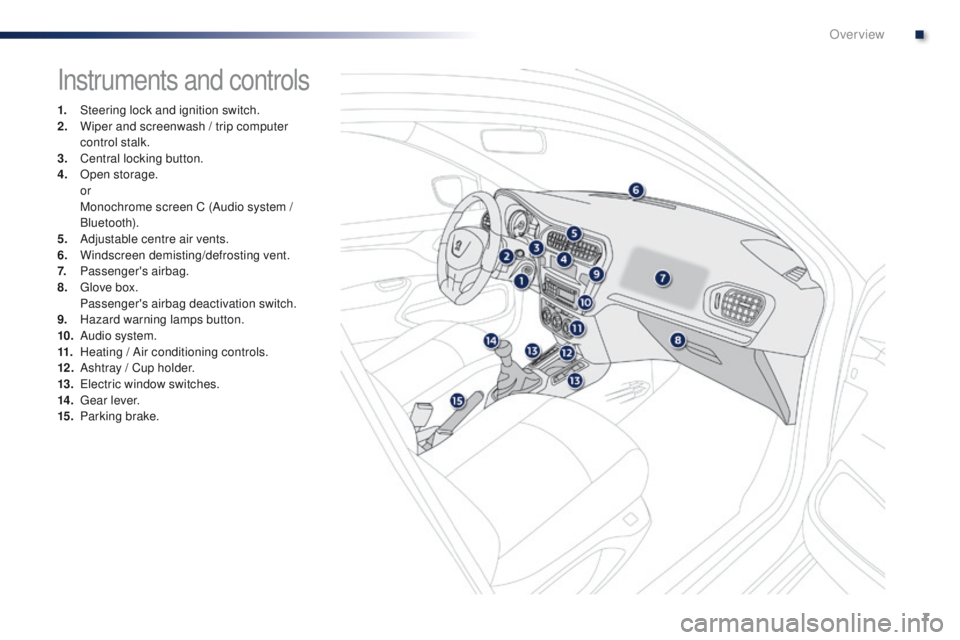
Instruments and controls
1. Steering lock and ignition switch.
2. Wiper and screenwash / trip computer
control stalk.
3.
C
entral locking button.
4.
O
pen storage.
or
M
onochrome screen C (Audio system /
Bluetooth).
5.
A
djustable centre air vents.
6.
W
indscreen demisting/defrosting vent.
7.
P
assenger's airbag.
8.
G
love box.
P
assenger's airbag deactivation switch.
9.
H
azard warning lamps button.
10.
A
udio system.
11.
H
eating / Air conditioning controls.
12 .
A
shtray / Cup holder.
13.
E
lectric window switches.
14 .
G
ear lever.
15.
P
arking brake.
.
Over view
Page 13 of 285
11
301_en_Chap01_controle-de-marche_ed01-2014
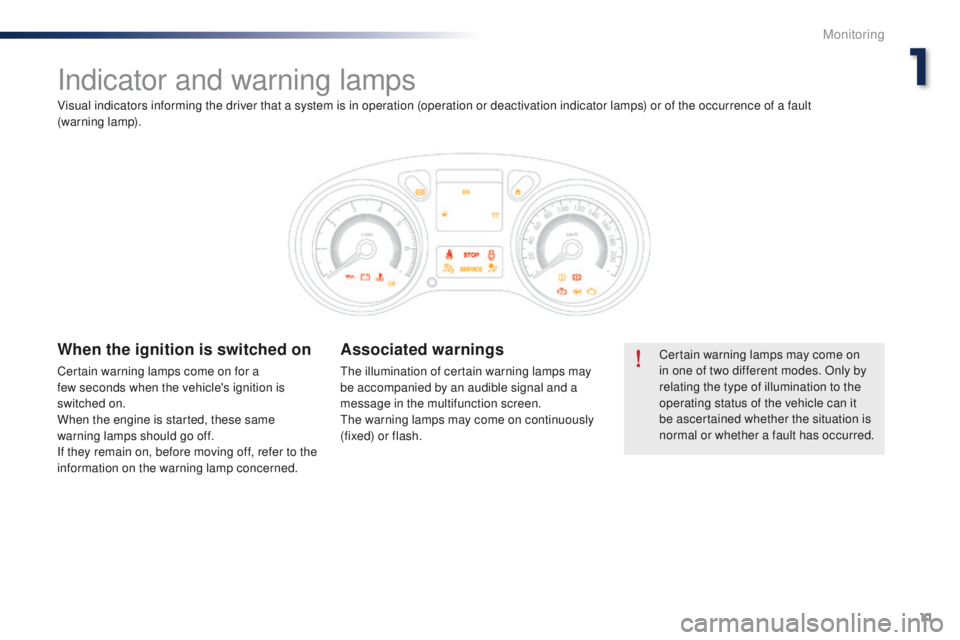
Indicator and warning lamps
Certain warning lamps may come on
in one of two different modes. Only by
relating the type of illumination to the
operating status of the vehicle can it
be ascertained whether the situation is
normal or whether a fault has occurred.When the ignition is switched on
Certain warning lamps come on for a
few seconds when the vehicle's ignition is
switched on.
When the engine is started, these same
warning lamps should go off.
If they remain on, before moving off, refer to the
information on the warning lamp concerned.
Associated warnings
The illumination of certain warning lamps may
be accompanied by an audible signal and a
message in the multifunction screen.
The warning lamps may come on continuously
(fixed) or flash.
Visual indicators informing the driver that a system is in operation (operation or deactivation indicator lamps) or of the occurrence of a fault
(warning
lamp).
1
Monitoring
Page 14 of 285
12
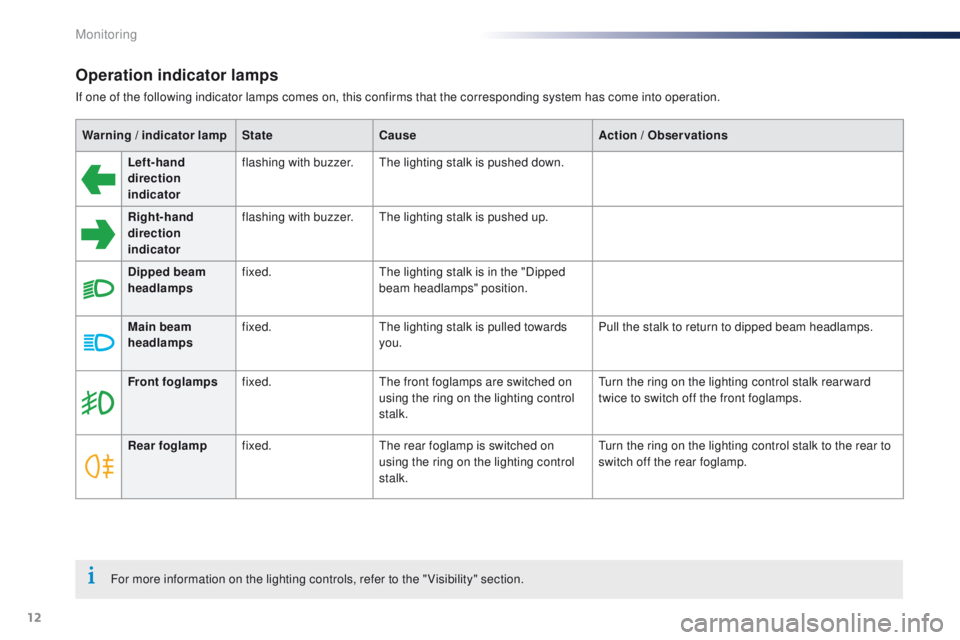
Operation indicator lamps
If one of the following indicator lamps comes on, this confirms that the corresponding system has come into operation.Warning
/ indicator lamp State Cause Action
/ Observations
Left-hand
direction
indicato r flashing with buzzer.
The lighting stalk is pushed down.
Right-hand
direction
indicator flashing with buzzer.
The lighting stalk is pushed up.
Dipped beam
headlamps fixed.
The lighting stalk is in the "Dipped
beam headlamps" position.
Main beam
headlamps fixed.
The lighting stalk is pulled towards
you. Pull the stalk to return to dipped beam headlamps.
Front foglamps fixed. The front foglamps are switched on
using the ring on the lighting control
stalk. Turn the ring on the lighting control stalk rear ward
twice to switch off the front foglamps.
Rear foglamp fixed. The rear foglamp is switched on
using the ring on the lighting control
stalk. Turn the ring on the lighting control stalk to the rear to
switch off the rear foglamp.
For more information on the lighting controls, refer to the " Visibility" section.
Monitoring
Page 15 of 285
13
301_en_Chap01_controle-de-marche_ed01-2014
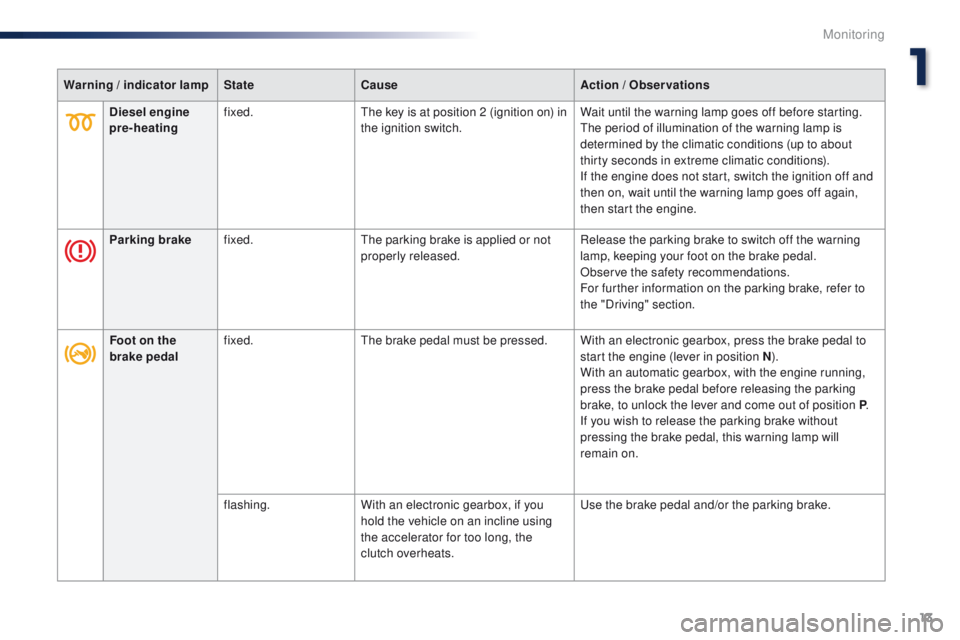
Warning / indicator lamp State Cause Action / Observations
Diesel engine
pre-heating fixed.
The key is at position 2 (ignition on) in
the ignition switch. Wait until the warning lamp goes off before starting.
The period of illumination of the warning lamp is
determined by the climatic conditions (up to about
thirty seconds in extreme climatic conditions).
If the engine does not start, switch the ignition off and
then on, wait until the warning lamp goes off again,
then start the engine.
Parking brake fixed. The parking brake is applied or not
properly released. Release the parking brake to switch off the warning
lamp, keeping your foot on the brake pedal.
Observe the safety recommendations.
For further information on the parking brake, refer to
the "Driving" section.
Foot on the
brake pedal fixed.
The brake pedal must be pressed. With an electronic gearbox, press the brake pedal to
start the engine (lever in position N).
With an automatic gearbox, with the engine running,
press the brake pedal before releasing the parking
brake, to unlock the lever and come out of position P .
If you wish to release the parking brake without
pressing the brake pedal, this warning lamp will
remain on.
flashing. With an electronic gearbox, if you
hold the vehicle on an incline using
the accelerator for too long, the
clutch overheats. Use the brake pedal and/or the parking brake.
1
Monitoring
Page 16 of 285
14
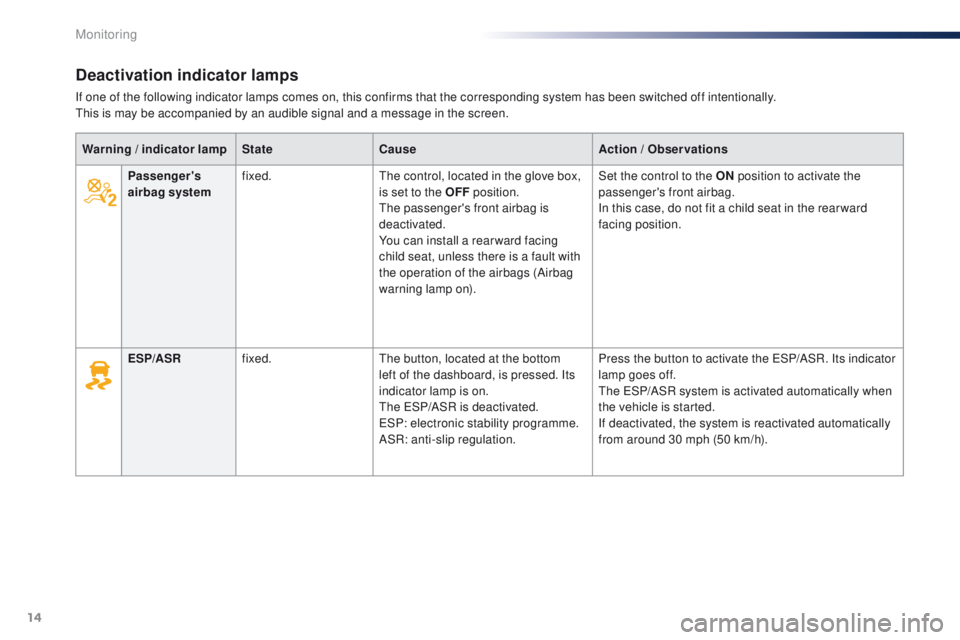
Deactivation indicator lamps
If one of the following indicator lamps comes on, this confirms that the corresponding system has been switched off intentionally.
This is may be accompanied by an audible signal and a message in the screen.Warning
/ indicator lamp State Cause Action
/ Observations
Passenger's
airbag system fixed.
The control, located in the glove box,
is set to the OFF position.
The passenger's front airbag is
deactivated.
You can install a rear ward facing
child seat, unless there is a fault with
the operation of the airbags (Airbag
warning lamp on). Set the control to the ON
position to activate the
passenger's front airbag.
In this case, do not fit a child seat in the rear ward
facing position.
ESP/ASR fixed. The button, located at the bottom
left of the dashboard, is pressed. Its
indicator lamp is on.
The ESP/ASR is deactivated.
ESP: electronic stability programme.
ASR: anti-slip regulation. Press the button to activate the ESP/ASR. Its indicator
lamp goes off.
The ESP/ASR system is activated automatically when
the vehicle is started.
If deactivated, the system is reactivated automatically
from around 30 mph (50 km/h).
Monitoring