phone Peugeot 301 2017 User Guide
[x] Cancel search | Manufacturer: PEUGEOT, Model Year: 2017, Model line: 301, Model: Peugeot 301 2017Pages: 306, PDF Size: 9.87 MB
Page 200 of 306
198
The calls list includes calls sent and
received in the vehicle using the
connected telephone.
It is possible to make a call directly from
the telephone; park the vehicle first as a
safety measure.
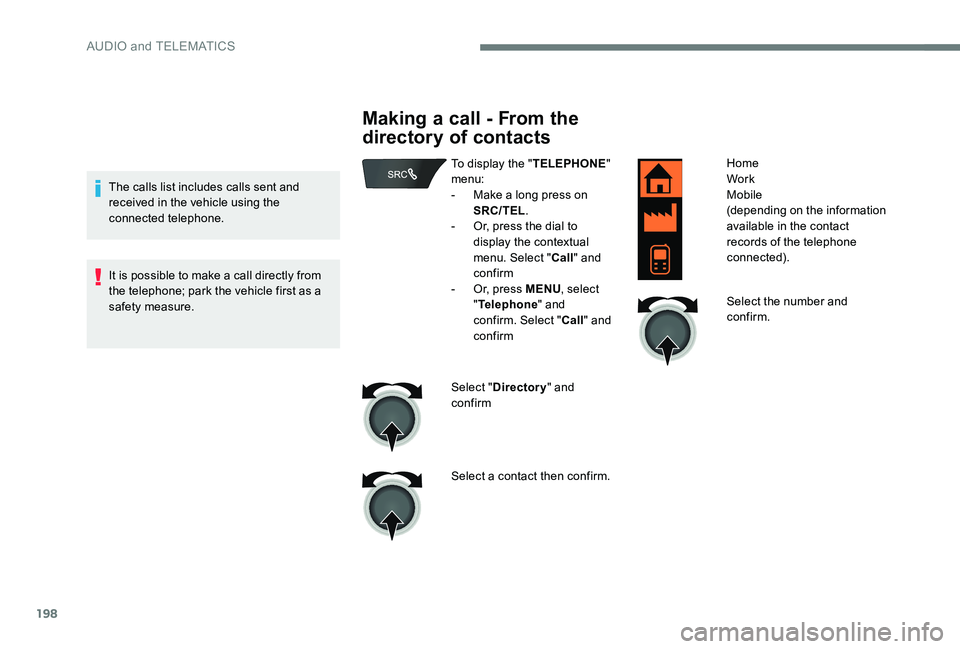
Making a call - From the
directory of contacts
To display the "TELEPHONE"
menu:
-
M
ake a long press on
SRC/TEL .
-
O
r, press the dial to
display the contextual
menu. Select " Call" and
confirm
-
O
r, press MENU , select
" Telephone " and
confirm. Select " Call" and
confirm
Select " Directory " and
confirm
Select a contact then confirm. Home
Work
Mobile
(depending on the information
available in the contact
records of the telephone
connected).
Select the number and
confirm.
AUDIO and TELEMATICS
Page 202 of 306
200
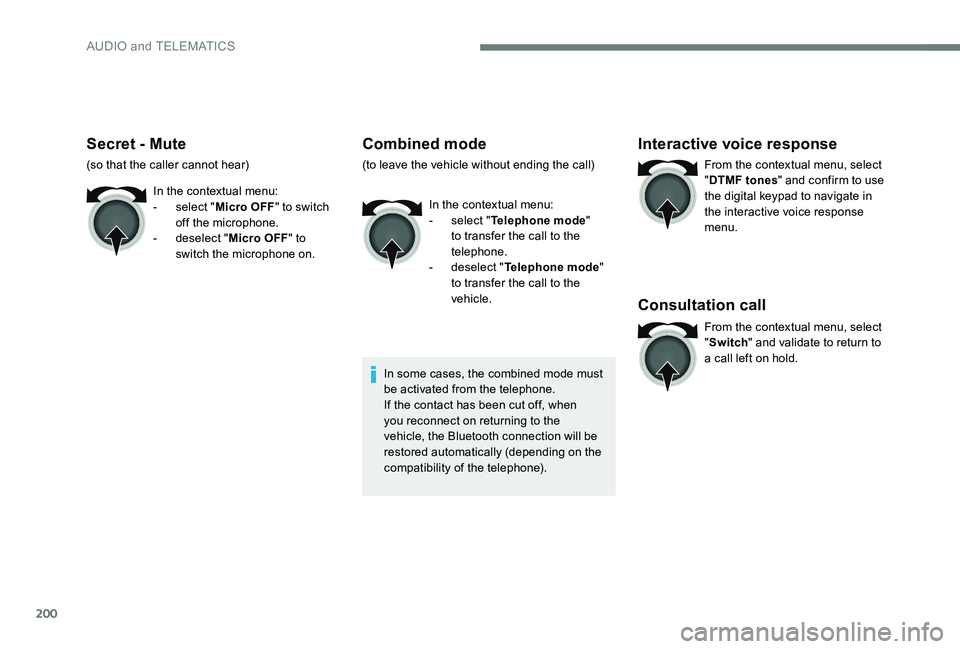
Secret - Mute
(so that the caller cannot hear)In the contextual menu:
-
s
elect "Micro OFF " to switch
off the microphone.
-
d
eselect "Micro OFF " to
switch the microphone on.
Combined mode
(to leave the vehicle without ending the call)
In the contextual menu:
-
s
elect "Telephone mode "
to transfer the call to the
telephone.
-
d
eselect "Telephone mode "
to transfer the call to the
vehicle.
In some cases, the combined mode must
be activated from the telephone.
If the contact has been cut off, when
you reconnect on returning to the
vehicle, the Bluetooth connection will be
restored automatically (depending on the
compatibility of the telephone).
Interactive voice response
From the contextual menu, select
" DTMF tones " and confirm to use
the digital keypad to navigate in
the interactive voice response
menu.
Consultation call
From the contextual menu, select
" Switch " and validate to return to
a call left on hold.
AUDIO and TELEMATICS
Page 203 of 306
201
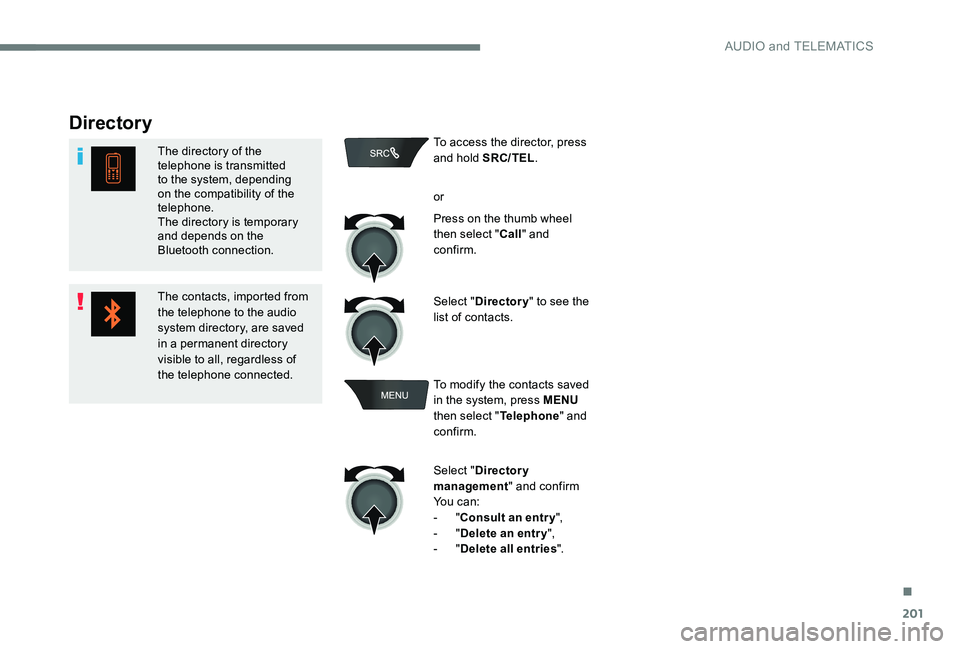
Directory
The directory of the
telephone is transmitted
to the system, depending
on the compatibility of the
telephone.
The directory is temporary
and depends on the
Bluetooth connection.
The contacts, imported from
the telephone to the audio
system directory, are saved
in a permanent directory
visible to all, regardless of
the telephone connected.To access the director, press
and hold SRC/TEL
.
or
Press on the thumb wheel
then select " Call" and
confirm.
Select " Directory " to see the
list of contacts.
To modify the contacts saved
in the system, press MENU
then select " Telephone" and
confirm.
Select " Directory
management " and confirm
Yo u c a n :
-
"Consult an entr y ",
-
"Delete an entry ",
-
"Delete all entries ".
.
AUDIO and TELEMATICS
Page 207 of 306
205
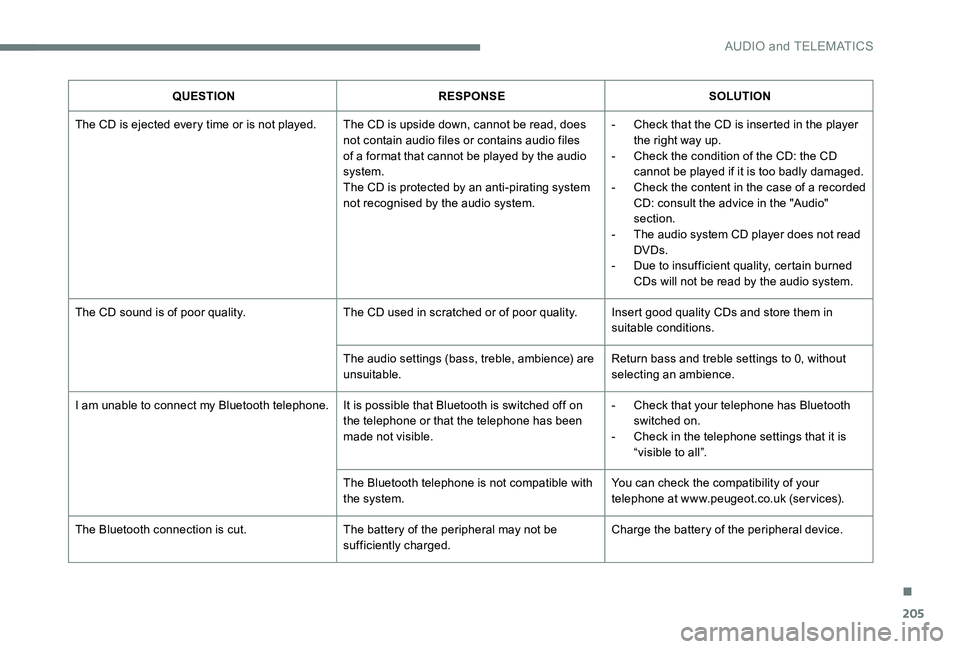
QUESTIONRESPONSE SOLUTION
The CD is ejected every time or is not played. The CD is upside down, cannot be read, does not contain audio files or contains audio files
of a format that cannot be played by the audio
system.
The CD is protected by an anti-pirating system
not recognised by the audio system.-
C
heck that the CD is inserted in the player
the right way up.
-
C
heck the condition of the CD: the CD
cannot be played if it is too badly damaged.
-
C
heck the content in the case of a recorded
CD: consult the advice in the "Audio"
section.
-
T
he audio system CD player does not read
DVDs.
-
D
ue to insufficient quality, certain burned
CDs will not be read by the audio system.
The CD sound is of poor quality. The CD used in scratched or of poor quality. Insert good quality CDs and store them in
suitable conditions.
The audio settings (bass, treble, ambience) are
unsuitable. Return bass and treble settings to 0, without
selecting an ambience.
I am unable to connect my Bluetooth telephone. It is possible that Bluetooth is switched off on the telephone or that the telephone has been
made not visible.-
C
heck that your telephone has Bluetooth
switched on.
-
C
heck in the telephone settings that it is
“visible to all”.
The Bluetooth telephone is not compatible with
the system. You can check the compatibility of your
telephone at www.peugeot.co.uk (services).
The Bluetooth connection is cut. The battery of the peripheral may not be
sufficiently charged.Charge the battery of the peripheral device.
.
AUDIO and TELEMATICS
Page 208 of 306
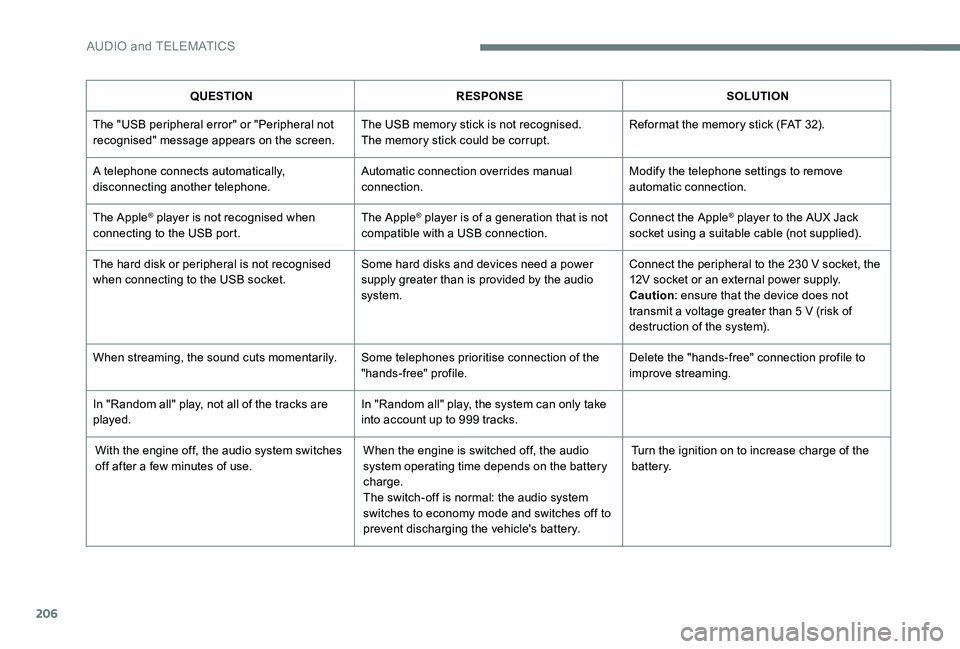
206
QUESTIONRESPONSE SOLUTION
The "USB peripheral error" or "Peripheral not
recognised" message appears on the screen. The USB memory stick is not recognised.
The memory stick could be corrupt.Reformat the memory stick (FAT 32).
A telephone connects automatically,
disconnecting another telephone. Automatic connection overrides manual
connection.Modify the telephone settings to remove
automatic connection.
The Apple
® player is not recognised when
connecting to the USB port. The Apple® player is of a generation that is not
compatible with a USB connection. Connect the Apple® player to the AUX Jack
socket using a suitable cable (not supplied).
The hard disk or peripheral is not recognised
when connecting to the USB socket. Some hard disks and devices need a power
supply greater than is provided by the audio
system.Connect the peripheral to the 230 V socket, the
12V socket or an external power supply.
Caution
: ensure that the device does not
transmit a voltage greater than 5 V (risk of
destruction of the system).
When streaming, the sound cuts momentarily. Some telephones prioritise connection of the
"hands-free" profile.Delete the "hands-free" connection profile to
improve streaming.
In "Random all" play, not all of the tracks are
played. In "Random all" play, the system can only take
into account up to 999 tracks.
With the engine off, the audio system switches
off after a few minutes of use. When the engine is switched off, the audio
system operating time depends on the battery
charge.
The switch-off is normal: the audio system
switches to economy mode and switches off to
prevent discharging the vehicle's battery.Turn the ignition on to increase charge of the
battery.
AUDIO and TELEMATICS
Page 223 of 306
221
Tables of engines ................................... 18 0 -181
Tables of fuses ............................... 167-169, 171
Ta n k , f u e l
................................................ 12 9 -13 0
Technical data
........................................ 18
0 -181
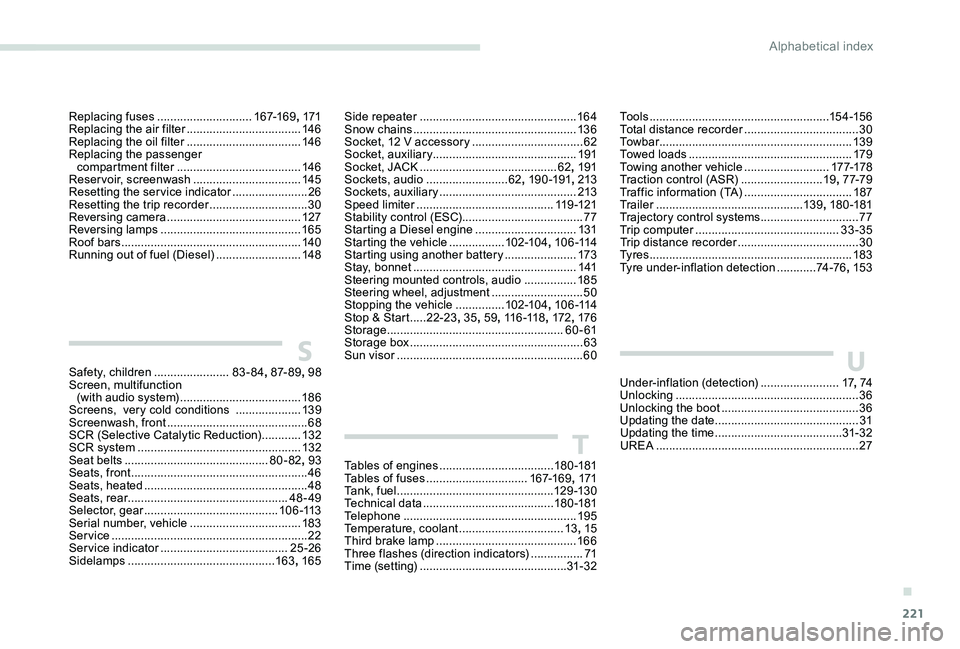
Telephone
..............................
.......................195
Temperature, coolant
................................13, 15
Third brake lamp
........................................... 166
Three flashes (direction indicators)
................ 71
T
ime (setting)
............................................. 31- 32
S
T
Safety, children .......................83-84, 87- 8 9 , 98
Screen, multifunction (with audio system)
..................................... 18
6
Screens, very cold conditions
....................13
9
Screenwash, front
........................................... 68
SCR (Selective Catalytic Reduction)
............132
SCR system
.................................................. 132
Seat belts
............................................ 80-82, 93
Seats, front
...............................
.......................46
Seats, heated
.................................................. 48
Seats, rear
................................................. 48-49
Selector, gear
......................................... 1 0 6 -113
Serial number, vehicle
..................................183
Service
............................................................ 22
Service indicator
....................................... 25 -26
Sidelamps
............................................. 16
3, 165
Replacing fuses
.............................
167-169, 171
Replacing the air filter
................................... 14
6
Replacing the oil filter
................................... 14
6
Replacing the passenger compartment filter
......................................
146
Reservoir, screenwash
.................................
145
Resetting the service indicator
.......................
26
Resetting the trip recorder
..............................
30
Reversing camera
...............................
..........
127
Reversing lamps
..............................
.............
165
Roof bars
.......................................................
140
Running out of fuel (Diesel) ..........................
148Side repeater
................................................
16 4
Snow chains
..................................................
13 6
Socket, 12 V accessory ..................................
62
Socket, auxiliary
............................................ 19
1
Socket, JACK
..........................................
62, 191
Sockets, audio
......................... 62
, 19 0 -191
, 213
Sockets, auxiliary
...............................
...........
213
Speed limiter
.......................................... 11
9 -12 1
Stability control (ESC)..................................... 77
Starting a Diesel engine
............................... 13
1
Starting the vehicle
................. 10
2-104
, 1 0 6 -114
Starting using another battery
......................
173
Stay, bonnet
..................................................
141
Steering mounted controls, audio
................ 18
5
Steering wheel, adjustment
............................ 50
S
topping the vehicle
...............
102-104, 1 0 6 -114
Stop & Start
.....
22-23 , 35, 59, 11 6 -118 , 172, 176
Storage
......................................................
60 - 61
Storage box
.....................................................
63
Sun visor
...............................
..........................
60To o l s
.......................................................
15 4 -15 6
Total distance recorder
...................................
30
To w b a r
...............................
............................
13 9
Towed loads
..................................................
179
Towing another vehicle
..........................
17 7-178
Traction control (ASR)
.........................
19, 7 7-79
Traffic information (TA)
.................................
187
Tr a i l e r
...............
..............................
13 9, 18 0 -181
Trajectory control systems
..............................
77
T
rip computer
............................................
33-35
Trip distance recorder
..................................... 3
0
Ty r e s
..............................................................
183
Tyre under-inflation detection
............
74 -76, 153
Under-inflation (detection) ........................17, 74
Unlocking
........................................................36
Unlocking the boot
...............................
...........36
Updating the date
............................................ 31
U
pdating the time
...............................
........31- 32
UREA
..............................................................27U
.
Alphabetical index
Page 233 of 306
1
PEUGEOT Connect Nav
GPS satellite navigation -
Applications - Multimedia
audio system - Bluetooth
®
telephone
Contents
First steps
2
S
teering mounted controls
3
M
enus
4
V
oice commands
5
N
avigation
1
1
Connected navigation
1
5
Applications
1
8
Radio
2
3
DAB radio (Digital Audio Broadcasting)
2
5
Media
26
T
elephone
2
8
Configuration
3
3
Frequently asked questions
3
7The different functions and settings
described vary according to the version
and configuration of your vehicle.
As a safety measure and because it
requires sustained attention by the
driver, the pairing of a Bluetooth mobile
telephone with the Bluetooth hands-free
system of your audio system must be
done with the vehicle stationary
and the
ignition on.
The system is protected in such a way that
it will only operate in your vehicle.
The display of the Energy Economy
Mode message signals that a change to
standby is imminent.
The link below gives access to OSS (Open
Source Software) codes for the system.
https://www.groupe-psa.com/fr/oss/
https://www.groupe-psa.com/en/oss/
.
PEUGEOT Connect Nav
Page 234 of 306
2
12:13
18,5 21,5
23 °CFirst steps
With the engine running, a press
mutes the sound.
With the ignition off, a press turns
the system on.
Adjustment of the volume.
Use the buttons either side of or below the
touch screen for access to the menus, then
press the virtual buttons in the touch screen.
Depending on the model, use the "Source" or
"Menu" buttons on the left of the touch screen
for access to the menus, then press the virtual
buttons in the touch screen.
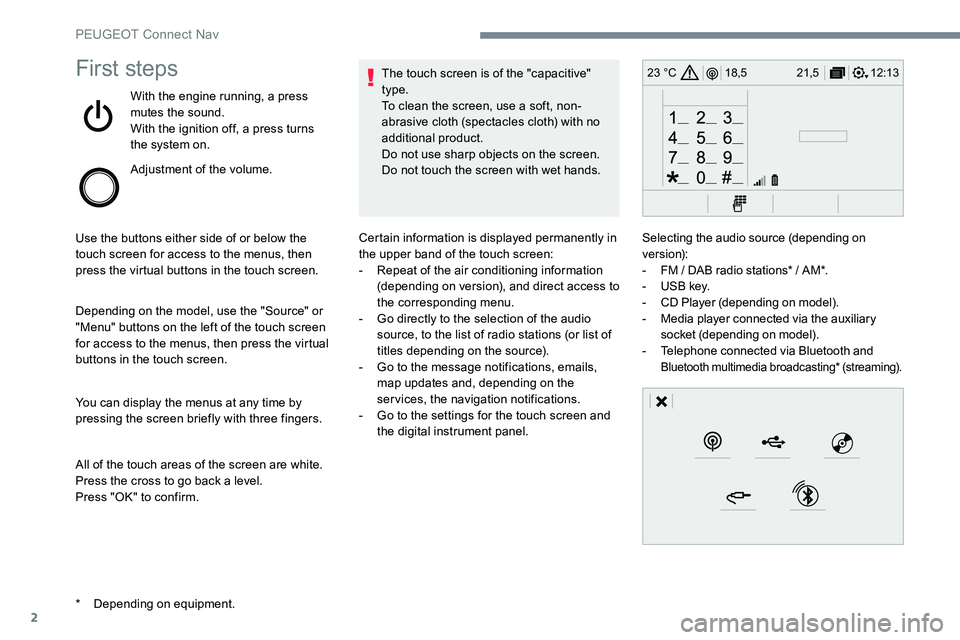
You can display the menus at any time by
pressing the screen briefly with three fingers.
All of the touch areas of the screen are white.
Press the cross to go back a level.
Press "OK" to confirm. The touch screen is of the "capacitive"
type.
To clean the screen, use a soft, non-
abrasive cloth (spectacles cloth) with no
additional product.
Do not use sharp objects on the screen.
Do not touch the screen with wet hands.
*
D
epending on equipment. Certain information is displayed permanently in
the upper band of the touch screen:
-
R
epeat of the air conditioning information
(depending on version), and direct access to
the corresponding menu.
-
G
o directly to the selection of the audio
source, to the list of radio stations (or list of
titles depending on the source).
-
G
o to the message notifications, emails,
map updates and, depending on the
services, the navigation notifications.
-
G
o to the settings for the touch screen and
the digital instrument panel. Selecting the audio source (depending on
version):
-
F
M / DAB radio stations* / AM*.
-
U
SB key.
-
C
D Player (depending on model).
-
M
edia player connected via the auxiliary
socket (depending on model).
-
T
elephone connected via Bluetooth and
Bluetooth multimedia broadcasting* (streaming).
PEUGEOT Connect Nav
Page 235 of 306
3
In the "Settings" menu you can create
a profile for just one person or a group
of people with common features, with
the possibility of entering a multitude of
settings (radio presets, audio settings,
navigation history, contact favourites, ...);
these settings are taken into account
automatically.
In very hot conditions, the volume may
be limited to protect the system. It may go
into standby (screen and sound off) for at
least 5 minutes.
The return to normal takes place when
the temperature in the passenger
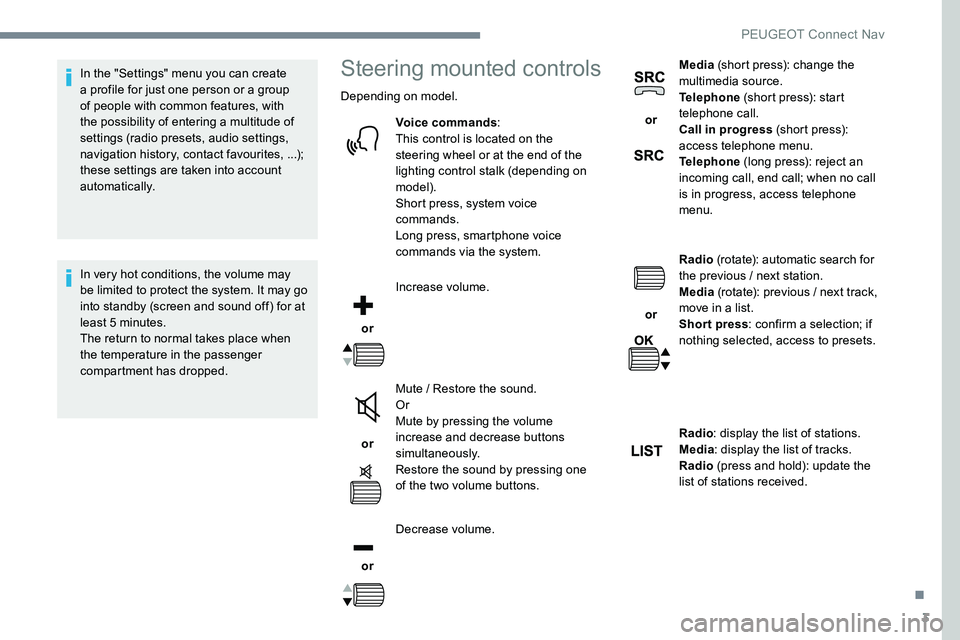
compartment has dropped.Steering mounted controls
Depending on model.Voice commands :
This control is located on the
steering wheel or at the end of the
lighting control stalk (depending on
model).
Short press, system voice
commands.
Long press, smartphone voice
commands via the system.
or Increase volume.
or Mute / Restore the sound.
Or
Mute by pressing the volume
increase and decrease buttons
simultaneously.
Restore the sound by pressing one
of the two volume buttons.
or Decrease volume. or
Media
(short press): change the
multimedia source.
Telephone (short press): start
telephone call.
Call in progress (short press):
access telephone menu.
Telephone (long press): reject an
incoming call, end call; when no call
is in progress, access telephone
menu.
or Radio
(rotate): automatic search for
the previous / next station.
Media (rotate): previous / next track,
move in a list.
Short press : confirm a selection; if
nothing selected, access to presets.
Radio : display the list of stations.
Media : display the list of tracks.
Radio (press and hold): update the
list of stations received.
.
PEUGEOT Connect Nav
Page 236 of 306
4
FM/87.5 MHz
87.5MHz
12:13
18,5 21,5
23 °C
12:13
18,5 21,5
23 °C
12:13
18,5 21,5
23 °C
21,518,5
12:1323 °C
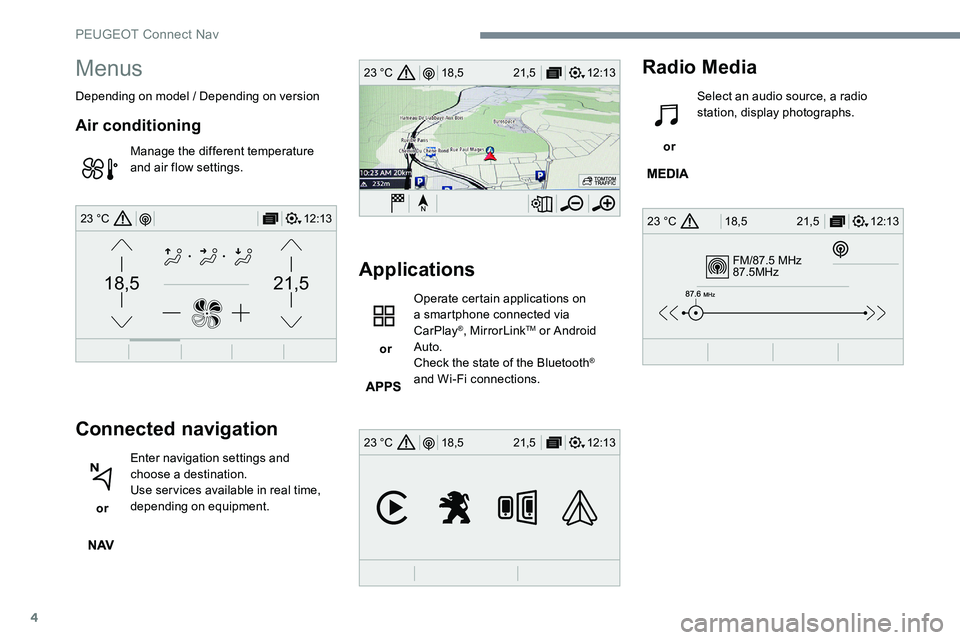
Menus
Depending on model / Depending on version
Air conditioning
Manage the different temperature
and air flow settings.
Connected navigation
or Enter navigation settings and
choose a destination.
Use services available in real time,
depending on equipment.
Applications
or Operate certain applications on
a smartphone connected via
CarPlay
®, MirrorLinkTM or Android
Auto.
Check the state of the Bluetooth
®
and Wi-Fi connections.
Radio Media
or Select an audio source, a radio
station, display photographs.
PEUGEOT Connect Nav