radio Peugeot 301 2017 Owner's Guide
[x] Cancel search | Manufacturer: PEUGEOT, Model Year: 2017, Model line: 301, Model: Peugeot 301 2017Pages: 306, PDF Size: 9.87 MB
Page 234 of 306
2
12:13
18,5 21,5
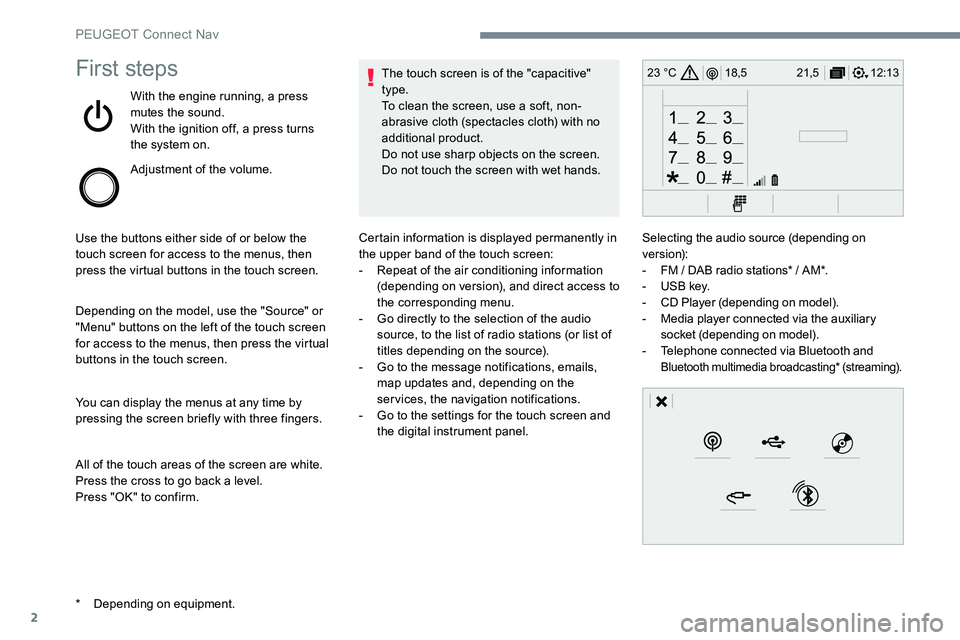
23 °CFirst steps
With the engine running, a press
mutes the sound.
With the ignition off, a press turns
the system on.
Adjustment of the volume.
Use the buttons either side of or below the
touch screen for access to the menus, then
press the virtual buttons in the touch screen.
Depending on the model, use the "Source" or
"Menu" buttons on the left of the touch screen
for access to the menus, then press the virtual
buttons in the touch screen.
You can display the menus at any time by
pressing the screen briefly with three fingers.
All of the touch areas of the screen are white.
Press the cross to go back a level.
Press "OK" to confirm. The touch screen is of the "capacitive"
type.
To clean the screen, use a soft, non-
abrasive cloth (spectacles cloth) with no
additional product.
Do not use sharp objects on the screen.
Do not touch the screen with wet hands.
*
D
epending on equipment. Certain information is displayed permanently in
the upper band of the touch screen:
-
R
epeat of the air conditioning information
(depending on version), and direct access to
the corresponding menu.
-
G
o directly to the selection of the audio
source, to the list of radio stations (or list of
titles depending on the source).
-
G
o to the message notifications, emails,
map updates and, depending on the
services, the navigation notifications.
-
G
o to the settings for the touch screen and
the digital instrument panel. Selecting the audio source (depending on
version):
-
F
M / DAB radio stations* / AM*.
-
U
SB key.
-
C
D Player (depending on model).
-
M
edia player connected via the auxiliary
socket (depending on model).
-
T
elephone connected via Bluetooth and
Bluetooth multimedia broadcasting* (streaming).
PEUGEOT Connect Nav
Page 235 of 306
3
In the "Settings" menu you can create
a profile for just one person or a group
of people with common features, with
the possibility of entering a multitude of
settings (radio presets, audio settings,
navigation history, contact favourites, ...);
these settings are taken into account
automatically.
In very hot conditions, the volume may
be limited to protect the system. It may go
into standby (screen and sound off) for at
least 5 minutes.
The return to normal takes place when
the temperature in the passenger
compartment has dropped.Steering mounted controls
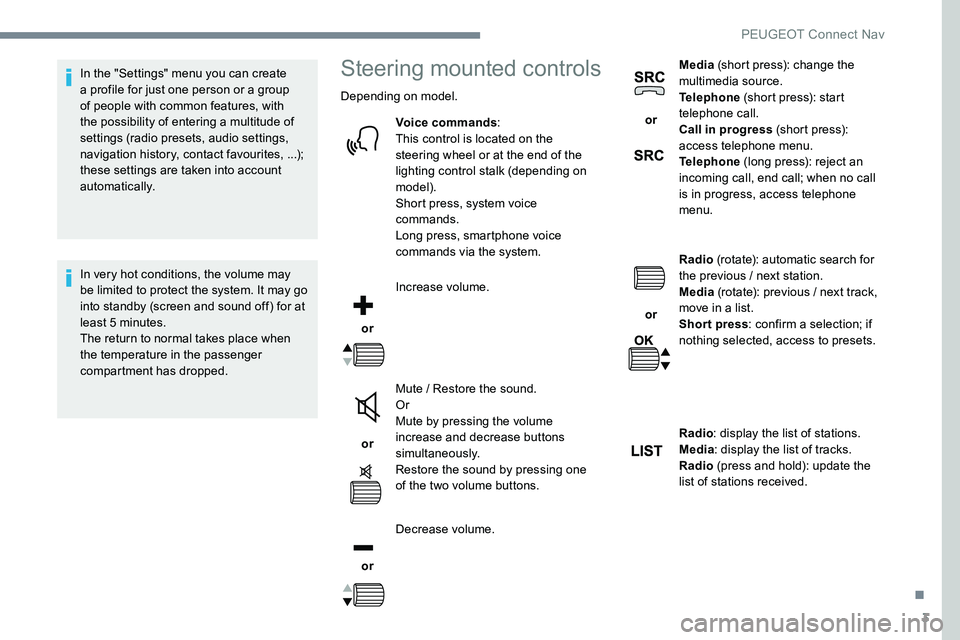
Depending on model.Voice commands :
This control is located on the
steering wheel or at the end of the
lighting control stalk (depending on
model).
Short press, system voice
commands.
Long press, smartphone voice
commands via the system.
or Increase volume.
or Mute / Restore the sound.
Or
Mute by pressing the volume
increase and decrease buttons
simultaneously.
Restore the sound by pressing one
of the two volume buttons.
or Decrease volume. or
Media
(short press): change the
multimedia source.
Telephone (short press): start
telephone call.
Call in progress (short press):
access telephone menu.
Telephone (long press): reject an
incoming call, end call; when no call
is in progress, access telephone
menu.
or Radio
(rotate): automatic search for
the previous / next station.
Media (rotate): previous / next track,
move in a list.
Short press : confirm a selection; if
nothing selected, access to presets.
Radio : display the list of stations.
Media : display the list of tracks.
Radio (press and hold): update the
list of stations received.
.
PEUGEOT Connect Nav
Page 236 of 306
4
FM/87.5 MHz
87.5MHz
12:13
18,5 21,5
23 °C
12:13
18,5 21,5
23 °C
12:13
18,5 21,5
23 °C
21,518,5
12:1323 °C
Menus
Depending on model / Depending on version
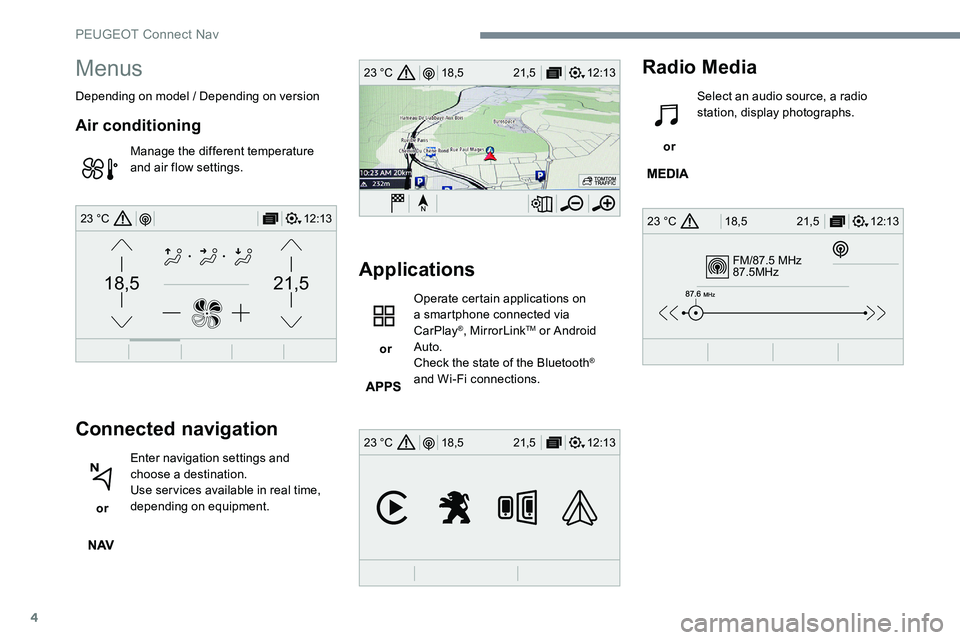
Air conditioning
Manage the different temperature
and air flow settings.
Connected navigation
or Enter navigation settings and
choose a destination.
Use services available in real time,
depending on equipment.
Applications
or Operate certain applications on
a smartphone connected via
CarPlay
®, MirrorLinkTM or Android
Auto.
Check the state of the Bluetooth
®
and Wi-Fi connections.
Radio Media
or Select an audio source, a radio
station, display photographs.
PEUGEOT Connect Nav
Page 238 of 306
6
First steps
Example of a "voice command" for
navigation:
"Navigate to address" "11 Regent
Street, London".
Example of a "voice command" for
the radio and media:
"Play ar tist" "Madonna" .
Example of a "voice command" for
the telephone:
"Call David Miller" .
The voice commands, with a choice of
12 languages (English, French, Italian,
Spanish, German, Dutch, Portuguese,
Polish, Turkish, Russian, Arabic,
Brazilian), are made using the language
previously chosen and set in the system.
For some voice commands, there are
alternative synonyms.
Example: Guide to / Navigate to /
Go to / ...
The voice commands in Arabic for:
"Navigate to address" and "Display POI in
the city", are not available.
Information - Using the
system
Press the voice commands
button and say your
command after the audible
signal. Don’t forget that you
can interrupt me at any time
by pressing this button.
You can press this button
again while I listen to you
if you would like to end the
conversation. If you are lost
and would like to start again,
say "cancel". If you would like
to go back, say "back". To
get some help or advice, say
"help". If you say a command
and I need more information,
I will give you examples in
order to help you provide
me with the information I
need or I will guide you. You
will find more information in
"beginner" mode. If you feel
more comfortable, you can
set the voice interaction to
"expert" mode.
Global voice commands
These commands can be made from any
screen page after pressing the " Voice
command" or "Telephone" button located
on the steering wheel, as long as there is
no telephone call in progress.
PEUGEOT Connect Nav
Page 239 of 306
7
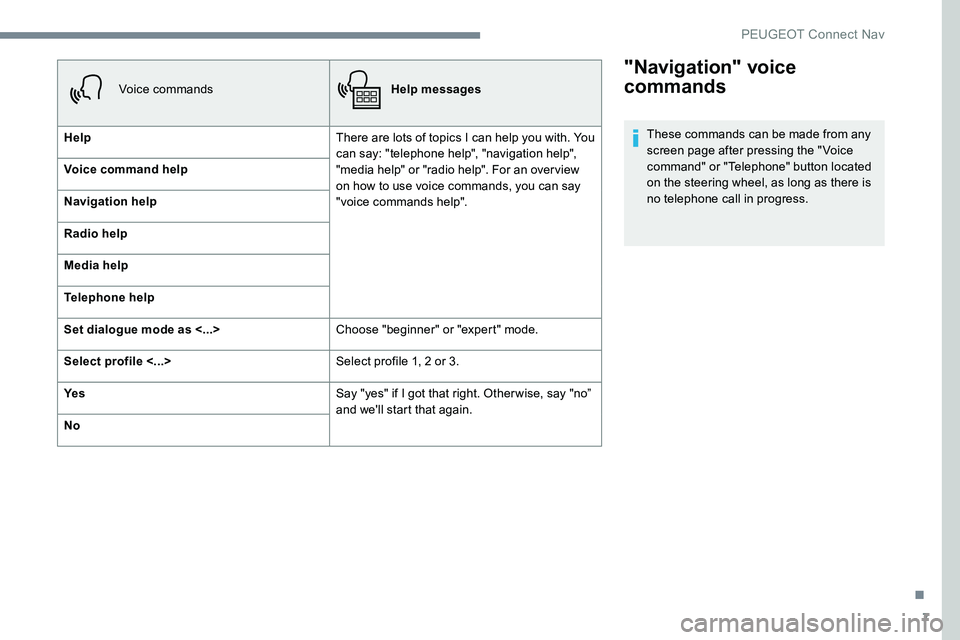
"Navigation" voice
commands
These commands can be made from any
screen page after pressing the " Voice
command" or "Telephone" button located
on the steering wheel, as long as there is
no telephone call in progress.
Voice commands
Help messages
Help There are lots of topics I can help you with. You
can say: "telephone help", "navigation help",
"media help" or "radio help". For an overview
on how to use voice commands, you can say
"voice commands help".
Voice command help
Navigation help
Radio help
Media help
Telephone help
Set dialogue mode as <...>
Choose "beginner" or "expert" mode.
Select profile <...> Select profile 1, 2 or 3.
Ye s Say "yes" if I got that right. Other wise, say "no”
and we'll start that again.
No
.
PEUGEOT Connect Nav
Page 240 of 306
8
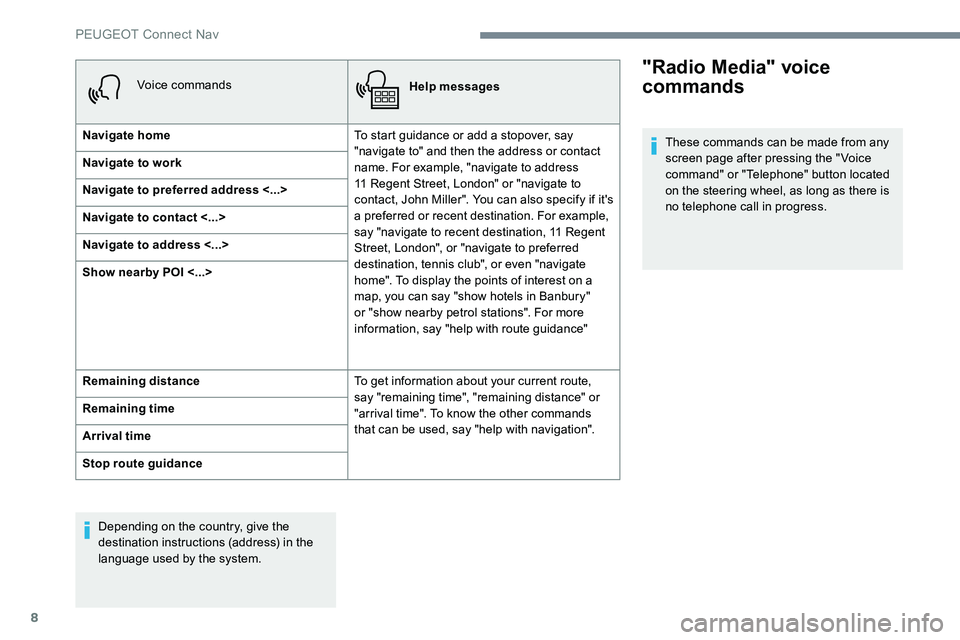
Voice commandsHelp messages
Navigate home To start guidance or add a stopover, say
"navigate to" and then the address or contact
name. For example, "navigate to address
11 Regent Street, London" or "navigate to
contact, John Miller". You can also specify if it's
a preferred or recent destination. For example,
say "navigate to recent destination, 11 Regent
Street, London", or "navigate to preferred
destination, tennis club", or even "navigate
home". To display the points of interest on a
map, you can say "show hotels in Banbury"
or "show nearby petrol stations". For more
information, say "help with route guidance"
Navigate to work
Navigate to preferred address <...>
Navigate to contact <...>
Navigate to address <...>
Show nearby POI <...>
Remaining distance
To get information about your current route,
say "remaining time", "remaining distance" or
"arrival time". To know the other commands
that can be used, say "help with navigation".
Remaining time
Arrival time
Stop route guidance
Depending on the country, give the
destination instructions (address) in the
language used by the system."Radio Media" voice
commands
These commands can be made from any
screen page after pressing the " Voice
command" or "Telephone" button located
on the steering wheel, as long as there is
no telephone call in progress.
PEUGEOT Connect Nav
Page 241 of 306
9
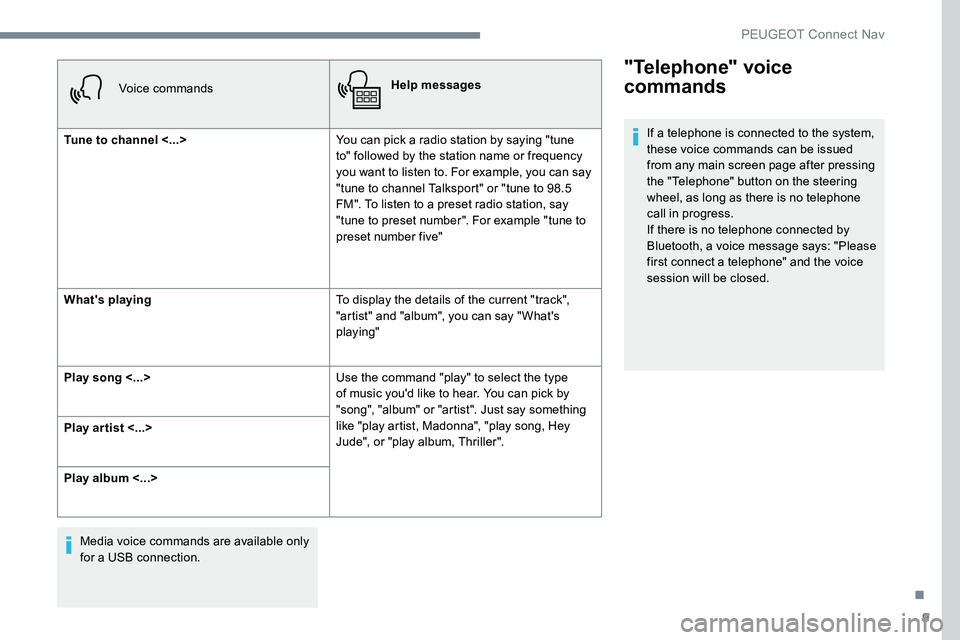
Voice commandsHelp messages
Tune to channel <...> You can pick a radio station by saying "tune
to" followed by the station name or frequency
you want to listen to. For example, you can say
"tune to channel Talksport" or "tune to 98.5
FM". To listen to a preset radio station, say
"tune to preset number". For example "tune to
preset number five"
What's playing To display the details of the current "track",
"artist" and "album", you can say " What's
playing"
Play song <...> Use the command "play" to select the type
of music you'd like to hear. You can pick by
"song", "album" or "artist". Just say something
like "play artist, Madonna", "play song, Hey
Jude", or "play album, Thriller".
Play ar tist <...>
Play album <...>
Media voice commands are available only
for a USB connection.
"Telephone" voice
commands
If a telephone is connected to the system,
these voice commands can be issued
from any main screen page after pressing
the "Telephone" button on the steering
wheel, as long as there is no telephone
call in progress.
If there is no telephone connected by
Bluetooth, a voice message says: "Please
first connect a telephone" and the voice
session will be closed.
.
PEUGEOT Connect Nav
Page 246 of 306
14
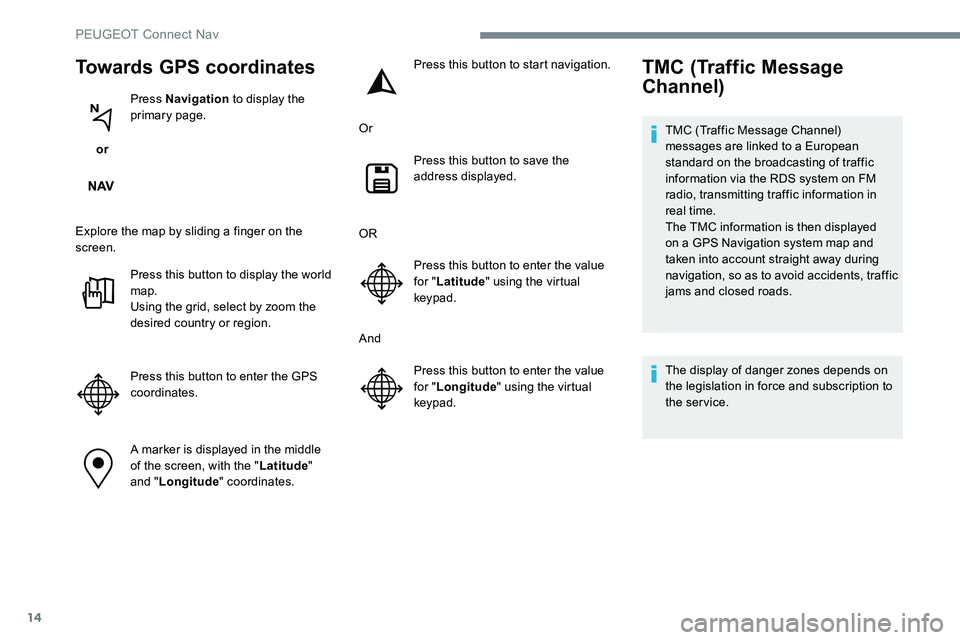
Towards GPS coordinates
or Press Navigation
to display the
primary page.
Explore the map by sliding a finger on the
screen. Press this button to display the world
map.
Using the grid, select by zoom the
desired country or region.
Press this button to enter the GPS
coordinates.
A marker is displayed in the middle
of the screen, with the " Latitude"
and " Longitude " coordinates. Press this button to start navigation.
Or Press this button to save the
address displayed.
OR Press this button to enter the value
for "Latitude " using the virtual
keypad.
And Press this button to enter the value
for "Longitude " using the virtual
keypad.
TMC (Traffic Message
Channel)
TMC (Traffic Message Channel)
messages are linked to a European
standard on the broadcasting of traffic
information via the RDS system on FM
radio, transmitting traffic information in
real time.
The TMC information is then displayed
on a GPS Navigation system map and
taken into account straight away during
navigation, so as to avoid accidents, traffic
jams and closed roads.
The display of danger zones depends on
the legislation in force and subscription to
the service.
PEUGEOT Connect Nav
Page 248 of 306
16
The services offered with connected
navigation are as follows.
A Connected Services pack:
-
Weather,
-
F
illing stations,
-
C
ar parks,
-
Tr a f f i c ,
-
P
OI local search.
A Danger zones pack (option).
The principles and standards
are constantly changing; for the
communication process between the
smartphone and the system to work
correctly, we recommend that you
update the operating system of the
smar tphone as well as the date and
time of the smar tphone and the
system.Settings specific to
connected navigation
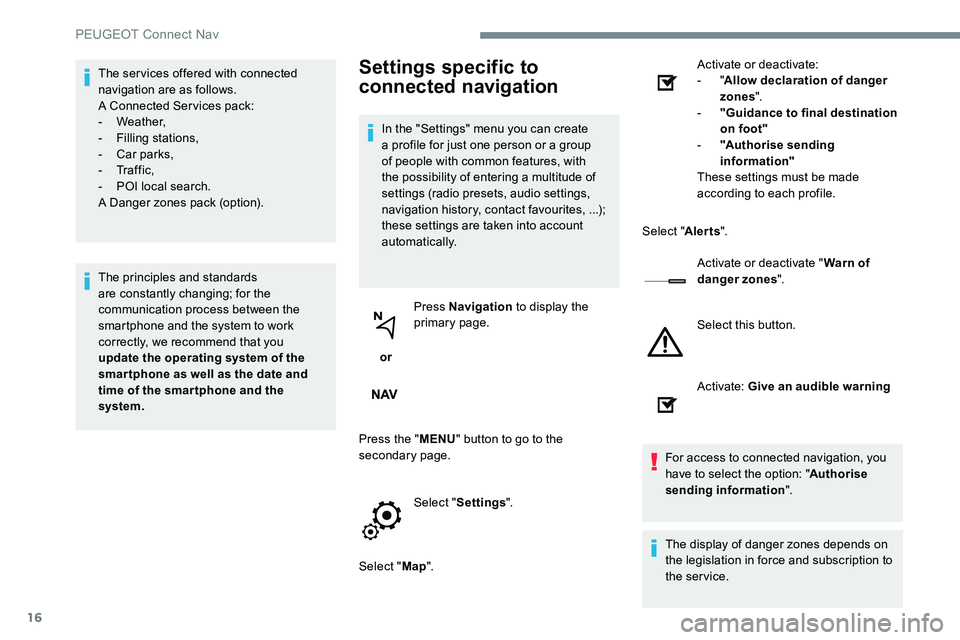
In the "Settings" menu you can create
a profile for just one person or a group
of people with common features, with
the possibility of entering a multitude of
settings (radio presets, audio settings,
navigation history, contact favourites, ...);
these settings are taken into account
automatically.
or Press Navigation
to display the
primary page.
Press the " MENU" button to go to the
secondary page.
Select "Settings ".
Select " Map". Activate or deactivate:
-
"
Allow declaration of danger
zones ".
- " Guidance to final destination
on foot"
- " Authorise sending
information"
These settings must be made
according to each profile.
Select " Alerts".
Activate or deactivate " Warn of
danger zones ".
Select this button.
Activate: Give an audible warning
For access to connected navigation, you
have to select the option: " Authorise
sending information ".
The display of danger zones depends on
the legislation in force and subscription to
the service.
PEUGEOT Connect Nav
Page 255 of 306
23
Press "OK" to confirm.
To protect against unauthorised access
and make your systems as secure as
possible, the use of a complex security
code or password is recommended.
Manage connections
or Press Applications
to display the
primary page.
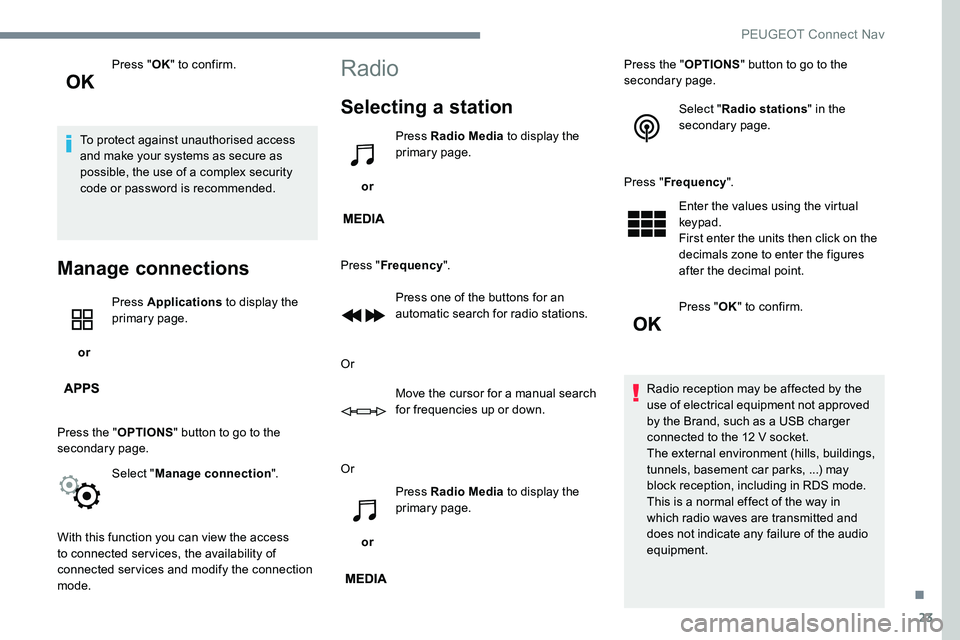
Press the " OPTIONS" button to go to the
secondary page.
Select "Manage connection ".
With this function you can view the access
to connected services, the availability of
connected services and modify the connection
mode.
Radio
Selecting a station
or Press Radio Media
to display the
primary page.
Press " Frequency ".
Press one of the buttons for an
automatic search for radio stations.
Or Move the cursor for a manual search
for frequencies up or down.
Or
or Press Radio Media
to display the
primary page. Press the "
OPTIONS" button to go to the
secondary page.
Select "Radio stations " in the
secondary page.
Press " Frequency ".
Enter the values using the virtual
keypad.
First enter the units then click on the
decimals zone to enter the figures
after the decimal point.
Press " OK" to confirm.
Radio reception may be affected by the
use of electrical equipment not approved
by the Brand, such as a USB charger
connected to the 12 V socket.
The external environment (hills, buildings,
tunnels, basement car parks, ...) may
block reception, including in RDS mode.
This is a normal effect of the way in
which radio waves are transmitted and
does not indicate any failure of the audio
equipment.
.
PEUGEOT Connect Nav