CD changer Peugeot 307 CC 2003 User Guide
[x] Cancel search | Manufacturer: PEUGEOT, Model Year: 2003, Model line: 307 CC, Model: Peugeot 307 CC 2003Pages: 173, PDF Size: 2.12 MB
Page 55 of 173
22-09-2003
YOUR 307 CC IN DETAIL
56
RDS SYSTEM Using the RDS (Radio Data System) function on FM Radio Data System allows you to continue listening to the same station, whatever frequency it is using for the region you are going through. Briefly press the "RDS"button to switch the function on or off.
The multi-function screen will show: Ð RDS if the function is active
Ð RDS crossed out or greyed out if the function is active but not available.
RDS station following
This display indicates the name of the station selected. The audio/telephone continuously searches for the transmitter which
transmits the same programme with the best reception. This search may cause slight interference with the transmission.
Traffic information programme Press the "TA/PTY" button to switch the function on or off.
The multi-function screen will show: Ð TA if the function is selected
Ð TA crossed out or greyed out if the function is selected but not available.
Any traffic information flash will be given priority, whatever source you are listening to (radio, CD or CD changer).If you wish to interrupt the broadcasting of a message, press the "TA/PTY"button.
Note: the volume of the traffic information is independent of the volume of normal radio/telephone listening . You can
adjust it by using the volume button. The setting will be stored and will be used when the next messages are broadcast. Regional following mode (REG) When they are part of a network, certain stations broadcast regional programmes in the various areas they serve. With regio- nal following mode you can keep listening to the same programme.
To do this, press the "RDS"button for more than two seconds to switch the function on or off.
The multi-function screen will show:Ð REG if the function is active,
Ð REG crossed out or greyed out if the function is active but not available.
Page 58 of 173
22-09-2003
YOUR 307 CC IN DETAIL59
COMPACT DISC CHANGER Selecting CD changer mode Press the "SOURCE" button several times.
Selecting a disc Press one of the buttons "1"to "5" on the audio/telephone to select the appropriate disc.
Buttons Hand Iallow you to select respectively the previous or following disc in the changer.
Selecting a track Press button Mto select the following track.
Press button Nto return to the start of the current track or to select the previous track.
Accelerated playPress and hold button Mor Nfor forwards or backwards accelerated play.
Accelerated play stops as soon as the button is released. Contextual menu
The contextual menu permits you to switch on or switch off the shuffle, playing the start of a track or repeat a track functions.
Page 66 of 173

22-09-2003
YOUR 307 CC IN DETAIL67
Voice commands The voice commands make it possible to use pre-recorded words or phrases to control a certain number of functions of the
RT3 audio/telephone. Activation of the voice commands Press the button on the end of the lights stalk to activate this function. Example: to recall the radio station stored on button 3, the key words are: "Radio" "Memory" "3" .
To use these key words, you must say the word "Radio", wait for the audible confirmation signal, then say the word
"Memory" , wait for the audible confirmation signal, then end with the word "3", wait for the audible confirmation signal which
will carry out the action requested. Notes: Ð between two key words, a screen indicates the time remaining and the key word recognised,
Ð in the absence of any voice commands, this function will be switched off after approximately five seconds,Ð if a command is not understood, the system transmits "Pardon"and displays "Word not recognised" on the screen.
Saying the phrase "Help"or "What can I say" displays all of the commands available on the screen.
List of commands available
Ð For the radio, say "RADIO", then: "PREVIOUS"/"FOLLOWING"/"MEMORY" + 1...6/"AUTOSTORE"
Ð For the CD, say "CD PLAYER", then: "PREVIOUS TRACK"/"FOLLOWING TRACK"/"TRACK NUMBER" + 1..20/"SHUFFLE"/"SCAN"/"REPEAT"
Ð For the CD changer, say "CHANGER", then: "PREVIOUS TRACK"/"FOLLOWING TRACK"/"TRACK NUMBER" + 1...20/"PREVIOUS DISC"/"FOLLOWING DISC"/
"DISC NUMBER" + 1...5/"SHUFFLE"/"SCAN"/"REPEAT"
Ð For the telephone, say "TELEPHONE", then: "LAST NUMBER"/"DIRECTORY" + DESCRIPTION/"SERVICES"
Ð For navigation, say "NAVIGATION", then: "STOP"/"RE-START"/"DIRECTORY" + DESCRIPTION
Ð To change the permanent application, say "DISPLAY", then: "AUDIO"/"TELEPHONE"/"NAVIGATION"/"TRIP COMPUTER"
Ð To call someone recorded in the directory directly, say "CALL" + DESCRIPTION
Ð To be guided to the address of someone recorded in the directory, say "GUIDE TO" + DESCRIPTION.
Ð Various:
"CANCEL"/"HELP"/"WHAT CAN I SAY"
Page 68 of 173
22-09-2003
YOUR 307 CC IN DETAIL69
CD CHANGER
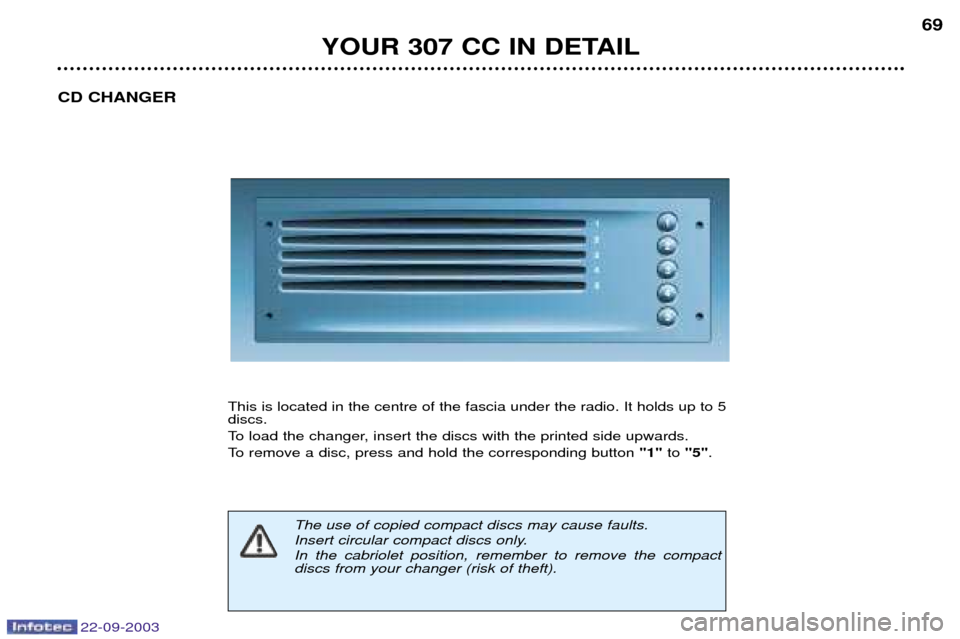
This is located in the centre of the fascia under the radio. It holds up to 5 discs.
To load the changer, insert the discs with the printed side upwards.
To remove a disc, press and hold the corresponding button "1"to "5" .
The use of copied compact discs may cause faults.
Insert circular compact discs only.In the cabriolet position, remember to remove the compact discs from your changer (risk of theft).
Page 71 of 173
22-09-2003
YOUR 307 CC IN DETAIL
72
Select the Navigation/Guidance icon using the dial, then validate by pres-sing the dial to access the main"Navigation - Guidance"
menu.
General menu
Switch on the RT3 audio/telephone and insert the navigation CD-Rom. Press the "MENU"button to access
the general menu .
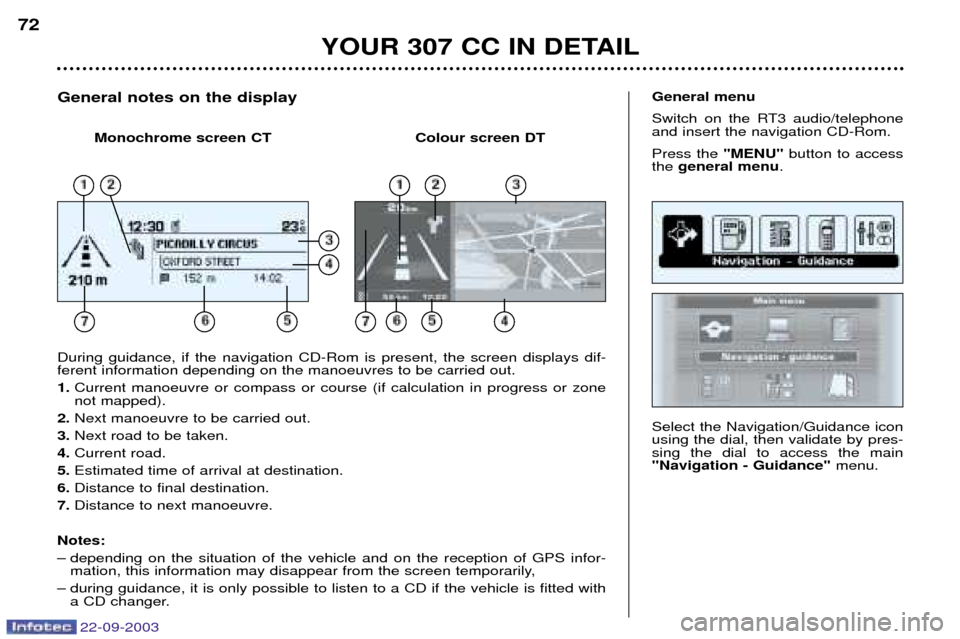
During guidance, if the navigation CD-Rom is present, the screen displays dif- ferent information depending on the manoeuvres to be carried out. 1. Current manoeuvre or compass or course (if calculation in progress or zone not mapped).
2. Next manoeuvre to be carried out.
3. Next road to be taken.
4. Current road.
5. Estimated time of arrival at destination.
6. Distance to final destination.
7. Distance to next manoeuvre.
Notes:
Ð depending on the situation of the vehicle and on the reception of GPS infor- mation, this information may disappear from the screen temporarily,
Ð during guidance, it is only possible to listen to a CD if the vehicle is fitted with a CD changer.
General notes on the display
Monochrome screen CT Colour screen DT
Page 169 of 173
22-09-2003
PRACTICAL INFORMATION155
ACCESSORIES FOR YOUR 307 CC
For your PEUGEOT only use accessories and original parts approved by the manufacturer.
These accessories and parts are all adapted to your PEUGEOT, after being tested and approved for reliability and safety,
which PEUGEOT cannot guarantee for other products.
A wide choice of original accessories, approved by PEUGEOT, is available through the dealer network. They all carry
the PEUGEOT guarantee.
Ð Safety :
Anti-theft alarm, window engraving, wheel locks, first aid kit, warning triangle, safety jacket, rear parking assistance, ...
Ð Comfort : Telephone console, front centre arm rest, covers compatible with side air bags, mats, boot
tray, luggage net , CD storage, ...
Ð Communication : Audio systems, telephone, hands-free kit, speakers, amplifiers, CD changer, satellite navi-gation systems, ...
Ð Customising : Alloy wheels , trims, sport exhaust, aluminium or PVC door sills, mud flaps, ...
Ð Leisure : Tow bar, snow chains, ...
Ð Children : Booster seats and child seats, Isofix Kiddy seats, ...
Ð Maintenance products : Screenwash, interior and exterior maintenance and cleaning products, ...
Before installing an accessory on your vehicle, particularly in the boot, contact a PEUGEOT dealer.